Content is stored alongside the site in the same repository as Markdown and TypeScript files, with no external CMS dependency
AstroPortfolioBlog
astro_academia — Astro Portfolio Template
By maiobarbero
Astro Academia is an Astro-based template for a personal academic website that brings research, publications, CV, and blog content together in one place, with content stored alongside the site as Markdown and TypeScript files.
Explore the design
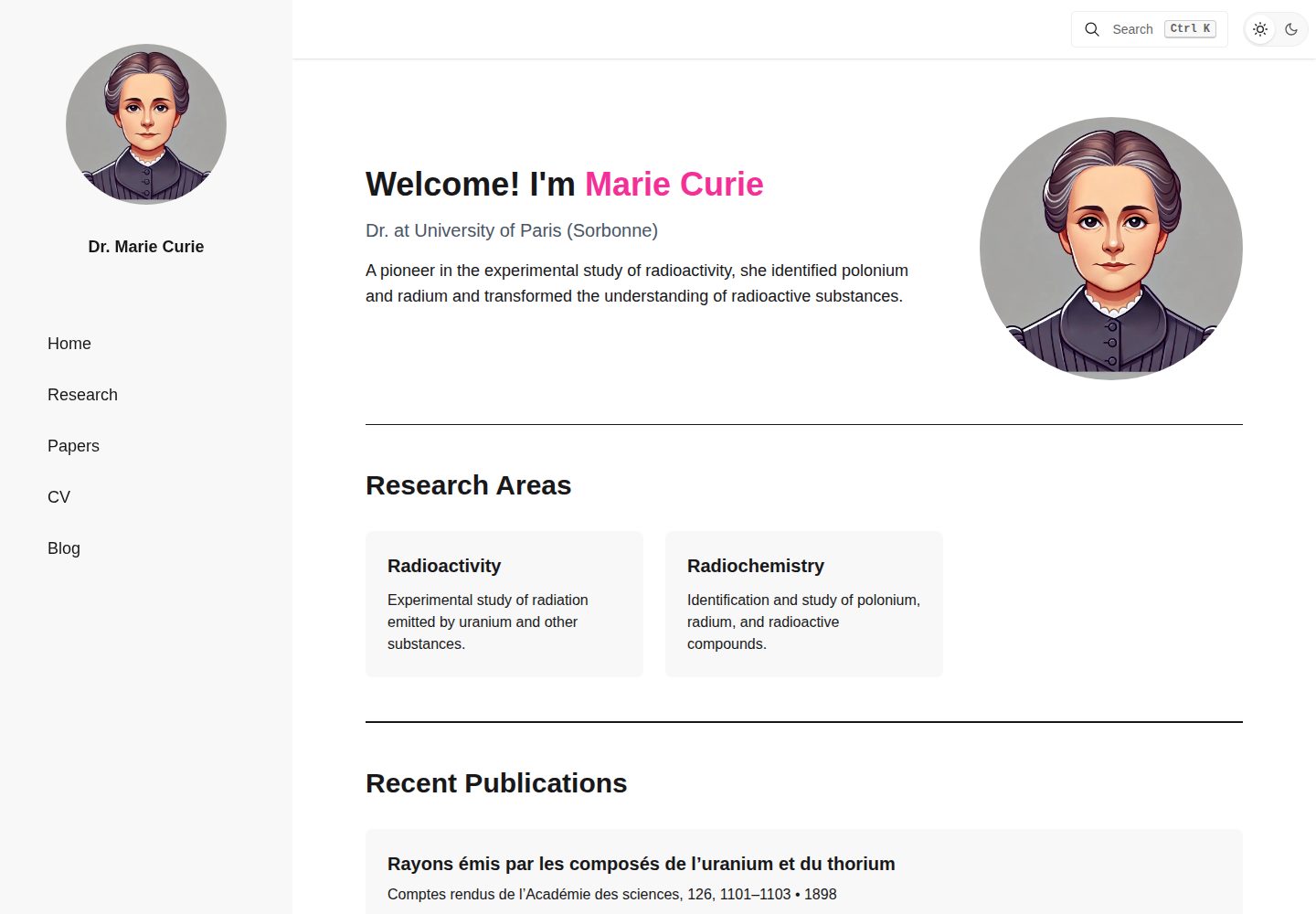
Compare the page layouts and mobile experience. Open any screenshot for a closer look.
Desktop homepage1 / 3
Desktop captureTop of page
Actual screenshot captured by the server browser.
All pages & views 3
Screenshots show visual appearance; interactive behavior may differ.
Recorded 2026-10-02View source
What stands out
A quick read of the recorded project description.
Built-in blog with tag and pagination support; posts are placed in the src/content/BlogPosts/ directory
Provides site-wide search across posts and publications, with accompanying search-related tests
Supports light and dark theme switching, with themes configured via DaisyUI in src/styles/global.css
Generates RSS feed and sitemap; build output is a static site
CV and publications share the publications array in src/data/cv.ts, avoiding duplicate maintenance
Template Details
Astro Academia targets personal academic homepage scenarios, integrating research introductions, publication lists, a CV, and a blog into a single site. Content does not rely on an external CMS; instead, it is stored alongside the site code as Markdown and TypeScript files, making it easy to version-control with the repository. The template includes a blog (with tags and pagination), site-wide search, light and dark themes, RSS feed, and sitemap. The build output is a static site that can be deployed to GitHub Pages or other static hosting services.
Before use, you need to modify the four exported objects in src/settings.ts: profile, social, template, and seo, which correspond to personal details, social links, site and theme settings, and SEO defaults, respectively. CV and publication data are centralized in src/data/cv.ts, divided into four arrays: experiences, education, skills, and publications. The CV page reads all four; the publications page reuses publications. Blog posts go in src/content/BlogPosts/; each requires a title, a quoted date, and an excerpt, with tags optional. Some text is written directly in Astro components, such as the welcome message, homepage research introduction, and research page title, and must be replaced manually.
Limitations: The repository's built-in workflow only performs development checks and updates the changelog; GitHub Pages deployment must be configured separately. Before building, you must set template.website_url and template.base, otherwise site links will still point to localhost. Sample posts, sample data, and placeholder images need to be replaced or removed before publishing.
AstroPortfolioBlog
Is it right for your project?
Use Cases
- Build a personal academic homepage to showcase research areas, publications, and CV in one place
- Create a blog with tags and pagination for researchers to publish research notes or field records
- Maintain résumé data as TypeScript arrays and automatically render it as a CV page
- Deploy to GitHub Pages or other static hosting services as a purely static site
Suitable For
- Researchers who need a personal academic website and are willing to edit code and Markdown files directly
- Those who want to manage publications, CV, and blog in a single repository
- Users who prefer static sites without relying on a database or admin panel
- Developers using Astro who want to start quickly with a ready-made structure
Getting started & customization
Use these recorded setup notes alongside the repository instructions for your chosen version.
- 1
After cloning or creating a repository from the template, run npm ci and npm run dev using the Node.js version specified in .nvmrc
- 2
First edit the four exported objects in src/settings.ts: profile, social, template, and seo; set unused social items to empty strings to hide their icons
- 3
Replace the placeholder data for experiences, education, skills, and publications in src/data/cv.ts; set unneeded arrays to [] to hide the corresponding sections
- 4
Replace src/assets/profile_pictures.jpg and public/favicon.svg, and add a social preview image and set seo.default_image
- 5
Before building, set template.website_url and template.base; GitHub Pages deployment requires configuring a workflow yourself, as the repository's built-in workflow does not include deployment
License & source material
Usage conditions & limitations
Free to use · keep license noticeThis entry covers the free version under the MIT license in the public repository; the free scope applies to that version's code and does not imply that external services or third-party assets are free.
Must comply with when using
- You are allowed to use, modify, commercialize, and distribute the code of this version for free.
- When distributing copies or substantial portions of the code, retain the original author's copyright notice and the full MIT license notice.
- The code is provided as is; warranties and limitations of liability are governed by the original license and applicable law.
Additional costs & items to verify
- The repository's built-in workflow only performs development checks and updates the changelog; it does not include deployment. GitHub Pages deployment must be configured separately.
- Before publishing, you must set template.website_url and template.base, otherwise site links will still point to localhost.
- Sample blog posts must be replaced or removed before publishing.
- Demo images, fonts, icons, and other third-party assets must be checked against their respective licenses; they cannot be judged solely by the code's MIT license.
- External services such as domains, hosting, databases, payments, or AI may incur additional charges.
View Original Text Basis
Permission is hereby granted, free of charge
Original License Text
The workflows currently included in this repository run development checks and update the changelog; deployment needs its own setup.
Original README
Replace the default localhost URL before publishing.
Original README
https://github.com/maiobarbero/astro_academia/blob/main/LICENSEhttps://github.com/maiobarbero/astro_academia/blob/main/README.mdReplace or remove the sample post before publishing.
Original README
Compiled by DeepSeek based on repository license and README ·2026-10-02. Results only cover the materials read; dependencies, images, fonts, and subsequent term changes are subject to their respective original texts.
Project checks & description sources
Template Information
- Source platforms
- GitHub
- Documentation and maintenance reference score
- More documented · 92 / 100
- Technologies
- Astro
- Website type
- Portfolio · Blog
How this score is calculated
Our heuristic uses license records (up to 30), a demo link (12), a preview (10), stars (15), recorded maintenance (15), description completeness (8), feature records (5) and classification data (5). It is not a code, security or performance test, or a Google score. A link does not establish tested functionality.
What to verify for this project
- Repository update recorded
- 2026-09-30
- Screenshot last checked
- 2026-10-02
A demo link is listed. Check it with your own content and viewport sizes; its presence does not confirm that forms, authentication or payments work.
The catalog identifies Astro as the primary stack. Check the actual dependency manifest and lockfile for versions and hosting requirements. These notes use recorded metadata, not a code audit or a deployment test.
Use a selection guide →How this description was prepared
AI-assisted description based on catalog records and repository material. Repository authors are not automatically the reviewers of this description.
Automatically checked against source and license rules; no manual editorial review.
Inspect the recorded source material
SHA-256: 208886408be6923fa3bcbc683805ae15c864908976958a5a24813b1eb6fe9b50
2026-10-02T16:07:13.835Z
Source file / repository
# Astro Academia
[](https://github.com/maiobarbero/astro_academia/actions/workflows/ci.yml)

[](https://astro.build/)
[](LICENSE)
<a href="https://buymeacoffee.com/maiobarbero"><img src="https://cdn.buymeacoffee.com/buttons/default-yellow.png" alt="Buy Me a Coffee" height="41" width="174"></a>
Astro Academia is an Astro template for a personal academic website. It brings your research, publications, CV, and writing into one place, with content stored in Markdown and TypeScript files alongside the site.
The template includes a blog with tags and pagination, search across posts and publications, light and dark themes, an RSS feed, and a sitemap. The build produces a static website you can host on GitHub Pages or another static hosting service.
[View the demo](https://astro-academia.maiobarbero.dev)
## Getting started
Fork this repository, then clone your fork, or create a new repository using **Astro Academia** as template. From the project directory, install dependencies and start the development server:
```sh
nvm install
nvm use
npm ci
npm run dev
```
The `.nvmrc` file specifies the project's Node.js version. If you use another version manager, select that version before installing dependencies.
Open the local address printed in your terminal, usually `http://localhost:4321`. Changes to your content and settings appear as you edit.
## Make it yours
### Profile and settings
Start with [src/settings.ts](src/settings.ts). It exports four objects:
| Export | What to change |
| --- | --- |
| `profile` | Your name, title, institute, research areas, and the author name highlighted in publications. |
| `social` | Your email and links to social or academic profiles. Set unused values to `''` to hide their icons. |
| `template` | Your deployed URL, base path, navigation position, themes, transitions, excerpt length, and posts per page. |
| `seo` | The default page title, description, and social preview image. |
For example, replace the `profile` export with your details:
```ts
export const profile: Profile = {
fullName: 'Alex Smith',
title: 'Research Fellow',
institute: 'University of Example',
author_name: 'Alex Smith',
research_areas: [
{
title: 'Scientific Computing',
description: 'Numerical methods for modelling physical systems.',
field: 'computer-science',
},
],
}
```
Research area icons are defined in [src/data/researchIcons.ts](src/data/researchIcons.ts). Choose a matching field or add your own.
Some content lives directly in Astro components. Replace the introduction in [src/components/Welcome.astro](src/components/Welcome.astro), the short research description in [src/components/ui/Hero.astro](src/components/ui/Hero.astro), and the sample text and page title in [src/pages/research.astro](src/pages/research.astro).
Replace `src/assets/profile_pictures.jpg` with your photo and `public/favicon.svg` with your favicon. Add a social preview image under `public/` and set `seo.default_image` to its public path, for example `/images/social-preview.png` for `public/images/social-preview.png`.
### CV and publications
Edit [src/data/cv.ts](src/data/cv.ts). It exports separate `experiences`, `education`, `skills`, and `publications` arrays. The CV page reads all four; the papers page uses the same publications array.
Keep those export names and replace the placeholder entries. For example:
```ts
export const education = [
{
school: 'University of Example',
time: '2018 - 2022',
degree: 'Ph.D. in Computer Science',
location: 'Amsterdam, Netherlands',
description: 'Research on numerical methods for physical simulations.',
},
]
export const experiences = [
{
company: 'Example Research Lab',
time: '2022 - Present',
title: 'Research Fellow',
location: 'Amsterdam, Netherlands',
description: 'Developing tools for scientific computing.',
},
]
```
Use `time` for dates and `school` for education institutions. The CV sorts entries using the end of the `time` range; use a format such as `2018 - 2022` or `2022 - Present`. Set unused arrays to `[]` to hide those CV sections.
The fields for skills and publications are defined in [src/types/cv.ts](src/types/cv.ts). Publications include a title, authors, journal, and time, with optional link and abstract fields.
### Blog posts
Add Markdown files to `src/content/BlogPosts/`. Each post needs a title, a quoted date, and an excerpt. Tags are optional.
For example, create `src/content/BlogPosts/field-notes.md`:
```markdown
---
title: "Notes from the field"
date: "2026-09-23"
excerpt: "Observations from our latest round of measurements."
tags: ["research", "fieldwork"]
---
Our latest measurements raised a few questions about the model.
Write the rest of your post here using Markdown.
```
Posts are included in the blog automatically. Replace or remove the sample post before publishing.
### Themes
Set `template.lightTheme` and `template.darkTheme` in `src/settings.ts` to theme names enabled in [src/styles/global.css](src/styles/global.css). That stylesheet contains the DaisyUI theme configuration and is also the place to add your own styles.
## Build and deploy
Before building, set `template.website_url` and `template.base` in `src/settings.ts` for your hosting location:
| Hosting location | `website_url` | `base` |
| --- | --- | --- |
| GitHub Pages project site | `https://your-username.github.io` | `/your-repository` |
| GitHub Pages user site | `https://your-username.github.io` | `''` |
| Custom domain | `https://example.com` | `''` |
These values are used by the Astro configuration and site links. Replace the default localhost URL before publishing.
```sh
npm run build
npm run preview
```
The build writes the site to `dist/`. Preview it locally, then configure your static hosting service to run `npm ci` and `npm run build` with the Node.js version from `.nvmrc`, and publish `dist/`.
For GitHub Pages, configure a Pages deployment workflow to build and upload `dist/`. The workflows currently included in this repository run development checks and update the changelog; deployment needs its own setup.
## Development checks
```sh
npm test # Core search tests
npm run lint # ESLint
npm run check # Astro diagnostics and TypeScript checks
```
GitHub Actions runs these checks on pushes and pull requests. The tests cover search indexing, filtering, content and URL preparation, snippets, and loading recovery.
## License
[MIT](LICENSE).
Explore similar templates
Compare previews and descriptions within the same stack and category.

astrowind
AstroWind is a free, open-source Astro starter theme using Astro and Tailwind CSS, released under the MIT license.
Astro · Blog

astro-paper
AstroPaper is a minimal, responsive, accessible, and SEO-friendly Astro blog theme. Articles are stored as Markdown/MDX in src/content/posts/, with subdirectories affecting URLs.
Astro · Blog

fuwari
Fuwari is a static blog template built with Astro and Tailwind CSS for personal blogs. It manages posts as Markdown files in src/content/posts/, with frontmatter for title, date, description, cover, tags, categories, draft status, and language.
Astro · Blog

Firefly
Firefly is a clean personal blog theme forked from Astro and Fuwari, offering four background modes, single/double sidebar and list/grid layouts, Pagefind client-side full-text search, and a six-language UI.
Astro · Blog

astro-theme-cactus
Astro Cactus is an Astro-based blog and portfolio theme that uses Markdown/MDX content collections to manage posts, notes, and tags, with frontmatter type-checked by a schema.
Astro · Portfolio

astrofy
Astrofy is a free and open-source personal portfolio website template built with Astro and TailwindCSS, with built-in blog, CV timeline, project showcase, store, and RSS feed modules.
Astro · Portfolio