内容以 Markdown 与 TypeScript 文件形式与站点同仓库存放,不依赖外部 CMS
Astro作品集博客
astro_academia — Astro 作品集模板
作者 maiobarbero
Astro Academia 是一个基于 Astro 的个人学术网站模板,把研究、论文、简历与博客内容集中到一处,内容以 Markdown 和 TypeScript 文件形式与站点一起存放。
看看你的网站会是什么样
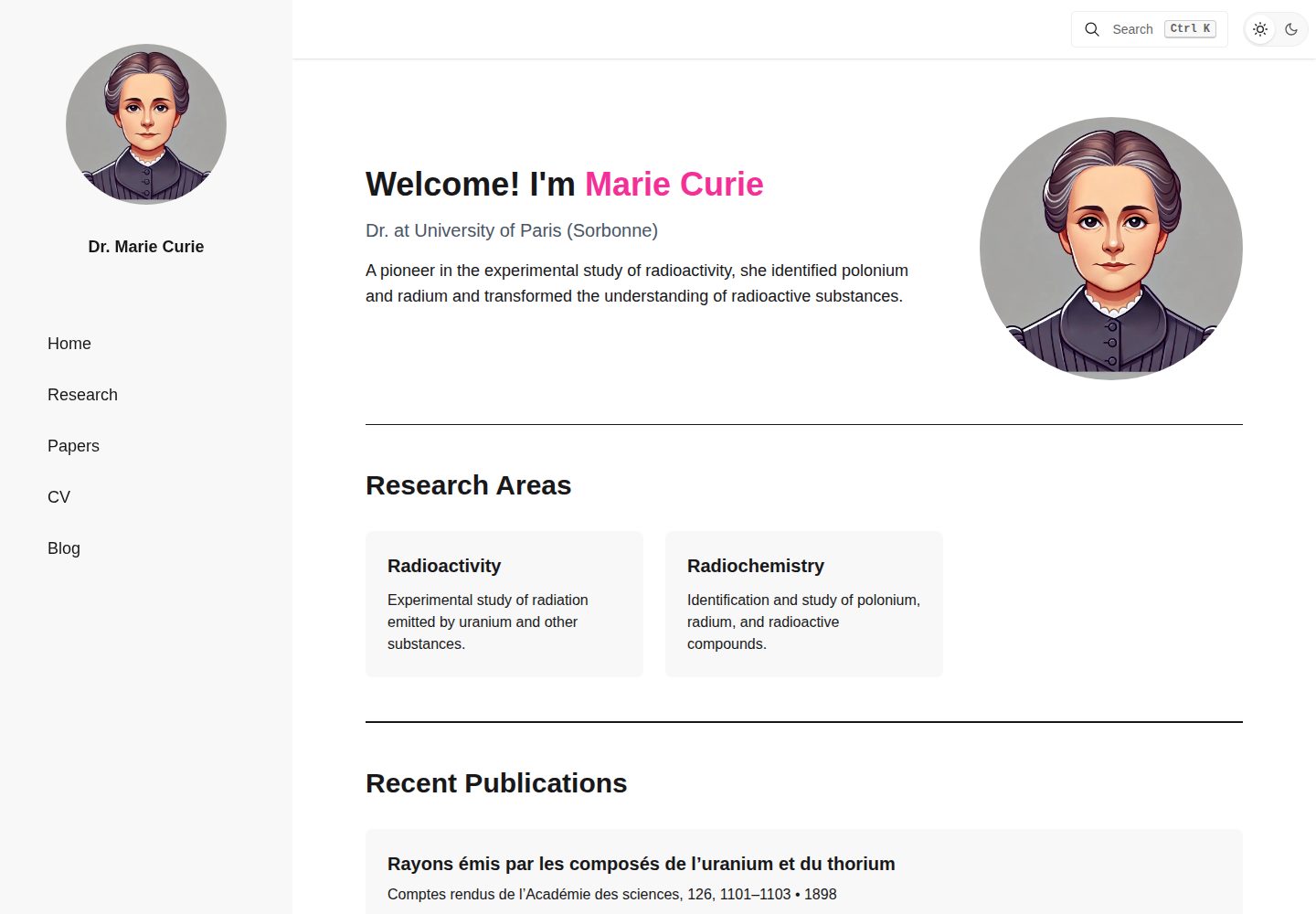
浏览真实页面截图,比较内容排版与手机效果。点击下方缩略图切换,放大查看整页细节。
全部页面与视图 3
截图用于了解视觉与布局,交互效果请以实际项目为准。
采集于 2026-10-02查看来源
值得关注的模板亮点
从已有项目资料中,快速了解它的特点。
内置博客,支持标签与分页,文章放在 src/content/BlogPosts/ 目录
提供跨文章与论文的站内搜索,并附带搜索相关测试
支持明暗主题切换,主题在 src/styles/global.css 中通过 DaisyUI 配置
生成 RSS 订阅与 sitemap,构建输出为静态站点
CV 与论文共用 src/data/cv.ts 中的 publications 数组,避免重复维护
模板详细介绍
Astro Academia 面向个人学术主页场景,把研究介绍、论文列表、CV 和博客整合在同一个站点中。内容不依赖外部 CMS,而是以 Markdown 和 TypeScript 文件的形式与站点代码放在一起,便于随仓库一起版本管理。模板自带博客(支持标签与分页)、站内搜索、明暗主题、RSS 订阅和 sitemap,构建产物是静态站点,可部署到 GitHub Pages 或其他静态托管服务。
使用前需要修改 src/settings.ts 中的 profile、social、template、seo 四个导出对象,分别对应个人资料、社交链接、站点与主题设置、SEO 默认值。CV 与论文数据集中在 src/data/cv.ts,分为 experiences、education、skills、publications 四个数组,CV 页面读取全部四项,论文页面复用 publications。博客文章放在 src/content/BlogPosts/,每篇需要 title、带引号的 date 和 excerpt,标签可选。部分文案直接写在 Astro 组件里,例如欢迎语、首页研究简介和研究页标题,需要手动替换。
限制方面:仓库自带的工作流只做开发检查与更新 changelog,GitHub Pages 部署需要自行配置;构建前必须设置 template.website_url 和 template.base,否则站点链接仍指向 localhost。示例文章、示例数据与占位图片需要在发布前替换或删除。
Astro作品集博客
适合你的项目吗?
适用场景
- 搭建个人学术主页,集中展示研究领域、论文与 CV
- 为科研人员建立带标签和分页的博客,用于发布研究笔记或田野记录
- 把简历数据以 TypeScript 数组形式维护,并自动渲染为 CV 页面
- 部署到 GitHub Pages 或其他静态托管服务,作为纯静态站点发布
适合人群
- 需要个人学术网站且愿意直接编辑代码与 Markdown 文件的研究人员
- 希望把论文、CV 与博客放在同一仓库统一管理的人
- 偏好静态站点、不依赖数据库或后台管理系统的用户
- 使用 Astro 并希望以现成结构快速起步的开发者
上手与定制指南
结合仓库当前版本的说明,按下面的资料检查内容、配置与运行要求。
- 1
克隆或基于模板创建仓库后,按 .nvmrc 指定的 Node.js 版本执行 npm ci 与 npm run dev
- 2
先编辑 src/settings.ts 的 profile、social、template、seo 四个导出对象,未使用的社交项设为空字符串以隐藏图标
- 3
在 src/data/cv.ts 中替换 experiences、education、skills、publications 的占位数据,不需要的数组设为 [] 以隐藏对应区块
- 4
替换 src/assets/profile_pictures.jpg、public/favicon.svg,并添加社交预览图后设置 seo.default_image
- 5
构建前设置 template.website_url 与 template.base,GitHub Pages 部署需自行配置工作流,仓库自带工作流不包含部署
授权与来源资料
使用条件与限制
免费使用 · 保留许可声明本次收录的是公开仓库中采用 MIT 许可的免费版本;免费范围为该版本代码,不代表外部服务或第三方素材免费。
使用时需要遵守
- 允许免费使用、修改、商用和分发该版本代码。
- 分发代码副本或实质性部分时,保留原作者版权声明和完整 MIT 许可声明。
- 代码按现状提供;担保与责任限制以原许可证及适用法律为准。
额外费用与待核对事项
- 仓库自带工作流仅执行开发检查与更新 changelog,不包含部署;GitHub Pages 部署需自行配置。
- 发布前必须设置 template.website_url 与 template.base,否则站点链接仍指向 localhost。
- 发布前需替换或删除示例博客文章。
- 演示图片、字体、图标及其他第三方素材需按各自许可核对,不能仅凭代码的 MIT 许可判断。
- 域名、托管、数据库、支付或 AI 等外部服务可能另外收费。
查看原文依据
Permission is hereby granted, free of charge
许可证原文
The workflows currently included in this repository run development checks and update the changelog; deployment needs its own setup.
README 原文
Replace the default localhost URL before publishing.
README 原文
https://github.com/maiobarbero/astro_academia/blob/main/LICENSEhttps://github.com/maiobarbero/astro_academia/blob/main/README.mdReplace or remove the sample post before publishing.
README 原文
DeepSeek 根据仓库许可证和 README 整理 ·2026-10-02。结果仅覆盖已读取资料,依赖、图片、字体及后续条款变更以各自原文为准。
项目核对记录与介绍依据
模板资料
- 来源平台
- GitHub
- 资料与维护参考分
- 资料较完整 · 92 / 100
- 技术栈
- Astro
- 网站类型
- 作品集 · 博客
这个分数如何计算
本站按许可资料(最高30分)、演示链接(12分)、预览图(10分)、Star数(15分)、记录的维护时间(15分)、描述完整度(8分)、功能记录(5分)和分类资料(5分)计算。它不是代码、安全或性能测试,也不是 Google 评分;有链接不代表已实测可用。
这个项目需要核对什么
- 记录的仓库更新时间
- 2026-09-30
- 截图检查日期
- 2026-10-02
已收录演示链接。请用你的内容与屏幕尺寸检查;有演示不代表表单、认证或支付已经可用。
目录记录的主要技术栈是 Astro。请通过依赖清单和锁文件核对实际版本与托管要求。这些说明基于收录资料,不代表代码审计或部署实测。
查看具体选型方法 →介绍的制作与核对状态
介绍由 AI 辅助整理目录与仓库资料。仓库作者不等于这篇介绍的审核者。
已完成服务器许可规则与 AI 来源核对;未经过人工编辑审核。
查看当时使用的来源资料
SHA-256: 208886408be6923fa3bcbc683805ae15c864908976958a5a24813b1eb6fe9b50
2026-10-02T16:07:13.835Z
来源文件 / 仓库
# Astro Academia
[](https://github.com/maiobarbero/astro_academia/actions/workflows/ci.yml)

[](https://astro.build/)
[](LICENSE)
<a href="https://buymeacoffee.com/maiobarbero"><img src="https://cdn.buymeacoffee.com/buttons/default-yellow.png" alt="Buy Me a Coffee" height="41" width="174"></a>
Astro Academia is an Astro template for a personal academic website. It brings your research, publications, CV, and writing into one place, with content stored in Markdown and TypeScript files alongside the site.
The template includes a blog with tags and pagination, search across posts and publications, light and dark themes, an RSS feed, and a sitemap. The build produces a static website you can host on GitHub Pages or another static hosting service.
[View the demo](https://astro-academia.maiobarbero.dev)
## Getting started
Fork this repository, then clone your fork, or create a new repository using **Astro Academia** as template. From the project directory, install dependencies and start the development server:
```sh
nvm install
nvm use
npm ci
npm run dev
```
The `.nvmrc` file specifies the project's Node.js version. If you use another version manager, select that version before installing dependencies.
Open the local address printed in your terminal, usually `http://localhost:4321`. Changes to your content and settings appear as you edit.
## Make it yours
### Profile and settings
Start with [src/settings.ts](src/settings.ts). It exports four objects:
| Export | What to change |
| --- | --- |
| `profile` | Your name, title, institute, research areas, and the author name highlighted in publications. |
| `social` | Your email and links to social or academic profiles. Set unused values to `''` to hide their icons. |
| `template` | Your deployed URL, base path, navigation position, themes, transitions, excerpt length, and posts per page. |
| `seo` | The default page title, description, and social preview image. |
For example, replace the `profile` export with your details:
```ts
export const profile: Profile = {
fullName: 'Alex Smith',
title: 'Research Fellow',
institute: 'University of Example',
author_name: 'Alex Smith',
research_areas: [
{
title: 'Scientific Computing',
description: 'Numerical methods for modelling physical systems.',
field: 'computer-science',
},
],
}
```
Research area icons are defined in [src/data/researchIcons.ts](src/data/researchIcons.ts). Choose a matching field or add your own.
Some content lives directly in Astro components. Replace the introduction in [src/components/Welcome.astro](src/components/Welcome.astro), the short research description in [src/components/ui/Hero.astro](src/components/ui/Hero.astro), and the sample text and page title in [src/pages/research.astro](src/pages/research.astro).
Replace `src/assets/profile_pictures.jpg` with your photo and `public/favicon.svg` with your favicon. Add a social preview image under `public/` and set `seo.default_image` to its public path, for example `/images/social-preview.png` for `public/images/social-preview.png`.
### CV and publications
Edit [src/data/cv.ts](src/data/cv.ts). It exports separate `experiences`, `education`, `skills`, and `publications` arrays. The CV page reads all four; the papers page uses the same publications array.
Keep those export names and replace the placeholder entries. For example:
```ts
export const education = [
{
school: 'University of Example',
time: '2018 - 2022',
degree: 'Ph.D. in Computer Science',
location: 'Amsterdam, Netherlands',
description: 'Research on numerical methods for physical simulations.',
},
]
export const experiences = [
{
company: 'Example Research Lab',
time: '2022 - Present',
title: 'Research Fellow',
location: 'Amsterdam, Netherlands',
description: 'Developing tools for scientific computing.',
},
]
```
Use `time` for dates and `school` for education institutions. The CV sorts entries using the end of the `time` range; use a format such as `2018 - 2022` or `2022 - Present`. Set unused arrays to `[]` to hide those CV sections.
The fields for skills and publications are defined in [src/types/cv.ts](src/types/cv.ts). Publications include a title, authors, journal, and time, with optional link and abstract fields.
### Blog posts
Add Markdown files to `src/content/BlogPosts/`. Each post needs a title, a quoted date, and an excerpt. Tags are optional.
For example, create `src/content/BlogPosts/field-notes.md`:
```markdown
---
title: "Notes from the field"
date: "2026-09-23"
excerpt: "Observations from our latest round of measurements."
tags: ["research", "fieldwork"]
---
Our latest measurements raised a few questions about the model.
Write the rest of your post here using Markdown.
```
Posts are included in the blog automatically. Replace or remove the sample post before publishing.
### Themes
Set `template.lightTheme` and `template.darkTheme` in `src/settings.ts` to theme names enabled in [src/styles/global.css](src/styles/global.css). That stylesheet contains the DaisyUI theme configuration and is also the place to add your own styles.
## Build and deploy
Before building, set `template.website_url` and `template.base` in `src/settings.ts` for your hosting location:
| Hosting location | `website_url` | `base` |
| --- | --- | --- |
| GitHub Pages project site | `https://your-username.github.io` | `/your-repository` |
| GitHub Pages user site | `https://your-username.github.io` | `''` |
| Custom domain | `https://example.com` | `''` |
These values are used by the Astro configuration and site links. Replace the default localhost URL before publishing.
```sh
npm run build
npm run preview
```
The build writes the site to `dist/`. Preview it locally, then configure your static hosting service to run `npm ci` and `npm run build` with the Node.js version from `.nvmrc`, and publish `dist/`.
For GitHub Pages, configure a Pages deployment workflow to build and upload `dist/`. The workflows currently included in this repository run development checks and update the changelog; deployment needs its own setup.
## Development checks
```sh
npm test # Core search tests
npm run lint # ESLint
npm run check # Astro diagnostics and TypeScript checks
```
GitHub Actions runs these checks on pushes and pull requests. The tests cover search indexing, filtering, content and URL preparation, snippets, and loading recovery.
## License
[MIT](LICENSE).
看看同类模板
对比同技术栈与用途的模板,找到更适合的视觉与内容结构。

astrowind
⭕️ AstroWind: A free template using Astro v7 and Tailwind CSS v4. Astro starter theme.
Astro · 博客

astro-paper
A minimal, accessible and SEO-friendly Astro blog theme.
Astro · 博客

fuwari
✨A static blog template built with Astro.
Astro · 博客

Firefly
Firefly 是一款基于 Astro 的静态博客主题,由 CuteLeaf 在 saicaca 的 Fuwari 模板基础上二次开发,主打清新美观的视觉风格。
Astro · 博客

astro-theme-cactus
A simple Astro theme. Use it to create your blog or website.
Astro · 作品集

astrofy
Astrofy is a free and open-source template for your Personal Portfolio Website built with Astro and TailwindCS…
Astro · 作品集