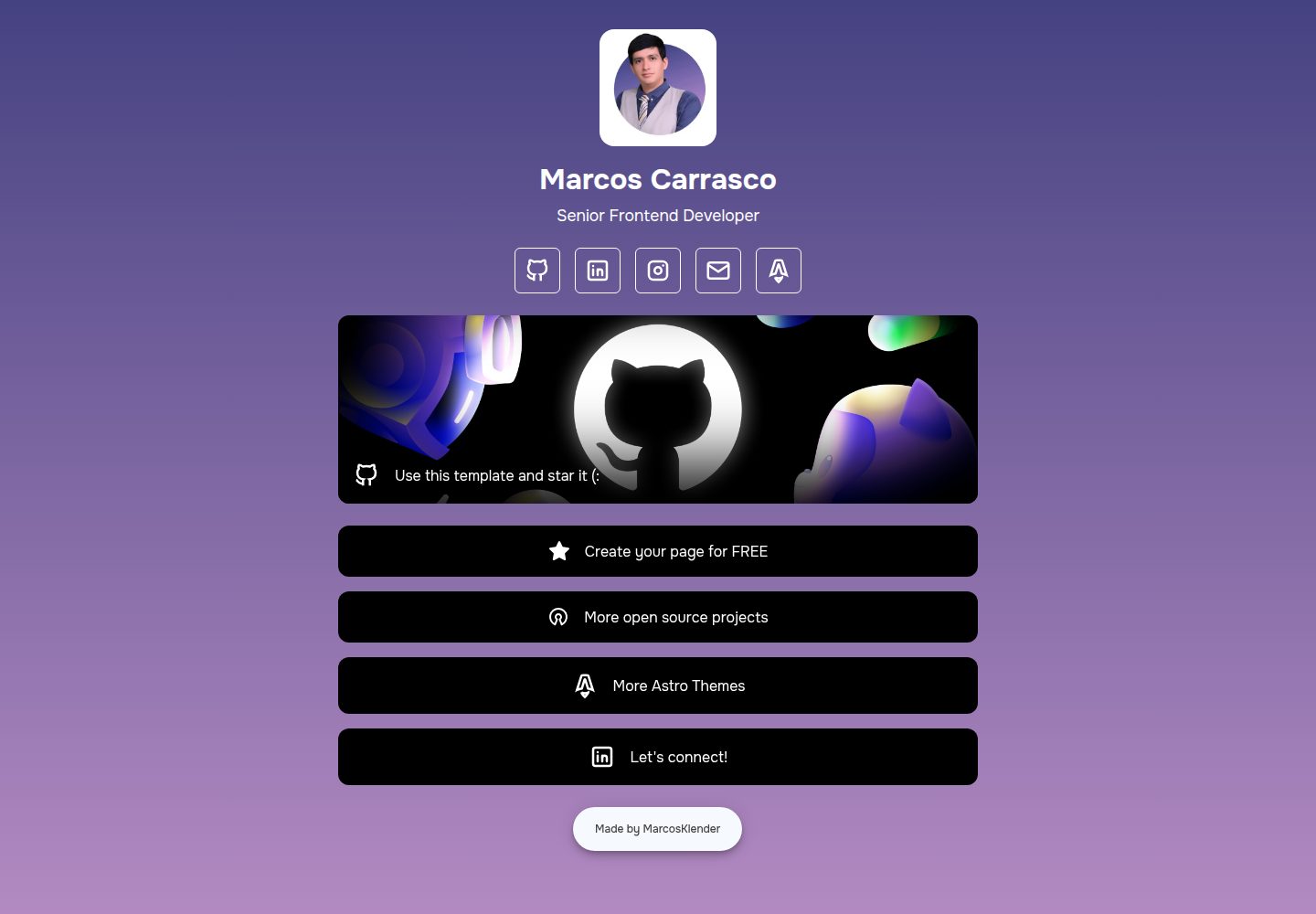
Page content and style are centrally configured through index.json, with no need to change component code
AstroStarter
AstroLinkHub — Astro Starter Template
By MarcosKlender
AstroLinkHub is an open-source link aggregation page template built with Astro. You can adjust page content and style by editing index.json, and it is MIT licensed.
Explore the design
Compare the page layouts and mobile experience. Open any screenshot for a closer look.
Desktop homepage1 / 2
Desktop captureTop of page
Actual screenshot captured by the server browser.
All pages & views 2
Screenshots show visual appearance; interactive behavior may differ.
Recorded 2026-10-04View source
What stands out
A quick read of the recorded project description.
Supports sections such as solid or gradient backgrounds, avatar and bio, social icons, buttons, featured links, and footer
Icons are based on Tabler Icons, with built-in preset network values such as GitHub, X, YouTube, Spotify, and Discord
Built with Astro; the README states that Node.js v22.0.0 or higher is required
The repository is MIT licensed, allowing free use, modification, commercial use, and distribution
Template Details
AstroLinkHub is an open-source link aggregation page template for individuals or brands, built with Astro. Page content and appearance are centrally controlled by the index.json file, so most customization can be done without changing component code. The README states that its goal is to replace free link page services that promote themselves on every page, letting users control the page themselves and keep all attribution.
The JSON configuration covers multiple sections: html controls language, title, description, and favicon; background supports a solid color (two identical colors) or a gradient; header sets the avatar image, name, and bio; socials and buttons are used to add social links and buttons; featured can highlight links with a background image or color; footer allows editing copyright information and developer links. Icons come from Tabler Icons, and the network field must use case-sensitive preset values, such as GitHub, X, YouTube, Spotify, Discord, Instagram, LinkedIn, Mail, Map, Medium, OpenSource, SoundCloud, Star, TikTok, Twitch, WhatsApp, Facebook, and AstroLogo.
Before use, Node.js v22.0.0 or higher is required. The README recommends Visual Studio Code with the official Astro extension, and shows using pnpm to install dependencies and start the development server. The repository is MIT licensed, allowing free use, modification, commercial use, and distribution of this version of the code; when distributing, the copyright notice and license notice must be retained; the code is provided as is. Third-party assets such as demo images, fonts, and icons, as well as external services such as domains and hosting, are not covered by this license and must be checked separately or paid for.
AstroStarter
Is it right for your project?
Use Cases
- Build a page for a personal homepage or portfolio that centrally displays social accounts and external links
- Create a link aggregation page for a company or team that does not show third-party platform self-promotion
- Quickly adjust colors, avatar, buttons, and footer with JSON to fit different brands
- Use as a starter template for an Astro project to learn how to organize page content driven by JSON
Suitable For
- Individuals or teams who want to self-host a links page and do not want to use free services with platform promotion
- Users who can run a Node.js environment and are willing to customize by editing JSON
- Developers who need a links page template that can be freely modified and used commercially under the MIT license
Getting started & customization
Use these recorded setup notes alongside the repository instructions for your chosen version.
- 1
Environment requirement: Node.js v22.0.0 or higher; the README recommends Visual Studio Code with the official Astro extension installed
- 2
After cloning the repository, enter the directory and run pnpm install to install dependencies, then run pnpm dev to start the development server
- 3
The main customization entry point is index.json, where sections such as html, background, header, socials, featured, buttons, and footer can be modified
- 4
Images such as the avatar and favicon need to be replaced with the corresponding files in the /public directory
- 5
The network field must use the case-sensitive preset values listed in the README; icons can be extended by referring to Tabler Icons
License & source material
Usage conditions & limitations
Free to use · keep license noticeThis entry covers the free version in the public repository under the MIT license; the free scope is the code of this version and does not mean that external services or third-party assets are free.
Must comply with when using
- Free use, modification, commercial use, and distribution of this version of the code are allowed.
- When distributing copies or substantial portions of the code, retain the original author's copyright notice and the complete MIT license notice.
- The code is provided as is; warranties and limitations of liability are governed by the original license and applicable law.
Additional costs & items to verify
- Demo images, fonts, icons, and other third-party assets must be checked against their respective licenses and cannot be judged solely by the code's MIT license.
- External services such as domains, hosting, databases, payments, or AI may incur additional charges.
- Using this template requires Node.js v22.0.0 or higher installed locally; lower versions cannot run the development server and build as described in the README.
- The README recommends pnpm rather than npm for installing dependencies; although not mandatory, following the documented process requires installing pnpm globally first.
- When configuring social icons, the network field must use the preset values listed in the README and is case-sensitive; custom or misspelled values will not display icons correctly.
- Extended icons must be obtained from Tabler Icons yourself; the licensing and usage conditions of these third-party icon assets are not covered by this project's MIT license and must be checked separately.
View Original Text Basis
Permission is hereby granted, free of charge
Original License Text
- **Node.js** -> `v22.0.0` or higher.
Original README
Personally I prefer using `pnpm` instead `npm` and to install it you can use:
Original README
Just edit the key `network` with any of the following values (case-sensitive):
Original README
https://github.com/MarcosKlender/AstroLinkHub/blob/main/LICENSEhttps://github.com/MarcosKlender/AstroLinkHub/blob/main/README.md> You can add more open-source icons from: [Tabler Icons](https://tabler.io/icons)
Original README
Compiled by DeepSeek based on repository license and README ·2026-10-04. Results only cover the materials read; dependencies, images, fonts, and subsequent term changes are subject to their respective original texts.
Project checks & description sources
Template Information
- Source platforms
- Astro Themes
- Documentation and maintenance reference score
- More documented · 87 / 100
- Technologies
- Astro
- Website type
- Starter
How this score is calculated
Our heuristic uses license records (up to 30), a demo link (12), a preview (10), stars (15), recorded maintenance (15), description completeness (8), feature records (5) and classification data (5). It is not a code, security or performance test, or a Google score. A link does not establish tested functionality.
What to verify for this project
- Repository update recorded
- 2026-01-12
- Screenshot last checked
- 2026-10-04
A demo link is listed. Check it with your own content and viewport sizes; its presence does not confirm that forms, authentication or payments work.
The catalog identifies Astro as the primary stack. Check the actual dependency manifest and lockfile for versions and hosting requirements. These notes use recorded metadata, not a code audit or a deployment test.
Use a selection guide →How this description was prepared
AI-assisted description based on catalog records and repository material. Repository authors are not automatically the reviewers of this description.
Review declaration: [email protected] · 2026-10-04
Inspect the recorded source material
SHA-256: 5c445cb6f3c97c921c9ed9ae6639203467913aafa462952c7e5e3544b5fef7b0
2026-10-04T16:41:58.064Z
Source file / repository<a id="readme-top"></a>
<div align="center">

[](https://astro.build/themes/details/astrolinkhub)
</div>
<h1 align="center">AstroLinkHub</h1>
<div align="center">




Open source links page, customizable via JSON. Made with Astro 4.
</div>

## Table of Contents
<ol>
<li>
<a href="#about-the-project">About The Project</a>
</li>
<li>
<a href="#getting-started">Getting Started</a>
<ul>
<li><a href="#prerequisites">Prerequisites</a></li>
<li><a href="#installation">Installation</a></li>
</ul>
</li>
<li>
<a href="#json">JSON</a>
<ul>
<li><a href="#icons">Icons</a></li>
</ul>
</li>
<li><a href="#contributing">Contributing</a></li>
<li><a href="#license">License</a></li>
</ol>
## About The Project
> [!IMPORTANT]
> I'm glad to announce that this project is available on [Astro Themes](https://astro.build/themes/details/astrolinkhub)! 🚀
For a while I was thinking about how popular link pages have become, both for companies and individuals. I've never liked the "free" solutions that many companies provide where they self-promote on every page you create.
That's exactly why I created AstroLinkHub! With this template you will be able to:
- Create your very own links page for FREE.
- Use the colors you want and give yourself all the credits for it.
- And most importantly, update it very easily using JSON.
<p align="right"><a href="#readme-top">Back to top ⬆️</a></p>
## Getting Started
### Prerequisites
- **Node.js** -> `v22.0.0` or higher.
- **Visual Studio Code** -> with the [Official Astro Extension](https://marketplace.visualstudio.com/items?itemName=astro-build.astro-vscode).
Personally I prefer using `pnpm` instead `npm` and to install it you can use:
```sh
npm install -g pnpm
```
### Installation
1. Clone this repo to your computer:
```sh
git clone [email protected]:MarcosKlender/AstroLinkHub.git
```
2. Install Astro dependencies:
```sh
cd AstroLinkHub
pnpm install
```
3. Run the Astro dev server:
```sh
pnpm dev
```
<p align="right"><a href="#readme-top">Back to top ⬆️</a></p>
## JSON
The best part of AstroLinkHub is that you can modify every aspect of the website very easily, you just have to edit the `index.json` file. This JSON contains the following sections:
- **html** -> Edit language, title, description and favicon (replace it in `/public`).
- **background** -> Use the same color twice for a solid color or use two colors for a gradient color.
- **header** -> Edit your image (replace it in `/public`), name and description.
- **socials** -> Add more icons with your socials URL (see the networks available).
- **featured** -> Highlight links with a background image or color (same as buttons).
- **buttons** -> Add more buttons with your socials URL (see the networks available).
- **footer** -> Edit the copyright and URL of the developer (Made just for you 😎).
### Icons
> [!NOTE]
> You can add more open-source icons from: [Tabler Icons](https://tabler.io/icons)
Just edit the key `network` with any of the following values (case-sensitive):
- AstroLogo
- Discord
- Facebook
- GitHub
- Instagram
- LinkedIn
- Mail
- Map
- Medium
- OpenSource
- SoundCloud
- Spotify
- Star
- TikTok
- Twitch
- WhatsApp
- X
- YouTube
<p align="right"><a href="#readme-top">Back to top ⬆️</a></p>
## Contributing
Contributions are what make the open source community such an amazing place to learn, inspire, and create. Any contributions you make are **greatly appreciated**.
If you have a suggestion that would make this better, please fork the repo and create a pull request. You can also simply open an issue with the tag "feature".
**Don't forget to give the project a star!** ⭐
<p align="right"><a href="#readme-top">Back to top ⬆️</a></p>
## License
Distributed under the MIT License. `Open Source` is pretty self-descriptive.
<p align="right"><a href="#readme-top">Back to top ⬆️</a></p>
Explore similar templates
Compare previews and descriptions within the same stack and category.

astrowind
AstroWind is a free, open-source Astro starter theme using Astro and Tailwind CSS, released under the MIT license.
Astro · Blog
accessible-astro-starter
An accessibility-focused Astro 6 starter template with WCAG 2.2 AA practices, Tailwind CSS 4, TypeScript, Prettier, ESLint, form validation, blog and portfolio examples, and preference toggles for dark mode, high contrast, and reduced motion.
Astro · Blog

astro-erudite
astro-erudite is an opinionated, unstyled static blog template built with Astro and native CSS, with no UI or CSS framework and minimal dependencies.
Astro · Portfolio

astro-shopify
A lightweight Shopify headless ecommerce starter template built with Astro and Svelte, integrating the Shopify Storefront API for product and inventory data, with built-in cart state management and basic add-to-cart and checkout flow.
Astro · E-commerce

brutal
Brutal is a neobrutalism Astro starter theme from ElianCodes, derived from the author's personal site and generalized. It includes a Markdown blog collection, build-time RSS and sitemap, image optimization, Tailwind CSS styling, and Biome checks, with no JavaScript by default.
Astro · Starter

qwind
Qwind is a free and open-source website template built on Qwik and Tailwind CSS, featuring directory-based routing via QwikCity, a Markdown blog, dark mode, and static deployment configuration.
Astro · Tool Site