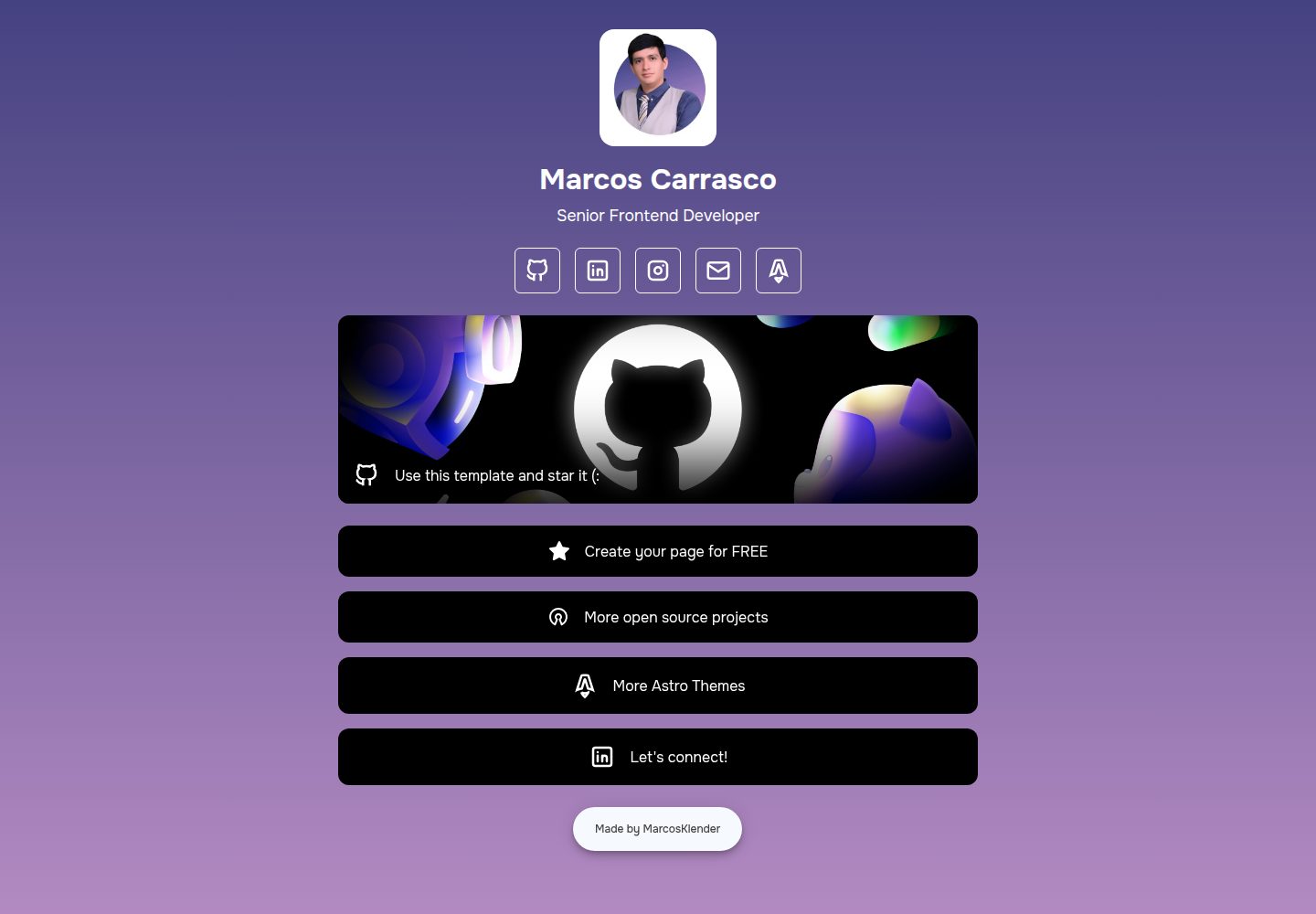
页面内容与样式集中由 index.json 配置,无需改动组件代码
Astro启动器
AstroLinkHub — Astro 启动器模板
作者 MarcosKlender
AstroLinkHub 是一个基于 Astro 的开源链接聚合页模板,通过编辑 index.json 即可调整页面内容与样式,采用 MIT 许可。
看看你的网站会是什么样
浏览真实页面截图,比较内容排版与手机效果。点击下方缩略图切换,放大查看整页细节。
全部页面与视图 2
截图用于了解视觉与布局,交互效果请以实际项目为准。
采集于 2026-10-04查看来源
值得关注的模板亮点
从已有项目资料中,快速了解它的特点。
支持纯色或渐变背景、头像与简介、社交图标、按钮、精选链接与页脚等区块
图标基于 Tabler Icons,内置 GitHub、X、YouTube、Spotify、Discord 等预设 network 值
使用 Astro 构建,README 说明需要 Node.js v22.0.0 或更高版本
仓库采用 MIT 许可,允许免费使用、修改、商用和分发
模板详细介绍
AstroLinkHub 是一个开源的个人或品牌链接聚合页模板,使用 Astro 构建,页面内容与外观集中由 index.json 文件控制,无需改动组件代码即可完成大部分定制。README 说明其目标是替代那些会在每个页面上自我推广的免费链接页服务,让使用者自行掌控页面并保留全部署名。
JSON 配置覆盖多个区块:html 控制语言、标题、描述与 favicon;background 支持纯色(两个相同颜色)或渐变色;header 设置头像图片、名称与简介;socials 与 buttons 用于添加社交链接和按钮;featured 可用背景图或颜色突出显示链接;footer 可编辑版权信息与开发者链接。图标来自 Tabler Icons,network 字段需使用区分大小写的预设值,例如 GitHub、X、YouTube、Spotify、Discord、Instagram、LinkedIn、Mail、Map、Medium、OpenSource、SoundCloud、Star、TikTok、Twitch、WhatsApp、Facebook、AstroLogo。
使用前需要 Node.js v22.0.0 或更高版本,README 推荐搭配 Visual Studio Code 与官方 Astro 扩展,并示例使用 pnpm 安装依赖与启动开发服务器。仓库采用 MIT 许可,允许免费使用、修改、商用和分发该版本代码,分发时需保留版权声明与许可声明;代码按现状提供。演示图片、字体、图标等第三方素材以及域名、托管等外部服务不在该许可范围内,需另行核对或付费。
Astro启动器
适合你的项目吗?
适用场景
- 为个人主页或作品集搭建一个集中展示社交账号与外部链接的页面
- 为公司或团队制作不显示第三方平台自我推广的链接聚合页
- 用 JSON 快速调整配色、头像、按钮与页脚,适配不同品牌
- 作为 Astro 项目的入门模板,了解以 JSON 驱动页面内容的组织方式
适合人群
- 希望自行托管链接页、不愿使用带平台推广的免费服务的个人或团队
- 能运行 Node.js 环境并愿意通过编辑 JSON 完成定制的使用者
- 需要 MIT 许可下可自由修改与商用的链接页模板的开发者
上手与定制指南
结合仓库当前版本的说明,按下面的资料检查内容、配置与运行要求。
- 1
环境要求:Node.js v22.0.0 或更高版本,README 推荐使用 Visual Studio Code 并安装官方 Astro 扩展
- 2
克隆仓库后进入目录执行 pnpm install 安装依赖,再运行 pnpm dev 启动开发服务器
- 3
主要定制入口是 index.json,可修改 html、background、header、socials、featured、buttons、footer 等区块
- 4
头像与 favicon 等图片需替换 /public 目录下的对应文件
- 5
network 字段必须使用 README 列出的区分大小写的预设值,图标可参考 Tabler Icons 扩展
授权与来源资料
使用条件与限制
免费使用 · 保留许可声明本次收录的是公开仓库中采用 MIT 许可的免费版本;免费范围为该版本代码,不代表外部服务或第三方素材免费。
使用时需要遵守
- 允许免费使用、修改、商用和分发该版本代码。
- 分发代码副本或实质性部分时,保留原作者版权声明和完整 MIT 许可声明。
- 代码按现状提供;担保与责任限制以原许可证及适用法律为准。
额外费用与待核对事项
- 演示图片、字体、图标及其他第三方素材需按各自许可核对,不能仅凭代码的 MIT 许可判断。
- 域名、托管、数据库、支付或 AI 等外部服务可能另外收费。
- 使用该模板需要本地环境安装 Node.js v22.0.0 或更高版本,低于此版本无法按 README 说明运行开发服务器与构建。
- README 推荐使用 pnpm 而非 npm 安装依赖,虽非强制,但按文档流程操作需先全局安装 pnpm。
- 配置社交图标时 network 字段必须使用 README 列出的预设值且区分大小写,自定义或拼写不符的值无法正确显示图标。
- 扩展图标需自行从 Tabler Icons 获取,这些第三方图标素材的许可与使用条件不在本项目 MIT 许可范围内,需另行核对。
查看原文依据
Permission is hereby granted, free of charge
许可证原文
- **Node.js** -> `v22.0.0` or higher.
README 原文
Personally I prefer using `pnpm` instead `npm` and to install it you can use:
README 原文
Just edit the key `network` with any of the following values (case-sensitive):
README 原文
https://github.com/MarcosKlender/AstroLinkHub/blob/main/LICENSEhttps://github.com/MarcosKlender/AstroLinkHub/blob/main/README.md> You can add more open-source icons from: [Tabler Icons](https://tabler.io/icons)
README 原文
DeepSeek 根据仓库许可证和 README 整理 ·2026-10-04。结果仅覆盖已读取资料,依赖、图片、字体及后续条款变更以各自原文为准。
项目核对记录与介绍依据
模板资料
- 来源平台
- Astro Themes
- 资料与维护参考分
- 资料较完整 · 87 / 100
- 技术栈
- Astro
- 网站类型
- 启动器
这个分数如何计算
本站按许可资料(最高30分)、演示链接(12分)、预览图(10分)、Star数(15分)、记录的维护时间(15分)、描述完整度(8分)、功能记录(5分)和分类资料(5分)计算。它不是代码、安全或性能测试,也不是 Google 评分;有链接不代表已实测可用。
这个项目需要核对什么
- 记录的仓库更新时间
- 2026-01-12
- 截图检查日期
- 2026-10-04
已收录演示链接。请用你的内容与屏幕尺寸检查;有演示不代表表单、认证或支付已经可用。
目录记录的主要技术栈是 Astro。请通过依赖清单和锁文件核对实际版本与托管要求。这些说明基于收录资料,不代表代码审计或部署实测。
查看具体选型方法 →介绍的制作与核对状态
介绍由 AI 辅助整理目录与仓库资料。仓库作者不等于这篇介绍的审核者。
审核声明: [email protected] · 2026-10-04
查看当时使用的来源资料
SHA-256: 5c445cb6f3c97c921c9ed9ae6639203467913aafa462952c7e5e3544b5fef7b0
2026-10-04T16:41:58.064Z
来源文件 / 仓库<a id="readme-top"></a>
<div align="center">

[](https://astro.build/themes/details/astrolinkhub)
</div>
<h1 align="center">AstroLinkHub</h1>
<div align="center">




Open source links page, customizable via JSON. Made with Astro 4.
</div>

## Table of Contents
<ol>
<li>
<a href="#about-the-project">About The Project</a>
</li>
<li>
<a href="#getting-started">Getting Started</a>
<ul>
<li><a href="#prerequisites">Prerequisites</a></li>
<li><a href="#installation">Installation</a></li>
</ul>
</li>
<li>
<a href="#json">JSON</a>
<ul>
<li><a href="#icons">Icons</a></li>
</ul>
</li>
<li><a href="#contributing">Contributing</a></li>
<li><a href="#license">License</a></li>
</ol>
## About The Project
> [!IMPORTANT]
> I'm glad to announce that this project is available on [Astro Themes](https://astro.build/themes/details/astrolinkhub)! 🚀
For a while I was thinking about how popular link pages have become, both for companies and individuals. I've never liked the "free" solutions that many companies provide where they self-promote on every page you create.
That's exactly why I created AstroLinkHub! With this template you will be able to:
- Create your very own links page for FREE.
- Use the colors you want and give yourself all the credits for it.
- And most importantly, update it very easily using JSON.
<p align="right"><a href="#readme-top">Back to top ⬆️</a></p>
## Getting Started
### Prerequisites
- **Node.js** -> `v22.0.0` or higher.
- **Visual Studio Code** -> with the [Official Astro Extension](https://marketplace.visualstudio.com/items?itemName=astro-build.astro-vscode).
Personally I prefer using `pnpm` instead `npm` and to install it you can use:
```sh
npm install -g pnpm
```
### Installation
1. Clone this repo to your computer:
```sh
git clone [email protected]:MarcosKlender/AstroLinkHub.git
```
2. Install Astro dependencies:
```sh
cd AstroLinkHub
pnpm install
```
3. Run the Astro dev server:
```sh
pnpm dev
```
<p align="right"><a href="#readme-top">Back to top ⬆️</a></p>
## JSON
The best part of AstroLinkHub is that you can modify every aspect of the website very easily, you just have to edit the `index.json` file. This JSON contains the following sections:
- **html** -> Edit language, title, description and favicon (replace it in `/public`).
- **background** -> Use the same color twice for a solid color or use two colors for a gradient color.
- **header** -> Edit your image (replace it in `/public`), name and description.
- **socials** -> Add more icons with your socials URL (see the networks available).
- **featured** -> Highlight links with a background image or color (same as buttons).
- **buttons** -> Add more buttons with your socials URL (see the networks available).
- **footer** -> Edit the copyright and URL of the developer (Made just for you 😎).
### Icons
> [!NOTE]
> You can add more open-source icons from: [Tabler Icons](https://tabler.io/icons)
Just edit the key `network` with any of the following values (case-sensitive):
- AstroLogo
- Discord
- Facebook
- GitHub
- Instagram
- LinkedIn
- Mail
- Map
- Medium
- OpenSource
- SoundCloud
- Spotify
- Star
- TikTok
- Twitch
- WhatsApp
- X
- YouTube
<p align="right"><a href="#readme-top">Back to top ⬆️</a></p>
## Contributing
Contributions are what make the open source community such an amazing place to learn, inspire, and create. Any contributions you make are **greatly appreciated**.
If you have a suggestion that would make this better, please fork the repo and create a pull request. You can also simply open an issue with the tag "feature".
**Don't forget to give the project a star!** ⭐
<p align="right"><a href="#readme-top">Back to top ⬆️</a></p>
## License
Distributed under the MIT License. `Open Source` is pretty self-descriptive.
<p align="right"><a href="#readme-top">Back to top ⬆️</a></p>
看看同类模板
对比同技术栈与用途的模板,找到更适合的视觉与内容结构。

astrowind
⭕️ AstroWind: A free template using Astro v7 and Tailwind CSS v4. Astro starter theme.
Astro · 博客
accessible-astro-starter
Accessible Astro Starter 是一个以无障碍为核心理念的 Astro 6 启动模板,由 incluud 团队维护。
Astro · 博客

astro-erudite
An opinionated, unstyled static blogging template built with Astro and native CSS.
Astro · 作品集

astro-shopify
astro-shopify 是一个面向开发者的轻量级电商启动模板,用于构建基于 Shopify 的无头店面。
Astro · 电商

brutal
A neobrutalism Astro starter theme
Astro · 启动器

qwind
⭕️ Qwind: A template to make your website using Qwik + Tailwind CSS.
Astro · 工具站