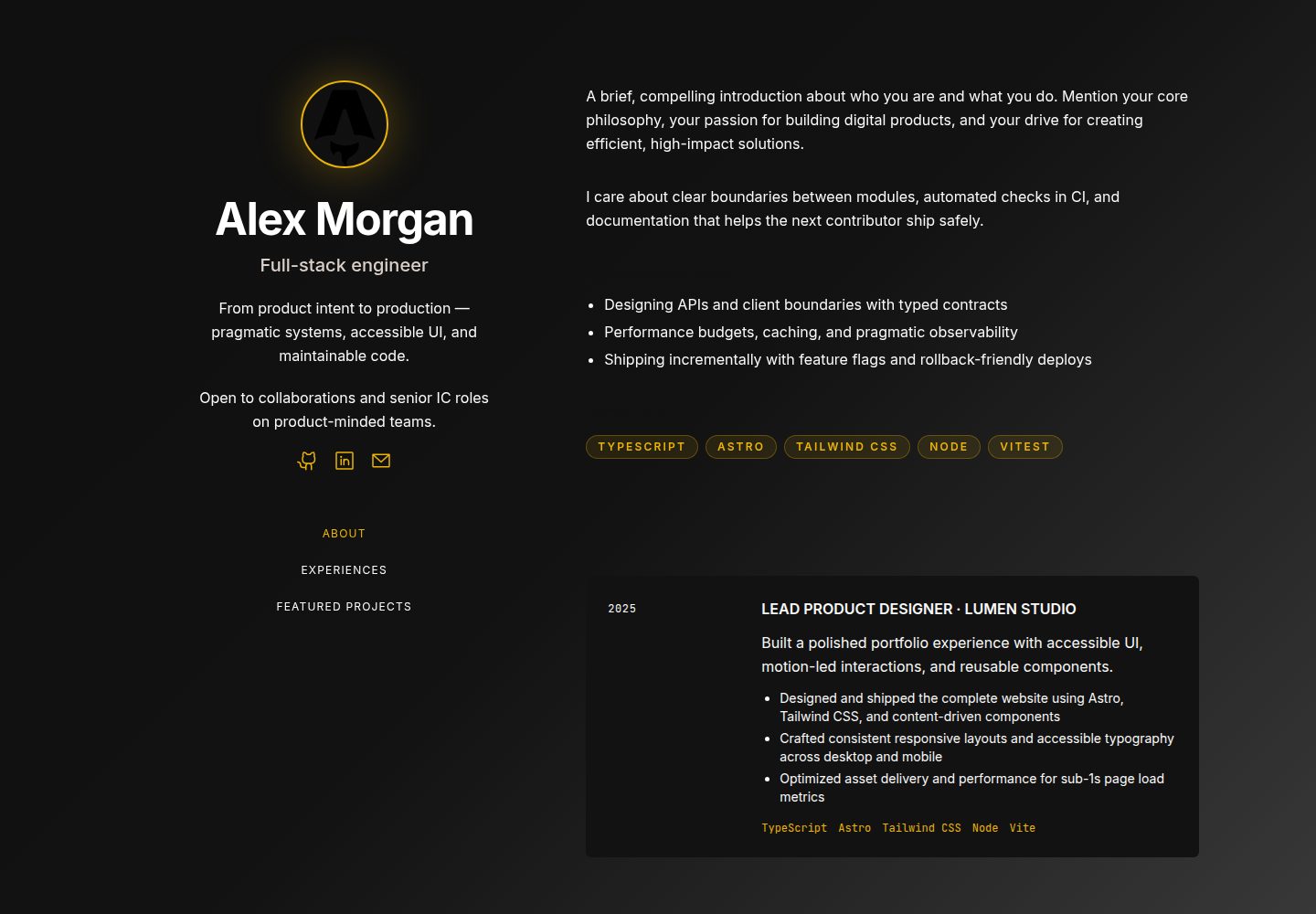
Content centralized in the /data directory for easy replacement of site copy and project data
AstroPortfolio
projects-portfolio-template — Astro Portfolio Template
By masoudsoleymani
A responsive Astro-based portfolio template with content centralized in the /data directory and multiple built-in color themes, suitable for showcasing projects and experience.
Explore the design
Compare the page layouts and mobile experience. Open any screenshot for a closer look.
Desktop homepage1 / 3
Desktop captureTop of page
Actual screenshot captured by the server browser.
All pages & views 3
Screenshots show visual appearance; interactive behavior may differ.
Recorded 2026-10-03View source
What stands out
A quick read of the recorded project description.
Four built-in color themes: default, strategic, innovator, and executive, switchable in src/config.ts
Responsive design covering mobile, tablet, and desktop
SEO-related settings including Open Graph and semantic HTML
Static-first architecture with build output to ./dist/
MIT license, allowing free use, modification, commercial use, and distribution of the code
Template Details
This is a responsive portfolio template built with Astro for showcasing projects and personal experience. The template centralizes site copy and project data in the /data directory. The README explains that you can update the hero section, about section, experience cards, project archive page, and contact information by editing data/site.ts. Sample images are placed in the /public directory for replacement.
For theming, the template includes multiple color schemes. You can switch between them by modifying the baseTheme variable in src/config.ts. Available values include default, strategic, innovator, and executive. The project structure is divided into public static assets, data files, components, layouts, pages, and global styles under src, plus configuration files astro.config.mjs and tsconfig.json.
Before use, you need Node.js v22.12.0 or higher. Run npm install, then npm run dev to start the local development server. The build output goes to ./dist/. The template is MIT licensed, allowing free use, modification, commercial use, and distribution of the code. However, third-party assets such as demo images, fonts, and icons must be checked separately under their respective licenses. External services such as domains and hosting may incur additional charges.
AstroPortfolio
Is it right for your project?
Use Cases
- Building a personal project portfolio page to showcase selected projects and experience cards
- Providing a static site starting point for developers or designers to quickly replace content
- Scenarios requiring multiple color schemes to quickly adjust the site's visual style
- Personal sites deployed to static hosting platforms such as Netlify
Suitable For
- Developers who want to build a personal portfolio with Astro
- Users who need centralized management of site copy and project data
- Those who prefer static sites and plan to deploy to a hosting platform themselves
- Those who accept the MIT license and will independently verify third-party asset licensing
Getting started & customization
Use these recorded setup notes alongside the repository instructions for your chosen version.
- 1
Requires Node.js v22.12.0 or higher
- 2
After cloning the repository, run npm install to install dependencies, then npm run dev to start the local development server (default localhost:4321)
- 3
Edit data/site.ts to update the hero section, about section, experience cards, project archive page, and contact information
- 4
Replace sample images in /public, including featured project card images and favicon/logo
- 5
Modify the baseTheme variable in src/config.ts to switch color themes
License & source material
Usage conditions & limitations
Free to use · keep license noticeThis entry covers the free version under the MIT license in the public repository; the free scope applies to that version's code and does not imply that external services or third-party assets are free.
Must comply with when using
- Free use, modification, commercial use, and distribution of this version's code are permitted.
- When distributing copies or substantial portions of the code, retain the original author's copyright notice and the full MIT license notice.
- The code is provided as is; warranties and limitations of liability are governed by the original license and applicable law.
Additional costs & items to verify
- Demo images, fonts, icons, and other third-party assets must be checked under their respective licenses; they cannot be judged solely by the code's MIT license.
- External services such as domains, hosting, databases, payments, or AI may incur additional charges.
View Original Text Basis
Compiled by DeepSeek based on repository license and README ·2026-10-03. Results only cover the materials read; dependencies, images, fonts, and subsequent term changes are subject to their respective original texts.
Project checks & description sources
Template Information
- Source platforms
- Astro Themes
- Documentation and maintenance reference score
- More documented · 83 / 100
- Technologies
- Astro
- Website type
- Portfolio
How this score is calculated
Our heuristic uses license records (up to 30), a demo link (12), a preview (10), stars (15), recorded maintenance (15), description completeness (8), feature records (5) and classification data (5). It is not a code, security or performance test, or a Google score. A link does not establish tested functionality.
What to verify for this project
- Repository update recorded
- 2026-05-29
- Screenshot last checked
- 2026-10-03
A demo link is listed. Check it with your own content and viewport sizes; its presence does not confirm that forms, authentication or payments work.
The catalog identifies Astro as the primary stack. Check the actual dependency manifest and lockfile for versions and hosting requirements. These notes use recorded metadata, not a code audit or a deployment test.
Use a selection guide →How this description was prepared
AI-assisted description based on catalog records and repository material. Repository authors are not automatically the reviewers of this description.
Automatically checked against source and license rules; no manual editorial review.
Inspect the recorded source material
SHA-256: ba747ff5207bc43fb32c00fd2a73032fc8b8b98bae0a8a4f2ead722d8037fa40
2026-10-03T06:43:42.834Z
Source file / repository# Projects Portfolio Template A responsive Astro starter portfolio template designed to be easy to customize as a reusable template.    ## ✨ Features - **Centralized Data:** All content in `/data/` for easy customization - **Built-in Themes**: Choose a costum theme color palettes from a single config file. - **Fully Responsive:** Optimized for mobile, tablet, and desktop. - **Performance:** Optimized for perfect Lighthouse scores. - **SEO Ready:** Open Graph and semantic HTML - **Fast** — Static-first architecture ## 🚀 Getting Started Make sure you have **Node.js** v22.12.0 or higher installed on your machine. 1. Click **Use this template** on this repository. 2. Choose **Create a new repository**. 3. Clone your new repository: `git clone <your-repo-url>` 4. Navigate to your repo: `cd <your-repo-name>` 5. Install dependencies: `npm install` 6. Start development server: `npm run dev` 7. Update your content in `/data` 8. Deploy on your preferred platform ### Replace Content Edit **`data/site.ts`** to update: - Hero section texts - About section texts - experience cards content - Archive projects page content - Contact links ### Replace Images Replace the sample images in **`/public`** with your own: - Featured projects cards images - Favicon/logo ### 🎨 Theme Switching This template comes with multiple built-in color palettes. To change the theme of your portfolio, open `src/config.ts` and update the `baseTheme` variable to one of the available options: `'default', 'strategic', 'innovator', 'executive'` ## 📁 Project Structure ``` ├── public/ # Static assets ├── data/ # jsON files for project data ├── src/ │ ├── components/ # Reusable Astro components │ ├── layouts/ # Layout templates with Meta tags │ ├── pages/ # Site routes (index.astro) │ └── styles/ # global css styles │ └── config.ts # Global site configuration ├── astro.config.mjs # Astro configuration └── tsconfig.json # Typescript configuration ``` ## 🛠 Commands | Command | Action | | :------------------------ | :----------------------------------------------- | | `npm install` | Installs dependencies | | `npm run dev` | Starts local dev server at `localhost:4321` | | `npm run build` | Build your production site to `./dist/` | | `npm run preview` | Preview your build locally, before deploying | | `npm run astro ...` | Run CLI commands like `astro add`, `astro check` | | `npm run astro -- --help` | Get help using the Astro CLI | ## 🤝 Contributions Please read the [Contributing Guide](CONTRIBUTING.md) before opening a PR. ## 📝 License This project is licensed under the [MIT License](LICENSE). You are free to use, modify, and distribute this template.
Explore similar templates
Compare previews and descriptions within the same stack and category.

astro-theme-cactus
Astro Cactus is an Astro-based blog and portfolio theme that uses Markdown/MDX content collections to manage posts, notes, and tags, with frontmatter type-checked by a schema.
Astro · Portfolio

astrofy
Astrofy is a free and open-source personal portfolio website template built with Astro and TailwindCSS, with built-in blog, CV timeline, project showcase, store, and RSS feed modules.
Astro · Portfolio

astro-nano
Astro Nano is a static, minimalist portfolio and blog template built with Astro, Tailwind, and TypeScript without frontend frameworks. It includes light/dark themes, animated UI, automatic sitemap and RSS feed generation, and Markdown/MDX support with component imports.
Astro · Portfolio

astro-erudite
astro-erudite is an opinionated, unstyled static blog template built with Astro and native CSS, with no UI or CSS framework and minimal dependencies.
Astro · Portfolio

astro-sphere
Astro Sphere is a static, minimalist portfolio and blog theme maintained by markhorn-dev, built mainly with Astro, Tailwind, and TypeScript, with a small amount of SolidJS for stateful components.
Astro · Portfolio

astro-micro
Astro Micro is a framework-free blog and portfolio theme for Astro, forked from Astro Nano. It adds Pagefind search and Giscus comments while retaining type safety, sitemap, RSS, Markdown and MDX support, and TailwindCSS with system, light, and dark themes.
Astro · Portfolio