Astro as the main framework, React for reusable UI components, Tailwind CSS for styling
AstroReactSaaSCorporate Website
ModernSaaS-LandingPage-Template — Astro SaaS Template
By MasuRii
A SaaS startup landing page template built on Astro and React, with light/dark mode, content data files, and a GitHub Pages deployment workflow.
Explore the design
Compare the page layouts and mobile experience. Open any screenshot for a closer look.
Desktop homepage1 / 3
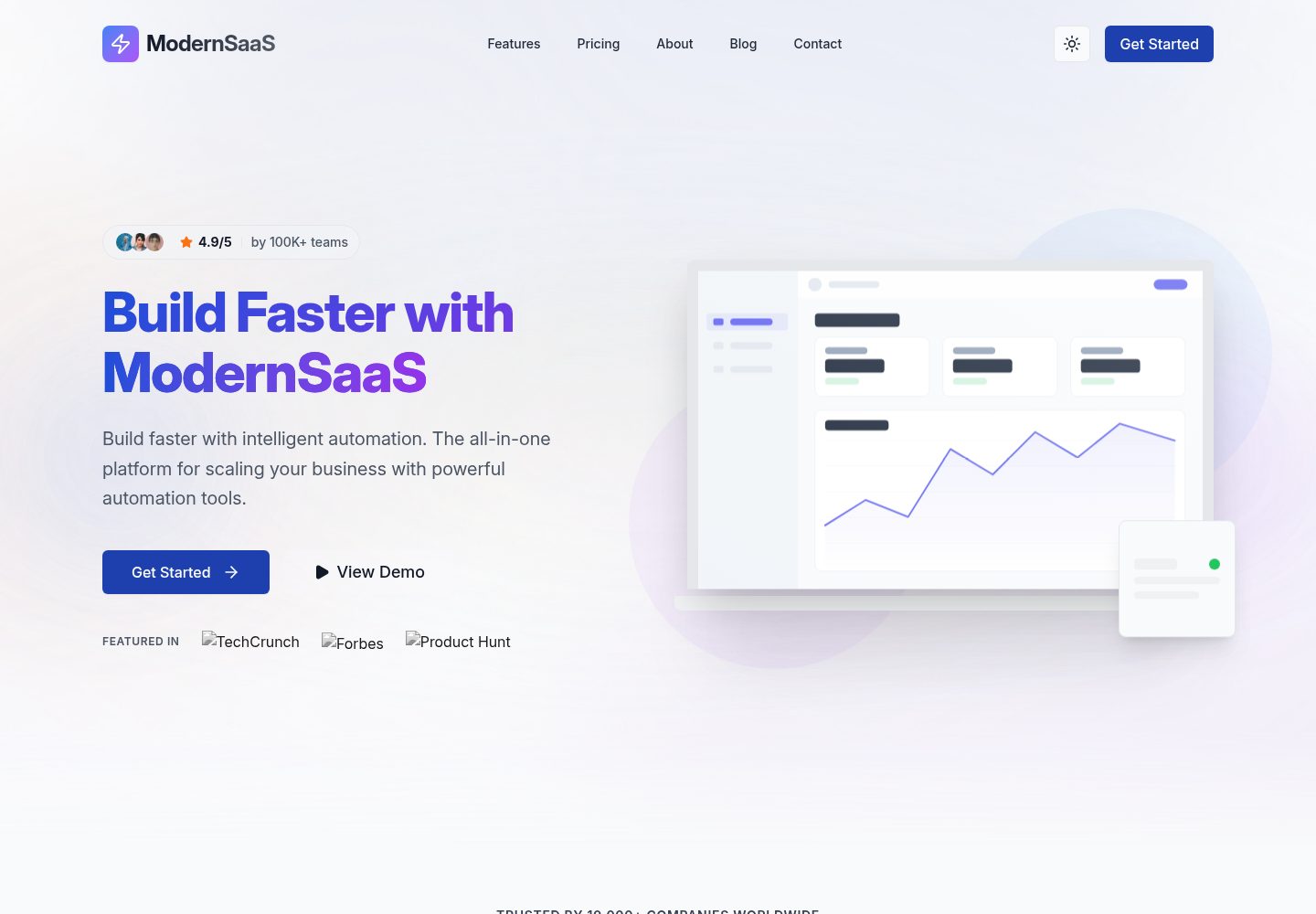
Desktop captureTop of page
Actual screenshot captured by the server browser.
All pages & views 3
Screenshots show visual appearance; interactive behavior may differ.
Recorded 2026-10-03View source
What stands out
A quick read of the recorded project description.
Feature, pricing, testimonial, team, FAQ, and navigation content managed centrally through data files under src/data/
Built-in light/dark mode with system preference detection and a persistent toggle
GitHub Actions automated deployment workflow for GitHub Pages, with Vercel deployment also supported
Includes Vitest unit tests, Playwright end-to-end tests, axe-core accessibility tests, and visual regression test scripts
MIT-licensed, allowing free use, modification, commercialization, and distribution
Template Details
This is a landing page template for SaaS startups, using Astro as the main framework with React components, Tailwind CSS for styling, Motion One for animations, Radix UI for base UI components, and Lucide React for icons. The repository is MIT-licensed, so the code can be used, modified, commercialized, and distributed for free, but third-party assets such as demo images, fonts, and icons require separate license checks.
Page content is managed centrally through data files under src/data/, including features.ts (feature list, bento grid, zigzag sections), pricing.ts (pricing tiers and feature comparison), testimonials.ts (customer testimonials), team.ts (team members), integrations.ts (integration partners), faq.ts (frequently asked questions), and navigation.ts (header and footer navigation). Brand information, social links, contact details, SEO defaults, and feature toggles are configured in src/config/site.ts; theme colors and fonts are adjusted via CSS variables in src/styles/tokens.css.
The template supports light/dark mode (with system preference detection and a persistent toggle), responsive layouts, and includes built-in JSON-LD structured data, automatic sitemap, and meta tags. The repository ships with Vitest unit tests, Playwright end-to-end tests, axe-core accessibility tests, Lighthouse audits, and visual regression test scripts. For deployment, it provides a GitHub Actions workflow for GitHub Pages, can also be deployed to Vercel, or you can run the build and deploy the dist/ directory to other platforms.
Limitations to note: the repository has few stars and is at version 0.1.0, making it an early-stage release; statements in the README about performance scores, test counts, and similar claims are the author's own and were not independently verified in this material.
AstroReactSaaSCorporate website
Is it right for your project?
Use Cases
- Building a marketing landing page for a SaaS product with features, pricing, testimonials, and FAQ sections
- A startup homepage that needs light/dark mode and responsive layouts
- Sites where copy and list content are maintained through data files rather than page code
- Projects planning to publish a static site via GitHub Pages or Vercel
Suitable For
- SaaS startup teams and independent developers
- Front-end developers familiar with Astro, React, and Tailwind CSS
- Landing page projects that need customizable brand colors and content structure
- Users who accept an early-stage template and are willing to adjust the code themselves
Getting started & customization
Use these recorded setup notes alongside the repository instructions for your chosen version.
- 1
Requires Bun (recommended) or Node.js 18+ and Git
- 2
After cloning the repository, run bun install to install dependencies and bun dev to start the local development server (default localhost:4321)
- 3
Copy .env.example to .env and set SITE_URL, BASE_PATH, and GITHUB_PAGES according to the deployment environment
- 4
Modify brand information, social links, and SEO defaults in src/config/site.ts; adjust theme colors and fonts in src/styles/tokens.css
- 5
When deploying to GitHub Pages, set the Pages source to GitHub Actions in the repository settings
License & source material
Usage conditions & limitations
Free to use · keep license noticeThis entry covers the free version in the public repository under the MIT license; the free scope applies to that version's code and does not mean external services or third-party assets are free.
Must comply with when using
- The code of this version may be used, modified, commercialized, and distributed for free.
- When distributing copies or substantial portions of the code, retain the original author's copyright notice and the full MIT license notice.
- The code is provided as is; warranties and limitations of liability are governed by the original license and applicable law.
Additional costs & items to verify
- Demo images, fonts, icons, and other third-party assets must be checked against their respective licenses; the code's MIT license alone is not sufficient to determine this.
- External services such as domains, hosting, databases, payments, or AI may incur separate charges.
View Original Text Basis
https://github.com/MasuRii/ModernSaaS-LandingPage-Template/blob/main/LICENSEhttps://github.com/MasuRii/ModernSaaS-LandingPage-Template/blob/main/README.mdPermission is hereby granted, free of charge
Original License Text
Compiled by DeepSeek based on repository license and README ·2026-10-03. Results only cover the materials read; dependencies, images, fonts, and subsequent term changes are subject to their respective original texts.
Project checks & description sources
Template Information
- Source platforms
- GitHub
- Documentation and maintenance reference score
- More documented · 88 / 100
- Technologies
- Astro · React
- Website type
- SaaS · Corporate Website
How this score is calculated
Our heuristic uses license records (up to 30), a demo link (12), a preview (10), stars (15), recorded maintenance (15), description completeness (8), feature records (5) and classification data (5). It is not a code, security or performance test, or a Google score. A link does not establish tested functionality.
What to verify for this project
- Repository update recorded
- 2026-02-14
- Screenshot last checked
- 2026-10-03
A demo link is listed. Check it with your own content and viewport sizes; its presence does not confirm that forms, authentication or payments work.
The catalog identifies Astro as the primary stack. Check the actual dependency manifest and lockfile for versions and hosting requirements. These notes use recorded metadata, not a code audit or a deployment test.
Use a selection guide →How this description was prepared
AI-assisted description based on catalog records and repository material. Repository authors are not automatically the reviewers of this description.
Automatically checked against source and license rules; no manual editorial review.
Inspect the recorded source material
SHA-256: 463892ad8134ed30edca658838e56219983dde7aebe38a13d97f4f582283ab5e
2026-10-03T08:32:37.422Z
Source file / repository<div align="center"> # ModernSaaS Landing Page Template     [](https://github.com/MasuRii/ModernSaaS-LandingPage-Template/actions) [](https://github.com/MasuRii/ModernSaaS-LandingPage-Template/actions/workflows/deploy.yml) [](package.json) [](LICENSE) [](CONTRIBUTING.md) **A production-ready, visually stunning SaaS startup landing page template featuring modern 2026 design trends, comprehensive light/dark mode support, Core Web Vitals optimization, and seamless GitHub Pages deployment.**  [🚀 Live Demo](https://masurii.github.io/ModernSaaS-LandingPage-Template/) | [Documentation](#documentation) | [Quick Start](#quick-start) </div> --- ## Features - **Blazing Fast** - Built with Astro 5 for near-zero JavaScript by default. Perfect Lighthouse scores. - **Modern Design** - 2026 design trends including glassmorphism, bento grids, and mesh gradients. - **Dark Mode** - First-class dark mode support with automatic system preference detection and persistent toggle. - **Fully Responsive** - Optimized for all devices from 320px mobile to ultra-wide desktops. - **SEO Optimized** - Built-in JSON-LD structured data, automatic sitemaps, and optimized meta tags. - **Production-Grade Testing** - 1,100+ unit tests and comprehensive E2E suite using Playwright. - **Atomic Components** - Highly reusable UI components built with React and Tailwind CSS v4. - **Fluid Animations** - Smooth, hardware-accelerated animations using Motion One with reduced motion support. - **Content Driven** - Easily customizable via centralized data files. ## Tech Stack | Category | Technology | | ----------------- | ----------------------------------------------------------------------- | | **Framework** | [Astro](https://astro.build) v5.17.2 | | **UI Library** | [React](https://react.dev) v19.2.4 | | **Styling** | [Tailwind CSS](https://tailwindcss.com) v4.1.18 | | **Animations** | [Motion One](https://motion.dev) v12.34.0 | | **UI Primitives** | [Radix UI](https://www.radix-ui.com) | | **Icons** | [Lucide React](https://lucide.dev) | | **Testing** | [Vitest](https://vitest.dev), [Playwright](https://playwright.dev) | | **Runtime** | [Bun](https://bun.sh) | | **Deployment** | [GitHub Pages](https://pages.github.com) / [Vercel](https://vercel.com) | ## Quick Start ### Prerequisites - [Bun](https://bun.sh) (recommended) or [Node.js](https://nodejs.org) 18+ - [Git](https://git-scm.com) ### Installation ```bash # Clone the repository git clone https://github.com/MasuRii/ModernSaaS-LandingPage-Template.git cd ModernSaaS-LandingPage-Template # Install dependencies bun install # or npm install # Start development server bun dev # or npm run dev ``` The site will be available at `http://localhost:4321` ## Commands All commands are run from the root of the project: | Command | Description | | ----------------------- | ------------------------------------------ | | `bun install` | Install dependencies | | `bun dev` | Start local dev server at `localhost:4321` | | `bun build` | Build production site to `./dist/` | | `bun preview` | Preview production build locally | | `bun run typecheck` | Run TypeScript type checking | | `bun run lint` | Run ESLint for code quality | | `bun run format` | Run Prettier for code formatting | | `bun run test` | Run unit tests with Vitest | | `bun run test:coverage` | Generate test coverage report | | `bun run test:e2e` | Run E2E tests with Playwright | | `bun run test:a11y` | Run accessibility tests with axe-core | | `bun run test:perf` | Run Lighthouse performance audit | | `bun run test:visual` | Run visual regression tests | ## Project Structure ``` ModernSaaS-LandingPage-Template/ ├── .github/workflows/ # CI/CD (GitHub Actions) ├── e2e/ # End-to-end tests (Playwright) │ ├── tests/ # E2E test files │ ├── snapshots/ # Visual regression baselines │ └── VISUAL_REGRESSION.md # Visual testing documentation ├── public/ # Static assets (images, fonts, robots.txt) ├── scripts/ # Utility scripts (image fetching, deployment) ├── src/ │ ├── assets/ # Project-specific assets │ ├── components/ # UI components (Atomic design) │ │ ├── layout/ # Layout components (Header, Footer) │ │ ├── sections/ # Page sections (Hero, Features, etc.) │ │ └── ui/ # Reusable UI components │ ├── config/ # Centralized configuration │ ├── content/ # Content collections (blog posts) │ ├── data/ # Content data files (JSON/TS) │ ├── hooks/ # Custom React hooks │ ├── layouts/ # Page layouts │ ├── lib/ # Utility libraries │ ├── pages/ # Astro pages and routing │ ├── styles/ # Global styles and CSS tokens │ ├── types/ # TypeScript definitions │ └── utils/ # Shared utility functions ├── tests/ # Unit and integration tests (Vitest) │ └── unit/ ├── CHANGELOG.md ├── CONTRIBUTING.md ├── CUSTOMIZATION.md └── package.json ``` ## Customization ### Content Edit the data files in `src/data/` to update the site content: - **`features.ts`** - Feature lists, bento grid content, zigzag sections - **`pricing.ts`** - Pricing tiers, billing cycles, feature comparisons - **`testimonials.ts`** - Customer quotes, avatars, ratings - **`team.ts`** - Team member profiles - **`integrations.ts`** - Integration partners and logos - **`faq.ts`** - Frequently asked questions - **`navigation.ts`** - Header and footer navigation ### Branding & Configuration Update `src/config/site.ts` to change: - **Company Name**: `company.name` - **Tagline**: `company.tagline` - **Social Links**: `social` object - **Contact Info**: `contact` object - **SEO Defaults**: `seo` object - **Feature Flags**: Enable/disable features (newsletter, search, darkMode) ### Styling The template uses **Tailwind CSS v4** with CSS variables in `src/styles/tokens.css`: - **Primary Color**: Update `--primitive-color-primary-*` scale - **Secondary Color**: Update `--primitive-color-secondary-*` scale - **Typography**: Update `--font-family-sans` and `--font-size-*` tokens ## Environment Variables | Variable | Description | Example | | -------------- | ---------------------------------------------------------- | ---------------------------------- | | `SITE_URL` | Production URL for sitemaps and canonical URLs | `https://my-saas.com` | | `BASE_PATH` | Subdirectory path (e.g., `/my-repo`) | `/ModernSaaS-LandingPage-Template` | | `GITHUB_PAGES` | Set to `true` for GitHub Pages subdirectory auto-detection | `true` | Copy `.env.example` to `.env` and update the values for your deployment. ## Deployment This project supports both **GitHub Pages** and **Vercel** deployment: ### GitHub Pages (Automatic) 1. Push your code to GitHub 2. Enable GitHub Pages in repository settings (Settings → Pages → Source: GitHub Actions) 3. The included workflow will automatically build and deploy on every push to `main` 4. Your site will be available at `https://<username>.github.io/<repo-name>/` ### Vercel 1. Push your code to GitHub 2. Import the repository in [Vercel](https://vercel.com) 3. Set environment variables in Vercel dashboard 4. Deploy! For other platforms, run `bun build` and deploy the `dist/` folder. ## Testing The template includes a comprehensive testing suite: ### Unit & Integration Tests ```bash # Run all unit tests bun run test # Generate coverage report bun run test:coverage ``` ### End-to-End Tests ```bash # Run all E2E tests bun run test:e2e # Run with UI mode bun run test:e2e:ui # Run production smoke tests bun run test:e2e:prod ``` ### Accessibility & SEO ```bash # Run accessibility audit bun run test:a11y # Run Lighthouse audit bun run test:perf ``` ## Documentation - [Customization Guide](./CUSTOMIZATION.md) - Detailed customization instructions - [Contributing Guidelines](./CONTRIBUTING.md) - How to contribute to this project - [Changelog](./CHANGELOG.md) - Version history and changes - [Visual Regression Testing](./e2e/VISUAL_REGRESSION.md) - Visual testing documentation ## Contributing Contributions are welcome! Please read our [Contributing Guidelines](./CONTRIBUTING.md) before submitting a pull request. We follow: - [Conventional Commits](https://www.conventionalcommits.org/) for commit messages - ESLint and Prettier for code style - Git Flow branching strategy --- <div align="center"> **Built with love by [MasuRii](https://github.com/MasuRii)** If you found this helpful, please consider giving it a star! [](https://github.com/MasuRii/ModernSaaS-LandingPage-Template) </div>
Explore similar templates
Compare previews and descriptions within the same stack and category.

astrowind
AstroWind is a free, open-source Astro starter theme using Astro and Tailwind CSS, released under the MIT license.
Astro · Blog

astro-landing-page
An Astro + Tailwind CSS landing page example template with theme variables, dark mode, responsive layout, and Open Graph tags, under the MIT license, suitable as a starting point for single-page product, event, or corporate homepage sites.
Astro · Corporate Website

Tailcast
Tailcast is a dark-themed corporate website template built with Astro and Tailwind CSS for a fictional startup.
Astro · Corporate Website

Positivus
Positivus is an Astro and Tailwind CSS landing page theme for digital marketing agencies, maintained by manulthanura with a demo on Vercel.
Astro · Corporate Website

qwind
Qwind is a free and open-source website template built on Qwik and Tailwind CSS, featuring directory-based routing via QwikCity, a Markdown blog, dark mode, and static deployment configuration.
Astro · Tool Site

agency-landing-page-Astrojs
A single-page digital agency landing page template built with Astro and Tailwind CSS, featuring light and dark themes and a modular component directory. Suitable for static showcase pages, with MIT-licensed code and third-party assets requiring separate license verification.
Astro · Corporate Website