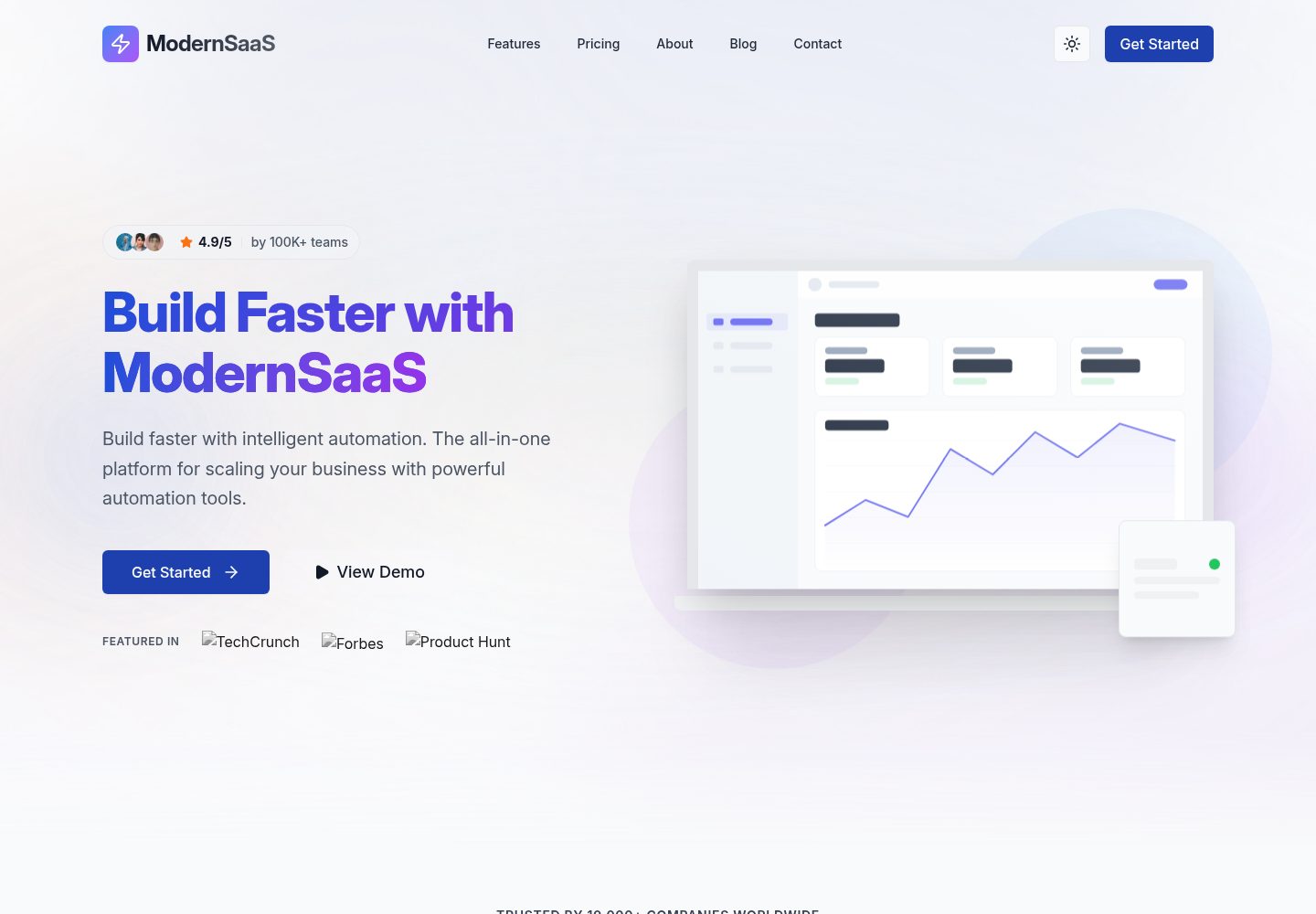
Astro 为主框架,React 负责可复用 UI 组件,Tailwind CSS 处理样式
AstroReactSaaS企业官网
ModernSaaS-LandingPage-Template — Astro SaaS模板
作者 MasuRii
基于 Astro 与 React 的 SaaS 创业公司落地页模板,含明暗模式、内容数据文件与 GitHub Pages 部署工作流。
看看你的网站会是什么样
浏览真实页面截图,比较内容排版与手机效果。点击下方缩略图切换,放大查看整页细节。
全部页面与视图 3
截图用于了解视觉与布局,交互效果请以实际项目为准。
采集于 2026-10-03查看来源
值得关注的模板亮点
从已有项目资料中,快速了解它的特点。
通过 src/data/ 下的数据文件集中管理功能、定价、评价、团队、FAQ 与导航内容
内置明暗模式,支持系统偏好检测与持久化切换
提供 GitHub Pages 的 GitHub Actions 自动部署工作流,也可部署到 Vercel
包含 Vitest 单元测试、Playwright 端到端测试、axe-core 无障碍测试与视觉回归测试脚本
采用 MIT 许可,允许免费使用、修改、商用与分发
模板详细介绍
这是一个面向 SaaS 创业公司的落地页模板,使用 Astro 作为主框架并搭配 React 组件,样式基于 Tailwind CSS,动画使用 Motion One,UI 基础组件来自 Radix UI,图标使用 Lucide React。仓库采用 MIT 许可,代码可免费使用、修改、商用和分发,但演示图片、字体、图标等第三方素材需单独核对许可。
页面内容通过 src/data/ 下的数据文件集中管理,包括 features.ts(功能列表、bento 网格、zigzag 区块)、pricing.ts(定价层级与功能对比)、testimonials.ts(客户评价)、team.ts(团队成员)、integrations.ts(集成伙伴)、faq.ts(常见问题)和 navigation.ts(页头页脚导航)。品牌信息、社交链接、联系方式、SEO 默认值和功能开关在 src/config/site.ts 中配置;主题色与字体在 src/styles/tokens.css 的 CSS 变量中调整。
模板支持明暗模式(含系统偏好检测与持久化切换)、响应式布局,并内置 JSON-LD 结构化数据、自动站点地图和 meta 标签。仓库附带 Vitest 单元测试、Playwright 端到端测试、axe-core 无障碍测试、Lighthouse 审计和视觉回归测试脚本。部署方面提供 GitHub Pages 的 GitHub Actions 工作流,也可部署到 Vercel,或执行构建后将 dist/ 目录部署到其他平台。
需要注意的限制:仓库星标数较少,版本号为 0.1.0,属于早期版本;README 中关于性能得分、测试数量等表述为作者自述,未在本次资料中独立验证。
AstroReactSaaS企业官网
适合你的项目吗?
适用场景
- 为 SaaS 产品搭建包含功能、定价、评价与 FAQ 模块的营销落地页
- 需要明暗模式与响应式布局的创业公司官网首页
- 希望用数据文件而非页面代码维护文案与列表内容的站点
- 计划通过 GitHub Pages 或 Vercel 发布静态站点的项目
适合人群
- SaaS 创业团队与独立开发者
- 熟悉 Astro、React 与 Tailwind CSS 的前端开发者
- 需要可自定义品牌色与内容结构的落地页项目
- 接受早期版本模板并愿意自行调整代码的使用者
上手与定制指南
结合仓库当前版本的说明,按下面的资料检查内容、配置与运行要求。
- 1
需要 Bun(推荐)或 Node.js 18+ 以及 Git
- 2
克隆仓库后执行 bun install 安装依赖,bun dev 启动本地开发服务器(默认 localhost:4321)
- 3
复制 .env.example 为 .env,按部署环境设置 SITE_URL、BASE_PATH、GITHUB_PAGES
- 4
品牌信息、社交链接与 SEO 默认值在 src/config/site.ts 修改,主题色与字体在 src/styles/tokens.css 调整
- 5
部署到 GitHub Pages 时需在仓库设置中将 Pages 来源设为 GitHub Actions
授权与来源资料
使用条件与限制
免费使用 · 保留许可声明本次收录的是公开仓库中采用 MIT 许可的免费版本;免费范围为该版本代码,不代表外部服务或第三方素材免费。
使用时需要遵守
- 允许免费使用、修改、商用和分发该版本代码。
- 分发代码副本或实质性部分时,保留原作者版权声明和完整 MIT 许可声明。
- 代码按现状提供;担保与责任限制以原许可证及适用法律为准。
额外费用与待核对事项
- 演示图片、字体、图标及其他第三方素材需按各自许可核对,不能仅凭代码的 MIT 许可判断。
- 域名、托管、数据库、支付或 AI 等外部服务可能另外收费。
查看原文依据
https://github.com/MasuRii/ModernSaaS-LandingPage-Template/blob/main/LICENSEhttps://github.com/MasuRii/ModernSaaS-LandingPage-Template/blob/main/README.mdPermission is hereby granted, free of charge
许可证原文
DeepSeek 根据仓库许可证和 README 整理 ·2026-10-03。结果仅覆盖已读取资料,依赖、图片、字体及后续条款变更以各自原文为准。
项目核对记录与介绍依据
模板资料
- 来源平台
- GitHub
- 资料与维护参考分
- 资料较完整 · 88 / 100
- 技术栈
- Astro · React
- 网站类型
- SaaS · 企业官网
这个分数如何计算
本站按许可资料(最高30分)、演示链接(12分)、预览图(10分)、Star数(15分)、记录的维护时间(15分)、描述完整度(8分)、功能记录(5分)和分类资料(5分)计算。它不是代码、安全或性能测试,也不是 Google 评分;有链接不代表已实测可用。
这个项目需要核对什么
- 记录的仓库更新时间
- 2026-02-14
- 截图检查日期
- 2026-10-03
已收录演示链接。请用你的内容与屏幕尺寸检查;有演示不代表表单、认证或支付已经可用。
目录记录的主要技术栈是 Astro。请通过依赖清单和锁文件核对实际版本与托管要求。这些说明基于收录资料,不代表代码审计或部署实测。
查看具体选型方法 →介绍的制作与核对状态
介绍由 AI 辅助整理目录与仓库资料。仓库作者不等于这篇介绍的审核者。
已完成服务器许可规则与 AI 来源核对;未经过人工编辑审核。
查看当时使用的来源资料
SHA-256: 463892ad8134ed30edca658838e56219983dde7aebe38a13d97f4f582283ab5e
2026-10-03T08:32:37.422Z
来源文件 / 仓库<div align="center"> # ModernSaaS Landing Page Template     [](https://github.com/MasuRii/ModernSaaS-LandingPage-Template/actions) [](https://github.com/MasuRii/ModernSaaS-LandingPage-Template/actions/workflows/deploy.yml) [](package.json) [](LICENSE) [](CONTRIBUTING.md) **A production-ready, visually stunning SaaS startup landing page template featuring modern 2026 design trends, comprehensive light/dark mode support, Core Web Vitals optimization, and seamless GitHub Pages deployment.**  [🚀 Live Demo](https://masurii.github.io/ModernSaaS-LandingPage-Template/) | [Documentation](#documentation) | [Quick Start](#quick-start) </div> --- ## Features - **Blazing Fast** - Built with Astro 5 for near-zero JavaScript by default. Perfect Lighthouse scores. - **Modern Design** - 2026 design trends including glassmorphism, bento grids, and mesh gradients. - **Dark Mode** - First-class dark mode support with automatic system preference detection and persistent toggle. - **Fully Responsive** - Optimized for all devices from 320px mobile to ultra-wide desktops. - **SEO Optimized** - Built-in JSON-LD structured data, automatic sitemaps, and optimized meta tags. - **Production-Grade Testing** - 1,100+ unit tests and comprehensive E2E suite using Playwright. - **Atomic Components** - Highly reusable UI components built with React and Tailwind CSS v4. - **Fluid Animations** - Smooth, hardware-accelerated animations using Motion One with reduced motion support. - **Content Driven** - Easily customizable via centralized data files. ## Tech Stack | Category | Technology | | ----------------- | ----------------------------------------------------------------------- | | **Framework** | [Astro](https://astro.build) v5.17.2 | | **UI Library** | [React](https://react.dev) v19.2.4 | | **Styling** | [Tailwind CSS](https://tailwindcss.com) v4.1.18 | | **Animations** | [Motion One](https://motion.dev) v12.34.0 | | **UI Primitives** | [Radix UI](https://www.radix-ui.com) | | **Icons** | [Lucide React](https://lucide.dev) | | **Testing** | [Vitest](https://vitest.dev), [Playwright](https://playwright.dev) | | **Runtime** | [Bun](https://bun.sh) | | **Deployment** | [GitHub Pages](https://pages.github.com) / [Vercel](https://vercel.com) | ## Quick Start ### Prerequisites - [Bun](https://bun.sh) (recommended) or [Node.js](https://nodejs.org) 18+ - [Git](https://git-scm.com) ### Installation ```bash # Clone the repository git clone https://github.com/MasuRii/ModernSaaS-LandingPage-Template.git cd ModernSaaS-LandingPage-Template # Install dependencies bun install # or npm install # Start development server bun dev # or npm run dev ``` The site will be available at `http://localhost:4321` ## Commands All commands are run from the root of the project: | Command | Description | | ----------------------- | ------------------------------------------ | | `bun install` | Install dependencies | | `bun dev` | Start local dev server at `localhost:4321` | | `bun build` | Build production site to `./dist/` | | `bun preview` | Preview production build locally | | `bun run typecheck` | Run TypeScript type checking | | `bun run lint` | Run ESLint for code quality | | `bun run format` | Run Prettier for code formatting | | `bun run test` | Run unit tests with Vitest | | `bun run test:coverage` | Generate test coverage report | | `bun run test:e2e` | Run E2E tests with Playwright | | `bun run test:a11y` | Run accessibility tests with axe-core | | `bun run test:perf` | Run Lighthouse performance audit | | `bun run test:visual` | Run visual regression tests | ## Project Structure ``` ModernSaaS-LandingPage-Template/ ├── .github/workflows/ # CI/CD (GitHub Actions) ├── e2e/ # End-to-end tests (Playwright) │ ├── tests/ # E2E test files │ ├── snapshots/ # Visual regression baselines │ └── VISUAL_REGRESSION.md # Visual testing documentation ├── public/ # Static assets (images, fonts, robots.txt) ├── scripts/ # Utility scripts (image fetching, deployment) ├── src/ │ ├── assets/ # Project-specific assets │ ├── components/ # UI components (Atomic design) │ │ ├── layout/ # Layout components (Header, Footer) │ │ ├── sections/ # Page sections (Hero, Features, etc.) │ │ └── ui/ # Reusable UI components │ ├── config/ # Centralized configuration │ ├── content/ # Content collections (blog posts) │ ├── data/ # Content data files (JSON/TS) │ ├── hooks/ # Custom React hooks │ ├── layouts/ # Page layouts │ ├── lib/ # Utility libraries │ ├── pages/ # Astro pages and routing │ ├── styles/ # Global styles and CSS tokens │ ├── types/ # TypeScript definitions │ └── utils/ # Shared utility functions ├── tests/ # Unit and integration tests (Vitest) │ └── unit/ ├── CHANGELOG.md ├── CONTRIBUTING.md ├── CUSTOMIZATION.md └── package.json ``` ## Customization ### Content Edit the data files in `src/data/` to update the site content: - **`features.ts`** - Feature lists, bento grid content, zigzag sections - **`pricing.ts`** - Pricing tiers, billing cycles, feature comparisons - **`testimonials.ts`** - Customer quotes, avatars, ratings - **`team.ts`** - Team member profiles - **`integrations.ts`** - Integration partners and logos - **`faq.ts`** - Frequently asked questions - **`navigation.ts`** - Header and footer navigation ### Branding & Configuration Update `src/config/site.ts` to change: - **Company Name**: `company.name` - **Tagline**: `company.tagline` - **Social Links**: `social` object - **Contact Info**: `contact` object - **SEO Defaults**: `seo` object - **Feature Flags**: Enable/disable features (newsletter, search, darkMode) ### Styling The template uses **Tailwind CSS v4** with CSS variables in `src/styles/tokens.css`: - **Primary Color**: Update `--primitive-color-primary-*` scale - **Secondary Color**: Update `--primitive-color-secondary-*` scale - **Typography**: Update `--font-family-sans` and `--font-size-*` tokens ## Environment Variables | Variable | Description | Example | | -------------- | ---------------------------------------------------------- | ---------------------------------- | | `SITE_URL` | Production URL for sitemaps and canonical URLs | `https://my-saas.com` | | `BASE_PATH` | Subdirectory path (e.g., `/my-repo`) | `/ModernSaaS-LandingPage-Template` | | `GITHUB_PAGES` | Set to `true` for GitHub Pages subdirectory auto-detection | `true` | Copy `.env.example` to `.env` and update the values for your deployment. ## Deployment This project supports both **GitHub Pages** and **Vercel** deployment: ### GitHub Pages (Automatic) 1. Push your code to GitHub 2. Enable GitHub Pages in repository settings (Settings → Pages → Source: GitHub Actions) 3. The included workflow will automatically build and deploy on every push to `main` 4. Your site will be available at `https://<username>.github.io/<repo-name>/` ### Vercel 1. Push your code to GitHub 2. Import the repository in [Vercel](https://vercel.com) 3. Set environment variables in Vercel dashboard 4. Deploy! For other platforms, run `bun build` and deploy the `dist/` folder. ## Testing The template includes a comprehensive testing suite: ### Unit & Integration Tests ```bash # Run all unit tests bun run test # Generate coverage report bun run test:coverage ``` ### End-to-End Tests ```bash # Run all E2E tests bun run test:e2e # Run with UI mode bun run test:e2e:ui # Run production smoke tests bun run test:e2e:prod ``` ### Accessibility & SEO ```bash # Run accessibility audit bun run test:a11y # Run Lighthouse audit bun run test:perf ``` ## Documentation - [Customization Guide](./CUSTOMIZATION.md) - Detailed customization instructions - [Contributing Guidelines](./CONTRIBUTING.md) - How to contribute to this project - [Changelog](./CHANGELOG.md) - Version history and changes - [Visual Regression Testing](./e2e/VISUAL_REGRESSION.md) - Visual testing documentation ## Contributing Contributions are welcome! Please read our [Contributing Guidelines](./CONTRIBUTING.md) before submitting a pull request. We follow: - [Conventional Commits](https://www.conventionalcommits.org/) for commit messages - ESLint and Prettier for code style - Git Flow branching strategy --- <div align="center"> **Built with love by [MasuRii](https://github.com/MasuRii)** If you found this helpful, please consider giving it a star! [](https://github.com/MasuRii/ModernSaaS-LandingPage-Template) </div>
看看同类模板
对比同技术栈与用途的模板,找到更适合的视觉与内容结构。

astrowind
⭕️ AstroWind: A free template using Astro v7 and Tailwind CSS v4. Astro starter theme.
Astro · 博客

astro-landing-page
An Astro + Tailwind CSS Example/Template for Landing Pages
Astro · 企业官网

Tailcast
Dark-themed website template built on Astro and Tailwind CSS
Astro · 企业官网

Positivus
A stunning and versatile Astro theme designed for digital marketing agencies.
Astro · 企业官网

qwind
⭕️ Qwind: A template to make your website using Qwik + Tailwind CSS.
Astro · 工具站

agency-landing-page-Astrojs
A simple agency landing page made with astrojs and tailwindcss
Astro · 企业官网