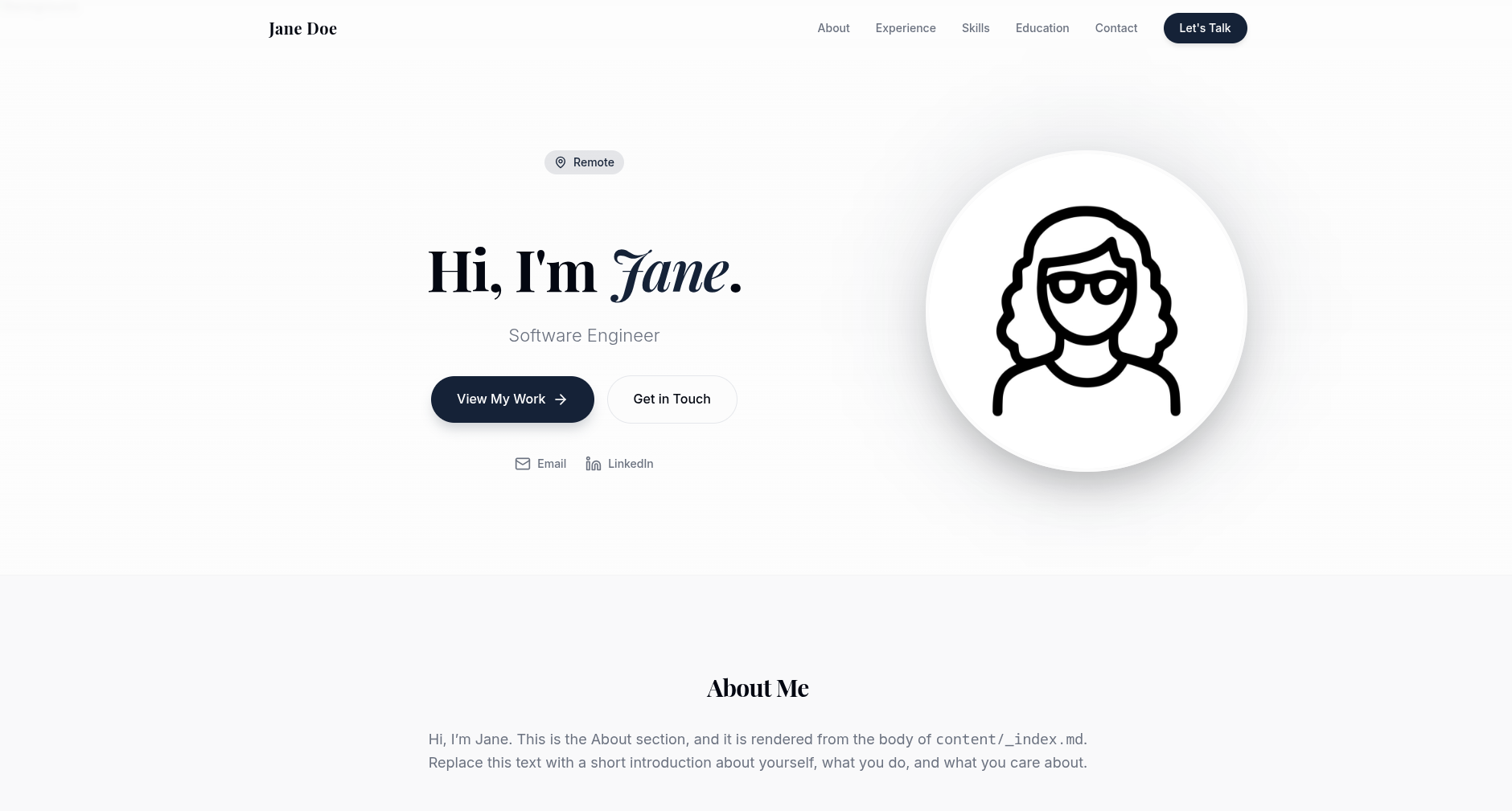
Single-page layout with smooth-scrolling navigation and a mobile menu
HugoPortfolioCorporate Website
hugo-theme-kiyomi-portfolio — Hugo Portfolio Template
By mathscantor
A Hugo-based single-page portfolio theme that uses YAML data files to drive sections such as experience timeline, skills, presentations, education/certifications, and awards, suitable for quickly building a personal career homepage.
Explore the design
Compare the page layouts and mobile experience. Open any screenshot for a closer look.
Author preview
Author-provided preview
Preview provided in the project README.
One original preview is available. Open the full image to inspect the design.
Screenshots show visual appearance; interactive behavior may differ.
Recorded 2026-10-01View source
What stands out
A quick read of the recorded project description.
Experience timeline supports optional project and media coverage entries
Skill tags can be clicked to expand explanations, and language proficiency is shown with progress bars
Presentations section supports image or video media
Education, certifications, and awards are presented as separate columns or cards
Sections are automatically hidden when their data is missing
Template Details
kiyomi-portfolio is a single-page Hugo portfolio theme released under the MIT license. Page content is driven by YAML files in the data/ directory and site parameters, allowing you to organize sections such as personal introduction, experience timeline, skills, presentations, education/certifications, and awards without modifying templates. The theme requires the Hugo extended version and declares a minimum version of 0.128.0.
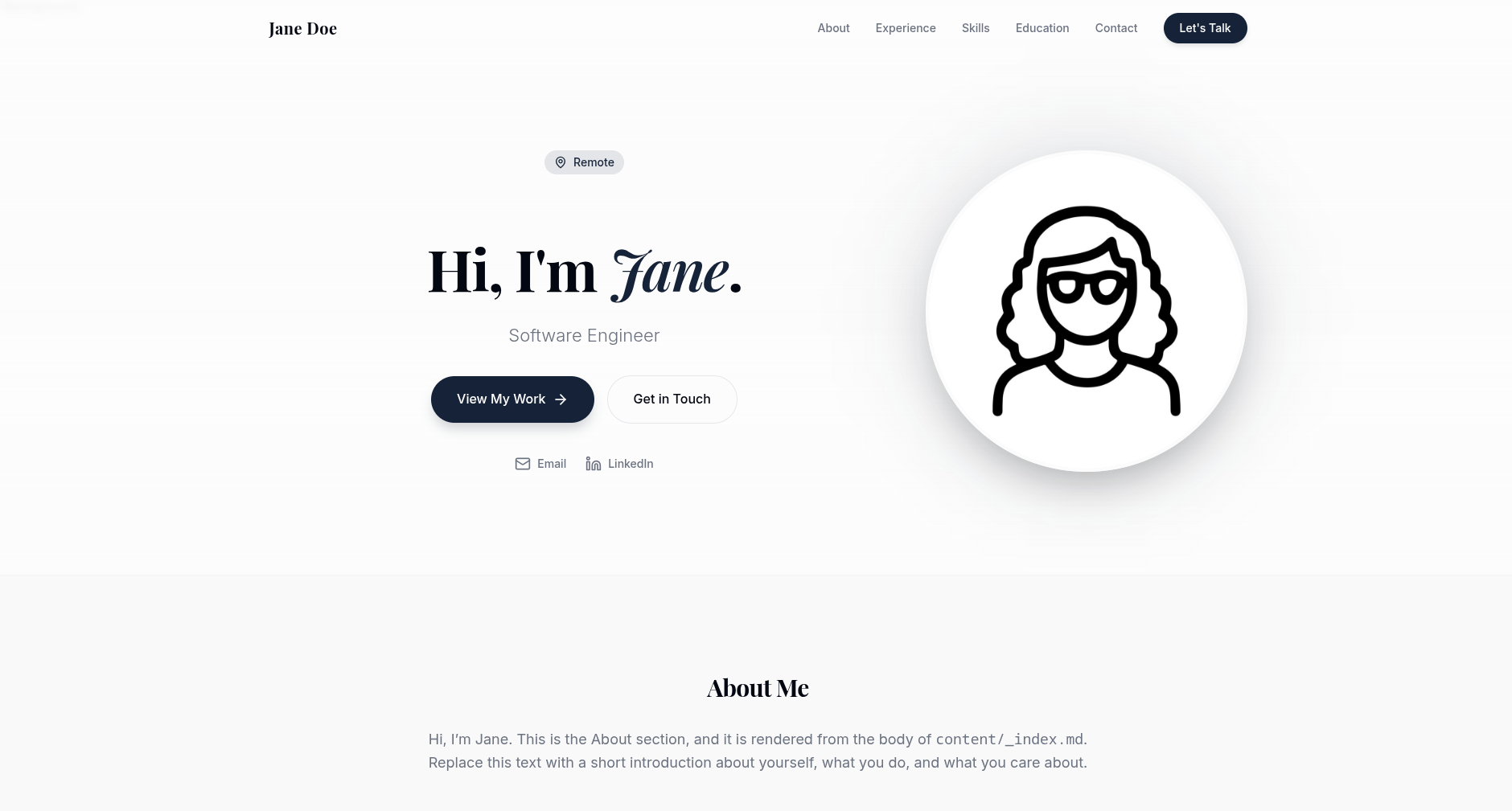
The layout is single-page, with smooth-scrolling navigation and a mobile menu, plus scroll-reveal animations. The hero section displays an avatar, tagline, location, and quick contact links; the experience section is presented as a timeline and can include optional projects and media coverage; skills are shown as clickable tags with explanations, and language proficiency is represented by progress bars; the presentations section supports images or videos; education, certifications, and awards are each presented as columns or cards. Each section is automatically hidden when its corresponding data is missing or empty.
The theme does not include a top-level data/ directory, so the site's own data/ files are always the sole data source and will not be overridden by theme default data. The exampleSite provides a complete example site and includes a scripts/init-data.sh script that copies the example data and content/_index.md into the site without overwriting existing files. Assets such as the avatar, hero background, favicon, Open Graph image, resume, and presentation media need to be placed in the static/ directory yourself. Colors, fonts, border radius, and spacing are adjusted via CSS custom properties at the top of assets/css/main.css, and animation styles are located in assets/css/animations.css.
HugoPortfolioCorporate website
Is it right for your project?
Use Cases
- Building a personal career homepage to centrally showcase work experience, skills, and educational background
- Organizing presentations, projects, and award records for developers or researchers
- Serving as a template basis for team member profile pages on a corporate website
Suitable For
- Users familiar with Hugo who want to maintain a personal homepage using YAML data
- Individuals who need a single-page portfolio and do not plan to write templates
- Developers who want to freely modify and distribute the theme under the MIT license
Getting started & customization
Use these recorded setup notes alongside the repository instructions for your chosen version.
- 1
Requires the Hugo extended version, with version no lower than 0.128.0
- 2
Install via Git submodule or Hugo Modules, and set theme = 'kiyomi-portfolio' in hugo.toml
- 3
Run scripts/init-data.sh or manually copy data/ and content/_index.md from exampleSite; the copy method does not overwrite existing files
- 4
Configure name, tagline, email, LinkedIn, avatar, background image, favicon, Open Graph image, and resume path in [params] in hugo.toml
- 5
Place assets such as avatar, background image, favicon, Open Graph image, resume, and presentation media into the static/ directory
License & source material
Usage conditions & limitations
Free to use · keep license noticeThis entry covers the free version under the MIT license in the public repository; the free scope applies to that version's code and does not imply that external services or third-party assets are free.
Must comply with when using
- You may freely use, modify, use commercially, and distribute the code of this version.
- When distributing copies or substantial portions of the code, retain the original author's copyright notice and the full MIT license notice.
- The code is provided as is; warranties and limitations of liability are governed by the original license and applicable law.
Additional costs & items to verify
- Demo images, fonts, icons, and other third-party assets must be checked against their respective licenses and cannot be judged solely by the code's MIT license.
- External services such as domains, hosting, databases, payments, or AI may incur additional charges.
View Original Text Basis
https://github.com/mathscantor/hugo-theme-kiyomi-portfolio/blob/main/LICENSEhttps://github.com/mathscantor/hugo-theme-kiyomi-portfolio/blob/main/README.mdPermission is hereby granted, free of charge
Original License Text
Compiled by DeepSeek based on repository license and README ·2026-10-01. Results only cover the materials read; dependencies, images, fonts, and subsequent term changes are subject to their respective original texts.
Project checks & description sources
Template Information
- Source platforms
- GitHub
- Documentation and maintenance reference score
- More documented · 76 / 100
- Technologies
- Hugo
- Website type
- Portfolio · Corporate Website
How this score is calculated
Our heuristic uses license records (up to 30), a demo link (12), a preview (10), stars (15), recorded maintenance (15), description completeness (8), feature records (5) and classification data (5). It is not a code, security or performance test, or a Google score. A link does not establish tested functionality.
What to verify for this project
- Repository update recorded
- 2026-05-31
- Screenshot last checked
- 2026-10-01
No demo link is recorded. Use the repository instructions to evaluate the project locally; the screenshot alone cannot establish interactive behavior.
The catalog identifies Hugo as the primary stack. Check the actual dependency manifest and lockfile for versions and hosting requirements. These notes use recorded metadata, not a code audit or a deployment test.
Use a selection guide →How this description was prepared
AI-assisted description based on catalog records and repository material. Repository authors are not automatically the reviewers of this description.
Automatically checked against source and license rules; no manual editorial review.
Inspect the recorded source material
SHA-256: 2aa405dac4144ce80f499f146119a9bb6f2a2267e1b5ef8d04232a98b542f702
2026-10-01T00:15:03.409Z
Source file / repository# kiyomi-portfolio
A single-page [Hugo](https://gohugo.io) portfolio theme with an animated hero,
experience timeline, clickable skills, presentations, education/certifications,
awards, and a floating contact button. Content is driven entirely by simple
YAML data files and site params, so you can build a polished personal site
without touching any templates.
- License: MIT
- Hugo: extended, `>= 0.128.0`
## Features
- Single-page layout with smooth-scroll navigation and a mobile menu
- Scroll-reveal animations and staggered transitions
- Hero with profile photo, tagline, location, and quick contact links
- Experience timeline with optional projects and media mentions
- Clickable skill pills with per-skill explanations + language proficiency bars
- Presentations grid supporting images or videos
- Education and certifications columns
- Awards & recognition cards
- Floating contact button (email / LinkedIn) and downloadable resume link
- Every section auto-hides when its data is absent
## Requirements
- Hugo **extended** edition, version **0.128.0** or newer.
## Installation
### Option A: Git submodule
From the root of your Hugo site:
```bash
git submodule add https://github.com/mathscantor/hugo-theme-kiyomi-portfolio.git themes/kiyomi-portfolio
```
Then set the theme in your `hugo.toml`:
```toml
theme = 'kiyomi-portfolio'
```
### Option B: Hugo Modules
Initialize modules (once) and import the theme:
```bash
hugo mod init github.com/you/your-site
```
```toml
# hugo.toml
[module]
[[module.imports]]
path = "github.com/mathscantor/hugo-theme-kiyomi-portfolio"
```
```bash
hugo mod get -u
```
## Quick start
1. Install the theme (above) and set `theme = 'kiyomi-portfolio'`.
2. Copy the starter data into your site (only fills in files you don't have):
```bash
bash themes/kiyomi-portfolio/scripts/init-data.sh
```
Or do it manually with a no-clobber copy:
```bash
cp -rn themes/kiyomi-portfolio/exampleSite/data/. data/
cp -n themes/kiyomi-portfolio/exampleSite/content/_index.md content/_index.md
```
3. Edit `hugo.toml` `[params]`, the files in `data/`, and `content/_index.md`.
4. Add your images under `static/` (see [Assets](#assets)).
5. Run the dev server:
```bash
hugo server
```
You can also preview the bundled demo directly from the theme:
```bash
cd themes/kiyomi-portfolio/exampleSite
hugo server --themesDir ../..
```
## Configuration (site params)
Set these under `[params]` in your `hugo.toml`:
| Param | Purpose | Example |
| ---------------- | ----------------------------------------- | ---------------------------------------------- |
| `firstName` | First name (hero, nav, footer) | `"Jane"` |
| `lastName` | Last name (nav, footer, resume filename) | `"Doe"` |
| `tagline` | Short role/tagline under the hero name | `"Software Engineer"` |
| `email` | Contact email (hero, contact, FAB) | `"[email protected]"` |
| `linkedin` | LinkedIn profile URL | `"https://www.linkedin.com/in/example/"` |
| `location` | Location label in the hero | `"Remote"` |
| `profileImage` | Hero profile photo path | `"/images/profile.png"` |
| `heroBackground` | Hero background image path | `"/images/hero-bg.png"` |
| `favicon` | Favicon path (SVG) | `"/favicon.svg"` |
| `ogImage` | Open Graph / Twitter share image | `"/opengraph.jpg"` |
| `resumeFile` | Downloadable resume path | `"/resume.pdf"` |
| `description` | Meta description + social card text | `"Jane Doe — Software Engineer"` |
The site `title` (top-level in `hugo.toml`) is used for the `<title>` tag and
social cards.
## About section content
The **About** section renders the body of `content/_index.md`. Add a `title`
in front matter and write your intro as Markdown:
```markdown
---
title: "Jane Doe — Software Engineer"
---
Hi, I'm Jane. Replace this with a short introduction about yourself.
```
## Data reference
All data files live in your site's `data/` directory. Each maps to a section;
if a file is missing or empty, that section is hidden.
### `data/experience.yaml`
A list of roles, newest first. `context`, `projects`, and `media_mentions` are
optional.
```yaml
- company: "Example Corp"
title: "Senior Software Engineer"
period: "Jan 2022 - Present"
context: "Optional one-line description of the company or team."
bullets:
- "A key responsibility or achievement."
- "Another concise bullet point."
projects: # optional
- title: "Sample Project"
desc: "What this project does."
tags: ["Go", "Distributed Systems"]
media_mentions: # optional
- publication: "Example News"
article_title: "How Example Corp shipped X"
excerpt: "A short quote or summary."
url: "https://example.com/article"
```
### `data/presentations.yaml`
A list of talks. `media_type` is `"image"` or `"video"`; `media_src` points to
a file under `static/`. `description` and `link` are optional.
```yaml
- title: "An Example Conference Talk"
event: "Sample Conference 2025"
date: "Oct 2025"
description: "A short summary of the talk."
tags: ["Topic A", "Topic B"]
media_type: "image" # or "video"
media_src: "/images/talk.png"
link: "https://example.com/slides" # optional
```
### `data/skills.yaml`
Skills grouped by category. Each skill exposes an `explanation` shown when the
pill is clicked.
```yaml
- category: "Technical"
items:
- name: "Go"
explanation: "Used to build backend services and CLI tools."
- name: "Python"
explanation: "Used for scripting and automation."
```
### `data/languages.yaml`
Spoken languages with a `level` label and a `percent` (0-100) for the bar.
```yaml
- name: "English"
level: "Native"
percent: 100
```
### `data/education.yaml`
Education history, newest first.
```yaml
- degree: "BSc in Computer Science"
school: "Example University"
year: "2019"
```
### `data/certifications.yaml`
Certifications grouped by year, newest first.
```yaml
- year: "2025"
items:
- "Example Professional Certification"
```
### `data/awards.yaml`
Awards & recognition cards. Each links to `link`. Remove or empty the file to
hide the Awards section.
```yaml
- title: "Example Award of Excellence"
source: "Sample Organization"
link: "https://example.com"
```
## Assets
The theme references several files via params and presentation `media_src`.
Place them under your site's `static/` directory:
| Asset | Default path (under `static/`) |
| ---------------- | ---------------------------------- |
| Profile photo | `images/profile.png` |
| Hero background | `images/hero-bg.png` |
| Favicon | `favicon.svg` |
| Open Graph image | `opengraph.jpg` |
| Resume | `resume.pdf` |
| Presentation art | `images/<your-file>.png` / `.mp4` |
These are intentionally not shipped with the theme; supply your own.
## Customization
Colors, fonts, radius, and spacing are defined as CSS custom properties at the
top of `assets/css/main.css` (`:root { --primary: ...; --font-display: ...; }`).
Override them in your own CSS, or fork the theme's stylesheet. Animations live
in `assets/css/animations.css`.
## How placeholder data works
Hugo never writes into your source tree during a build, so the theme cannot
"auto-create" files in your `data/` directory. The theme also intentionally
does **not** ship a top-level `data/` directory, so your project's `data/`
files are always authoritative: whatever you put in `data/` is exactly what
renders, and an empty or missing file simply hides that section (each section
is guarded in `layouts/index.html`).
To get started quickly, use the editable starter files instead:
- **Copy-if-missing starter (recommended).** `exampleSite/` contains a complete
working site. The `scripts/init-data.sh` helper (or the `cp -rn` one-liner
above) copies those data files and `content/_index.md` into your site **only
when they don't already exist**, so you get editable copies without ever
clobbering your own work. Re-running it is safe.
Because there are no theme-level data defaults, you never see Hugo's
"overridden by higher precedence data" warnings, and you stay in full control
of every section.
## License
MIT. See the [LICENSE](LICENSE) file for the full text.
Explore similar templates
Compare previews and descriptions within the same stack and category.

hugo-PaperMod
A fast, clean, responsive Hugo theme for blogs and lightweight portfolios, with three layout modes (Regular, Home-Info, Profile), automatic and manual light/dark themes, Fuse.js client-side search, multilingual support, and built-in Open Graph, Twitter Cards, and Schema.org data.
Hugo · Portfolio

Congo
Congo is a minimal Hugo content theme built on Tailwind CSS 3.0, designed for blogs, portfolios, and lightweight content sites. It offers multiple homepage layouts, customizable dark mode, multilingual support including RTL, and built-in client-side search, Mermaid, Chart.js, and KaTeX.
Hugo · Blog
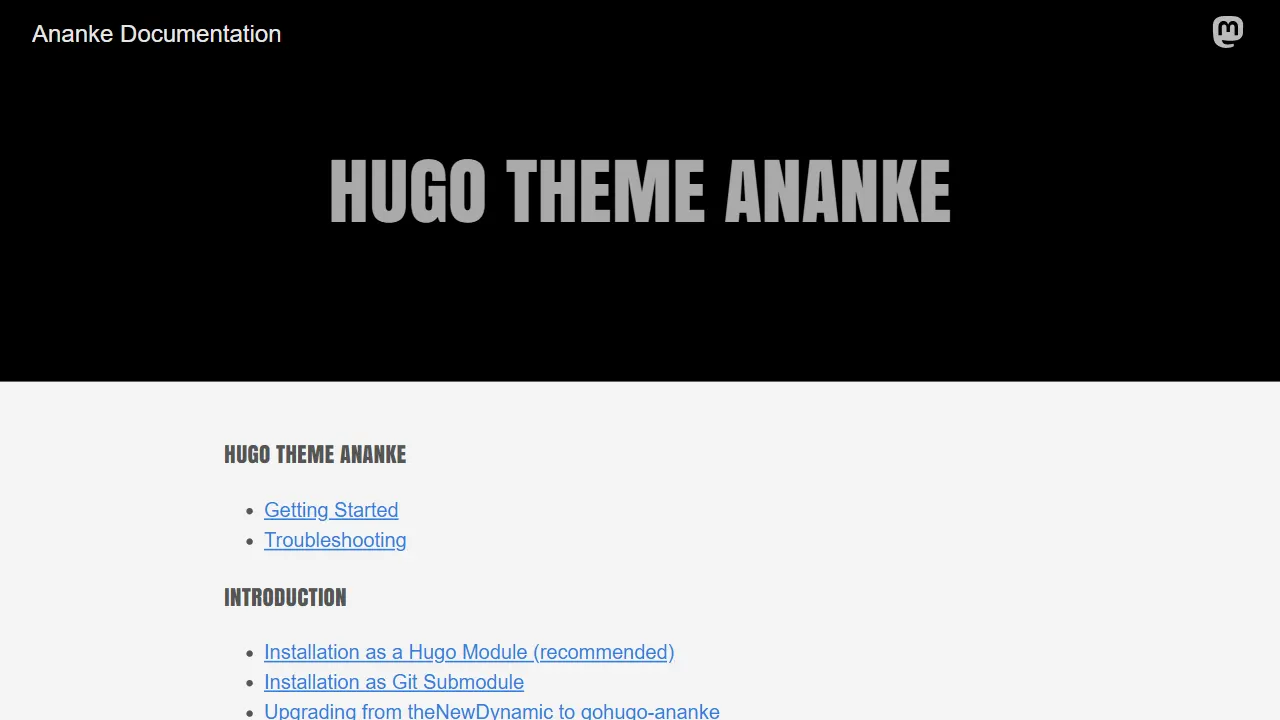
Ananke
Ananke is a classic general-purpose Hugo theme positioned as a flexible, production-ready starter for blogs, organizational homepages, and content-focused websites.
Hugo · Blog

toha
Toha is a Hugo theme for personal portfolios, featuring a minimalist, responsive design with configurable homepage sections such as about, experience timeline, and achievements gallery.
Hugo · Portfolio

hugo-profile
hugo-profile is a mobile-first Hugo theme for personal portfolios and blogs, with multilingual support, light/dark themes, categories and tags, Google Analytics, Disqus comments, and Formspree contact forms.
Hugo · Portfolio

hugo-theme-introduction
Introduction is a minimal Hugo theme that can be configured as a single-page site or a full site with multiple sections. Homepage sections are generated from Markdown files under content/home/, with weight sorting and optional images.
Hugo · Portfolio