单页布局,带平滑滚动导航与移动端菜单
Hugo作品集企业官网
hugo-theme-kiyomi-portfolio — Hugo 作品集模板
作者 mathscantor
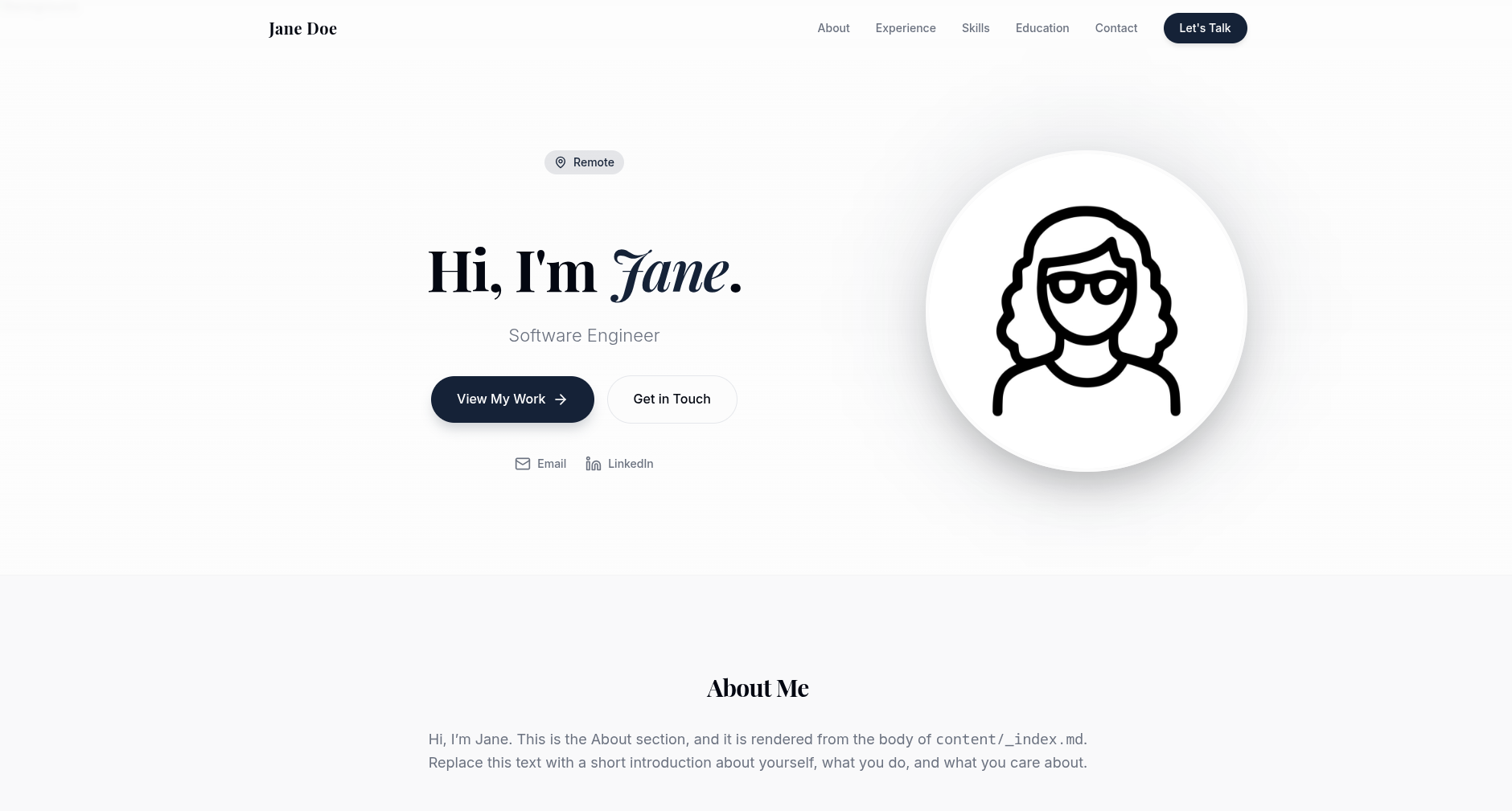
基于 Hugo 的单页作品集主题,用 YAML 数据文件驱动经历时间线、技能、演讲、教育认证与奖项等板块,适合快速搭建个人职业主页。
看看你的网站会是什么样
浏览真实页面截图,比较内容排版与手机效果。点击下方缩略图切换,放大查看整页细节。
目前有 1 张原始预览,可打开完整图片查看设计细节。
截图用于了解视觉与布局,交互效果请以实际项目为准。
采集于 2026-10-01查看来源
值得关注的模板亮点
从已有项目资料中,快速了解它的特点。
经历时间线支持可选的项目与媒体报道条目
技能标签可点击展开说明,语言能力以进度条展示
演讲板块支持图片或视频媒体
教育、认证与奖项分别以列或卡片呈现
数据缺失时对应板块自动隐藏
模板详细介绍
kiyomi-portfolio 是一个 Hugo 单页作品集主题,采用 MIT 许可。页面内容由 data/ 目录下的 YAML 文件和站点参数驱动,无需修改模板即可组织个人介绍、经历时间线、技能、演讲、教育/认证与奖项等板块。主题要求使用 Hugo extended 版本,并声明最低版本为 0.128.0。
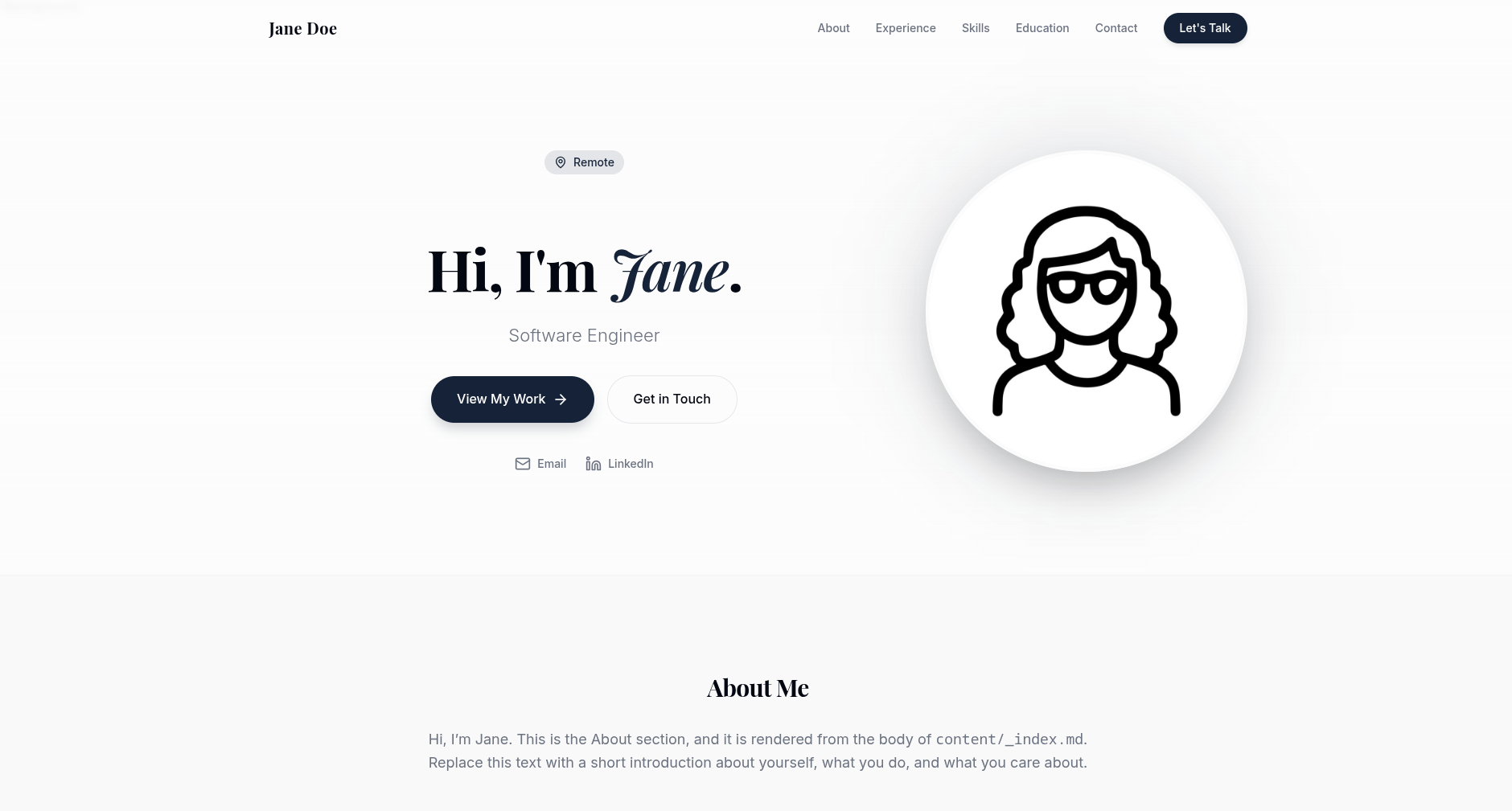
布局为单页形式,包含平滑滚动导航与移动端菜单,并带有滚动显现动画。Hero 区域展示头像、标语、所在地和快捷联系方式;经历部分以时间线呈现,可附加项目与媒体报道;技能以可点击的标签展示说明,语言能力用进度条表示;演讲板块支持图片或视频;教育、认证与奖项各自成列或卡片。每个板块在对应数据缺失或为空时自动隐藏。
主题不附带顶层 data/ 目录,因此站点自身的 data/ 文件始终是唯一数据来源,不会出现被主题默认数据覆盖的情况。exampleSite 提供完整示例站点,并附带 scripts/init-data.sh 脚本,可将示例数据与 content/_index.md 以不覆盖已有文件的方式复制到站点中。头像、Hero 背景、favicon、Open Graph 图片、简历及演讲媒体等资源需要自行放入 static/ 目录。颜色、字体、圆角与间距通过 assets/css/main.css 顶部的 CSS 自定义属性调整,动画样式位于 assets/css/animations.css。
Hugo作品集企业官网
适合你的项目吗?
适用场景
- 搭建个人职业主页,集中展示工作经历、技能与教育背景
- 为开发者或研究人员整理演讲、项目与获奖记录
- 作为企业官网中团队成员个人介绍页的模板基础
适合人群
- 熟悉 Hugo 并希望用 YAML 数据维护个人主页的用户
- 需要单页作品集且不打算编写模板的个人
- 希望以 MIT 许可自由修改和分发主题的开发者
上手与定制指南
结合仓库当前版本的说明,按下面的资料检查内容、配置与运行要求。
- 1
需要 Hugo extended 版本,且版本不低于 0.128.0
- 2
通过 Git submodule 或 Hugo Modules 安装,并在 hugo.toml 中设置 theme = 'kiyomi-portfolio'
- 3
运行 scripts/init-data.sh 或手动复制 exampleSite 中的 data/ 与 content/_index.md,复制方式不会覆盖已有文件
- 4
在 hugo.toml 的 [params] 中配置姓名、标语、邮箱、LinkedIn、头像、背景图、favicon、Open Graph 图片与简历路径
- 5
将头像、背景图、favicon、Open Graph 图片、简历及演讲媒体等资源放入 static/ 目录
授权与来源资料
使用条件与限制
免费使用 · 保留许可声明本次收录的是公开仓库中采用 MIT 许可的免费版本;免费范围为该版本代码,不代表外部服务或第三方素材免费。
使用时需要遵守
- 允许免费使用、修改、商用和分发该版本代码。
- 分发代码副本或实质性部分时,保留原作者版权声明和完整 MIT 许可声明。
- 代码按现状提供;担保与责任限制以原许可证及适用法律为准。
额外费用与待核对事项
- 演示图片、字体、图标及其他第三方素材需按各自许可核对,不能仅凭代码的 MIT 许可判断。
- 域名、托管、数据库、支付或 AI 等外部服务可能另外收费。
查看原文依据
https://github.com/mathscantor/hugo-theme-kiyomi-portfolio/blob/main/LICENSEhttps://github.com/mathscantor/hugo-theme-kiyomi-portfolio/blob/main/README.mdPermission is hereby granted, free of charge
许可证原文
DeepSeek 根据仓库许可证和 README 整理 ·2026-10-01。结果仅覆盖已读取资料,依赖、图片、字体及后续条款变更以各自原文为准。
项目核对记录与介绍依据
模板资料
- 来源平台
- GitHub
- 资料与维护参考分
- 资料较完整 · 76 / 100
- 技术栈
- Hugo
- 网站类型
- 作品集 · 企业官网
这个分数如何计算
本站按许可资料(最高30分)、演示链接(12分)、预览图(10分)、Star数(15分)、记录的维护时间(15分)、描述完整度(8分)、功能记录(5分)和分类资料(5分)计算。它不是代码、安全或性能测试,也不是 Google 评分;有链接不代表已实测可用。
这个项目需要核对什么
- 记录的仓库更新时间
- 2026-05-31
- 截图检查日期
- 2026-10-01
目前没有记录演示链接。请依据仓库说明在本地评估;仅凭截图无法确认交互行为。
目录记录的主要技术栈是 Hugo。请通过依赖清单和锁文件核对实际版本与托管要求。这些说明基于收录资料,不代表代码审计或部署实测。
查看具体选型方法 →介绍的制作与核对状态
介绍由 AI 辅助整理目录与仓库资料。仓库作者不等于这篇介绍的审核者。
已完成服务器许可规则与 AI 来源核对;未经过人工编辑审核。
查看当时使用的来源资料
SHA-256: 2aa405dac4144ce80f499f146119a9bb6f2a2267e1b5ef8d04232a98b542f702
2026-10-01T00:15:03.409Z
来源文件 / 仓库# kiyomi-portfolio
A single-page [Hugo](https://gohugo.io) portfolio theme with an animated hero,
experience timeline, clickable skills, presentations, education/certifications,
awards, and a floating contact button. Content is driven entirely by simple
YAML data files and site params, so you can build a polished personal site
without touching any templates.
- License: MIT
- Hugo: extended, `>= 0.128.0`
## Features
- Single-page layout with smooth-scroll navigation and a mobile menu
- Scroll-reveal animations and staggered transitions
- Hero with profile photo, tagline, location, and quick contact links
- Experience timeline with optional projects and media mentions
- Clickable skill pills with per-skill explanations + language proficiency bars
- Presentations grid supporting images or videos
- Education and certifications columns
- Awards & recognition cards
- Floating contact button (email / LinkedIn) and downloadable resume link
- Every section auto-hides when its data is absent
## Requirements
- Hugo **extended** edition, version **0.128.0** or newer.
## Installation
### Option A: Git submodule
From the root of your Hugo site:
```bash
git submodule add https://github.com/mathscantor/hugo-theme-kiyomi-portfolio.git themes/kiyomi-portfolio
```
Then set the theme in your `hugo.toml`:
```toml
theme = 'kiyomi-portfolio'
```
### Option B: Hugo Modules
Initialize modules (once) and import the theme:
```bash
hugo mod init github.com/you/your-site
```
```toml
# hugo.toml
[module]
[[module.imports]]
path = "github.com/mathscantor/hugo-theme-kiyomi-portfolio"
```
```bash
hugo mod get -u
```
## Quick start
1. Install the theme (above) and set `theme = 'kiyomi-portfolio'`.
2. Copy the starter data into your site (only fills in files you don't have):
```bash
bash themes/kiyomi-portfolio/scripts/init-data.sh
```
Or do it manually with a no-clobber copy:
```bash
cp -rn themes/kiyomi-portfolio/exampleSite/data/. data/
cp -n themes/kiyomi-portfolio/exampleSite/content/_index.md content/_index.md
```
3. Edit `hugo.toml` `[params]`, the files in `data/`, and `content/_index.md`.
4. Add your images under `static/` (see [Assets](#assets)).
5. Run the dev server:
```bash
hugo server
```
You can also preview the bundled demo directly from the theme:
```bash
cd themes/kiyomi-portfolio/exampleSite
hugo server --themesDir ../..
```
## Configuration (site params)
Set these under `[params]` in your `hugo.toml`:
| Param | Purpose | Example |
| ---------------- | ----------------------------------------- | ---------------------------------------------- |
| `firstName` | First name (hero, nav, footer) | `"Jane"` |
| `lastName` | Last name (nav, footer, resume filename) | `"Doe"` |
| `tagline` | Short role/tagline under the hero name | `"Software Engineer"` |
| `email` | Contact email (hero, contact, FAB) | `"[email protected]"` |
| `linkedin` | LinkedIn profile URL | `"https://www.linkedin.com/in/example/"` |
| `location` | Location label in the hero | `"Remote"` |
| `profileImage` | Hero profile photo path | `"/images/profile.png"` |
| `heroBackground` | Hero background image path | `"/images/hero-bg.png"` |
| `favicon` | Favicon path (SVG) | `"/favicon.svg"` |
| `ogImage` | Open Graph / Twitter share image | `"/opengraph.jpg"` |
| `resumeFile` | Downloadable resume path | `"/resume.pdf"` |
| `description` | Meta description + social card text | `"Jane Doe — Software Engineer"` |
The site `title` (top-level in `hugo.toml`) is used for the `<title>` tag and
social cards.
## About section content
The **About** section renders the body of `content/_index.md`. Add a `title`
in front matter and write your intro as Markdown:
```markdown
---
title: "Jane Doe — Software Engineer"
---
Hi, I'm Jane. Replace this with a short introduction about yourself.
```
## Data reference
All data files live in your site's `data/` directory. Each maps to a section;
if a file is missing or empty, that section is hidden.
### `data/experience.yaml`
A list of roles, newest first. `context`, `projects`, and `media_mentions` are
optional.
```yaml
- company: "Example Corp"
title: "Senior Software Engineer"
period: "Jan 2022 - Present"
context: "Optional one-line description of the company or team."
bullets:
- "A key responsibility or achievement."
- "Another concise bullet point."
projects: # optional
- title: "Sample Project"
desc: "What this project does."
tags: ["Go", "Distributed Systems"]
media_mentions: # optional
- publication: "Example News"
article_title: "How Example Corp shipped X"
excerpt: "A short quote or summary."
url: "https://example.com/article"
```
### `data/presentations.yaml`
A list of talks. `media_type` is `"image"` or `"video"`; `media_src` points to
a file under `static/`. `description` and `link` are optional.
```yaml
- title: "An Example Conference Talk"
event: "Sample Conference 2025"
date: "Oct 2025"
description: "A short summary of the talk."
tags: ["Topic A", "Topic B"]
media_type: "image" # or "video"
media_src: "/images/talk.png"
link: "https://example.com/slides" # optional
```
### `data/skills.yaml`
Skills grouped by category. Each skill exposes an `explanation` shown when the
pill is clicked.
```yaml
- category: "Technical"
items:
- name: "Go"
explanation: "Used to build backend services and CLI tools."
- name: "Python"
explanation: "Used for scripting and automation."
```
### `data/languages.yaml`
Spoken languages with a `level` label and a `percent` (0-100) for the bar.
```yaml
- name: "English"
level: "Native"
percent: 100
```
### `data/education.yaml`
Education history, newest first.
```yaml
- degree: "BSc in Computer Science"
school: "Example University"
year: "2019"
```
### `data/certifications.yaml`
Certifications grouped by year, newest first.
```yaml
- year: "2025"
items:
- "Example Professional Certification"
```
### `data/awards.yaml`
Awards & recognition cards. Each links to `link`. Remove or empty the file to
hide the Awards section.
```yaml
- title: "Example Award of Excellence"
source: "Sample Organization"
link: "https://example.com"
```
## Assets
The theme references several files via params and presentation `media_src`.
Place them under your site's `static/` directory:
| Asset | Default path (under `static/`) |
| ---------------- | ---------------------------------- |
| Profile photo | `images/profile.png` |
| Hero background | `images/hero-bg.png` |
| Favicon | `favicon.svg` |
| Open Graph image | `opengraph.jpg` |
| Resume | `resume.pdf` |
| Presentation art | `images/<your-file>.png` / `.mp4` |
These are intentionally not shipped with the theme; supply your own.
## Customization
Colors, fonts, radius, and spacing are defined as CSS custom properties at the
top of `assets/css/main.css` (`:root { --primary: ...; --font-display: ...; }`).
Override them in your own CSS, or fork the theme's stylesheet. Animations live
in `assets/css/animations.css`.
## How placeholder data works
Hugo never writes into your source tree during a build, so the theme cannot
"auto-create" files in your `data/` directory. The theme also intentionally
does **not** ship a top-level `data/` directory, so your project's `data/`
files are always authoritative: whatever you put in `data/` is exactly what
renders, and an empty or missing file simply hides that section (each section
is guarded in `layouts/index.html`).
To get started quickly, use the editable starter files instead:
- **Copy-if-missing starter (recommended).** `exampleSite/` contains a complete
working site. The `scripts/init-data.sh` helper (or the `cp -rn` one-liner
above) copies those data files and `content/_index.md` into your site **only
when they don't already exist**, so you get editable copies without ever
clobbering your own work. Re-running it is safe.
Because there are no theme-level data defaults, you never see Hugo's
"overridden by higher precedence data" warnings, and you stay in full control
of every section.
## License
MIT. See the [LICENSE](LICENSE) file for the full text.
看看同类模板
对比同技术栈与用途的模板,找到更适合的视觉与内容结构。

hugo-PaperMod
PaperMod 是 Hugo 生态里知名度较高的主题之一,定位很明确:给博客和轻量作品集站点提供一套干净、响应式的阅读界面。
Hugo · 作品集

Congo
Congo 是一款为 Hugo 设计的现代内容主题,核心定位是让内容本身成为页面焦点。 它基于 Tailwind CSS 3.0 构建,整体布局完全响应式,视觉风格干净且克制,没有多余装饰。
Hugo · 博客
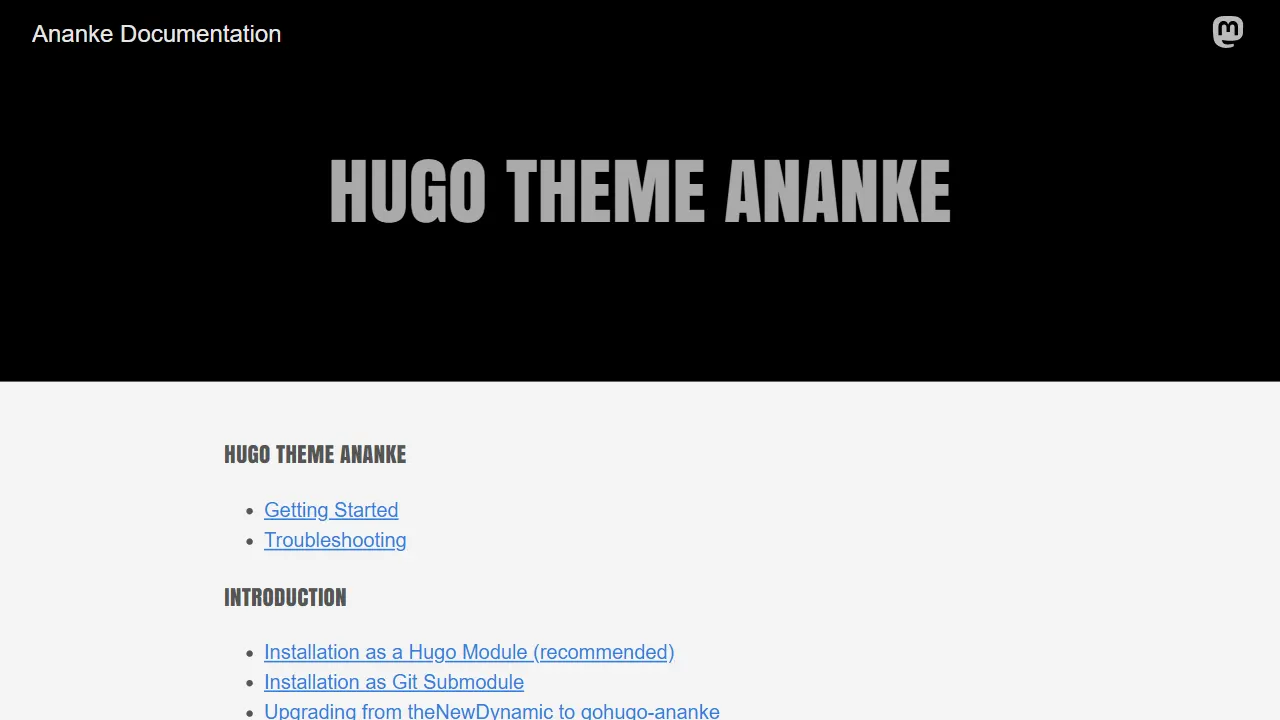
Ananke
Ananke 是 Hugo 社区中流传较广的通用主题,定位是灵活、生产可用的起始模板,强调可访问性、性能与可维护的默认配置。
Hugo · 博客

toha
Toha 是一款面向个人作品集场景的 Hugo 主题,以极简设计和响应式布局为核心,适合用来搭建个人主页、作品展示或技术博客。
Hugo · 作品集

hugo-profile
A highly customizable and mobile first Hugo template for personal portfolio and blog.
Hugo · 作品集

hugo-theme-introduction
Minimal, single page, smooth-scrolling theme for Hugo static site generator.
Hugo · 作品集