Only two files (index.html and photo.gif), editable immediately after download
HTMLStarter
plain-academic — HTML Starter Template
By mavroudisv
A minimalist static personal homepage template for academics, requiring only index.html and photo.gif to begin editing, publishable via GitHub Pages.
Explore the design
Compare the page layouts and mobile experience. Open any screenshot for a closer look.
Author preview
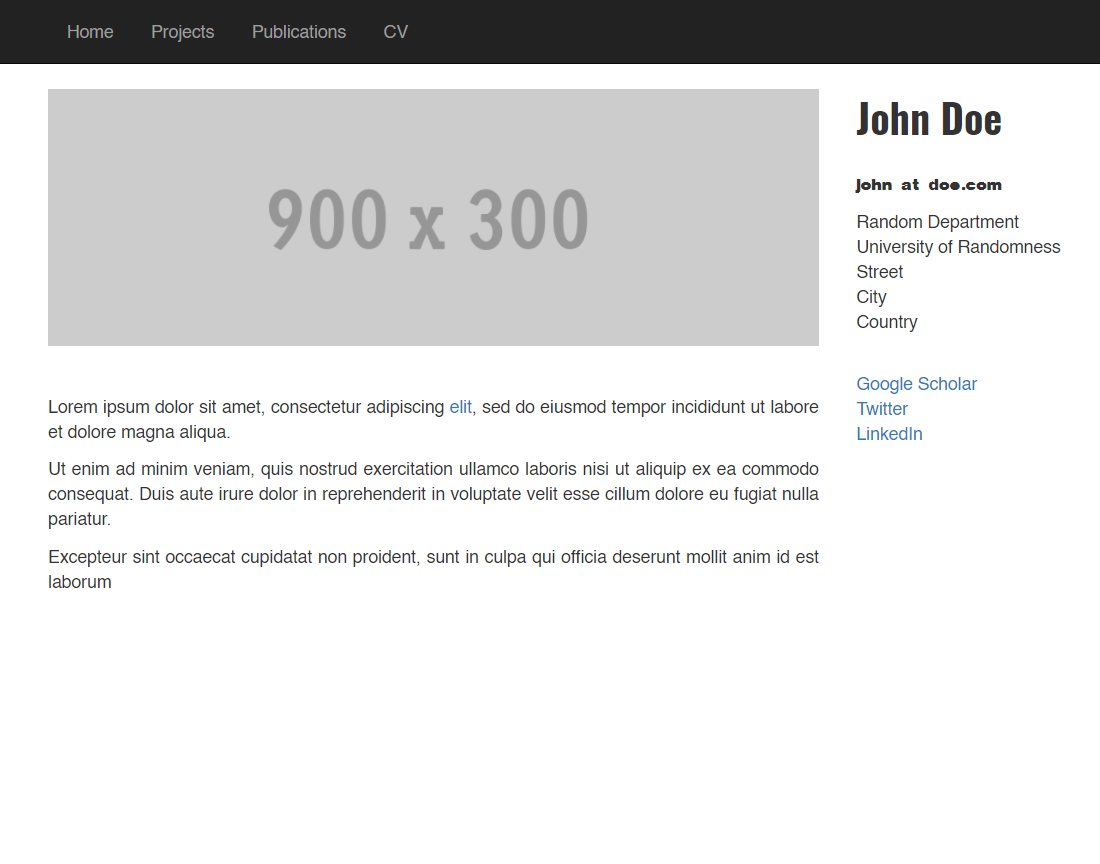
Author-provided previewTop of page
Preview provided in the project README.
One original preview is available. Open the full image to inspect the design.
Screenshots show visual appearance; interactive behavior may differ.
Recorded 2026-10-02View source
What stands out
A quick read of the recorded project description.
Pure HTML static page, no build tools or framework dependencies
README provides complete steps for forking, online editing, replacing the avatar, and enabling GitHub Pages
Supports direct modification on the GitHub web interface, or local cloning and editing with a text editor
Uses the BSD-2-Clause license, allowing free use, modification, commercial use, and redistribution
Template Details
Plain-Academic is a static personal homepage template for academics, with the author emphasizing simplicity in both styling and code complexity. The template contains only two files: index.html and photo.gif, which can be edited directly after download, with no build step or framework dependencies.
The usage path is primarily GitHub-based: first fork the repository, open index.html directly on GitHub and use the pencil icon to edit, replacing placeholder text with name, contact information, academic details, and links to papers, projects, and CV; then upload an image named photo.gif to replace the default avatar; finally, in the repository Settings under the Pages section, select the main branch as the source and save, after which the site is accessible at https://<username>.github.io/<repository-name>/. Alternatively, you can clone the repository locally, edit with a text editor such as VS Code, and git push back to GitHub.
The template's README lists several users' sites as references and requests that users retain the template attribution link so others can discover the template. The repository uses the BSD-2-Clause license, allowing free use, modification, commercial use, and redistribution, but third-party assets such as demo images, fonts, and icons must be checked separately under their respective licenses.
HTMLLauncher
Is it right for your project?
Use Cases
- Academics building a personal homepage to display name, contact information, and academic details
- Listing external links such as papers, projects, and CV in one place on the page
- Publishing a personal static site for free via GitHub Pages
- As a teaching or example resource demonstrating the structure of a minimal static personal homepage
Suitable For
- Academics who want to maintain a personal homepage with the fewest files
- People familiar with or willing to use GitHub for content editing and publishing
- Users who do not need a build process and prefer editing HTML directly
Getting started & customization
Use these recorded setup notes alongside the repository instructions for your chosen version.
- 1
After forking the repository, open index.html, click the pencil icon, and replace placeholder text with personal information and links
- 2
Upload your own avatar named photo.gif to replace the default image
- 3
In the repository Settings under the Pages section, select the main branch as the source and save; the site address is https://<username>.github.io/<repository-name>/
- 4
For local editing, first git clone, then after modifications commit back to GitHub via git add, git commit, and git push
- 5
Third-party assets such as demo images, fonts, and icons must be checked under their respective licenses and cannot be judged solely by the code's BSD-2-Clause license
License & source material
Usage conditions & limitations
Free to use · keep license noticeThis entry covers the free version in the public repository under the BSD-2-Clause license; the free scope applies to that version's code and does not mean external services or third-party assets are free.
Must comply with when using
- Free use, modification, commercial use, and distribution in source or binary form are permitted.
- Source distribution must retain the copyright notice, the two conditions, and the disclaimer; binary distribution must reproduce these in the documentation or accompanying materials.
- The code is provided as is; warranties and liability limitations are governed by the original license and applicable law.
Additional costs & items to verify
- The author requests that users not remove the template's attribution link so others can also discover the template. This is an attribution retention request; the original template's attribution link should be retained when publishing a site with this template.
- Demo images, fonts, icons, and other third-party assets must be checked under their respective licenses and cannot be judged solely by the code's BSD-2-Clause license.
- External services such as domains, hosting, databases, payments, or AI may incur separate charges.
View Original Text Basis
Redistribution and use in source and binary forms, with or without modification, are permitted
Original License Text
https://github.com/mavroudisv/plain-academic/blob/master/LICENSE.txthttps://github.com/mavroudisv/plain-academic/blob/master/README.mdPlease do not remove the attibution link of the template, so that other people can find it too.
Original README
Compiled by DeepSeek based on repository license and README ·2026-10-02. Results only cover the materials read; dependencies, images, fonts, and subsequent term changes are subject to their respective original texts.
Project checks & description sources
Template Information
- Source platforms
- GitHub
- Documentation and maintenance reference score
- Partly documented · 73 / 100
- Technologies
- HTML
- Website type
- Starter
How this score is calculated
Our heuristic uses license records (up to 30), a demo link (12), a preview (10), stars (15), recorded maintenance (15), description completeness (8), feature records (5) and classification data (5). It is not a code, security or performance test, or a Google score. A link does not establish tested functionality.
What to verify for this project
- Repository update recorded
- 2024-12-06
- Screenshot last checked
- 2026-10-02
No demo link is recorded. Use the repository instructions to evaluate the project locally; the screenshot alone cannot establish interactive behavior.
The catalog identifies HTML as the primary stack. Check the actual dependency manifest and lockfile for versions and hosting requirements. These notes use recorded metadata, not a code audit or a deployment test.
Use a selection guide →How this description was prepared
AI-assisted description based on catalog records and repository material. Repository authors are not automatically the reviewers of this description.
Automatically checked against source and license rules; no manual editorial review.
Inspect the recorded source material
SHA-256: e28a746f89a93d5836750f375eedcc2eaad40c77d502fc39b8f8b127648280a9
2026-10-02T08:42:01.172Z
Source file / repository# Plain-Academic Template
A truly simple website template for academics. It was developed with simplicity in mind (both in terms of style and in code complexity).
Just download the two files (index.html and photo.gif) and start editing straightaway.
<img src="/img/frontpage.png" width="60%" height="60%">
# How To
### Step 1: Fork the Repository
1. Open the **Plain-Academic Template** repository on GitHub.
2. Click the **Fork** button in the top-right corner to create your own copy.
### Step 2: Edit Directly on GitHub
1. Open the `index.html` file in your forked repository.
2. Click the pencil icon (✏️) to edit the file.
3. Replace the placeholder text with your own details:
- Update your name, contact information, and academic details.
- Add your own links to papers, projects, or CV.
### Step 3: Replace the Profile Picture
1. Upload your own profile picture:
- Click **Add file** → **Upload files** in your repository.
- Ensure your picture is named `photo.gif` (so it replaces the existing one).
### Step 4: Enable GitHub Pages
1. Go to your repository’s **Settings**.
2. Scroll down to the **Pages** section.
3. In the "Source" dropdown, select the `main` branch and click **Save**.
4. Your website will be live at `https://<your-username>.github.io/<repo-name>/`.
---
### Editing Locally (Optional)
If you prefer to work locally instead of editing directly on GitHub:
1. Clone your forked repository:
```bash
git clone https://github.com/<your-username>/<repo-name>.git
```
2. Open the files in a text editor like VS Code.
3. After making changes, push them back to GitHub:
```bash
git add .
git commit -m "Updated my website"
git push
```
# Contribute
If you have suggestions for improvements feel free to make a pull request or open an issue.
If you are using it, I'd be happy to hear from you! You can drop me a line at ([link](https://mavroud.is))!
You can get more ideas from other nice people using this template:
- [Jonathan Bootle](https://jbootle.github.io/)
- [Hossein Rezaei](https://www.cs.ucf.edu/~rezaei)
- [Gustavo Cevolani](http://www.gustavocevolani.it/)
- [Isabel Papadimitriou](https://nlp.stanford.edu/~isabelvp/)
- [Debjani Saha](https://www.cs.umd.edu/~dsaha/)
- [Dong Chen](https://dongchen-coder.github.io/)
- [Sourav Chatterjee](https://statweb.stanford.edu/~souravc/index.html)
- [Chenfanfu Jiang](https://www.seas.upenn.edu/~cffjiang/)
- [Masum Hasan](http://masumhasan.net/)
- [Tapajit Dey](https://tapjdey.github.io/)
- [Jakob Brounstein](https://jakobbrounstein.github.io/)
Please do not remove the attibution link of the template, so that other people can find it too.
Explore similar templates
Compare previews and descriptions within the same stack and category.

startbootstrap-simple-sidebar
A Bootstrap off-canvas sidebar navigation HTML starter template from Start Bootstrap. It provides directly editable HTML and CSS in the dist directory, while the source uses Pug, SCSS, and JavaScript with npm build scripts for live preview and compilation.
HTML · Starter

adminkit
AdminKit is a free, MIT-licensed HTML admin and dashboard template built on Bootstrap 5. The free version includes 15 demo pages, 1 plugin, and 1 color scheme, with hundreds of UI components, forms, tables, charts, and icons.
HTML · Admin dashboard

Landing-Page
A general-purpose landing page HTML template maintained by Tailwind Toolbox, written in pure HTML and loading the complete Tailwind CSS via CDN.
HTML · Corporate Website

light-bootstrap-dashboard
Light Bootstrap Dashboard is a free, MIT-licensed admin dashboard template from Creative Tim, built on Bootstrap with a responsive static HTML structure.
HTML · Admin dashboard

sing-app
Sing App Lite is a free, open-source admin dashboard template from Flatlogic, built with Bootstrap 4.5 and SCSS. It provides a responsive layout, dashboard examples, typography, tables, notifications, basic charts, icons, maps, and a hover sidebar, along with styled Bootstrap components.
HTML · Admin dashboard

startbootstrap-modern-business
Modern Business is a multipurpose Bootstrap full-site HTML template from Start Bootstrap with 17 standalone pages covering home, about, services, portfolio, pricing, blog, FAQ, and contact.
HTML · Starter