仅两个文件(index.html 与 photo.gif),下载后即可编辑
HTML启动器
plain-academic — HTML 启动器模板
作者 mavroudisv
面向学术人员的极简静态个人主页模板,仅需 index.html 与 photo.gif 两个文件即可开始编辑,可通过 GitHub Pages 发布。
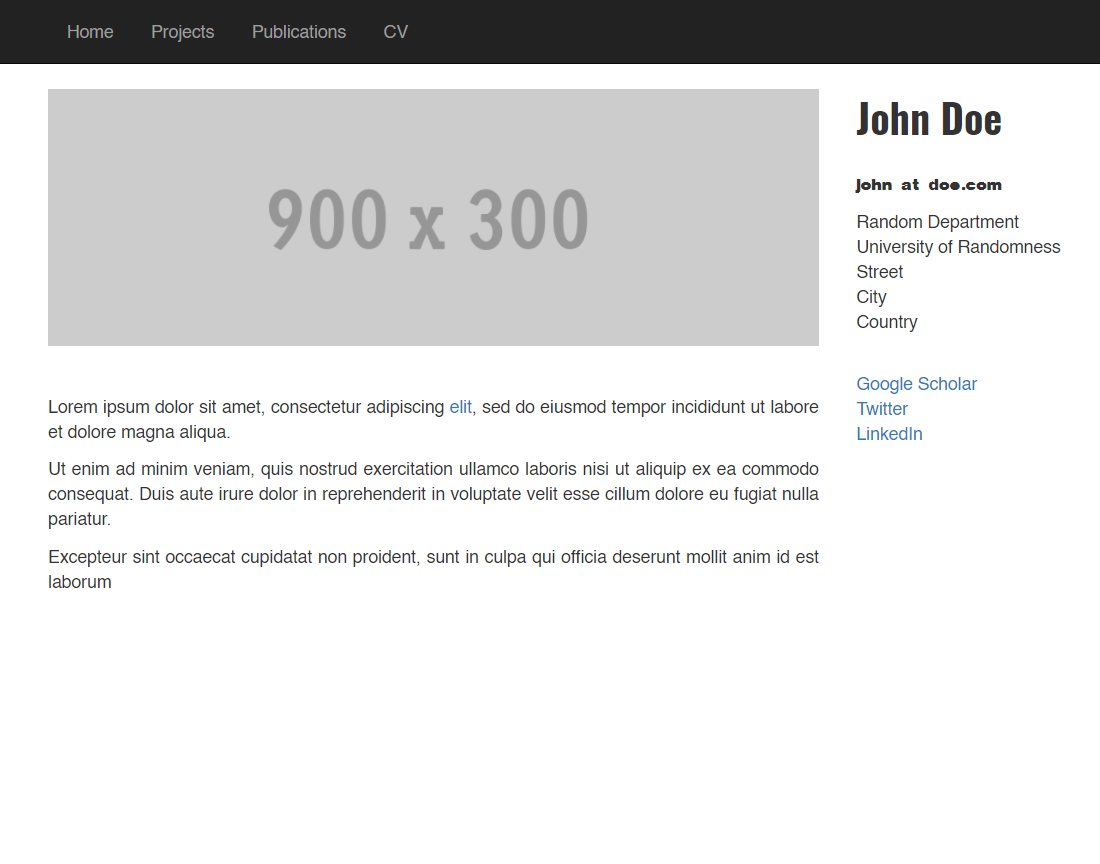
看看你的网站会是什么样
浏览真实页面截图,比较内容排版与手机效果。点击下方缩略图切换,放大查看整页细节。
目前有 1 张原始预览,可打开完整图片查看设计细节。
截图用于了解视觉与布局,交互效果请以实际项目为准。
采集于 2026-10-02查看来源
值得关注的模板亮点
从已有项目资料中,快速了解它的特点。
纯 HTML 静态页面,无需构建工具或框架依赖
README 给出 Fork、在线编辑、替换头像、开启 GitHub Pages 的完整步骤
支持在 GitHub 网页端直接修改,也可本地克隆后用文本编辑器编辑
采用 BSD-2-Clause 许可,允许免费使用、修改、商用与再分发
模板详细介绍
Plain-Academic 是一个面向学术人员的静态个人主页模板,作者强调其在样式与代码复杂度上都保持简单。模板只包含两个文件:index.html 和 photo.gif,下载后即可直接编辑,无需构建步骤或框架依赖。
使用路径以 GitHub 为主:先 Fork 仓库,在 GitHub 上直接打开 index.html 用铅笔图标编辑,把占位文本替换为姓名、联系方式、学术信息以及论文、项目、CV 链接;再上传一张命名为 photo.gif 的图片替换默认头像;最后在仓库 Settings 的 Pages 区域选择 main 分支作为来源并保存,站点即可通过 https://<用户名>.github.io/<仓库名>/ 访问。也可以选择在本地克隆仓库,用 VS Code 等文本编辑器修改后 git push 回 GitHub。
模板在 README 中列出了多位使用者的站点作为参考,并请求使用者保留模板署名链接,以便其他人发现该模板。仓库采用 BSD-2-Clause 许可,允许免费使用、修改、商用及再分发,但演示图片、字体、图标等第三方素材需按各自许可单独核对。
HTML启动器
适合你的项目吗?
适用场景
- 学术人员搭建个人主页,展示姓名、联系方式与学术信息
- 在页面上集中列出论文、项目与 CV 等外部链接
- 通过 GitHub Pages 免费发布个人静态站点
- 作为教学或示例,演示最小化静态个人主页的结构
适合人群
- 希望用最少文件维护个人主页的学术人员
- 熟悉或愿意使用 GitHub 进行内容编辑与发布的人
- 不需要构建流程、偏好直接编辑 HTML 的使用者
上手与定制指南
结合仓库当前版本的说明,按下面的资料检查内容、配置与运行要求。
- 1
Fork 仓库后打开 index.html,点击铅笔图标替换占位文本为个人信息与链接
- 2
上传自己的头像并命名为 photo.gif,以替换默认图片
- 3
在仓库 Settings 的 Pages 区域选择 main 分支作为来源并保存,站点地址为 https://<用户名>.github.io/<仓库名>/
- 4
本地编辑需先 git clone,修改后通过 git add、git commit、git push 提交回 GitHub
- 5
演示图片、字体、图标等第三方素材需按各自许可核对,不能仅凭代码的 BSD-2-Clause 许可判断
授权与来源资料
使用条件与限制
免费使用 · 保留许可声明本次收录的是公开仓库中采用 BSD-2-Clause 许可的免费版本;免费范围为该版本代码,不代表外部服务或第三方素材免费。
使用时需要遵守
- 允许免费使用、修改、商用以及源代码或二进制形式的分发。
- 源代码分发需保留版权声明、两项条件和免责声明;二进制分发需在文档或随附材料中重现这些内容。
- 代码按现状提供;担保与责任限制以原许可证及适用法律为准。
额外费用与待核对事项
- 作者请求使用者不要移除模板的署名链接,以便其他人也能发现该模板。这是一项署名保留请求,使用该模板发布站点时应保留原模板的归属链接。
- 演示图片、字体、图标及其他第三方素材需按各自许可核对,不能仅凭代码的 BSD-2-Clause 许可判断。
- 域名、托管、数据库、支付或 AI 等外部服务可能另外收费。
查看原文依据
Redistribution and use in source and binary forms, with or without modification, are permitted
许可证原文
https://github.com/mavroudisv/plain-academic/blob/master/LICENSE.txthttps://github.com/mavroudisv/plain-academic/blob/master/README.mdPlease do not remove the attibution link of the template, so that other people can find it too.
README 原文
DeepSeek 根据仓库许可证和 README 整理 ·2026-10-02。结果仅覆盖已读取资料,依赖、图片、字体及后续条款变更以各自原文为准。
项目核对记录与介绍依据
模板资料
- 来源平台
- GitHub
- 资料与维护参考分
- 资料一般 · 73 / 100
- 技术栈
- HTML
- 网站类型
- 启动器
这个分数如何计算
本站按许可资料(最高30分)、演示链接(12分)、预览图(10分)、Star数(15分)、记录的维护时间(15分)、描述完整度(8分)、功能记录(5分)和分类资料(5分)计算。它不是代码、安全或性能测试,也不是 Google 评分;有链接不代表已实测可用。
这个项目需要核对什么
- 记录的仓库更新时间
- 2024-12-06
- 截图检查日期
- 2026-10-02
目前没有记录演示链接。请依据仓库说明在本地评估;仅凭截图无法确认交互行为。
目录记录的主要技术栈是 HTML。请通过依赖清单和锁文件核对实际版本与托管要求。这些说明基于收录资料,不代表代码审计或部署实测。
查看具体选型方法 →介绍的制作与核对状态
介绍由 AI 辅助整理目录与仓库资料。仓库作者不等于这篇介绍的审核者。
已完成服务器许可规则与 AI 来源核对;未经过人工编辑审核。
查看当时使用的来源资料
SHA-256: e28a746f89a93d5836750f375eedcc2eaad40c77d502fc39b8f8b127648280a9
2026-10-02T08:42:01.172Z
来源文件 / 仓库# Plain-Academic Template
A truly simple website template for academics. It was developed with simplicity in mind (both in terms of style and in code complexity).
Just download the two files (index.html and photo.gif) and start editing straightaway.
<img src="/img/frontpage.png" width="60%" height="60%">
# How To
### Step 1: Fork the Repository
1. Open the **Plain-Academic Template** repository on GitHub.
2. Click the **Fork** button in the top-right corner to create your own copy.
### Step 2: Edit Directly on GitHub
1. Open the `index.html` file in your forked repository.
2. Click the pencil icon (✏️) to edit the file.
3. Replace the placeholder text with your own details:
- Update your name, contact information, and academic details.
- Add your own links to papers, projects, or CV.
### Step 3: Replace the Profile Picture
1. Upload your own profile picture:
- Click **Add file** → **Upload files** in your repository.
- Ensure your picture is named `photo.gif` (so it replaces the existing one).
### Step 4: Enable GitHub Pages
1. Go to your repository’s **Settings**.
2. Scroll down to the **Pages** section.
3. In the "Source" dropdown, select the `main` branch and click **Save**.
4. Your website will be live at `https://<your-username>.github.io/<repo-name>/`.
---
### Editing Locally (Optional)
If you prefer to work locally instead of editing directly on GitHub:
1. Clone your forked repository:
```bash
git clone https://github.com/<your-username>/<repo-name>.git
```
2. Open the files in a text editor like VS Code.
3. After making changes, push them back to GitHub:
```bash
git add .
git commit -m "Updated my website"
git push
```
# Contribute
If you have suggestions for improvements feel free to make a pull request or open an issue.
If you are using it, I'd be happy to hear from you! You can drop me a line at ([link](https://mavroud.is))!
You can get more ideas from other nice people using this template:
- [Jonathan Bootle](https://jbootle.github.io/)
- [Hossein Rezaei](https://www.cs.ucf.edu/~rezaei)
- [Gustavo Cevolani](http://www.gustavocevolani.it/)
- [Isabel Papadimitriou](https://nlp.stanford.edu/~isabelvp/)
- [Debjani Saha](https://www.cs.umd.edu/~dsaha/)
- [Dong Chen](https://dongchen-coder.github.io/)
- [Sourav Chatterjee](https://statweb.stanford.edu/~souravc/index.html)
- [Chenfanfu Jiang](https://www.seas.upenn.edu/~cffjiang/)
- [Masum Hasan](http://masumhasan.net/)
- [Tapajit Dey](https://tapjdey.github.io/)
- [Jakob Brounstein](https://jakobbrounstein.github.io/)
Please do not remove the attibution link of the template, so that other people can find it too.
看看同类模板
对比同技术栈与用途的模板,找到更适合的视觉与内容结构。

startbootstrap-simple-sidebar
An off canvas sidebar navigation Bootstrap HTML template created by Start Bootstrap
HTML · 启动器

adminkit
AdminKit is a free & open-source HTML dashboard & admin template based on Bootstrap 5
HTML · 后台

Landing-Page
Tailwind CSS Starter Template - Landing Page
HTML · 企业官网

light-bootstrap-dashboard
Light Bootstrap Dashboard is an admin dashboard template designed to be beautiful and simple.
HTML · 后台

sing-app
💥Free and open-source admin dashboard template built with Bootstrap 4.5 💥
HTML · 后台

startbootstrap-modern-business
A multipurpose Bootstrap full website template created by Start Bootstrap
HTML · 启动器