Laravel and MoonShine-based admin panel starter template with preconfigured MoonShine basics
LaravelAdmin dashboardStarter
orion — Laravel Admin dashboard Template
By maycolmunoz
Orion is a Laravel and MoonShine-based admin panel starter template with a prebuilt RBAC permission system and installation commands, intended to speed up admin backend development.
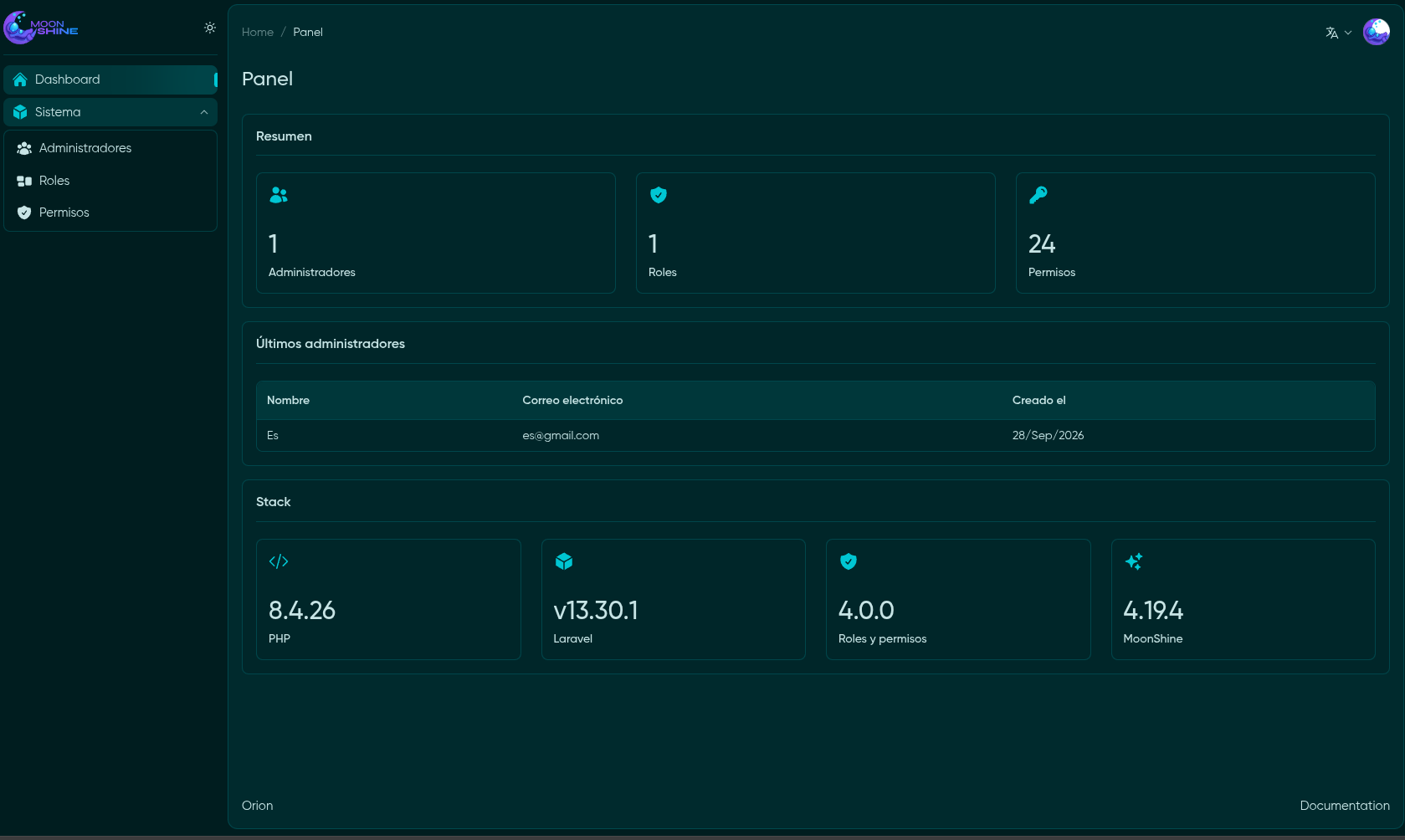
Explore the design
Compare the page layouts and mobile experience. Open any screenshot for a closer look.
Author preview
Author-provided preview
Preview provided in the project README.
One original preview is available. Open the full image to inspect the design.
Screenshots show visual appearance; interactive behavior may differ.
Recorded 2026-10-01View source
What stands out
A quick read of the recorded project description.
Integrated RBAC roles and permissions system, with permissions that can be generated automatically by command
Provides three resource development traits: WithProperties, WithSoftDeletes, and WithTrashedQuery
The `launch:permissions` command scans registered MoonShine resources and creates a Super Admin role
Interface supports English and Spanish
The `launch:install` command completes key generation, migrations, permissions, and initial user creation
Template Details
Orion is a Laravel-oriented admin panel starter template whose management interface is provided by MoonShine. It preconfigures MoonShine's basic setup and includes several traits for resource development: WithProperties for applying chainable properties to resources, WithSoftDeletes for implementing soft deletes on resources, and WithTrashedQuery for queries that include soft-deleted records.
On the security side, the template integrates role-based access control (RBAC), including a roles and permissions system. Permissions are generated automatically via the `launch:permissions` command: it scans registered MoonShine resources, creates corresponding permissions, and finally creates a Super Admin role that holds all permissions.
The interface supports English and Spanish. The installation process is to clone the repository, copy .env.example and install Composer and npm dependencies, build frontend assets, then run `php artisan launch:install`, which generates the application key, runs database migrations, creates permissions and the superadmin role, and creates an initial user. The README also mentions running `php artisan boost:install` to generate IDE configuration and agent guidelines.
The template's README does not describe test coverage, deployment methods, or production environment considerations, nor does it list specific version compatibility ranges beyond the dependencies mentioned above; you should verify dependencies and the runtime environment yourself before actual use.
LaravelAdmin panelStarter kit
Is it right for your project?
Use Cases
- Project kickoff that needs a Laravel admin backend built quickly
- Scenarios introducing role and permission control for a MoonShine backend
- Resource development requiring soft deletes and queries that include deleted records
- Admin interfaces for English- or Spanish-speaking users
Suitable For
- Developers building admin panels with Laravel and MoonShine
- Backend projects that need a prebuilt RBAC permission system
- Teams that want to reduce backend initialization configuration work with a ready-made template
Getting started & customization
Use these recorded setup notes alongside the repository instructions for your chosen version.
- 1
After cloning the repository, copy .env.example to .env and run composer install, npm install, and npm run build
- 2
Run php artisan launch:install to complete application key generation, database migrations, permissions, the superadmin role, and initial user creation
- 3
Optionally run php artisan boost:install to automatically detect the IDE and generate configuration files and agent guidelines
- 4
The README does not describe testing or deployment details; verify dependency versions and the runtime environment yourself before use
License & source material
Usage conditions & limitations
Free to use · keep license noticeThis entry covers the free version in a public repository under the MIT license; the free scope is that version's code and does not mean external services or third-party assets are free.
Must comply with when using
- You may use, modify, commercialize, and distribute this version's code for free.
- When distributing copies or substantial portions of the code, retain the original author's copyright notice and the full MIT license notice.
- The code is provided as is; warranties and limitations of liability are governed by the original license and applicable law.
Additional costs & items to verify
- Demo images, fonts, icons, and other third-party assets must be checked against their respective licenses and cannot be judged solely by the code's MIT license.
- External services such as domains, hosting, databases, payments, or AI may incur separate charges.
View Original Text Basis
https://github.com/maycolmunoz/orion/blob/main/LICENSEhttps://github.com/maycolmunoz/orion/blob/main/README.mdPermission is hereby granted, free of charge
Original License Text
Compiled by DeepSeek based on repository license and README ·2026-10-01. Results only cover the materials read; dependencies, images, fonts, and subsequent term changes are subject to their respective original texts.
Project checks & description sources
Template Information
- Source platforms
- GitHub
- Documentation and maintenance reference score
- More documented · 80 / 100
- Technologies
- Laravel
- Website type
- Admin dashboard · Starter
How this score is calculated
Our heuristic uses license records (up to 30), a demo link (12), a preview (10), stars (15), recorded maintenance (15), description completeness (8), feature records (5) and classification data (5). It is not a code, security or performance test, or a Google score. A link does not establish tested functionality.
What to verify for this project
- Repository update recorded
- 2026-09-29
- Screenshot last checked
- 2026-10-01
No demo link is recorded. Use the repository instructions to evaluate the project locally; the screenshot alone cannot establish interactive behavior.
The catalog identifies Laravel as the primary stack. Check the actual dependency manifest and lockfile for versions and hosting requirements. These notes use recorded metadata, not a code audit or a deployment test.
Use a selection guide →How this description was prepared
AI-assisted description based on catalog records and repository material. Repository authors are not automatically the reviewers of this description.
Automatically checked against source and license rules; no manual editorial review.
Inspect the recorded source material
SHA-256: b12b121feacac83b85ed77d4804b49dafebd9553673f2e187c343023a93d8e11
2026-10-01T02:18:50.689Z
Source file / repository# Orion: Starter Kit for Laravel MoonShine 🚀
**Orion** is a starter project that speeds up the development of admin panels in Laravel using [MoonShine](https://moonshine-laravel.com/) as the admin framework.

## 📦 Main Technologies
| Package | Version | Description |
| --------------------------- | ------- | ---------------------------- |
| PHP | ^8.4.1 | Runtime |
| Laravel | v13 | Core PHP framework |
| MoonShine | v4 | Admin panel |
| moonshine-roles-permissions | v4 | Roles and permissions system |
## ✨ Key Features
### 🛠 Base Configuration
- Fully pre-configured MoonShine
- WithProperties - Trait for applying chainable properties to resources
- WithSoftDeletes - Trait for implementing soft deletes to resources
- WithTrashedQuery - Trait for implementing query with trashed resources
### 🔐 Security
- Integrated RBAC (Roles and Permissions) system
- Command for automatic permission generation
Permissions are automatically generated using the `launch:permissions` command (see [`LaunchPermissions`](modules/MoonLaunch/Console/Commands/LaunchPermissions.php)). This command scans the **registered MoonShine resources**, creates the necessary permissions, and finishes by creating a **Super Admin** role holding all of them.
### 🎨 Interface
- Support for both English and Spanish
## 🚀 Installation
1. Clone the repository:
```bash
git clone https://github.com/maycolmunoz/orion.git
cd orion
```
2. Set up the environment:
```bash
cp .env.example .env
composer install
npm install
npm run build
```
3. Run the installer:
```bash
php artisan launch:install
```
The installer will automatically:
- Generate the application key
- Run database migrations
- Create permissions and the superadmin role
- Create the initial user
4. Set up Laravel Boost:
```bash
php artisan boost:install
```
The installer will auto-detect your IDE and generate the appropriate configuration files and agent guidelines.
---
📘 **Additional Documentation**:
- [moonshine](https://moonshine-laravel.com/docs)
- [moonshine-roles-permissions](https://github.com/SWEET1S/moonshine-roles-permissions/)
Explore similar templates
Compare previews and descriptions within the same stack and category.

sage
Sage is a WordPress starter theme maintained by Roots, using Laravel Blade components and templates, Vite builds, Tailwind CSS, and built-in block editor support.
Laravel · Starter

wave
Wave is an open-source SaaS starter kit built on Laravel and released under the MIT license.
Laravel · SaaS

coreui-free-laravel-admin-template
A free MIT-licensed Laravel admin template using CoreUI Bootstrap styles, with a sample login account and management examples for users, menus, roles, media, BREAD, and email templates.
Laravel · Admin dashboard

sneat-bootstrap-html-laravel-admin-template-free
Sneat Free is a Laravel admin template with a Bootstrap 5 frontend, MIT-licensed, offering a dashboard, multiple layouts, authentication pages, forms, and tables.
Laravel · Admin dashboard

filament-starter
A Laravel TALL stack starter template maintained by Log1x, with a preconfigured Filament admin panel and plugins including Curator, Gravatar, Exceptions, Jobs Monitor, Breezy, Peek, and Logger.
Laravel · Starter

electrik
Electrik is a Laravel SaaS starter kit installed as a Composer package, with authentication, teams, Stripe subscription billing, and the Slate 3 interface under the Electrik\ namespace rather than copied into App\.
Laravel · SaaS