Single-page HTML portfolio with sections for about, services, portfolio, testimonials, blog, and contact
HTMLPortfolioStarter
demo-personal-website — HTML Portfolio Template
By md-abu-kayser
A single-page personal portfolio HTML template for full-stack engineers and UI/UX designers, built with Tailwind CSS and DaisyUI, including sections for about, services, portfolio, testimonials, blog, and contact, usable directly as a personal portfolio or starter template.
Explore the design
Compare the page layouts and mobile experience. Open any screenshot for a closer look.
Desktop homepage1 / 2
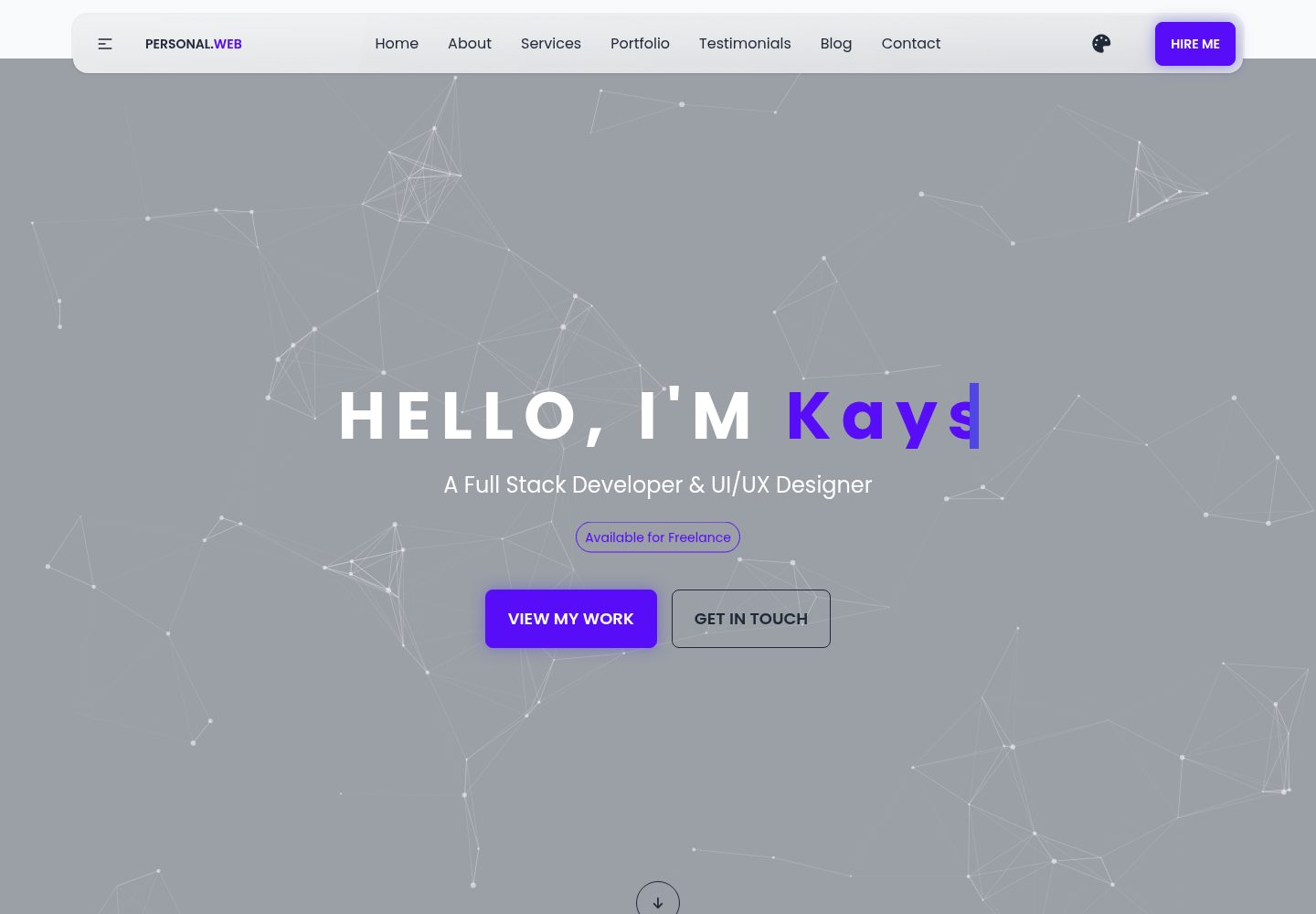
Desktop captureTop of page
Actual screenshot captured by the server browser.
All pages & views 2
Screenshots show visual appearance; interactive behavior may differ.
Recorded 2026-10-11View source
What stands out
A quick read of the recorded project description.
Built with Tailwind CSS and DaisyUI component classes; the navigation bar provides a theme selector
Portfolio is a grid of image cards, the skills section uses animated progress bars, and testimonials are a carousel
Icons use Font Awesome, and the font is Poppins from Google Fonts
Color themes are centrally managed via CSS variables, making it easy to swap color schemes
MIT license, allowing free use, modification, commercial use, and distribution
Template Details
This template is a single-page HTML portfolio website. The repository mainly contains index.html, README.md, a css/ directory (including styles.css), and an images/ directory (placeholder images and avatars). The page structure covers header navigation, hero, about, services, portfolio, testimonials, and contact sections; the navigation bar provides a theme selector and a Hire button. For styling, it uses Tailwind CSS (loaded via CDN) and the DaisyUI component library, along with a small amount of custom CSS; icons use Font Awesome, and the font is Poppins from Google Fonts. The portfolio section is a grid of image cards, the skills section uses animated progress bars, and testimonials are presented as a carousel. The template is positioned as a personal portfolio and starter template; you can fork it and replace the name, email, images, and color variables to showcase your own work.
Usage limitations: The project is pure static HTML with no build step or backend logic; running it locally only requires a modern browser—just open index.html directly. For deployment, GitHub Pages is recommended (push to the main branch and enable Pages in the repository settings, selecting the root directory); you can also drag and drop it to Netlify or Vercel. The code is under the MIT license, allowing free use, modification, commercial use, and distribution, but the copyright and license notice must be retained; third-party assets such as demo images, fonts, and icons need to be checked against their respective licenses and cannot be judged solely by the code's MIT license. The performance and accessibility descriptions mentioned in the README are the author's own statements and have not been verified in the dependency list or tests.
HTMLPortfolioStarter
Is it right for your project?
Use Cases
- Individual developers or designers building a single-page portfolio to showcase work and services
- Using it as a starter template: fork it, replace personal information and images, and quickly generate your own portfolio
- For client demos or teaching scenarios to demonstrate the page structure of Tailwind CSS and DaisyUI
- Deploying to GitHub Pages, Netlify, or Vercel as a static site
Suitable For
- Full-stack engineers or UI/UX designers who need to quickly build a personal portfolio page
- Developers who want to showcase projects and contact information in a pure static HTML way
- Front-end learners who want to modify the template based on Tailwind CSS and DaisyUI component classes
Getting started & customization
Use these recorded setup notes alongside the repository instructions for your chosen version.
- 1
Running locally only requires a modern browser; just open index.html directly, with no build step
- 2
Clone the repository: git clone https://github.com/md-abu-kayser/demo-personal-website.git
- 3
Replace the name, email, and personal details in the About section of index.html, and update the image paths in images/
- 4
Adjust colors, animations, and spacing via the :root CSS variables in css/styles.css
- 5
The theme can be switched via the selector in the navigation bar; to fix a theme, modify the data-theme attribute of the html element
License & source material
Usage conditions & limitations
Free to use · keep license noticeThis entry covers the free version under the MIT license in the public repository; the free scope applies to that version's code and does not mean external services or third-party assets are free.
Must comply with when using
- Free use, modification, commercial use, and distribution of this version's code are permitted.
- When distributing copies or substantial portions of the code, retain the original author's copyright notice and the full MIT license notice.
- The code is provided as is; warranties and limitations of liability are governed by the original license and applicable law.
Additional costs & items to verify
- Demo images, fonts, icons, and other third-party assets must be checked against their respective licenses and cannot be judged solely by the code's MIT license.
- External services such as domains, hosting, databases, payments, or AI may incur additional charges.
View Original Text Basis
https://github.com/md-abu-kayser/demo-personal-website/blob/main/LICENSEhttps://github.com/md-abu-kayser/demo-personal-website/blob/main/README.mdPermission is hereby granted, free of charge
Original License Text
Compiled by DeepSeek based on repository license and README ·2026-10-11. Results only cover the materials read; dependencies, images, fonts, and subsequent term changes are subject to their respective original texts.
Project checks & description sources
Template Information
- Source platforms
- GitHub
- Documentation and maintenance reference score
- More documented · 88 / 100
- Technologies
- HTML
- Website type
- Portfolio · Starter
How this score is calculated
Our heuristic uses license records (up to 30), a demo link (12), a preview (10), stars (15), recorded maintenance (15), description completeness (8), feature records (5) and classification data (5). It is not a code, security or performance test, or a Google score. A link does not establish tested functionality.
What to verify for this project
- Repository update recorded
- 2026-08-25
- Screenshot last checked
- 2026-10-11
A demo link is listed. Check it with your own content and viewport sizes; its presence does not confirm that forms, authentication or payments work.
The catalog identifies HTML as the primary stack. Check the actual dependency manifest and lockfile for versions and hosting requirements. These notes use recorded metadata, not a code audit or a deployment test.
Use a selection guide →How this description was prepared
AI-assisted description based on catalog records and repository material. Repository authors are not automatically the reviewers of this description.
Review declaration: [email protected] · 2026-10-13
Inspect the recorded source material
SHA-256: 215614d8a1cae3c736d07f8fc4422999cdfacd32c5b490d29a1fc6b0f2eca7a9
2026-10-11T20:45:33.640Z
Source file / repository# Md Abu Kayser - Full-Stack Engineer | Personal Portfolio <!-- MIT License --> [](./LICENSE) <!-- Demo Live Link --> [](https://md-abu-kayser.github.io/demo-personal-website/) <!-- HTML & CSS --> [](https://developer.mozilla.org/en-US/docs/Web/HTML) [](https://developer.mozilla.org/en-US/docs/Web/CSS) <!-- Styling / PostCSS --> [](https://tailwindcss.com/docs/) [](https://postcss.org/) [](https://daisyui.com/) <!-- Fonts & Icons --> [](https://fonts.google.com/) [](https://fontawesome.com/) <!-- Languages & Web Standards --> [](https://developer.mozilla.org/en-US/docs/Web/JavaScript) [](https://www.ecma-international.org/publications-and-standards/standards/ecma-262/) --- ## Demo Frontend Professional, responsive personal portfolio template for a Full Stack Developer and UI/UX Designer. Built with Tailwind CSS, DaisyUI and lightweight custom CSS for fast performance and easy customization. ## Table of Contents - Overview - Live Demo - Features - Tech Stack - Project Structure - Getting Started - Customization Guide - Deployment - Contributing - Contact ## Overview This repository contains a polished landing/portfolio website showcasing projects, services, client testimonials, and contact information for Md Abu Kayser - a Full Stack Developer and UI/UX Designer. The layout emphasizes performance, accessibility, and a modern aesthetic with theme switching and responsive components. The project is intended both as a personal portfolio and as a starter template you can fork and customize to present your own work to clients. ## Live Demo github pages - **GitHub Pages:** https://md-abu-kayser.github.io/demo-personal-website/ ## Features - Clean, responsive hero and multi-section layout (About, Services, Portfolio, Testimonials, Blog, Contact) - Theme selection (DaisyUI themes) and accessible color contrasts - Portfolio grid with category filters and animated hover states - Skills section with animated progress bars - Reusable components using Tailwind + DaisyUI utility classes - Optimized for performance: minimal custom CSS and CDN-hosted UI libraries ## Tech Stack - HTML5 - CSS3 (custom styles + Tailwind CSS via CDN) - DaisyUI (component library for Tailwind) - Font Awesome (icons) - Google Fonts (Poppins) ### Project Structure **Root files:** ``` index.html # Single-page portfolio site README.md # Project documentation (this file) css/ # Custom styles styles.css # Project-specific CSS images/ # Placeholder images and avatar ``` ### Key sections in `index.html`: - Header / Navigation - responsive navbar with theme picker and Hire button - Hero - prominent headline, call-to-actions and animated typewriter - About - personal summary, contact metadata, and skills - Services - cards describing offered services - Portfolio - projects gallery (image cards) - Testimonials - client feedback carousel - Contact - contact call-to-action and links ### Getting Started **Prerequisites: a modern browser. To run locally:** 1. Clone the repository: - git clone https://github.com/md-abu-kayser/demo-personal-website.git ### Customization Guide - Replace the name, email and personal details in the About section of `index.html`. - Swap out images in the `images/` folder and update image paths. - Edit `css/styles.css` to tweak colors, animations, and spacing. The project uses CSS variables for easy color theming (see `:root`). - Tailwind / DaisyUI themes can be changed via the theme picker in the navbar. To permanently set a theme, modify the `data-theme` attribute on the `<html>` element in `index.html`. ### Accessibility notes - Semantic HTML is used for headings and sections. - Buttons and links include clear text CTAs. - Ensure images include concise `alt` text when adding or replacing images. ### Deployment **Recommended quick deploy options:** - GitHub Pages - push to `main` and enable Pages from the repository settings (select root). The site will be served at `https://md-abu-kayser.github.io/demo-personal-website/`. - Netlify / Vercel - drag & drop the project folder or connect your GitHub repo for CI/CD. ### Contributing This repo is primarily a personal portfolio template. If you'd like to suggest improvements, feel free to open an issue or submit a pull request. Keep changes focused and provide screenshots for visual edits. **Suggested contribution workflow:** 1. Fork the repository 2. Create a feature branch (`git checkout -b feat/awesome-improvement`) 3. Commit changes and push 4. Open a Pull Request describing your changes ### License - This project is licensed under the terms of the **[MIT License](./LICENSE)**. - You may replace or update the license as needed for client or proprietary projects. --- ### Contact and Maintainer - **_Name:_** Md Abu Kayser - Full-Stack Engineer - **_Project:_** _demo-personal-website_ - **_Maintainer:_** [md-abu-kayser](https://github.com/md-abu-kayser) - **_Email:_** [[email protected]](mailto:[email protected]) - **_GitHub:_** [github.com/abu.kayser-official](https://github.com/md-abu-kayser) If you’d like this README tailored for a specific purpose - such as **hiring managers**, **open-source contributors**, or **client deliverables** - feel free to request a custom tone or format. --- **Thank you for reviewing this project!** It’s designed to be **clean, well-structured**, and **pleasant to explore** - perfect for portfolio showcases, or professional demos. **Made with love - a clean, responsive portfolio template for showcasing modern web skills.** ---
Explore similar templates
Compare previews and descriptions within the same stack and category.

simplefolio
Simplefolio is a minimal single-page portfolio template for developers, built with HTML, Bootstrap, SCSS, and Parcel under the MIT license. It includes Hero, About, Projects, Contact, and Footer sections, with content edited in /src/index.html and theme colors controlled by two SCSS variables.
HTML · Portfolio

Freelancer
A bright, single-page Bootstrap portfolio template for freelancers, designers, and small studios. It includes a responsive portfolio grid with modal detail windows and an SB Forms contact form that requires an API token.
HTML · Portfolio

Resume
A single-page resume and CV template from Start Bootstrap, built on Bootstrap with a fixed sidebar and content sections.
HTML · Portfolio

Creative
A single-page marketing template by Start Bootstrap for creative agencies and product services, built on Bootstrap with SCSS, featuring a portfolio grid and call-to-action sections. It includes pre-set SB Forms markers for form integration and npm build scripts for source customization.
HTML · Corporate Website

startbootstrap-simple-sidebar
A Bootstrap off-canvas sidebar navigation HTML starter template from Start Bootstrap. It provides directly editable HTML and CSS in the dist directory, while the source uses Pug, SCSS, and JavaScript with npm build scripts for live preview and compilation.
HTML · Starter

adminkit
AdminKit is a free, MIT-licensed HTML admin and dashboard template built on Bootstrap 5. The free version includes 15 demo pages, 1 plugin, and 1 color scheme, with hundreds of UI components, forms, tables, charts, and icons.
HTML · Admin dashboard