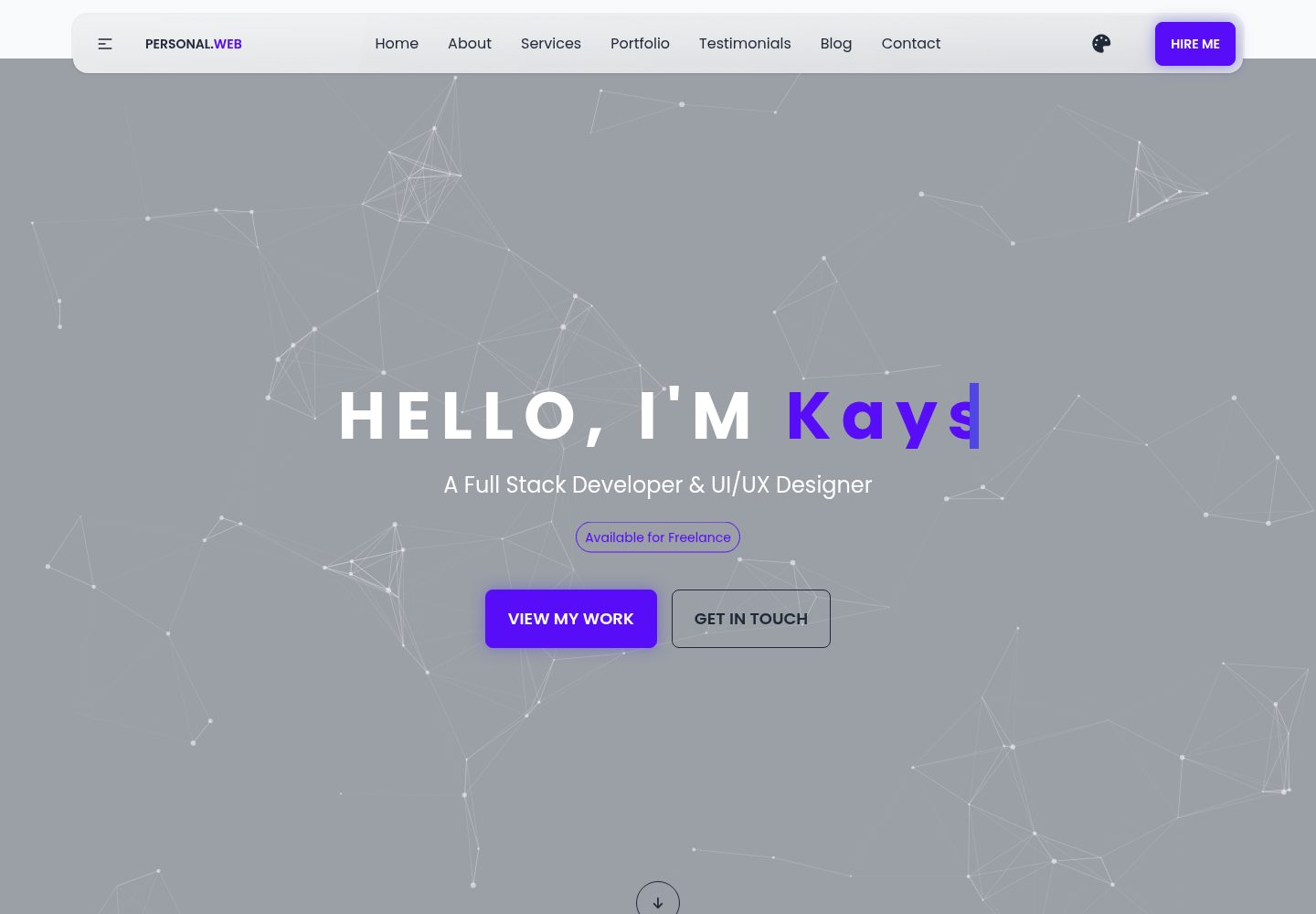
单页 HTML 作品集,包含关于、服务、作品集、客户评价、博客与联系等区块
HTML作品集启动器
demo-personal-website — HTML 作品集模板
作者 md-abu-kayser
一个面向全栈工程师与 UI/UX 设计师的单页个人作品集 HTML 模板,使用 Tailwind CSS 与 DaisyUI 构建,包含关于、服务、作品集、客户评价、博客与联系等区块,可直接作为个人作品集或启动模板使用。
看看你的网站会是什么样
浏览真实页面截图,比较内容排版与手机效果。点击下方缩略图切换,放大查看整页细节。
全部页面与视图 2
截图用于了解视觉与布局,交互效果请以实际项目为准。
采集于 2026-10-11查看来源
值得关注的模板亮点
从已有项目资料中,快速了解它的特点。
使用 Tailwind CSS 与 DaisyUI 组件类构建,导航栏提供主题选择器
作品集为图片卡片网格,技能部分使用动画进度条,客户评价为轮播
图标使用 Font Awesome,字体使用 Google Fonts 的 Poppins
通过 CSS 变量集中管理颜色主题,便于替换配色
MIT 许可,可免费使用、修改、商用与分发
模板详细介绍
该模板是一个单页 HTML 作品集网站,仓库中主要包含 index.html、README.md、css/ 目录(含 styles.css)以及 images/ 目录(占位图片与头像)。页面结构覆盖头部导航、Hero、关于、服务、作品集、客户评价、联系等区块,导航栏提供主题选择器与 Hire 按钮。样式方面使用 Tailwind CSS(通过 CDN 引入)与 DaisyUI 组件库,配合少量自定义 CSS;图标使用 Font Awesome,字体使用 Google Fonts 的 Poppins。作品集区块为图片卡片网格,技能部分使用动画进度条,客户评价为轮播形式。模板定位为个人作品集与启动模板,可 fork 后替换姓名、邮箱、图片与颜色变量来展示自己的作品。
使用限制方面:项目为纯静态 HTML,没有构建步骤或后端逻辑;本地运行只需现代浏览器,直接打开 index.html 即可。部署推荐 GitHub Pages(推送 main 分支并在仓库设置中启用 Pages,选择根目录),也可拖拽到 Netlify 或 Vercel。代码采用 MIT 许可,允许免费使用、修改、商用与分发,但需保留版权与许可声明;演示图片、字体、图标等第三方素材需按各自许可核对,不能仅凭代码的 MIT 许可判断。README 中提到的性能与可访问性描述属于作者自述,未在依赖清单或测试中核实。
HTML作品集启动器
适合你的项目吗?
适用场景
- 个人开发者或设计师搭建展示作品与服务的单页作品集
- 作为启动模板 fork 后替换个人信息与图片,快速生成自己的作品集
- 用于客户演示或教学场景中展示 Tailwind CSS 与 DaisyUI 的页面结构
- 部署到 GitHub Pages、Netlify 或 Vercel 作为静态站点
适合人群
- 需要快速搭建个人作品集页面的全栈工程师或 UI/UX 设计师
- 希望以纯 HTML 静态方式展示项目与联系方式的开发者
- 想基于 Tailwind CSS 与 DaisyUI 组件类二次修改模板的前端学习者
上手与定制指南
结合仓库当前版本的说明,按下面的资料检查内容、配置与运行要求。
- 1
本地运行只需现代浏览器,直接打开 index.html 即可,无需构建步骤
- 2
克隆仓库:git clone https://github.com/md-abu-kayser/demo-personal-website.git
- 3
在 index.html 的 About 区块替换姓名、邮箱与个人资料,并更新 images/ 中的图片路径
- 4
在 css/styles.css 中通过 :root 的 CSS 变量调整颜色、动画与间距
- 5
主题可通过导航栏选择器切换;如需固定主题,修改 html 元素的 data-theme 属性
授权与来源资料
使用条件与限制
免费使用 · 保留许可声明本次收录的是公开仓库中采用 MIT 许可的免费版本;免费范围为该版本代码,不代表外部服务或第三方素材免费。
使用时需要遵守
- 允许免费使用、修改、商用和分发该版本代码。
- 分发代码副本或实质性部分时,保留原作者版权声明和完整 MIT 许可声明。
- 代码按现状提供;担保与责任限制以原许可证及适用法律为准。
额外费用与待核对事项
- 演示图片、字体、图标及其他第三方素材需按各自许可核对,不能仅凭代码的 MIT 许可判断。
- 域名、托管、数据库、支付或 AI 等外部服务可能另外收费。
查看原文依据
https://github.com/md-abu-kayser/demo-personal-website/blob/main/LICENSEhttps://github.com/md-abu-kayser/demo-personal-website/blob/main/README.mdPermission is hereby granted, free of charge
许可证原文
DeepSeek 根据仓库许可证和 README 整理 ·2026-10-11。结果仅覆盖已读取资料,依赖、图片、字体及后续条款变更以各自原文为准。
项目核对记录与介绍依据
模板资料
- 来源平台
- GitHub
- 资料与维护参考分
- 资料较完整 · 88 / 100
- 技术栈
- HTML
- 网站类型
- 作品集 · 启动器
这个分数如何计算
本站按许可资料(最高30分)、演示链接(12分)、预览图(10分)、Star数(15分)、记录的维护时间(15分)、描述完整度(8分)、功能记录(5分)和分类资料(5分)计算。它不是代码、安全或性能测试,也不是 Google 评分;有链接不代表已实测可用。
这个项目需要核对什么
- 记录的仓库更新时间
- 2026-08-25
- 截图检查日期
- 2026-10-11
已收录演示链接。请用你的内容与屏幕尺寸检查;有演示不代表表单、认证或支付已经可用。
目录记录的主要技术栈是 HTML。请通过依赖清单和锁文件核对实际版本与托管要求。这些说明基于收录资料,不代表代码审计或部署实测。
查看具体选型方法 →介绍的制作与核对状态
介绍由 AI 辅助整理目录与仓库资料。仓库作者不等于这篇介绍的审核者。
审核声明: [email protected] · 2026-10-13
查看当时使用的来源资料
SHA-256: 215614d8a1cae3c736d07f8fc4422999cdfacd32c5b490d29a1fc6b0f2eca7a9
2026-10-11T20:45:33.640Z
来源文件 / 仓库# Md Abu Kayser - Full-Stack Engineer | Personal Portfolio <!-- MIT License --> [](./LICENSE) <!-- Demo Live Link --> [](https://md-abu-kayser.github.io/demo-personal-website/) <!-- HTML & CSS --> [](https://developer.mozilla.org/en-US/docs/Web/HTML) [](https://developer.mozilla.org/en-US/docs/Web/CSS) <!-- Styling / PostCSS --> [](https://tailwindcss.com/docs/) [](https://postcss.org/) [](https://daisyui.com/) <!-- Fonts & Icons --> [](https://fonts.google.com/) [](https://fontawesome.com/) <!-- Languages & Web Standards --> [](https://developer.mozilla.org/en-US/docs/Web/JavaScript) [](https://www.ecma-international.org/publications-and-standards/standards/ecma-262/) --- ## Demo Frontend Professional, responsive personal portfolio template for a Full Stack Developer and UI/UX Designer. Built with Tailwind CSS, DaisyUI and lightweight custom CSS for fast performance and easy customization. ## Table of Contents - Overview - Live Demo - Features - Tech Stack - Project Structure - Getting Started - Customization Guide - Deployment - Contributing - Contact ## Overview This repository contains a polished landing/portfolio website showcasing projects, services, client testimonials, and contact information for Md Abu Kayser - a Full Stack Developer and UI/UX Designer. The layout emphasizes performance, accessibility, and a modern aesthetic with theme switching and responsive components. The project is intended both as a personal portfolio and as a starter template you can fork and customize to present your own work to clients. ## Live Demo github pages - **GitHub Pages:** https://md-abu-kayser.github.io/demo-personal-website/ ## Features - Clean, responsive hero and multi-section layout (About, Services, Portfolio, Testimonials, Blog, Contact) - Theme selection (DaisyUI themes) and accessible color contrasts - Portfolio grid with category filters and animated hover states - Skills section with animated progress bars - Reusable components using Tailwind + DaisyUI utility classes - Optimized for performance: minimal custom CSS and CDN-hosted UI libraries ## Tech Stack - HTML5 - CSS3 (custom styles + Tailwind CSS via CDN) - DaisyUI (component library for Tailwind) - Font Awesome (icons) - Google Fonts (Poppins) ### Project Structure **Root files:** ``` index.html # Single-page portfolio site README.md # Project documentation (this file) css/ # Custom styles styles.css # Project-specific CSS images/ # Placeholder images and avatar ``` ### Key sections in `index.html`: - Header / Navigation - responsive navbar with theme picker and Hire button - Hero - prominent headline, call-to-actions and animated typewriter - About - personal summary, contact metadata, and skills - Services - cards describing offered services - Portfolio - projects gallery (image cards) - Testimonials - client feedback carousel - Contact - contact call-to-action and links ### Getting Started **Prerequisites: a modern browser. To run locally:** 1. Clone the repository: - git clone https://github.com/md-abu-kayser/demo-personal-website.git ### Customization Guide - Replace the name, email and personal details in the About section of `index.html`. - Swap out images in the `images/` folder and update image paths. - Edit `css/styles.css` to tweak colors, animations, and spacing. The project uses CSS variables for easy color theming (see `:root`). - Tailwind / DaisyUI themes can be changed via the theme picker in the navbar. To permanently set a theme, modify the `data-theme` attribute on the `<html>` element in `index.html`. ### Accessibility notes - Semantic HTML is used for headings and sections. - Buttons and links include clear text CTAs. - Ensure images include concise `alt` text when adding or replacing images. ### Deployment **Recommended quick deploy options:** - GitHub Pages - push to `main` and enable Pages from the repository settings (select root). The site will be served at `https://md-abu-kayser.github.io/demo-personal-website/`. - Netlify / Vercel - drag & drop the project folder or connect your GitHub repo for CI/CD. ### Contributing This repo is primarily a personal portfolio template. If you'd like to suggest improvements, feel free to open an issue or submit a pull request. Keep changes focused and provide screenshots for visual edits. **Suggested contribution workflow:** 1. Fork the repository 2. Create a feature branch (`git checkout -b feat/awesome-improvement`) 3. Commit changes and push 4. Open a Pull Request describing your changes ### License - This project is licensed under the terms of the **[MIT License](./LICENSE)**. - You may replace or update the license as needed for client or proprietary projects. --- ### Contact and Maintainer - **_Name:_** Md Abu Kayser - Full-Stack Engineer - **_Project:_** _demo-personal-website_ - **_Maintainer:_** [md-abu-kayser](https://github.com/md-abu-kayser) - **_Email:_** [[email protected]](mailto:[email protected]) - **_GitHub:_** [github.com/abu.kayser-official](https://github.com/md-abu-kayser) If you’d like this README tailored for a specific purpose - such as **hiring managers**, **open-source contributors**, or **client deliverables** - feel free to request a custom tone or format. --- **Thank you for reviewing this project!** It’s designed to be **clean, well-structured**, and **pleasant to explore** - perfect for portfolio showcases, or professional demos. **Made with love - a clean, responsive portfolio template for showcasing modern web skills.** ---
看看同类模板
对比同技术栈与用途的模板,找到更适合的视觉与内容结构。

simplefolio
⚡️ A minimal portfolio template for Developers
HTML · 作品集

Freelancer
Freelancer 是 Start Bootstrap 出品的单页作品集模板,专为自由职业者、设计师和小型工作室设计。 页面结构清晰,包含多个内容区块、响应式作品集网格,每个作品项目配有模态窗口展示详情。
HTML · 作品集

Resume
Resume 是 Start Bootstrap 推出的简历与 CV 主题,基于 Bootstrap 构建,采用固定侧边栏加内容区块的结构。
HTML · 作品集

Creative
Creative 是 Start Bootstrap 团队维护的一款单页营销模板,定位明确:为创意机构或产品服务提供一个以作品展示和行动号召为核心的落地页。
HTML · 企业官网

startbootstrap-simple-sidebar
An off canvas sidebar navigation Bootstrap HTML template created by Start Bootstrap
HTML · 启动器

adminkit
AdminKit is a free & open-source HTML dashboard & admin template based on Bootstrap 5
HTML · 后台