No npm packages, CDN calls, build steps, credentials, or environment variables
HTMLAdmin dashboard
RTX-Dashboard-Template — HTML Admin dashboard Template
By MECMwithShawn
RTX Dashboard Template is a dependency-free static dashboard starter repository for building RTX-branded operations consoles, with sample data and a replaceable data contract.
Explore the design
Compare the page layouts and mobile experience. Open any screenshot for a closer look.
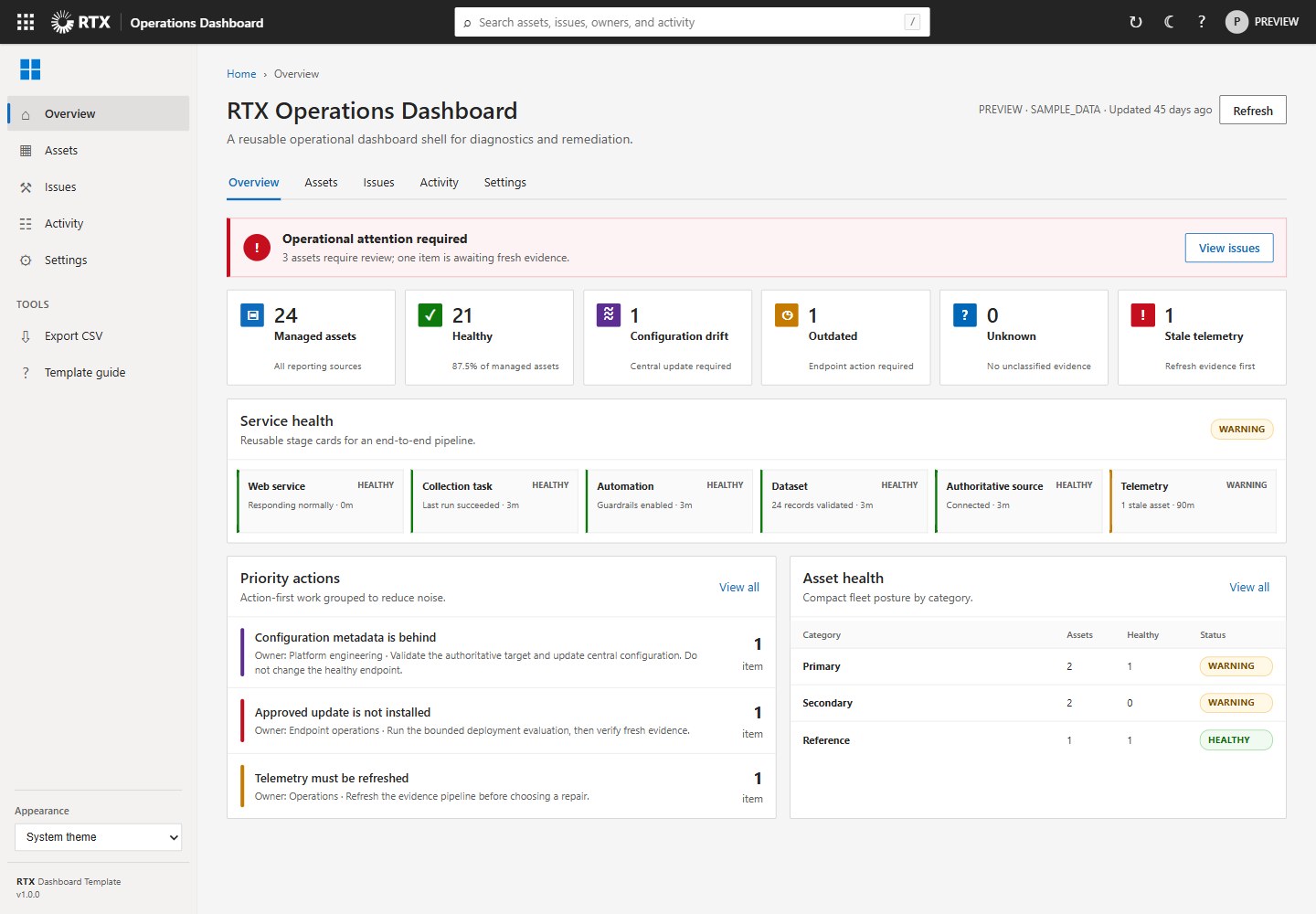
Desktop homepage1 / 2
Desktop captureTop of page
Rendered from the fixed source checkout.
All pages & views 2
Screenshots show visual appearance; interactive behavior may differ.
Recorded 2026-10-16View source
What stands out
A quick read of the recorded project description.
Includes the RTX logo, Windows four-square icon, and persistent System/Light/Dark appearance settings
Provides summary metrics, service health stages, grouped issues, managed assets, activity history, a detail drawer, search, and CSV export
Ships a versioned JSON data contract and representative sample data
Responsive layout designed and tested at 125% browser zoom
Includes a dependency-free validation workflow and an MIT license
Template Details
This template targets an RTX-branded operations dashboard, retaining the light, compact Microsoft admin-center visual style developed for Windows Store App Health while separating the presentation shell from a specific product's backend, data, and remediation logic. The repository contains no npm packages, CDN calls, build steps, credentials, or environment variables; it provides only static pages, styles, scripts, and a versioned JSON data contract with representative sample data.
The template includes the RTX logo in the global header, the Windows four-square icon in the left sidebar, three persistent appearance settings (System/Light/Dark), and a responsive layout designed and tested for 125% browser zoom. Functionally it provides summary metrics, service health stages, grouped issues, managed assets, activity history, a detail drawer, search, and CSV export. The README explains that you can create a new dashboard via the GitHub template feature or by copying the repository, update the title, environment, metrics, pipeline stages, issues, assets, and activity summary in data/dashboard.json, replace the sample JSON adapter in loadData() only when a live API is needed, and keep the rendering contract stable.
The README does not document the template's production readiness, performance characteristics, or specific framework versions; the sample actions in the detail drawer must be replaced with authenticated, allow-listed, and evidence-gated backend operations. Running locally requires a static web server; you cannot open index.html directly because browsers block JSON fetch requests from file:// pages.
HTMLBackend
Is it right for your project?
Use Cases
- Build an operations dashboard front-end shell for an RTX-branded product
- Demonstrate dashboard layout, theme switching, and interaction logic with sample data
- Replace the sample JSON adapter with a live API while keeping the rendering contract stable
- Derive a new RTX dashboard repository via the GitHub template feature
Suitable For
- Developers who need a static dashboard starter structure with no build step
- RTX-related projects that want to reuse the Microsoft admin-center visual style
- Teams that need to validate the interface with sample data before connecting a backend API
Getting started & customization
Use these recorded setup notes alongside the repository instructions for your chosen version.
- 1
Run with any static web server; do not open index.html directly because browsers block JSON fetch requests from file:// pages
- 2
Local example command: python -m http.server 8765 --bind 127.0.0.1, then visit http://127.0.0.1:8765/
- 3
Update the product title, environment, metrics, pipeline stages, issues, assets, and activity summary in data/dashboard.json
- 4
Replace the sample JSON adapter in loadData() only when a live API is needed, and keep the rendering contract stable
- 5
Replace the sample drawer actions with authenticated, allow-listed, and evidence-gated backend operations, and run the validation workflow
License & source material
Usage conditions & limitations
Free to use · keep license noticeThis listing covers the free version under the MIT license in the public repository; the free scope is the code of this version and does not mean external services or third-party assets are free.
Must comply with when using
- You may use, modify, commercialize, and distribute the code of this version for free.
- When distributing copies or substantial portions of the code, retain the original author's copyright notice and the full MIT license notice.
- The code is provided as is; warranties and limitations of liability are governed by the original license and applicable law.
Additional costs & items to verify
- Demo images, fonts, icons, and other third-party assets must be checked against their respective licenses; you cannot judge solely by the code's MIT license.
- External services such as domains, hosting, databases, payments, or AI may incur separate charges.
- You cannot open index.html directly; you must run it via a static web server because browsers block JSON fetch requests from file:// pages.
- Replace the sample JSON adapter in loadData() only when a live API is needed, and keep the rendering contract stable.
- Sample drawer actions must be replaced with authenticated, allow-listed, and evidence-gated backend operations.
- You must run the validation workflow and test Light, Dark, and System modes at 125% zoom.
- The template ships representative sample data and does not include an environment-specific backend.
- The repository contains no npm packages, CDN calls, build steps, credentials, or environment variables.
- After publishing, you must enable the template repository feature in Settings → General → Template repository.
- Shared community health files are provided by the owner-level .github repository; this template only contains product-specific validation workflows and a license.
View Original Text Basis
Permission is hereby granted, free of charge
Original License Text
Use any static web server. Do not open `index.html` directly because browsers
Original README
3. Replace the sample JSON adapter in `loadData()` only when a live API is
Original README
4. Replace the sample drawer action with authenticated, allowlisted,
Original README
5. Run the validation workflow and test Light, Dark, and System modes at 125%.
Original README
_Windows Store App Health implementation example. The reusable template ships
Original README
- No npm packages, CDN calls, build step, credentials, or environment values.
Original README
After publishing, enable **Settings → General → Template repository**. New RTX
Original README
https://github.com/MECMwithShawn/RTX-Dashboard-Template/blob/main/LICENSEhttps://github.com/MECMwithShawn/RTX-Dashboard-Template/blob/main/README.mdThe owner-level `.github` repository supplies shared community-health files to
Original README
Compiled by DeepSeek based on repository license and README ·2026-10-15. Results only cover the materials read; dependencies, images, fonts, and subsequent term changes are subject to their respective original texts.
Project checks & description sources
Template Information
- Source platforms
- GitHub
- Documentation and maintenance reference score
- Partly documented · 68 / 100
- Technologies
- HTML
- Website type
- Admin dashboard
How this score is calculated
Our heuristic uses license records (up to 30), a demo link (12), a preview (10), stars (15), recorded maintenance (15), description completeness (8), feature records (5) and classification data (5). It is not a code, security or performance test, or a Google score. A link does not establish tested functionality.
What to verify for this project
- Repository update recorded
- 2026-09-01
- Screenshot last checked
- 2026-10-16
No demo link is recorded. Use the repository instructions to evaluate the project locally; the screenshot alone cannot establish interactive behavior.
The catalog identifies HTML as the primary stack. Check the actual dependency manifest and lockfile for versions and hosting requirements. These notes use recorded metadata, not a code audit or a deployment test.
Use a selection guide →How this description was prepared
AI-assisted description based on catalog records and repository material. Repository authors are not automatically the reviewers of this description.
Review declaration: codex-user-requested-batch-review-20261017 · 2026-10-16
Inspect the recorded source material
SHA-256: 859c68155777060b7147286e034c56fd02e2cd531786614ac3a9ea2f3d0a0020
2026-10-15T12:43:23.331Z
Source file / repository# RTX Dashboard Template A dependency-free starter repository for RTX-branded operational dashboards. It preserves the light, dense Microsoft-admin-center visual language developed for Windows Store App Health while separating the presentation shell from any one product's backend, data, or remediation logic.  _Windows Store App Health implementation example. The reusable template ships with representative sample data and no environment-specific backend._ ## What is included - RTX logo in the global header and the Windows four-square icon in the left rail. - Persistent System, Light, and Dark appearance settings. - Responsive layout designed and tested for 125% browser zoom. - Summary metrics, service-health stages, grouped issues, managed assets, activity history, details drawer, search, and CSV export. - A versioned JSON data contract with representative sample data. - No npm packages, CDN calls, build step, credentials, or environment values. ## Start locally Use any static web server. Do not open `index.html` directly because browsers block JSON `fetch` calls from `file://` pages. ```powershell python -m http.server 8765 --bind 127.0.0.1 ``` Then open `http://127.0.0.1:8765/`. ## Create a dashboard from the template 1. Use this repository as a GitHub template, or copy it to a new repository. 2. Update `data/dashboard.json` with the product title, environment, metrics, pipeline stages, issues, assets, and bounded activity summaries. 3. Replace the sample JSON adapter in `loadData()` only when a live API is required. Keep the rendering contract stable. 4. Replace the sample drawer action with authenticated, allowlisted, evidence-gated backend operations. 5. Run the validation workflow and test Light, Dark, and System modes at 125%. See [docs/CUSTOMIZATION.md](docs/CUSTOMIZATION.md) for the data contract, component map, security boundary, and release checklist. ## Recommended GitHub location GitHub repositories cannot be nested in folders. Publish this repository as: ```text MECMwithShawn/RTX-Dashboard-Template ``` Use repository topics to create the RTX family online: ```text rtx, dashboard-template, operations-dashboard, fluent-ui, html, powershell ``` After publishing, enable **Settings → General → Template repository**. New RTX dashboards can then be created with **Use this template** without carrying the Store App Health product history or backend. The owner-level `.github` repository supplies shared community-health files to repositories that do not override them. This template intentionally contains only its product-specific validation workflow and license. ## Repository layout ```text assets/rtx-dashboard.css Design tokens, components, responsive and dark themes assets/rtx_logo.svg RTX brand asset data/dashboard.json Sample implementation of the stable data contract docs/CUSTOMIZATION.md Extension and safety guidance docs/images/ Reference screenshots of completed implementations dashboard.js Rendering, navigation, search, export, and theme logic index.html Accessible application shell .github/workflows/ Dependency-free validation ``` ## License MIT. See [LICENSE](LICENSE).
Explore similar templates
Compare previews and descriptions within the same stack and category.

AdminLTE
An HTML admin dashboard built with Bootstrap 5 and vanilla JavaScript. Astro builds the documentation; React, Vue and Angular editions live in separate repositories.
HTML · Admin dashboard

gentelella
Gentelella v4 is a free, open-source admin dashboard template maintained by Colorlib, built with vanilla JavaScript, SCSS, and Vite 8 without Bootstrap or jQuery.
HTML · Admin dashboard

coreui-free-bootstrap-admin-template
A free Bootstrap admin template maintained by CoreUI, built on CoreUI's own UI component library. It provides compiled HTML pages and Pug template source code, covering dashboards, authentication, forms, components, icons, and error pages.
HTML · Admin dashboard

dashboards
A collection of responsive dashboard HTML templates open-sourced by Keen IO, built on CSS Grid, offering multiple prebuilt admin data interface layouts.
HTML · Admin dashboard

SB Admin 2
SB Admin 2 is a classic Bootstrap admin template from Start Bootstrap, offering dashboards, charts, tables, and common management pages.
HTML · Admin dashboard

Adminator-admin-dashboard
Adminator 4 is a vanilla HTML, CSS and JavaScript admin dashboard template with a CSS-variable token design system, built-in light and dark themes, no jQuery or Bootstrap dependency, and 18 pages covering dashboards, mail, calendar, charts, forms, tables and error pages.
HTML · Admin dashboard