无 npm 包、CDN 调用、构建步骤、凭据或环境变量
HTML后台
RTX-Dashboard-Template — HTML 后台模板
作者 MECMwithShawn
RTX Dashboard Template 是一个无依赖的静态仪表板起始仓库,用于搭建 RTX 品牌风格的运维控制台,附带示例数据与可替换的数据契约。
看看你的网站会是什么样
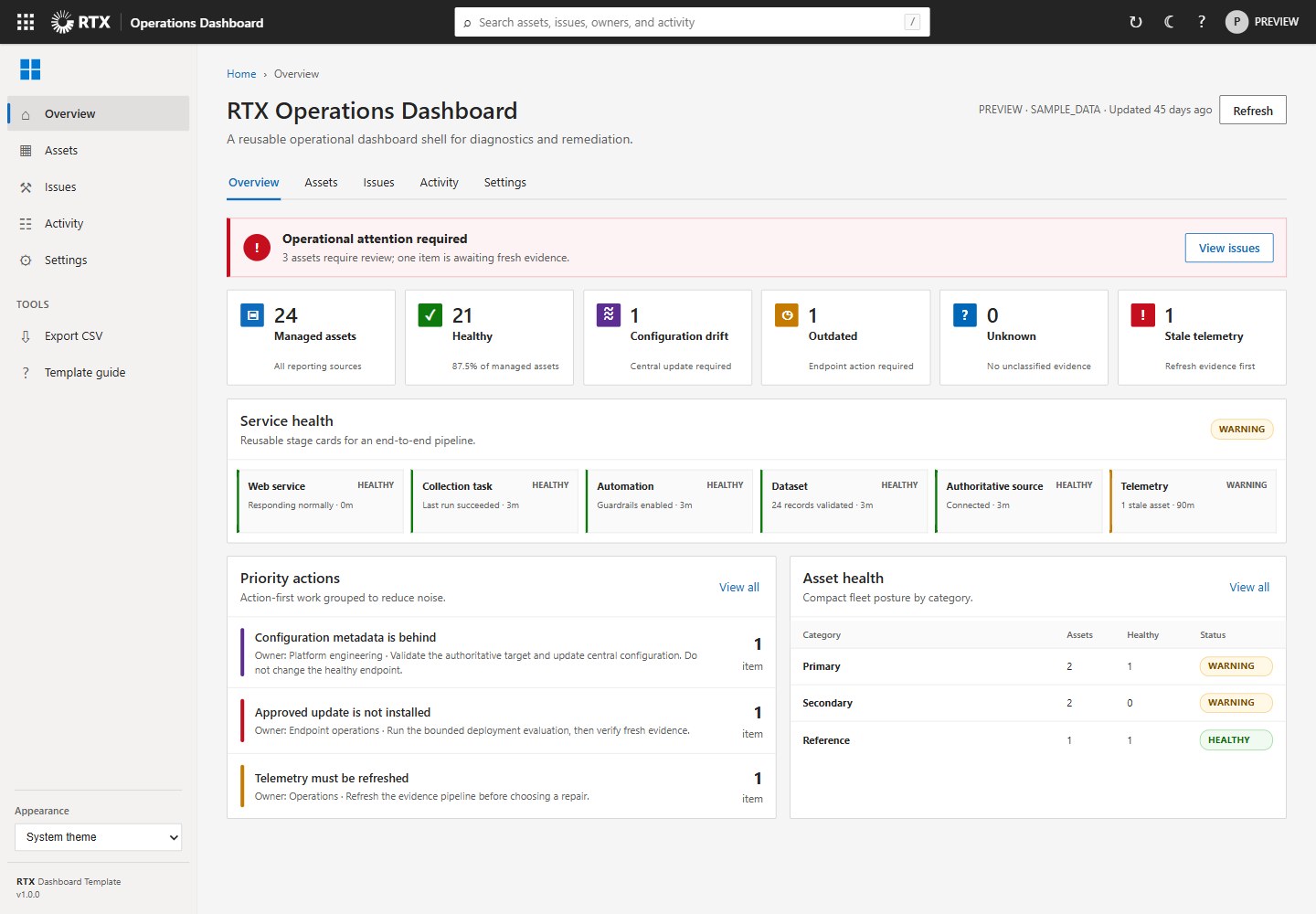
浏览真实页面截图,比较内容排版与手机效果。点击下方缩略图切换,放大查看整页细节。
全部页面与视图 2
截图用于了解视觉与布局,交互效果请以实际项目为准。
采集于 2026-10-16查看来源
值得关注的模板亮点
从已有项目资料中,快速了解它的特点。
包含 RTX 标志、Windows 四方图标及 System/Light/Dark 持久化外观设置
提供摘要指标、服务健康阶段、分组问题、受管资产、活动历史、详情抽屉、搜索和 CSV 导出
附带版本化 JSON 数据契约与代表性示例数据
响应式布局按 125% 浏览器缩放设计和测试
包含无依赖的验证工作流与 MIT 许可证
模板详细介绍
该模板面向 RTX 品牌运维仪表板,保留了为 Windows Store App Health 开发的浅色、紧凑的 Microsoft 管理中心视觉风格,同时把展示外壳与具体产品的后端、数据和修复逻辑分离。仓库不包含 npm 包、CDN 调用、构建步骤、凭据或环境变量,只提供静态页面、样式、脚本和一份版本化 JSON 数据契约及代表性示例数据。
模板包含全局页头的 RTX 标志、左侧栏的 Windows 四方图标、System/Light/Dark 三种持久化外观设置,以及为 125% 浏览器缩放设计和测试的响应式布局。功能层面提供摘要指标、服务健康阶段、分组问题、受管资产、活动历史、详情抽屉、搜索和 CSV 导出。README 说明可通过 GitHub 模板功能或复制仓库来创建新仪表板,更新 data/dashboard.json 中的标题、环境、指标、流水线阶段、问题、资产和活动摘要,仅在需要实时 API 时替换 loadData() 中的示例 JSON 适配器,并保持渲染契约稳定。
README 未说明该模板在生产环境中的就绪程度、性能表现或具体框架版本;详情抽屉的示例操作需替换为经过认证、允许列表和证据门控的后端操作。本地运行需使用静态 Web 服务器,不能直接打开 index.html,因为浏览器会阻止 file:// 页面发起的 JSON fetch 请求。
HTML后台
适合你的项目吗?
适用场景
- 为 RTX 品牌产品搭建运维仪表板前端外壳
- 以示例数据演示仪表板布局、主题切换和交互逻辑
- 在保持渲染契约稳定的前提下,将示例 JSON 适配器替换为实时 API
- 通过 GitHub 模板功能派生新的 RTX 仪表板仓库
适合人群
- 需要无构建步骤静态仪表板起始结构的开发者
- 希望复用 Microsoft 管理中心视觉风格的 RTX 相关项目
- 需要先以示例数据验证界面再接入后端 API 的团队
上手与定制指南
结合仓库当前版本的说明,按下面的资料检查内容、配置与运行要求。
- 1
使用任意静态 Web 服务器运行,不要直接打开 index.html,因为浏览器会阻止 file:// 页面发起 JSON fetch 请求
- 2
本地示例命令:python -m http.server 8765 --bind 127.0.0.1,然后访问 http://127.0.0.1:8765/
- 3
更新 data/dashboard.json 中的产品标题、环境、指标、流水线阶段、问题、资产和活动摘要
- 4
仅在需要实时 API 时替换 loadData() 中的示例 JSON 适配器,并保持渲染契约稳定
- 5
将示例抽屉操作替换为经过认证、允许列表和证据门控的后端操作,并运行验证工作流
授权与来源资料
使用条件与限制
免费使用 · 保留许可声明本次收录的是公开仓库中采用 MIT 许可的免费版本;免费范围为该版本代码,不代表外部服务或第三方素材免费。
使用时需要遵守
- 允许免费使用、修改、商用和分发该版本代码。
- 分发代码副本或实质性部分时,保留原作者版权声明和完整 MIT 许可声明。
- 代码按现状提供;担保与责任限制以原许可证及适用法律为准。
额外费用与待核对事项
- 演示图片、字体、图标及其他第三方素材需按各自许可核对,不能仅凭代码的 MIT 许可判断。
- 域名、托管、数据库、支付或 AI 等外部服务可能另外收费。
- 不能直接打开 index.html,必须通过静态 Web 服务器运行,因为浏览器会阻止 file:// 页面发起的 JSON fetch 请求。
- 仅在需要实时 API 时替换 loadData() 中的示例 JSON 适配器,并保持渲染契约稳定。
- 示例抽屉操作需替换为经过认证、允许列表和证据门控的后端操作。
- 需运行验证工作流,并在 125% 缩放下测试 Light、Dark 和 System 模式。
- 模板附带代表性示例数据,不包含特定环境的后端。
- 仓库不含 npm 包、CDN 调用、构建步骤、凭据或环境变量。
- 发布后需在 Settings → General → Template repository 中启用模板仓库功能。
- 共享社区健康文件由所有者级 .github 仓库提供,本模板仅含产品特定的验证工作流和许可证。
查看原文依据
Permission is hereby granted, free of charge
许可证原文
Use any static web server. Do not open `index.html` directly because browsers
README 原文
3. Replace the sample JSON adapter in `loadData()` only when a live API is
README 原文
4. Replace the sample drawer action with authenticated, allowlisted,
README 原文
5. Run the validation workflow and test Light, Dark, and System modes at 125%.
README 原文
_Windows Store App Health implementation example. The reusable template ships
README 原文
- No npm packages, CDN calls, build step, credentials, or environment values.
README 原文
After publishing, enable **Settings → General → Template repository**. New RTX
README 原文
https://github.com/MECMwithShawn/RTX-Dashboard-Template/blob/main/LICENSEhttps://github.com/MECMwithShawn/RTX-Dashboard-Template/blob/main/README.mdThe owner-level `.github` repository supplies shared community-health files to
README 原文
DeepSeek 根据仓库许可证和 README 整理 ·2026-10-15。结果仅覆盖已读取资料,依赖、图片、字体及后续条款变更以各自原文为准。
项目核对记录与介绍依据
模板资料
- 来源平台
- GitHub
- 资料与维护参考分
- 资料一般 · 68 / 100
- 技术栈
- HTML
- 网站类型
- 后台
这个分数如何计算
本站按许可资料(最高30分)、演示链接(12分)、预览图(10分)、Star数(15分)、记录的维护时间(15分)、描述完整度(8分)、功能记录(5分)和分类资料(5分)计算。它不是代码、安全或性能测试,也不是 Google 评分;有链接不代表已实测可用。
这个项目需要核对什么
- 记录的仓库更新时间
- 2026-09-01
- 截图检查日期
- 2026-10-16
目前没有记录演示链接。请依据仓库说明在本地评估;仅凭截图无法确认交互行为。
目录记录的主要技术栈是 HTML。请通过依赖清单和锁文件核对实际版本与托管要求。这些说明基于收录资料,不代表代码审计或部署实测。
查看具体选型方法 →介绍的制作与核对状态
介绍由 AI 辅助整理目录与仓库资料。仓库作者不等于这篇介绍的审核者。
审核声明: codex-user-requested-batch-review-20261017 · 2026-10-16
查看当时使用的来源资料
SHA-256: 859c68155777060b7147286e034c56fd02e2cd531786614ac3a9ea2f3d0a0020
2026-10-15T12:43:23.331Z
来源文件 / 仓库# RTX Dashboard Template A dependency-free starter repository for RTX-branded operational dashboards. It preserves the light, dense Microsoft-admin-center visual language developed for Windows Store App Health while separating the presentation shell from any one product's backend, data, or remediation logic.  _Windows Store App Health implementation example. The reusable template ships with representative sample data and no environment-specific backend._ ## What is included - RTX logo in the global header and the Windows four-square icon in the left rail. - Persistent System, Light, and Dark appearance settings. - Responsive layout designed and tested for 125% browser zoom. - Summary metrics, service-health stages, grouped issues, managed assets, activity history, details drawer, search, and CSV export. - A versioned JSON data contract with representative sample data. - No npm packages, CDN calls, build step, credentials, or environment values. ## Start locally Use any static web server. Do not open `index.html` directly because browsers block JSON `fetch` calls from `file://` pages. ```powershell python -m http.server 8765 --bind 127.0.0.1 ``` Then open `http://127.0.0.1:8765/`. ## Create a dashboard from the template 1. Use this repository as a GitHub template, or copy it to a new repository. 2. Update `data/dashboard.json` with the product title, environment, metrics, pipeline stages, issues, assets, and bounded activity summaries. 3. Replace the sample JSON adapter in `loadData()` only when a live API is required. Keep the rendering contract stable. 4. Replace the sample drawer action with authenticated, allowlisted, evidence-gated backend operations. 5. Run the validation workflow and test Light, Dark, and System modes at 125%. See [docs/CUSTOMIZATION.md](docs/CUSTOMIZATION.md) for the data contract, component map, security boundary, and release checklist. ## Recommended GitHub location GitHub repositories cannot be nested in folders. Publish this repository as: ```text MECMwithShawn/RTX-Dashboard-Template ``` Use repository topics to create the RTX family online: ```text rtx, dashboard-template, operations-dashboard, fluent-ui, html, powershell ``` After publishing, enable **Settings → General → Template repository**. New RTX dashboards can then be created with **Use this template** without carrying the Store App Health product history or backend. The owner-level `.github` repository supplies shared community-health files to repositories that do not override them. This template intentionally contains only its product-specific validation workflow and license. ## Repository layout ```text assets/rtx-dashboard.css Design tokens, components, responsive and dark themes assets/rtx_logo.svg RTX brand asset data/dashboard.json Sample implementation of the stable data contract docs/CUSTOMIZATION.md Extension and safety guidance docs/images/ Reference screenshots of completed implementations dashboard.js Rendering, navigation, search, export, and theme logic index.html Accessible application shell .github/workflows/ Dependency-free validation ``` ## License MIT. See [LICENSE](LICENSE).
看看同类模板
对比同技术栈与用途的模板,找到更适合的视觉与内容结构。

AdminLTE
基于 HTML、Bootstrap 5 和原生 JavaScript 的管理后台模板。Astro 用于构建文档;React、Vue 与 Angular 版本分别位于其他仓库。
HTML · 后台

gentelella
Free admin dashboard template — vanilla JS, SCSS, Vite 8. No Bootstrap, no jQuery.
HTML · 后台

coreui-free-bootstrap-admin-template
Free Bootstrap Admin & Dashboard Template Built for AI-Assisted Development
HTML · 后台

dashboards
Responsive dashboard templates 📊✨
HTML · 后台

SB Admin 2
SB Admin 2 是 Start Bootstrap 推出的开源后台模板,基于 Bootstrap 构建,整体风格偏向经典管理界面。
HTML · 后台

Adminator-admin-dashboard
Adminator is easy to use and well design admin dashboard template with dark mode for web apps, websites, servi…
HTML · 后台