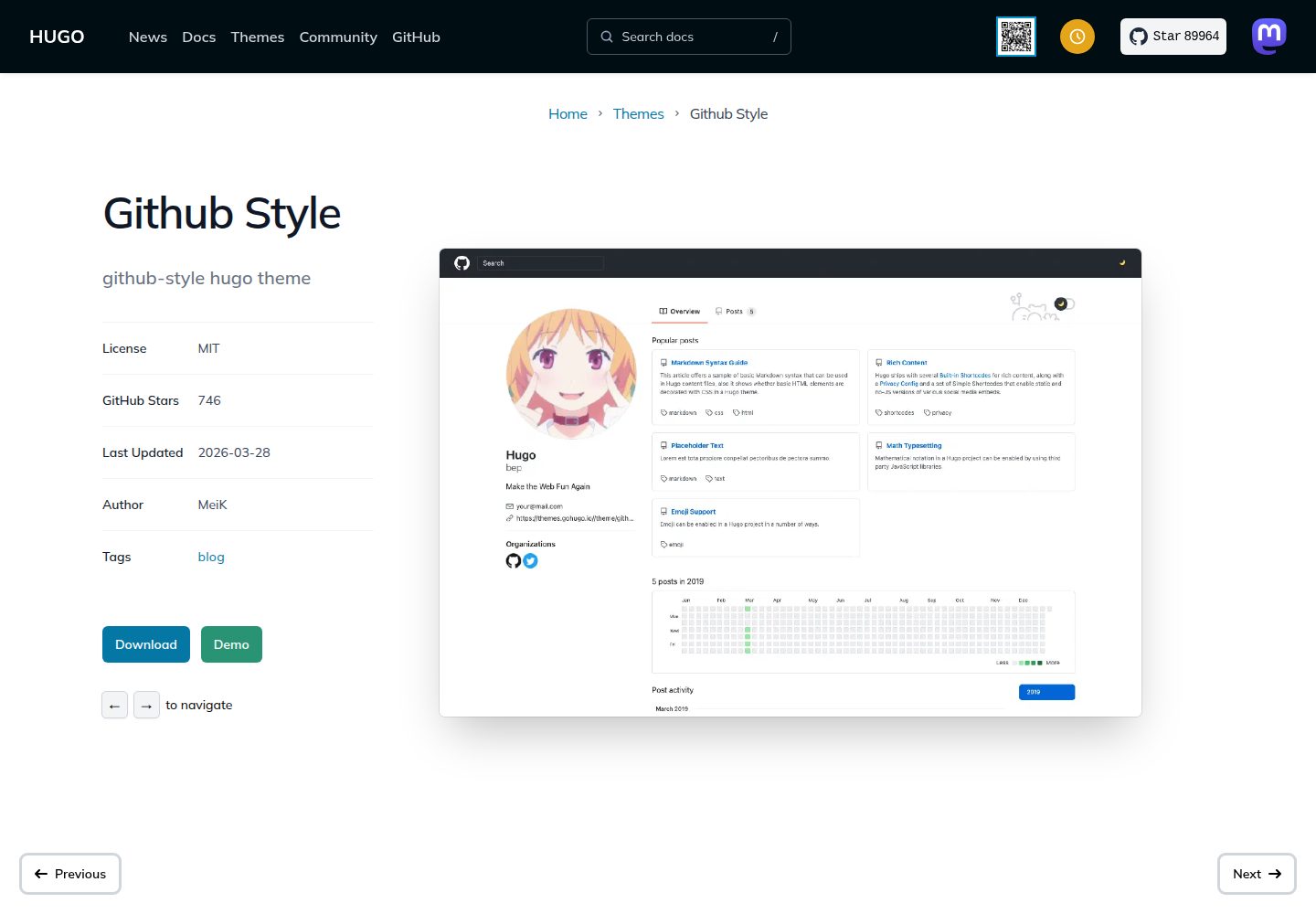
Interface mimics GitHub's visual style, with desktop and mobile layouts
HugoBlog
github-style — Hugo Blog Template
By MeiK2333
github-style is a Hugo blog theme whose interface mimics GitHub's visual style, supporting pinned posts, Gitalk comments, LaTeX/MathJax formulas, local search, and custom CSS/JS.
Explore the design
Compare the page layouts and mobile experience. Open any screenshot for a closer look.
Desktop homepage1 / 3
Desktop captureTop of page
Actual screenshot captured by the server browser.
All pages & views 3
Screenshots show visual appearance; interactive behavior may differ.
Recorded 2026-10-02View source
What stands out
A quick read of the recorded project description.
Supports pinning posts via pin: true in front matter
Integrates Gitalk comments, requiring configuration of GitHub OAuth app information
Supports two math formula rendering methods: KaTeX and MathJax
Provides local search based on fuse.js
Allows appending custom styles and scripts via the custom_css and custom_js parameters
Template Details
github-style is a Hugo blog theme developed by MeiK2333, with the repository under the MIT license. The theme presents blog content in GitHub's interface style, including a homepage, post list, and post pages, with separate layouts for desktop and mobile.
For content organization, the theme pins posts via pin: true in front matter, controls summary display on list pages using the summary field or the <!--more--> marker, and can show the last modified time on the page via the lastmod configuration. Posts are created with draft: true by default and must be manually changed to false to appear on the site.
In terms of features, the theme supports Gitalk comments (requiring the clientID and clientSecret of a GitHub OAuth app), two math formula rendering methods—KaTeX and MathJax—local search based on fuse.js, and a details shortcode for generating collapsible blocks. Styles and scripts can be appended via the custom_css, custom_js, and defer_custom_js parameters in config.toml.
Note that the README's TODO records that the JS introduced by title navigation throws errors in the console, indicating that this part is not yet complete; third-party assets such as demo images, fonts, and icons in the theme need to be checked separately for their licenses and cannot be judged solely by the code's MIT license.
HugoBlog
Is it right for your project?
Use Cases
- Building a personal blog with Hugo and wanting an interface close to GitHub's style
- Needing to display LaTeX or MathJax math formulas in posts
- Wanting to manage blog comments in a GitHub repository via Gitalk
- Needing to pin some posts and control how summaries are displayed on list pages
Suitable For
- Developers familiar with basic Hugo commands and config.toml configuration
- Bloggers who prefer GitHub's visual style and focus on text content
- Technical blogs that need math formula rendering or Gitalk comments
Getting started & customization
Use these recorded setup notes alongside the repository instructions for your chosen version.
- 1
Install the theme into the themes/github-style directory via git submodule add
- 2
When upgrading from an older version, rename content/posts to content/post
- 3
Using Gitalk comments requires filling in clientID, clientSecret, repo, owner, and other parameters in config.toml
- 4
Enabling local search requires setting enableSearch = true and configuring JSON output in outputs and outputFormats
- 5
The README's TODO notes that the JS introduced by title navigation throws errors in the console, so be aware before use
License & source material
Usage conditions & limitations
Free to use · keep license noticeThis entry covers the free version under the MIT license in the public repository; the free scope is the code of this version and does not mean that external services or third-party assets are free.
Must comply with when using
- Free use, modification, commercial use, and distribution of this version's code are permitted.
- When distributing copies or substantial portions of the code, retain the original author's copyright notice and the full MIT license notice.
- The code is provided as is; warranties and limitations of liability are governed by the original license and applicable law.
Additional costs & items to verify
- Enabling Gitalk comments requires creating a GitHub OAuth app yourself and filling in clientID and clientSecret in config.toml; comment data is stored in the specified GitHub repository and depends on GitHub accounts and external services.
- The example configuration includes a Google Analytics service item; once enabled, the site sends visit statistics to Google, which is an external third-party service, and you need to apply for an ID yourself and comply with its terms.
- The theme is installed from a GitHub repository via git submodule; building and updating depend on access to GitHub and git tools, and cannot be obtained directly in an offline environment.
- The README's TODO explicitly records that the JS introduced by title navigation throws errors in the browser console; this part is not yet complete, so be aware before use.
- Demo images, fonts, icons, and other third-party assets need to be checked against their respective licenses and cannot be judged solely by the code's MIT license.
- External services such as domains, hosting, databases, payments, or AI may incur additional charges.
View Original Text Basis
Permission is hereby granted, free of charge
Original License Text
clientID = "Your client ID" clientSecret = "Your client secret"
Original README
[services.googleAnalytics] ID = "UA-123456-789"
Original README
git submodule add [email protected]:MeiK2333/github-style.git themes/github-style
Original README
https://github.com/MeiK2333/github-style/blob/master/LICENSEhttps://github.com/MeiK2333/github-style/blob/master/README.md- 重写标题导航,那玩意儿引入的 JS 在控制台报错。
Original README
Compiled by DeepSeek based on repository license and README ·2026-10-02. Results only cover the materials read; dependencies, images, fonts, and subsequent term changes are subject to their respective original texts.
Project checks & description sources
Template Information
- Source platforms
- Hugo Themes
- Documentation and maintenance reference score
- More documented · 83 / 100
- Technologies
- Hugo
- Website type
- Blog
How this score is calculated
Our heuristic uses license records (up to 30), a demo link (12), a preview (10), stars (15), recorded maintenance (15), description completeness (8), feature records (5) and classification data (5). It is not a code, security or performance test, or a Google score. A link does not establish tested functionality.
What to verify for this project
- Repository update recorded
- 2026-03-28
- Screenshot last checked
- 2026-10-02
A demo link is listed. Check it with your own content and viewport sizes; its presence does not confirm that forms, authentication or payments work.
The catalog identifies Hugo as the primary stack. Check the actual dependency manifest and lockfile for versions and hosting requirements. These notes use recorded metadata, not a code audit or a deployment test.
Use a selection guide →How this description was prepared
AI-assisted description based on catalog records and repository material. Repository authors are not automatically the reviewers of this description.
Automatically checked against source and license rules; no manual editorial review.
Inspect the recorded source material
SHA-256: 6719928bf7767cce7abf003d95702d2a78209f9784916ad10b51015ba43a90b5
2026-10-02T10:30:58.370Z
Source file / repository# github-style ## Init hugo site ```bash hugo new site mysite cd mysite ``` ## Install the theme ```bash git submodule add [email protected]:MeiK2333/github-style.git themes/github-style ``` ## Update the theme If you just installed the theme, it is already in the latest version. If not, you can update using the below commands ```bash cd themes/github-style git pull ``` Then, you need to rename the previous `posts` folder to `post` ```bash cd <you-project-folder> mv content/posts content/post ``` ## Setup readme ```bash hugo new readme.md echo '`Hello World!`' > content/readme.md ``` ## Pin post ``` --- pin: true --- ``` ## Add new post Hugo will create a post with `draft: true`, change it to false in order for it to show in the website. ``` hugo new post/title_of_the_post.md ``` ## Limit display content ### Approach 1: use summary ``` --- title: "title" date: 2019-10-22T18:46:47+08:00 draft: false summary: "The summary content" --- ``` ### Approach 2: use `<!--more-->` Use `<!--more-->` to separate content that will display in the posts page as abstraction and the rest of the content. This is different from summary, as summary will not appear in the post. ``` --- title: "title" date: 2019-10-22T18:46:47+08:00 draft: false --- abstraction show in the post page <!--more--> other content ``` ## Add last modified date add to `config.toml` ```toml lastmod = true [frontmatter] lastmod = ["lastmod", ":fileModTime", ":default"] ``` ## Use [gitalk](https://github.com/gitalk/gitalk) to support comments add to `config.toml` ```toml enableGitalk = true [params.gitalk] clientID = "Your client ID" clientSecret = "Your client secret" repo = "repo" owner = "Your Github username" admin = "Your Github username" id = "location.pathname" labels = "gitalk" perPage = 30 pagerDirection = "last" createIssueManually = true distractionFreeMode = false ``` ## Support LaTeX In you post add `math: true` to [front matter](https://gohugo.io/content-management/front-matter/) ``` --- katex: math --- ``` Then the [katex script](https://katex.org/docs/autorender.html) will auto render the string enclosed by delimiters. ``` # replace ... with latex formula display inline \\( ... \\) display block $$ ... $$ ``` 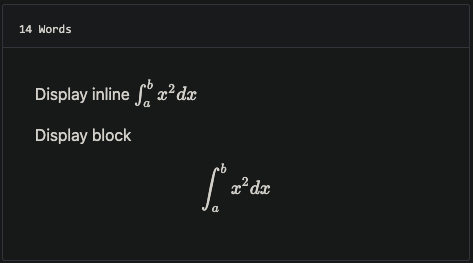 ## Support MathJax you can add MathJax:true to frontmatter ``` mathJax: true ``` ## Custom CSS and JS Add your files in the static folder and list them in the custom_css and custom_js parameters For example, with static/css/custom.css and static/js/custom.js, add to `config.toml` ```toml [params] custom_css = ["css/custom.css"] custom_js = ["js/custom.js"] # custom script with defer attribute defer_custom_js = ["js/defer_custom.js"] ``` ## config.toml example ```toml baseURL = "https://meik2333.com/" languageCode = "zh-cn" title = "MeiK's blog" theme = "github-style" pygmentsCodeFences = true pygmentsUseClasses = true [params] author = "MeiK" description = "In solitude, where we are least alone." github = "MeiK2333" facebook = "MeiK2333" twitter = "MeiK2333" linkedin = "MeiK2333" instagram = "MeiK2333" tumblr = "MeiK2333" email = "[email protected]" url = "https://meik2333.com" keywords = "blog, google analytics" rss = true lastmod = true userStatusEmoji = "😀" favicon = "/images/github.png" avatar = "/images/avatar.png" headerIcon = "/images/GitHub-Mark-Light-32px.png" location = "China" enableGitalk = true custom_css = ["css/custom.css"] custom_js = ["js/custom.js"] [params.gitalk] clientID = "Your client ID" clientSecret = "Your client secret" repo = "repo" owner = "MeiK2333" admin = "MeiK2333" id = "location.pathname" labels = "gitalk" perPage = 15 pagerDirection = "last" createIssueManually = true distractionFreeMode = false [[params.links]] title = "Link" href = "https://github.com/meik2333" [[params.links]] title = "Link2" href = "https://meik2333.com" icon = "https://meik2333.com/images/avatar.png" [frontmatter] lastmod = ["lastmod", ":fileModTime", ":default"] [services] [services.googleAnalytics] ID = "UA-123456-789" ``` ## Support collapsible block You can create a collapsible block like this: ``` {{<details "summary title">}} block content {{</details>}} ``` And it will show like this: <details> <summary>summary title</summary> <p>block content</p> </details> ## Support local search add to `config.toml` ```toml [params] enableSearch = true [outputs] home = ["html", "json"] [outputFormats.json] mediaType = "application/json" baseName = "index" isPlainText = false ``` We can do local search now, it is implemented by `fuse.js`. ## deploy.sh example There are various way to deploy to github, here is a link to official [document](https://gohugo.io/hosting-and-deployment/hosting-on-github/). Here is an sample. Note line 22 have `env HUGO_ENV="production"`, makes sure googleAnalysis is loaded during production, but is not loaded when we are testing it in localhost. ```bash #!/bin/sh if [ "`git status -s`" ] then echo "The working directory is dirty. Please commit any pending changes." exit 1; fi echo "Deleting old publication" rm -rf public mkdir public git worktree prune rm -rf .git/worktrees/public/ echo "Checking out gh-pages branch into public" git worktree add -B gh-pages public origin/gh-pages echo "Removing existing files" rm -rf public/* echo "Generating site" env HUGO_ENV="production" hugo -t github-style echo "Updating gh-pages branch" cd public && git add --all && git commit -m "Publishing to gh-pages (publish.sh)" #echo "Pushing to github" #git push --all ``` Then you can verify the site is working and use `git push --all` to push the change to github. If you don't want to check again every time, you can uncomment the `#git push --all` in the script. ## TODO - 重写标题导航,那玩意儿引入的 JS 在控制台报错。
Explore similar templates
Compare previews and descriptions within the same stack and category.

hugo-PaperMod
A fast, clean, responsive Hugo theme for blogs and lightweight portfolios, with three layout modes (Regular, Home-Info, Profile), automatic and manual light/dark themes, Fuse.js client-side search, multilingual support, and built-in Open Graph, Twitter Cards, and Schema.org data.
Hugo · Portfolio

LoveIt
LoveIt is a clean, elegant, and feature-rich Hugo blog theme derived from LeaveIt and KeepIt, MIT-licensed. It offers light/dark modes, responsive layout, multilingual support, and search via Lunr.js or Algolia.
Hugo · Blog

hugo-coder
hugo-coder is a minimalist Hugo blog theme maintained by luizdepra under the MIT license. It provides a clean, text-focused blog appearance, configuration documentation in the docs directory, and a complete exampleSite with hugo.toml.
Hugo · Blog

blowfish
Blowfish is a Hugo personal website and blog theme built with Tailwind CSS 4, focused on lightness, simplicity, and content-first presentation.
Hugo · Blog

hugo-paper
hugo-paper is a simple, clean, and customizable Hugo blog theme configured through config.toml or hugo.toml.
Hugo · Blog

hextra
Hextra is a Hugo theme for documentation and blog sites, built on Hugo and Tailwind CSS with design referencing Nextra.
Hugo · Documentation