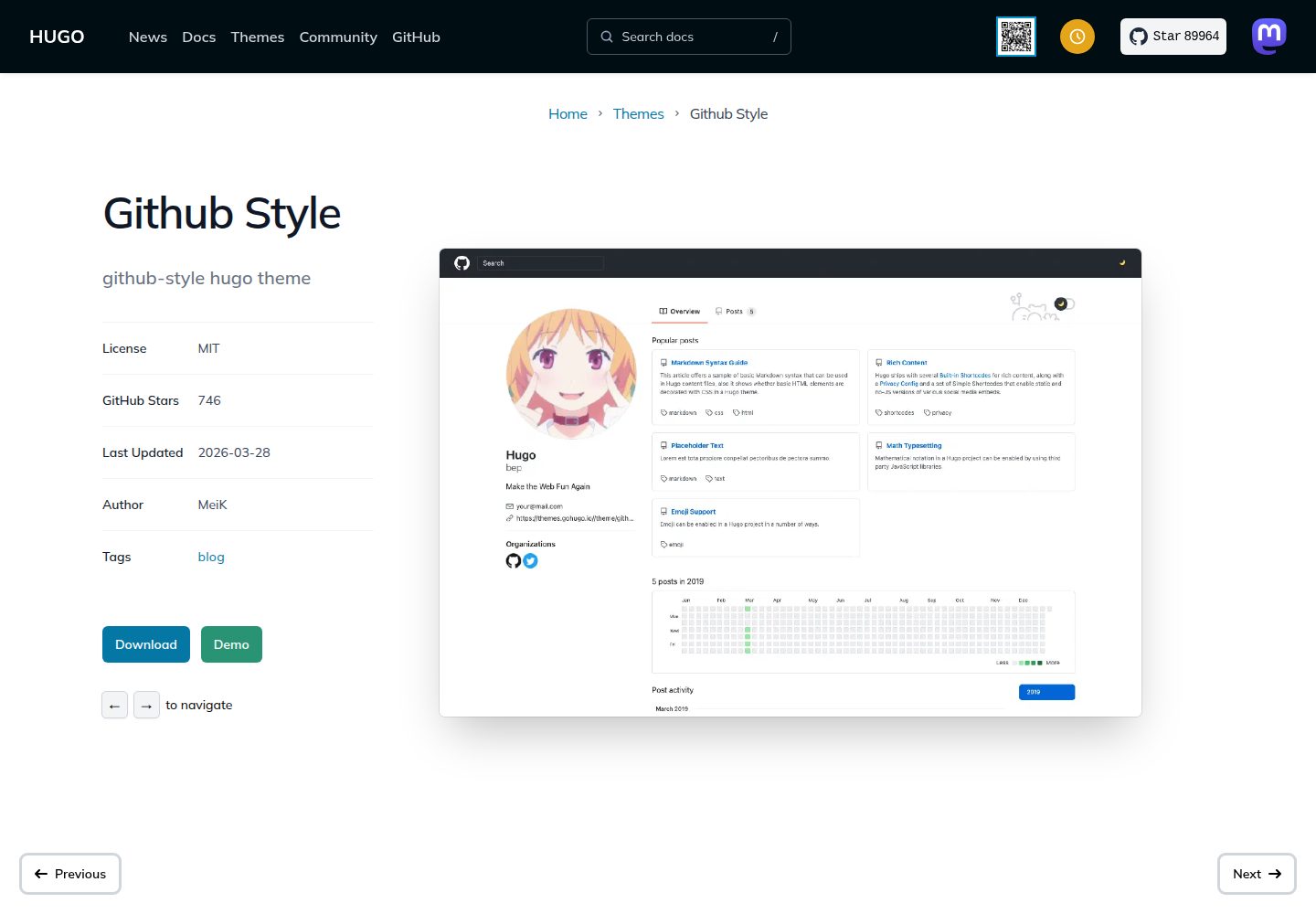
界面模仿 GitHub 的视觉风格,包含桌面端与移动端布局
Hugo博客
github-style — Hugo 博客模板
作者 MeiK2333
github-style 是一个 Hugo 博客主题,界面模仿 GitHub 的视觉风格,支持置顶文章、Gitalk 评论、LaTeX/MathJax 公式、本地搜索与自定义 CSS/JS。
看看你的网站会是什么样
浏览真实页面截图,比较内容排版与手机效果。点击下方缩略图切换,放大查看整页细节。
全部页面与视图 3
截图用于了解视觉与布局,交互效果请以实际项目为准。
采集于 2026-10-02查看来源
值得关注的模板亮点
从已有项目资料中,快速了解它的特点。
支持通过 front matter 的 pin: true 置顶文章
集成 Gitalk 评论,需要配置 GitHub OAuth 应用信息
支持 KaTeX 与 MathJax 两种数学公式渲染
提供基于 fuse.js 的本地搜索
可通过 custom_css、custom_js 参数追加自定义样式与脚本
模板详细介绍
github-style 是 MeiK2333 开发的 Hugo 博客主题,仓库采用 MIT 许可。主题以 GitHub 的界面风格呈现博客内容,包含首页、文章列表与文章内页,并针对桌面端与移动端分别做了页面布局。
在内容组织上,主题通过 front matter 中的 pin: true 置顶文章,用 summary 字段或 <!--more--> 标记控制列表页的摘要展示,并可借助 lastmod 配置在页面上显示最后修改时间。文章默认以 draft: true 创建,需要手动改为 false 才会出现在站点中。
功能方面,主题支持 Gitalk 评论(需要 GitHub OAuth 应用的 clientID 与 clientSecret)、KaTeX 与 MathJax 两种数学公式渲染方式、基于 fuse.js 的本地搜索,以及 details 短代码生成可折叠区块。样式与脚本可通过 config.toml 中的 custom_css、custom_js 和 defer_custom_js 参数追加。
需要注意,README 的 TODO 中记录标题导航引入的 JS 在控制台报错,说明该部分尚未完善;主题的演示图片、字体、图标等第三方素材需单独核对其许可,不能仅凭代码的 MIT 许可判断。
Hugo博客
适合你的项目吗?
适用场景
- 使用 Hugo 搭建个人博客,并希望界面接近 GitHub 风格
- 需要在文章中展示 LaTeX 或 MathJax 数学公式
- 希望通过 Gitalk 在 GitHub 仓库中管理博客评论
- 需要置顶部分文章并在列表页控制摘要展示方式
适合人群
- 熟悉 Hugo 基本命令与 config.toml 配置的开发者
- 偏好 GitHub 视觉风格、以文字内容为主的博客作者
- 需要数学公式渲染或 Gitalk 评论的技术博客
上手与定制指南
结合仓库当前版本的说明,按下面的资料检查内容、配置与运行要求。
- 1
通过 git submodule add 将主题安装到 themes/github-style 目录
- 2
从旧版本升级时需将 content/posts 重命名为 content/post
- 3
使用 Gitalk 评论需在 config.toml 中填写 clientID、clientSecret、repo、owner 等参数
- 4
启用本地搜索需设置 enableSearch = true,并在 outputs 与 outputFormats 中配置 JSON 输出
- 5
README 的 TODO 指出标题导航引入的 JS 会在控制台报错,使用前需留意
授权与来源资料
使用条件与限制
免费使用 · 保留许可声明本次收录的是公开仓库中采用 MIT 许可的免费版本;免费范围为该版本代码,不代表外部服务或第三方素材免费。
使用时需要遵守
- 允许免费使用、修改、商用和分发该版本代码。
- 分发代码副本或实质性部分时,保留原作者版权声明和完整 MIT 许可声明。
- 代码按现状提供;担保与责任限制以原许可证及适用法律为准。
额外费用与待核对事项
- 启用 Gitalk 评论需自行创建 GitHub OAuth 应用,并在 config.toml 中填写 clientID 与 clientSecret;评论数据存储在指定的 GitHub 仓库中,依赖 GitHub 账号与外部服务。
- 示例配置包含 Google Analytics 服务项,启用后站点会向 Google 发送访问统计数据,属于外部第三方服务,需自行申请 ID 并遵守其条款。
- 主题通过 git submodule 从 GitHub 仓库安装,构建与更新依赖访问 GitHub 及 git 工具,离线环境无法直接获取。
- README 的 TODO 明确记录标题导航引入的 JS 会在浏览器控制台报错,该部分功能尚未完善,使用前需留意。
- 演示图片、字体、图标及其他第三方素材需按各自许可核对,不能仅凭代码的 MIT 许可判断。
- 域名、托管、数据库、支付或 AI 等外部服务可能另外收费。
查看原文依据
Permission is hereby granted, free of charge
许可证原文
clientID = "Your client ID" clientSecret = "Your client secret"
README 原文
[services.googleAnalytics] ID = "UA-123456-789"
README 原文
git submodule add [email protected]:MeiK2333/github-style.git themes/github-style
README 原文
https://github.com/MeiK2333/github-style/blob/master/LICENSEhttps://github.com/MeiK2333/github-style/blob/master/README.md- 重写标题导航,那玩意儿引入的 JS 在控制台报错。
README 原文
DeepSeek 根据仓库许可证和 README 整理 ·2026-10-02。结果仅覆盖已读取资料,依赖、图片、字体及后续条款变更以各自原文为准。
项目核对记录与介绍依据
模板资料
- 来源平台
- Hugo Themes
- 资料与维护参考分
- 资料较完整 · 83 / 100
- 技术栈
- Hugo
- 网站类型
- 博客
这个分数如何计算
本站按许可资料(最高30分)、演示链接(12分)、预览图(10分)、Star数(15分)、记录的维护时间(15分)、描述完整度(8分)、功能记录(5分)和分类资料(5分)计算。它不是代码、安全或性能测试,也不是 Google 评分;有链接不代表已实测可用。
这个项目需要核对什么
- 记录的仓库更新时间
- 2026-03-28
- 截图检查日期
- 2026-10-02
已收录演示链接。请用你的内容与屏幕尺寸检查;有演示不代表表单、认证或支付已经可用。
目录记录的主要技术栈是 Hugo。请通过依赖清单和锁文件核对实际版本与托管要求。这些说明基于收录资料,不代表代码审计或部署实测。
查看具体选型方法 →介绍的制作与核对状态
介绍由 AI 辅助整理目录与仓库资料。仓库作者不等于这篇介绍的审核者。
已完成服务器许可规则与 AI 来源核对;未经过人工编辑审核。
查看当时使用的来源资料
SHA-256: 6719928bf7767cce7abf003d95702d2a78209f9784916ad10b51015ba43a90b5
2026-10-02T10:30:58.370Z
来源文件 / 仓库# github-style ## Init hugo site ```bash hugo new site mysite cd mysite ``` ## Install the theme ```bash git submodule add [email protected]:MeiK2333/github-style.git themes/github-style ``` ## Update the theme If you just installed the theme, it is already in the latest version. If not, you can update using the below commands ```bash cd themes/github-style git pull ``` Then, you need to rename the previous `posts` folder to `post` ```bash cd <you-project-folder> mv content/posts content/post ``` ## Setup readme ```bash hugo new readme.md echo '`Hello World!`' > content/readme.md ``` ## Pin post ``` --- pin: true --- ``` ## Add new post Hugo will create a post with `draft: true`, change it to false in order for it to show in the website. ``` hugo new post/title_of_the_post.md ``` ## Limit display content ### Approach 1: use summary ``` --- title: "title" date: 2019-10-22T18:46:47+08:00 draft: false summary: "The summary content" --- ``` ### Approach 2: use `<!--more-->` Use `<!--more-->` to separate content that will display in the posts page as abstraction and the rest of the content. This is different from summary, as summary will not appear in the post. ``` --- title: "title" date: 2019-10-22T18:46:47+08:00 draft: false --- abstraction show in the post page <!--more--> other content ``` ## Add last modified date add to `config.toml` ```toml lastmod = true [frontmatter] lastmod = ["lastmod", ":fileModTime", ":default"] ``` ## Use [gitalk](https://github.com/gitalk/gitalk) to support comments add to `config.toml` ```toml enableGitalk = true [params.gitalk] clientID = "Your client ID" clientSecret = "Your client secret" repo = "repo" owner = "Your Github username" admin = "Your Github username" id = "location.pathname" labels = "gitalk" perPage = 30 pagerDirection = "last" createIssueManually = true distractionFreeMode = false ``` ## Support LaTeX In you post add `math: true` to [front matter](https://gohugo.io/content-management/front-matter/) ``` --- katex: math --- ``` Then the [katex script](https://katex.org/docs/autorender.html) will auto render the string enclosed by delimiters. ``` # replace ... with latex formula display inline \\( ... \\) display block $$ ... $$ ``` 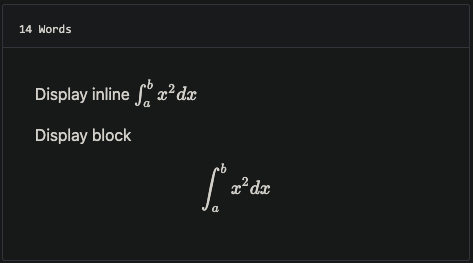 ## Support MathJax you can add MathJax:true to frontmatter ``` mathJax: true ``` ## Custom CSS and JS Add your files in the static folder and list them in the custom_css and custom_js parameters For example, with static/css/custom.css and static/js/custom.js, add to `config.toml` ```toml [params] custom_css = ["css/custom.css"] custom_js = ["js/custom.js"] # custom script with defer attribute defer_custom_js = ["js/defer_custom.js"] ``` ## config.toml example ```toml baseURL = "https://meik2333.com/" languageCode = "zh-cn" title = "MeiK's blog" theme = "github-style" pygmentsCodeFences = true pygmentsUseClasses = true [params] author = "MeiK" description = "In solitude, where we are least alone." github = "MeiK2333" facebook = "MeiK2333" twitter = "MeiK2333" linkedin = "MeiK2333" instagram = "MeiK2333" tumblr = "MeiK2333" email = "[email protected]" url = "https://meik2333.com" keywords = "blog, google analytics" rss = true lastmod = true userStatusEmoji = "😀" favicon = "/images/github.png" avatar = "/images/avatar.png" headerIcon = "/images/GitHub-Mark-Light-32px.png" location = "China" enableGitalk = true custom_css = ["css/custom.css"] custom_js = ["js/custom.js"] [params.gitalk] clientID = "Your client ID" clientSecret = "Your client secret" repo = "repo" owner = "MeiK2333" admin = "MeiK2333" id = "location.pathname" labels = "gitalk" perPage = 15 pagerDirection = "last" createIssueManually = true distractionFreeMode = false [[params.links]] title = "Link" href = "https://github.com/meik2333" [[params.links]] title = "Link2" href = "https://meik2333.com" icon = "https://meik2333.com/images/avatar.png" [frontmatter] lastmod = ["lastmod", ":fileModTime", ":default"] [services] [services.googleAnalytics] ID = "UA-123456-789" ``` ## Support collapsible block You can create a collapsible block like this: ``` {{<details "summary title">}} block content {{</details>}} ``` And it will show like this: <details> <summary>summary title</summary> <p>block content</p> </details> ## Support local search add to `config.toml` ```toml [params] enableSearch = true [outputs] home = ["html", "json"] [outputFormats.json] mediaType = "application/json" baseName = "index" isPlainText = false ``` We can do local search now, it is implemented by `fuse.js`. ## deploy.sh example There are various way to deploy to github, here is a link to official [document](https://gohugo.io/hosting-and-deployment/hosting-on-github/). Here is an sample. Note line 22 have `env HUGO_ENV="production"`, makes sure googleAnalysis is loaded during production, but is not loaded when we are testing it in localhost. ```bash #!/bin/sh if [ "`git status -s`" ] then echo "The working directory is dirty. Please commit any pending changes." exit 1; fi echo "Deleting old publication" rm -rf public mkdir public git worktree prune rm -rf .git/worktrees/public/ echo "Checking out gh-pages branch into public" git worktree add -B gh-pages public origin/gh-pages echo "Removing existing files" rm -rf public/* echo "Generating site" env HUGO_ENV="production" hugo -t github-style echo "Updating gh-pages branch" cd public && git add --all && git commit -m "Publishing to gh-pages (publish.sh)" #echo "Pushing to github" #git push --all ``` Then you can verify the site is working and use `git push --all` to push the change to github. If you don't want to check again every time, you can uncomment the `#git push --all` in the script. ## TODO - 重写标题导航,那玩意儿引入的 JS 在控制台报错。
看看同类模板
对比同技术栈与用途的模板,找到更适合的视觉与内容结构。

hugo-PaperMod
PaperMod 是 Hugo 生态里知名度较高的主题之一,定位很明确:给博客和轻量作品集站点提供一套干净、响应式的阅读界面。
Hugo · 作品集

LoveIt
❤️A clean, elegant but advanced blog theme for Hugo 一个简洁、优雅且高效的 Hugo 主题
Hugo · 博客

hugo-coder
A minimalist blog theme for hugo.
Hugo · 博客

blowfish
Personal Website & Blog Theme for Hugo
Hugo · 博客

hugo-paper
🪺 A simple, clean, customizable Hugo theme
Hugo · 博客

hextra
Hextra 是一个 Hugo 主题,定位在文档站与博客之间:既提供侧边栏导航、目录、面包屑、分页这类文档站结构,也能承载博客内容。
Hugo · 文档