Project data is driven by src/contents/projects.ts, with entries added as typed objects
Next.jsReactPortfolioBlog
devfolio-templete — Next.js Portfolio Template
By Mela13076
An open-source developer portfolio template built with Next.js and MDX, featuring project showcases, a Markdown blog, theme presets, and a Resend contact form.
Explore the design
Compare the page layouts and mobile experience. Open any screenshot for a closer look.
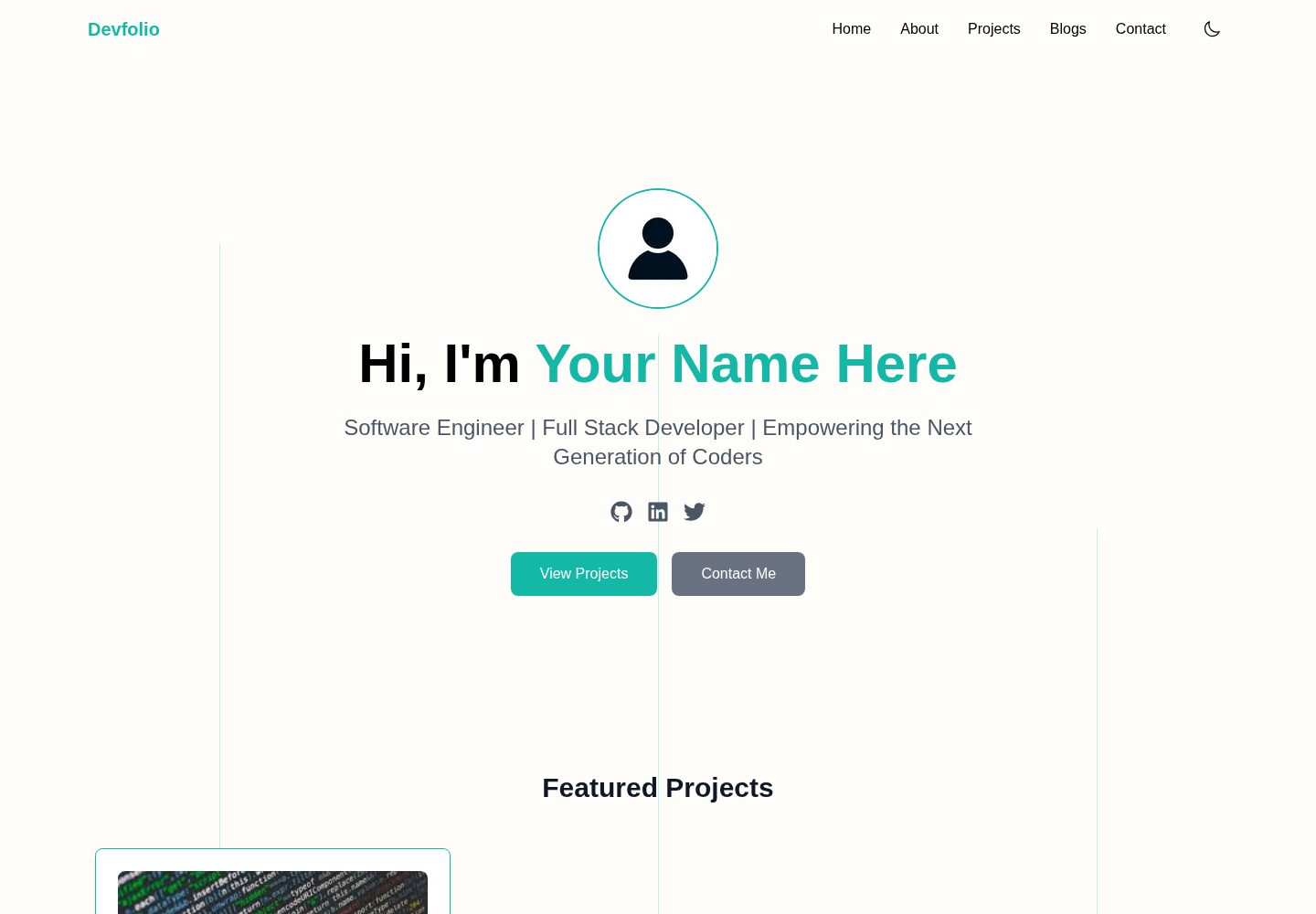
Desktop homepage1 / 3
Desktop captureTop of page
Actual screenshot captured by the server browser.
All pages & views 3
Screenshots show visual appearance; interactive behavior may differ.
Recorded 2026-10-03View source
What stands out
A quick read of the recorded project description.
The blog uses MDX, with filenames as slugs and frontmatter metadata automatically generating list and detail pages at build time
Site name, navigation, social links, footer, and about content are modified centrally in siteConfig.ts
8 built-in color presets with light and dark mode support, and palettes can be extended in themePresets.ts
The contact form sends emails via the Resend API, requiring an API key and sender/recipient addresses to be configured
Open-sourced under the MIT license, free for personal or commercial use
Template Details
This is a personal portfolio template for developers, built with the Next.js App Router alongside Tailwind CSS, Framer Motion, and MDX. The pages include routes for home, about, projects, blog, and contact. Project data is centralized in src/contents/projects.ts. Blog posts are stored as .mdx files in the content directory, where the filename serves as the post slug and frontmatter provides metadata such as title, summary, and date. The blog list and detail pages are generated automatically at build time.
Site information, navigation, social links, footer, and contact form recipient settings are centralized in src/config/siteConfig.ts. The color scheme can be switched among 8 built-in theme presets, or you can modify or add palettes in themePresets.ts. Light and dark mode switching is also supported. The contact form sends emails via the Resend API, which requires obtaining your own API key and configuring environment variables; this is an optional feature.
The template is released under the MIT license, allowing free use, modification, and distribution, provided the copyright and license notice are retained. Third-party assets in the demo, such as images, fonts, and icons, require separate verification of their licensing. External services like Resend and hosting may incur costs. The repository provides three documents covering configuration, customization, and blog writing, along with Vercel deployment instructions.
Next.jsReactPortfolioBlog
Is it right for your project?
Use Cases
- Building a personal developer portfolio site to showcase projects and contact information
- Writing technical blogs with MDX and automatically generating post lists and detail pages
- Using as a learning and secondary development starting point for Next.js App Router projects
- Quickly replacing site information and color schemes by modifying configuration and theme presets
Suitable For
- Developers who want to manage content with Next.js and MDX
- Personal sites that need both a portfolio and a blog
- Users willing to configure external services like Resend themselves
- Front-end developers comfortable modifying configuration and themes at the source code level
Getting started & customization
Use these recorded setup notes alongside the repository instructions for your chosen version.
- 1
It is recommended to use 'Use this template' on GitHub to create a repository, or clone it directly and run npm install and npm run dev
- 2
Site information, navigation, social links, and themes are modified in src/config/siteConfig.ts; color presets are in themePresets.ts
- 3
Blog posts go in the src/contents/blogs directory, and each .mdx file must include frontmatter fields such as title, summary, and date
- 4
To use the contact form, register with Resend, create an API key, set the RESEND_API_KEY environment variable, and configure sender and recipient email addresses
- 5
When deploying to Vercel, add environment variables in the project settings, otherwise the contact form cannot send emails
License & source material
Usage conditions & limitations
Free to use · keep license noticeThis entry covers the free version available in a public repository under the MIT license; the free scope applies to that version's code and does not imply that external services or third-party assets are free.
Must comply with when using
- The code of this version may be used, modified, used commercially, and distributed for free.
- When distributing copies or substantial portions of the code, retain the original author's copyright notice and the full MIT license notice.
- The code is provided as is; warranties and limitations of liability are governed by the original license and applicable law.
Additional costs & items to verify
- The contact form is an optional feature, but using it requires registering a Resend account, creating an API key, configuring the RESEND_API_KEY environment variable, and setting sender and recipient email addresses; without configuration, the form cannot send emails.
- Deployment relies on external hosting services such as Vercel, which may be subject to their free tier limits and terms; exceeding them may incur costs.
- Demo images, fonts, icons, and other third-party assets must be verified under their respective licenses and cannot be assumed to be covered solely by the code's MIT license.
- External services such as domains, hosting, databases, payments, or AI may incur additional charges.
View Original Text Basis
Permission is hereby granted, free of charge
Original License Text
Create a free Resend account
Original README
https://github.com/Mela13076/devfolio-templete/blob/main/LICENSEhttps://github.com/Mela13076/devfolio-templete/blob/main/README.mdfree deployment with Vercel
Original README
Compiled by DeepSeek based on repository license and README ·2026-10-03. Results only cover the materials read; dependencies, images, fonts, and subsequent term changes are subject to their respective original texts.
Project checks & description sources
Template Information
- Source platforms
- GitHub
- Documentation and maintenance reference score
- More documented · 92 / 100
- Technologies
- Next.js · React
- Website type
- Portfolio · Blog
How this score is calculated
Our heuristic uses license records (up to 30), a demo link (12), a preview (10), stars (15), recorded maintenance (15), description completeness (8), feature records (5) and classification data (5). It is not a code, security or performance test, or a Google score. A link does not establish tested functionality.
What to verify for this project
- Repository update recorded
- 2025-12-22
- Screenshot last checked
- 2026-10-03
A demo link is listed. Check it with your own content and viewport sizes; its presence does not confirm that forms, authentication or payments work.
The catalog identifies Next.js as the primary stack. Check the actual dependency manifest and lockfile for versions and hosting requirements. These notes use recorded metadata, not a code audit or a deployment test.
Use a selection guide →How this description was prepared
AI-assisted description based on catalog records and repository material. Repository authors are not automatically the reviewers of this description.
Review declaration: [email protected] · 2026-10-04
Inspect the recorded source material
SHA-256: 7b6446c5ef39ea43379a768a99f64c7ecc733c543812d902c1a9910b61f4aed6
2026-10-03T21:04:25.285Z
Source file / repository
<p align="center">
<img src="https://img.shields.io/github/license/Mela13076/devfolio-templete" />
<img src="https://img.shields.io/github/stars/Mela13076/devfolio-templete" />
<img src="https://img.shields.io/github/issues/Mela13076/devfolio-templete" />
<img src="https://img.shields.io/github/forks/Mela13076/devfolio-templete" />
<img src="https://img.shields.io/badge/deploy-vercel-black?logo=vercel" />
<img src="https://github.com/Mela13076/devfolio-templete/actions/workflows/ci.yml/badge.svg"/>
</p>
## **Devfolio - Developer Portfolio Template (Next.js 15 + MDX + Tailwind)**
A modern, customizable developer portfolio built with **Next.js 15, Tailwind CSS, MDX, and Framer Motion**.
Designed and customized by **Amelia R. Trevino** — now available as an open-source template for anyone to use, modify, and deploy.
🔗 **Live Demo:** [https://devfolio-templete.vercel.app](https://devfolio-templete.vercel.app/)
📦 **Tech Stack:** Next.js 15 • TypeScript • TailwindCSS • MDX • Framer Motion • Resend Email API
---
## **Features**
* **Beautiful, modern portfolio design** with animations and smooth UX
* **Fully responsive** across all devices
* **Dynamic Projects section** powered by `src/contents/projects.ts`
* **Dynamic Blog system** using:
* MDX files stored in `/src/contents/posts`
* Blog metadata stored in your .mdx files
* **Automatic routing for blog posts** (`/blogs/[slug]`)
* **Customizable site information** through one config file: `src/config/siteConfig.ts`
* **Configurable Theme Presets** — choose from 8 built-in color themes directly in
`src/config/siteConfig.ts` (`blue`, `green`, `purple`, `pink`, `orange`, `red`, `yellow`, `teal`)
* **Advanced theme customization** — edit or create new palettes in
`src/config/themePresets.ts`
* **Dark & Light mode theme toggle** with customizable color palette
* **Contact form integrated with Resend API**
* **Easy to extend, easy to deploy** (free deployment with Vercel)
* **Clean folder structure** ideal for beginners and scalable for advanced users
---
## 📘 Documentation
- **Configuration Guide** → [docs/site-config.md](./docs/site-config.md)
- **Customization Guide** → [docs/customization.md](./docs/customization.md)
- **Blog Writing Guide** → [docs/blog-mdx-guide.md](./docs/blog-mdx-guide.md)
---
## 🏁 **Getting Started**
### **Option 1 — Use This Template (Recommended)**
This repository is published as a **GitHub Template**.
If you're building **your own portfolio**, this is the fastest way to get started:
1. Click **“Use this template”** on GitHub
2. Create your own repository from the template
3. Clone your new repository:
```bash
git clone https://github.com/<your-username>/<your-repo-name>.git
cd <your-repo-name>
````
4. Install dependencies and start the dev server:
```bash
npm install
npm run dev
```
---
### Option 2 — Clone This Repository
You can also clone this repository directly if you just want to explore the code or experiment locally:
```bash
git clone https://github.com/Mela13076/devfolio-templete.git
cd devfolio-templete
npm install
npm run dev
```
You do **not** need to fork this repository unless you plan to contribute changes back.
If you’d like to **fix bugs**, **suggest features**, or **submit a pull request**, please see
[CONTRIBUTING.md](./CONTRIBUTING.md).
## ⬆️ **Update Your Site Configuration**
>This template uses a **content-driven approach**.
>You only edit simple `.ts` files and `.mdx` files — no need to touch React components.
All global website settings are stored in:
```
src/config/siteConfig.ts
```
You can edit:
* name & tagline
* social links
* navigation menu
* footer text
* about content
The website will automatically update everywhere after modifying this file.
### 🎨 **Customization — Theme Presets & Colors**
---
This template includes 8 customizable **theme presets** you can switch between in `src/config/siteConfig.ts`:
```
siteColorTheme: "teal"
```
Available presets:
```
blue • green • purple • pink • orange • red • yellow • teal
```
To modify or add new themes, edit:
```
src/config/themePresets.ts
```
Each theme controls the full color system (accent, hover, borders, backgrounds, etc.).
### 🧩 Adding Projects
---
Projects are stored here:
```
src/contents/projects.ts
```
Each project takes a typed object (types are optional & documented in `src/types/index.ts`):
```ts
{
title: "My Cool Project",
description: "...",
tags: ["Next.js", "TypeScript"],
demoUrl: "https://...",
codeUrl: "https://..."
}
```
### 📚 Adding Blog Content (MDX)
---
All blog content in Devfolio is powered by MDX and uses the file system as the single source of truth.
Blog post live here:
```
src/contents/blogs/
```
Each blog must be a its own unique `.mdx` file:
The filename becomes the blog slug
```
/src/contents/posts/my-first-post.mdx
```
### Metadata
At the top of the MDX file, include metadata.
**Required fields**
* `title` – string
* `summary` – string (used for blog cards)
* `date` – string (ISO format recommended)
**Optional fields**
* `tags` – string[]
* `readTime` – string
* `lastUpdated` – string
Example:
```mdx
---
title: "My First Post"
summary: "A short summary of the blog post."
date: "2025-01-01"
tags: ["Career", "Education"]
readTime: "6 min read"
lastUpdated: "2025-05-01"
---
# My First Post
Your article content goes here.
MDX allows you to mix Markdown with React components.
```
### How Blogs Are Generated
* Blog metadata is **automatically extracted** from MDX frontmatter
* Blog cards and blog pages are generated at **build time**
* No manual blog list or config file is required
* Invalid or missing metadata will throw a **helpful error during build**
🔹 **Important notes**
* Every blog must have its own `.mdx` file
* Do not manually add blog metadata anywhere else
## ✉️ **Contact Form Setup (Resend API)**
>**Contact form is optional to use**
The contact form sends emails through **Resend**.
1. Create a free Resend account
- ➡ [https://resend.com](https://resend.com)
2. Create an API key
3. Add an `.env` file:
```
RESEND_API_KEY=your_resend_key_here
```
4. Configure your Resend data in `src/config/siteConfig.ts`
```
resend: {
fromEmail: "",
toEmail: "",
},
```
4. Your route is already set up here:
```
src/app/api/contact/route.ts
```
* no changes needed in this file
The form will work automatically once the API key is configured.
## ☁️ **Deployment (Vercel)**
1. Commit and push your code to GitHub
2. Go to Vercel → "New Project"
3. Select your GitHub repo
4. Add environment variables if using Contact Form (important!)
```
RESEND_API_KEY=your_resend_key_here
```
5. Deploy
- Vercel will automatically handle build, routing, and optimization.
## 🗂 **Recommended Folder Structure**
```
src/
├── app/
│ ├── page.tsx
│ ├── globals.css
│ ├── layout.tsx
│ ├── about/
│ ├── projects/
│ ├── blogs/
│ ├── contact/
│ └── api/contact/route.ts
├── components/
├── contents/
│ ├── projects.ts
│ └── blogs/
├── config/
│ ├── siteConfig.ts
│ └── themePresets.ts
├── types/
├── utils/
└── lib/
```
## 🛠 **Technologies Used**
* **Next.js 15 (App Router)**
* **React + TypeScript**
* **TailwindCSS**
* **Framer Motion**
* **MDX**
* **Resend API**
* **Vercel Deployment**
## 📄 **License**
[MIT Licence](./LICENSE)
This project is open-source and free for personal or commercial use.
If you use it, ⭐ **please consider giving the repo a star!**
It helps others discover the template and supports its development.
## 🤝 **Contributing**
If you would like to suggest improvements to the original template, you have several options:
### 💡 Feature Suggestions or Bug Reports
Create a new **Issue** using the Bug Report or Feature Request templates.
### 💬 Discussions
Join the conversation in the **Discussions** tab to ask questions, share ideas, or request enhancements.
### 🔧 Contribute via Pull Request
If you'd like to directly contribute to the project:
1. Read the [`CONTRIBUTING.md`](./CONTRIBUTING.md) file
2. Create a new branch
3. Submit a pull request
All contributions are welcome — from small fixes to major improvements!
## 🙌 **Acknowledgements**
Designed and built by **Amelia R. Trevino**.
Made open-source to help developers build beautiful, production-ready portfolios fast.
Explore similar templates
Compare previews and descriptions within the same stack and category.

tailwind-nextjs-starter-blog
A Next.js and Tailwind CSS blog starter template using Contentlayer for Markdown/MDX, with built-in SEO, code highlighting, and tags. It targets personal technical blogs and migration from Jekyll/Hugo to React, and supports one-click Vercel deployment.
Next.js · Blog

react-resume-template
A personal resume website template for software developers, built with Next.js, React, and TypeScript and styled with Tailwind CSS. Site content is driven by a single data file at /src/data/data.tsx, with types in dataDef.ts and images in src/images/.
Next.js · Portfolio

Nextjs-tailwindcss-blog-template
A personal blog template built with Next.js and Tailwind CSS, using Velite to process Markdown content. It includes home, about, contact and article pages, with a demo site and a companion YouTube tutorial.
Next.js · Blog

Next-js-Blog-Boilerplate
A blog starter built on Next.js 12 and Tailwind CSS 3, integrating TypeScript, ESLint, Prettier, and PostCSS.
Next.js · Blog

nextjs-blog-theme
A Next.js 15 and Tailwind CSS 4.x blog starter by Netlify, designed by Bejamas, with MDX support, dark/light theme switching, and environment-variable configuration. It includes a visual setup wizard for deploying to Netlify and manages content via local .mdx files.
Next.js · Blog

blog
A personal blog forked from Timlrx's tailwind-nextjs-starter-blog, built with Next.js, React, and Tailwind CSS. Content is stored as Markdown/MDX under data/, with site, author, navigation, and project data in separate files.
Next.js · Blog