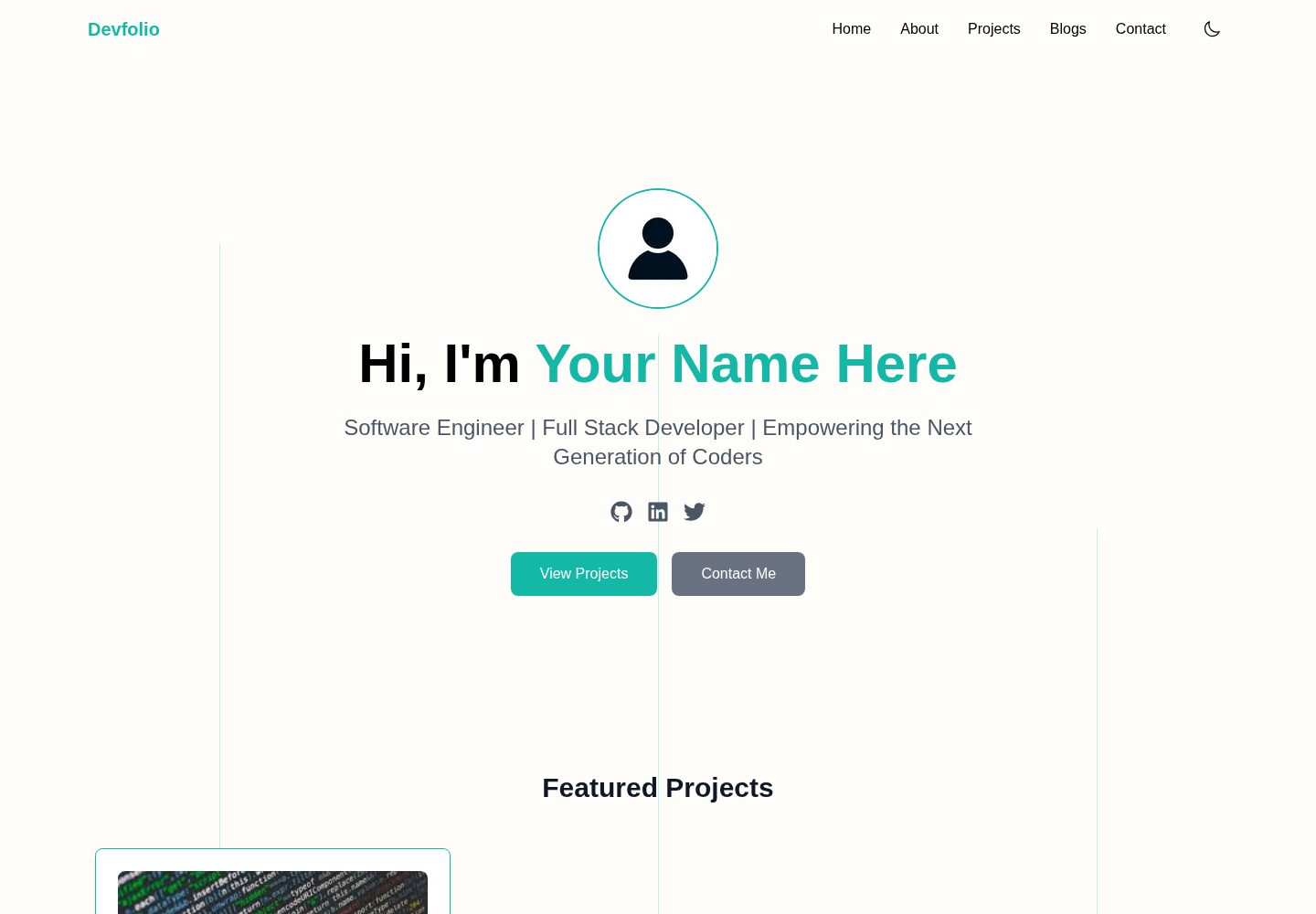
项目数据由 src/contents/projects.ts 驱动,按类型化对象添加条目
Next.jsReact作品集博客
devfolio-templete — Next.js 作品集模板
作者 Mela13076
基于 Next.js 与 MDX 的开源开发者作品集模板,包含项目展示、Markdown 博客、主题预设与 Resend 联系表单。
看看你的网站会是什么样
浏览真实页面截图,比较内容排版与手机效果。点击下方缩略图切换,放大查看整页细节。
全部页面与视图 3
截图用于了解视觉与布局,交互效果请以实际项目为准。
采集于 2026-10-03查看来源
值得关注的模板亮点
从已有项目资料中,快速了解它的特点。
博客使用 MDX,文件名作为 slug,frontmatter 元数据在构建时自动生成列表与详情页
站点名称、导航、社交链接、页脚与关于内容集中在 siteConfig.ts 中修改
内置 8 个配色预设并支持明暗模式,可在 themePresets.ts 中扩展调色板
联系表单通过 Resend API 发送邮件,需配置 API Key 与收发件地址
以 MIT 许可开源,可免费用于个人或商业用途
模板详细介绍
这是一个面向开发者的个人作品集模板,使用 Next.js App Router 构建,配合 Tailwind CSS、Framer Motion 与 MDX。页面包含首页、关于、项目、博客与联系等路由,项目数据集中存放在 src/contents/projects.ts,博客文章以 .mdx 文件放在内容目录中,文件名即文章 slug,frontmatter 提供标题、摘要、日期等元数据,构建时自动生成博客列表与详情页。
站点信息、导航、社交链接、页脚与联系表单收件配置集中在 src/config/siteConfig.ts,配色可在 8 个内置主题预设之间切换,也可在 themePresets.ts 中修改或新增调色板,并支持明暗模式切换。联系表单通过 Resend API 发送邮件,需要自行申请 API Key 并配置环境变量,属于可选功能。
模板以 MIT 许可发布,可免费使用、修改与分发,需保留版权与许可声明;演示中的图片、字体、图标等第三方素材需单独核对授权,Resend、托管等外部服务可能产生费用。仓库提供配置、定制与博客写作三份文档,以及 Vercel 部署说明。
Next.jsReact作品集博客
适合你的项目吗?
适用场景
- 搭建个人开发者作品集网站,展示项目与联系方式
- 用 MDX 写技术博客并自动生成文章列表与详情页
- 作为 Next.js App Router 项目的学习与二次开发起点
- 通过修改配置与主题预设快速替换站点信息与配色
适合人群
- 希望用 Next.js 与 MDX 管理内容的开发者
- 需要作品集与博客合一的个人站点
- 愿意自行配置 Resend 等外部服务的用户
- 接受在源码层面修改配置与主题的前端开发者
上手与定制指南
结合仓库当前版本的说明,按下面的资料检查内容、配置与运行要求。
- 1
推荐在 GitHub 上使用 Use this template 创建仓库,或直接克隆后执行 npm install 与 npm run dev
- 2
站点信息、导航、社交链接与主题在 src/config/siteConfig.ts 中修改,配色预设见 themePresets.ts
- 3
博客文章放在 src/contents/blogs 目录,每个 .mdx 文件需包含 title、summary、date 等 frontmatter 字段
- 4
使用联系表单需注册 Resend、创建 API Key 并设置 RESEND_API_KEY 环境变量,同时配置收发件邮箱
- 5
部署到 Vercel 时需在项目设置中添加环境变量,否则联系表单无法发送邮件
授权与来源资料
使用条件与限制
免费使用 · 保留许可声明本次收录的是公开仓库中采用 MIT 许可的免费版本;免费范围为该版本代码,不代表外部服务或第三方素材免费。
使用时需要遵守
- 允许免费使用、修改、商用和分发该版本代码。
- 分发代码副本或实质性部分时,保留原作者版权声明和完整 MIT 许可声明。
- 代码按现状提供;担保与责任限制以原许可证及适用法律为准。
额外费用与待核对事项
- 联系表单为可选功能,但使用它需要注册 Resend 账户并创建 API Key,配置 RESEND_API_KEY 环境变量及收发件邮箱;不配置则表单无法发送邮件。
- 部署依赖 Vercel 等外部托管服务,可能受其免费额度与条款限制,超出后可能产生费用。
- 演示图片、字体、图标及其他第三方素材需按各自许可核对,不能仅凭代码的 MIT 许可判断。
- 域名、托管、数据库、支付或 AI 等外部服务可能另外收费。
查看原文依据
Permission is hereby granted, free of charge
许可证原文
Create a free Resend account
README 原文
https://github.com/Mela13076/devfolio-templete/blob/main/LICENSEhttps://github.com/Mela13076/devfolio-templete/blob/main/README.mdfree deployment with Vercel
README 原文
DeepSeek 根据仓库许可证和 README 整理 ·2026-10-03。结果仅覆盖已读取资料,依赖、图片、字体及后续条款变更以各自原文为准。
项目核对记录与介绍依据
模板资料
- 来源平台
- GitHub
- 资料与维护参考分
- 资料较完整 · 92 / 100
- 技术栈
- Next.js · React
- 网站类型
- 作品集 · 博客
这个分数如何计算
本站按许可资料(最高30分)、演示链接(12分)、预览图(10分)、Star数(15分)、记录的维护时间(15分)、描述完整度(8分)、功能记录(5分)和分类资料(5分)计算。它不是代码、安全或性能测试,也不是 Google 评分;有链接不代表已实测可用。
这个项目需要核对什么
- 记录的仓库更新时间
- 2025-12-22
- 截图检查日期
- 2026-10-03
已收录演示链接。请用你的内容与屏幕尺寸检查;有演示不代表表单、认证或支付已经可用。
目录记录的主要技术栈是 Next.js。请通过依赖清单和锁文件核对实际版本与托管要求。这些说明基于收录资料,不代表代码审计或部署实测。
查看具体选型方法 →介绍的制作与核对状态
介绍由 AI 辅助整理目录与仓库资料。仓库作者不等于这篇介绍的审核者。
审核声明: [email protected] · 2026-10-04
查看当时使用的来源资料
SHA-256: 7b6446c5ef39ea43379a768a99f64c7ecc733c543812d902c1a9910b61f4aed6
2026-10-03T21:04:25.285Z
来源文件 / 仓库
<p align="center">
<img src="https://img.shields.io/github/license/Mela13076/devfolio-templete" />
<img src="https://img.shields.io/github/stars/Mela13076/devfolio-templete" />
<img src="https://img.shields.io/github/issues/Mela13076/devfolio-templete" />
<img src="https://img.shields.io/github/forks/Mela13076/devfolio-templete" />
<img src="https://img.shields.io/badge/deploy-vercel-black?logo=vercel" />
<img src="https://github.com/Mela13076/devfolio-templete/actions/workflows/ci.yml/badge.svg"/>
</p>
## **Devfolio - Developer Portfolio Template (Next.js 15 + MDX + Tailwind)**
A modern, customizable developer portfolio built with **Next.js 15, Tailwind CSS, MDX, and Framer Motion**.
Designed and customized by **Amelia R. Trevino** — now available as an open-source template for anyone to use, modify, and deploy.
🔗 **Live Demo:** [https://devfolio-templete.vercel.app](https://devfolio-templete.vercel.app/)
📦 **Tech Stack:** Next.js 15 • TypeScript • TailwindCSS • MDX • Framer Motion • Resend Email API
---
## **Features**
* **Beautiful, modern portfolio design** with animations and smooth UX
* **Fully responsive** across all devices
* **Dynamic Projects section** powered by `src/contents/projects.ts`
* **Dynamic Blog system** using:
* MDX files stored in `/src/contents/posts`
* Blog metadata stored in your .mdx files
* **Automatic routing for blog posts** (`/blogs/[slug]`)
* **Customizable site information** through one config file: `src/config/siteConfig.ts`
* **Configurable Theme Presets** — choose from 8 built-in color themes directly in
`src/config/siteConfig.ts` (`blue`, `green`, `purple`, `pink`, `orange`, `red`, `yellow`, `teal`)
* **Advanced theme customization** — edit or create new palettes in
`src/config/themePresets.ts`
* **Dark & Light mode theme toggle** with customizable color palette
* **Contact form integrated with Resend API**
* **Easy to extend, easy to deploy** (free deployment with Vercel)
* **Clean folder structure** ideal for beginners and scalable for advanced users
---
## 📘 Documentation
- **Configuration Guide** → [docs/site-config.md](./docs/site-config.md)
- **Customization Guide** → [docs/customization.md](./docs/customization.md)
- **Blog Writing Guide** → [docs/blog-mdx-guide.md](./docs/blog-mdx-guide.md)
---
## 🏁 **Getting Started**
### **Option 1 — Use This Template (Recommended)**
This repository is published as a **GitHub Template**.
If you're building **your own portfolio**, this is the fastest way to get started:
1. Click **“Use this template”** on GitHub
2. Create your own repository from the template
3. Clone your new repository:
```bash
git clone https://github.com/<your-username>/<your-repo-name>.git
cd <your-repo-name>
````
4. Install dependencies and start the dev server:
```bash
npm install
npm run dev
```
---
### Option 2 — Clone This Repository
You can also clone this repository directly if you just want to explore the code or experiment locally:
```bash
git clone https://github.com/Mela13076/devfolio-templete.git
cd devfolio-templete
npm install
npm run dev
```
You do **not** need to fork this repository unless you plan to contribute changes back.
If you’d like to **fix bugs**, **suggest features**, or **submit a pull request**, please see
[CONTRIBUTING.md](./CONTRIBUTING.md).
## ⬆️ **Update Your Site Configuration**
>This template uses a **content-driven approach**.
>You only edit simple `.ts` files and `.mdx` files — no need to touch React components.
All global website settings are stored in:
```
src/config/siteConfig.ts
```
You can edit:
* name & tagline
* social links
* navigation menu
* footer text
* about content
The website will automatically update everywhere after modifying this file.
### 🎨 **Customization — Theme Presets & Colors**
---
This template includes 8 customizable **theme presets** you can switch between in `src/config/siteConfig.ts`:
```
siteColorTheme: "teal"
```
Available presets:
```
blue • green • purple • pink • orange • red • yellow • teal
```
To modify or add new themes, edit:
```
src/config/themePresets.ts
```
Each theme controls the full color system (accent, hover, borders, backgrounds, etc.).
### 🧩 Adding Projects
---
Projects are stored here:
```
src/contents/projects.ts
```
Each project takes a typed object (types are optional & documented in `src/types/index.ts`):
```ts
{
title: "My Cool Project",
description: "...",
tags: ["Next.js", "TypeScript"],
demoUrl: "https://...",
codeUrl: "https://..."
}
```
### 📚 Adding Blog Content (MDX)
---
All blog content in Devfolio is powered by MDX and uses the file system as the single source of truth.
Blog post live here:
```
src/contents/blogs/
```
Each blog must be a its own unique `.mdx` file:
The filename becomes the blog slug
```
/src/contents/posts/my-first-post.mdx
```
### Metadata
At the top of the MDX file, include metadata.
**Required fields**
* `title` – string
* `summary` – string (used for blog cards)
* `date` – string (ISO format recommended)
**Optional fields**
* `tags` – string[]
* `readTime` – string
* `lastUpdated` – string
Example:
```mdx
---
title: "My First Post"
summary: "A short summary of the blog post."
date: "2025-01-01"
tags: ["Career", "Education"]
readTime: "6 min read"
lastUpdated: "2025-05-01"
---
# My First Post
Your article content goes here.
MDX allows you to mix Markdown with React components.
```
### How Blogs Are Generated
* Blog metadata is **automatically extracted** from MDX frontmatter
* Blog cards and blog pages are generated at **build time**
* No manual blog list or config file is required
* Invalid or missing metadata will throw a **helpful error during build**
🔹 **Important notes**
* Every blog must have its own `.mdx` file
* Do not manually add blog metadata anywhere else
## ✉️ **Contact Form Setup (Resend API)**
>**Contact form is optional to use**
The contact form sends emails through **Resend**.
1. Create a free Resend account
- ➡ [https://resend.com](https://resend.com)
2. Create an API key
3. Add an `.env` file:
```
RESEND_API_KEY=your_resend_key_here
```
4. Configure your Resend data in `src/config/siteConfig.ts`
```
resend: {
fromEmail: "",
toEmail: "",
},
```
4. Your route is already set up here:
```
src/app/api/contact/route.ts
```
* no changes needed in this file
The form will work automatically once the API key is configured.
## ☁️ **Deployment (Vercel)**
1. Commit and push your code to GitHub
2. Go to Vercel → "New Project"
3. Select your GitHub repo
4. Add environment variables if using Contact Form (important!)
```
RESEND_API_KEY=your_resend_key_here
```
5. Deploy
- Vercel will automatically handle build, routing, and optimization.
## 🗂 **Recommended Folder Structure**
```
src/
├── app/
│ ├── page.tsx
│ ├── globals.css
│ ├── layout.tsx
│ ├── about/
│ ├── projects/
│ ├── blogs/
│ ├── contact/
│ └── api/contact/route.ts
├── components/
├── contents/
│ ├── projects.ts
│ └── blogs/
├── config/
│ ├── siteConfig.ts
│ └── themePresets.ts
├── types/
├── utils/
└── lib/
```
## 🛠 **Technologies Used**
* **Next.js 15 (App Router)**
* **React + TypeScript**
* **TailwindCSS**
* **Framer Motion**
* **MDX**
* **Resend API**
* **Vercel Deployment**
## 📄 **License**
[MIT Licence](./LICENSE)
This project is open-source and free for personal or commercial use.
If you use it, ⭐ **please consider giving the repo a star!**
It helps others discover the template and supports its development.
## 🤝 **Contributing**
If you would like to suggest improvements to the original template, you have several options:
### 💡 Feature Suggestions or Bug Reports
Create a new **Issue** using the Bug Report or Feature Request templates.
### 💬 Discussions
Join the conversation in the **Discussions** tab to ask questions, share ideas, or request enhancements.
### 🔧 Contribute via Pull Request
If you'd like to directly contribute to the project:
1. Read the [`CONTRIBUTING.md`](./CONTRIBUTING.md) file
2. Create a new branch
3. Submit a pull request
All contributions are welcome — from small fixes to major improvements!
## 🙌 **Acknowledgements**
Designed and built by **Amelia R. Trevino**.
Made open-source to help developers build beautiful, production-ready portfolios fast.
看看同类模板
对比同技术栈与用途的模板,找到更适合的视觉与内容结构。

tailwind-nextjs-starter-blog
tailwind-nextjs-starter-blog 是一个面向个人技术博客的 Next.js 与 Tailwind CSS 启动模板,其 v2 版本基于 App Router 与 React Server Comp…
Next.js · 博客

react-resume-template
A personal resume website template built with React.js, Typescript, Next.js, and styled with Tailwind css
Next.js · 作品集

Nextjs-tailwindcss-blog-template
⭐Build SEO optimized personal blog website with Next.js, Tailwind CSS and Contentlayer. If you want to learn t…
Next.js · 博客

Next-js-Blog-Boilerplate
Next-js-Blog-Boilerplate 是一套面向个人与技术博客的启动代码,基于 Next.js 12 与 Tailwind CSS 3 构建,同时集成了 TypeScript、ESLint、Prettier …
Next.js · 博客

nextjs-blog-theme
nextjs-blog-theme 是 Netlify 团队维护的一个博客启动模板,基于 Next.js 15(Pages Router)和 Tailwind CSS 4.x 构建,设计由 Bejamas 机构完成。
Next.js · 博客

blog
🚀 My personal blog made with Tailwind CSS and NextJS. Template from Timlrx. Feel free to fork, follow and use…
Next.js · 博客