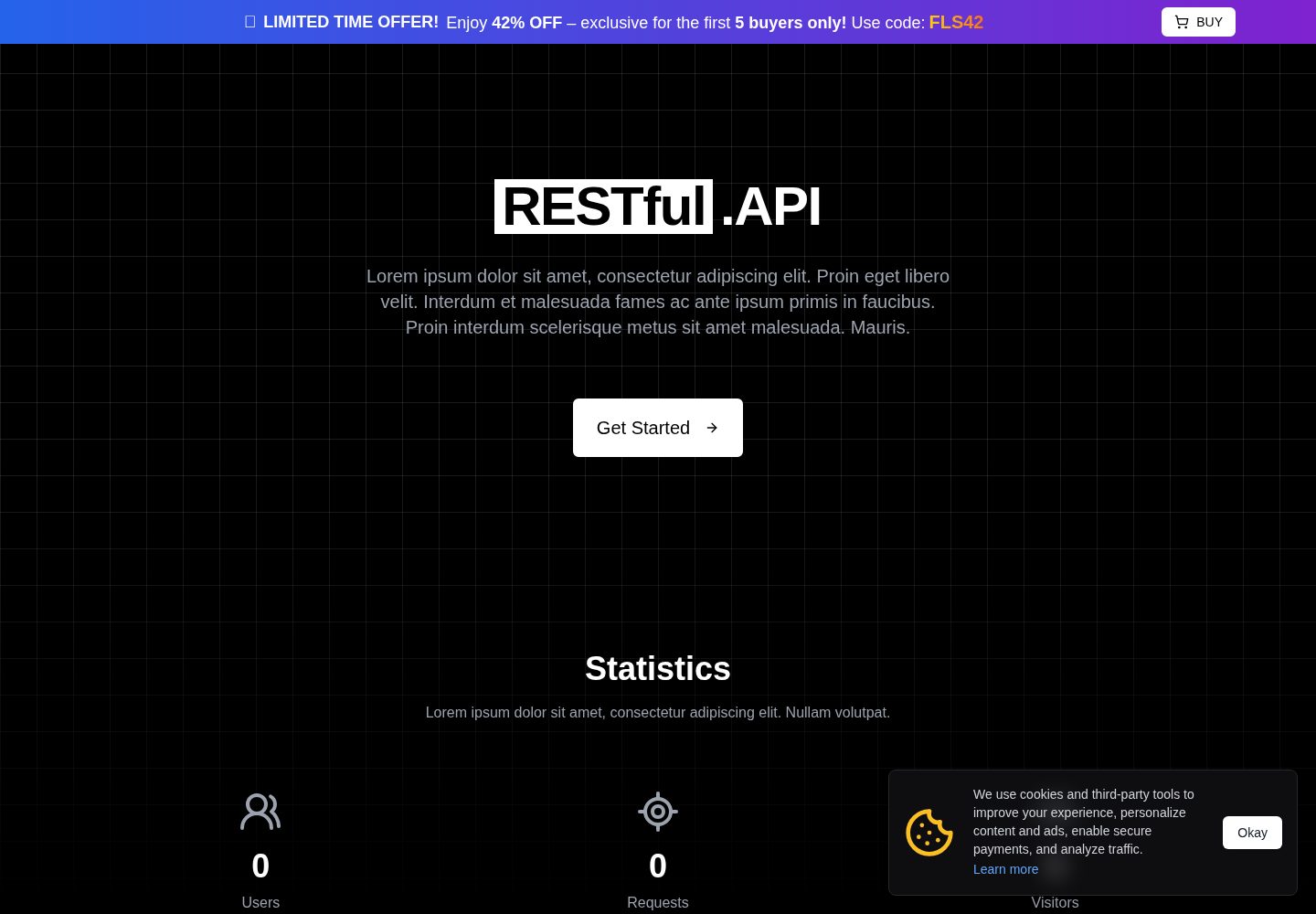
Built-in Swagger UI debugging interface for testing APIs directly within the dashboard
Next.jsReactStarter
nextjs-api-starter-kit — Next.js Starter Template
By MGalaCyber
A REST API platform starter template based on Next.js and Tailwind CSS, integrating Swagger UI, user authentication, a dashboard, API keys and rate limiting, available in free and paid versions.
Explore the design
Compare the page layouts and mobile experience. Open any screenshot for a closer look.
Desktop homepage1 / 2
Desktop captureTop of page
Actual screenshot captured by the server browser.
All pages & views 2
Screenshots show visual appearance; interactive behavior may differ.
Recorded 2026-10-14View source
What stands out
A quick read of the recorded project description.
A complete API key system supporting X-RESTful-KEY request header validation and differentiated rate limits for free and paid users
Provides authentication flows such as login and registration, email verification, and forgot/reset password (paid version)
Supports OAuth2 providers such as Google, GitHub and Discord (paid version)
Includes a landing page, dashboard, upgrade plan page, status page and 404 page
The README lists developer tools such as automatic generation of API endpoints, types, client components and a mock server
Template Details
This template targets developers who want to quickly build a REST API platform and its accompanying management interface. The README shows it includes a landing page, login and registration, a user dashboard, an upgrade plan page, and a Swagger UI debugging interface embedded in the dashboard. The backend provides RESTful API routes and OpenAPI documentation, and implements an API key system: each registered user is assigned a unique key that must be passed via the X-RESTful-KEY request header; invalid or missing keys return 401, and free and paid users can have different rate limits. The technology stack involves Next.js, Tailwind CSS, Swagger UI (OpenAPI 3.x), TypeScript/JavaScript, Axios/Fetch, as well as MongoDB, JWT, NextAuth and SMTP.
The template is divided into a free version and a paid version. The free version includes Swagger UI, the landing page, the dashboard, the debug page, the upgrade page and the status page; the paid version additionally provides login and registration, forgot/reset/confirm email pages, 4 OAuth2 providers, a custom Swagger theme, custom VSCode code snippets, SMTP, rate limiting, API key access, account management and priority support. The environment variable configuration in the README (such as database, NextAuth, OAuth, SMTP) is marked as only available in the paid version.
On the developer features side, the README lists automatic component and API generators (generating TypeScript endpoints, types and client components from OpenAPI/Swagger schemas), dynamic client SDK generation (fetch wrappers or React hooks), an integrated request inspector, mock server support, and automatic generation of JSON response structures. The README does not further document the specific implementation details or availability scope of these features.
Next.jsStarter
Is it right for your project?
Use Cases
- Building a REST API platform with user authentication and API key management
- Quickly generating a management dashboard with a Swagger debugging interface for an existing API
- Using as a starting template for a SaaS product, including free/paid plan upgrade pages
- API service prototypes that need OAuth2 login, SMTP email and rate limiting
Suitable For
- Developers who need to quickly launch a REST API platform and its accompanying frontend
- Teams that want to integrate Swagger UI and OpenAPI documentation
- Projects planning to implement API key access control and rate limiting
- SaaS prototypes that need login and registration, email verification and OAuth2 login
Getting started & customization
Use these recorded setup notes alongside the repository instructions for your chosen version.
- 1
After cloning the repository, install dependencies using npm, yarn, pnpm or bun
- 2
Environment variable configuration (database, NextAuth, OAuth, SMTP, etc.) is only provided in the paid version; refer to .env.example
- 3
Site configuration is located in src/config/site.ts
- 4
Run commands such as npm run dev to start the development server, accessible by default at http://localhost:3000
- 5
When calling protected endpoints, the X-RESTful-KEY must be included in the request header
License & source material
Usage conditions & limitations
Free to use · keep license noticeThis entry covers the free version under the MIT license in the public repository; the free scope is the code of this version and does not mean that external services or third-party assets are free.
Must comply with when using
- Free use, modification, commercial use and distribution of this version's code are permitted.
- When distributing copies or substantial portions of the code, the original author's copyright notice and the complete MIT license notice must be retained.
- The code is provided as is; warranties and limitations of liability are governed by the original license and applicable law.
Additional costs & items to verify
- The project materials mention an optional paid version or features; this entry only covers the public free code and does not include paid upgrades.
- Demo images, fonts, icons and other third-party assets must be checked against their respective licenses and cannot be judged solely by the code's MIT license.
- External services such as domains, hosting, databases, payments or AI may incur additional charges.
- Environment variable configuration (database, NextAuth, OAuth, SMTP, etc.) is only provided in the paid version; the free version cannot complete full configuration according to the README.
- Login and registration pages are only provided in the paid version; the free version does not include this feature.
- Forgot password, reset password and confirm email pages are only provided in the paid version.
- Login with 4 OAuth2 providers is only provided in the paid version.
- SMTP email sending support is only provided in the paid version.
- Rate limiting is only provided in the paid version.
- API key access control is only provided in the paid version.
- Account management is only provided in the paid version.
- Priority support is only provided in the paid version.
- Access to exclusive features is only provided in the paid version.
- An exclusive Discord role is only provided in the paid version.
- Early access to updates is only provided in the paid version.
- The paid version must be purchased separately via the SociaBuzz link; the free and paid versions are different distributions.
- A MongoDB database connection address (such as MongoDB Atlas) must be provided by the user.
- An SMTP service account (such as Brevo or a free SMTP) must be provided by the user for email functionality.
View Original Text Basis
Permission is hereby granted, free of charge
Original License Text
4. Setup environment (Note: `Only available in Premium version`)
Original README
| Sign In & Sign Up Page | ❌ | ✅ |
Original README
| Forgot, Reset & Confirm Email Pages | ❌ | ✅ |
Original README
| Supports 4 OAuth2 Providers | ❌ | ✅ |
Original README
| Supports SMTP | ❌ | ✅ |
Original README
| Rate Limiting | ❌ | ✅ |
Original README
| API Key Access | ❌ | ✅ |
Original README
| Account Management | ❌ | ✅ |
Original README
| Priority Support | ❌ | ✅ |
Original README
| Access to Exclusive Features | ❌ | ✅ |
Original README
| Access to Exclusive Discord Roles | ❌ | ✅ |
Original README
| Early Access to Updates | ❌ | ✅ |
Original README
1. Clone this repository or download from [MGalaCyber](https://github.com/MGalaCyber/nextjs-api-starter-kit) or buy premium version [HERE](https://sociabuzz.com/galaxd/p/nextjs-api-starter-kit)
Original README
MONGOOSE_URI=REPLACE_ME #Go to: https://cloud.mongodb.com
Original README
https://github.com/MGalaCyber/nextjs-api-starter-kit/blob/master/LICENSEhttps://github.com/MGalaCyber/nextjs-api-starter-kit/blob/master/README.md# NODEMAILER - You can search "SMTP Free" on browser or use Brevo
Original README
Compiled by DeepSeek based on repository license and README ·2026-10-14. Results only cover the materials read; dependencies, images, fonts, and subsequent term changes are subject to their respective original texts.
Project checks & description sources
Template Information
- Source platforms
- GitHub
- Documentation and maintenance reference score
- More documented · 83 / 100
- Technologies
- Next.js · React
- Website type
- Starter
How this score is calculated
Our heuristic uses license records (up to 30), a demo link (12), a preview (10), stars (15), recorded maintenance (15), description completeness (8), feature records (5) and classification data (5). It is not a code, security or performance test, or a Google score. A link does not establish tested functionality.
What to verify for this project
- Repository update recorded
- 2026-01-15
- Screenshot last checked
- 2026-10-14
A demo link is listed. Check it with your own content and viewport sizes; its presence does not confirm that forms, authentication or payments work.
The catalog identifies Next.js as the primary stack. Check the actual dependency manifest and lockfile for versions and hosting requirements. These notes use recorded metadata, not a code audit or a deployment test.
Use a selection guide →How this description was prepared
AI-assisted description based on catalog records and repository material. Repository authors are not automatically the reviewers of this description.
Review declaration: codex-user-requested-batch-review-20261017 · 2026-10-16
Inspect the recorded source material
SHA-256: 8ecd921245f4ea5b293246a3e9ad999d998d1e436f7ff45b107c556ce925d2db
2026-10-14T07:11:33.904Z
Source file / repository# 🚀 NEXTJS API Starter Kit A powerful starter kit built with **Next.js**, **Tailwind CSS**, and **Swagger UI** — perfect for building modern REST API platforms with user authentication, dashboards, freemium upgrade pages, and built-in API documentation playground. --- ## 📚Table of Contents - [Screenshot](#️-preview-screenshots) - [Features](#-features) - [Tech Stack](#-tech-stack) - [Quick start](#-quick-start) - [File Structure](#-quick-start) --- ## 🖼️ Preview Screenshots #### FREE VERSION > [DEMO](https://demo.galaxd.com/p/nextjs-api-starter-kit-free) | Landing Page | Dashboard | |--------------|-----------| |  |  | | Status | Swagger Playground | |------------|--------------------| |  |  | #### PREMIUM VERSION > [DEMO](https://demo.galaxd.com/r/nextjs-api-starter-kit-premium) ``` DEMO ACCOUNT: email: [email protected] password: demo ``` <div align="center" style"border-radius:15px"> <a href="https://sociabuzz.com/galaxd/p/nextjs-api-starter-kit"> <img alt="SociaBuzz" height="50" src="https://github.com/MGalaCyber/Badges/blob/master/sociabuzz.svg"/> </a> </div> | Landing Page | Dashboard Dark Mode | Dashboard Light Mode | |-----------|-----------|-----------| |  |  |  | | Sign In | Sign Up | Verification Email | |-----------|-----------|-----------| |  |  |  | | Forgot Password | Reset Password | Playground | |-----------|-----------|-----------| |  |  |  | | Status | Not Found | Pricing | |-----------|-----------|-----------| |  |  |  | | Settings API Key | Settings Account | Settings Danger Zone | |-----------|-----------|-----------| |  |  |  | | Delete Account | SMTP Confirm Email | SMTP Forgot Password | |-----------|-----------|-----------| |  |  |  | --- ## ✨ Features - 🌐 Beautiful landing page (Tailwind CSS) - 🔐 Login & registration system - 📊 User dashboard with access control - 💎 Upgrade page for free/premium plans - 🧪 API Playground using Swagger UI inside the dashboard - ⚙️ RESTful API routes with OpenAPI documentation - 🔑 API Key system with rate limiting - 📁 Clean and modular project structure ## 🧰 Developer Features - 🧬 Auto Component & API Generator - Automatically generate TypeScript API endpoints, types, and client components from OpenAPI or Swagger schema. - 🔄 Dynamic Client SDK Generation - Auto-generate fetch wrappers or React hooks from OpenAPI schema (`useApi` style).integration. - 🔍 Integrated Request Inspector - View real-time request/response logs inside dashboard (for debugging API keys or endpoints). - 🧪 Mock Server Support - Built-in support for mock API responses (for testing frontend without real backend). - 🔁 Auto-generate JSON response structure - Automatically produce structured JSON examples for Swagger/OpenAPI `responses` section, based on validation schema or model definitions. ### 🆚 Free vs Premium Comparison | FEATURES | FREE | PREMIUM | |---------------------------- |:--------:|:-------:| | Swagger UI | ✅ | ✅ | | Landing Page | ✅ | ✅ | | Dashboard Page | ✅ | ✅ | | Playground Page | ✅ | ✅ | | Upgrade Plan Page | ✅ | ✅ | | Stats & Status Page | ✅ | ✅ | | Sign In & Sign Up Page | ❌ | ✅ | | Forgot, Reset & Confirm Email Pages | ❌ | ✅ | | Supports 4 OAuth2 Providers | ❌ | ✅ | | Custom Swagger Theme UI | ❌ | ✅ | | Custom VSCode Snippets | ❌ | ✅ | | Supports SMTP | ❌ | ✅ | | Rate Limiting | ❌ | ✅ | | API Key Access | ❌ | ✅ | | Account Management | ❌ | ✅ | | Priority Support | ❌ | ✅ | | Access to Exclusive Features | ❌ | ✅ | | Access to Exclusive Discord Roles | ❌ | ✅ | | Early Access to Updates | ❌ | ✅ | --- ## 🔑 API Key System This project includes a built-in API key system for managing access to protected endpoints. ### How it works: - Every registered user is assigned a unique API key. - API keys must be passed in the `X-RESTful-KEY` header. - Different rate limits can be set for free vs. premium users. - Invalid or missing API keys will result in a `401 Unauthorized` error. --- ## 🧱 Tech Stack - **Next.js** - **Tailwind CSS** - **Swagger UI (OpenAPI 3.x)** - **TypeScript / JavaScript** - **Axios / Fetch** - **MongoDB, JWT, NextAuth, SMTP** --- ## 🛠 Quick start 1. Clone this repository or download from [MGalaCyber](https://github.com/MGalaCyber/nextjs-api-starter-kit) or buy premium version [HERE](https://sociabuzz.com/galaxd/p/nextjs-api-starter-kit) 2. Make sure you have **Node.js** installed on your machine. 3. Install the dependencies using your preferred package manager: ```bash npm install # or yarn install # or pnpm install # or bun install ``` 4. Setup environment (Note: `Only available in Premium version`) ```yml SITE_MODE=REPLACE_ME #Use: development | production MONGOOSE_URI=REPLACE_ME #Go to: https://cloud.mongodb.com NEXTAUTH_SECRET=REPLACE_ME #Open terminal and type: openssl rand -base64 64 NEXTAUTH_URL=REPLACE_ME #Paste your domain URL # AUTH PROVIDERS # Google - Go to: https://console.cloud.google.com/auth AUTH_GOOGLE_CLIENT_ID=REPLACE_ME AUTH_GOOGLE_CLIENT_SECRET=REPLACE_ME # Github - Go to: https://github.com/settings/developers AUTH_GITHUB_CLIENT_ID=REPLACE_ME AUTH_GITHUB_CLIENT_SECRET=REPLACE_ME # Discord - Go to: https://discord.com/developers/applications AUTH_DISCORD_CLIENT_ID=REPLACE_ME AUTH_DISCORD_CLIENT_SECRET=REPLACE_ME # NODEMAILER - You can search "SMTP Free" on browser or use Brevo NODEMAILER_AUTH_USER=REPLACE_ME NODEMAILER_AUTH_PASSWORD=REPLACE_ME ``` 6. Setup site: Go to `src/config/site.ts` 7. Start the development server: ```bash npm run dev # or yarn dev # or pnpm dev # or bun dev ``` 8. Open http://localhost:3000 in your browser to view the app. ### Example request with API key: ```bash curl -X 'GET' \ 'http://localhost:3000/api/v1/users' \ -H 'accept: application/json' \ -H 'X-RESTful-KEY: your-api-key-goes-here ``` --- ## 📂 Files Structure <details> <summary>Premium version</summary> ``` . ├── .vscode │ └── nextjs-api-starter-kit-premium.code-snippets ├── public │ ├── preview │ │ ├── free │ │ │ ├── dashboard.png │ │ │ ├── landing.png │ │ │ ├── playground.png │ │ │ └── status.png │ │ └── premium │ │ ├── 404.png │ │ ├── dashboard.png │ │ ├── delete-account.png │ │ ├── email-verification.png │ │ ├── forgot-password.png │ │ ├── landing.png │ │ ├── light-mode.png │ │ ├── playground.png │ │ ├── pricing.png │ │ ├── reset-password.png │ │ ├── settings-account.png │ │ ├── settings-apikey.png │ │ ├── settings-dangerzone.png │ │ ├── signin.png │ │ ├── signup.png │ │ ├── smtp-confirm-email.png │ │ ├── smtp-forgot-password.png │ │ └── status.png │ ├── file.svg │ ├── globe.svg │ ├── next.svg │ ├── vercel.svg │ └── window.svg ├── src │ ├── app │ │ ├── actions │ │ │ └── github.ts │ │ ├── api │ │ │ ├── [...slug] │ │ │ │ └── route.ts │ │ │ ├── auth │ │ │ │ ├── [...nextauth] │ │ │ │ │ └── route.ts │ │ │ │ └── signup │ │ │ │ └── route.ts │ │ │ ├── data │ │ │ │ ├── regenKey │ │ │ │ │ └── route.ts │ │ │ │ ├── stats │ │ │ │ │ ├── server │ │ │ │ │ │ └── route.ts │ │ │ │ │ └── route.ts │ │ │ │ └── user │ │ │ │ └── route.ts │ │ │ ├── sendMail │ │ │ │ ├── reset-password │ │ │ │ │ └── route.ts │ │ │ │ └── verification-email │ │ │ │ └── route.ts │ │ │ ├── test │ │ │ │ └── route.ts │ │ │ └── v1 │ │ │ └── users │ │ │ └── route.ts │ │ ├── auth │ │ │ ├── confirm-email │ │ │ │ └── page.tsx │ │ │ ├── forgot-password │ │ │ │ └── page.tsx │ │ │ ├── reset-password │ │ │ │ └── [userId] │ │ │ │ └── page.tsx │ │ │ ├── signin │ │ │ │ └── page.tsx │ │ │ ├── signup │ │ │ │ └── page.tsx │ │ │ └── verification │ │ │ └── [userId] │ │ │ └── page.tsx │ │ ├── dashboard │ │ │ ├── playground │ │ │ │ └── page.tsx │ │ │ ├── pricing │ │ │ │ └── page.tsx │ │ │ └── page.tsx │ │ ├── endpoints │ │ │ └── route.ts │ │ ├── status │ │ │ └── page.tsx │ │ ├── favicon.ico │ │ ├── globals.css │ │ ├── layout.tsx │ │ ├── not-found.tsx │ │ └── page.tsx │ │ └── robots.ts │ │ └── sitemap.ts │ ├── components │ │ ├── dash │ │ │ ├── stats │ │ │ │ ├── account.tsx │ │ │ │ └── global.tsx │ │ │ ├── content.tsx │ │ │ ├── layout.tsx │ │ │ ├── profile.tsx │ │ │ ├── project-list.tsx │ │ │ ├── settings.tsx │ │ │ ├── sidebar.tsx │ │ │ └── top-nav.tsx │ │ ├── ui │ │ │ ├── alert-dialog.tsx │ │ │ ├── alert.tsx │ │ │ ├── avatar.tsx │ │ │ ├── button.tsx │ │ │ ├── card.tsx │ │ │ ├── dialog.tsx │ │ │ ├── dropdown-menu.tsx │ │ │ ├── input.tsx │ │ │ ├── label.tsx │ │ │ ├── progress.tsx │ │ │ ├── separator.tsx │ │ │ ├── sonner.tsx │ │ │ ├── tabs.tsx │ │ │ ├── textarea.tsx │ │ │ ├── toast.tsx │ │ │ └── toaster.tsx │ │ ├── background.tsx │ │ ├── confirm-email.tsx │ │ ├── cookie-consent.tsx │ │ ├── footer.tsx │ │ ├── preloader.tsx │ │ ├── theme-provider.tsx │ │ ├── theme-toggle.tsx │ │ ├── type-writer.tsx │ │ └── visitor.tsx │ ├── config │ │ ├── site.ts │ │ └── swagger.ts │ ├── context │ │ └── authProvider.tsx │ ├── hooks │ │ ├── use-toast.ts │ │ ├── useCountUp.ts │ │ └── useTextScramble.ts │ ├── lib │ │ ├── functions.ts │ │ ├── httpErrorHandler.ts │ │ ├── mongodb.ts │ │ ├── nodemailer.ts │ │ ├── responseHandlers.ts │ │ ├── swaggerCompiler.ts │ │ ├── utils.ts │ │ └── withApiKeyAuth.ts │ ├── models │ │ ├── cooldown.ts │ │ ├── passwordResetStatus.ts │ │ ├── user.ts │ │ └── verificationStatus.ts │ ├── styles │ │ └── SwaggerTheme.css │ ├── types │ │ ├── auth.ts │ │ ├── next-auth.d.ts │ │ └── swagger.ts │ └── middleware.ts ├── .env.example ├── .gitignore ├── components.json ├── eslint.config.mjs ├── LICENSE ├── next.config.ts ├── package.json ├── postcss.config.mjs ├── README.md ├── tailwind.config.ts └── tsconfig.json ``` </details> <details> <summary>Free version</summary> ``` . ├── public │ ├── preview │ │ ├── dashboard.png │ │ ├── landing.png │ │ ├── playground.png │ │ └── status.png │ ├── file.svg │ ├── globe.svg │ ├── next.svg │ ├── vercel.svg │ └── window.svg ├── src │ ├── app │ │ ├── actions │ │ │ └── github.ts │ │ ├── api │ │ │ ├── data │ │ │ │ ├── stats │ │ │ │ │ └── route.ts │ │ │ │ └── user │ │ │ │ └── route.ts │ │ │ ├── test │ │ │ │ └── route.ts │ │ │ └── v1 │ │ │ └── users │ │ │ └── route.ts │ │ ├── dashboard │ │ │ ├── playground │ │ │ │ └── page.tsx │ │ │ └── page.tsx │ │ ├── endpoints │ │ │ └── route.ts │ │ ├── login │ │ │ └── page.tsx │ │ ├── status │ │ │ └── page.tsx │ │ ├── favicon.ico │ │ ├── globals.css │ │ ├── layout.tsx │ │ └── page.tsx │ ├── assets │ ├── components │ │ ├── dash │ │ │ ├── stats │ │ │ │ └── global.tsx │ │ │ ├── content.tsx │ │ │ ├── dashboard.tsx │ │ │ ├── layout.tsx │ │ │ ├── profile.tsx │ │ │ ├── project-list.tsx │ │ │ ├── settings.tsx │ │ │ ├── sidebar.tsx │ │ │ └── top-nav.tsx │ │ ├── ui │ │ │ ├── alert-dialog.tsx │ │ │ ├── button.tsx │ │ │ ├── card.tsx │ │ │ ├── dialog.tsx │ │ │ ├── dropdown-menu.tsx │ │ │ ├── input.tsx │ │ │ ├── label.tsx │ │ │ ├── progress.tsx │ │ │ └── tabs.tsx │ │ ├── background.tsx │ │ ├── footer.tsx │ │ ├── preloader.tsx │ │ ├── theme-provider.tsx │ │ ├── theme-toggle.tsx │ │ └── type-writer.tsx │ ├── config │ │ ├── site.ts │ │ ├── swagger.ts │ │ └── swaggerCompiler.ts │ ├── hooks │ │ ├── useCountUp.ts │ │ └── useTextScramble.ts │ ├── lib │ │ ├── responseHandlers.ts │ │ └── utils.ts │ ├── sections │ ├── types │ │ ├── auth.ts │ │ └── swagger.ts │ └── middleware.ts ├── .env.example ├── .gitignore ├── components.json ├── eslint.config.mjs ├── LICENSE ├── next-env.d.ts ├── next.config.ts ├── package.json ├── postcss.config.mjs ├── README.md ├── tailwind.config.ts └── tsconfig.json ``` </details>
Explore similar templates
Compare previews and descriptions within the same stack and category.

Next.js SaaS Starter
The official Next.js SaaS starter template, integrating email/password authentication, Stripe Checkout subscriptions, a dashboard with user/team CRUD, basic Owner/Member RBAC, and activity logging.
Next.js · SaaS

Next.js Commerce
Vercel's officially maintained Next.js App Router ecommerce starter with deep Shopify integration, offering a complete product catalog, cart, and checkout flow. Core logic is modular for swapping backends, and community provider versions exist for BigCommerce, Medusa, and Saleor.
Next.js · E-commerce

Next-js-Boilerplate
A developer-first Next.js 16 starter with Tailwind CSS 4 and TypeScript, supporting both App Router and Page Router.
Next.js · Starter

tailwind-nextjs-starter-blog
A Next.js and Tailwind CSS blog starter template using Contentlayer for Markdown/MDX, with built-in SEO, code highlighting, and tags. It targets personal technical blogs and migration from Jekyll/Hugo to React, and supports one-click Vercel deployment.
Next.js · Blog

next-forge
next-forge is a Turborepo-based Next.js template maintained by Vercel, positioned as a starting point for SaaS products.
Next.js · Starter

SaaS-Boilerplate
SaaS-Boilerplate is an open-source SaaS starter template built with Next.js App Router, React 19, TypeScript, Tailwind CSS, and Shadcn UI.
Next.js · SaaS