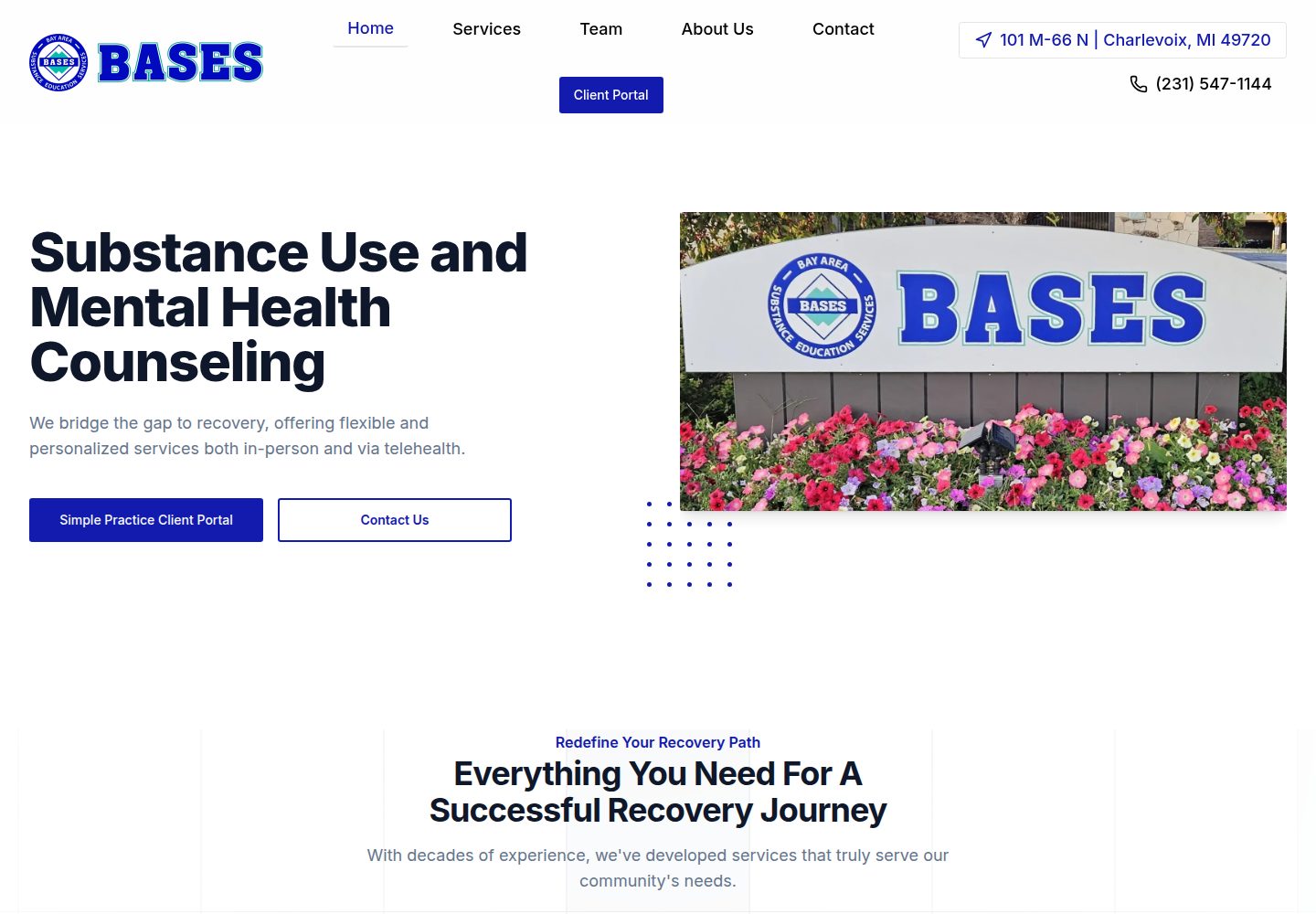
Built with Next.js and Payload CMS, with content managed through the admin
Next.jsReactCorporate Website
bases — Next.js Business Template
By mikecebul
A marketing website template for small businesses in substance and mental health counseling, built on Next.js and Payload CMS, with built-in pages for home, services, team, about us, and resources.
Explore the design
Compare the page layouts and mobile experience. Open any screenshot for a closer look.
Desktop homepage1 / 3
Desktop captureTop of page
Actual screenshot captured by the server browser.
All pages & views 3
Screenshots show visual appearance; interactive behavior may differ.
Recorded 2026-10-02View source
What stands out
A quick read of the recorded project description.
Includes five page structures: home, services, team, about us, and resources
Services, team members, and links support one-click Seed to populate sample data when the collection is empty
Resource card images can be uploaded manually or generated via the Unsplash API using keywords
Images can be stored on the local file system or S3-compatible storage (such as Cloudflare R2)
The footer can include company information and a Google map via checkboxes
Template Details
This template is a small business marketing website that the author uses as a starting point when taking on new projects. The current demo site serves a substance and mental health counseling business. Technically, it is built with Next.js and Payload CMS, uses MongoDB for data storage, can store images on S3-compatible storage such as Cloudflare R2, uses Framer Motion for animations, and uses Shadcn/ui for interface components.
The page structure covers the home page (service introduction), service details, team (board and staff, with URLs like /team/staff/[slug]), about us, and resources (a collection of links and videos). Content is managed through the Payload admin. Services, team members, and links each provide a one-click Seed function that appears only when the corresponding collection is empty. The resources page can be hidden from search engines via the hideFromSearchEngines checkbox in the SEO tab. Card images can be uploaded manually or generated as random images via the Unsplash API using comma-separated keywords. The about us page is rich text plus subheadings, and supports uploading multiple images that rotate in a carousel every 5 seconds. Navigation allows adding menu items in the header and footer; the footer also supports adding company information and a Google map via checkboxes.
The template does not include a built-in contact form or contact page. The author explains that their employer prefers clients to call directly, so the main call to action on mobile is to make a phone call. For the database, the author runs MongoDB in a Docker container on a VPS and uses Dokploy for deployment and automatic backups; the README also provides example commands for manual backup and restore using mongorestore.
Next.jsCorporate Website
Is it right for your project?
Use Cases
- Building a marketing website for small service organizations such as psychological counseling or addiction counseling
- Next.js projects that need admin-editable content but do not want to build a CMS from scratch
- Developers who want to quickly launch a small business website using an existing page structure
- Deployment scenarios that need to host images on S3-compatible object storage
Suitable For
- Small business website projects, especially consulting and service organizations
- Developers familiar with Next.js and Payload CMS who are willing to configure MongoDB and object storage themselves
- Scenarios where a content team needs to maintain services, team, and resources pages through the admin
Getting started & customization
Use these recorded setup notes alongside the repository instructions for your chosen version.
- 1
A MongoDB database is required, and the connection string must be set in MONGODB_URI
- 2
Production requires configuring S3-compatible storage (such as Cloudflare R2) and setting S3_ENABLED=true along with the relevant credentials
- 3
Optional services include Google Maps API, Resend email, and Unsplash API; fill in the corresponding keys in .env as needed
- 4
During development, S3_ENABLED can be set to false; images will be saved to the local file system and ignored by gitignore
- 5
Running the team Seed on the Vercel free plan may take 20–30 seconds, so the function execution duration must be adjusted to at least 30 seconds
License & source material
Usage conditions & limitations
Free to use · keep license noticeThis entry covers the free version in the public repository under the MIT license; the free scope is the code of that version and does not mean external services or third-party assets are free.
Must comply with when using
- You may use, modify, commercialize, and distribute the code of this version for free.
- When distributing copies or substantial portions of the code, retain the original author's copyright notice and the full MIT license notice.
- The code is provided as is; warranties and limitations of liability are governed by the original license and applicable law.
Additional costs & items to verify
- Using this template requires preparing and running a MongoDB database yourself and setting the connection string in MONGODB_URI; it cannot run without a database.
- Production requires obtaining credentials for S3-compatible object storage (such as Cloudflare R2) and configuring the relevant environment variables, which involves external service costs and account requirements.
- The footer Google map feature is optional and requires creating a Google Cloud project, enabling the Maps JavaScript API, and providing a key, which may incur external service fees.
- The email feature is optional and requires registering a Resend account and configuring an API key, which is an external service dependency.
- The feature for automatically generating resource card images by keyword is optional and requires registering an Unsplash developer account and providing an access key.
- Running the team Seed on the Vercel free plan may take 20–30 seconds, so the function execution duration must be adjusted to at least 30 seconds; otherwise it may time out and fail.
- Demo images, fonts, icons, and other third-party assets must be checked against their respective licenses and cannot be judged solely by the code's MIT license.
- External services such as domains, hosting, databases, payments, or AI may incur additional charges.
View Original Text Basis
Permission is hereby granted, free of charge
Original License Text
Create a new database - Add the connection string to `MONGODB_URI` in your `.env` file
Original README
Set `S3_ENABLED=true` for production - Obtain credentials from your S3-compatible storage provider
Original README
Create/select project in [Google Cloud Console](https://console.cloud.google.com/) - Enable Maps JavaScript API - Add key to `GOOGLE_MAPS_API_KEY`
Original README
Get API key from [Resend](https://resend.com/) - Add to `RESEND_API_KEY`
Original README
Register at [Unsplash Developers](https://unsplash.com/developers) - Add keys to `UNSPLASH_ACCESS_KEY` and `UNSPLASH_SECRET_KEY`
Original README
https://github.com/mikecebul/bases/blob/main/LICENSEhttps://github.com/mikecebul/bases/blob/main/README.mdThis can take 20-30 seconds to complete on Vercel on the free plan, so increase your function length to at least 30 seconds.
Original README
Compiled by DeepSeek based on repository license and README ·2026-10-02. Results only cover the materials read; dependencies, images, fonts, and subsequent term changes are subject to their respective original texts.
Project checks & description sources
Template Information
- Source platforms
- GitHub
- Documentation and maintenance reference score
- More documented · 87 / 100
- Technologies
- Next.js · React
- Website type
- Corporate Website
How this score is calculated
Our heuristic uses license records (up to 30), a demo link (12), a preview (10), stars (15), recorded maintenance (15), description completeness (8), feature records (5) and classification data (5). It is not a code, security or performance test, or a Google score. A link does not establish tested functionality.
What to verify for this project
- Repository update recorded
- 2026-03-17
- Screenshot last checked
- 2026-10-02
A demo link is listed. Check it with your own content and viewport sizes; its presence does not confirm that forms, authentication or payments work.
The catalog identifies Next.js as the primary stack. Check the actual dependency manifest and lockfile for versions and hosting requirements. These notes use recorded metadata, not a code audit or a deployment test.
Use a selection guide →How this description was prepared
AI-assisted description based on catalog records and repository material. Repository authors are not automatically the reviewers of this description.
Automatically checked against source and license rules; no manual editorial review.
Inspect the recorded source material
SHA-256: f402fd28fc4f7d0ff2fe6873a5462e59de40e9623811d3741a88d087110f95ee
2026-10-02T19:54:19.650Z
Source file / repository# Boilerplate Template - Business Website for Substance and Mental Health Counseling This project was built with [PayloadCMS](https://payloadcms.com/) and [Next.js 15](https://nextjs.org/), focusing on providing substance and mental health counseling services. ## Table of Contents - [📄 Pages](#pages) - [✨ Features](#features) - [🚀 Getting Started](#getting-started) - [💻 Installation](#installation) - [🔧 Environment Setup](#environment-setup) - [🏃♂️ Running the Application](#running-the-application) - [🎨 Creating Content](#creating-content) - [💁♂️ Create Pages](#create-pages) - [🛠️ Create Services](#create-services) - [👥 Create Team Members](#create-team-members) - [📚 Create Resources](#create-resources) - [ℹ️ Create About Us](#create-about-us) - [🔗 Create Links](#create-links) - [🧭 Navigation](#navigation) - [🖼️ Images](#images) - [💾 Database](#database) - [🚀 Deployment](#deployment) - [📝 Notes](#notes) ## Pages - **Home**: Introduction to the services. - **Services**: Detailed information about the counseling services. - **Team**: Dynamic listing of board members and staff members. URLs follow the pattern "/team/staff/[slug]". - **About Us**: Information about the organization. - **Resources**: A collection of links and videos. ## Features - **Framework**: Next.js 15 (React 19) - **Admin Panel**: Payload CMS - **Database**: MongoDB - **Image Storage**: [Cloudflare R2](https://r2.cloudflarestorage.com/). - **Animations**: [Framer Motion v12](https://www.framer.com/motion/). - **Blocks**: Components built with [Shadcn/ui](https://ui.shadcn.com/). ## Getting Started ### Inspiration This project is designed to be my base boilerplate for any new small business websites. For my current job as a counsler, my boss wanted to utilize my tech skills to improve the business website. This is my third iteration since starting 5 years ago. One thing I found is the need to modify to meet specific business needs, that's where Payload comes in. Also, if I'm going to make money doing this I better have a solid starting point. I hope others find use out of it too. ### Installation 1. [Create a new repository with this template](https://github.com/new?template_name=payload-marketing-template&template_owner=mikecebul) 2. Run `pnpm install` to install dependencies. 3. Copy `.env.example` to `.env` and fill in the required details. ### Environment Setup Before running the application, you need to set up the following services: #### Required Services 1. **MongoDB Database** - Create a new database - Add the connection string to `MONGODB_URI` in your `.env` file 2. **S3 Compatible Storage (Cloudflare R2)** - Set `S3_ENABLED=true` for production - Obtain credentials from your S3-compatible storage provider - Fill in the S3-related environment variables #### Optional Services 1. **Google Maps API** - Create/select project in [Google Cloud Console](https://console.cloud.google.com/) - Enable Maps JavaScript API - Add key to `GOOGLE_MAPS_API_KEY` 2. **Resend Email** - Get API key from [Resend](https://resend.com/) - Add to `RESEND_API_KEY` - Set `RESEND_DEFAULT_EMAIL` 3. **Unsplash API** - Register at [Unsplash Developers](https://unsplash.com/developers) - Add keys to `UNSPLASH_ACCESS_KEY` and `UNSPLASH_SECRET_KEY` ### Running the Application 1. Run `pnpm run dev` to start the development server. 2. Open [http://localhost:3000](http://localhost:3000) with your browser to see the result. ## Creating Content ### Create Pages You'll most likely want to create the Home page first. When adding blocks you'll notice you need other pages to link to on your header's call to action. This template has blocks to make the following pages: - Home - Services - Team - About Us - Resources (Lists of Links/Videos) I didn't create a contact page/form as my boss prefers customers call, so that's the primary CTA on mobile. I may add a form later. ### Create Services This one is easy as you can simply click the "Seed Services" that is only shown when the there are no services in the database. This has a custom select field to select a matching icon. ### Create Team Members This one is also easy as you can simply click the "Seed Team" that is only shown when the there are no team members in the database. This can take 20-30 seconds to complete on Vercel on the free plan, so increase your function length to at least 30 seconds. This also has SEO fields for each team member. The layout of those pages uses the TeamMemberBlock automatically. ### Create Resources My boss uses the website to quickly grab videos for group trainings, and other resources. So, I hide the pages from webcrawlers with the 'hideFromSearchEngines' checkbox in the SEO tab. Also, he would like to add link cards, but would never be bothered to add an image, so I use Unsplash API to grab a random image for the card when you choose 'generate' instead of 'manual upload'. You simply add coma seperated keywords for the type of image you want to be generated. ### Create About Us This is basically just a RichText Field. I have a subtitle field to help match the theme of the website. Also, the is a hasMany upload field to add images that open in a slider which is setup to rotate every 5 seconds. Probably an easier way of doing this, but I originally planned for a slider. ### Create Links This one is pretty easy as you can simply click the "Seed Links" that is only shown when the there are no links in the database. This has a custom select field to select a matching icon. This uses the LinksBlock automatically. ### Navigation You add menu items to the header and footer. in the footer you can also add the company info and a google map by simply clicking a checkbox. The encypt and decrypt utilities are in the utilities folder as I was going to have a field for the API key, but later changed my mind. ## Images In development you simply use the S3_ENABLED=false in the .env file and all your images will be saved to the local file system, and marked in the gitignore. When you are ready to deploy, go to vercel and create a new project. In the project settings, go to the "Domains" tab and add your domain. Then, go to the "Environment Variables" tab and add the following: - S3_ENABLED=false - S3_ACCESS_KEY_ID= - S3_SECRET_ACCESS_KEY= - S3_REGION=auto - S3_ENDPOINT= - S3_BUCKET= - NEXT_PUBLIC_S3_HOSTNAME= - NEXT_PUBLIC_UPLOAD_PREFIX=media Cloudflare R2 is convient if you already use them for DNS as you simply click a button and you have a subdomain for your bucket. Love it. ## Database MongoDB is running in a Docker container alongside the application on my VPS. I use Dokploy on a Hetzner server. ### Database Backup & Restore Dokploy has features for automatic backups using crontab, how many to store so it deletes old ones (I set it to 90), and an easy way to restore if needed. #### Manual Database Management 1. Install MongoDB Database Tools for working with backups: ##### MacOS ```bash brew tap mongodb/brew brew install mongodb-database-tools ``` ##### Ubuntu ```bash sudo apt-get install mongodb-database-tools ``` #### Restoring from Backup 1. Download the backup file from S3 to your local machine's `.dumps` directory 2. To restore to a new database name: ```bash mongorestore --uri="YOUR_MONGODB_URI" \ --nsInclude="original-db-name.*" \ --nsFrom="original-db-name.*" \ --nsTo="new-db-name.*" \ --gzip \ --archive=".dumps/your-backup-file.gz" ``` 3. To drop and restore to the same database: ##### MongoDB Shell (mongosh): ```bash mongosh "YOUR_MONGODB_URI" use database-name db.dropDatabase() ``` ##### MongoDB Compass: ```bash 1. Connect to your database 2. Right-click on the database name 3. Select "Drop Database" 4. Confirm the deletion ``` ##### Then restore (notice we don't need nsFrom/nsTo when keeping the same name) ```bash mongorestore --uri="YOUR_MONGODB_URI" \ --nsInclude="database-name.\*" \ --gzip \ --archive=".dumps/your-backup-file.gz" ``` ## Deployment This project is deployed on a VPS (Virtual Private Server) with Hetzner using [Dokploy](https://dokploy.com/) as the Platform as a Service (PaaS) solution. The setup includes: ### Infrastructure - **VPS Provider**: Hetzner - **Container Management**: Docker - **PaaS**: Dokploy for simplified deployment and management - **Database**: Self-hosted MongoDB in Docker - **Backups**: Automatic backups to S3 storage ### Deployment Process 1. The application and MongoDB run in separate Docker containers 2. Dokploy manages container orchestration and deployment 3. Environment variables are managed through Dokploy's interface 4. Database backups should be performed regularly and uploaded to S3 ### Environment Variables Update your production `.env` file with MongoDB connection details: ```bash MONGODB_URI=mongodb://username:password@localhost:27017/database # ... other existing env vars ... ```
Explore similar templates
Compare previews and descriptions within the same stack and category.

SaaS-Boilerplate
SaaS-Boilerplate is an open-source SaaS starter template built with Next.js App Router, React 19, TypeScript, Tailwind CSS, and Shadcn UI.
Next.js · SaaS

Next-JS-Landing-Page-Starter-Template
A free Next.js landing page starter template written in Tailwind CSS and TypeScript, featuring built-in navbar, hero, features, CTA banner, and footer sections.
Next.js · Corporate Website

next-saas-starter
A free Next.js SaaS marketing landing page template from Blazity, using static generation and styled-components with no extra UI library.
Next.js · SaaS

startup-nextjs
Startup is a free, MIT-licensed Next.js template from NextJSTemplates for SaaS startups and corporate landing pages.
Next.js · SaaS

shadcn-landing-page
A Next.js landing page template built with Shadcn, TypeScript, and Tailwind, converted from a Shadcn-Vue version. It includes sections such as Navbar, mobile Sidebar, Hero, Pricing, FAQ, and Footer, and highlights responsive design, navigation, and dark mode.
Next.js · Corporate Website

shadcn-dashboard-landing-template
An open-source admin dashboard and marketing landing page template built on shadcn/ui and Tailwind CSS, with both Vite + React and Next.js versions in one repository.
Next.js · Admin dashboard