Content is centralized in a single data.json file, where client information, services, portfolio, about section and statistics are configured
HTMLStarter
video-production-template — HTML Starter Template
By mikecordovar
A static website template for video production agencies, built with HTML5, CSS3 and vanilla JavaScript. All content is configured in data.json, YouTube or self-hosted MP4 videos are supported, and it can be deployed to Vercel, Netlify or any static host.
Explore the design
Compare the page layouts and mobile experience. Open any screenshot for a closer look.
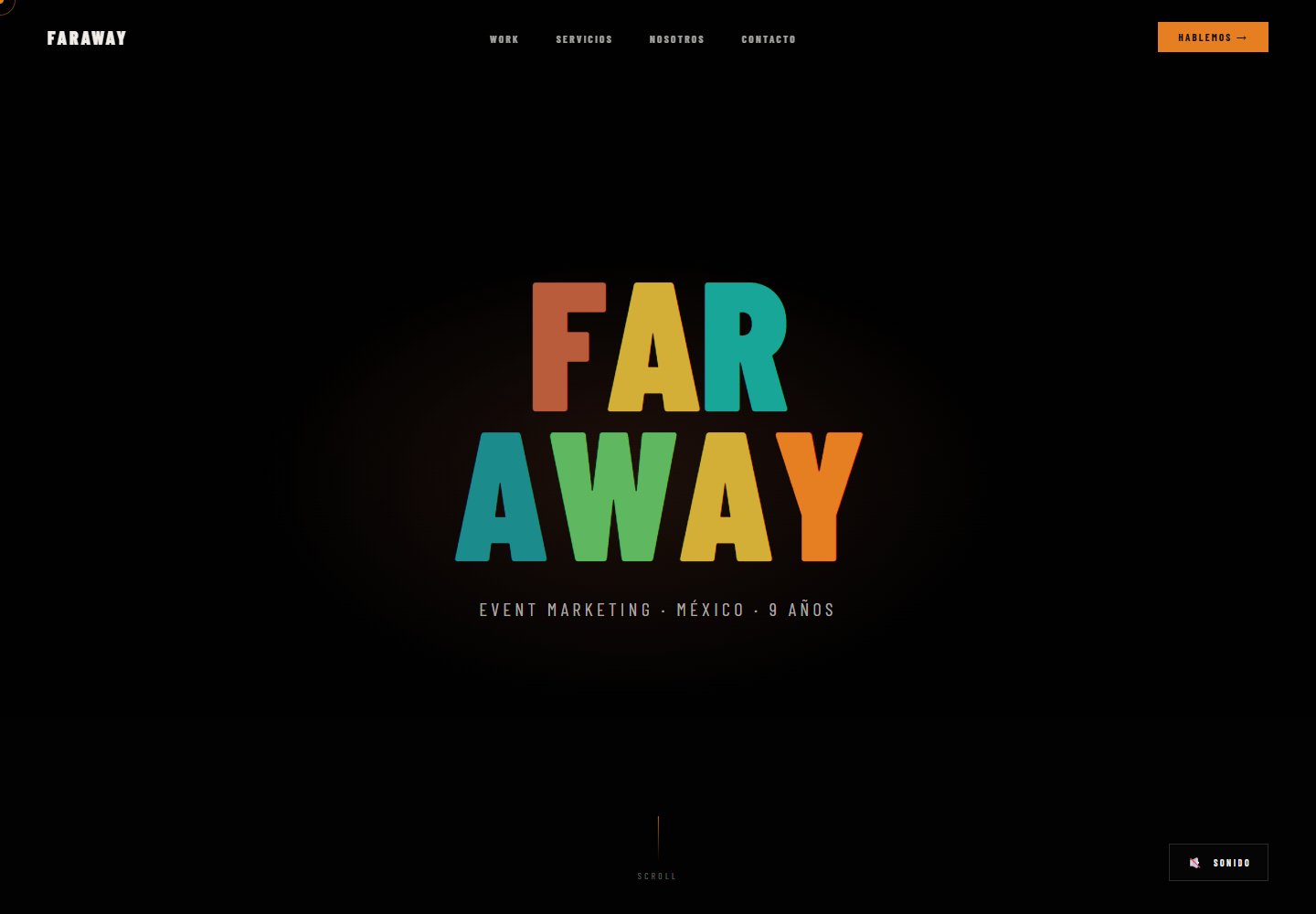
Desktop homepage1 / 2
Desktop captureTop of page
Actual browser screenshot from the verified demo.
All pages & views 2
Screenshots show visual appearance; interactive behavior may differ.
Recorded 2026-10-16View source
What stands out
A quick read of the recorded project description.
Videos support either YouTube video IDs or self-hosted MP4 direct links
Uses HTML5, CSS3 and vanilla JavaScript; the README states there is no framework dependency
Colors are adjusted uniformly through CSS variables in css/main.css
The README provides three deployment paths: Vercel, Netlify and manual upload
Provides a multi-client reuse flow: copy the template, modify data.json, change the Git remote and deploy
Template Details
This is a reusable website template for video production agencies. The stack is HTML5, CSS3 and vanilla JavaScript, with no front-end framework dependency. The README states that all page content is centralized in data.json at the root, including client name, tagline, contact details, service list, portfolio video links, about section and statistics. index.html serves as the template, js/app.js loads the JSON and renders the page, js/cursor.js provides a custom cursor, and styling is controlled by css/main.css and css/animations.css.
Videos are supported in two ways: YouTube videos use portfolio[].videoId to enter the video ID; self-hosted videos use portfolio[].videoUrl to enter a direct MP4 address, with the README using Cloudinary's free tier as an example. Colors are adjusted through CSS variables in css/main.css, and the README lists variables such as --terracota, --teal, --orange, --gold, --mint and --cyan.
For deployment, the README recommends Vercel (import the GitHub repository and click Deploy) or Netlify (create a new site from Git), and also supports manually uploading index.html, data.json, css/, js/ and assets/ to any host. The README also provides a multi-client reuse method: copy the template directory, modify data.json, set a new Git remote and push, then deploy with the vercel command.
The README does not document build tools, package managers, testing methods, accessibility support details or a content management backend; the template's functionality, performance and production readiness must be judged by the actual code and your own verification.
HTMLStarter
Is it right for your project?
Use Cases
- Building a static website for a video production agency to showcase services, portfolio and contact details
- Projects that need to maintain client name, tagline, services and portfolio in a single JSON file
- Embedding the portfolio from external video sources such as YouTube or Cloudinary rather than hosting video files on the site
- Copying the same template for multiple clients, modifying data.json separately and deploying each independently
- Deploying to Vercel, Netlify or any host that supports static files
Suitable For
- Showcase websites for video production, photography or drone aerial photography agencies
- Teams that accept updating content by editing a JSON file rather than through an admin interface
- Projects that want to use native HTML/CSS/JS without introducing a front-end framework
- Developers who need to quickly copy the template and deploy it separately for multiple clients
Getting started & customization
Use these recorded setup notes alongside the repository instructions for your chosen version.
- 1
Edit data.json at the root to fill in client information, services, portfolio, about section and statistics
- 2
For YouTube videos, enter the video ID in portfolio[].videoId; for self-hosted videos, enter the MP4 direct link in portfolio[].videoUrl
- 3
Adjust colors by modifying variables such as --terracota, --teal, --orange, --gold, --mint and --cyan in :root in css/main.css
- 4
Deploy to Vercel: push the code to GitHub, import the project and click Deploy; for Netlify, create a new site from Git; you can also manually upload index.html, data.json, css/, js/ and assets/
- 5
The README does not provide build commands or dependency installation steps; the template is used as static files
License & source material
Usage conditions & limitations
Free to use · keep license noticeThis entry covers the free version under the MIT license in the public repository; the free scope is the code of that version and does not mean external services or third-party assets are free.
Must comply with when using
- Free use, modification, commercial use and distribution of this version's code are allowed.
- When distributing copies or substantial portions of the code, retain the original author's copyright notice and the complete MIT license notice.
- The code is provided as is; warranties and limitations of liability are governed by the original license and applicable law.
Additional costs & items to verify
- Demo images, fonts, icons and other third-party assets must be checked against their respective licenses and cannot be judged solely by the code's MIT license.
- External services such as domains, hosting, databases, payments or AI may incur additional charges.
- The self-hosted video example uses Cloudinary, which requires registering an account at cloudinary.com (the README states there is a free tier); using this method means you are responsible for the account and external service.
- The README recommends setting YouTube videos to "Unlisted", which means relying on YouTube as an external video hosting service.
- Deployment recommends Vercel, which the README marks as free with automatic deployment; using this hosting service requires registering a Vercel account.
- Deployment can optionally use Netlify, which the README marks as free with automatic deployment; using this hosting service requires registering a Netlify account.
- The client names in the data.json example (Volkswagen, Samsung, GNC, Kotex) are sample content and do not mean authorization to use these brand marks has been obtained.
- The amplify.partners example lists YouTube, Vimeo and Netflix as sample text only and does not mean there is a partnership or authorization relationship with these platforms.
View Original Text Basis
Permission is hereby granted, free of charge
Original License Text
1. Create account at cloudinary.com (free tier)
Original README
2. Make "Unlisted" (not public, not private)
Original README
### Vercel (Recommended - Free, Auto-deploy)
Original README
### Netlify (Free, Auto-deploy)
Original README
"clients": ["Volkswagen", "Samsung", "GNC", "Kotex"],
Original README
https://github.com/mikecordovar/video-production-template/blob/main/LICENSEhttps://github.com/mikecordovar/video-production-template/blob/main/README.md"partners": ["YouTube", "Vimeo", "Netflix"]
Original README
Compiled by DeepSeek based on repository license and README ·2026-10-14. Results only cover the materials read; dependencies, images, fonts, and subsequent term changes are subject to their respective original texts.
Project checks & description sources
Template Information
- Source platforms
- GitHub
- Documentation and maintenance reference score
- More documented · 80 / 100
- Technologies
- HTML
- Website type
- Starter
How this score is calculated
Our heuristic uses license records (up to 30), a demo link (12), a preview (10), stars (15), recorded maintenance (15), description completeness (8), feature records (5) and classification data (5). It is not a code, security or performance test, or a Google score. A link does not establish tested functionality.
What to verify for this project
- Repository update recorded
- 2026-06-08
- Screenshot last checked
- 2026-10-16
A demo link is listed. Check it with your own content and viewport sizes; its presence does not confirm that forms, authentication or payments work.
The catalog identifies HTML as the primary stack. Check the actual dependency manifest and lockfile for versions and hosting requirements. These notes use recorded metadata, not a code audit or a deployment test.
Use a selection guide →How this description was prepared
AI-assisted description based on catalog records and repository material. Repository authors are not automatically the reviewers of this description.
Review declaration: codex-user-requested-batch-review-20261017 · 2026-10-16
Inspect the recorded source material
SHA-256: 2609505cc8e98ba92eee89e274769156a14d1a5499b6cedcfb43577482e827d8
2026-10-14T00:18:55.822Z
Source file / repository# Video Production Template
A professional, reusable website template for video production agencies. Built with HTML5, CSS3, and vanilla JavaScript. Fully customizable via `data.json`.
## Quick Start
### 1. Edit `data.json`
All content lives in one file:
- Client name, tagline, contact
- Services & descriptions
- Portfolio with video links
- About section & stats
### 2. Add Videos
- YouTube: Get video ID from URL, add to `portfolio[].videoId`
- Self-hosted: Use direct MP4 URL in `portfolio[].videoUrl`
### 3. Deploy
```bash
git add .
git commit -m "Customize for [Client]"
git push
# Visit vercel.com → Import Project → Select repo → Deploy
```
## File Structure
```
video-production-template/
├── index.html (template)
├── data.json (ALL content here)
├── css/
│ ├── main.css
│ └── animations.css
├── js/
│ ├── app.js (loads JSON, renders page)
│ └── cursor.js
├── assets/images/
└── README.md
```
## Customizing Content
### data.json Structure
```json
{
"client": {
"name": "TEMPLUM",
"tagline": "Video Production · México",
"yearsActive": "10+",
"whatsappNumber": "+525512345678",
"email": "[email protected]",
"phone": "+525512345679",
"linkedin": "https://linkedin.com/company/templum",
"instagram": "https://instagram.com/templum.tv"
},
"hero": {
"videoId": "youtube-video-id",
"fallbackGradient": "linear-gradient(...)"
},
"about": {
"title": "Production of<br>world-class quality",
"description1": "We bridge...",
"stats": [
{ "number": "10+", "label": "Years of experience" }
]
},
"services": [
{
"number": "01",
"title": "Video Production",
"description": "Commercials, corporate videos, digital content..."
},
{
"number": "02",
"title": "Photography",
"description": "Professional shoots..."
},
{
"number": "03",
"title": "Drone Services",
"description": "Aerial filming..."
}
],
"clients": ["Volkswagen", "Samsung", "GNC", "Kotex"],
"portfolio": [
{
"title": "Project Name<br>Subtitle",
"client": "Brand Name · Category",
"tag": "Commercial",
"videoId": "youtube-id-or-url"
}
],
"amplify": {
"title": "Premium Quality.<br>Global Reach.",
"partners": ["YouTube", "Vimeo", "Netflix"]
}
}
```
## Adding Videos
### YouTube (Recommended)
1. Upload to your YouTube channel
2. Make "Unlisted" (not public, not private)
3. Get video ID: `https://youtube.com/watch?v=**abc123xyz**`
4. Add to data.json: `"videoId": "abc123xyz"`
### Cloudinary (Self-hosted)
1. Create account at cloudinary.com (free tier)
2. Upload video
3. Copy public URL
4. Add to data.json: `"videoUrl": "https://res.cloudinary.com/..."`
## Customizing Colors
Edit `css/main.css` root variables:
```css
:root {
--terracota: #B85C3C; /* Primary */
--teal: #1B8B8B; /* Secondary */
--orange: #E67E22; /* Accent */
--gold: #D4AF37;
--mint: #5FB85F;
--cyan: #17A697;
}
```
## Deployment
### Vercel (Recommended - Free, Auto-deploy)
1. Push code to GitHub
2. Go to vercel.com
3. Click "New Project"
4. Select this repo
5. Click "Deploy"
6. Get live URL + auto-updates on push
### Netlify (Free, Auto-deploy)
1. netlify.com → New site from Git
2. Connect GitHub repo
3. Deploy
### Manual Deploy
Upload these files to your hosting:
- index.html
- data.json
- css/ directory
- js/ directory
- assets/ directory
## Features
✨ Smooth animations (scroll reveal, custom cursor)
🎬 Video-ready (portfolio grid, hero video)
📱 100% responsive (mobile, tablet, desktop)
⚡ Fast & optimized (vanilla JS, no frameworks)
🔧 Easy to customize (single data.json file)
🌙 Dark mode optimized
## Using for Multiple Clients
### Quick Method
```bash
# Copy template
cp -r video-production-template client-name
cd client-name
# Edit data.json for new client
nano data.json
# Create new GitHub repo for this client (optional)
git remote set-url origin https://github.com/superadmin-mike/client-name.git
git push -u origin main
# Deploy to Vercel
vercel
```
## Performance Tips
**Video Optimization**
- Use YouTube (CDN included, no setup)
- Or upload to Cloudinary (free tier)
- Target: 1080p, H.264, 5-15MB max
**Image Optimization**
- WebP format preferred
- Max width: 1920px
- Use TinyPNG or Squoosh to compress
**Monitoring**
- Google PageSpeed Insights
- GTmetrix
- Lighthouse audit (Chrome DevTools)
## Browser Support
- Chrome 90+
- Firefox 88+
- Safari 14+
- Mobile browsers (iOS Safari, Chrome Mobile)
## Troubleshooting
**Videos not playing?**
- Verify YouTube video ID (no `v=` prefix)
- Check if video is public or unlisted
- Open browser console (F12 → Console) for errors
**Styles look broken?**
- Clear browser cache (Ctrl+Shift+Delete on Windows, Cmd+Shift+Delete on Mac)
- Hard refresh (Ctrl+F5 or Cmd+Shift+R)
**Data not loading?**
- Validate data.json at jsonlint.com
- Ensure data.json is in root directory
- Check browser console for fetch errors
**Mobile looks off?**
- Test on actual device or Chrome DevTools
- Resize viewport to 375px width
- Check for CSS media queries in main.css
## Support
For issues:
1. Check data.json is valid JSON
2. Verify file paths are correct
3. Check browser console (F12)
4. Open issue on GitHub with error details
## License
MIT — Use for personal and commercial projects
---
**Built for video production agencies. Deploy in minutes, customize in seconds.**
Updated: 2025-06-07
Explore similar templates
Compare previews and descriptions within the same stack and category.

startbootstrap-simple-sidebar
A Bootstrap off-canvas sidebar navigation HTML starter template from Start Bootstrap. It provides directly editable HTML and CSS in the dist directory, while the source uses Pug, SCSS, and JavaScript with npm build scripts for live preview and compilation.
HTML · Starter

adminkit
AdminKit is a free, MIT-licensed HTML admin and dashboard template built on Bootstrap 5. The free version includes 15 demo pages, 1 plugin, and 1 color scheme, with hundreds of UI components, forms, tables, charts, and icons.
HTML · Admin dashboard

Landing-Page
A general-purpose landing page HTML template maintained by Tailwind Toolbox, written in pure HTML and loading the complete Tailwind CSS via CDN.
HTML · Corporate Website

light-bootstrap-dashboard
Light Bootstrap Dashboard is a free, MIT-licensed admin dashboard template from Creative Tim, built on Bootstrap with a responsive static HTML structure.
HTML · Admin dashboard

sing-app
Sing App Lite is a free, open-source admin dashboard template from Flatlogic, built with Bootstrap 4.5 and SCSS. It provides a responsive layout, dashboard examples, typography, tables, notifications, basic charts, icons, maps, and a hover sidebar, along with styled Bootstrap components.
HTML · Admin dashboard

startbootstrap-modern-business
Modern Business is a multipurpose Bootstrap full-site HTML template from Start Bootstrap with 17 standalone pages covering home, about, services, portfolio, pricing, blog, FAQ, and contact.
HTML · Starter