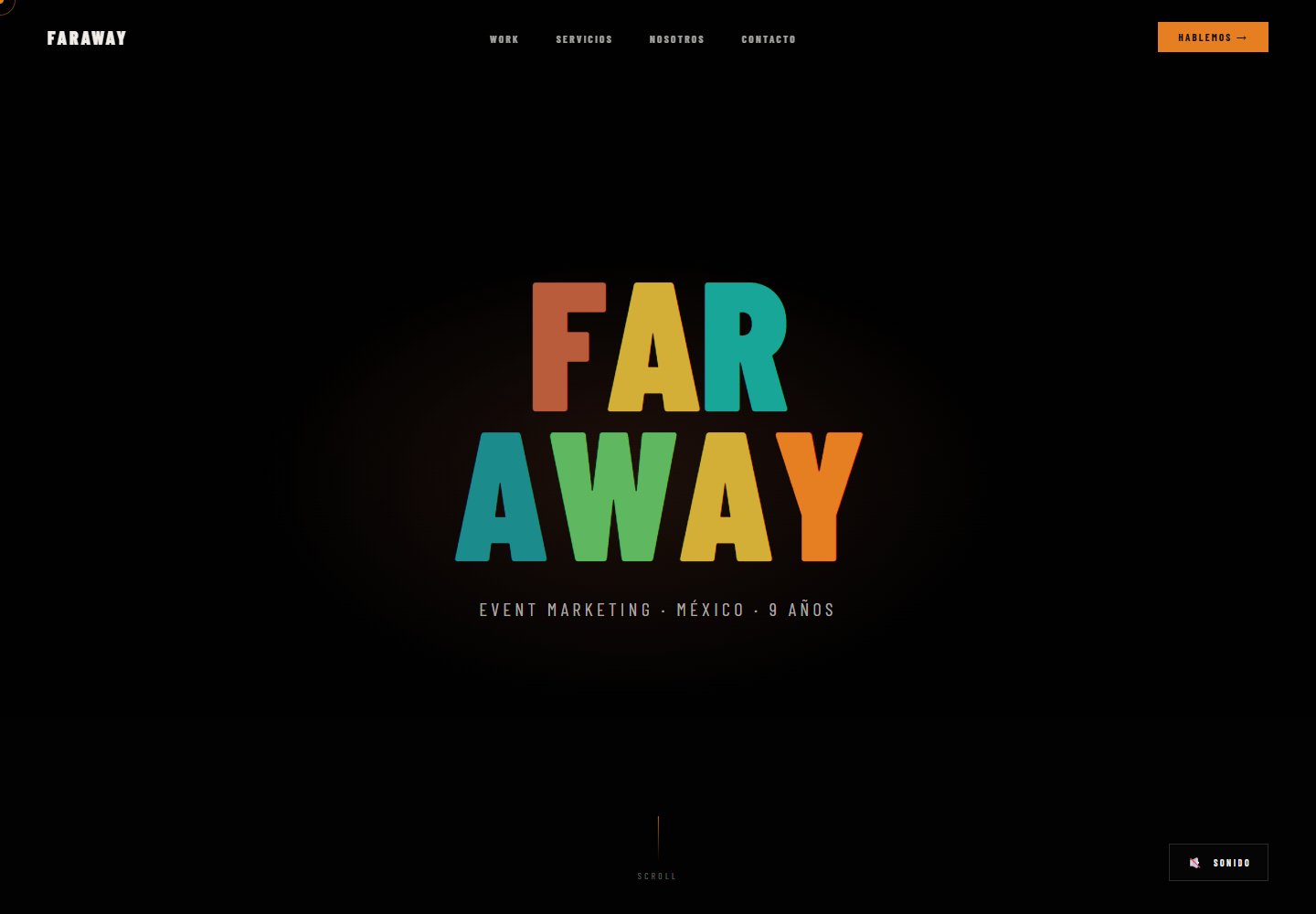
内容集中在单个 data.json 文件,客户信息、服务、作品集、关于区块与统计数据均在此配置
HTML启动器
video-production-template — HTML 启动器模板
作者 mikecordovar
面向视频制作机构的静态网站模板,使用 HTML5、CSS3 与原生 JavaScript 构建,所有内容集中在 data.json 中配置,支持 YouTube 或自托管 MP4 视频,可部署到 Vercel、Netlify 或任意静态托管。
看看你的网站会是什么样
浏览真实页面截图,比较内容排版与手机效果。点击下方缩略图切换,放大查看整页细节。
全部页面与视图 2
截图用于了解视觉与布局,交互效果请以实际项目为准。
采集于 2026-10-16查看来源
值得关注的模板亮点
从已有项目资料中,快速了解它的特点。
视频支持 YouTube 视频 ID 或自托管 MP4 直链两种方式
使用 HTML5、CSS3 与原生 JavaScript,README 说明不依赖框架
配色通过 css/main.css 中的 CSS 变量统一调整
README 提供 Vercel、Netlify 与手动上传三种部署路径
提供多客户复用流程:复制模板、修改 data.json、更换 Git 远程仓库后部署
模板详细介绍
这是一个面向视频制作机构的可复用网站模板,技术栈为 HTML5、CSS3 和原生 JavaScript,不依赖前端框架。README 说明页面内容全部集中在根目录的 data.json 中,包括客户名称、标语、联系方式、服务列表、作品集视频链接、关于区块与统计数据。index.html 作为模板,js/app.js 负责加载 JSON 并渲染页面,js/cursor.js 提供自定义光标,样式由 css/main.css 与 css/animations.css 控制。
视频支持两种方式:YouTube 视频通过 portfolio[].videoId 填写视频 ID;自托管视频使用 portfolio[].videoUrl 填写直接的 MP4 地址,README 以 Cloudinary 免费套餐为例。配色通过 css/main.css 中的 CSS 变量调整,README 列出了 --terracota、--teal、--orange、--gold、--mint、--cyan 等变量。
部署方面,README 推荐 Vercel(导入 GitHub 仓库后点击 Deploy)或 Netlify(从 Git 新建站点),也支持手动上传 index.html、data.json、css/、js/、assets/ 到任意主机。README 还提供了多客户复用方法:复制模板目录、修改 data.json、设置新的 Git 远程仓库并推送,再用 vercel 命令部署。
README 未说明构建工具、包管理器、测试方式、无障碍支持细节或内容管理后台;模板的功能、性能与生产就绪程度需以实际代码和自行验证为准。
HTML启动器
适合你的项目吗?
适用场景
- 为视频制作机构搭建展示服务、作品集与联系方式的静态网站
- 需要将客户名称、标语、服务与作品集集中在一个 JSON 文件中维护的项目
- 以 YouTube 或 Cloudinary 等外部视频源嵌入作品集,而不在站点内托管视频文件
- 同一模板复制后为多个客户分别修改 data.json 并独立部署
- 部署到 Vercel、Netlify 或任意支持静态文件的主机
适合人群
- 视频制作、摄影或无人机航拍类机构展示型网站
- 接受通过编辑 JSON 文件而非后台界面更新内容的团队
- 希望使用原生 HTML/CSS/JS 且不引入前端框架的项目
- 需要快速复制模板并分别为多个客户部署的开发者
上手与定制指南
结合仓库当前版本的说明,按下面的资料检查内容、配置与运行要求。
- 1
编辑根目录 data.json 填写客户信息、服务、作品集、关于区块与统计数据
- 2
YouTube 视频在 portfolio[].videoId 填写视频 ID;自托管视频在 portfolio[].videoUrl 填写 MP4 直链
- 3
在 css/main.css 的 :root 中修改 --terracota、--teal、--orange、--gold、--mint、--cyan 等变量调整配色
- 4
部署到 Vercel:推送代码到 GitHub 后导入项目并点击 Deploy;Netlify 则从 Git 新建站点;也可手动上传 index.html、data.json、css/、js/、assets/
- 5
README 未提供构建命令或依赖安装步骤,模板按静态文件方式使用
授权与来源资料
使用条件与限制
免费使用 · 保留许可声明本次收录的是公开仓库中采用 MIT 许可的免费版本;免费范围为该版本代码,不代表外部服务或第三方素材免费。
使用时需要遵守
- 允许免费使用、修改、商用和分发该版本代码。
- 分发代码副本或实质性部分时,保留原作者版权声明和完整 MIT 许可声明。
- 代码按现状提供;担保与责任限制以原许可证及适用法律为准。
额外费用与待核对事项
- 演示图片、字体、图标及其他第三方素材需按各自许可核对,不能仅凭代码的 MIT 许可判断。
- 域名、托管、数据库、支付或 AI 等外部服务可能另外收费。
- 自托管视频示例使用 Cloudinary,需在 cloudinary.com 注册账号(README 称有免费套餐);使用该方式需自行承担账号与外部服务。
- README 建议将 YouTube 视频设为“不公开(Unlisted)”,即依赖 YouTube 作为外部视频托管服务。
- 部署推荐 Vercel,README 标注为免费并自动部署;使用该托管服务需注册 Vercel 账号。
- 部署可选 Netlify,README 标注为免费并自动部署;使用该托管服务需注册 Netlify 账号。
- data.json 示例中的客户名称(Volkswagen、Samsung、GNC、Kotex)为示例内容,不代表已获授权使用这些品牌标识。
- amplify.partners 示例列出 YouTube、Vimeo、Netflix,仅为示例文本,不代表与这些平台存在合作或授权关系。
查看原文依据
Permission is hereby granted, free of charge
许可证原文
1. Create account at cloudinary.com (free tier)
README 原文
2. Make "Unlisted" (not public, not private)
README 原文
### Vercel (Recommended - Free, Auto-deploy)
README 原文
### Netlify (Free, Auto-deploy)
README 原文
"clients": ["Volkswagen", "Samsung", "GNC", "Kotex"],
README 原文
https://github.com/mikecordovar/video-production-template/blob/main/LICENSEhttps://github.com/mikecordovar/video-production-template/blob/main/README.md"partners": ["YouTube", "Vimeo", "Netflix"]
README 原文
DeepSeek 根据仓库许可证和 README 整理 ·2026-10-14。结果仅覆盖已读取资料,依赖、图片、字体及后续条款变更以各自原文为准。
项目核对记录与介绍依据
模板资料
- 来源平台
- GitHub
- 资料与维护参考分
- 资料较完整 · 80 / 100
- 技术栈
- HTML
- 网站类型
- 启动器
这个分数如何计算
本站按许可资料(最高30分)、演示链接(12分)、预览图(10分)、Star数(15分)、记录的维护时间(15分)、描述完整度(8分)、功能记录(5分)和分类资料(5分)计算。它不是代码、安全或性能测试,也不是 Google 评分;有链接不代表已实测可用。
这个项目需要核对什么
- 记录的仓库更新时间
- 2026-06-08
- 截图检查日期
- 2026-10-16
已收录演示链接。请用你的内容与屏幕尺寸检查;有演示不代表表单、认证或支付已经可用。
目录记录的主要技术栈是 HTML。请通过依赖清单和锁文件核对实际版本与托管要求。这些说明基于收录资料,不代表代码审计或部署实测。
查看具体选型方法 →介绍的制作与核对状态
介绍由 AI 辅助整理目录与仓库资料。仓库作者不等于这篇介绍的审核者。
审核声明: codex-user-requested-batch-review-20261017 · 2026-10-16
查看当时使用的来源资料
SHA-256: 2609505cc8e98ba92eee89e274769156a14d1a5499b6cedcfb43577482e827d8
2026-10-14T00:18:55.822Z
来源文件 / 仓库# Video Production Template
A professional, reusable website template for video production agencies. Built with HTML5, CSS3, and vanilla JavaScript. Fully customizable via `data.json`.
## Quick Start
### 1. Edit `data.json`
All content lives in one file:
- Client name, tagline, contact
- Services & descriptions
- Portfolio with video links
- About section & stats
### 2. Add Videos
- YouTube: Get video ID from URL, add to `portfolio[].videoId`
- Self-hosted: Use direct MP4 URL in `portfolio[].videoUrl`
### 3. Deploy
```bash
git add .
git commit -m "Customize for [Client]"
git push
# Visit vercel.com → Import Project → Select repo → Deploy
```
## File Structure
```
video-production-template/
├── index.html (template)
├── data.json (ALL content here)
├── css/
│ ├── main.css
│ └── animations.css
├── js/
│ ├── app.js (loads JSON, renders page)
│ └── cursor.js
├── assets/images/
└── README.md
```
## Customizing Content
### data.json Structure
```json
{
"client": {
"name": "TEMPLUM",
"tagline": "Video Production · México",
"yearsActive": "10+",
"whatsappNumber": "+525512345678",
"email": "[email protected]",
"phone": "+525512345679",
"linkedin": "https://linkedin.com/company/templum",
"instagram": "https://instagram.com/templum.tv"
},
"hero": {
"videoId": "youtube-video-id",
"fallbackGradient": "linear-gradient(...)"
},
"about": {
"title": "Production of<br>world-class quality",
"description1": "We bridge...",
"stats": [
{ "number": "10+", "label": "Years of experience" }
]
},
"services": [
{
"number": "01",
"title": "Video Production",
"description": "Commercials, corporate videos, digital content..."
},
{
"number": "02",
"title": "Photography",
"description": "Professional shoots..."
},
{
"number": "03",
"title": "Drone Services",
"description": "Aerial filming..."
}
],
"clients": ["Volkswagen", "Samsung", "GNC", "Kotex"],
"portfolio": [
{
"title": "Project Name<br>Subtitle",
"client": "Brand Name · Category",
"tag": "Commercial",
"videoId": "youtube-id-or-url"
}
],
"amplify": {
"title": "Premium Quality.<br>Global Reach.",
"partners": ["YouTube", "Vimeo", "Netflix"]
}
}
```
## Adding Videos
### YouTube (Recommended)
1. Upload to your YouTube channel
2. Make "Unlisted" (not public, not private)
3. Get video ID: `https://youtube.com/watch?v=**abc123xyz**`
4. Add to data.json: `"videoId": "abc123xyz"`
### Cloudinary (Self-hosted)
1. Create account at cloudinary.com (free tier)
2. Upload video
3. Copy public URL
4. Add to data.json: `"videoUrl": "https://res.cloudinary.com/..."`
## Customizing Colors
Edit `css/main.css` root variables:
```css
:root {
--terracota: #B85C3C; /* Primary */
--teal: #1B8B8B; /* Secondary */
--orange: #E67E22; /* Accent */
--gold: #D4AF37;
--mint: #5FB85F;
--cyan: #17A697;
}
```
## Deployment
### Vercel (Recommended - Free, Auto-deploy)
1. Push code to GitHub
2. Go to vercel.com
3. Click "New Project"
4. Select this repo
5. Click "Deploy"
6. Get live URL + auto-updates on push
### Netlify (Free, Auto-deploy)
1. netlify.com → New site from Git
2. Connect GitHub repo
3. Deploy
### Manual Deploy
Upload these files to your hosting:
- index.html
- data.json
- css/ directory
- js/ directory
- assets/ directory
## Features
✨ Smooth animations (scroll reveal, custom cursor)
🎬 Video-ready (portfolio grid, hero video)
📱 100% responsive (mobile, tablet, desktop)
⚡ Fast & optimized (vanilla JS, no frameworks)
🔧 Easy to customize (single data.json file)
🌙 Dark mode optimized
## Using for Multiple Clients
### Quick Method
```bash
# Copy template
cp -r video-production-template client-name
cd client-name
# Edit data.json for new client
nano data.json
# Create new GitHub repo for this client (optional)
git remote set-url origin https://github.com/superadmin-mike/client-name.git
git push -u origin main
# Deploy to Vercel
vercel
```
## Performance Tips
**Video Optimization**
- Use YouTube (CDN included, no setup)
- Or upload to Cloudinary (free tier)
- Target: 1080p, H.264, 5-15MB max
**Image Optimization**
- WebP format preferred
- Max width: 1920px
- Use TinyPNG or Squoosh to compress
**Monitoring**
- Google PageSpeed Insights
- GTmetrix
- Lighthouse audit (Chrome DevTools)
## Browser Support
- Chrome 90+
- Firefox 88+
- Safari 14+
- Mobile browsers (iOS Safari, Chrome Mobile)
## Troubleshooting
**Videos not playing?**
- Verify YouTube video ID (no `v=` prefix)
- Check if video is public or unlisted
- Open browser console (F12 → Console) for errors
**Styles look broken?**
- Clear browser cache (Ctrl+Shift+Delete on Windows, Cmd+Shift+Delete on Mac)
- Hard refresh (Ctrl+F5 or Cmd+Shift+R)
**Data not loading?**
- Validate data.json at jsonlint.com
- Ensure data.json is in root directory
- Check browser console for fetch errors
**Mobile looks off?**
- Test on actual device or Chrome DevTools
- Resize viewport to 375px width
- Check for CSS media queries in main.css
## Support
For issues:
1. Check data.json is valid JSON
2. Verify file paths are correct
3. Check browser console (F12)
4. Open issue on GitHub with error details
## License
MIT — Use for personal and commercial projects
---
**Built for video production agencies. Deploy in minutes, customize in seconds.**
Updated: 2025-06-07
看看同类模板
对比同技术栈与用途的模板,找到更适合的视觉与内容结构。

startbootstrap-simple-sidebar
An off canvas sidebar navigation Bootstrap HTML template created by Start Bootstrap
HTML · 启动器

adminkit
AdminKit is a free & open-source HTML dashboard & admin template based on Bootstrap 5
HTML · 后台

Landing-Page
Tailwind CSS Starter Template - Landing Page
HTML · 企业官网

light-bootstrap-dashboard
Light Bootstrap Dashboard is an admin dashboard template designed to be beautiful and simple.
HTML · 后台

sing-app
💥Free and open-source admin dashboard template built with Bootstrap 4.5 💥
HTML · 后台

startbootstrap-modern-business
A multipurpose Bootstrap full website template created by Start Bootstrap
HTML · 启动器