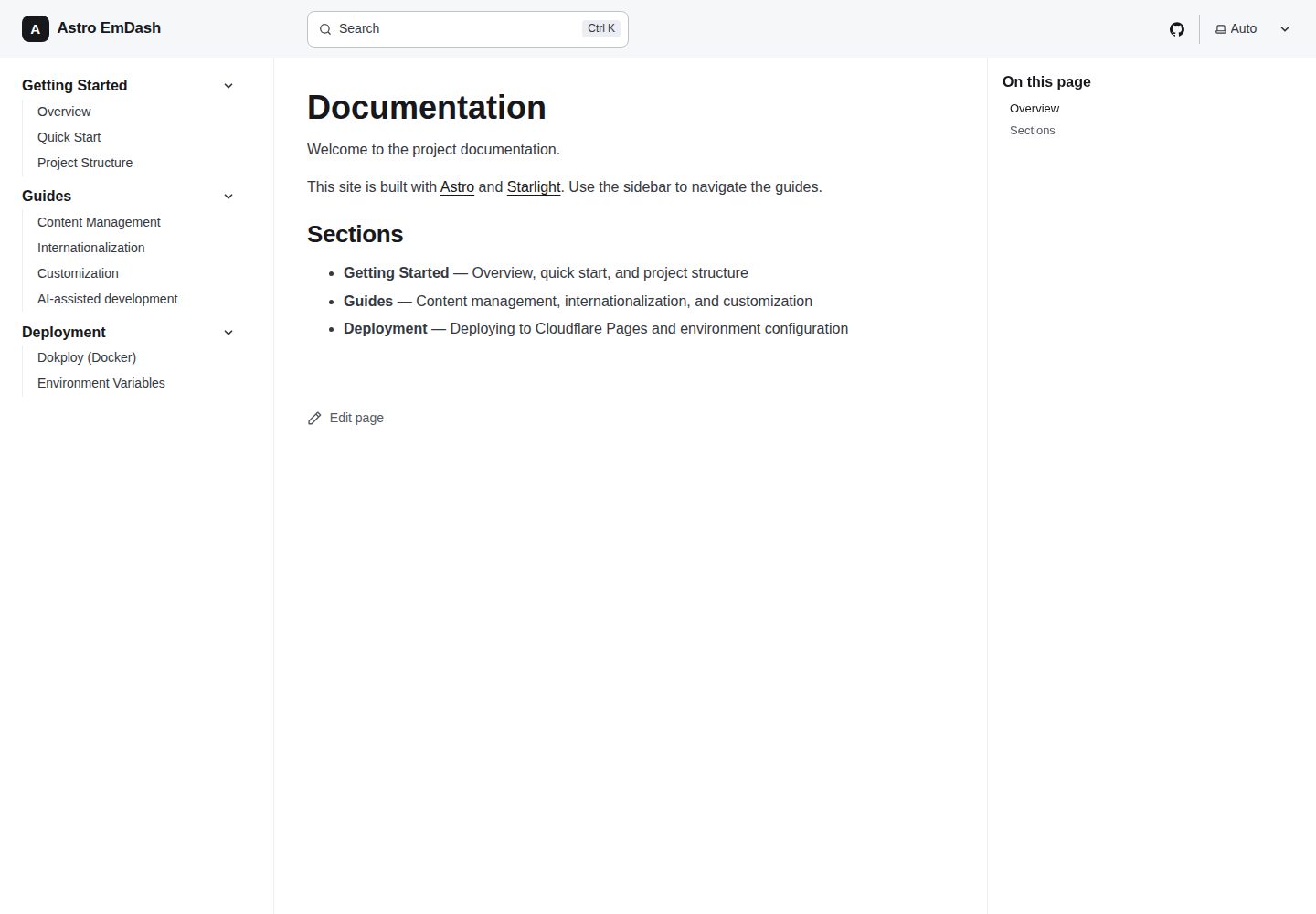
EmDash CMS as the single content source for blog and pages, with content stored in SQLite and media optionally on Cloudflare R2
AstroBlogDocumentationCorporate WebsiteStarter
astro-emdash-sqlite-r2-starter — Astro Blog Template
By milzamsz
A self-hostable marketing, blog, and documentation site starter built on Astro and the EmDash CMS, with content stored in SQLite and media optionally on Cloudflare R2.
Explore the design
Compare the page layouts and mobile experience. Open any screenshot for a closer look.
Desktop homepage1 / 3
Desktop captureTop of page
Actual screenshot captured by the server browser.
All pages & views 3
Screenshots show visual appearance; interactive behavior may differ.
Recorded 2026-10-02View source
What stands out
A quick read of the recorded project description.
Pages built from typed fields (hero, features repeater, CTA), with real inputs in the admin instead of JSON text boxes
Starlight-powered documentation with full-text search, sharing the same site as marketing pages and the blog
English-first with a built-in prefix-based routing multilingual engine that can be extended to other languages
SEO defaults include canonical, hreflang, JSON-LD, Open Graph, sitemap, RSS, and a dynamic llms.txt
Public pages contain almost no client-side JS, with interactions implemented using native Astro and small inline scripts
Template Details
This is an Astro site template for self-hosting that combines marketing pages, a blog, and documentation in a single codebase. Content is managed centrally by the EmDash CMS: blog and page collections are stored in SQLite, routes read records at request time via src/lib/cms.ts, and rich text is rendered with <PortableText>. Pages use typed fields (hero title and subtitle, features repeater, CTA fields) instead of hand-written JSON, so editors get real form inputs in the admin. The documentation section is provided by Starlight with full-text search; other content (docs, services, tech stack, settings) remains in src/content as Markdown/JSON and is type-checked through content collection schemas.
The site is English-first by default and includes a prefix-based routing multilingual engine that can be extended to other languages. The theme is a monochrome OKLCH design system with light and dark mode support. For SEO, it provides canonical, hreflang, JSON-LD, Open Graph, sitemap, RSS, and a dynamic llms.txt. Public pages use as little client-side JS as possible, with interactions implemented using native Astro and small inline scripts.
Deployment uses the Astro Node adapter for server-side rendering, and the repository includes a Dockerfile for deployment to Dokploy or any Docker host; you need to mount a persistent volume at /app/data and configure R2 credentials. Local development requires no database configuration—the SQLite file and local file uploads work out of the box; the first run automatically migrates and imports seed/seed.json. In production, media uploads go to R2 and are served through EmDash's same-origin proxy route, so the bucket can remain private. Magic link login via Resend is optional.
AstroBlogDocumentationCorporate WebsiteStarter
Is it right for your project?
Use Cases
- A self-hosted site that needs to host marketing pages, a blog, and documentation together
- Teams that want to manage content through a CMS admin but do not want to depend on an external SaaS
- Projects planning to deploy to Dokploy or any Docker host and store data using SQLite plus object storage
- Sites that need to be English-first and later extend to multiple languages
- Projects with default requirements for SEO metadata, sitemaps, and RSS
Suitable For
- Developers or small teams able to maintain a Node service and persistent volumes themselves
- Projects that accept using SQLite as the content database and R2 as media storage
- Scenarios that need marketing, blog, and documentation unified in one Astro project
- Users who want to start from a template and replace branding, navigation, and seed content themselves
Getting started & customization
Use these recorded setup notes alongside the repository instructions for your chosen version.
- 1
After cloning the repository, run pnpm install and pnpm dev; the first run automatically migrates the database and imports seed/seed.json
- 2
Locally, ./data/emdash.db and ./data/uploads are used by default with no database configuration; in production, mount a persistent volume at /app/data
- 3
Follow the README checklist to replace placeholder content in src/config/site.config.ts, src/config/nav.config.ts, astro.config.ts, and seed/seed.json
- 4
Copy .env.example to .env and set SITE_URL; R2 credentials are only needed in production
- 5
Production deployment uses the included Dockerfile, and gzip/Brotli should be enabled at the Traefik proxy layer because the Node adapter outputs uncompressed assets
License & source material
Usage conditions & limitations
Free to use · keep license noticeThis listing covers the free version in the public repository under the MIT license; the free scope is that version's code and does not mean external services or third-party assets are free.
Must comply with when using
- You may use, modify, commercialize, and distribute this version's code for free.
- When distributing copies or substantial portions of the code, retain the original author's copyright notice and the full MIT license notice.
- The code is provided as is; warranties and limitations of liability are governed by the original license and applicable law.
Additional costs & items to verify
- Magic link login is optional; enabling it requires the third-party service Resend and a RESEND_API_KEY, which may involve external service accounts and fees.
- Production requires Cloudflare R2 credentials to store media via the S3 API, which involves a third-party cloud service account and potential fees.
- Deploying to Dokploy requires mounting a persistent volume at /app/data and setting R2 environment variables, depending on external hosting and storage services.
- For the best Lighthouse scores, you must enable gzip/Brotli compression yourself at the Traefik proxy layer, which is an additional operational configuration requirement.
- Demo images, fonts, icons, and other third-party assets must be checked against their respective licenses; the code's MIT license alone is not sufficient to judge them.
- External services such as domains, hosting, databases, payments, or AI may incur separate charges.
View Original Text Basis
Permission is hereby granted, free of charge
Original License Text
Optional magic-link sign-in via [Resend](https://resend.com) (set `RESEND_API_KEY`)
Original README
R2 credentials are only needed in production.
Original README
deploy it to **Dokploy** with a persistent volume mounted at `/app/data` and R2 credentials set as environment variables.
Original README
https://github.com/milzamsz/astro-emdash-sqlite-r2-starter/blob/main/LICENSEhttps://github.com/milzamsz/astro-emdash-sqlite-r2-starter/blob/main/README.mdenable **gzip/Brotli at the Traefik proxy** for best Lighthouse scores.
Original README
Compiled by DeepSeek based on repository license and README ·2026-10-02. Results only cover the materials read; dependencies, images, fonts, and subsequent term changes are subject to their respective original texts.
Project checks & description sources
Template Information
- Source platforms
- Astro Themes
- Documentation and maintenance reference score
- More documented · 92 / 100
- Technologies
- Astro
- Website type
- Blog · Documentation · Corporate Website · Starter
How this score is calculated
Our heuristic uses license records (up to 30), a demo link (12), a preview (10), stars (15), recorded maintenance (15), description completeness (8), feature records (5) and classification data (5). It is not a code, security or performance test, or a Google score. A link does not establish tested functionality.
What to verify for this project
- Repository update recorded
- 2026-09-28
- Screenshot last checked
- 2026-10-02
A demo link is listed. Check it with your own content and viewport sizes; its presence does not confirm that forms, authentication or payments work.
The catalog identifies Astro as the primary stack. Check the actual dependency manifest and lockfile for versions and hosting requirements. These notes use recorded metadata, not a code audit or a deployment test.
Use a selection guide →How this description was prepared
AI-assisted description based on catalog records and repository material. Repository authors are not automatically the reviewers of this description.
Automatically checked against source and license rules; no manual editorial review.
Inspect the recorded source material
SHA-256: 6b8fc0e579cbfbf3cf5c0e0fa30eb40d41b5d8fdb715f549c70d6cf292c449d3
2026-10-02T21:36:49.616Z
Source file / repository# Astro EmDash Starter A production-ready marketing + blog + docs site built with **Astro 7** and the **[EmDash](https://github.com/emdash-cms/emdash) CMS**. English-first and multilanguage-ready. Content is authored in the EmDash admin panel and stored in **SQLite**, with media on **Cloudflare R2** in production. Designed to **self-host on Dokploy** (or any Docker host). ## Features - EmDash CMS as the single source of truth for the blog and pages (Portable Text rich content) - Pages use **typed fields** (hero, a `features` repeater, CTA) instead of hand-written JSON - English-first with a multilanguage-ready i18n engine (prefix-based routing) - Marketing pages, blog, and Starlight-powered docs with full-text search - Minimal client JS: interactive bits are plain Astro + tiny inline scripts (no React on public pages) - Light/dark theming with a monochrome OKLCH design system - SEO defaults: canonical, hreflang, JSON-LD, Open Graph, sitemap, RSS, dynamic `llms.txt` - Optional magic-link sign-in via [Resend](https://resend.com) (set `RESEND_API_KEY`) - Server-rendered via the Astro Node adapter — runs anywhere Node + a volume is available - SQLite database (local file or persistent volume) + Cloudflare R2 media via the S3 API ## Quick Start ```bash git clone https://github.com/milzamsz/astro-emdash-sqlite-r2-starter.git cd astro-emdash-sqlite-r2-starter pnpm install pnpm dev ``` `pnpm dev` runs EmDash's dev server, which boots Astro, runs database migrations, and seeds `seed/seed.json` on first run. Then open: - Site: **http://localhost:4321** - Admin: **http://localhost:4321/_emdash/admin** The first time you open the admin panel, EmDash walks you through creating an owner account. No database config is needed locally — SQLite (`./data/emdash.db`) and local file uploads (`./data/uploads`) work out of the box. ## Make it yours After clicking **Use this template**, update these: - [ ] `src/config/site.config.ts` — `url`, `name`, `description`, `author`, `email`, social links, OG image. Single source of truth (canonical/OG/sitemap/`llms.txt`; `astro.config.ts` reads `url`). - [ ] `src/config/nav.config.ts` — footer GitHub/social URLs. - [ ] `astro.config.ts` — Starlight `editLink.baseUrl` and the GitHub social link. - [ ] `seed/seed.json` — starter collections and content (or edit everything in the admin panel after first run). - [ ] `public/favicon.svg`, logos, and the default OG image. - [ ] `.env.example` → `.env`; set `SITE_URL`. R2 credentials are only needed in production. - [ ] `LICENSE` copyright holder and `CHANGELOG.md`. > Tip: search for `your-org`, `Your Name`, `[email protected]`, and `yourhandle` to find placeholders. ## Documentation | Document | Purpose | |----------|---------| | [SETUP.md](SETUP.md) | Local setup, seeding, and Dokploy deployment | | [CONTRIBUTING.md](CONTRIBUTING.md) | Development workflow and conventions | | [SECURITY.md](SECURITY.md) | Reporting vulnerabilities | | [CHANGELOG.md](CHANGELOG.md) | Release notes | | `/docs` (Starlight) | In-app guides: getting started, content, i18n, deployment | ## Scripts ```bash pnpm dev # start EmDash + Astro dev server (auto-migrate + seed) pnpm build # production build to dist/ (server output) pnpm start # run the built Node server (dist/server/entry.mjs) pnpm preview # preview the production build pnpm types:cms # regenerate EmDash collection types pnpm export-seed # export current CMS content back to a seed file pnpm lint # eslint + stylelint + type-check + validations pnpm test # unit tests (vitest) pnpm test:e2e # end-to-end tests (playwright) # Maintenance (operate on an existing database) pnpm set-site-url https://your-domain # set the stored emdash:site_url (email links) pnpm set-url-patterns # apply collection urlPattern values to an old DB ``` ## Content model The **blog** and **pages** collections are owned by EmDash and live in SQLite. Routes read them at request time through the adapter in `src/lib/cms.ts`, which shapes EmDash records into the types the Astro components already expect, and renders rich content with `<PortableText>`. Collection schemas and starter content are defined in `seed/seed.json`. Pages are built from **typed fields** — `hero_title`/`hero_subtitle`, a `features` repeater (rows of title/description/icon), and `cta_*` fields — so editors get real inputs in the admin instead of a JSON box. Each collection also declares a `urlPattern` (`/{slug}` for pages, `/blog/{slug}` for posts) that drives the admin's "View on site" link and sitemaps. Media is uploaded to R2 and served through EmDash's same-origin proxy route, so the bucket can stay private. See the in-app docs at `/docs/guides/content-management`. Other content (docs, services, stack, settings) still lives in `src/content` as Markdown/JSON, type-checked via content collection schemas. ## Deployment Server-rendered Astro on a Node host. The included `Dockerfile` builds a standalone server; deploy it to **Dokploy** with a persistent volume mounted at `/app/data` and R2 credentials set as environment variables. The Node adapter serves assets uncompressed, so enable **gzip/Brotli at the Traefik proxy** for best Lighthouse scores. See [SETUP.md](SETUP.md) and `/docs/deployment/dokploy`. ## License [MIT](LICENSE)
Explore similar templates
Compare previews and descriptions within the same stack and category.

astrowind
AstroWind is a free, open-source Astro starter theme using Astro and Tailwind CSS, released under the MIT license.
Astro · Blog

astro-paper
AstroPaper is a minimal, responsive, accessible, and SEO-friendly Astro blog theme. Articles are stored as Markdown/MDX in src/content/posts/, with subdirectories affecting URLs.
Astro · Blog

fuwari
Fuwari is a static blog template built with Astro and Tailwind CSS for personal blogs. It manages posts as Markdown files in src/content/posts/, with frontmatter for title, date, description, cover, tags, categories, draft status, and language.
Astro · Blog

Firefly
Firefly is a clean personal blog theme forked from Astro and Fuwari, offering four background modes, single/double sidebar and list/grid layouts, Pagefind client-side full-text search, and a six-language UI.
Astro · Blog

astro-theme-cactus
Astro Cactus is an Astro-based blog and portfolio theme that uses Markdown/MDX content collections to manage posts, notes, and tags, with frontmatter type-checked by a schema.
Astro · Portfolio

astrofy
Astrofy is a free and open-source personal portfolio website template built with Astro and TailwindCSS, with built-in blog, CV timeline, project showcase, store, and RSS feed modules.
Astro · Portfolio