EmDash CMS 作为博客与页面的唯一内容源,内容存于 SQLite,媒体可放 Cloudflare R2
Astro博客文档企业官网启动器
astro-emdash-sqlite-r2-starter — Astro 博客模板
作者 milzamsz
基于 Astro 与 EmDash CMS 的自托管营销、博客与文档站点启动器,内容存于 SQLite,媒体可放 Cloudflare R2。
看看你的网站会是什么样
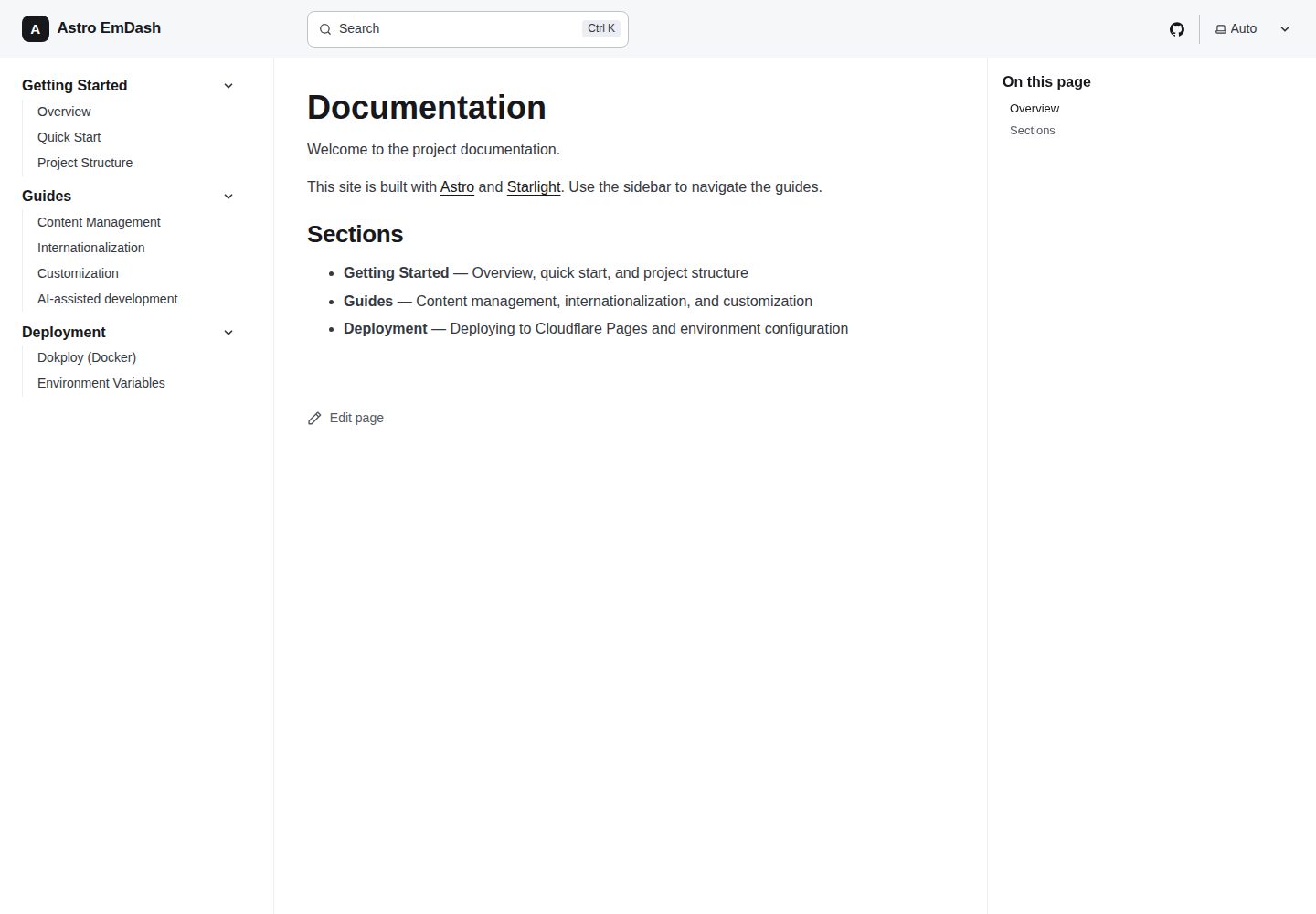
浏览真实页面截图,比较内容排版与手机效果。点击下方缩略图切换,放大查看整页细节。
全部页面与视图 3
截图用于了解视觉与布局,交互效果请以实际项目为准。
采集于 2026-10-02查看来源
值得关注的模板亮点
从已有项目资料中,快速了解它的特点。
页面由类型化字段(hero、features 重复器、CTA)构建,后台提供真实输入而非 JSON 文本框
Starlight 驱动的文档带全文搜索,与营销页、博客共用同一站点
英文优先并内置基于前缀路由的多语言引擎,可扩展其他语言
SEO 默认包含 canonical、hreflang、JSON-LD、Open Graph、sitemap、RSS 与动态 llms.txt
公开页面几乎不含客户端 JS,交互用原生 Astro 与小型内联脚本实现
模板详细介绍
这是一个面向自托管场景的 Astro 站点模板,把营销页、博客和文档整合在同一套代码里。内容由 EmDash CMS 统一管理:博客与页面集合存放在 SQLite 中,路由在请求时通过 src/lib/cms.ts 读取记录,并用 <PortableText> 渲染富文本。页面使用类型化字段(hero 标题与副标题、features 重复器、CTA 字段)而非手写 JSON,编辑者在后台获得真实表单输入。文档部分由 Starlight 提供并带全文搜索;其余内容(文档、服务、技术栈、设置)仍以 Markdown/JSON 形式放在 src/content,并通过内容集合 schema 做类型检查。
站点默认英文优先,内置基于前缀路由的多语言引擎,可扩展其他语言。主题为单色 OKLCH 设计系统,支持明暗模式。SEO 方面提供 canonical、hreflang、JSON-LD、Open Graph、sitemap、RSS 以及动态 llms.txt。公开页面尽量少用客户端 JS,交互部分用原生 Astro 加小型内联脚本实现。
部署上采用 Astro Node 适配器做服务端渲染,仓库自带 Dockerfile,可部署到 Dokploy 或任何 Docker 主机,需要把持久化卷挂载到 /app/data 并配置 R2 凭据。本地开发无需数据库配置,SQLite 文件与本地文件上传开箱即用;首次运行会自动迁移并导入 seed/seed.json。生产环境媒体上传到 R2,并通过 EmDash 的同源代理路由提供,因此存储桶可以保持私有。可选通过 Resend 实现魔法链接登录。
Astro博客文档企业官网启动器
适合你的项目吗?
适用场景
- 需要同时承载营销页、博客和文档的自托管站点
- 希望用 CMS 后台管理内容、但不想依赖外部 SaaS 的团队
- 计划部署到 Dokploy 或任意 Docker 主机,并用 SQLite 加对象存储保存数据
- 需要英文优先、后续可扩展多语言的站点
- 对 SEO 元数据、站点地图与 RSS 有默认要求的项目
适合人群
- 能自行维护 Node 服务与持久化卷的开发者或小团队
- 接受用 SQLite 作为内容数据库、R2 作为媒体存储的项目
- 需要营销、博客、文档三部分统一在一个 Astro 项目里的场景
- 希望从模板起步并自行替换品牌、导航与种子内容的用户
上手与定制指南
结合仓库当前版本的说明,按下面的资料检查内容、配置与运行要求。
- 1
克隆仓库后执行 pnpm install 与 pnpm dev;首次运行会自动迁移数据库并导入 seed/seed.json
- 2
本地默认使用 ./data/emdash.db 与 ./data/uploads,无需数据库配置;生产环境需挂载持久化卷到 /app/data
- 3
按 README 清单修改 src/config/site.config.ts、src/config/nav.config.ts、astro.config.ts 与 seed/seed.json 等占位内容
- 4
将 .env.example 复制为 .env 并设置 SITE_URL;R2 凭据仅在生产环境需要
- 5
生产部署使用自带 Dockerfile,并在 Traefik 代理层启用 gzip/Brotli,因为 Node 适配器输出未压缩资源
授权与来源资料
使用条件与限制
免费使用 · 保留许可声明本次收录的是公开仓库中采用 MIT 许可的免费版本;免费范围为该版本代码,不代表外部服务或第三方素材免费。
使用时需要遵守
- 允许免费使用、修改、商用和分发该版本代码。
- 分发代码副本或实质性部分时,保留原作者版权声明和完整 MIT 许可声明。
- 代码按现状提供;担保与责任限制以原许可证及适用法律为准。
额外费用与待核对事项
- 魔法链接登录为可选功能,启用时需使用第三方服务 Resend 并配置 RESEND_API_KEY,可能涉及外部服务账号与费用。
- 生产环境需配置 Cloudflare R2 凭据以使用 S3 API 存储媒体,涉及第三方云服务账号与潜在费用。
- 部署到 Dokploy 需挂载持久化卷到 /app/data 并设置 R2 环境变量,依赖外部托管与存储服务。
- 为获得最佳 Lighthouse 分数,需在 Traefik 代理层自行启用 gzip/Brotli 压缩,属于额外运维配置要求。
- 演示图片、字体、图标及其他第三方素材需按各自许可核对,不能仅凭代码的 MIT 许可判断。
- 域名、托管、数据库、支付或 AI 等外部服务可能另外收费。
查看原文依据
Permission is hereby granted, free of charge
许可证原文
Optional magic-link sign-in via [Resend](https://resend.com) (set `RESEND_API_KEY`)
README 原文
R2 credentials are only needed in production.
README 原文
deploy it to **Dokploy** with a persistent volume mounted at `/app/data` and R2 credentials set as environment variables.
README 原文
https://github.com/milzamsz/astro-emdash-sqlite-r2-starter/blob/main/LICENSEhttps://github.com/milzamsz/astro-emdash-sqlite-r2-starter/blob/main/README.mdenable **gzip/Brotli at the Traefik proxy** for best Lighthouse scores.
README 原文
DeepSeek 根据仓库许可证和 README 整理 ·2026-10-02。结果仅覆盖已读取资料,依赖、图片、字体及后续条款变更以各自原文为准。
项目核对记录与介绍依据
模板资料
- 来源平台
- Astro Themes
- 资料与维护参考分
- 资料较完整 · 92 / 100
- 技术栈
- Astro
- 网站类型
- 博客 · 文档 · 企业官网 · 启动器
这个分数如何计算
本站按许可资料(最高30分)、演示链接(12分)、预览图(10分)、Star数(15分)、记录的维护时间(15分)、描述完整度(8分)、功能记录(5分)和分类资料(5分)计算。它不是代码、安全或性能测试,也不是 Google 评分;有链接不代表已实测可用。
这个项目需要核对什么
- 记录的仓库更新时间
- 2026-09-28
- 截图检查日期
- 2026-10-02
已收录演示链接。请用你的内容与屏幕尺寸检查;有演示不代表表单、认证或支付已经可用。
目录记录的主要技术栈是 Astro。请通过依赖清单和锁文件核对实际版本与托管要求。这些说明基于收录资料,不代表代码审计或部署实测。
查看具体选型方法 →介绍的制作与核对状态
介绍由 AI 辅助整理目录与仓库资料。仓库作者不等于这篇介绍的审核者。
已完成服务器许可规则与 AI 来源核对;未经过人工编辑审核。
查看当时使用的来源资料
SHA-256: 6b8fc0e579cbfbf3cf5c0e0fa30eb40d41b5d8fdb715f549c70d6cf292c449d3
2026-10-02T21:36:49.616Z
来源文件 / 仓库# Astro EmDash Starter A production-ready marketing + blog + docs site built with **Astro 7** and the **[EmDash](https://github.com/emdash-cms/emdash) CMS**. English-first and multilanguage-ready. Content is authored in the EmDash admin panel and stored in **SQLite**, with media on **Cloudflare R2** in production. Designed to **self-host on Dokploy** (or any Docker host). ## Features - EmDash CMS as the single source of truth for the blog and pages (Portable Text rich content) - Pages use **typed fields** (hero, a `features` repeater, CTA) instead of hand-written JSON - English-first with a multilanguage-ready i18n engine (prefix-based routing) - Marketing pages, blog, and Starlight-powered docs with full-text search - Minimal client JS: interactive bits are plain Astro + tiny inline scripts (no React on public pages) - Light/dark theming with a monochrome OKLCH design system - SEO defaults: canonical, hreflang, JSON-LD, Open Graph, sitemap, RSS, dynamic `llms.txt` - Optional magic-link sign-in via [Resend](https://resend.com) (set `RESEND_API_KEY`) - Server-rendered via the Astro Node adapter — runs anywhere Node + a volume is available - SQLite database (local file or persistent volume) + Cloudflare R2 media via the S3 API ## Quick Start ```bash git clone https://github.com/milzamsz/astro-emdash-sqlite-r2-starter.git cd astro-emdash-sqlite-r2-starter pnpm install pnpm dev ``` `pnpm dev` runs EmDash's dev server, which boots Astro, runs database migrations, and seeds `seed/seed.json` on first run. Then open: - Site: **http://localhost:4321** - Admin: **http://localhost:4321/_emdash/admin** The first time you open the admin panel, EmDash walks you through creating an owner account. No database config is needed locally — SQLite (`./data/emdash.db`) and local file uploads (`./data/uploads`) work out of the box. ## Make it yours After clicking **Use this template**, update these: - [ ] `src/config/site.config.ts` — `url`, `name`, `description`, `author`, `email`, social links, OG image. Single source of truth (canonical/OG/sitemap/`llms.txt`; `astro.config.ts` reads `url`). - [ ] `src/config/nav.config.ts` — footer GitHub/social URLs. - [ ] `astro.config.ts` — Starlight `editLink.baseUrl` and the GitHub social link. - [ ] `seed/seed.json` — starter collections and content (or edit everything in the admin panel after first run). - [ ] `public/favicon.svg`, logos, and the default OG image. - [ ] `.env.example` → `.env`; set `SITE_URL`. R2 credentials are only needed in production. - [ ] `LICENSE` copyright holder and `CHANGELOG.md`. > Tip: search for `your-org`, `Your Name`, `[email protected]`, and `yourhandle` to find placeholders. ## Documentation | Document | Purpose | |----------|---------| | [SETUP.md](SETUP.md) | Local setup, seeding, and Dokploy deployment | | [CONTRIBUTING.md](CONTRIBUTING.md) | Development workflow and conventions | | [SECURITY.md](SECURITY.md) | Reporting vulnerabilities | | [CHANGELOG.md](CHANGELOG.md) | Release notes | | `/docs` (Starlight) | In-app guides: getting started, content, i18n, deployment | ## Scripts ```bash pnpm dev # start EmDash + Astro dev server (auto-migrate + seed) pnpm build # production build to dist/ (server output) pnpm start # run the built Node server (dist/server/entry.mjs) pnpm preview # preview the production build pnpm types:cms # regenerate EmDash collection types pnpm export-seed # export current CMS content back to a seed file pnpm lint # eslint + stylelint + type-check + validations pnpm test # unit tests (vitest) pnpm test:e2e # end-to-end tests (playwright) # Maintenance (operate on an existing database) pnpm set-site-url https://your-domain # set the stored emdash:site_url (email links) pnpm set-url-patterns # apply collection urlPattern values to an old DB ``` ## Content model The **blog** and **pages** collections are owned by EmDash and live in SQLite. Routes read them at request time through the adapter in `src/lib/cms.ts`, which shapes EmDash records into the types the Astro components already expect, and renders rich content with `<PortableText>`. Collection schemas and starter content are defined in `seed/seed.json`. Pages are built from **typed fields** — `hero_title`/`hero_subtitle`, a `features` repeater (rows of title/description/icon), and `cta_*` fields — so editors get real inputs in the admin instead of a JSON box. Each collection also declares a `urlPattern` (`/{slug}` for pages, `/blog/{slug}` for posts) that drives the admin's "View on site" link and sitemaps. Media is uploaded to R2 and served through EmDash's same-origin proxy route, so the bucket can stay private. See the in-app docs at `/docs/guides/content-management`. Other content (docs, services, stack, settings) still lives in `src/content` as Markdown/JSON, type-checked via content collection schemas. ## Deployment Server-rendered Astro on a Node host. The included `Dockerfile` builds a standalone server; deploy it to **Dokploy** with a persistent volume mounted at `/app/data` and R2 credentials set as environment variables. The Node adapter serves assets uncompressed, so enable **gzip/Brotli at the Traefik proxy** for best Lighthouse scores. See [SETUP.md](SETUP.md) and `/docs/deployment/dokploy`. ## License [MIT](LICENSE)
看看同类模板
对比同技术栈与用途的模板,找到更适合的视觉与内容结构。

astrowind
⭕️ AstroWind: A free template using Astro v7 and Tailwind CSS v4. Astro starter theme.
Astro · 博客

astro-paper
A minimal, accessible and SEO-friendly Astro blog theme.
Astro · 博客

fuwari
✨A static blog template built with Astro.
Astro · 博客

Firefly
Firefly 是一款基于 Astro 的静态博客主题,由 CuteLeaf 在 saicaca 的 Fuwari 模板基础上二次开发,主打清新美观的视觉风格。
Astro · 博客

astro-theme-cactus
A simple Astro theme. Use it to create your blog or website.
Astro · 作品集

astrofy
Astrofy is a free and open-source template for your Personal Portfolio Website built with Astro and TailwindCS…
Astro · 作品集