Based on the Jekyll static site generator and the Chirpy theme
JekyllBlog
mmacdonnacha.github.io_OLD — Jekyll Blog Template
By mmacdonnacha
A Jekyll-based Chirpy theme blog repository for building a personal site and publishing posts.
Explore the design
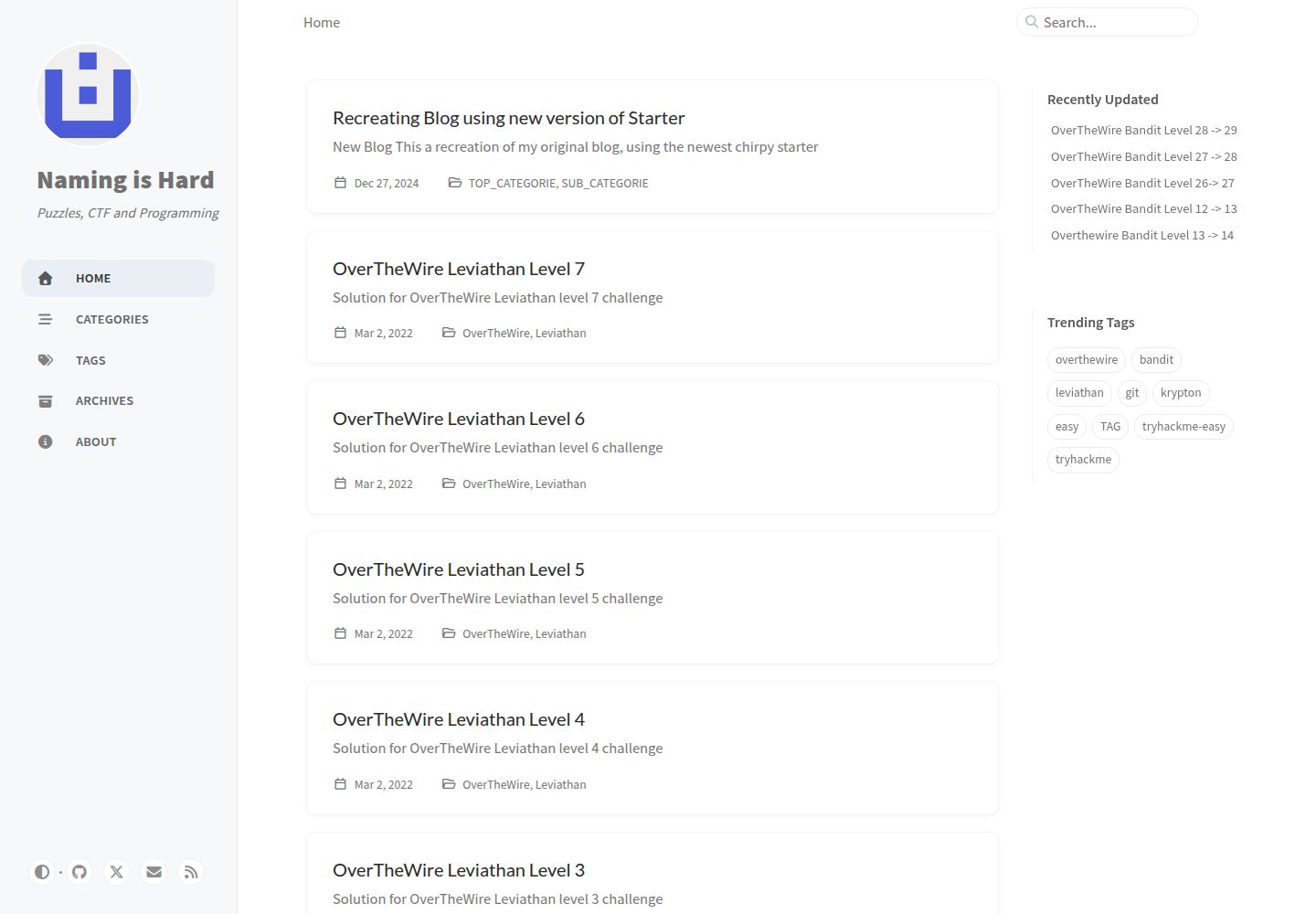
Compare the page layouts and mobile experience. Open any screenshot for a closer look.
Desktop homepage1 / 3
Desktop captureTop of page
Actual screenshot captured by the server browser.
All pages & views 3
Screenshots show visual appearance; interactive behavior may differ.
Recorded 2026-10-03View source
What stands out
A quick read of the recorded project description.
The repository originates from Chirpy Starter and already includes files required for the theme's full functionality, such as _config.yml, _plugins, _tabs, and index.html
Supports generating a USERNAME.github.io repository via a GitHub template and deploying to GitHub Pages
Content is automatically updated when new versions are released in the upstream jekyll-theme-chirpy main repository
Uses the MIT license, permitting use, modification, commercial use, and distribution of the code
Template Details
This repository contains the source code for a blog site using Jekyll and the Chirpy theme. The repository name carries an _OLD suffix, indicating it is an earlier version of the author's GitHub Pages blog. The README shows that its content originates from the Chirpy Starter template: after installing jekyll-theme-chirpy via RubyGems, Jekyll can only read the _data, _layouts, _includes, _sass, and assets directories from the theme gem, as well as some options in _config.yml. Therefore, this template additionally provides key files such as _config.yml, _plugins, _tabs, and index.html, enabling the site to directly use the theme's full functionality.
To use it, generate a repository named USERNAME.github.io from this template on GitHub, clone it locally, run bundle to install dependencies, and then write and configure content according to the Chirpy theme documentation. The repository content is automatically updated when new versions are released in the upstream Chirpy main repository.
Limitations: The _OLD in the repository name indicates this is a historical version, and the author may have migrated to a new repository. The repository does not provide separate deployment instructions; actual publishing depends on GitHub Pages or a self-configured continuous deployment process. The licenses for third-party assets such as demo images, fonts, and icons must be checked separately; the MIT license covers only the code itself.
JekyllBlog
Is it right for your project?
Use Cases
- Building a personal technical blog and publishing Markdown posts
- Hosting a static blog site on GitHub Pages
- Using it as a starting template for the Chirpy theme for further customization
- Referencing this repository to understand the directory and configuration file structure required by the Chirpy theme
Suitable For
- Individual developers who want to blog using Jekyll and the Chirpy theme
- Users who need free static site hosting via GitHub Pages
- Developers familiar with Git and a Ruby environment who are willing to configure it themselves according to the theme documentation
Getting started & customization
Use these recorded setup notes alongside the repository instructions for your chosen version.
- 1
First install the base environment according to the official Jekyll documentation, and install Git
- 2
On GitHub, use this template to generate a repository named USERNAME.github.io, where USERNAME is the GitHub username
- 3
After cloning the repository locally, run bundle to install dependencies
- 4
For specific configuration and writing methods, see the official Chirpy theme documentation
- 5
The repository name contains _OLD; before use, it is advisable to confirm whether the author has migrated to a new repository
License & source material
Usage conditions & limitations
Free to use · keep license noticeThis entry covers the free version under the MIT license in a public repository; the free scope is the code of this version and does not mean that external services or third-party assets are free.
Must comply with when using
- Permits free use, modification, commercial use, and distribution of this version's code.
- When distributing copies or substantial portions of the code, retain the original author's copyright notice and the full MIT license notice.
- The code is provided as is; warranties and limitations of liability are governed by the original license and applicable law.
Additional costs & items to verify
- Using this template requires logging into a GitHub account and generating a new repository through GitHub's "use this template" feature, so it depends on the GitHub platform and account.
- Local use requires first installing the base environment according to the official Jekyll documentation and additionally installing Git, creating external tool dependencies.
- The repository content is automatically updated when new versions are released in the upstream Chirpy main repository; users cannot fully pin the version, which may introduce upstream changes.
- Demo images, fonts, icons, and other third-party assets must be checked against their respective licenses and cannot be judged solely by the code's MIT license.
- External services such as domains, hosting, databases, payments, or AI may incur additional charges.
View Original Text Basis
Permission is hereby granted, free of charge
Original License Text
Sign in to GitHub and [**use this template**][use-template] to generate a brand new repository
Original README
Follow the instructions in the [Jekyll Docs](https://jekyllrb.com/docs/installation/) to complete the installation of the basic environment. [Git](https://git-scm.com/) also needs to be installed.
Original README
https://github.com/mmacdonnacha/mmacdonnacha.github.io_OLD/blob/main/LICENSEhttps://github.com/mmacdonnacha/mmacdonnacha.github.io_OLD/blob/main/README.mdThe contents of this repository are automatically updated when new releases are made to the [main repository][chirpy].
Original README
Compiled by DeepSeek based on repository license and README ·2026-10-03. Results only cover the materials read; dependencies, images, fonts, and subsequent term changes are subject to their respective original texts.
Project checks & description sources
Template Information
- Source platforms
- GitHub
- Documentation and maintenance reference score
- Partly documented · 65 / 100
- Technologies
- Jekyll
- Website type
- Blog
How this score is calculated
Our heuristic uses license records (up to 30), a demo link (12), a preview (10), stars (15), recorded maintenance (15), description completeness (8), feature records (5) and classification data (5). It is not a code, security or performance test, or a Google score. A link does not establish tested functionality.
What to verify for this project
- Repository update recorded
- 2024-07-17
- Screenshot last checked
- 2026-10-03
A demo link is listed. Check it with your own content and viewport sizes; its presence does not confirm that forms, authentication or payments work.
The catalog identifies Jekyll as the primary stack. Check the actual dependency manifest and lockfile for versions and hosting requirements. These notes use recorded metadata, not a code audit or a deployment test.
Use a selection guide →How this description was prepared
AI-assisted description based on catalog records and repository material. Repository authors are not automatically the reviewers of this description.
Review declaration: [email protected] · 2026-10-04
Inspect the recorded source material
SHA-256: ffc05c65c3c1f4bc4561d98f8784e3ada8be6e93524e22fb5a511250af1da266
2026-10-03T21:32:29.535Z
Source file / repository# Chirpy Starter [][gem] [][mit] When installing the [**Chirpy**][chirpy] theme through [RubyGems.org][gem], Jekyll can only read files in the folders `_data`, `_layouts`, `_includes`, `_sass` and `assets`, as well as a small part of options of the `_config.yml` file from the theme's gem. If you have ever installed this theme gem, you can use the command `bundle info --path jekyll-theme-chirpy` to locate these files. The Jekyll team claims that this is to leave the ball in the user’s court, but this also results in users not being able to enjoy the out-of-the-box experience when using feature-rich themes. To fully use all the features of **Chirpy**, you need to copy the other critical files from the theme's gem to your Jekyll site. The following is a list of targets: ```shell . ├── _config.yml ├── _plugins ├── _tabs └── index.html ``` To save you time, and also in case you lose some files while copying, we extract those files/configurations of the latest version of the **Chirpy** theme and the [CD][CD] workflow to here, so that you can start writing in minutes. ## Prerequisites Follow the instructions in the [Jekyll Docs](https://jekyllrb.com/docs/installation/) to complete the installation of the basic environment. [Git](https://git-scm.com/) also needs to be installed. ## Installation Sign in to GitHub and [**use this template**][use-template] to generate a brand new repository and name it `USERNAME.github.io`, where `USERNAME` represents your GitHub username. Then clone it to your local machine and run: ```console $ bundle ``` ## Usage Please see the [theme's docs](https://github.com/cotes2020/jekyll-theme-chirpy#documentation). ## Contributing The contents of this repository are automatically updated when new releases are made to the [main repository][chirpy]. If you have problems using it, or would like to participate in improving it, please go to the main repository for feedback! ## License This work is published under [MIT][mit] License. [gem]: https://rubygems.org/gems/jekyll-theme-chirpy [chirpy]: https://github.com/cotes2020/jekyll-theme-chirpy/ [use-template]: https://github.com/cotes2020/chirpy-starter/generate [CD]: https://en.wikipedia.org/wiki/Continuous_deployment [mit]: https://github.com/cotes2020/chirpy-starter/blob/master/LICENSE
Explore similar templates
Compare previews and descriptions within the same stack and category.

al-folio
A Jekyll academic homepage theme for scholars and researchers, with a clean responsive design and out-of-the-box support for publication lists, project showcases, CVs, and blogs.
Jekyll · Portfolio

minimal-mistakes
Minimal Mistakes is a two-column Jekyll theme for personal sites, blogs, project documentation, or portfolios.
Jekyll · Portfolio

Beautiful Jekyll
Beautiful Jekyll is a mature, easy-to-use Jekyll blog theme maintained by Dean Attali since 2015, with over 50,000 users.
Jekyll · Blog

jekyll-TeXt-theme
A customizable Jekyll theme for personal sites, team sites, blogs, projects, and documentation.
Jekyll · Blog

startbootstrap-clean-blog-jekyll
The official Jekyll version of Start Bootstrap's Clean Blog theme, offering a blog home page, about page, contact page, and sample post pages, with a Formspree-powered contact form.
Jekyll · Blog

So Simple
A minimal reading-oriented Jekyll theme by Michael Rose for personal blogs, portfolios, and long-form reading. It offers multiple layouts, microformat markup, Disqus comments, Google Analytics, Jekyll SEO Tag, three skins, and aggregation by year, category, and tag with a grid view.
Jekyll · Blog