基于 Jekyll 静态站点生成器与 Chirpy 主题
Jekyll博客
mmacdonnacha.github.io_OLD — Jekyll 博客模板
作者 mmacdonnacha
基于 Jekyll 的 Chirpy 主题博客仓库,用于搭建个人站点并发布文章。
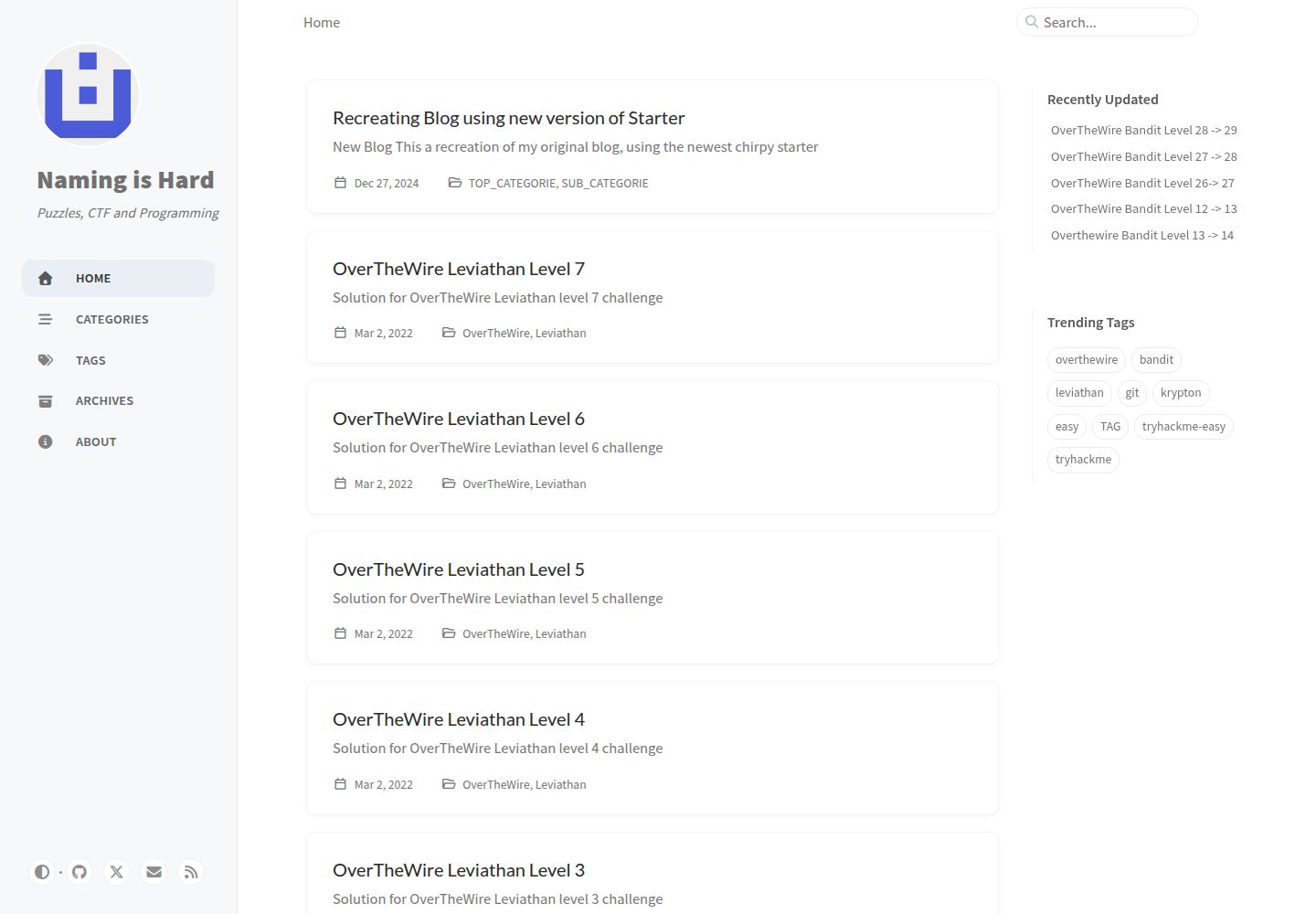
看看你的网站会是什么样
浏览真实页面截图,比较内容排版与手机效果。点击下方缩略图切换,放大查看整页细节。
全部页面与视图 3
截图用于了解视觉与布局,交互效果请以实际项目为准。
采集于 2026-10-03查看来源
值得关注的模板亮点
从已有项目资料中,快速了解它的特点。
仓库源自 Chirpy Starter,已包含 _config.yml、_plugins、_tabs、index.html 等主题完整功能所需文件
支持通过 GitHub 模板生成 USERNAME.github.io 仓库并部署到 GitHub Pages
内容随上游 jekyll-theme-chirpy 主仓库发布而自动更新
采用 MIT 许可,允许使用、修改、商用与分发代码
模板详细介绍
该仓库是一个采用 Jekyll 与 Chirpy 主题的博客站点源码,仓库名带有 _OLD 后缀,说明它是作者较早版本的 GitHub Pages 博客。README 显示其内容源自 Chirpy Starter 模板:通过 RubyGems 安装 jekyll-theme-chirpy 后,Jekyll 只能读取主题 gem 中的 _data、_layouts、_includes、_sass、assets 目录以及 _config.yml 的部分选项,因此该模板额外提供了 _config.yml、_plugins、_tabs 和 index.html 等关键文件,使站点可以直接使用主题的完整功能。
使用方式为在 GitHub 上以该模板生成名为 USERNAME.github.io 的仓库,克隆到本地后执行 bundle 安装依赖,随后按 Chirpy 主题文档撰写与配置内容。仓库内容会随上游 Chirpy 主仓库发布新版本而自动更新。
限制方面:仓库名中的 _OLD 表明这是历史版本,作者可能已迁移到新仓库;仓库未提供独立的部署说明,实际发布依赖 GitHub Pages 或自行配置的持续部署流程;演示图片、字体、图标等第三方素材的许可需单独核对,MIT 许可仅覆盖代码本身。
Jekyll博客
适合你的项目吗?
适用场景
- 搭建个人技术博客并发布 Markdown 文章
- 以 GitHub Pages 托管静态博客站点
- 作为 Chirpy 主题的起步模板进行二次定制
- 参考该仓库了解 Chirpy 主题所需的目录与配置文件结构
适合人群
- 希望使用 Jekyll 与 Chirpy 主题写博客的个人开发者
- 需要以 GitHub Pages 免费托管静态站点的用户
- 熟悉 Git 与 Ruby 环境、愿意按主题文档自行配置的开发者
上手与定制指南
结合仓库当前版本的说明,按下面的资料检查内容、配置与运行要求。
- 1
需先按 Jekyll 官方文档安装基础环境,并安装 Git
- 2
在 GitHub 上使用该模板生成名为 USERNAME.github.io 的仓库,USERNAME 为 GitHub 用户名
- 3
克隆仓库到本地后执行 bundle 安装依赖
- 4
具体配置与写作方式参见 Chirpy 主题官方文档
- 5
仓库名含 _OLD,使用前建议确认作者是否已迁移至新仓库
授权与来源资料
使用条件与限制
免费使用 · 保留许可声明本次收录的是公开仓库中采用 MIT 许可的免费版本;免费范围为该版本代码,不代表外部服务或第三方素材免费。
使用时需要遵守
- 允许免费使用、修改、商用和分发该版本代码。
- 分发代码副本或实质性部分时,保留原作者版权声明和完整 MIT 许可声明。
- 代码按现状提供;担保与责任限制以原许可证及适用法律为准。
额外费用与待核对事项
- 使用该模板需登录 GitHub 账号,并通过 GitHub 的“use this template”功能生成新仓库,因此依赖 GitHub 平台与账号。
- 本地使用需先按 Jekyll 官方文档安装基础环境,并额外安装 Git,存在外部工具依赖。
- 仓库内容会随上游 Chirpy 主仓库发布新版本而自动更新,使用者无法完全固定版本,可能引入上游变更。
- 演示图片、字体、图标及其他第三方素材需按各自许可核对,不能仅凭代码的 MIT 许可判断。
- 域名、托管、数据库、支付或 AI 等外部服务可能另外收费。
查看原文依据
Permission is hereby granted, free of charge
许可证原文
Sign in to GitHub and [**use this template**][use-template] to generate a brand new repository
README 原文
Follow the instructions in the [Jekyll Docs](https://jekyllrb.com/docs/installation/) to complete the installation of the basic environment. [Git](https://git-scm.com/) also needs to be installed.
README 原文
https://github.com/mmacdonnacha/mmacdonnacha.github.io_OLD/blob/main/LICENSEhttps://github.com/mmacdonnacha/mmacdonnacha.github.io_OLD/blob/main/README.mdThe contents of this repository are automatically updated when new releases are made to the [main repository][chirpy].
README 原文
DeepSeek 根据仓库许可证和 README 整理 ·2026-10-03。结果仅覆盖已读取资料,依赖、图片、字体及后续条款变更以各自原文为准。
项目核对记录与介绍依据
模板资料
- 来源平台
- GitHub
- 资料与维护参考分
- 资料一般 · 65 / 100
- 技术栈
- Jekyll
- 网站类型
- 博客
这个分数如何计算
本站按许可资料(最高30分)、演示链接(12分)、预览图(10分)、Star数(15分)、记录的维护时间(15分)、描述完整度(8分)、功能记录(5分)和分类资料(5分)计算。它不是代码、安全或性能测试,也不是 Google 评分;有链接不代表已实测可用。
这个项目需要核对什么
- 记录的仓库更新时间
- 2024-07-17
- 截图检查日期
- 2026-10-03
已收录演示链接。请用你的内容与屏幕尺寸检查;有演示不代表表单、认证或支付已经可用。
目录记录的主要技术栈是 Jekyll。请通过依赖清单和锁文件核对实际版本与托管要求。这些说明基于收录资料,不代表代码审计或部署实测。
查看具体选型方法 →介绍的制作与核对状态
介绍由 AI 辅助整理目录与仓库资料。仓库作者不等于这篇介绍的审核者。
审核声明: [email protected] · 2026-10-04
查看当时使用的来源资料
SHA-256: ffc05c65c3c1f4bc4561d98f8784e3ada8be6e93524e22fb5a511250af1da266
2026-10-03T21:32:29.535Z
来源文件 / 仓库# Chirpy Starter [][gem] [][mit] When installing the [**Chirpy**][chirpy] theme through [RubyGems.org][gem], Jekyll can only read files in the folders `_data`, `_layouts`, `_includes`, `_sass` and `assets`, as well as a small part of options of the `_config.yml` file from the theme's gem. If you have ever installed this theme gem, you can use the command `bundle info --path jekyll-theme-chirpy` to locate these files. The Jekyll team claims that this is to leave the ball in the user’s court, but this also results in users not being able to enjoy the out-of-the-box experience when using feature-rich themes. To fully use all the features of **Chirpy**, you need to copy the other critical files from the theme's gem to your Jekyll site. The following is a list of targets: ```shell . ├── _config.yml ├── _plugins ├── _tabs └── index.html ``` To save you time, and also in case you lose some files while copying, we extract those files/configurations of the latest version of the **Chirpy** theme and the [CD][CD] workflow to here, so that you can start writing in minutes. ## Prerequisites Follow the instructions in the [Jekyll Docs](https://jekyllrb.com/docs/installation/) to complete the installation of the basic environment. [Git](https://git-scm.com/) also needs to be installed. ## Installation Sign in to GitHub and [**use this template**][use-template] to generate a brand new repository and name it `USERNAME.github.io`, where `USERNAME` represents your GitHub username. Then clone it to your local machine and run: ```console $ bundle ``` ## Usage Please see the [theme's docs](https://github.com/cotes2020/jekyll-theme-chirpy#documentation). ## Contributing The contents of this repository are automatically updated when new releases are made to the [main repository][chirpy]. If you have problems using it, or would like to participate in improving it, please go to the main repository for feedback! ## License This work is published under [MIT][mit] License. [gem]: https://rubygems.org/gems/jekyll-theme-chirpy [chirpy]: https://github.com/cotes2020/jekyll-theme-chirpy/ [use-template]: https://github.com/cotes2020/chirpy-starter/generate [CD]: https://en.wikipedia.org/wiki/Continuous_deployment [mit]: https://github.com/cotes2020/chirpy-starter/blob/master/LICENSE
看看同类模板
对比同技术栈与用途的模板,找到更适合的视觉与内容结构。

al-folio
al-folio 是一个面向学者与研究人员的 Jekyll 作品集主题,设计简洁、响应式,适合搭建个人学术主页。
Jekyll · 作品集

minimal-mistakes
:triangular_ruler: Jekyll theme for building a personal site, blog, project documentation, or portfolio.
Jekyll · 作品集

Beautiful Jekyll
Beautiful Jekyll 是一个在 Jekyll 生态中经过长期打磨的博客主题,由 Dean Attali 维护,自 2015 年起积累了超过 5 万用户。
Jekyll · 博客

jekyll-TeXt-theme
💎 🐳 A super customizable Jekyll theme for personal site, team site, blog, project, documentation, etc.
Jekyll · 博客

startbootstrap-clean-blog-jekyll
A Jekyll version of the Clean Blog theme by Start Bootstrap
Jekyll · 博客

So Simple
So Simple 是 Michael Rose 开发的 Jekyll 主题,定位清晰:为文字和图片提供一个干净、可读性强的展示框架。
Jekyll · 博客