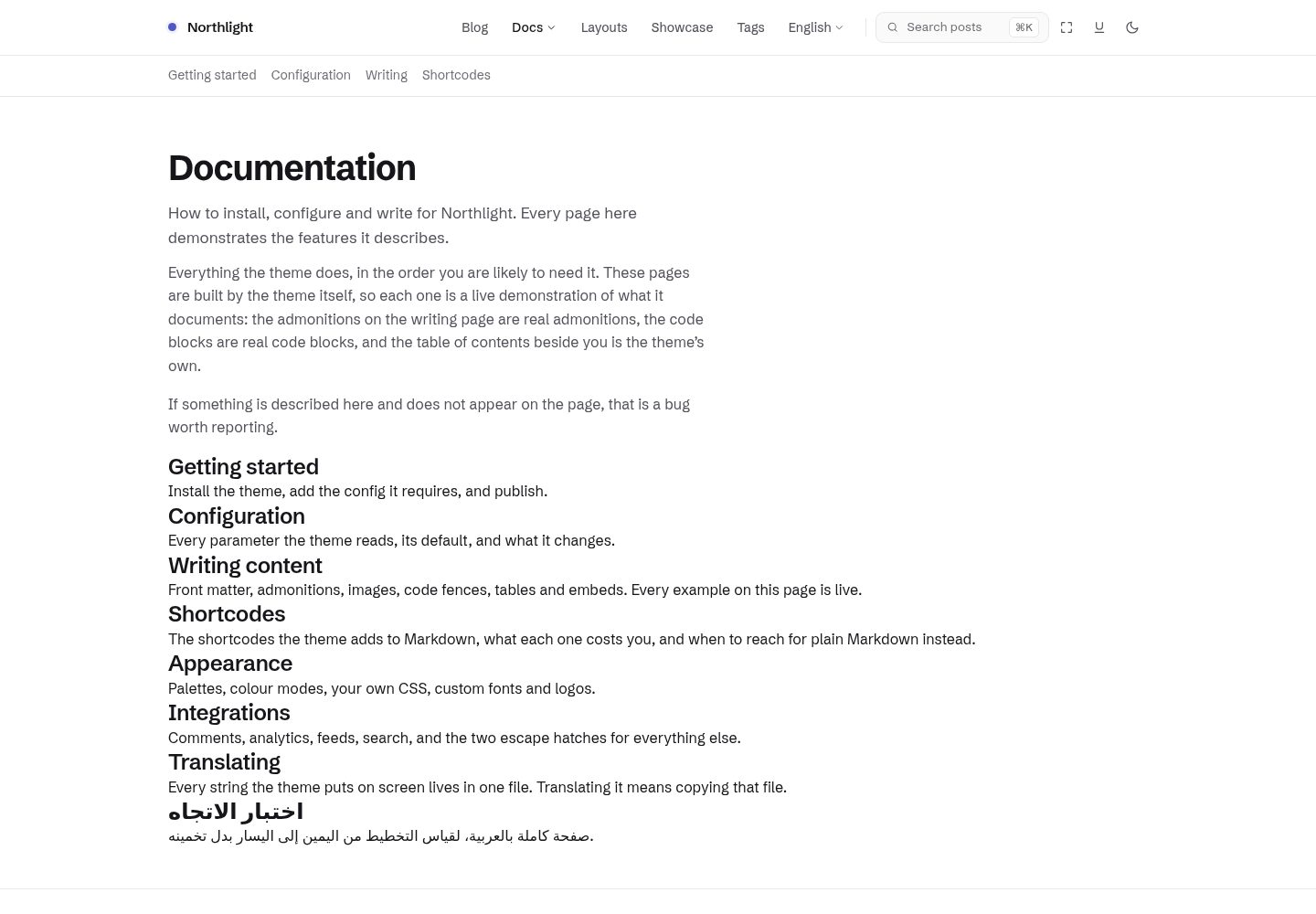
Light and dark modes are designed separately rather than simple inversions, and three soft palettes are provided: periwinkle, sage, and clay
HugoBlog
northlight — Hugo Blog Template
By mortennordbye
Northlight is a Hugo theme for technical writing that emphasizes quiet, readable typography, with separately designed light and dark modes and three soft color palettes.
Explore the design
Compare the page layouts and mobile experience. Open any screenshot for a closer look.
Desktop homepage1 / 3
Desktop captureTop of page
Actual screenshot captured by the server browser.
All pages & views 3
Screenshots show visual appearance; interactive behavior may differ.
Recorded 2026-09-30View source
What stands out
A quick read of the recorded project description.
Code blocks use Chroma class-based syntax highlighting, adapted separately for light and dark, with a filename bar and copy button
Provides a sticky scroll-spy table of contents, reading progress, and heading anchors
Built-in ⌘K search modal with cover thumbnails and keyboard navigation
The homepage has ten layouts, switchable via a single setting; thirty-eight shortcodes are included
Interactive features degrade gracefully: with JavaScript disabled, the site remains readable and navigable, and only search disappears
Template Details
Northlight is a blog theme built with Hugo, positioned for technical writing. Its visual goals come from the design mockup design/northlight.html, covering the homepage, article list, and full article pages in two color modes and three palettes. The theme uses hand-written CSS and vanilla JavaScript, with no dependency on Node, npm, or a CSS framework; building only requires Hugo extended.
For reading experience, the theme provides a sticky scroll-spy table of contents, reading progress, and heading anchors; code blocks use Chroma class-based syntax highlighting, designed separately for light and dark, with a filename bar and copy button. Search is a ⌘K modal with cover thumbnails and keyboard navigation. Cover images render at their original aspect ratio without cropping. At the article level, it includes tags, related articles, previous/next navigation, share links, and comment hooks. The homepage offers ten layouts, switchable via a single setting. The theme includes thirty-eight shortcodes and uses render hooks where plain Markdown can express the same thing, keeping content portable.
Interactive features degrade gracefully: with JavaScript disabled, the site remains readable and navigable, the table of contents remains a usable list of links, tab panels become headed sections, color mode falls back to prefers-color-scheme, and only search disappears. Sites can add custom CSS via assets/css/custom.css, which is automatically merged into the theme's fingerprinted asset bundle.
In terms of usage constraints, the theme requires Hugo extended 0.164.0 or newer, because it relies on the template system introduced in Hugo 0.146 and the light/dark Chroma style pairs added in 0.164. Several configuration items cannot be omitted: markup.highlight.noClasses must be false, otherwise code blocks will be unstyled; the home output must include JSON, otherwise the search index will be empty; the tag taxonomy must be defined, as the theme uses it to generate tag rows and related articles; markup.goldmark.parser.wrapStandAloneImageWithinParagraph must be set to false so that standalone images become figures with captions. If articles contain raw HTML or require related-articles functionality, additional configuration for unsafe rendering and related indexes is needed. Configuration keys are treated as an API and will not be renamed or repurposed after release without a major version change.
The theme's demo site serves as both documentation and integration test, generated from exampleSite/content/docs/. The repository includes test scripts for build artifacts and checks SEO, accessibility, and best-practices scores on every pull request, requiring five routes to maintain a score of 100, while also using lychee to check internal links and heading anchors. Performance is reported but not used as a gate.
HugoBlog
Is it right for your project?
Use Cases
- Building a text-focused technical blog or documentation site
- A writing site that needs separately designed light and dark modes with soft, easy-on-the-eyes palettes
- Technical authors who want content to remain portable and expressed in standard Markdown as much as possible
- Blogs that need to include code blocks, a table of contents, tags, and related articles in their posts
Suitable For
- Technical writers using Hugo extended 0.164.0 or newer
- Developers who prefer hand-written CSS and vanilla JavaScript without introducing a Node build chain
- Blogs that need code highlighting, a table of contents, and search for technical articles
- Site maintainers who value accessibility, SEO, and build artifact checks
Getting started & customization
Use these recorded setup notes alongside the repository instructions for your chosen version.
- 1
Requires Hugo extended 0.164.0 or newer; no Node, npm, or CSS framework is needed
- 2
Add the theme via git submodule or Hugo Module, and set theme or module.imports in hugo.toml
- 3
markup.highlight.noClasses must be false, otherwise code blocks will be unstyled
- 4
The home output must include JSON, otherwise the search index will be empty; the tag taxonomy must be defined to generate tag rows and related articles
- 5
markup.goldmark.parser.wrapStandAloneImageWithinParagraph must be set to false so that standalone images get captions
License & source material
Usage conditions & limitations
Free to use · keep license noticeThis entry covers the free version under the MIT license in the public repository; the free scope is the code of that version and does not mean external services or third-party assets are free.
Must comply with when using
- Free use, modification, commercial use, and distribution of this version's code are permitted.
- When distributing copies or substantial portions of the code, retain the original author's copyright notice and the full MIT license notice.
- The code is provided as is; warranties and limitations of liability are governed by the original license and applicable law.
Additional costs & items to verify
- Using this theme requires Hugo extended 0.164.0 or newer; standard Hugo or older versions will not work.
- markup.highlight.noClasses must be set to false in the configuration, otherwise code blocks will have no styling.
- The home output must include JSON, otherwise the search index will be empty and search will not work.
- The tags taxonomy must be defined; the theme uses it to generate tag rows and related articles.
- wrapStandAloneImageWithinParagraph must be set to false so that standalone images produce figures with captions.
- If articles contain raw HTML, unsafe rendering must be enabled separately; the theme does not decide this for you.
- Using the related-articles feature requires additional related index configuration; otherwise Hugo's default index does not cover the fields the theme needs.
- The development workflow requires running via containers; do not install Hugo on the host machine.
- Demo images, fonts, icons, and other third-party assets must be checked against their respective licenses; they cannot be judged solely by the code's MIT license.
- External services such as domains, hosting, databases, payments, or AI may incur separate charges.
View Original Text Basis
Permission is hereby granted, free of charge
Original License Text
**Requirements:** Hugo **extended** 0.164.0 or newer.
Original README
noClasses = false # syntax highlighting uses CSS classes, which this theme styles.
Original README
home = ["HTML", "RSS", "JSON"] # JSON is the search index. Drop it and search finds nothing.
Original README
tag = "tags" # the theme reads the `tags` taxonomy for tag rows and related posts
Original README
wrapStandAloneImageWithinParagraph = false # lets an image on its own line become a
Original README
unsafe = true # only if your posts contain raw HTML. Your call, not the theme's.
Original README
includeNewer = true # cover `keywords`, which this theme does not use
Original README
https://github.com/mortennordbye/northlight/blob/main/LICENSEhttps://github.com/mortennordbye/northlight/blob/main/README.mdEverything runs in a container. Do not install Hugo on your host.
Original README
Compiled by DeepSeek based on repository license and README ·2026-09-30. Results only cover the materials read; dependencies, images, fonts, and subsequent term changes are subject to their respective original texts.
Project checks & description sources
Template Information
- Source platforms
- GitHub
- Documentation and maintenance reference score
- More documented · 83 / 100
- Technologies
- Hugo
- Website type
- Blog
How this score is calculated
Our heuristic uses license records (up to 30), a demo link (12), a preview (10), stars (15), recorded maintenance (15), description completeness (8), feature records (5) and classification data (5). It is not a code, security or performance test, or a Google score. A link does not establish tested functionality.
What to verify for this project
- Repository update recorded
- 2026-09-28
- Screenshot last checked
- 2026-09-30
A demo link is listed. Check it with your own content and viewport sizes; its presence does not confirm that forms, authentication or payments work.
The catalog identifies Hugo as the primary stack. Check the actual dependency manifest and lockfile for versions and hosting requirements. These notes use recorded metadata, not a code audit or a deployment test.
Use a selection guide →How this description was prepared
AI-assisted description based on catalog records and repository material. Repository authors are not automatically the reviewers of this description.
Automatically checked against source and license rules; no manual editorial review.
Inspect the recorded source material
SHA-256: 11dd18dad79058d9b6679013bbc2a5092cf0ba196e4b1ea7259cd4610dc6c28c
2026-09-30T09:45:26.480Z
Source file / repository<div align="center">
# 🪟 Northlight
### A quiet, readable Hugo theme for technical writing.
[](https://gohugo.io) [](assets/css) [](assets/js) [](Makefile)
[](https://github.com/mortennordbye/northlight/actions/workflows/ci.yml) [](https://github.com/mortennordbye/northlight/actions/workflows/audit.yml) [](https://github.com/mortennordbye/northlight/actions/workflows/pages.yml) [](https://scorecard.dev/viewer/?uri=github.com/mortennordbye/northlight)
[](#audited-output) [](#audited-output) [](#audited-output)
[](LICENSE) [](https://github.com/mortennordbye/northlight/commits/main) [](https://github.com/mortennordbye/northlight/stargazers)
North light is the soft, even light from a north-facing window — no glare, no hard shadows, the
same all day. That is the whole brief. Northlight has no concept to get between you and the
words: no gradients, no glass, no glow, no decorative motion. What it has instead is a careful
type scale, a spacing rhythm that holds, syntax highlighting that works in both colour modes,
and a dark mode designed rather than inverted.
**[Demo and documentation](https://mortennordbye.github.io/northlight/docs/)** · Screenshots:
[light](images/screenshot.png) · the same page in both modes and all three palettes is in
[`design/northlight.html`](design/northlight.html).
</div>
---
## Overview
| Area | What you get |
| ---- | ------------ |
| Reading | Sticky scroll-spy table of contents, reading progress, heading anchors |
| Code | Chroma class-based highlighting styled for light and dark, filename bar, copy button |
| Search | A ⌘K modal with cover thumbnails and keyboard navigation |
| Covers | Rendered at their exact aspect ratio and never cropped |
| Post furniture | Tags, related posts, prev/next, share links, a comments hook |
| Home page | Ten layouts, from a full archive to a photo grid, chosen with one setting |
| Shortcodes | Thirty-eight, and a render hook wherever plain Markdown can do the job instead |
| Feeds | RSS, JSON search index, sitemap and robots.txt |
| Palettes | Periwinkle, sage and clay, each in a designed light and dark mode |
Content is enriched through render hooks wherever Markdown can express it, so posts stay
portable: admonitions use GitHub's alert syntax, and prose images get intrinsic dimensions, a
`srcset` and optional captions with nothing theme-specific in the source. A site can add its own
`assets/css/custom.css` and it is folded into the theme's fingerprinted bundle automatically.
Everything interactive degrades. With JavaScript off the site stays readable and navigable, the
table of contents is still a list of working links, tabbed panels become headed sections, and the
colour mode falls back to `prefers-color-scheme`. Only search disappears.
### Design
Open [`design/northlight.html`](design/northlight.html) in a browser. It is a single
self-contained file showing the home page, the post index and a full article, in both colour
modes and three palettes. That mockup is the approved visual target.
Type is **Schibsted Grotesk** with **Spline Sans Mono** for code — chosen over the near-universal
Inter and JetBrains Mono because a theme should not look like every other theme.
Colour is a white and near-black base plus one pastel primary. Each palette carries two accent
tones, a readable one for text and links and a genuinely pastel one for fills and hovers, which is
what lets a pastel work without failing contrast.
---
## Getting started
**Requirements:** Hugo **extended** 0.164.0 or newer. Nothing else — no Node, no npm, no CSS
framework, no build step beyond Hugo itself.
0.164.0 is the floor because the theme is built on the template system Hugo introduced in 0.146
and on the light/dark Chroma style pairs added in 0.164.
1. **Add the theme.** As a git submodule (recommended — no Go toolchain needed):
```bash
git submodule add https://github.com/mortennordbye/northlight.git themes/northlight
```
```toml
# hugo.toml
theme = "northlight"
```
If you build in CI, remember `submodules: recursive` on the checkout step.
Or as a Hugo Module, which needs Go available wherever you build:
```bash
hugo mod init github.com/you/your-site
```
```toml
# hugo.toml
[module]
[[module.imports]]
path = "github.com/mortennordbye/northlight"
```
2. **Configure.** Copy [`exampleSite/hugo.toml`](exampleSite/hugo.toml) as your starting point.
It is a working file with every option in it and a comment on each.
3. **Run.**
```bash
hugo server
```
### The config this theme cannot run without
Everything else is optional and has a default. These are not:
```toml
[markup.highlight]
noClasses = false # syntax highlighting uses CSS classes, which this theme styles.
# Leave it true and code blocks render unstyled.
[outputs]
home = ["HTML", "RSS", "JSON"] # JSON is the search index. Drop it and search finds nothing.
[taxonomies]
tag = "tags" # the theme reads the `tags` taxonomy for tag rows and related posts
[markup.goldmark.parser]
wrapStandAloneImageWithinParagraph = false # lets an image on its own line become a
# <figure> with a caption. Without it, images
# still work — they just never get captions.
```
Add these two if they apply to you:
```toml
[markup.goldmark.renderer]
unsafe = true # only if your posts contain raw HTML. Your call, not the theme's.
[related] # required for params.article.showRelated — Hugo's default indices
includeNewer = true # cover `keywords`, which this theme does not use
threshold = 80
toLower = false
[[related.indices]]
name = "tags"
weight = 100
[[related.indices]]
name = "date"
weight = 10
```
**Config keys are API.** Once released, a key is not renamed or repurposed without a major
version bump — see [`CHANGELOG.md`](CHANGELOG.md).
---
## Documentation
**The demo site is the manual: <https://mortennordbye.github.io/northlight/docs/>**
Every page there is built by the theme, so each one *demonstrates* the feature it documents
rather than describing it. It is generated from `exampleSite/content/docs/`, which means a change
to the theme and a change to its documentation are the same pull request — the documentation
cannot drift, because it is the integration test.
That is also why the full configuration reference is not repeated here. A table of parameters in
a README is a second copy that goes stale quietly; the pages below are rendered by the code they
describe.
| Page | What is on it |
| ---- | ------------- |
| [Getting started](https://mortennordbye.github.io/northlight/docs/getting-started/) | Install, required config, first post |
| [Configuration](https://mortennordbye.github.io/northlight/docs/configuration/) | Every `site.Params` key, its default and what it changes |
| [Writing content](https://mortennordbye.github.io/northlight/docs/writing/) | Front matter, admonitions, images, covers, code fences, tables |
| [Shortcodes](https://mortennordbye.github.io/northlight/docs/shortcodes/) | All thirty-eight, each running live on the page |
| [Appearance](https://mortennordbye.github.io/northlight/docs/appearance/) | Palettes, colour modes, the ten home layouts, custom CSS |
| [Integrations](https://mortennordbye.github.io/northlight/docs/integrations/) | Comments, analytics, verification tags, the head and footer hooks |
| [Translating](https://mortennordbye.github.io/northlight/docs/translating/) | The string catalogue, and adding a language |
---
## Development
Everything runs in a container. Do not install Hugo on your host.
```bash
make serve # dev server on http://localhost:1313
make build # production build of exampleSite
make check # the gate: build with warnings as errors, then run the test suite
make test # run the test suite against the current build
make clean
```
```text
northlight/
├── layouts/ # the theme: baseof, page templates, _partials/, _markup/ render hooks
├── assets/{css,js}/ # hand-written CSS and small vanilla-JS modules, each optional
├── i18n/ # every user-facing string; en.toml is the catalogue
├── static/ # files copied verbatim
├── exampleSite/ # demo site, documentation and integration test in one
├── tests/run.sh # the assertion suite `make check` runs against the build
├── design/ # the approved visual target, plus ten rejected explorations
├── docs/ # SPEC, BUILD-PLAN, DESIGN tokens, FEATURE-SURVEY, AUTOMATION
├── Makefile # every workflow, containerised
└── theme.toml # Hugo theme gallery metadata
```
---
## Audited output
A theme is only as good as the HTML it emits, so that is measured on every pull request rather
than asserted here. **SEO, accessibility and best practices are required to stay at 100** across
five routes covering a home page, a list, an article with images and admonitions, a documentation
page and a taxonomy. The build fails if any of them drops, so the badges above are an enforced
floor rather than a snapshot of a good day.
Performance is reported but not gated: it is timing-sensitive on shared runners, and a check that
goes red at random is a check people learn to ignore.
A second job runs `lychee` over the built HTML, checking internal links and heading anchors,
including the fragments the generated table of contents points at.
None of it replaces `tests/run.sh`, which asserts the SEO furniture *exists* — sitemap,
`robots.txt`, `rel=canonical`, OpenGraph, JSON-LD that is not double-encoded, an `alt` on every
image. The audit judges whether it is *correct*.
[`docs/AUTOMATION.md`](docs/AUTOMATION.md) documents the workflows, the audit thresholds, the
required checks and how a release is cut.
---
## Showcase
Sites running Northlight are listed at
<https://mortennordbye.github.io/northlight/showcase/>. If yours is one of them, add it: append a
four-line block to `exampleSite/data/showcase.toml` and open a pull request. That is the whole
process — see [`CONTRIBUTING.md`](CONTRIBUTING.md#adding-your-site-to-the-showcase).
---
## Contributing
Read [`CONTRIBUTING.md`](CONTRIBUTING.md) first. It documents the working rules, including the
invariants that are easy to break by accident: covers are never cropped, Chroma needs both colour
modes, asset fingerprinting is mandatory, and nothing author-specific belongs in theme files.
Known gaps that are deliberately deferred live in [`BACKLOG.md`](BACKLOG.md).
Security issues go through [private vulnerability reporting](SECURITY.md), not a public issue.
## Licence
MIT. See [`LICENSE`](LICENSE).
---
<div align="center">
### ⭐ Star this repo if you find it useful ⭐
<a href="https://www.star-history.com/#mortennordbye/northlight&Date">
<picture>
<source media="(prefers-color-scheme: dark)" srcset="https://api.star-history.com/svg?repos=mortennordbye/northlight&type=Date&theme=dark" />
<source media="(prefers-color-scheme: light)" srcset="https://api.star-history.com/svg?repos=mortennordbye/northlight&type=Date" />
<img alt="Star History Chart" src="https://api.star-history.com/svg?repos=mortennordbye/northlight&type=Date" width="600" />
</picture>
</a>
Made by [Morten Victor Nordbye](https://nordbye.it)
</div>
Explore similar templates
Compare previews and descriptions within the same stack and category.

hugo-PaperMod
A fast, clean, responsive Hugo theme for blogs and lightweight portfolios, with three layout modes (Regular, Home-Info, Profile), automatic and manual light/dark themes, Fuse.js client-side search, multilingual support, and built-in Open Graph, Twitter Cards, and Schema.org data.
Hugo · Portfolio

LoveIt
LoveIt is a clean, elegant, and feature-rich Hugo blog theme derived from LeaveIt and KeepIt, MIT-licensed. It offers light/dark modes, responsive layout, multilingual support, and search via Lunr.js or Algolia.
Hugo · Blog

hugo-coder
hugo-coder is a minimalist Hugo blog theme maintained by luizdepra under the MIT license. It provides a clean, text-focused blog appearance, configuration documentation in the docs directory, and a complete exampleSite with hugo.toml.
Hugo · Blog

blowfish
Blowfish is a Hugo personal website and blog theme built with Tailwind CSS 4, focused on lightness, simplicity, and content-first presentation.
Hugo · Blog

hugo-paper
hugo-paper is a simple, clean, and customizable Hugo blog theme configured through config.toml or hugo.toml.
Hugo · Blog

hextra
Hextra is a Hugo theme for documentation and blog sites, built on Hugo and Tailwind CSS with design referencing Nextra.
Hugo · Documentation