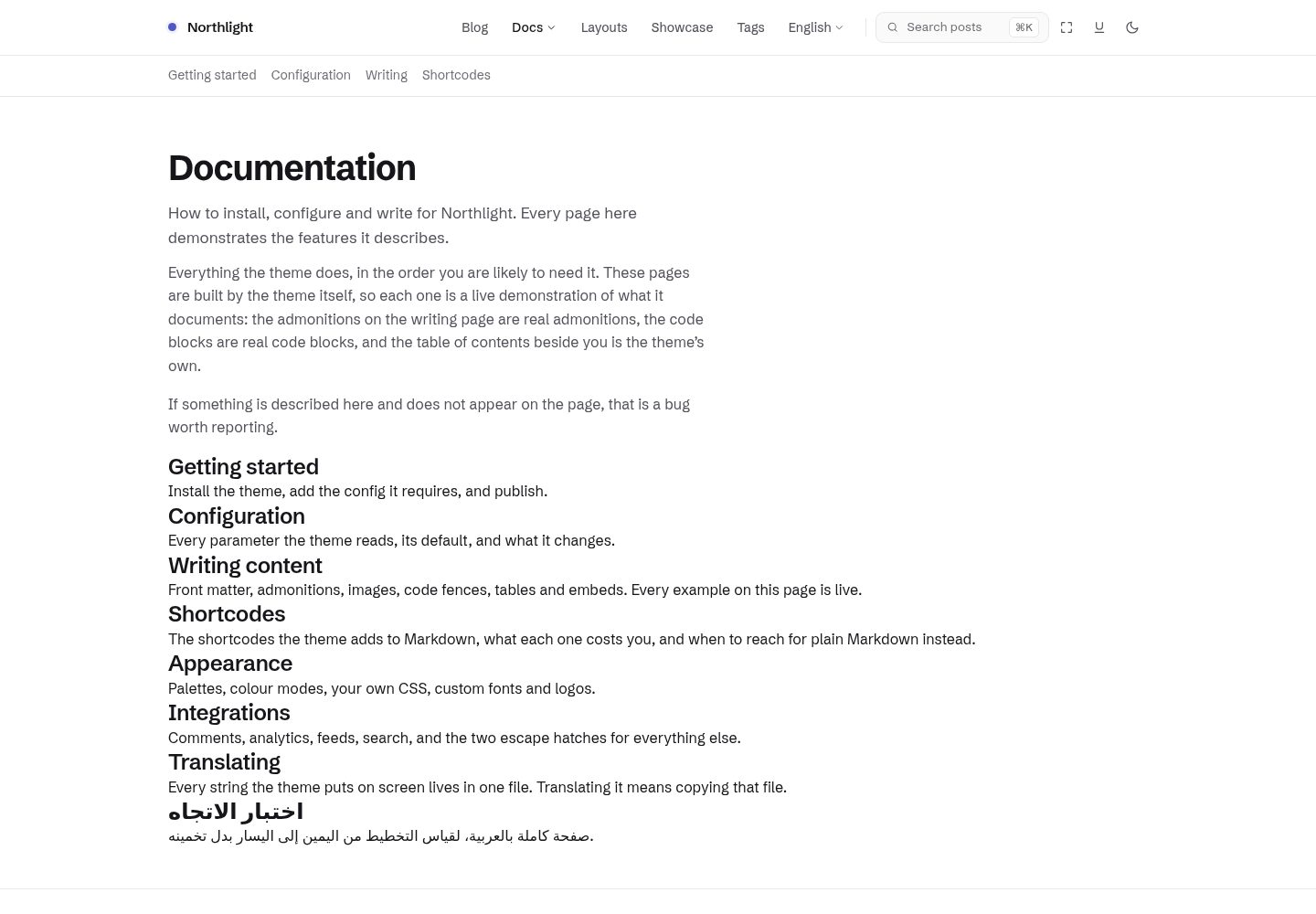
浅色与深色模式分别设计,而非简单反色,并提供 periwinkle、sage、clay 三套柔和配色
Hugo博客
northlight — Hugo 博客模板
作者 mortennordbye
Northlight 是一个面向技术写作的 Hugo 主题,强调安静、可读的排版,提供独立设计的浅色与深色模式以及三套柔和配色。
看看你的网站会是什么样
浏览真实页面截图,比较内容排版与手机效果。点击下方缩略图切换,放大查看整页细节。
全部页面与视图 3
截图用于了解视觉与布局,交互效果请以实际项目为准。
采集于 2026-09-30查看来源
值得关注的模板亮点
从已有项目资料中,快速了解它的特点。
代码块使用基于 Chroma 类的语法高亮,分别适配浅色与深色,带文件名栏和复制按钮
提供粘性滚动监听目录、阅读进度和标题锚点
内置 ⌘K 搜索模态框,支持封面缩略图和键盘导航
首页有十种布局,通过一个设置切换;内置三十八个短代码
交互功能可降级,关闭 JavaScript 后站点仍可阅读和导航,仅搜索消失
模板详细介绍
Northlight 是一个用 Hugo 构建的博客主题,定位是技术写作。它的视觉目标来自设计稿 design/northlight.html,包含首页、文章列表和完整文章页在两种色彩模式与三套配色下的效果。主题使用手写 CSS 和原生 JavaScript,不依赖 Node、npm 或 CSS 框架,构建只需 Hugo extended。
阅读体验方面,主题提供粘性滚动监听目录、阅读进度和标题锚点;代码块使用基于 Chroma 类的语法高亮,并针对浅色与深色分别设计,附带文件名栏和复制按钮。搜索是一个 ⌘K 模态框,支持封面缩略图和键盘导航。封面图按原始宽高比渲染且不裁剪。文章层面包含标签、相关文章、上一篇/下一篇、分享链接和评论钩子。首页有十种布局可选,通过一个设置切换。主题内置三十八个短代码,并在纯 Markdown 能表达的地方使用渲染钩子,让内容保持可移植。
交互功能具备降级能力:关闭 JavaScript 后站点仍可阅读和导航,目录仍是可用的链接列表,选项卡面板变为带标题的区块,色彩模式回退到 prefers-color-scheme,只有搜索会消失。站点可以通过 assets/css/custom.css 添加自定义 CSS,并自动并入主题带指纹的资源包。
使用限制方面,主题要求 Hugo extended 0.164.0 或更新版本,因为依赖 Hugo 0.146 引入的模板系统以及 0.164 加入的浅色/深色 Chroma 样式对。配置中有几项不能省略:markup.highlight.noClasses 必须为 false,否则代码块无样式;home 输出必须包含 JSON,否则搜索索引为空;需要定义 tag 分类法,主题据此生成标签行和相关文章;markup.goldmark.parser.wrapStandAloneImageWithinParagraph 需设为 false,独立成行的图片才能变成带说明的 figure。若文章包含原始 HTML 或需要相关文章功能,还需额外配置 unsafe 渲染和相关索引。配置键被视为 API,发布后不会在没有主版本号变更的情况下重命名或改变用途。
主题的演示站点同时充当文档和集成测试,由 exampleSite/content/docs/ 生成。仓库包含针对构建产物的测试脚本,并在每次拉取请求时检查 SEO、可访问性和最佳实践分数,要求五条路由保持 100 分,同时用 lychee 检查内部链接和标题锚点。性能会被报告但不作为门禁。
Hugo博客
适合你的项目吗?
适用场景
- 搭建以文字为主的技术博客或文档站点
- 需要浅色与深色模式分别设计、且配色柔和不刺眼的写作站点
- 希望内容保持可移植、尽量用标准 Markdown 表达的技术作者
- 需要在文章中加入代码块、目录、标签和相关文章的博客
适合人群
- 使用 Hugo extended 0.164.0 或更新版本的技术写作者
- 偏好手写 CSS、原生 JavaScript、不引入 Node 构建链的开发者
- 需要为技术文章提供代码高亮、目录和搜索的博客
- 重视可访问性、SEO 和构建产物检查的站点维护者
上手与定制指南
结合仓库当前版本的说明,按下面的资料检查内容、配置与运行要求。
- 1
需要 Hugo extended 0.164.0 或更新版本,无需 Node、npm 或 CSS 框架
- 2
通过 git submodule 或 Hugo Module 添加主题,并在 hugo.toml 中设置 theme 或 module.imports
- 3
markup.highlight.noClasses 必须为 false,否则代码块无样式
- 4
home 输出必须包含 JSON,否则搜索索引为空;需定义 tag 分类法以生成标签行和相关文章
- 5
markup.goldmark.parser.wrapStandAloneImageWithinParagraph 需设为 false,独立图片才能获得说明文字
授权与来源资料
使用条件与限制
免费使用 · 保留许可声明本次收录的是公开仓库中采用 MIT 许可的免费版本;免费范围为该版本代码,不代表外部服务或第三方素材免费。
使用时需要遵守
- 允许免费使用、修改、商用和分发该版本代码。
- 分发代码副本或实质性部分时,保留原作者版权声明和完整 MIT 许可声明。
- 代码按现状提供;担保与责任限制以原许可证及适用法律为准。
额外费用与待核对事项
- 使用本主题必须安装 Hugo extended 0.164.0 或更新版本,普通版 Hugo 或更旧版本无法运行。
- 配置中 markup.highlight.noClasses 必须设为 false,否则代码块将没有样式。
- home 输出必须包含 JSON,否则搜索索引为空、搜索功能失效。
- 必须定义 tags 分类法,主题据此生成标签行和相关文章。
- 需将 wrapStandAloneImageWithinParagraph 设为 false,独立成行的图片才能生成带说明的 figure。
- 若文章包含原始 HTML,需自行开启 unsafe 渲染,主题不代为决定。
- 使用相关文章功能需额外配置 related 索引,否则 Hugo 默认索引不覆盖主题所需字段。
- 开发工作流要求通过容器运行,不要在宿主机安装 Hugo。
- 演示图片、字体、图标及其他第三方素材需按各自许可核对,不能仅凭代码的 MIT 许可判断。
- 域名、托管、数据库、支付或 AI 等外部服务可能另外收费。
查看原文依据
Permission is hereby granted, free of charge
许可证原文
**Requirements:** Hugo **extended** 0.164.0 or newer.
README 原文
noClasses = false # syntax highlighting uses CSS classes, which this theme styles.
README 原文
home = ["HTML", "RSS", "JSON"] # JSON is the search index. Drop it and search finds nothing.
README 原文
tag = "tags" # the theme reads the `tags` taxonomy for tag rows and related posts
README 原文
wrapStandAloneImageWithinParagraph = false # lets an image on its own line become a
README 原文
unsafe = true # only if your posts contain raw HTML. Your call, not the theme's.
README 原文
includeNewer = true # cover `keywords`, which this theme does not use
README 原文
https://github.com/mortennordbye/northlight/blob/main/LICENSEhttps://github.com/mortennordbye/northlight/blob/main/README.mdEverything runs in a container. Do not install Hugo on your host.
README 原文
DeepSeek 根据仓库许可证和 README 整理 ·2026-09-30。结果仅覆盖已读取资料,依赖、图片、字体及后续条款变更以各自原文为准。
项目核对记录与介绍依据
模板资料
- 来源平台
- GitHub
- 资料与维护参考分
- 资料较完整 · 83 / 100
- 技术栈
- Hugo
- 网站类型
- 博客
这个分数如何计算
本站按许可资料(最高30分)、演示链接(12分)、预览图(10分)、Star数(15分)、记录的维护时间(15分)、描述完整度(8分)、功能记录(5分)和分类资料(5分)计算。它不是代码、安全或性能测试,也不是 Google 评分;有链接不代表已实测可用。
这个项目需要核对什么
- 记录的仓库更新时间
- 2026-09-28
- 截图检查日期
- 2026-09-30
已收录演示链接。请用你的内容与屏幕尺寸检查;有演示不代表表单、认证或支付已经可用。
目录记录的主要技术栈是 Hugo。请通过依赖清单和锁文件核对实际版本与托管要求。这些说明基于收录资料,不代表代码审计或部署实测。
查看具体选型方法 →介绍的制作与核对状态
介绍由 AI 辅助整理目录与仓库资料。仓库作者不等于这篇介绍的审核者。
已完成服务器许可规则与 AI 来源核对;未经过人工编辑审核。
查看当时使用的来源资料
SHA-256: 11dd18dad79058d9b6679013bbc2a5092cf0ba196e4b1ea7259cd4610dc6c28c
2026-09-30T09:45:26.480Z
来源文件 / 仓库<div align="center">
# 🪟 Northlight
### A quiet, readable Hugo theme for technical writing.
[](https://gohugo.io) [](assets/css) [](assets/js) [](Makefile)
[](https://github.com/mortennordbye/northlight/actions/workflows/ci.yml) [](https://github.com/mortennordbye/northlight/actions/workflows/audit.yml) [](https://github.com/mortennordbye/northlight/actions/workflows/pages.yml) [](https://scorecard.dev/viewer/?uri=github.com/mortennordbye/northlight)
[](#audited-output) [](#audited-output) [](#audited-output)
[](LICENSE) [](https://github.com/mortennordbye/northlight/commits/main) [](https://github.com/mortennordbye/northlight/stargazers)
North light is the soft, even light from a north-facing window — no glare, no hard shadows, the
same all day. That is the whole brief. Northlight has no concept to get between you and the
words: no gradients, no glass, no glow, no decorative motion. What it has instead is a careful
type scale, a spacing rhythm that holds, syntax highlighting that works in both colour modes,
and a dark mode designed rather than inverted.
**[Demo and documentation](https://mortennordbye.github.io/northlight/docs/)** · Screenshots:
[light](images/screenshot.png) · the same page in both modes and all three palettes is in
[`design/northlight.html`](design/northlight.html).
</div>
---
## Overview
| Area | What you get |
| ---- | ------------ |
| Reading | Sticky scroll-spy table of contents, reading progress, heading anchors |
| Code | Chroma class-based highlighting styled for light and dark, filename bar, copy button |
| Search | A ⌘K modal with cover thumbnails and keyboard navigation |
| Covers | Rendered at their exact aspect ratio and never cropped |
| Post furniture | Tags, related posts, prev/next, share links, a comments hook |
| Home page | Ten layouts, from a full archive to a photo grid, chosen with one setting |
| Shortcodes | Thirty-eight, and a render hook wherever plain Markdown can do the job instead |
| Feeds | RSS, JSON search index, sitemap and robots.txt |
| Palettes | Periwinkle, sage and clay, each in a designed light and dark mode |
Content is enriched through render hooks wherever Markdown can express it, so posts stay
portable: admonitions use GitHub's alert syntax, and prose images get intrinsic dimensions, a
`srcset` and optional captions with nothing theme-specific in the source. A site can add its own
`assets/css/custom.css` and it is folded into the theme's fingerprinted bundle automatically.
Everything interactive degrades. With JavaScript off the site stays readable and navigable, the
table of contents is still a list of working links, tabbed panels become headed sections, and the
colour mode falls back to `prefers-color-scheme`. Only search disappears.
### Design
Open [`design/northlight.html`](design/northlight.html) in a browser. It is a single
self-contained file showing the home page, the post index and a full article, in both colour
modes and three palettes. That mockup is the approved visual target.
Type is **Schibsted Grotesk** with **Spline Sans Mono** for code — chosen over the near-universal
Inter and JetBrains Mono because a theme should not look like every other theme.
Colour is a white and near-black base plus one pastel primary. Each palette carries two accent
tones, a readable one for text and links and a genuinely pastel one for fills and hovers, which is
what lets a pastel work without failing contrast.
---
## Getting started
**Requirements:** Hugo **extended** 0.164.0 or newer. Nothing else — no Node, no npm, no CSS
framework, no build step beyond Hugo itself.
0.164.0 is the floor because the theme is built on the template system Hugo introduced in 0.146
and on the light/dark Chroma style pairs added in 0.164.
1. **Add the theme.** As a git submodule (recommended — no Go toolchain needed):
```bash
git submodule add https://github.com/mortennordbye/northlight.git themes/northlight
```
```toml
# hugo.toml
theme = "northlight"
```
If you build in CI, remember `submodules: recursive` on the checkout step.
Or as a Hugo Module, which needs Go available wherever you build:
```bash
hugo mod init github.com/you/your-site
```
```toml
# hugo.toml
[module]
[[module.imports]]
path = "github.com/mortennordbye/northlight"
```
2. **Configure.** Copy [`exampleSite/hugo.toml`](exampleSite/hugo.toml) as your starting point.
It is a working file with every option in it and a comment on each.
3. **Run.**
```bash
hugo server
```
### The config this theme cannot run without
Everything else is optional and has a default. These are not:
```toml
[markup.highlight]
noClasses = false # syntax highlighting uses CSS classes, which this theme styles.
# Leave it true and code blocks render unstyled.
[outputs]
home = ["HTML", "RSS", "JSON"] # JSON is the search index. Drop it and search finds nothing.
[taxonomies]
tag = "tags" # the theme reads the `tags` taxonomy for tag rows and related posts
[markup.goldmark.parser]
wrapStandAloneImageWithinParagraph = false # lets an image on its own line become a
# <figure> with a caption. Without it, images
# still work — they just never get captions.
```
Add these two if they apply to you:
```toml
[markup.goldmark.renderer]
unsafe = true # only if your posts contain raw HTML. Your call, not the theme's.
[related] # required for params.article.showRelated — Hugo's default indices
includeNewer = true # cover `keywords`, which this theme does not use
threshold = 80
toLower = false
[[related.indices]]
name = "tags"
weight = 100
[[related.indices]]
name = "date"
weight = 10
```
**Config keys are API.** Once released, a key is not renamed or repurposed without a major
version bump — see [`CHANGELOG.md`](CHANGELOG.md).
---
## Documentation
**The demo site is the manual: <https://mortennordbye.github.io/northlight/docs/>**
Every page there is built by the theme, so each one *demonstrates* the feature it documents
rather than describing it. It is generated from `exampleSite/content/docs/`, which means a change
to the theme and a change to its documentation are the same pull request — the documentation
cannot drift, because it is the integration test.
That is also why the full configuration reference is not repeated here. A table of parameters in
a README is a second copy that goes stale quietly; the pages below are rendered by the code they
describe.
| Page | What is on it |
| ---- | ------------- |
| [Getting started](https://mortennordbye.github.io/northlight/docs/getting-started/) | Install, required config, first post |
| [Configuration](https://mortennordbye.github.io/northlight/docs/configuration/) | Every `site.Params` key, its default and what it changes |
| [Writing content](https://mortennordbye.github.io/northlight/docs/writing/) | Front matter, admonitions, images, covers, code fences, tables |
| [Shortcodes](https://mortennordbye.github.io/northlight/docs/shortcodes/) | All thirty-eight, each running live on the page |
| [Appearance](https://mortennordbye.github.io/northlight/docs/appearance/) | Palettes, colour modes, the ten home layouts, custom CSS |
| [Integrations](https://mortennordbye.github.io/northlight/docs/integrations/) | Comments, analytics, verification tags, the head and footer hooks |
| [Translating](https://mortennordbye.github.io/northlight/docs/translating/) | The string catalogue, and adding a language |
---
## Development
Everything runs in a container. Do not install Hugo on your host.
```bash
make serve # dev server on http://localhost:1313
make build # production build of exampleSite
make check # the gate: build with warnings as errors, then run the test suite
make test # run the test suite against the current build
make clean
```
```text
northlight/
├── layouts/ # the theme: baseof, page templates, _partials/, _markup/ render hooks
├── assets/{css,js}/ # hand-written CSS and small vanilla-JS modules, each optional
├── i18n/ # every user-facing string; en.toml is the catalogue
├── static/ # files copied verbatim
├── exampleSite/ # demo site, documentation and integration test in one
├── tests/run.sh # the assertion suite `make check` runs against the build
├── design/ # the approved visual target, plus ten rejected explorations
├── docs/ # SPEC, BUILD-PLAN, DESIGN tokens, FEATURE-SURVEY, AUTOMATION
├── Makefile # every workflow, containerised
└── theme.toml # Hugo theme gallery metadata
```
---
## Audited output
A theme is only as good as the HTML it emits, so that is measured on every pull request rather
than asserted here. **SEO, accessibility and best practices are required to stay at 100** across
five routes covering a home page, a list, an article with images and admonitions, a documentation
page and a taxonomy. The build fails if any of them drops, so the badges above are an enforced
floor rather than a snapshot of a good day.
Performance is reported but not gated: it is timing-sensitive on shared runners, and a check that
goes red at random is a check people learn to ignore.
A second job runs `lychee` over the built HTML, checking internal links and heading anchors,
including the fragments the generated table of contents points at.
None of it replaces `tests/run.sh`, which asserts the SEO furniture *exists* — sitemap,
`robots.txt`, `rel=canonical`, OpenGraph, JSON-LD that is not double-encoded, an `alt` on every
image. The audit judges whether it is *correct*.
[`docs/AUTOMATION.md`](docs/AUTOMATION.md) documents the workflows, the audit thresholds, the
required checks and how a release is cut.
---
## Showcase
Sites running Northlight are listed at
<https://mortennordbye.github.io/northlight/showcase/>. If yours is one of them, add it: append a
four-line block to `exampleSite/data/showcase.toml` and open a pull request. That is the whole
process — see [`CONTRIBUTING.md`](CONTRIBUTING.md#adding-your-site-to-the-showcase).
---
## Contributing
Read [`CONTRIBUTING.md`](CONTRIBUTING.md) first. It documents the working rules, including the
invariants that are easy to break by accident: covers are never cropped, Chroma needs both colour
modes, asset fingerprinting is mandatory, and nothing author-specific belongs in theme files.
Known gaps that are deliberately deferred live in [`BACKLOG.md`](BACKLOG.md).
Security issues go through [private vulnerability reporting](SECURITY.md), not a public issue.
## Licence
MIT. See [`LICENSE`](LICENSE).
---
<div align="center">
### ⭐ Star this repo if you find it useful ⭐
<a href="https://www.star-history.com/#mortennordbye/northlight&Date">
<picture>
<source media="(prefers-color-scheme: dark)" srcset="https://api.star-history.com/svg?repos=mortennordbye/northlight&type=Date&theme=dark" />
<source media="(prefers-color-scheme: light)" srcset="https://api.star-history.com/svg?repos=mortennordbye/northlight&type=Date" />
<img alt="Star History Chart" src="https://api.star-history.com/svg?repos=mortennordbye/northlight&type=Date" width="600" />
</picture>
</a>
Made by [Morten Victor Nordbye](https://nordbye.it)
</div>
看看同类模板
对比同技术栈与用途的模板,找到更适合的视觉与内容结构。

hugo-PaperMod
PaperMod 是 Hugo 生态里知名度较高的主题之一,定位很明确:给博客和轻量作品集站点提供一套干净、响应式的阅读界面。
Hugo · 作品集

LoveIt
❤️A clean, elegant but advanced blog theme for Hugo 一个简洁、优雅且高效的 Hugo 主题
Hugo · 博客

hugo-coder
A minimalist blog theme for hugo.
Hugo · 博客

blowfish
Personal Website & Blog Theme for Hugo
Hugo · 博客

hugo-paper
🪺 A simple, clean, customizable Hugo theme
Hugo · 博客

hextra
Hextra 是一个 Hugo 主题,定位在文档站与博客之间:既提供侧边栏导航、目录、面包屑、分页这类文档站结构,也能承载博客内容。
Hugo · 文档