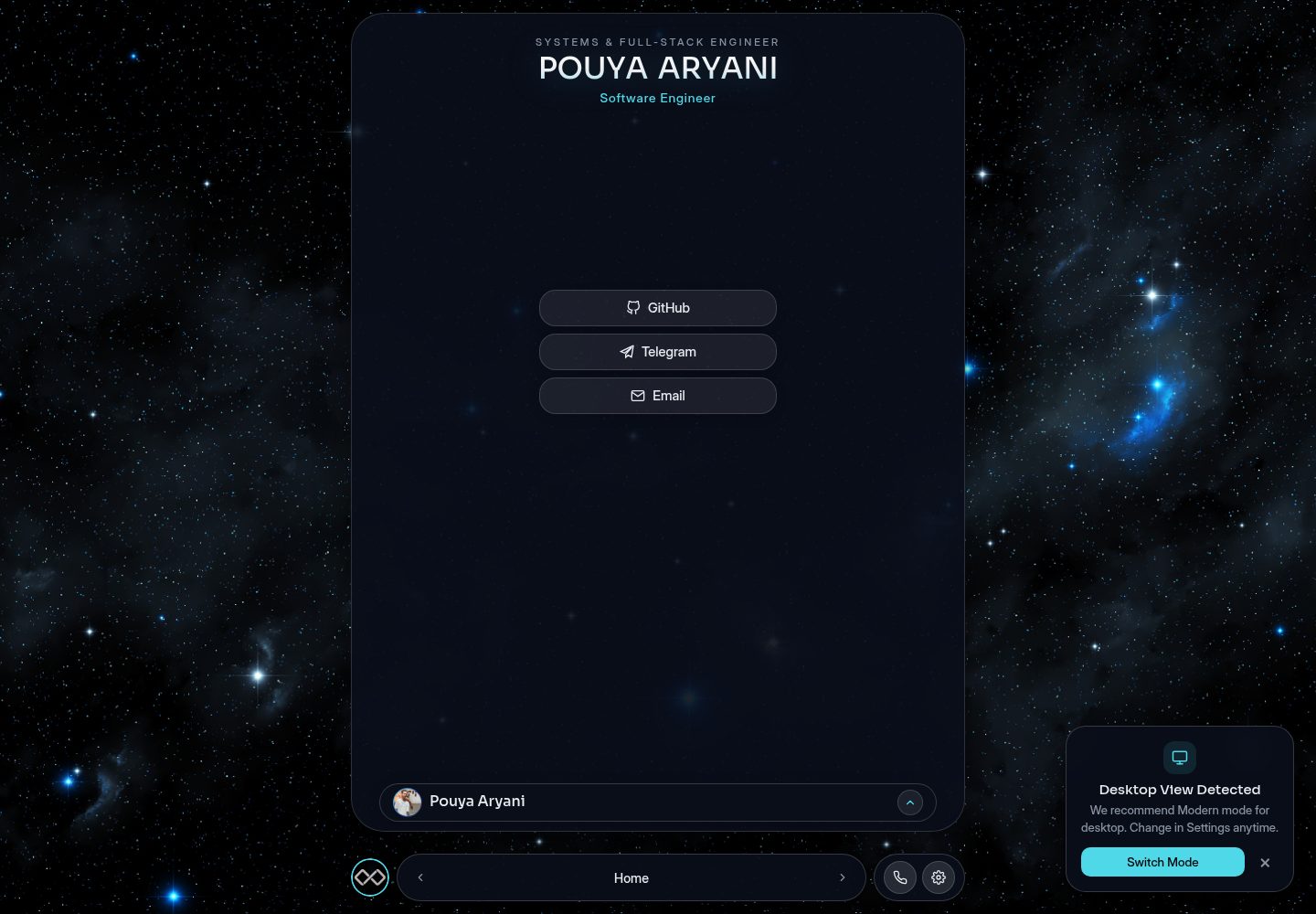
Three visual modes: Modern glassmorphism, Islands mobile floating components, and Classic 90s Windows retro style
HTMLPortfolio
PouyaAryani — HTML Portfolio Template
By MR-PR0G
PouyaAryani is a JSON-config-driven personal portfolio template that provides Modern, Islands and Classic visual modes, multilingual support and a hidden mini-game, with content managed through JSON files under the config/ directory.
Explore the design
Compare the page layouts and mobile experience. Open any screenshot for a closer look.
Desktop homepage1 / 2
Desktop captureTop of page
Actual screenshot captured by the server browser.
All pages & views 2
Screenshots show visual appearance; interactive behavior may differ.
Recorded 2026-10-12View source
What stands out
A quick read of the recorded project description.
Three color themes: Dark Neon, Glass Light and Sunrise Glow
Content is driven by JSON files under the config/ directory, so updating personal information requires no changes to HTML or JavaScript
Multilingual architecture; the README documents support for English and Persian (RTL) and gives steps for adding a new language
Clicking the personal avatar three times opens a hidden mini-game
Project entries are registered through config/projects/manifest.json, with each project corresponding to one JSON file
Template Details
PouyaAryani is a personal portfolio website template that the README describes as modular, responsive and organized around JSON configuration. The template offers three visual modes: Modern (glassmorphism and animations), Islands (floating interactive components aimed at mobile) and Classic (a 90s Windows retro style), and can switch between three themes: Dark Neon, Glass Light and Sunrise Glow. The multilingual architecture currently supports English and Persian (RTL), and the README documents the steps for adding a new language. All site content (bio, skills, social links, achievements, contact details, home headings, project list) is placed in JSON files under the config/ directory, so daily updates require no HTML changes; project entries are registered through manifest.json. The README also mentions that clicking the personal avatar three times opens a hidden mini-game. Running locally requires a web server because the project uses ES Modules and fetch() to read JSON. The README does not provide a dependency list, build process or deployment steps, and does not document browser compatibility or performance data.
HTMLPortfolio
Is it right for your project?
Use Cases
- Building a personal portfolio website and updating bio, skills, projects and contact details by editing JSON
- Needing the same site to present different interaction styles on desktop and mobile (Modern and Islands modes)
- Presenting personal information to a bilingual English and Persian (RTL) audience
- Adding a hidden mini-game to a portfolio as an easter egg
Suitable For
- Individual developers who want to maintain portfolio content through JSON configuration and do not often change page code
- Developers who need to present personal information in multiple languages (including RTL)
- Users who want a portfolio that offers multiple visual styles and theme-switching options
- Developers previewing locally with static servers such as VS Code Live Server, npx serve or Python http.server
Getting started & customization
Use these recorded setup notes alongside the repository instructions for your chosen version.
- 1
Clone the repository: git clone https://github.com/MR-PR0G/PouyaAryani.git and enter the directory
- 2
Content changes are concentrated in the JSON files under the config/ directory (about, achievements, contact, home, projects, skills)
- 3
To add a project, create a JSON file under config/projects/ and add the file name to the array in config/projects/manifest.json
- 4
Running locally requires a web server: VS Code Live Server, npx serve or python3 -m http.server 8000
- 5
The README suggests validating JSON syntax with JSONLint after editing and compressing project images
License & source material
Usage conditions & limitations
Free to use · keep license noticeThis entry covers the free version of the public repository released under the Apache-2.0 license; the free scope is the code of that version and does not mean external services or third-party assets are free.
Must comply with when using
- Free use, modification, commercial use and distribution are permitted; the Apache-2.0 license must be included when distributing.
- Modified files must carry prominent notices of changes, and relevant copyright, patent, trademark and attribution notices must be retained.
- If the original project includes a NOTICE file, applicable attribution notices in it must be retained when distributing derivative works.
- The license includes an applicable contributor patent grant; initiating patent litigation as described in the license terminates that patent grant, and no trademark rights are granted.
- The code is provided as is; warranties and limitations of liability are governed by the original license and applicable law.
Additional costs & items to verify
- Demo images, fonts, icons and other third-party assets must be checked against their own licenses and cannot be judged solely by the code's Apache-2.0 license.
- External services such as domains, hosting, databases, payments or AI may incur separate charges.
View Original Text Basis
https://github.com/MR-PR0G/PouyaAryani/blob/main/LICENSEhttps://github.com/MR-PR0G/PouyaAryani/blob/main/README.mdno-charge, royalty-free, irrevocable copyright license
Original License Text
Compiled by DeepSeek based on repository license and README ·2026-10-12. Results only cover the materials read; dependencies, images, fonts, and subsequent term changes are subject to their respective original texts.
Project checks & description sources
Template Information
- Source platforms
- GitHub
- Documentation and maintenance reference score
- More documented · 83 / 100
- Technologies
- HTML
- Website type
- Portfolio
How this score is calculated
Our heuristic uses license records (up to 30), a demo link (12), a preview (10), stars (15), recorded maintenance (15), description completeness (8), feature records (5) and classification data (5). It is not a code, security or performance test, or a Google score. A link does not establish tested functionality.
What to verify for this project
- Repository update recorded
- 2026-07-18
- Screenshot last checked
- 2026-10-12
A demo link is listed. Check it with your own content and viewport sizes; its presence does not confirm that forms, authentication or payments work.
The catalog identifies HTML as the primary stack. Check the actual dependency manifest and lockfile for versions and hosting requirements. These notes use recorded metadata, not a code audit or a deployment test.
Use a selection guide →How this description was prepared
AI-assisted description based on catalog records and repository material. Repository authors are not automatically the reviewers of this description.
Review declaration: codex-user-requested-batch-review-20261017 · 2026-10-16
Inspect the recorded source material
SHA-256: b369b60de2b860748d6c4053604f88e3c3c62d253dfcba5bb15a86285035d499
2026-10-12T13:51:16.463Z
Source file / repository
<div align="center" style="margin: 20px 0;">
  <a href="https://mr-pr0g.github.io/PouyaAryani" target="_blank" style="text-decoration: none;">
    <img src="https://img.shields.io/badge/🚀_LIVE_DEMO-ENTER_PORTFOLIO-4fd8e8?style=for-the-badge&logo=spacex&logoColor=white&labelColor=121624&color=4fd8e8" alt="Live Website">
  </a>
</div>

# 🌌 Modular Portfolio & Interactive Showcase

A highly performant, modular, and responsive personal portfolio website. Designed with a clean, extensible architecture, this project offers three distinct visual modes, multilingual support, and a hidden easter egg minigame.

> ⚡ **AI Redesigned & Optimized**
> This project has been refined with **AI-driven architectural design**, focusing on high-performance rendering (CSS Hardware Acceleration), sleek glassmorphism aesthetics, and a modular configuration system for seamless updates.

<div align="center" style="display: flex; gap: 12px; justify-content: center; flex-wrap: wrap;">
  <img src="/Demos/1.png" width="45%" style="min-width: 250px; border-radius: 10px; margin-bottom: 10px;">
  <img src="/Demos/2.png" width="45%" style="min-width: 250px; border-radius: 10px; margin-bottom: 10px;">
  <img src="/Demos/3.png" width="45%" style="min-width: 250px; border-radius: 10px;">
  <img src="/Demos/4.png" width="45%" style="min-width: 250px; border-radius: 10px;">
</div>

## 🎨 Core Features

*   **Three Visual Modes:**
    *   **Modern:** A sleek, glassmorphic UI with fluid animations.
    *   **Islands:** A custom, mobile-optimized experience with floating interactive components.
    *   **Classic:** A nostalgic 90s Windows-inspired retro aesthetic.
*   **Dynamic Themes:** Toggle between **Dark Neon**, **Glass Light**, and **Sunrise Glow**.
*   **Multilingual Architecture:** Easily extendable support for English, Persian (RTL), and more.
*   **JSON-Driven Content:** Manage your bio, projects, skills, and links through simple JSON configuration files—**no HTML knowledge required for daily updates.**
*   **Hidden Minigame:** Access an integrated mini-game by clicking the profile logo three times.
## 🚀 Getting Started
#### 1. Cloning the Project
Get started by cloning the repository to your local machine:
```
git clone https://github.com/MR-PR0G/PouyaAryani.git
cd PouyaAryani
```
#### 2. Customizing (Configuration)
All site content is managed inside the `config/` directory. You do not need to modify the HTML or JavaScript files to update your personal information. Simply edit the JSON files, and the site will load the new data automatically.
#### 3. Running Locally
Because this project uses ES Modules and local `fetch()` calls for JSON files, you must serve the files through a web server:
 * VS Code: Install the "Live Server" extension and click "Go Live".
 * Node.js: Run `npx serve` . in the terminal.
 * Python: Run `python3 -m http.server 8000` and visit `http://localhost:8000`
## 📂 Project Structure
```
.
├── config/              # 👈 Centralized content management (JSON)
│   ├── about/           # Bio, skills, and social links
│   ├── achievements/    # Certifications and milestones
│   ├── contact/         # Contact information
│   ├── home/            # Hero section settings
│   ├── projects/        # Portfolio items
│   └── skills/          # Technical skills
├── css/                 # Modular CSS styles
├── js/                  # Modular JavaScript logic
├── minigame/
├── font/
└── index.html           # Main Application entry
```
## 📝 Configuration Examples
#### Example 1: Updating the Hero Section (config/home/hero.json)
Modify this file to update the main title and subtitle of your website:
```
{
  "tag": "SYSTEMS & BACKEND ENGINEER",
  "name": "Pouya Aryani",
  "subtitle": "Full-Stack & Systems Engineer"
}
```
#### Example 2: Adding a New Project (config/projects/)
 1- Create a new JSON file (e.g., my-project.json) in the config/projects/ folder:
 ```
 {
  // The URL of your project's preview image (hosted on GitHub or elsewhere)
  "image": "https://github.com/MR-PR0G/YOUR-REPO/raw/main/image.png",

  // Category tag for filtering (provide both English and Persian)
  "tag": {
    "en": "System",
    "fa": "سیستم"
  },

  // The title of your project
  "title": {
    "en": "Project Name",
    "fa": "نام پروژه"
  },

  // A brief description of the project (keep it concise)
  "desc": {
    "en": "Brief English description.",
    "fa": "توضیحات کوتاه فارسی."
  },

  // Technologies used in this project
  "stack": ["C", "GTK", "Cairo"],

  // The direct URL to your project repository or live demo
  "link": "https://github.com/MR-PR0G/YOUR-REPO"
}
```
2- Add the filename (`"my-project.json"`) to the array in `config/projects/manifest.json`.
## 🌍 Adding New Languages
To support a new language (e.g., German):
 1. Update `js/translations.js`: Add a new key (e.g., `de`) to the `translations` object following the structure of the existing languages.
 2. Translate Config Files: Go through the JSON files in the `config/` directory and add the new language keys to the fields (e.g.,`"name": {"en": "...", "fa": "...", "de": "..."}`).
 3. Add Flag: Add the corresponding flag icon to the `.lang-switch-row` in `index.html`.

## 💡 Golden Rules for JSON Configuration

To ensure your project remains stable and performant, please follow these guidelines when editing or adding new configuration files:

| Guideline | Description |
| :--- | :--- |
| **Standard Structure** | Always include both `en` and `fa` fields for every text-based entry. Missing a field in one language can lead to broken UI or empty text blocks. |
| **Validate Syntax** | Always validate your code using [JSONLint](https://jsonlint.com/) before saving. A single missing comma or bracket will break `configLoader.js`. |
| **Optimize Images** | Keep the site lightweight by compressing all project images using [TinyPNG](https://tinypng.com/) or [Squoosh](https://squoosh.app/) before uploading. |

---

### 🙏 Support & Appreciation

**Thank you for your support!**

Building and maintaining open-source projects takes time and dedication. If you find this portfolio template useful for your own projects, please consider **starring** ⭐ this repository. Your support helps me keep improving this template and adding more cool features. Thank you for being part of the open-source community!

## 🔍 SEO & Personal Metadata

*   **Developer Name:** Pouya Aryani (پویا آریانی)
*   **Brand / Company:** MR Prog (آقای پروگ)
Explore similar templates
Compare previews and descriptions within the same stack and category.

simplefolio
Simplefolio is a minimal single-page portfolio template for developers, built with HTML, Bootstrap, SCSS, and Parcel under the MIT license. It includes Hero, About, Projects, Contact, and Footer sections, with content edited in /src/index.html and theme colors controlled by two SCSS variables.
HTML · Portfolio

Freelancer
A bright, single-page Bootstrap portfolio template for freelancers, designers, and small studios. It includes a responsive portfolio grid with modal detail windows and an SB Forms contact form that requires an API token.
HTML · Portfolio

Resume
A single-page resume and CV template from Start Bootstrap, built on Bootstrap with a fixed sidebar and content sections.
HTML · Portfolio

Creative
A single-page marketing template by Start Bootstrap for creative agencies and product services, built on Bootstrap with SCSS, featuring a portfolio grid and call-to-action sections. It includes pre-set SB Forms markers for form integration and npm build scripts for source customization.
HTML · Corporate Website

Grayscale
A dark single-page Bootstrap template from Start Bootstrap for photography, events and brand storytelling, with a large hero and clearly separated sections.
HTML · Corporate Website

startbootstrap-stylish-portfolio
A one-page Bootstrap portfolio theme from Start Bootstrap with multiple content sections and an off-canvas navigation menu. Basic use means editing HTML/CSS under dist and opening index.html; advanced use relies on npm with Pug and SCSS build scripts.
HTML · Portfolio