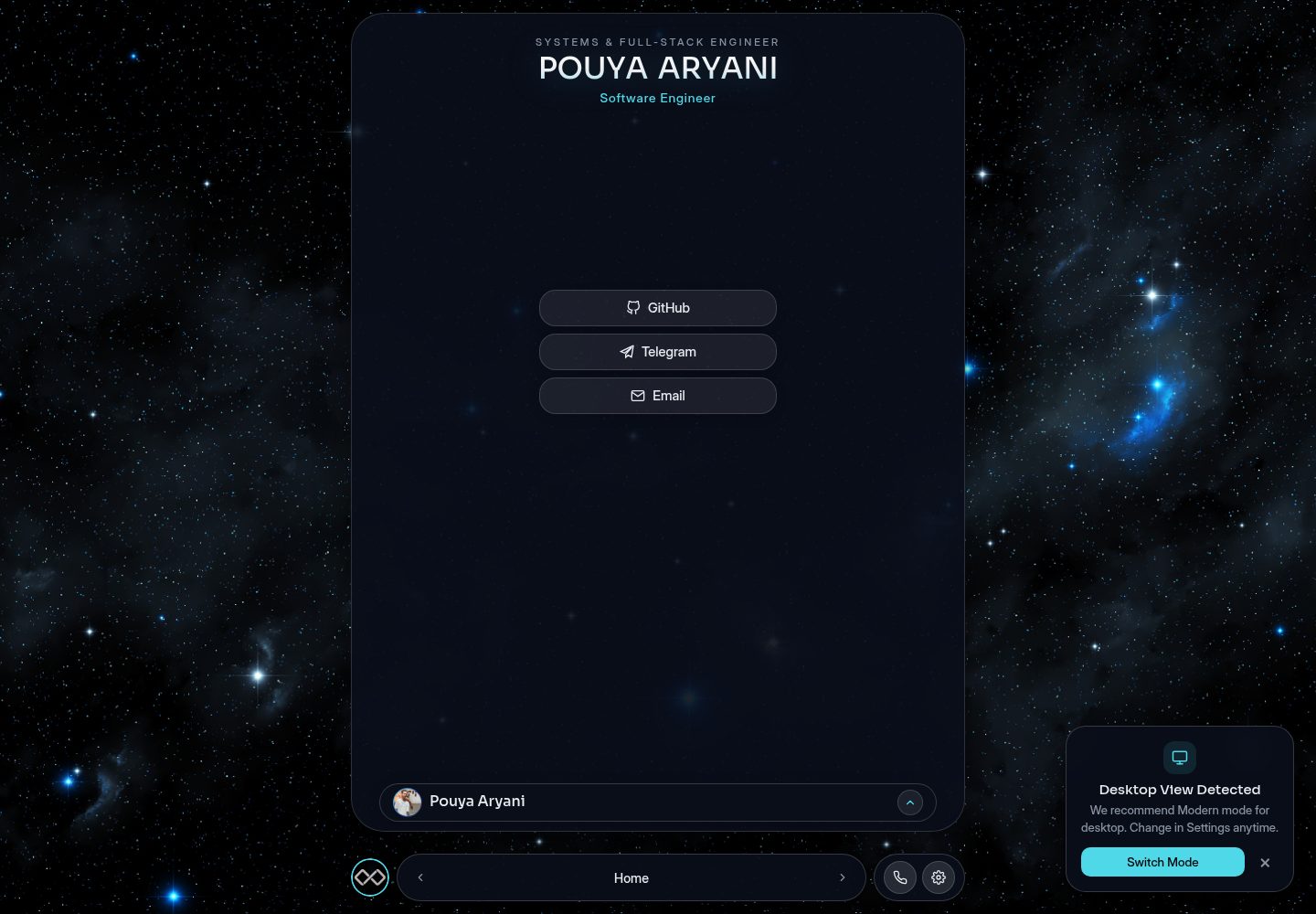
三种视觉模式:Modern 玻璃拟态、Islands 移动端浮动组件、Classic 90 年代 Windows 复古风格
HTML作品集
PouyaAryani — HTML 作品集模板
作者 MR-PR0G
PouyaAryani 是一个基于 JSON 配置驱动的个人作品集模板,提供 Modern、Islands、Classic 三种视觉模式、多语言支持与隐藏小游戏,内容通过 config/ 目录下的 JSON 文件管理。
看看你的网站会是什么样
浏览真实页面截图,比较内容排版与手机效果。点击下方缩略图切换,放大查看整页细节。
全部页面与视图 2
截图用于了解视觉与布局,交互效果请以实际项目为准。
采集于 2026-10-12查看来源
值得关注的模板亮点
从已有项目资料中,快速了解它的特点。
三种配色主题:Dark Neon、Glass Light、Sunrise Glow
内容由 config/ 目录下的 JSON 文件驱动,更新个人信息无需改动 HTML 或 JavaScript
多语言架构,README 说明支持英文与波斯文(RTL),并给出新增语言的步骤
点击个人头像三次可进入隐藏小游戏
项目条目通过 config/projects/manifest.json 注册,每个项目对应一个 JSON 文件
模板详细介绍
PouyaAryani 是一个个人作品集网站模板,README 将其描述为模块化、响应式,并围绕 JSON 配置组织内容。模板提供三种视觉模式:Modern(玻璃拟态与动画)、Islands(面向移动端的浮动交互组件)和 Classic(90 年代 Windows 复古风格),并可在 Dark Neon、Glass Light、Sunrise Glow 三种主题间切换。多语言架构目前支持英文与波斯文(RTL),README 说明了新增语言的步骤。站点内容(简介、技能、社交链接、成就、联系方式、首页标题、项目列表)全部放在 config/ 目录的 JSON 文件中,日常更新无需修改 HTML;项目条目通过 manifest.json 注册。README 还提到点击个人头像三次可进入隐藏小游戏。本地运行需要 Web 服务器,因为项目使用 ES Modules 和 fetch() 读取 JSON。README 未提供依赖清单、构建流程或部署步骤,也未说明浏览器兼容范围与性能数据。
HTML作品集
适合你的项目吗?
适用场景
- 搭建个人作品集网站,通过编辑 JSON 更新简介、技能、项目与联系方式
- 需要同一站点在桌面端与移动端呈现不同交互风格(Modern 与 Islands 模式)
- 面向英文与波斯文(RTL)双语受众展示个人资料
- 在作品集里加入隐藏小游戏作为彩蛋
适合人群
- 希望用 JSON 配置维护作品集内容、不常改动页面代码的个人开发者
- 需要多语言(含 RTL)展示个人资料的开发者
- 希望作品集提供多种视觉风格与主题切换选项的用户
- 使用 VS Code Live Server、npx serve 或 Python http.server 等静态服务器本地预览的开发者
上手与定制指南
结合仓库当前版本的说明,按下面的资料检查内容、配置与运行要求。
- 1
克隆仓库:git clone https://github.com/MR-PR0G/PouyaAryani.git 并进入目录
- 2
内容修改集中在 config/ 目录的 JSON 文件(about、achievements、contact、home、projects、skills)
- 3
新增项目时在 config/projects/ 创建 JSON 文件,并把文件名加入 config/projects/manifest.json 的数组
- 4
本地运行需通过 Web 服务器:VS Code Live Server、npx serve 或 python3 -m http.server 8000
- 5
README 建议编辑 JSON 后用 JSONLint 校验语法,并压缩项目图片
授权与来源资料
使用条件与限制
免费使用 · 保留许可声明本次收录的是公开仓库中采用 Apache-2.0 许可的免费版本;免费范围为该版本代码,不代表外部服务或第三方素材免费。
使用时需要遵守
- 允许免费使用、修改、商用和分发;分发时需随附 Apache-2.0 许可证。
- 修改过的文件需显著标明改动,并保留相关版权、专利、商标及归属声明。
- 若原项目附有 NOTICE 文件,分发衍生作品时需保留其中适用的归属声明。
- 许可包含适用的贡献者专利授权;发起许可所述专利诉讼会终止该专利授权,且不授予商标使用权。
- 代码按现状提供;担保与责任限制以原许可证及适用法律为准。
额外费用与待核对事项
- 演示图片、字体、图标及其他第三方素材需按各自许可核对,不能仅凭代码的 Apache-2.0 许可判断。
- 域名、托管、数据库、支付或 AI 等外部服务可能另外收费。
查看原文依据
https://github.com/MR-PR0G/PouyaAryani/blob/main/LICENSEhttps://github.com/MR-PR0G/PouyaAryani/blob/main/README.mdno-charge, royalty-free, irrevocable copyright license
许可证原文
DeepSeek 根据仓库许可证和 README 整理 ·2026-10-12。结果仅覆盖已读取资料,依赖、图片、字体及后续条款变更以各自原文为准。
项目核对记录与介绍依据
模板资料
- 来源平台
- GitHub
- 资料与维护参考分
- 资料较完整 · 83 / 100
- 技术栈
- HTML
- 网站类型
- 作品集
这个分数如何计算
本站按许可资料(最高30分)、演示链接(12分)、预览图(10分)、Star数(15分)、记录的维护时间(15分)、描述完整度(8分)、功能记录(5分)和分类资料(5分)计算。它不是代码、安全或性能测试,也不是 Google 评分;有链接不代表已实测可用。
这个项目需要核对什么
- 记录的仓库更新时间
- 2026-07-18
- 截图检查日期
- 2026-10-12
已收录演示链接。请用你的内容与屏幕尺寸检查;有演示不代表表单、认证或支付已经可用。
目录记录的主要技术栈是 HTML。请通过依赖清单和锁文件核对实际版本与托管要求。这些说明基于收录资料,不代表代码审计或部署实测。
查看具体选型方法 →介绍的制作与核对状态
介绍由 AI 辅助整理目录与仓库资料。仓库作者不等于这篇介绍的审核者。
审核声明: codex-user-requested-batch-review-20261017 · 2026-10-16
查看当时使用的来源资料
SHA-256: b369b60de2b860748d6c4053604f88e3c3c62d253dfcba5bb15a86285035d499
2026-10-12T13:51:16.463Z
来源文件 / 仓库
<div align="center" style="margin: 20px 0;">
  <a href="https://mr-pr0g.github.io/PouyaAryani" target="_blank" style="text-decoration: none;">
    <img src="https://img.shields.io/badge/🚀_LIVE_DEMO-ENTER_PORTFOLIO-4fd8e8?style=for-the-badge&logo=spacex&logoColor=white&labelColor=121624&color=4fd8e8" alt="Live Website">
  </a>
</div>

# 🌌 Modular Portfolio & Interactive Showcase

A highly performant, modular, and responsive personal portfolio website. Designed with a clean, extensible architecture, this project offers three distinct visual modes, multilingual support, and a hidden easter egg minigame.

> ⚡ **AI Redesigned & Optimized**
> This project has been refined with **AI-driven architectural design**, focusing on high-performance rendering (CSS Hardware Acceleration), sleek glassmorphism aesthetics, and a modular configuration system for seamless updates.

<div align="center" style="display: flex; gap: 12px; justify-content: center; flex-wrap: wrap;">
  <img src="/Demos/1.png" width="45%" style="min-width: 250px; border-radius: 10px; margin-bottom: 10px;">
  <img src="/Demos/2.png" width="45%" style="min-width: 250px; border-radius: 10px; margin-bottom: 10px;">
  <img src="/Demos/3.png" width="45%" style="min-width: 250px; border-radius: 10px;">
  <img src="/Demos/4.png" width="45%" style="min-width: 250px; border-radius: 10px;">
</div>

## 🎨 Core Features

*   **Three Visual Modes:**
    *   **Modern:** A sleek, glassmorphic UI with fluid animations.
    *   **Islands:** A custom, mobile-optimized experience with floating interactive components.
    *   **Classic:** A nostalgic 90s Windows-inspired retro aesthetic.
*   **Dynamic Themes:** Toggle between **Dark Neon**, **Glass Light**, and **Sunrise Glow**.
*   **Multilingual Architecture:** Easily extendable support for English, Persian (RTL), and more.
*   **JSON-Driven Content:** Manage your bio, projects, skills, and links through simple JSON configuration files—**no HTML knowledge required for daily updates.**
*   **Hidden Minigame:** Access an integrated mini-game by clicking the profile logo three times.
## 🚀 Getting Started
#### 1. Cloning the Project
Get started by cloning the repository to your local machine:
```
git clone https://github.com/MR-PR0G/PouyaAryani.git
cd PouyaAryani
```
#### 2. Customizing (Configuration)
All site content is managed inside the `config/` directory. You do not need to modify the HTML or JavaScript files to update your personal information. Simply edit the JSON files, and the site will load the new data automatically.
#### 3. Running Locally
Because this project uses ES Modules and local `fetch()` calls for JSON files, you must serve the files through a web server:
 * VS Code: Install the "Live Server" extension and click "Go Live".
 * Node.js: Run `npx serve` . in the terminal.
 * Python: Run `python3 -m http.server 8000` and visit `http://localhost:8000`
## 📂 Project Structure
```
.
├── config/              # 👈 Centralized content management (JSON)
│   ├── about/           # Bio, skills, and social links
│   ├── achievements/    # Certifications and milestones
│   ├── contact/         # Contact information
│   ├── home/            # Hero section settings
│   ├── projects/        # Portfolio items
│   └── skills/          # Technical skills
├── css/                 # Modular CSS styles
├── js/                  # Modular JavaScript logic
├── minigame/
├── font/
└── index.html           # Main Application entry
```
## 📝 Configuration Examples
#### Example 1: Updating the Hero Section (config/home/hero.json)
Modify this file to update the main title and subtitle of your website:
```
{
  "tag": "SYSTEMS & BACKEND ENGINEER",
  "name": "Pouya Aryani",
  "subtitle": "Full-Stack & Systems Engineer"
}
```
#### Example 2: Adding a New Project (config/projects/)
 1- Create a new JSON file (e.g., my-project.json) in the config/projects/ folder:
 ```
 {
  // The URL of your project's preview image (hosted on GitHub or elsewhere)
  "image": "https://github.com/MR-PR0G/YOUR-REPO/raw/main/image.png",

  // Category tag for filtering (provide both English and Persian)
  "tag": {
    "en": "System",
    "fa": "سیستم"
  },

  // The title of your project
  "title": {
    "en": "Project Name",
    "fa": "نام پروژه"
  },

  // A brief description of the project (keep it concise)
  "desc": {
    "en": "Brief English description.",
    "fa": "توضیحات کوتاه فارسی."
  },

  // Technologies used in this project
  "stack": ["C", "GTK", "Cairo"],

  // The direct URL to your project repository or live demo
  "link": "https://github.com/MR-PR0G/YOUR-REPO"
}
```
2- Add the filename (`"my-project.json"`) to the array in `config/projects/manifest.json`.
## 🌍 Adding New Languages
To support a new language (e.g., German):
 1. Update `js/translations.js`: Add a new key (e.g., `de`) to the `translations` object following the structure of the existing languages.
 2. Translate Config Files: Go through the JSON files in the `config/` directory and add the new language keys to the fields (e.g.,`"name": {"en": "...", "fa": "...", "de": "..."}`).
 3. Add Flag: Add the corresponding flag icon to the `.lang-switch-row` in `index.html`.

## 💡 Golden Rules for JSON Configuration

To ensure your project remains stable and performant, please follow these guidelines when editing or adding new configuration files:

| Guideline | Description |
| :--- | :--- |
| **Standard Structure** | Always include both `en` and `fa` fields for every text-based entry. Missing a field in one language can lead to broken UI or empty text blocks. |
| **Validate Syntax** | Always validate your code using [JSONLint](https://jsonlint.com/) before saving. A single missing comma or bracket will break `configLoader.js`. |
| **Optimize Images** | Keep the site lightweight by compressing all project images using [TinyPNG](https://tinypng.com/) or [Squoosh](https://squoosh.app/) before uploading. |

---

### 🙏 Support & Appreciation

**Thank you for your support!**

Building and maintaining open-source projects takes time and dedication. If you find this portfolio template useful for your own projects, please consider **starring** ⭐ this repository. Your support helps me keep improving this template and adding more cool features. Thank you for being part of the open-source community!

## 🔍 SEO & Personal Metadata

*   **Developer Name:** Pouya Aryani (پویا آریانی)
*   **Brand / Company:** MR Prog (آقای پروگ)
看看同类模板
对比同技术栈与用途的模板,找到更适合的视觉与内容结构。

simplefolio
⚡️ A minimal portfolio template for Developers
HTML · 作品集

Freelancer
Freelancer 是 Start Bootstrap 出品的单页作品集模板,专为自由职业者、设计师和小型工作室设计。 页面结构清晰,包含多个内容区块、响应式作品集网格,每个作品项目配有模态窗口展示详情。
HTML · 作品集

Resume
Resume 是 Start Bootstrap 推出的简历与 CV 主题,基于 Bootstrap 构建,采用固定侧边栏加内容区块的结构。
HTML · 作品集

Creative
Creative 是 Start Bootstrap 团队维护的一款单页营销模板,定位明确:为创意机构或产品服务提供一个以作品展示和行动号召为核心的落地页。
HTML · 企业官网

Grayscale
Grayscale 是 Start Bootstrap 出品的深色系单页 HTML 模板,基于 Bootstrap 构建。 它的视觉重心放在大尺寸首屏和清晰的内容分区上,整体氛围偏暗,适合摄影、活动或品牌叙事类网站。
HTML · 企业官网

startbootstrap-stylish-portfolio
Stylish Portfolio 是 Start Bootstrap 维护的单页作品集主题,基于 Bootstrap 构建,采用多个内容区块加离屏导航菜单的结构。
HTML · 作品集