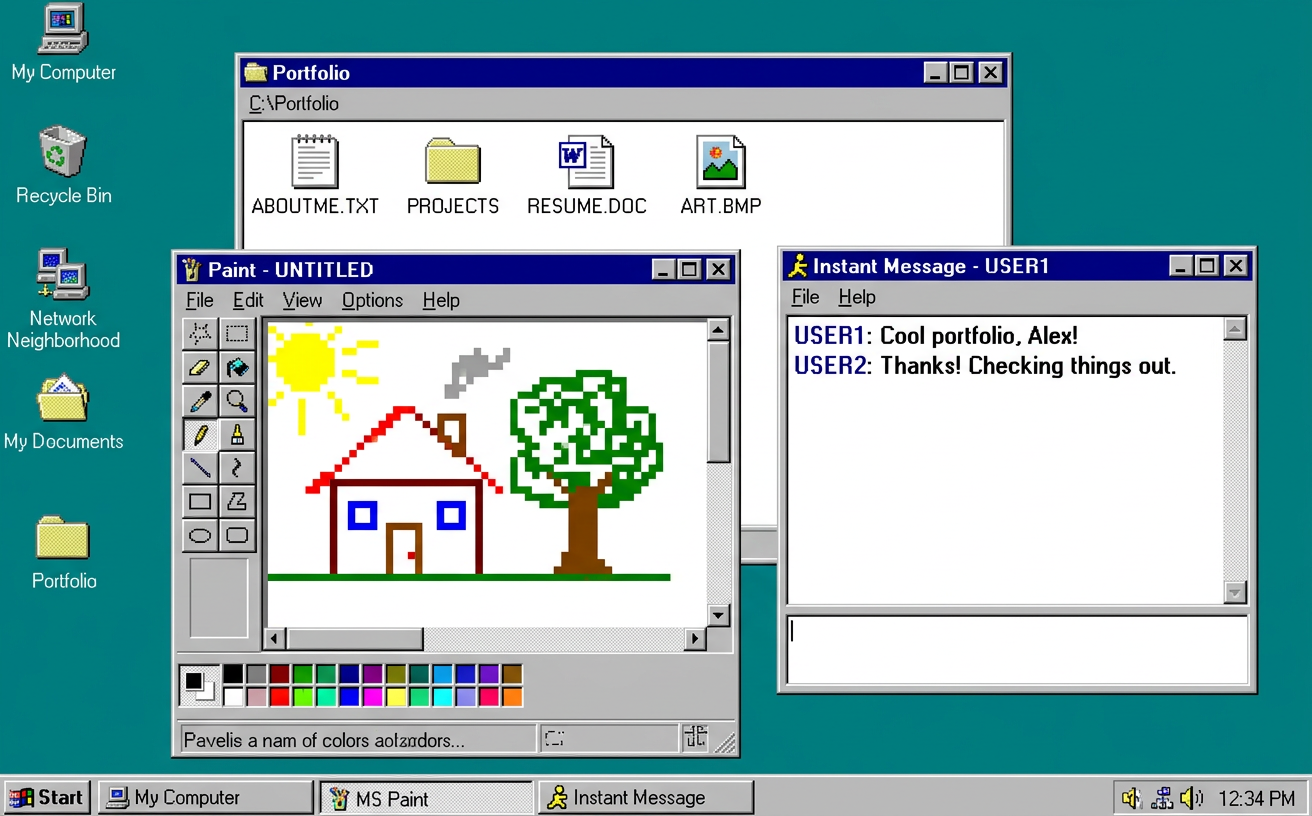
The same codebase contains two interface layers—a retro desktop and a modern portfolio—switched via a taskbar button
HTMLPortfolio
Portfolio-Template-23 — HTML Portfolio Template
By Muhammad112233-creator
A personal portfolio template written in HTML, CSS, and vanilla JavaScript, featuring two interface layers: an interactive 1996 retro desktop system and a 2026 modern animated showcase, switched via a taskbar button.
Explore the design
Compare the page layouts and mobile experience. Open any screenshot for a closer look.
Author preview
Author-provided preview
Preview provided in the project README.
One original preview is available. Open the full image to inspect the design.
Screenshots show visual appearance; interactive behavior may differ.
Recorded 2026-10-11View source
What stands out
A quick read of the recorded project description.
The desktop layer includes 16 interactive applications such as project folders, drawing, Minesweeper, Snake, a chat bot, and a screensaver
The modern layer uses Canvas for particle name, word rain, and starfield effects, along with scroll progress and case cards
Zero dependencies and no build step; double-click index.html or use any static server to run it
Personalization is concentrated in the CONFIG and PROJECTS objects in js/app.js, and case pages are batch-generated by a Python script
Licensed under MIT, allowing modification, commercial use, and distribution, provided the copyright and license notice are retained
Template Details
The template presents the portfolio as two layers. The first layer simulates a 1996 desktop operating system: a boot screen, draggable windows, a taskbar, a Start menu, and 16 runnable applications, including project folders, a notepad-style introduction, a resume window, a drawing tool, Minesweeper and Snake, a chat bot, wallpaper switching, a WebAudio chiptune player, and a screensaver. The second layer is a dark modern portfolio: a particle-assembled name hero, a scroll progress bar, a word-rain canvas, swipeable case cards, skill cards, and a contact section. The two layers are switched by a 2026 button in the taskbar that triggers a time-travel animation.
Technically, it relies on no frameworks or build tools; opening index.html directly runs it, and a local static server can also be used for preview. Personalization is concentrated in the CONFIG and PROJECTS objects at the top of js/app.js, where name, email, links, and project entries are filled in; case pages are regenerated by build_work_pages.py from a data file; images go in assets/img/, and the resume replaces resume.pdf.
Limitations: the template is a static site with no backend, database, or form submission logic; the contact section relies on external links such as email, phone, and LinkedIn; fonts come from Google Fonts and will not load offline; the number of projects, case page structure, and number of wallpapers are fixed in code, and extending them requires script changes. The license is MIT, allowing free use, modification, commercial use, and distribution, provided the copyright and license notice are retained; third-party assets in the repository such as demo images, fonts, and icons must be checked separately under their respective licenses.
HTMLPortfolio
Is it right for your project?
Use Cases
- Personal developers or designers building a portfolio site with nostalgic easter eggs
- Demonstrating front-end interactions: window management, Canvas animation, WebAudio synthesis, and pointer events
- As teaching or practice material for learning how to organize a framework-free vanilla HTML/CSS/JS project
- Deploying to static hosting platforms such as GitHub Pages as an online resume and project showcase page
Suitable For
- Individuals who want a distinctive portfolio and are open to a mixed retro and sci-fi visual style
- Front-end developers who can read and modify vanilla JavaScript and CSS
- Those who need a static, backend-free showcase site that can be hosted directly on GitHub Pages
- Users who want to freely modify and redistribute under the MIT license
Getting started & customization
Use these recorded setup notes alongside the repository instructions for your chosen version.
- 1
Double-click index.html to run it; you can also start a local server for preview with python3 -m http.server 8080 or npx serve .
- 2
Fill in name, email, and social links in CONFIG at the top of js/app.js, and project entries in PROJECTS
- 3
Replace portrait.jpg and work-*.jpg under assets/img/ (keeping the filenames), and replace resume.pdf with your own resume
- 4
After modifying the case page data, run python3 build_work_pages.py to regenerate the pages under the work/ directory
- 5
Adjust colors and fonts in :root in css/style.css; fonts come from Google Fonts and will not load in offline environments
License & source material
Usage conditions & limitations
Free to use · keep license noticeThis entry covers the free version under the MIT license in the public repository; the free scope is the code of this version and does not mean external services or third-party assets are free.
Must comply with when using
- Free use, modification, commercial use, and distribution of this version's code are permitted.
- When distributing copies or substantial portions of the code, retain the original author's copyright notice and the full MIT license notice.
- The code is provided as is; warranties and limitations of liability are governed by the original license and applicable law.
Additional costs & items to verify
- Demo images, fonts, icons, and other third-party assets must be checked under their respective licenses and cannot be judged solely by the code's MIT license.
- External services such as domains, hosting, databases, payments, or AI may incur separate charges.
- Fonts are loaded via Google Fonts, which is an external service; offline or when Google Fonts is unreachable, fonts will not load, so you must handle or replace fonts yourself.
- Use, modification, and distribution require retaining the MIT license and copyright notice.
View Original Text Basis
Permission is hereby granted, free of charge
Original License Text
Fonts: [VT323](https://fonts.google.com/specimen/VT323), [Pixelify Sans](https://fonts.google.com/specimen/Pixelify+Sans), [Inter](https://fonts.google.com/specimen/Inter), [Archivo](https://fonts.google.com/specimen/Archivo) via Google Fonts.
Original README
https://github.com/Muhammad112233-creator/Portfolio-Template-23/blob/main/LICENSEhttps://github.com/Muhammad112233-creator/Portfolio-Template-23/blob/main/README.mdMIT © Alex Carter — steal this template, keep the license, ship something wonderful.
Original README
Compiled by DeepSeek based on repository license and README ·2026-10-11. Results only cover the materials read; dependencies, images, fonts, and subsequent term changes are subject to their respective original texts.
Project checks & description sources
Template Information
- Source platforms
- GitHub
- Documentation and maintenance reference score
- More documented · 80 / 100
- Technologies
- HTML
- Website type
- Portfolio
How this score is calculated
Our heuristic uses license records (up to 30), a demo link (12), a preview (10), stars (15), recorded maintenance (15), description completeness (8), feature records (5) and classification data (5). It is not a code, security or performance test, or a Google score. A link does not establish tested functionality.
What to verify for this project
- Repository update recorded
- 2026-10-11
- Screenshot last checked
- 2026-10-11
A demo link is listed. Check it with your own content and viewport sizes; its presence does not confirm that forms, authentication or payments work.
The catalog identifies HTML as the primary stack. Check the actual dependency manifest and lockfile for versions and hosting requirements. These notes use recorded metadata, not a code audit or a deployment test.
Use a selection guide →How this description was prepared
AI-assisted description based on catalog records and repository material. Repository authors are not automatically the reviewers of this description.
Review declaration: [email protected] · 2026-10-13
Inspect the recorded source material
SHA-256: bdefc6b93b5bd991505e6bbf3c9a793999faedc13975b2c976008ddf0f0286b4
2026-10-11T14:54:05.751Z
Source file / repository<div align="center"> <img src="assets/readme/header.svg" width="880" alt="AlexOS ’96 → 2026 — animated rainbow banner"/> <img src="assets/readme/typing.svg" width="880" alt="terminal typing animation — boot desktop, install 2026, open portfolio"/> [](https://developer.mozilla.org/docs/Web/HTML) [](https://developer.mozilla.org/docs/Web/CSS) [](https://developer.mozilla.org/docs/Web/JavaScript) []() [](https://pages.github.com/) [](LICENSE) </div> <img src="assets/readme/divider.svg" width="880" alt=""/> ## 🌈 What is this? A portfolio that is **two websites in one**: it boots as a fully working **retro 1996 desktop OS** — windows, taskbar, start menu, games, paint, a chat bot, a screensaver — and when you press **⟳ 2026**, the whole thing time-travels through a light-speed vortex and lands in a **sleek, dark, animated 2026 portfolio**. No frameworks. No build step. Just **HTML + CSS + vanilla JavaScript**, canvas physics, WebAudio chiptunes and an unreasonable love for the year 1996. <div align="center"> <img src="assets/readme/preview.png" width="880" alt="Preview — the retro desktop layer"/> </div> <img src="assets/readme/divider.svg" width="880" alt=""/> ## ✨ The Experience | 🖥️ **1996 Layer** | ⚡ **2026 Layer** | | ------------------------------------------ | ---------------------------------------------------- | | Boot splash with blinking “click to start” | Particle hero that **assembles your name** from dust | | Draggable windows + taskbar + start menu | Scroll-progress bar + aurora backdrop | | 16 working apps (see below 👇) | Word-rain canvas that coalesces into your mission | | “Did you know?” tip popups + Clippy 📎 | Swipeable case-study cards with live dots | | Idle 45s → **starfield screensaver** | Big-type statement, capsule skill cards | | Sleep · Shut Down · Restart (all real) | Animated contact section + hiring toast | | Pixel-art custom cursors | Neon-lime custom cursors | <img src="assets/readme/divider.svg" width="880" alt=""/> ## 🕹️ Every App Works | Icon | App | What it actually does | | :--: | --------------------- | ------------------------------------------------------------------------------------- | | 🗂️ | **Selected Work** | Folder of 8 projects; each opens a project dossier + case-study link | | 📝 | **About Me** | Notepad-style bio | | 🅦 | **What I Do** | Skills window, three columns | | 🛰️ | **Now (2026)** | “Now page” in a window | | ✉️ | **Contact** | One-tap email / phone / LinkedIn | | 📄 | **Résumé.pdf** | In-window PDF viewer + real `resume.pdf` download | | 🎨 | **Kid Pix** | Full paint app: 12 colors, brush sizes, stamps, eraser, undo, 💣 clear, 💾 PNG export | | ❓ | **Pop Culture Quiz** | 5-question quiz with scoring + restart | | 📎 | **Clippy Help** | The assistant. Rotating tips. Blinking eyes. | | 🎮 | **Games** | Fully playable **Minesweeper** (flags, timer, face) & **Snake** (keyboard + swipe) | | 💬 | **AIMS** | Instant-messenger bot that answers about work, hiring, 2026… | | 🖼️ | **Backgrounds** | 5 wallpapers, persisted to `localStorage` | | 🎵 | **Napster** | Chiptune player — every track **synthesized live** with WebAudio | | 📺 | **Nostalgia Moments** | Timeline of the decade that made us | | 🕰️ | **Time Travel** | Flux-capacitor control panel → 88 MPH → 2026 | | 🗑️ | **Recycle Bin** | Questionable files. Emptiable. | <img src="assets/readme/divider.svg" width="880" alt=""/> ## 🚀 Quick Start (see the preview) **Option 1 — just open it:** double-click `index.html`. It runs from the filesystem. **Option 2 — local server (recommended, exactly like production):** ```bash # from the project root python3 -m http.server 8080 # then open http://localhost:8080 ``` ```bash # or, if you prefer Node npx serve . ``` Then: click anywhere to boot → explore the desktop → hit **⟳ 2026** in the taskbar. <img src="assets/readme/divider.svg" width="880" alt=""/> ## 🔧 Make It Yours (5-minute personalization) | What | Where | Change | | -------------------------- | --------------------------------------------------------- | ---------------------------------------------------------- | | 🧑 Your name, email, links | `js/app.js` → `CONFIG` (top of file) | One object — drives hero, OS name, contact windows | | 🗂️ Your projects | `js/app.js` → `PROJECTS` | 8 entries; drive the retro folder **and** the modern cards | | 📝 Case-study pages | `build_work_pages.py` → run `python3 build_work_pages.py` | Regenerates all 8 pages in `work/` | | 🖼️ Images | `assets/img/` | Replace `portrait.jpg` + `work-*.jpg` (keep filenames) | | 📄 Résumé | `resume.pdf` | Drop in your real PDF (same filename) | | 🎨 Colors | `css/style.css` → `:root` | Teal desktop, lime accent, fonts | <img src="assets/readme/divider.svg" width="880" alt=""/> ## 🗂️ Project Structure ``` 📦 alexos-portfolio ┣ 📄 index.html ← everything boots from here ┣ 📂 css/ ┃ ┗ 📄 style.css ← retro chrome + modern theme + responsive ┣ 📂 js/ ┃ ┗ 📄 app.js ← window manager · 16 apps · time travel · modern fx ┣ 📂 work/ ← 8 case-study pages (+ shared work.css / work.js) ┃ ┣ 📄 nordlys.html … sno.html ┣ 📂 assets/ ┃ ┣ 📂 img/ ← portrait + 8 project covers ┃ ┗ 📂 readme/ ← animated SVGs for this README ┣ 📄 resume.pdf ← replace with yours ┣ 📄 build_work_pages.py ← regenerates work/*.html from one data file ┣ 📄 LICENSE ← MIT ┗ 📄 README.md ← you are here 📍 ``` <img src="assets/readme/divider.svg" width="880" alt=""/> ## 🛠️ Under the Hood - 🧱 **Vanilla everything** — zero dependencies, zero build tools, works offline - 🎛️ **Canvas ×3** — particle-name hero, word-rain cloud, starfield + time-vortex - 🎹 **WebAudio** — UI blips, startup chime, and 4 fully synthesized chiptunes - 👆 **Pointer Events** — drag windows, drag-scrub the work strip, swipe Snake - 📱 **Responsive** — mobile icons tap-to-open, windows stack, layouts collapse gracefully - ♿ **Touches** — real `<a>`/`button` semantics, sr-only headings, reduced-motion friendly <img src="assets/readme/divider.svg" width="880" alt=""/> ## 📄 License & Credits MIT © Alex Carter — steal this template, keep the license, ship something wonderful. Fonts: [VT323](https://fonts.google.com/specimen/VT323), [Pixelify Sans](https://fonts.google.com/specimen/Pixelify+Sans), [Inter](https://fonts.google.com/specimen/Inter), [Archivo](https://fonts.google.com/specimen/Archivo) via Google Fonts. All artwork in `assets/` is original and safe to reuse. <div align="center"> ## 🌟 Support the Project If you find this template useful, please consider giving it a star! It helps others discover the repository and supports future development. </div> <div align="center"> <img src="assets/readme/footer.svg" width="880" alt="animated rainbow wave footer"/> </div>
Explore similar templates
Compare previews and descriptions within the same stack and category.

simplefolio
Simplefolio is a minimal single-page portfolio template for developers, built with HTML, Bootstrap, SCSS, and Parcel under the MIT license. It includes Hero, About, Projects, Contact, and Footer sections, with content edited in /src/index.html and theme colors controlled by two SCSS variables.
HTML · Portfolio

Freelancer
A bright, single-page Bootstrap portfolio template for freelancers, designers, and small studios. It includes a responsive portfolio grid with modal detail windows and an SB Forms contact form that requires an API token.
HTML · Portfolio

Resume
A single-page resume and CV template from Start Bootstrap, built on Bootstrap with a fixed sidebar and content sections.
HTML · Portfolio

Creative
A single-page marketing template by Start Bootstrap for creative agencies and product services, built on Bootstrap with SCSS, featuring a portfolio grid and call-to-action sections. It includes pre-set SB Forms markers for form integration and npm build scripts for source customization.
HTML · Corporate Website

Grayscale
A dark single-page Bootstrap template from Start Bootstrap for photography, events and brand storytelling, with a large hero and clearly separated sections.
HTML · Corporate Website

startbootstrap-stylish-portfolio
A one-page Bootstrap portfolio theme from Start Bootstrap with multiple content sections and an off-canvas navigation menu. Basic use means editing HTML/CSS under dist and opening index.html; advanced use relies on npm with Pug and SCSS build scripts.
HTML · Portfolio