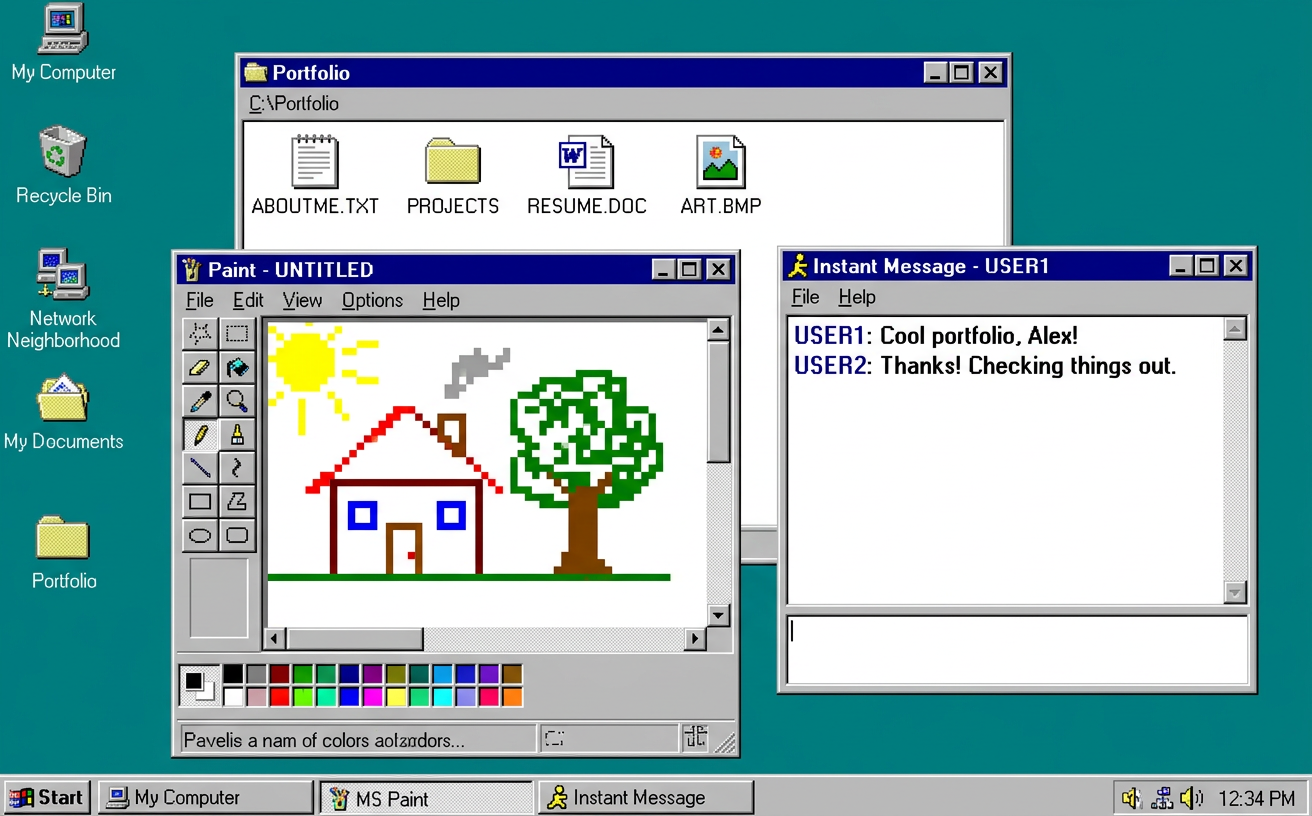
同一份代码包含复古桌面与现代作品集两层界面,通过任务栏按钮切换
HTML作品集
Portfolio-Template-23 — HTML 作品集模板
作者 Muhammad112233-creator
一个用 HTML、CSS 与原生 JavaScript 编写的个人作品集模板,包含可交互的 1996 复古桌面系统与 2026 现代动画展示两层界面,通过任务栏按钮切换。
看看你的网站会是什么样
浏览真实页面截图,比较内容排版与手机效果。点击下方缩略图切换,放大查看整页细节。
目前有 1 张原始预览,可打开完整图片查看设计细节。
截图用于了解视觉与布局,交互效果请以实际项目为准。
采集于 2026-10-11查看来源
值得关注的模板亮点
从已有项目资料中,快速了解它的特点。
桌面层含 16 个可交互应用,如项目文件夹、画图、扫雷、贪吃蛇、聊天机器人与屏保
现代层使用 Canvas 实现粒子名字、词雨与星空效果,并配有滚动进度与案例卡片
零依赖、无构建步骤,双击 index.html 或使用任意静态服务器即可运行
个性化集中在 js/app.js 的 CONFIG 与 PROJECTS 对象,案例页由 Python 脚本批量生成
采用 MIT 许可,允许修改、商用与分发,需保留版权与许可声明
模板详细介绍
该模板把作品集做成两层界面。第一层模拟 1996 年的桌面操作系统:开机画面、可拖动窗口、任务栏、开始菜单,以及 16 个可运行的应用,包括项目文件夹、记事本式简介、简历窗口、画图工具、扫雷与贪吃蛇、即时通讯机器人、壁纸切换、WebAudio 合成芯片音乐播放器、屏保等。第二层是深色现代作品集:粒子聚合成名字的首屏、滚动进度条、词雨画布、可滑动的案例卡片、技能卡片与联系区。两层之间通过任务栏的 2026 按钮触发时间穿越动画切换。
技术上不依赖框架和构建工具,直接打开 index.html 即可运行,也可用本地静态服务器预览。个性化集中在 js/app.js 顶部的 CONFIG 与 PROJECTS 对象,用于填写姓名、邮箱、链接和项目条目;案例页由 build_work_pages.py 从一个数据文件重新生成;图片放在 assets/img/,简历替换 resume.pdf。
限制方面:模板为静态站点,没有后端、数据库或表单提交逻辑,联系区依赖邮件、电话、LinkedIn 等外部链接;字体来自 Google Fonts,离线使用时字体不会加载;项目数量、案例页结构与壁纸数量在代码中固定,扩展需要改动脚本。许可为 MIT,可免费使用、修改、商用与分发,但需保留版权与许可声明;仓库中的演示图片、字体、图标等第三方素材需按各自许可单独核对。
HTML作品集
适合你的项目吗?
适用场景
- 个人开发者或设计师搭建带怀旧彩蛋的作品集站点
- 用于演示前端交互:窗口管理、Canvas 动画、WebAudio 合成与指针事件
- 作为教学或练习素材,学习无框架的原生 HTML/CSS/JS 项目组织方式
- 部署到 GitHub Pages 等静态托管平台作为在线简历与项目展示页
适合人群
- 希望作品集有辨识度、愿意接受复古与科幻混合视觉风格的个人
- 能阅读并修改原生 JavaScript 与 CSS 的前端开发者
- 需要静态、无后端、可直接托管在 GitHub Pages 的展示站点的人
- 想以 MIT 许可自由修改和二次分发的使用者
上手与定制指南
结合仓库当前版本的说明,按下面的资料检查内容、配置与运行要求。
- 1
直接双击 index.html 即可运行;也可用 python3 -m http.server 8080 或 npx serve . 启动本地服务器预览
- 2
在 js/app.js 顶部的 CONFIG 中填写姓名、邮箱与社交链接,在 PROJECTS 中填写项目条目
- 3
替换 assets/img/ 下的 portrait.jpg 与 work-*.jpg(保持文件名),并把 resume.pdf 换成自己的简历
- 4
修改案例页数据后运行 python3 build_work_pages.py 重新生成 work/ 目录下的页面
- 5
配色与字体在 css/style.css 的 :root 中调整;字体来自 Google Fonts,离线环境不会加载
授权与来源资料
使用条件与限制
免费使用 · 保留许可声明本次收录的是公开仓库中采用 MIT 许可的免费版本;免费范围为该版本代码,不代表外部服务或第三方素材免费。
使用时需要遵守
- 允许免费使用、修改、商用和分发该版本代码。
- 分发代码副本或实质性部分时,保留原作者版权声明和完整 MIT 许可声明。
- 代码按现状提供;担保与责任限制以原许可证及适用法律为准。
额外费用与待核对事项
- 演示图片、字体、图标及其他第三方素材需按各自许可核对,不能仅凭代码的 MIT 许可判断。
- 域名、托管、数据库、支付或 AI 等外部服务可能另外收费。
- 字体通过 Google Fonts 加载,属于外部服务;离线或无法访问 Google Fonts 时字体不会加载,需自行处理或替换字体。
- 使用、修改与分发需保留 MIT 许可与版权声明。
查看原文依据
Permission is hereby granted, free of charge
许可证原文
Fonts: [VT323](https://fonts.google.com/specimen/VT323), [Pixelify Sans](https://fonts.google.com/specimen/Pixelify+Sans), [Inter](https://fonts.google.com/specimen/Inter), [Archivo](https://fonts.google.com/specimen/Archivo) via Google Fonts.
README 原文
https://github.com/Muhammad112233-creator/Portfolio-Template-23/blob/main/LICENSEhttps://github.com/Muhammad112233-creator/Portfolio-Template-23/blob/main/README.mdMIT © Alex Carter — steal this template, keep the license, ship something wonderful.
README 原文
DeepSeek 根据仓库许可证和 README 整理 ·2026-10-11。结果仅覆盖已读取资料,依赖、图片、字体及后续条款变更以各自原文为准。
项目核对记录与介绍依据
模板资料
- 来源平台
- GitHub
- 资料与维护参考分
- 资料较完整 · 80 / 100
- 技术栈
- HTML
- 网站类型
- 作品集
这个分数如何计算
本站按许可资料(最高30分)、演示链接(12分)、预览图(10分)、Star数(15分)、记录的维护时间(15分)、描述完整度(8分)、功能记录(5分)和分类资料(5分)计算。它不是代码、安全或性能测试,也不是 Google 评分;有链接不代表已实测可用。
这个项目需要核对什么
- 记录的仓库更新时间
- 2026-10-11
- 截图检查日期
- 2026-10-11
已收录演示链接。请用你的内容与屏幕尺寸检查;有演示不代表表单、认证或支付已经可用。
目录记录的主要技术栈是 HTML。请通过依赖清单和锁文件核对实际版本与托管要求。这些说明基于收录资料,不代表代码审计或部署实测。
查看具体选型方法 →介绍的制作与核对状态
介绍由 AI 辅助整理目录与仓库资料。仓库作者不等于这篇介绍的审核者。
审核声明: [email protected] · 2026-10-13
查看当时使用的来源资料
SHA-256: bdefc6b93b5bd991505e6bbf3c9a793999faedc13975b2c976008ddf0f0286b4
2026-10-11T14:54:05.751Z
来源文件 / 仓库<div align="center"> <img src="assets/readme/header.svg" width="880" alt="AlexOS ’96 → 2026 — animated rainbow banner"/> <img src="assets/readme/typing.svg" width="880" alt="terminal typing animation — boot desktop, install 2026, open portfolio"/> [](https://developer.mozilla.org/docs/Web/HTML) [](https://developer.mozilla.org/docs/Web/CSS) [](https://developer.mozilla.org/docs/Web/JavaScript) []() [](https://pages.github.com/) [](LICENSE) </div> <img src="assets/readme/divider.svg" width="880" alt=""/> ## 🌈 What is this? A portfolio that is **two websites in one**: it boots as a fully working **retro 1996 desktop OS** — windows, taskbar, start menu, games, paint, a chat bot, a screensaver — and when you press **⟳ 2026**, the whole thing time-travels through a light-speed vortex and lands in a **sleek, dark, animated 2026 portfolio**. No frameworks. No build step. Just **HTML + CSS + vanilla JavaScript**, canvas physics, WebAudio chiptunes and an unreasonable love for the year 1996. <div align="center"> <img src="assets/readme/preview.png" width="880" alt="Preview — the retro desktop layer"/> </div> <img src="assets/readme/divider.svg" width="880" alt=""/> ## ✨ The Experience | 🖥️ **1996 Layer** | ⚡ **2026 Layer** | | ------------------------------------------ | ---------------------------------------------------- | | Boot splash with blinking “click to start” | Particle hero that **assembles your name** from dust | | Draggable windows + taskbar + start menu | Scroll-progress bar + aurora backdrop | | 16 working apps (see below 👇) | Word-rain canvas that coalesces into your mission | | “Did you know?” tip popups + Clippy 📎 | Swipeable case-study cards with live dots | | Idle 45s → **starfield screensaver** | Big-type statement, capsule skill cards | | Sleep · Shut Down · Restart (all real) | Animated contact section + hiring toast | | Pixel-art custom cursors | Neon-lime custom cursors | <img src="assets/readme/divider.svg" width="880" alt=""/> ## 🕹️ Every App Works | Icon | App | What it actually does | | :--: | --------------------- | ------------------------------------------------------------------------------------- | | 🗂️ | **Selected Work** | Folder of 8 projects; each opens a project dossier + case-study link | | 📝 | **About Me** | Notepad-style bio | | 🅦 | **What I Do** | Skills window, three columns | | 🛰️ | **Now (2026)** | “Now page” in a window | | ✉️ | **Contact** | One-tap email / phone / LinkedIn | | 📄 | **Résumé.pdf** | In-window PDF viewer + real `resume.pdf` download | | 🎨 | **Kid Pix** | Full paint app: 12 colors, brush sizes, stamps, eraser, undo, 💣 clear, 💾 PNG export | | ❓ | **Pop Culture Quiz** | 5-question quiz with scoring + restart | | 📎 | **Clippy Help** | The assistant. Rotating tips. Blinking eyes. | | 🎮 | **Games** | Fully playable **Minesweeper** (flags, timer, face) & **Snake** (keyboard + swipe) | | 💬 | **AIMS** | Instant-messenger bot that answers about work, hiring, 2026… | | 🖼️ | **Backgrounds** | 5 wallpapers, persisted to `localStorage` | | 🎵 | **Napster** | Chiptune player — every track **synthesized live** with WebAudio | | 📺 | **Nostalgia Moments** | Timeline of the decade that made us | | 🕰️ | **Time Travel** | Flux-capacitor control panel → 88 MPH → 2026 | | 🗑️ | **Recycle Bin** | Questionable files. Emptiable. | <img src="assets/readme/divider.svg" width="880" alt=""/> ## 🚀 Quick Start (see the preview) **Option 1 — just open it:** double-click `index.html`. It runs from the filesystem. **Option 2 — local server (recommended, exactly like production):** ```bash # from the project root python3 -m http.server 8080 # then open http://localhost:8080 ``` ```bash # or, if you prefer Node npx serve . ``` Then: click anywhere to boot → explore the desktop → hit **⟳ 2026** in the taskbar. <img src="assets/readme/divider.svg" width="880" alt=""/> ## 🔧 Make It Yours (5-minute personalization) | What | Where | Change | | -------------------------- | --------------------------------------------------------- | ---------------------------------------------------------- | | 🧑 Your name, email, links | `js/app.js` → `CONFIG` (top of file) | One object — drives hero, OS name, contact windows | | 🗂️ Your projects | `js/app.js` → `PROJECTS` | 8 entries; drive the retro folder **and** the modern cards | | 📝 Case-study pages | `build_work_pages.py` → run `python3 build_work_pages.py` | Regenerates all 8 pages in `work/` | | 🖼️ Images | `assets/img/` | Replace `portrait.jpg` + `work-*.jpg` (keep filenames) | | 📄 Résumé | `resume.pdf` | Drop in your real PDF (same filename) | | 🎨 Colors | `css/style.css` → `:root` | Teal desktop, lime accent, fonts | <img src="assets/readme/divider.svg" width="880" alt=""/> ## 🗂️ Project Structure ``` 📦 alexos-portfolio ┣ 📄 index.html ← everything boots from here ┣ 📂 css/ ┃ ┗ 📄 style.css ← retro chrome + modern theme + responsive ┣ 📂 js/ ┃ ┗ 📄 app.js ← window manager · 16 apps · time travel · modern fx ┣ 📂 work/ ← 8 case-study pages (+ shared work.css / work.js) ┃ ┣ 📄 nordlys.html … sno.html ┣ 📂 assets/ ┃ ┣ 📂 img/ ← portrait + 8 project covers ┃ ┗ 📂 readme/ ← animated SVGs for this README ┣ 📄 resume.pdf ← replace with yours ┣ 📄 build_work_pages.py ← regenerates work/*.html from one data file ┣ 📄 LICENSE ← MIT ┗ 📄 README.md ← you are here 📍 ``` <img src="assets/readme/divider.svg" width="880" alt=""/> ## 🛠️ Under the Hood - 🧱 **Vanilla everything** — zero dependencies, zero build tools, works offline - 🎛️ **Canvas ×3** — particle-name hero, word-rain cloud, starfield + time-vortex - 🎹 **WebAudio** — UI blips, startup chime, and 4 fully synthesized chiptunes - 👆 **Pointer Events** — drag windows, drag-scrub the work strip, swipe Snake - 📱 **Responsive** — mobile icons tap-to-open, windows stack, layouts collapse gracefully - ♿ **Touches** — real `<a>`/`button` semantics, sr-only headings, reduced-motion friendly <img src="assets/readme/divider.svg" width="880" alt=""/> ## 📄 License & Credits MIT © Alex Carter — steal this template, keep the license, ship something wonderful. Fonts: [VT323](https://fonts.google.com/specimen/VT323), [Pixelify Sans](https://fonts.google.com/specimen/Pixelify+Sans), [Inter](https://fonts.google.com/specimen/Inter), [Archivo](https://fonts.google.com/specimen/Archivo) via Google Fonts. All artwork in `assets/` is original and safe to reuse. <div align="center"> ## 🌟 Support the Project If you find this template useful, please consider giving it a star! It helps others discover the repository and supports future development. </div> <div align="center"> <img src="assets/readme/footer.svg" width="880" alt="animated rainbow wave footer"/> </div>
看看同类模板
对比同技术栈与用途的模板,找到更适合的视觉与内容结构。

simplefolio
⚡️ A minimal portfolio template for Developers
HTML · 作品集

Freelancer
Freelancer 是 Start Bootstrap 出品的单页作品集模板,专为自由职业者、设计师和小型工作室设计。 页面结构清晰,包含多个内容区块、响应式作品集网格,每个作品项目配有模态窗口展示详情。
HTML · 作品集

Resume
Resume 是 Start Bootstrap 推出的简历与 CV 主题,基于 Bootstrap 构建,采用固定侧边栏加内容区块的结构。
HTML · 作品集

Creative
Creative 是 Start Bootstrap 团队维护的一款单页营销模板,定位明确:为创意机构或产品服务提供一个以作品展示和行动号召为核心的落地页。
HTML · 企业官网

Grayscale
Grayscale 是 Start Bootstrap 出品的深色系单页 HTML 模板,基于 Bootstrap 构建。 它的视觉重心放在大尺寸首屏和清晰的内容分区上,整体氛围偏暗,适合摄影、活动或品牌叙事类网站。
HTML · 企业官网

startbootstrap-stylish-portfolio
Stylish Portfolio 是 Start Bootstrap 维护的单页作品集主题,基于 Bootstrap 构建,采用多个内容区块加离屏导航菜单的结构。
HTML · 作品集