Write content in MDX, allowing React components to be embedded in Markdown
Next.jsReactBlogDocumentation
findoora-docs — Next.js Blog Template
By muralitmuthuhotmail
A documentation site template based on Next.js 15 and MDX, supporting content types such as blogs, documentation, and tutorials, with built-in search, category navigation, and Docker deployment configuration.
Explore the design
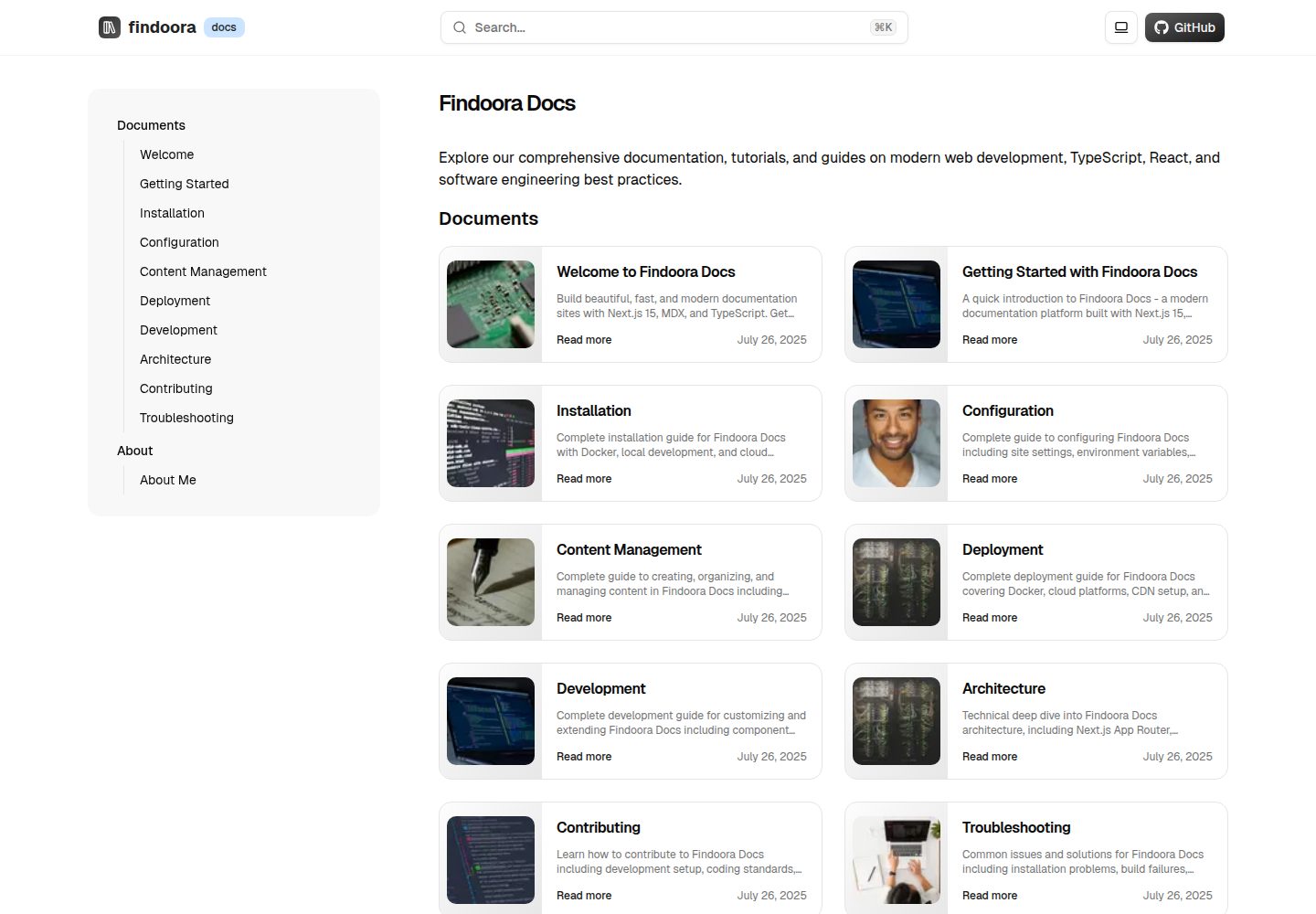
Compare the page layouts and mobile experience. Open any screenshot for a closer look.
Desktop homepage1 / 3
Desktop captureTop of page
Actual screenshot captured by the server browser.
All pages & views 3
Screenshots show visual appearance; interactive behavior may differ.
Recorded 2026-10-14View source
What stands out
A quick read of the recorded project description.
Automatically generate navigation and filtering based on categories, with support for custom metadata via frontmatter
Built-in search dialog, breadcrumbs, table of contents, back-to-top, and social sharing components
Support Mermaid diagrams and code syntax highlighting
Provide Dockerfile and docker-compose configuration, along with production deployment considerations
Include ESLint, Prettier, TypeScript type checking, and test scripts
Template Details
Findoora Docs is a content-centric documentation platform template built with Next.js 15 App Router, TypeScript, Tailwind CSS, and shadcn/ui. Content is stored as MDX files in the posts/ directory, with metadata such as title, category, and tags defined via frontmatter. The template automatically generates navigation and filtering by category, and provides UI components including a search dialog, breadcrumbs, table of contents, dark/light theme toggle, Mermaid diagrams, code highlighting, and social sharing. The README gives three startup methods: Docker Compose, local pnpm development, and Vercel, and lists items to consider for production deployment such as the health check endpoint /api/health, reverse proxy, and resource limits. Content types cover blogs, documentation, tutorials, guides, etc., but the README does not describe capabilities such as multilingual support, access control, or a database backend, nor does it provide specific performance data.
Next.jsReactBlogDocumentation
Is it right for your project?
Use Cases
- Build a documentation site for an open-source project including installation guides, API references, and contribution instructions
- Internal team knowledge base or product documentation, organizing articles and tutorials by category
- Personal tech blog or portfolio, using MDX to showcase project cases and learning notes
- Publish course materials, learning paths, and assignment instructions in teaching scenarios
Suitable For
- Front-end developers familiar with Next.js and Markdown/MDX
- Teams that need to self-host a documentation site and accept Docker deployment
- Content maintainers who want to enhance Markdown content expressiveness with React components
Getting started & customization
Use these recorded setup notes alongside the repository instructions for your chosen version.
- 1
Local development requires Node.js 18+ and pnpm (README states pnpm >= 10.7.0)
- 2
Docker method: after cloning the repository, run docker-compose up -d, then access http://localhost:3000 by default
- 3
Local method: run pnpm dev after pnpm install
- 4
You can create .env.local in the root directory to configure NEXT_PUBLIC_BASE_URL and optional NEXT_PUBLIC_GA_ID
- 5
For production deployment, it is recommended to set environment variables, use a reverse proxy, monitor /api/health, and configure resource limits
License & source material
Usage conditions & limitations
Free to use · keep license noticeThis entry covers the free version under the MIT license in the public repository; the free scope is the code of this version and does not imply that external services or third-party assets are free.
Must comply with when using
- Permits free use, modification, commercial use, and distribution of this version's code.
- When distributing copies or substantial portions of the code, retain the original author's copyright notice and the full MIT license notice.
- The code is provided as is; warranties and limitations of liability are governed by the original license and applicable law.
Additional costs & items to verify
- Demo images, fonts, icons, and other third-party assets must be checked against their respective licenses; they cannot be judged solely by the code's MIT license.
- External services such as domains, hosting, databases, payments, or AI may incur additional charges.
- Google Analytics is an optional external service; you must provide your own GA ID to enable analytics.
- Google site verification is an optional external service; you must provide your own verification code.
- Deploying to third-party platforms such as AWS, DigitalOcean, or Railway may incur external service fees.
- Using Husky Git hooks requires an additional install command after cloning.
View Original Text Basis
Permission is hereby granted, free of charge
Original License Text
# Google Analytics (optional)
Original README
# Optional: Google Analytics
Original README
# Optional: Google Site Verification
Original README
**AWS/DigitalOcean/Railway**:
Original README
https://github.com/muralitmuthuhotmail/findoora-docs/blob/main/LICENSEhttps://github.com/muralitmuthuhotmail/findoora-docs/blob/main/README.md> 💡 **Tip:** Install Husky after cloning with `pnpm dlx husky install` if not already set up.
Original README
Compiled by DeepSeek based on repository license and README ·2026-10-14. Results only cover the materials read; dependencies, images, fonts, and subsequent term changes are subject to their respective original texts.
Project checks & description sources
Template Information
- Source platforms
- GitHub
- Documentation and maintenance reference score
- More documented · 88 / 100
- Technologies
- Next.js · React
- Website type
- Blog · Documentation
How this score is calculated
Our heuristic uses license records (up to 30), a demo link (12), a preview (10), stars (15), recorded maintenance (15), description completeness (8), feature records (5) and classification data (5). It is not a code, security or performance test, or a Google score. A link does not establish tested functionality.
What to verify for this project
- Repository update recorded
- 2026-03-07
- Screenshot last checked
- 2026-10-14
A demo link is listed. Check it with your own content and viewport sizes; its presence does not confirm that forms, authentication or payments work.
The catalog identifies Next.js as the primary stack. Check the actual dependency manifest and lockfile for versions and hosting requirements. These notes use recorded metadata, not a code audit or a deployment test.
Use a selection guide →How this description was prepared
AI-assisted description based on catalog records and repository material. Repository authors are not automatically the reviewers of this description.
Review declaration: codex-user-requested-batch-review-20261015 · 2026-10-15
Inspect the recorded source material
SHA-256: 1ec6ca9b686f0eba4c7d5baa7d73ce06bb453aa933db333e3984a115fbd15b28
2026-10-14T10:18:26.503Z
Source file / repository# 📚 Findoora Docs
> A modern, highly extensible documentation platform built with Next.js 15, designed for developers who want powerful content management with exceptional user experience.
<div align="center">
[](https://nextjs.org/)
[](https://www.typescriptlang.org/)
[](https://mdxjs.com/)
[](https://www.docker.com/)
[](https://opensource.org/licenses/MIT)
</div>
**Findoora Docs** is a cutting-edge documentation platform that combines the simplicity of Markdown with the power of React components. Built for teams and individuals who need a fast, scalable, and beautiful way to create and share knowledge.
## ✨ Key Features
### 🎯 **Content-First Architecture**
- **Flexible Content System**: Support for blogs, documentation, tutorials, guides, and custom content types
- **MDX Integration**: Write in Markdown, enhance with React components
- **Category-Based Organization**: Automatic navigation and filtering by content categories
- **Frontmatter Support**: Rich metadata with custom fields
### 🚀 **Performance & Developer Experience**
- **Next.js 15 App Router**: Latest Next.js features with optimal performance
- **TypeScript Throughout**: Full type safety from content to components
- **Bundle Analysis**: Built-in tools to monitor and optimize bundle size
- **Hot Reload**: Instant feedback during development
- **Docker Ready**: Production-ready containerization
### 🎨 **Beautiful User Interface**
- **shadcn/ui Components**: Modern, accessible UI components
- **Responsive Design**: Mobile-first approach with seamless desktop experience
- **Dark/Light Mode**: System-aware theme switching
- **Interactive Navigation**: Smart sidebar with breadcrumbs and table of contents
- **Search Functionality**: Powerful full-text search with live suggestions
### 🔧 **Advanced Features**
- **Mermaid Diagrams**: Render complex diagrams and flowcharts
- **Syntax Highlighting**: Beautiful code blocks with GitHub-style themes
- **Social Sharing**: Built-in sharing for all major platforms
- **SEO Optimized**: Structured data, Open Graph, and sitemap generation
- **Accessibility**: WCAG 2.1 AA compliant with screen reader support
## 🚀 Quick Start
### Option 1: Docker (Recommended)
```bash
# Clone and start
git clone https://github.com/muralitmuthuhotmail/findoora-docs.git
cd findoora-docs
docker-compose up -d
# Visit http://localhost:3000
```
### Option 2: Local Development
```bash
# Prerequisites: Node.js 18+ and pnpm
git clone https://github.com/muralitmuthuhotmail/findoora-docs.git
cd findoora-docs
# Install dependencies
pnpm install
# Start development server
pnpm dev
# Visit http://localhost:3000
```
### Option 3: Deploy to Vercel
[](https://vercel.com/new/clone?repository-url=https://github.com/muralitmuthuhotmail/findoora-docs)
## � Use Cases
### 🏢 **For Teams & Organizations**
- **Technical Documentation**: API docs, implementation guides, troubleshooting
- **Knowledge Base**: Internal wikis, onboarding materials, best practices
- **Product Documentation**: User guides, feature announcements, changelog
- **Engineering Blogs**: Technical insights, architecture decisions, tutorials
### 👤 **For Individual Developers**
- **Personal Blog**: Share knowledge, document learning journey
- **Portfolio Website**: Showcase projects with detailed case studies
- **Tutorial Platform**: Create step-by-step learning materials
- **Note-Taking System**: Organize research, code snippets, and ideas
### 🎓 **For Education**
- **Course Materials**: Lessons, assignments, resources
- **Research Documentation**: Papers, methodology, findings
- **Student Portfolios**: Academic work, projects, achievements
- **Learning Paths**: Structured curriculum with progress tracking
### 🚀 **For Open Source Projects**
- **Project Documentation**: Setup guides, contribution guidelines
- **API Reference**: Comprehensive endpoint documentation
- **Community Hub**: Announcements, FAQ, community guidelines
- **Change Documentation**: Release notes, migration guides
## 🛠 Technology Stack
### **Core Framework**
- **[Next.js 15](https://nextjs.org/)** - React framework with App Router
- **[TypeScript](https://www.typescriptlang.org/)** - Type-safe JavaScript
- **[Tailwind CSS](https://tailwindcss.com/)** - Utility-first CSS framework
- **[shadcn/ui](https://ui.shadcn.com/)** - High-quality React components
### **Content Management**
- **[MDX](https://mdxjs.com/)** - Markdown with React components
- **[next-mdx-remote](https://github.com/hashicorp/next-mdx-remote)** - Remote MDX compilation
- **[remark](https://remark.js.org/)** & **[rehype](https://github.com/rehypejs/rehype)** - Markdown processing
- **[Mermaid](https://mermaid.js.org/)** - Diagram and flowchart generation
### **Performance & SEO**
- **[Bundle Analyzer](https://www.npmjs.com/package/@next/bundle-analyzer)** - Bundle size optimization
- **Structured Data** - Schema.org integration
- **Open Graph** - Social media optimization
- **Sitemap Generation** - Automatic SEO indexing
### **Development Tools**
- **[pnpm](https://pnpm.io/)** - Fast, efficient package manager
- **[Docker](https://www.docker.com/)** - Containerization for deployment
- **ESLint & Prettier** - Code quality and formatting
- **Turbopack** - Fast bundler for development
## 📁 Project Architecture
```
findoora-docs/
├── app/ # Next.js App Router
│ ├── [category]/ # Dynamic category routes
│ │ ├── page.tsx # Category listing page
│ │ └── [slug]/ # Individual content pages
│ ├── api/ # API routes
│ │ ├── search/ # Search functionality
│ │ ├── navigation/ # Navigation data
│ │ └── health/ # Health check
│ ├── layout.tsx # Root layout with navigation
│ └── page.tsx # Homepage
├── components/ # React components
│ ├── blocks/ # Content blocks
│ │ ├── mdx/ # MDX components
│ │ ├── content-list.tsx # Content listing
│ │ └── table-of-contents.tsx
│ ├── features/ # Feature components
│ │ ├── search-dialog.tsx # Search interface
│ │ ├── back-to-top.tsx # Navigation helper
│ │ └── social-share.tsx # Social sharing
│ ├── layout/ # Layout components
│ │ ├── app-bar.tsx # Top navigation
│ │ ├── navigation-sidebar.tsx
│ │ └── mobile-navigation.tsx
│ ├── pages/ # Page-specific components
│ ├── providers/ # Context providers
│ ├── seo/ # SEO components
│ └── ui/ # Reusable UI components
├── lib/ # Utility functions
│ ├── content.ts # Content management
│ ├── config.ts # App configuration
│ └── utils/ # Helper utilities
├── posts/ # MDX content files
├── public/ # Static assets
├── styles/ # CSS and styling
├── types/ # TypeScript definitions
├── docker-compose.yml # Docker configuration
├── dockerfile # Docker build instructions
└── next.config.ts # Next.js configuration
```
## 🛠️ Development
### Prerequisites
- Node.js >= 18 (for local development)
- pnpm >= 10.7.0 (for local development)
- Docker & Docker Compose (for containerized deployment)
### Getting Started
```bash
# Install dependencies
pnpm install
# Start development server
pnpm dev
# Open the site in your browser using the BASE_URL from lib/urls.ts
```
## 🐳 Docker Deployment
### Quick Start with Docker Compose
```bash
# Build and start the application
docker-compose up -d
# View logs
docker-compose logs -f
# Stop the application
docker-compose down
```
### Manual Docker Build
```bash
# Build the Docker image
docker build -t findoora-docs .
# Run the container
docker run -d \
--name findoora-docs \
-p 3000:3000 \
-e NODE_ENV=production \
findoora-docs
# View logs
docker logs -f findoora-docs
# Stop and remove container
docker stop findoora-docs
docker rm findoora-docs
```
### Production Deployment
For production environments, consider:
1. **Environment Variables**: Set appropriate environment variables
2. **Reverse Proxy**: Use nginx or similar for SSL termination
3. **Health Checks**: Monitor `/api/health` endpoint
4. **Resource Limits**: Set memory and CPU limits
5. **Logging**: Configure proper log aggregation
```bash
# Production deployment with resource limits
docker run -d \
--name findoora-docs-prod \
-p 3000:3000 \
-e NODE_ENV=production \
-e NEXT_TELEMETRY_DISABLED=1 \
--memory=512m \
--cpus=1 \
--restart=unless-stopped \
findoora-docs
```
### Docker Compose with Nginx (Production)
```yaml
# docker-compose.prod.yml
version: "3.8"
services:
docs:
build: .
environment:
- NODE_ENV=production
restart: unless-stopped
nginx:
image: nginx:alpine
ports:
- "80:80"
- "443:443"
volumes:
- ./nginx.conf:/etc/nginx/nginx.conf:ro
- ./ssl:/etc/nginx/ssl:ro
depends_on:
- docs
restart: unless-stopped
```
### Available Scripts
```bash
# Development
pnpm dev # Start development server with Turbopack
pnpm build # Build for production
pnpm start # Start production server
pnpm preview # Preview production build locally
# Code Quality
pnpm lint # Run ESLint
pnpm lint:fix # Fix ESLint issues
pnpm typecheck # Run TypeScript type checking
pnpm format # Format code with Prettier
# Testing
pnpm test # Run tests
pnpm test:watch # Run tests in watch mode
pnpm test:coverage # Run tests with coverage
pnpm test:ui # Run tests with UI
# Analysis
pnpm analyze # Analyze bundle size
pnpm build:analyze # Build and analyze bundle
```
### Environment Variables
Create a `.env.local` file in the root directory:
```env
# Base URL for the application
NEXT_PUBLIC_BASE_URL=http://localhost:3000
# Google Analytics (optional)
NEXT_PUBLIC_GA_ID=your-ga-id
```
## 📝 Content Management
### **Creating Content**
1. **Add a new MDX file** in the `posts/` directory:
```mdx
---
menuTitle: "Getting Started"
title: "Getting Started with Findoora Docs"
publishedAt: "2024-07-26"
summary: "Learn how to set up and customize your documentation site"
category: "documents"
author: "Your Name"
tags: ["setup", "configuration", "getting-started"]
thumbnail: "/images/getting-started.jpg"
---
```
# Getting Started
Welcome to your new documentation site! This guide will help you...
## Installation
Follow these steps to get started:
1. Clone the repository
2. Install dependencies
3. Start developing
```typescript
// Your code examples with syntax highlighting
const config = {
title: "My Documentation",
description: "A comprehensive guide",
};
```
## Next Steps
- [ ] Customize your site configuration
- [ ] Add your first content
- [ ] Deploy to production
### **Supported Content Types**
| Type | Category | Use Case | Example |
| ----------------- | ----------- | --------------------------------- | ----------------------------------------- |
| **Blog Posts** | `blog` | Articles, thoughts, announcements | Company updates, technical insights |
| **Documentation** | `docs` | Technical guides, API references | Installation guides, API documentation |
| **Tutorials** | `tutorial` | Step-by-step learning | How-to guides, code walkthroughs |
| **Guides** | `guide` | Best practices, methodologies | Style guides, workflow documentation |
| **Reference** | `reference` | Quick lookups, specifications | Command references, configuration options |
| **Custom** | `any-name` | Your unique content types | Press releases, case studies, etc. |
### **Rich Content Features**
#### **Code Blocks with Syntax Highlighting**
````mdx
```typescript
interface User {
id: string;
name: string;
email: string;
}
const users: User[] = await fetchUsers();
```
````
`````
#### **Mermaid Diagrams**
````mdx
```mermaid
graph TD
A[Start] --> B{Decision}
B -->|Yes| C[Action 1]
B -->|No| D[Action 2]
C --> E[End]
D --> E
```
`````
#### **Task Lists**
```mdx
- [x] Completed task
- [ ] Pending task
- [ ] Future enhancement
```
#### **Tables with Alignment**
```mdx
| Left | Center | Right |
| :--- | :----: | ----: |
| Data | Data | Data |
```
#### **Callouts and Quotes**
```mdx
> 💡 **Pro Tip**: Use frontmatter to add rich metadata to your content.
> ⚠️ **Warning**: Always backup your content before major changes.
```
### **Content Organization**
#### **Automatic Navigation**
The platform automatically generates navigation based on your content structure:
- Categories become top-level navigation items
- Individual posts become sub-navigation items
- Menu titles are used for clean navigation labels
#### **Search Integration**
All content is automatically indexed for search:
- Full-text search across titles, summaries, and content
- Category-based filtering
- Relevance scoring with highlighted matches
- Search suggestions and popular terms
#### **SEO & Social Sharing**
Every piece of content gets:
- Structured data for search engines
- Open Graph meta tags for social sharing
- Twitter Card support
- Automatic sitemap generation
- Optimized URLs based on categories and slugs
## ⚙️ Configuration
### **Environment Variables**
Create a `.env.local` file for local development:
```bash
# Base URL for your site
NEXT_PUBLIC_BASE_URL=http://localhost:3000
# API Base URL (usually same as base URL)
NEXT_PUBLIC_BASE_API_URL=http://localhost:3000
# Optional: Google Analytics
NEXT_PUBLIC_GA_ID=G-XXXXXXXXXX
# Optional: Google Site Verification
GOOGLE_SITE_VERIFICATION=your-verification-code
# Optional: Disable telemetry
NEXT_TELEMETRY_DISABLED=1
```
### **Site Configuration**
Update `lib/config.ts` to customize your site:
```typescript
export const SITE_NAME = "Your Docs Site";
export const SITE_SUB_TITLE = "Documentation";
export const SITE_DESCRIPTION = "Your site description";
export const GITHUB_URL = "https://github.com/your-username/your-repo";
export const SITE_AUTHOR = "@your-handle";
// ... more configuration options
```
### **Styling & Theming**
The platform uses Tailwind CSS with CSS custom properties for theming:
```css
/* styles/theme.css */
:root {
--background: 0 0% 100%;
--foreground: 222.2 84% 4.9%;
--primary: 222.2 47.4% 11.2%;
/* ... more theme variables */
}
[data-theme="dark"] {
--background: 222.2 84% 4.9%;
--foreground: 210 40% 98%;
/* ... dark theme overrides */
}
```
## 📦 Deployment
### **Docker Deployment**
1. **Using Docker Compose** (Recommended):
```bash
# Production deployment
docker-compose up -d
# View logs
docker-compose logs -f
# Stop services
docker-compose down
```
2. **Using Docker directly**:
```bash
# Build image
docker build -t findoora-docs .
# Run container
docker run -p 3000:3000 findoora-docs
```
### **Vercel Deployment**
1. **One-click deploy**
[](https://vercel.com/new/clone?repository-url=https://github.com/muralitmuthuhotmail/findoora-docs)
2. **Manual deployment**:
```bash
# Install Vercel CLI
npm i -g vercel
# Deploy
vercel --prod
```
### **Other Platforms**
**Netlify**:
```bash
# Build command
pnpm build
# Publish directory
.next
```
**AWS/DigitalOcean/Railway**:
- Use the provided `dockerfile` for container-based deployment
- Set environment variables in your platform's dashboard
- Ensure Node.js 18+ is available
## 🧪 Development
### **Available Scripts**
```bash
# Development
pnpm dev # Start development server with Turbopack
pnpm dev:debug # Start with debugging enabled
# Building
pnpm build # Production build
pnpm start # Start production server
pnpm build:analyze # Build with bundle analysis
# Code Quality
pnpm lint # Run ESLint
pnpm lint:fix # Fix linting issues
pnpm format # Format code with Prettier
pnpm typecheck # TypeScript type checking
# Testing
pnpm test # Run tests
pnpm test:watch # Run tests in watch mode
pnpm test:coverage # Generate coverage report
```
### **Development Workflow**
1. **Start the development server**:
```bash
pnpm dev
```
2. **Add content** to `posts/` directory with `.mdx` extension
3. **Customize components** in the `components/` directory
4. **Update configuration** in `lib/config.ts`
5. **Test your changes** and ensure type safety:
```bash
pnpm typecheck && pnpm lint
```
### **Adding Custom Components**
Create reusable MDX components:
```typescript
// components/blocks/mdx/custom-component.tsx
interface CustomComponentProps {
title: string;
children: React.ReactNode;
}
export function CustomComponent({ title, children }: CustomComponentProps) {
return (
<div className="my-6 p-4 border rounded-lg">
<h3 className="text-lg font-semibold mb-2">{title}</h3>
<div className="prose">{children}</div>
</div>
);
}
```
Register it in `custom-mdx.tsx`:
```typescript
import { CustomComponent } from "./custom-component";
const components = {
// ... existing components
CustomComponent,
};
```
Use in MDX content:
```mdx
<CustomComponent title="Important Note">
This is a custom component with **markdown** support!
</CustomComponent>
```
## 🤝 Contributing
We welcome contributions from the community! Here's how you can help:
### **Ways to Contribute**
- 🐛 **Bug Reports**: Found an issue? Let us know!
- 💡 **Feature Requests**: Have an idea? We'd love to hear it!
- 📖 **Documentation**: Help improve our docs
- 🎨 **Design**: UI/UX improvements and accessibility enhancements
- 🔧 **Code**: Bug fixes, new features, and optimizations
### **Development Setup**
1. **Fork the repository** on GitHub
2. **Clone your fork**:
```bash
git clone https://github.com/your-username/findoora-docs.git
cd findoora-docs
```
3. **Install dependencies**:
```bash
pnpm install
```
4. **Create a feature branch**:
```bash
git checkout -b feature/your-feature-name
```
5. **Make your changes** and test thoroughly
6. **Submit a pull request** with a clear description
### **Contribution Guidelines**
- ✅ Follow the existing code style and conventions
- ✅ Write tests for new features and bug fixes
- ✅ Update documentation for any API changes
- ✅ Ensure all tests pass and there are no linting errors
- ✅ Keep commits focused and write clear commit messages
### **Open Source Standards: Git Hooks**
To maintain high code quality and consistency, Findoora Docs uses [Husky](https://typicode.github.io/husky/) and [lint-staged](https://github.com/okonet/lint-staged) for Git hooks:
- **Pre-commit**: Runs ESLint and Prettier on staged files to catch lint and formatting issues before committing.
- **Pre-push**: Runs type checking and tests to ensure code correctness before pushing to the repository.
**Configuration Example:**
```json
// package.json
{
"lint-staged": {
"*.{js,jsx,ts,tsx}": ["eslint --fix", "prettier --write"],
"*.{md,mdx}": ["prettier --write"]
},
"husky": {
"hooks": {
"pre-commit": "lint-staged",
"pre-push": "pnpm typecheck && pnpm test"
}
}
}
```
**How it works:**
- On `git commit`, only properly formatted and linted code is committed.
- On `git push`, code must pass type checks and tests, preventing broken code from entering the repository.
> 💡 **Tip:** Install Husky after cloning with `pnpm dlx husky install` if not already set up.
For more details, see the [Contributing Guide](./md-content/contributing.mdx).
### **Code of Conduct**
We are committed to providing a welcoming and inclusive environment for all contributors. Please read our [Code of Conduct](CODE_OF_CONDUCT.md) before contributing.
## 📄 License
This project is licensed under the [MIT License](LICENSE) - see the LICENSE file for details.
### **What this means:**
- ✅ **Commercial Use**: Use this project in commercial applications
- ✅ **Modification**: Modify the source code to fit your needs
- ✅ **Distribution**: Distribute the original or modified versions
- ✅ **Private Use**: Use the project for personal or internal purposes
- ❗ **No Warranty**: The software is provided "as is" without warranty
- ❗ **Attribution Required**: Include the original license in any distribution
## 🙏 Acknowledgments
### **Built With Love Using**
- [Next.js](https://nextjs.org/) - The React framework for production
- [shadcn/ui](https://ui.shadcn.com/) - Beautiful and accessible React components
- [Tailwind CSS](https://tailwindcss.com/) - A utility-first CSS framework
- [MDX](https://mdxjs.com/) - Markdown for the component era
- [TypeScript](https://www.typescriptlang.org/) - JavaScript with syntax for types
### **Inspired By**
- [Docusaurus](https://docusaurus.io/) - Documentation platform excellence
- [GitBook](https://www.gitbook.com/) - Beautiful documentation experiences
- [Notion](https://www.notion.so/) - Modern content management
- [Linear](https://linear.app/) - Clean and performant web applications
---
<div align="center">
**[⭐ Star this project](https://github.com/muralitmuthuhotmail/findoora-docs)** • **[🐛 Report Bug](https://github.com/muralitmuthuhotmail/findoora-docs/issues)** • **[💡 Request Feature](https://github.com/muralitmuthuhotmail/findoora-docs/issues)**
Made with ❤️ by [Murali Thangamuthu](https://github.com/muralitmuthuhotmail)
</div>
Explore similar templates
Compare previews and descriptions within the same stack and category.

tailwind-nextjs-starter-blog
A Next.js and Tailwind CSS blog starter template using Contentlayer for Markdown/MDX, with built-in SEO, code highlighting, and tags. It targets personal technical blogs and migration from Jekyll/Hugo to React, and supports one-click Vercel deployment.
Next.js · Blog

Nextjs-tailwindcss-blog-template
A Next.js blog styled with Tailwind CSS. The current branch processes Markdown with Velite; the earlier Contentlayer setup is retained in a separate historical branch.
Next.js · Blog

nextjs-prisma-boilerplate
A production-grade full stack starter built on Next.js 12, React 18, Prisma 4, and Postgres, with layered frontend and backend architecture, Jest and Cypress testing, next-auth authentication, Docker and Gitpod development environments, GitHub Actions CI/CD, and Traefik-based production deployment.
Next.js · Documentation

Next-js-Blog-Boilerplate
A blog starter built on Next.js 12 and Tailwind CSS 3, integrating TypeScript, ESLint, Prettier, and PostCSS.
Next.js · Blog

nextjs-blog-theme
A Next.js 15 and Tailwind CSS 4.x blog starter by Netlify, designed by Bejamas, with MDX support, dark/light theme switching, and environment-variable configuration. It includes a visual setup wizard for deploying to Netlify and manages content via local .mdx files.
Next.js · Blog

blog
A personal blog forked from Timlrx's tailwind-nextjs-starter-blog, built with Next.js, React, and Tailwind CSS. Content is stored as Markdown/MDX under data/, with site, author, navigation, and project data in separate files.
Next.js · Blog