使用 MDX 编写内容,可在 Markdown 中嵌入 React 组件
Next.jsReact博客文档
findoora-docs — Next.js 博客模板
作者 muralitmuthuhotmail
基于 Next.js 15 与 MDX 的文档站点模板,支持博客、文档、教程等内容类型,内置搜索、分类导航与 Docker 部署配置。
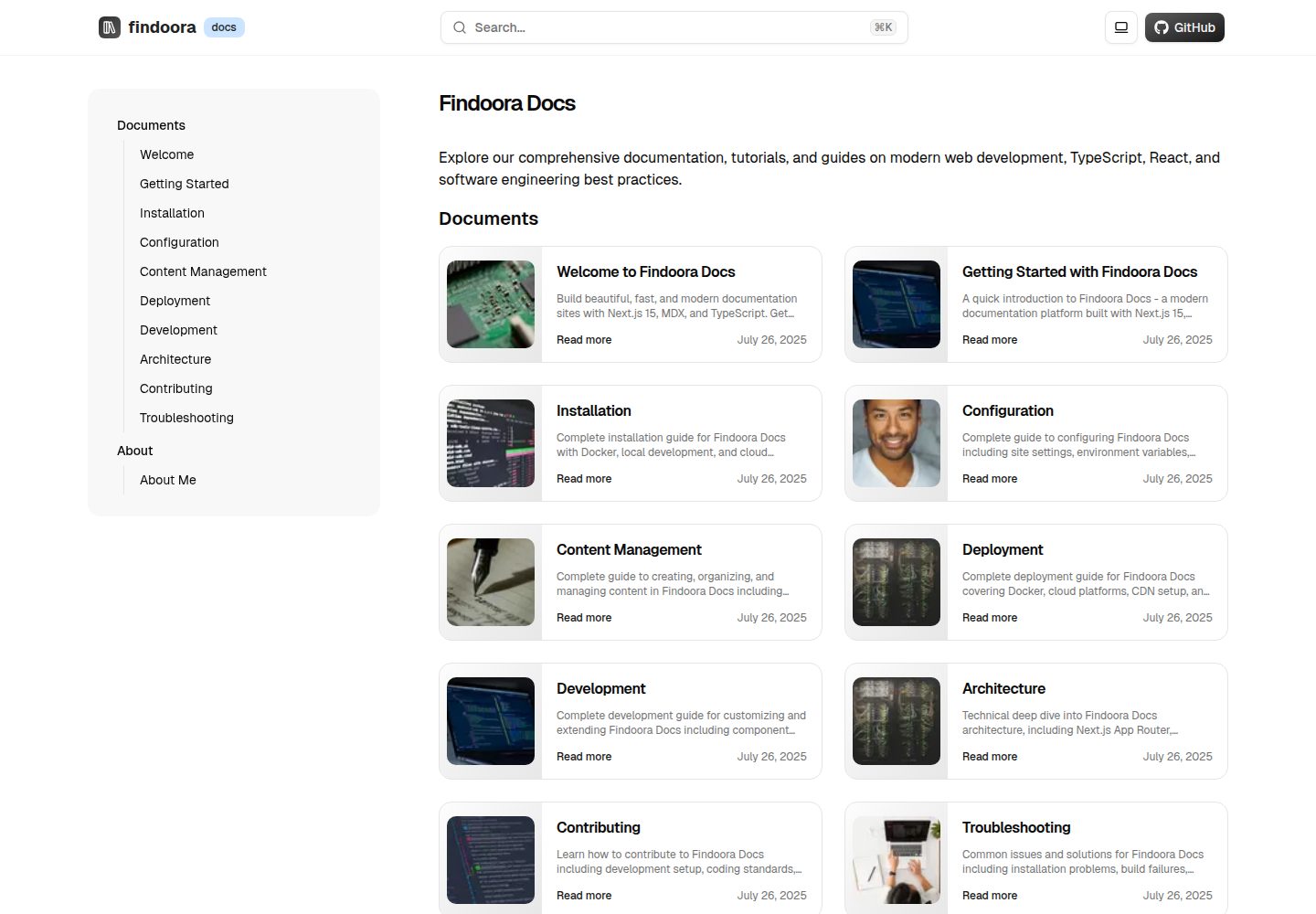
看看你的网站会是什么样
浏览真实页面截图,比较内容排版与手机效果。点击下方缩略图切换,放大查看整页细节。
全部页面与视图 3
截图用于了解视觉与布局,交互效果请以实际项目为准。
采集于 2026-10-14查看来源
值得关注的模板亮点
从已有项目资料中,快速了解它的特点。
基于分类自动生成导航与筛选,支持 frontmatter 自定义元数据
内置搜索对话框、面包屑、目录、返回顶部与社交分享组件
支持 Mermaid 图表与代码语法高亮
提供 Dockerfile 与 docker-compose 配置,并给出生产部署注意事项
包含 ESLint、Prettier、TypeScript 类型检查与测试脚本
模板详细介绍
Findoora Docs 是一个以内容为核心的文档平台模板,使用 Next.js 15 App Router、TypeScript、Tailwind CSS 与 shadcn/ui 构建,内容以 MDX 文件形式存放在 posts/ 目录,通过 frontmatter 定义标题、分类、标签等元数据。模板按分类自动生成导航与筛选,提供搜索对话框、面包屑、目录、深色/浅色主题切换、Mermaid 图表、代码高亮与社交分享等界面组件。README 给出了 Docker Compose、本地 pnpm 开发以及 Vercel 三种启动方式,并列出生产部署时建议关注的健康检查端点 /api/health、反向代理与资源限制等事项。内容类型涵盖博客、文档、教程、指南等,但 README 未说明多语言、权限控制或数据库后端等能力,也未提供具体性能数据。
Next.jsReact博客文档
适合你的项目吗?
适用场景
- 为开源项目搭建包含安装指南、API 参考与贡献说明的文档站
- 团队内部知识库或产品文档,按分类组织文章与教程
- 个人技术博客或作品集,用 MDX 展示项目案例与学习笔记
- 教学场景中发布课程材料、学习路径与作业说明
适合人群
- 熟悉 Next.js 与 Markdown/MDX 的前端开发者
- 需要自托管文档站并接受 Docker 部署方式的团队
- 希望用 React 组件增强 Markdown 内容表现力的内容维护者
上手与定制指南
结合仓库当前版本的说明,按下面的资料检查内容、配置与运行要求。
- 1
本地开发需 Node.js 18+ 与 pnpm(README 标注 pnpm >= 10.7.0)
- 2
Docker 方式:克隆仓库后执行 docker-compose up -d,默认访问 http://localhost:3000
- 3
本地方式:pnpm install 后运行 pnpm dev
- 4
可在根目录创建 .env.local,配置 NEXT_PUBLIC_BASE_URL 与可选的 NEXT_PUBLIC_GA_ID
- 5
生产部署建议设置环境变量、使用反向代理、监控 /api/health 并配置资源限制
授权与来源资料
使用条件与限制
免费使用 · 保留许可声明本次收录的是公开仓库中采用 MIT 许可的免费版本;免费范围为该版本代码,不代表外部服务或第三方素材免费。
使用时需要遵守
- 允许免费使用、修改、商用和分发该版本代码。
- 分发代码副本或实质性部分时,保留原作者版权声明和完整 MIT 许可声明。
- 代码按现状提供;担保与责任限制以原许可证及适用法律为准。
额外费用与待核对事项
- 演示图片、字体、图标及其他第三方素材需按各自许可核对,不能仅凭代码的 MIT 许可判断。
- 域名、托管、数据库、支付或 AI 等外部服务可能另外收费。
- Google Analytics 为可选外部服务,需自行提供 GA ID 才能启用统计功能。
- Google 站点验证为可选外部服务,需自行提供验证码。
- 部署到 AWS、DigitalOcean 或 Railway 等第三方平台可能产生外部服务费用。
- 使用 Husky Git 钩子需在克隆后额外执行安装命令。
查看原文依据
Permission is hereby granted, free of charge
许可证原文
# Google Analytics (optional)
README 原文
# Optional: Google Analytics
README 原文
# Optional: Google Site Verification
README 原文
**AWS/DigitalOcean/Railway**:
README 原文
https://github.com/muralitmuthuhotmail/findoora-docs/blob/main/LICENSEhttps://github.com/muralitmuthuhotmail/findoora-docs/blob/main/README.md> 💡 **Tip:** Install Husky after cloning with `pnpm dlx husky install` if not already set up.
README 原文
DeepSeek 根据仓库许可证和 README 整理 ·2026-10-14。结果仅覆盖已读取资料,依赖、图片、字体及后续条款变更以各自原文为准。
项目核对记录与介绍依据
模板资料
- 来源平台
- GitHub
- 资料与维护参考分
- 资料较完整 · 88 / 100
- 技术栈
- Next.js · React
- 网站类型
- 博客 · 文档
这个分数如何计算
本站按许可资料(最高30分)、演示链接(12分)、预览图(10分)、Star数(15分)、记录的维护时间(15分)、描述完整度(8分)、功能记录(5分)和分类资料(5分)计算。它不是代码、安全或性能测试,也不是 Google 评分;有链接不代表已实测可用。
这个项目需要核对什么
- 记录的仓库更新时间
- 2026-03-07
- 截图检查日期
- 2026-10-14
已收录演示链接。请用你的内容与屏幕尺寸检查;有演示不代表表单、认证或支付已经可用。
目录记录的主要技术栈是 Next.js。请通过依赖清单和锁文件核对实际版本与托管要求。这些说明基于收录资料,不代表代码审计或部署实测。
查看具体选型方法 →介绍的制作与核对状态
介绍由 AI 辅助整理目录与仓库资料。仓库作者不等于这篇介绍的审核者。
审核声明: codex-user-requested-batch-review-20261015 · 2026-10-15
查看当时使用的来源资料
SHA-256: 1ec6ca9b686f0eba4c7d5baa7d73ce06bb453aa933db333e3984a115fbd15b28
2026-10-14T10:18:26.503Z
来源文件 / 仓库# 📚 Findoora Docs
> A modern, highly extensible documentation platform built with Next.js 15, designed for developers who want powerful content management with exceptional user experience.
<div align="center">
[](https://nextjs.org/)
[](https://www.typescriptlang.org/)
[](https://mdxjs.com/)
[](https://www.docker.com/)
[](https://opensource.org/licenses/MIT)
</div>
**Findoora Docs** is a cutting-edge documentation platform that combines the simplicity of Markdown with the power of React components. Built for teams and individuals who need a fast, scalable, and beautiful way to create and share knowledge.
## ✨ Key Features
### 🎯 **Content-First Architecture**
- **Flexible Content System**: Support for blogs, documentation, tutorials, guides, and custom content types
- **MDX Integration**: Write in Markdown, enhance with React components
- **Category-Based Organization**: Automatic navigation and filtering by content categories
- **Frontmatter Support**: Rich metadata with custom fields
### 🚀 **Performance & Developer Experience**
- **Next.js 15 App Router**: Latest Next.js features with optimal performance
- **TypeScript Throughout**: Full type safety from content to components
- **Bundle Analysis**: Built-in tools to monitor and optimize bundle size
- **Hot Reload**: Instant feedback during development
- **Docker Ready**: Production-ready containerization
### 🎨 **Beautiful User Interface**
- **shadcn/ui Components**: Modern, accessible UI components
- **Responsive Design**: Mobile-first approach with seamless desktop experience
- **Dark/Light Mode**: System-aware theme switching
- **Interactive Navigation**: Smart sidebar with breadcrumbs and table of contents
- **Search Functionality**: Powerful full-text search with live suggestions
### 🔧 **Advanced Features**
- **Mermaid Diagrams**: Render complex diagrams and flowcharts
- **Syntax Highlighting**: Beautiful code blocks with GitHub-style themes
- **Social Sharing**: Built-in sharing for all major platforms
- **SEO Optimized**: Structured data, Open Graph, and sitemap generation
- **Accessibility**: WCAG 2.1 AA compliant with screen reader support
## 🚀 Quick Start
### Option 1: Docker (Recommended)
```bash
# Clone and start
git clone https://github.com/muralitmuthuhotmail/findoora-docs.git
cd findoora-docs
docker-compose up -d
# Visit http://localhost:3000
```
### Option 2: Local Development
```bash
# Prerequisites: Node.js 18+ and pnpm
git clone https://github.com/muralitmuthuhotmail/findoora-docs.git
cd findoora-docs
# Install dependencies
pnpm install
# Start development server
pnpm dev
# Visit http://localhost:3000
```
### Option 3: Deploy to Vercel
[](https://vercel.com/new/clone?repository-url=https://github.com/muralitmuthuhotmail/findoora-docs)
## � Use Cases
### 🏢 **For Teams & Organizations**
- **Technical Documentation**: API docs, implementation guides, troubleshooting
- **Knowledge Base**: Internal wikis, onboarding materials, best practices
- **Product Documentation**: User guides, feature announcements, changelog
- **Engineering Blogs**: Technical insights, architecture decisions, tutorials
### 👤 **For Individual Developers**
- **Personal Blog**: Share knowledge, document learning journey
- **Portfolio Website**: Showcase projects with detailed case studies
- **Tutorial Platform**: Create step-by-step learning materials
- **Note-Taking System**: Organize research, code snippets, and ideas
### 🎓 **For Education**
- **Course Materials**: Lessons, assignments, resources
- **Research Documentation**: Papers, methodology, findings
- **Student Portfolios**: Academic work, projects, achievements
- **Learning Paths**: Structured curriculum with progress tracking
### 🚀 **For Open Source Projects**
- **Project Documentation**: Setup guides, contribution guidelines
- **API Reference**: Comprehensive endpoint documentation
- **Community Hub**: Announcements, FAQ, community guidelines
- **Change Documentation**: Release notes, migration guides
## 🛠 Technology Stack
### **Core Framework**
- **[Next.js 15](https://nextjs.org/)** - React framework with App Router
- **[TypeScript](https://www.typescriptlang.org/)** - Type-safe JavaScript
- **[Tailwind CSS](https://tailwindcss.com/)** - Utility-first CSS framework
- **[shadcn/ui](https://ui.shadcn.com/)** - High-quality React components
### **Content Management**
- **[MDX](https://mdxjs.com/)** - Markdown with React components
- **[next-mdx-remote](https://github.com/hashicorp/next-mdx-remote)** - Remote MDX compilation
- **[remark](https://remark.js.org/)** & **[rehype](https://github.com/rehypejs/rehype)** - Markdown processing
- **[Mermaid](https://mermaid.js.org/)** - Diagram and flowchart generation
### **Performance & SEO**
- **[Bundle Analyzer](https://www.npmjs.com/package/@next/bundle-analyzer)** - Bundle size optimization
- **Structured Data** - Schema.org integration
- **Open Graph** - Social media optimization
- **Sitemap Generation** - Automatic SEO indexing
### **Development Tools**
- **[pnpm](https://pnpm.io/)** - Fast, efficient package manager
- **[Docker](https://www.docker.com/)** - Containerization for deployment
- **ESLint & Prettier** - Code quality and formatting
- **Turbopack** - Fast bundler for development
## 📁 Project Architecture
```
findoora-docs/
├── app/ # Next.js App Router
│ ├── [category]/ # Dynamic category routes
│ │ ├── page.tsx # Category listing page
│ │ └── [slug]/ # Individual content pages
│ ├── api/ # API routes
│ │ ├── search/ # Search functionality
│ │ ├── navigation/ # Navigation data
│ │ └── health/ # Health check
│ ├── layout.tsx # Root layout with navigation
│ └── page.tsx # Homepage
├── components/ # React components
│ ├── blocks/ # Content blocks
│ │ ├── mdx/ # MDX components
│ │ ├── content-list.tsx # Content listing
│ │ └── table-of-contents.tsx
│ ├── features/ # Feature components
│ │ ├── search-dialog.tsx # Search interface
│ │ ├── back-to-top.tsx # Navigation helper
│ │ └── social-share.tsx # Social sharing
│ ├── layout/ # Layout components
│ │ ├── app-bar.tsx # Top navigation
│ │ ├── navigation-sidebar.tsx
│ │ └── mobile-navigation.tsx
│ ├── pages/ # Page-specific components
│ ├── providers/ # Context providers
│ ├── seo/ # SEO components
│ └── ui/ # Reusable UI components
├── lib/ # Utility functions
│ ├── content.ts # Content management
│ ├── config.ts # App configuration
│ └── utils/ # Helper utilities
├── posts/ # MDX content files
├── public/ # Static assets
├── styles/ # CSS and styling
├── types/ # TypeScript definitions
├── docker-compose.yml # Docker configuration
├── dockerfile # Docker build instructions
└── next.config.ts # Next.js configuration
```
## 🛠️ Development
### Prerequisites
- Node.js >= 18 (for local development)
- pnpm >= 10.7.0 (for local development)
- Docker & Docker Compose (for containerized deployment)
### Getting Started
```bash
# Install dependencies
pnpm install
# Start development server
pnpm dev
# Open the site in your browser using the BASE_URL from lib/urls.ts
```
## 🐳 Docker Deployment
### Quick Start with Docker Compose
```bash
# Build and start the application
docker-compose up -d
# View logs
docker-compose logs -f
# Stop the application
docker-compose down
```
### Manual Docker Build
```bash
# Build the Docker image
docker build -t findoora-docs .
# Run the container
docker run -d \
--name findoora-docs \
-p 3000:3000 \
-e NODE_ENV=production \
findoora-docs
# View logs
docker logs -f findoora-docs
# Stop and remove container
docker stop findoora-docs
docker rm findoora-docs
```
### Production Deployment
For production environments, consider:
1. **Environment Variables**: Set appropriate environment variables
2. **Reverse Proxy**: Use nginx or similar for SSL termination
3. **Health Checks**: Monitor `/api/health` endpoint
4. **Resource Limits**: Set memory and CPU limits
5. **Logging**: Configure proper log aggregation
```bash
# Production deployment with resource limits
docker run -d \
--name findoora-docs-prod \
-p 3000:3000 \
-e NODE_ENV=production \
-e NEXT_TELEMETRY_DISABLED=1 \
--memory=512m \
--cpus=1 \
--restart=unless-stopped \
findoora-docs
```
### Docker Compose with Nginx (Production)
```yaml
# docker-compose.prod.yml
version: "3.8"
services:
docs:
build: .
environment:
- NODE_ENV=production
restart: unless-stopped
nginx:
image: nginx:alpine
ports:
- "80:80"
- "443:443"
volumes:
- ./nginx.conf:/etc/nginx/nginx.conf:ro
- ./ssl:/etc/nginx/ssl:ro
depends_on:
- docs
restart: unless-stopped
```
### Available Scripts
```bash
# Development
pnpm dev # Start development server with Turbopack
pnpm build # Build for production
pnpm start # Start production server
pnpm preview # Preview production build locally
# Code Quality
pnpm lint # Run ESLint
pnpm lint:fix # Fix ESLint issues
pnpm typecheck # Run TypeScript type checking
pnpm format # Format code with Prettier
# Testing
pnpm test # Run tests
pnpm test:watch # Run tests in watch mode
pnpm test:coverage # Run tests with coverage
pnpm test:ui # Run tests with UI
# Analysis
pnpm analyze # Analyze bundle size
pnpm build:analyze # Build and analyze bundle
```
### Environment Variables
Create a `.env.local` file in the root directory:
```env
# Base URL for the application
NEXT_PUBLIC_BASE_URL=http://localhost:3000
# Google Analytics (optional)
NEXT_PUBLIC_GA_ID=your-ga-id
```
## 📝 Content Management
### **Creating Content**
1. **Add a new MDX file** in the `posts/` directory:
```mdx
---
menuTitle: "Getting Started"
title: "Getting Started with Findoora Docs"
publishedAt: "2024-07-26"
summary: "Learn how to set up and customize your documentation site"
category: "documents"
author: "Your Name"
tags: ["setup", "configuration", "getting-started"]
thumbnail: "/images/getting-started.jpg"
---
```
# Getting Started
Welcome to your new documentation site! This guide will help you...
## Installation
Follow these steps to get started:
1. Clone the repository
2. Install dependencies
3. Start developing
```typescript
// Your code examples with syntax highlighting
const config = {
title: "My Documentation",
description: "A comprehensive guide",
};
```
## Next Steps
- [ ] Customize your site configuration
- [ ] Add your first content
- [ ] Deploy to production
### **Supported Content Types**
| Type | Category | Use Case | Example |
| ----------------- | ----------- | --------------------------------- | ----------------------------------------- |
| **Blog Posts** | `blog` | Articles, thoughts, announcements | Company updates, technical insights |
| **Documentation** | `docs` | Technical guides, API references | Installation guides, API documentation |
| **Tutorials** | `tutorial` | Step-by-step learning | How-to guides, code walkthroughs |
| **Guides** | `guide` | Best practices, methodologies | Style guides, workflow documentation |
| **Reference** | `reference` | Quick lookups, specifications | Command references, configuration options |
| **Custom** | `any-name` | Your unique content types | Press releases, case studies, etc. |
### **Rich Content Features**
#### **Code Blocks with Syntax Highlighting**
````mdx
```typescript
interface User {
id: string;
name: string;
email: string;
}
const users: User[] = await fetchUsers();
```
````
`````
#### **Mermaid Diagrams**
````mdx
```mermaid
graph TD
A[Start] --> B{Decision}
B -->|Yes| C[Action 1]
B -->|No| D[Action 2]
C --> E[End]
D --> E
```
`````
#### **Task Lists**
```mdx
- [x] Completed task
- [ ] Pending task
- [ ] Future enhancement
```
#### **Tables with Alignment**
```mdx
| Left | Center | Right |
| :--- | :----: | ----: |
| Data | Data | Data |
```
#### **Callouts and Quotes**
```mdx
> 💡 **Pro Tip**: Use frontmatter to add rich metadata to your content.
> ⚠️ **Warning**: Always backup your content before major changes.
```
### **Content Organization**
#### **Automatic Navigation**
The platform automatically generates navigation based on your content structure:
- Categories become top-level navigation items
- Individual posts become sub-navigation items
- Menu titles are used for clean navigation labels
#### **Search Integration**
All content is automatically indexed for search:
- Full-text search across titles, summaries, and content
- Category-based filtering
- Relevance scoring with highlighted matches
- Search suggestions and popular terms
#### **SEO & Social Sharing**
Every piece of content gets:
- Structured data for search engines
- Open Graph meta tags for social sharing
- Twitter Card support
- Automatic sitemap generation
- Optimized URLs based on categories and slugs
## ⚙️ Configuration
### **Environment Variables**
Create a `.env.local` file for local development:
```bash
# Base URL for your site
NEXT_PUBLIC_BASE_URL=http://localhost:3000
# API Base URL (usually same as base URL)
NEXT_PUBLIC_BASE_API_URL=http://localhost:3000
# Optional: Google Analytics
NEXT_PUBLIC_GA_ID=G-XXXXXXXXXX
# Optional: Google Site Verification
GOOGLE_SITE_VERIFICATION=your-verification-code
# Optional: Disable telemetry
NEXT_TELEMETRY_DISABLED=1
```
### **Site Configuration**
Update `lib/config.ts` to customize your site:
```typescript
export const SITE_NAME = "Your Docs Site";
export const SITE_SUB_TITLE = "Documentation";
export const SITE_DESCRIPTION = "Your site description";
export const GITHUB_URL = "https://github.com/your-username/your-repo";
export const SITE_AUTHOR = "@your-handle";
// ... more configuration options
```
### **Styling & Theming**
The platform uses Tailwind CSS with CSS custom properties for theming:
```css
/* styles/theme.css */
:root {
--background: 0 0% 100%;
--foreground: 222.2 84% 4.9%;
--primary: 222.2 47.4% 11.2%;
/* ... more theme variables */
}
[data-theme="dark"] {
--background: 222.2 84% 4.9%;
--foreground: 210 40% 98%;
/* ... dark theme overrides */
}
```
## 📦 Deployment
### **Docker Deployment**
1. **Using Docker Compose** (Recommended):
```bash
# Production deployment
docker-compose up -d
# View logs
docker-compose logs -f
# Stop services
docker-compose down
```
2. **Using Docker directly**:
```bash
# Build image
docker build -t findoora-docs .
# Run container
docker run -p 3000:3000 findoora-docs
```
### **Vercel Deployment**
1. **One-click deploy**
[](https://vercel.com/new/clone?repository-url=https://github.com/muralitmuthuhotmail/findoora-docs)
2. **Manual deployment**:
```bash
# Install Vercel CLI
npm i -g vercel
# Deploy
vercel --prod
```
### **Other Platforms**
**Netlify**:
```bash
# Build command
pnpm build
# Publish directory
.next
```
**AWS/DigitalOcean/Railway**:
- Use the provided `dockerfile` for container-based deployment
- Set environment variables in your platform's dashboard
- Ensure Node.js 18+ is available
## 🧪 Development
### **Available Scripts**
```bash
# Development
pnpm dev # Start development server with Turbopack
pnpm dev:debug # Start with debugging enabled
# Building
pnpm build # Production build
pnpm start # Start production server
pnpm build:analyze # Build with bundle analysis
# Code Quality
pnpm lint # Run ESLint
pnpm lint:fix # Fix linting issues
pnpm format # Format code with Prettier
pnpm typecheck # TypeScript type checking
# Testing
pnpm test # Run tests
pnpm test:watch # Run tests in watch mode
pnpm test:coverage # Generate coverage report
```
### **Development Workflow**
1. **Start the development server**:
```bash
pnpm dev
```
2. **Add content** to `posts/` directory with `.mdx` extension
3. **Customize components** in the `components/` directory
4. **Update configuration** in `lib/config.ts`
5. **Test your changes** and ensure type safety:
```bash
pnpm typecheck && pnpm lint
```
### **Adding Custom Components**
Create reusable MDX components:
```typescript
// components/blocks/mdx/custom-component.tsx
interface CustomComponentProps {
title: string;
children: React.ReactNode;
}
export function CustomComponent({ title, children }: CustomComponentProps) {
return (
<div className="my-6 p-4 border rounded-lg">
<h3 className="text-lg font-semibold mb-2">{title}</h3>
<div className="prose">{children}</div>
</div>
);
}
```
Register it in `custom-mdx.tsx`:
```typescript
import { CustomComponent } from "./custom-component";
const components = {
// ... existing components
CustomComponent,
};
```
Use in MDX content:
```mdx
<CustomComponent title="Important Note">
This is a custom component with **markdown** support!
</CustomComponent>
```
## 🤝 Contributing
We welcome contributions from the community! Here's how you can help:
### **Ways to Contribute**
- 🐛 **Bug Reports**: Found an issue? Let us know!
- 💡 **Feature Requests**: Have an idea? We'd love to hear it!
- 📖 **Documentation**: Help improve our docs
- 🎨 **Design**: UI/UX improvements and accessibility enhancements
- 🔧 **Code**: Bug fixes, new features, and optimizations
### **Development Setup**
1. **Fork the repository** on GitHub
2. **Clone your fork**:
```bash
git clone https://github.com/your-username/findoora-docs.git
cd findoora-docs
```
3. **Install dependencies**:
```bash
pnpm install
```
4. **Create a feature branch**:
```bash
git checkout -b feature/your-feature-name
```
5. **Make your changes** and test thoroughly
6. **Submit a pull request** with a clear description
### **Contribution Guidelines**
- ✅ Follow the existing code style and conventions
- ✅ Write tests for new features and bug fixes
- ✅ Update documentation for any API changes
- ✅ Ensure all tests pass and there are no linting errors
- ✅ Keep commits focused and write clear commit messages
### **Open Source Standards: Git Hooks**
To maintain high code quality and consistency, Findoora Docs uses [Husky](https://typicode.github.io/husky/) and [lint-staged](https://github.com/okonet/lint-staged) for Git hooks:
- **Pre-commit**: Runs ESLint and Prettier on staged files to catch lint and formatting issues before committing.
- **Pre-push**: Runs type checking and tests to ensure code correctness before pushing to the repository.
**Configuration Example:**
```json
// package.json
{
"lint-staged": {
"*.{js,jsx,ts,tsx}": ["eslint --fix", "prettier --write"],
"*.{md,mdx}": ["prettier --write"]
},
"husky": {
"hooks": {
"pre-commit": "lint-staged",
"pre-push": "pnpm typecheck && pnpm test"
}
}
}
```
**How it works:**
- On `git commit`, only properly formatted and linted code is committed.
- On `git push`, code must pass type checks and tests, preventing broken code from entering the repository.
> 💡 **Tip:** Install Husky after cloning with `pnpm dlx husky install` if not already set up.
For more details, see the [Contributing Guide](./md-content/contributing.mdx).
### **Code of Conduct**
We are committed to providing a welcoming and inclusive environment for all contributors. Please read our [Code of Conduct](CODE_OF_CONDUCT.md) before contributing.
## 📄 License
This project is licensed under the [MIT License](LICENSE) - see the LICENSE file for details.
### **What this means:**
- ✅ **Commercial Use**: Use this project in commercial applications
- ✅ **Modification**: Modify the source code to fit your needs
- ✅ **Distribution**: Distribute the original or modified versions
- ✅ **Private Use**: Use the project for personal or internal purposes
- ❗ **No Warranty**: The software is provided "as is" without warranty
- ❗ **Attribution Required**: Include the original license in any distribution
## 🙏 Acknowledgments
### **Built With Love Using**
- [Next.js](https://nextjs.org/) - The React framework for production
- [shadcn/ui](https://ui.shadcn.com/) - Beautiful and accessible React components
- [Tailwind CSS](https://tailwindcss.com/) - A utility-first CSS framework
- [MDX](https://mdxjs.com/) - Markdown for the component era
- [TypeScript](https://www.typescriptlang.org/) - JavaScript with syntax for types
### **Inspired By**
- [Docusaurus](https://docusaurus.io/) - Documentation platform excellence
- [GitBook](https://www.gitbook.com/) - Beautiful documentation experiences
- [Notion](https://www.notion.so/) - Modern content management
- [Linear](https://linear.app/) - Clean and performant web applications
---
<div align="center">
**[⭐ Star this project](https://github.com/muralitmuthuhotmail/findoora-docs)** • **[🐛 Report Bug](https://github.com/muralitmuthuhotmail/findoora-docs/issues)** • **[💡 Request Feature](https://github.com/muralitmuthuhotmail/findoora-docs/issues)**
Made with ❤️ by [Murali Thangamuthu](https://github.com/muralitmuthuhotmail)
</div>
看看同类模板
对比同技术栈与用途的模板,找到更适合的视觉与内容结构。

tailwind-nextjs-starter-blog
tailwind-nextjs-starter-blog 是一个面向个人技术博客的 Next.js 与 Tailwind CSS 启动模板,其 v2 版本基于 App Router 与 React Server Comp…
Next.js · 博客

Nextjs-tailwindcss-blog-template
使用 Tailwind CSS 的 Next.js 博客。当前分支通过 Velite 处理 Markdown,早期 Contentlayer 实现保留在单独的历史分支中。
Next.js · 博客

nextjs-prisma-boilerplate
nemanjam/nextjs-prisma-boilerplate 是一个面向中小型全栈应用的生产级启动器,围绕 Next.js 12、React 18、Prisma 4 和 Postgres 构建。
Next.js · 文档

Next-js-Blog-Boilerplate
Next-js-Blog-Boilerplate 是一套面向个人与技术博客的启动代码,基于 Next.js 12 与 Tailwind CSS 3 构建,同时集成了 TypeScript、ESLint、Prettier …
Next.js · 博客

nextjs-blog-theme
nextjs-blog-theme 是 Netlify 团队维护的一个博客启动模板,基于 Next.js 15(Pages Router)和 Tailwind CSS 4.x 构建,设计由 Bejamas 机构完成。
Next.js · 博客

blog
🚀 My personal blog made with Tailwind CSS and NextJS. Template from Timlrx. Feel free to fork, follow and use…
Next.js · 博客