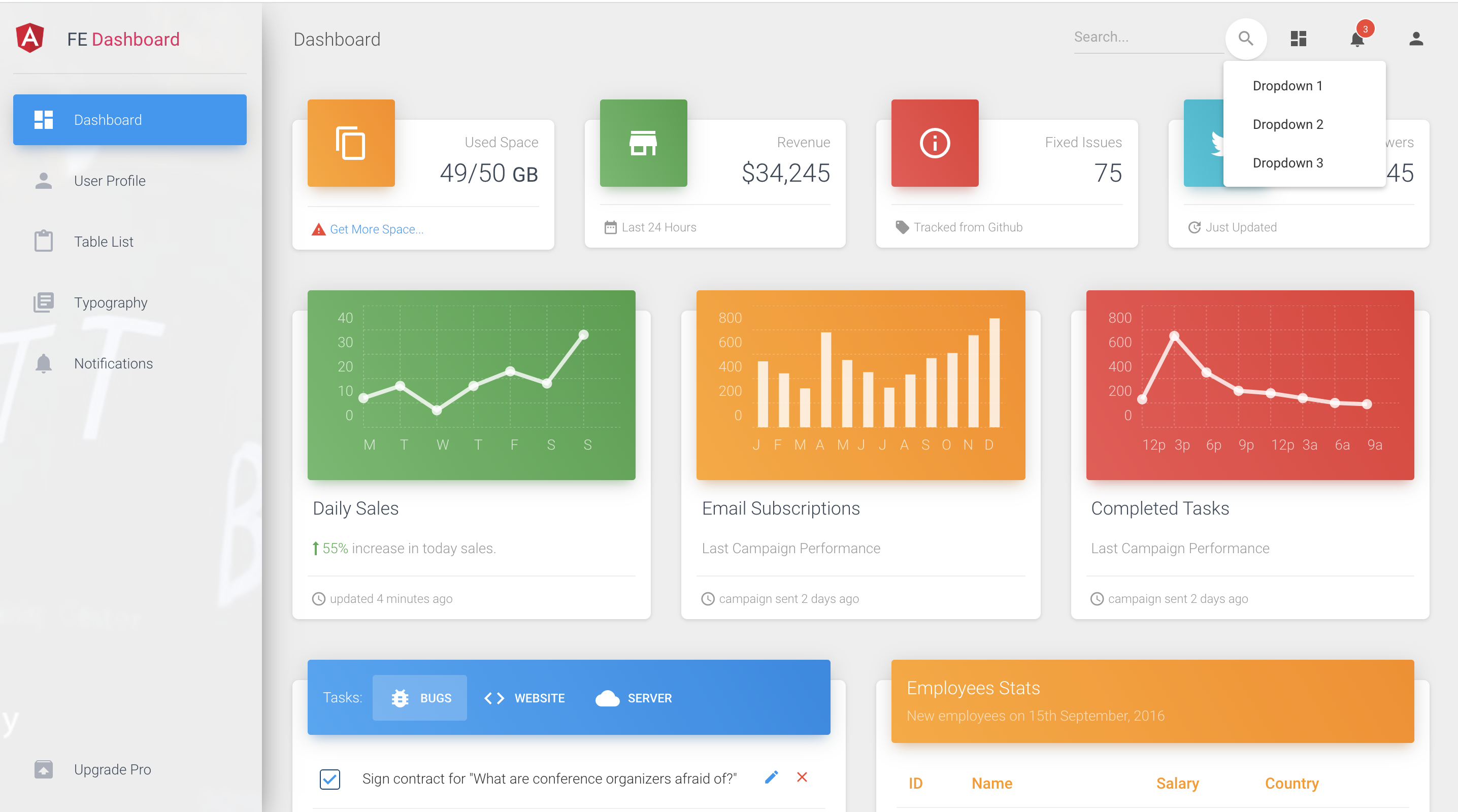
Admin interface built on Angular and Angular Material
HTMLAdmin dashboard
material-dashboard-template — HTML Admin dashboard Template
By myatthu-mm
An admin dashboard interface template built on Angular and Angular Material, including pages such as dashboard, tables, and user profile, with REST API call encapsulation.
Explore the design
Compare the page layouts and mobile experience. Open any screenshot for a closer look.
Author preview
Author-provided preview
Preview provided in the project README.
One original preview is available. Open the full image to inspect the design.
Screenshots show visual appearance; interactive behavior may differ.
Recorded 2026-10-13View source
What stands out
A quick read of the recorded project description.
Includes page components such as dashboard, user profile, table list, typography, and notifications
Provides navbar, sidebar, and footer layouts with responsive design
The api-calls branch encapsulates REST API calls, centralizing endpoint addresses and the HTTP module
Uses a layered directory structure with core, shared, modules, and views
Template Details
This template is a front-end admin site solution generated with Angular CLI. Its interface is based on the official Angular Material component library and adapted from Creative Tim's Material Bootstrap Dashboard template, using the author's own layered front-end/back-end code architecture.
Pages and structure: src/app/components contains components such as dashboard, user-profile, table-list, typography, upgrade, and notifications; the layouts directory provides footer, navbar, and sidebar; views contains two views: admin-layout and login. The README states the layout is responsive.
API calls: the api-calls branch shows how REST API calls are organized, centered under core/http, including api-http.service, api-endpoints.service, url-builder, query-string-parameters, and the endpoints directory. Its conventions are not to write API addresses directly in components, not to use the httpClient module directly, and to encode path variables.
Technical information: the project was generated by Angular CLI (the README mentions 8.2.1) and depends on Angular Material; the repository is a backend template under the HTML category, MIT licensed, and currently has no stars. The online preview address in the README is material-dashboard.netlify.com.
HTMLBackend
Is it right for your project?
Use Cases
- Building an admin interface with a sidebar and top navigation
- Projects needing common admin pages such as dashboard, table list, and user profile
- Front-end projects wanting to reference a REST API call encapsulation approach (centralized endpoint addresses, path variable encoding)
- Admin-side development based on the Angular Material component library
Suitable For
- Front-end developers familiar with Angular and TypeScript
- Teams needing a starter template for an admin interface
- Projects using Angular Material as the UI component library
Getting started & customization
Use these recorded setup notes alongside the repository instructions for your chosen version.
- 1
Install dependencies: npm install
- 2
Development debugging: run ng serve and visit http://localhost:4200/
- 3
Build output: run ng build, output to the dist/ directory; use the --prod flag for a production build
- 4
REST API call examples are in the api-calls branch
- 5
The online preview address in the README is https://material-dashboard.netlify.com/#/login
License & source material
Usage conditions & limitations
Free to use · keep license noticeThis entry covers the free version in the public repository under the MIT license; the free scope applies to that version's code and does not mean external services or third-party assets are free.
Must comply with when using
- Free use, modification, commercial use, and distribution of this version's code are permitted.
- When distributing copies or substantial portions of the code, retain the original author's copyright notice and the full MIT license notice.
- The code is provided as is; warranties and limitations of liability are governed by the original license and applicable law.
Additional costs & items to verify
- Demo images, fonts, icons, and other third-party assets must be checked against their respective licenses; the code's MIT license alone is not sufficient to determine this.
- External services such as domains, hosting, databases, payments, or AI may incur separate charges.
- This template is adapted from Creative Tim's Material Bootstrap Dashboard; when using it, note the attribution and licensing requirements of the upstream template.
- The project's code architecture comes from the author's own repository; when redistributing or modifying it, pay attention to attribution notes for that source.
- The REST API call encapsulation examples are in the api-calls branch; the main branch does not include that part, so you need to switch branches to obtain it.
View Original Text Basis
Permission is hereby granted, free of charge
Original License Text
> Using Angular official [Material](https://material.angular.io/) and Creative Tim's [Material Bootstrap Dashboard](https://demos.creative-tim.com/material-dashboard-angular2) template.
Original README
> Modified and used [Own project code architecture](https://github.com/myatthu-mm/FE-BE-Hierarcy).
Original README
https://github.com/myatthu-mm/material-dashboard-template/blob/master/LICENSE.mdhttps://github.com/myatthu-mm/material-dashboard-template/blob/master/README.md> Included good habits **REST api** in *api-calls* branch.
Original README
Compiled by DeepSeek based on repository license and README ·2026-10-13. Results only cover the materials read; dependencies, images, fonts, and subsequent term changes are subject to their respective original texts.
Project checks & description sources
Template Information
- Source platforms
- GitHub
- Documentation and maintenance reference score
- Less documented · 53 / 100
- Technologies
- HTML
- Website type
- Admin dashboard
How this score is calculated
Our heuristic uses license records (up to 30), a demo link (12), a preview (10), stars (15), recorded maintenance (15), description completeness (8), feature records (5) and classification data (5). It is not a code, security or performance test, or a Google score. A link does not establish tested functionality.
What to verify for this project
- Repository update recorded
- 2022-12-09
- Screenshot last checked
- 2026-10-13
No demo link is recorded. Use the repository instructions to evaluate the project locally; the screenshot alone cannot establish interactive behavior.
The catalog identifies HTML as the primary stack. Check the actual dependency manifest and lockfile for versions and hosting requirements. These notes use recorded metadata, not a code audit or a deployment test.
Use a selection guide →How this description was prepared
AI-assisted description based on catalog records and repository material. Repository authors are not automatically the reviewers of this description.
Review declaration: [email protected] · 2026-10-13
Inspect the recorded source material
SHA-256: 8852e278af4a64c33e9f2f5cf1d44aaa86bdf10b1600d4062780c9734b5ee02b
2026-10-13T00:03:06.324Z
Source file / repository# Angular Material Dashboard This project was generated with [Angular CLI](https://github.com/angular/angular-cli) version 8.2.1. ## Setup `npm install` ## Development server Run `ng serve` for a dev server. Navigate to `http://localhost:4200/`. The app will automatically reload if you change any of the source files. ## Build Run `ng build` to build the project. The build artifacts will be stored in the `dist/` directory. Use the `--prod` flag for a production build. ## About Project > This project was implemented for Front-end admin site solutions. > Using Angular official [Material](https://material.angular.io/) and Creative Tim's [Material Bootstrap Dashboard](https://demos.creative-tim.com/material-dashboard-angular2) template. > Modified and used [Own project code architecture](https://github.com/myatthu-mm/FE-BE-Hierarcy). > Layouts are also responsive. > Included good habits **REST api** in *api-calls* branch. ### **Three** good habits for REST api calls - Doesn't use API url directly in component, so don't need to change it in every component if *API url changed*. - Doesn't use `httpClient` module directly in component, so don't need to change it in every component if *replaces with another module*. - Path variable is encoded, so API calls won't fail even if *character isn’t a valid* URL character. ### What's included Within the download you'll find the following directories and files: ``` material-dashboard-angular ├── README.md ├── angular-cli.json ├── karma.conf.js ├── package-lock.json ├── package.json ├── protractor.conf.js ├── src │ ├── app │ │ ├── app.component.css │ │ ├── app.component.html │ │ ├── app.component.ts │ │ ├── app.module.ts │ │ ├── app.routing.ts │ │ ├── components │ │ │ ├── dashboard │ │ │ ├── user-profile │ │ │ ├── table-list │ │ │ ├── typography │ │ │ ├── upgrade │ │ │ └── notifications │ │ ├── core │ │ │ ├── auth │ │ │ ├── http │ │ │ │ ├── services │ │ │ │ │ ├── api-http.service │ │ │ │ │ └── api-endpoints.service │ │ │ │ ├── classes │ │ │ │ │ ├── query-string-parameters │ │ │ │ │ └── url-builder │ │ │ │ ├── endpoints │ │ │ │ │ ├── actions.ts │ │ │ │ │ ├── endpoint-service 0-N │ │ │ │ │ └── ........... │ │ │ └── mocks │ │ ├── entry-components │ │ │ └── ............ │ │ ├── layouts │ │ │ ├── footer │ │ │ ├── navbar │ │ │ └── sidebar │ │ ├── modules │ │ │ ├── layout.module │ │ │ ├── material.module │ │ ├── shared │ │ │ ├── components │ │ │ ├── directives │ │ │ ├── models │ │ │ ├── services │ │ │ │ ├── notification.service │ │ │ └── constants.ts │ │ ├── views │ │ │ ├── admin-layout │ │ │ └── login │ ├── assets │ │ ├── images │ │ └── scss │ │ ├── core │ │ └── material-dashboard.scss │ ├── environments │ │ ├── environment.prod │ │ └── environment │ ├── favicon.ico │ ├── index.html │ ├── main.ts │ ├── polyfills.ts │ ├── styles.css │ ├── test.ts │ ├── tsconfig.app.json │ ├── tsconfig.spec.json │ └── typings.d.ts ├── tsconfig.json ├── tslint.json └── typings ``` ## [Live Preview](https://material-dashboard.netlify.com/#/login) ## Screenshots #### Dashboard Preview  #### Responsive  #### Sidebar Navigation 
Explore similar templates
Compare previews and descriptions within the same stack and category.

gentelella
Gentelella v4 is a free, open-source admin dashboard template maintained by Colorlib, built with vanilla JavaScript, SCSS, and Vite 8 without Bootstrap or jQuery.
HTML · Admin dashboard

coreui-free-bootstrap-admin-template
A free Bootstrap admin template maintained by CoreUI, built on CoreUI's own UI component library. It provides compiled HTML pages and Pug template source code, covering dashboards, authentication, forms, components, icons, and error pages.
HTML · Admin dashboard

dashboards
A collection of responsive dashboard HTML templates open-sourced by Keen IO, built on CSS Grid, offering multiple prebuilt admin data interface layouts.
HTML · Admin dashboard

SB Admin 2
SB Admin 2 is a classic Bootstrap admin template from Start Bootstrap, offering dashboards, charts, tables, and common management pages.
HTML · Admin dashboard

Adminator-admin-dashboard
Adminator 4 is a vanilla HTML, CSS and JavaScript admin dashboard template with a CSS-variable token design system, built-in light and dark themes, no jQuery or Bootstrap dependency, and 18 pages covering dashboards, mail, calendar, charts, forms, tables and error pages.
HTML · Admin dashboard

SB Admin
SB Admin is a lightweight, open-source Bootstrap admin template from Start Bootstrap. It offers a sidebar-and-top-bar layout with data tables, forms, and stat cards, plus responsive design.
HTML · Admin dashboard