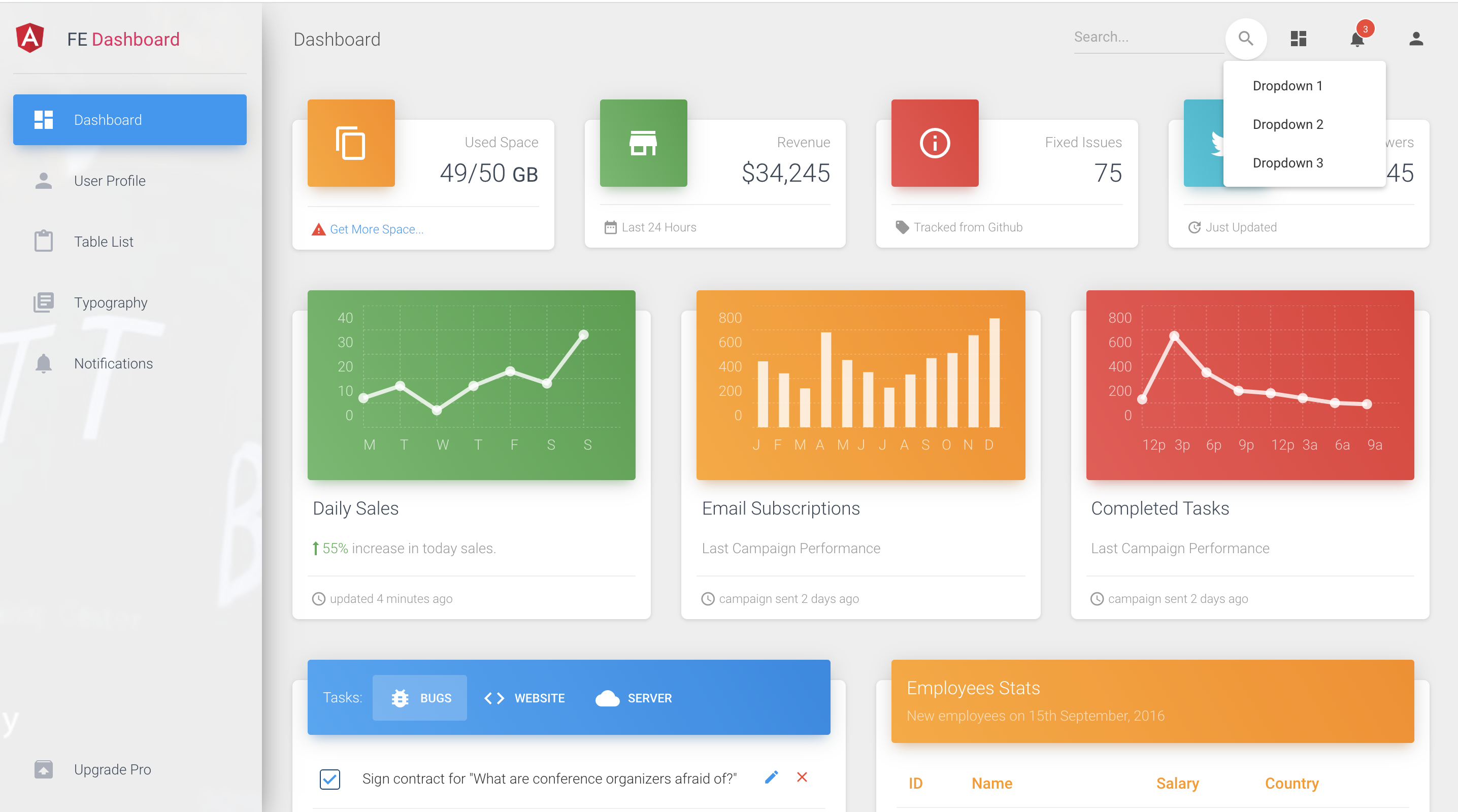
基于 Angular 与 Angular Material 构建的后台管理界面
HTML后台
material-dashboard-template — HTML 后台模板
作者 myatthu-mm
基于 Angular 与 Angular Material 的后台管理界面模板,包含仪表盘、表格、用户资料等页面,并提供 REST API 调用封装。
看看你的网站会是什么样
浏览真实页面截图,比较内容排版与手机效果。点击下方缩略图切换,放大查看整页细节。
目前有 1 张原始预览,可打开完整图片查看设计细节。
截图用于了解视觉与布局,交互效果请以实际项目为准。
采集于 2026-10-13查看来源
值得关注的模板亮点
从已有项目资料中,快速了解它的特点。
包含仪表盘、用户资料、表格列表、排版、通知等页面组件
提供 navbar、sidebar、footer 布局与响应式设计
api-calls 分支封装 REST API 调用,集中管理接口地址与 HTTP 模块
采用 core、shared、modules、views 等分层目录结构
模板详细介绍
该模板是一个前端后台管理站点方案,使用 Angular CLI 生成,界面基于 Angular 官方 Material 组件库与 Creative Tim 的 Material Bootstrap Dashboard 模板改造,并采用作者自有的前后端分层代码架构。
页面与结构:src/app/components 下包含 dashboard、user-profile、table-list、typography、upgrade、notifications 等组件;layouts 目录提供 footer、navbar、sidebar;views 下有 admin-layout 与 login 两个视图。README 说明布局为响应式。
API 调用:api-calls 分支中给出了 REST API 调用的组织方式,核心在 core/http 下,包括 api-http.service、api-endpoints.service、url-builder、query-string-parameters 以及 endpoints 目录。其约定是不在组件中直接写 API 地址、不直接使用 httpClient 模块,并对路径变量做编码处理。
技术信息:项目由 Angular CLI 生成(README 提到 8.2.1),依赖 Angular Material;仓库为 HTML 分类下的后台模板,MIT 许可,仓库当前无 star。README 中的在线预览地址为 material-dashboard.netlify.com。
HTML后台
适合你的项目吗?
适用场景
- 搭建带侧边栏与顶部导航的后台管理界面
- 需要仪表盘、表格列表、用户资料等常见后台页面的项目
- 希望参考 REST API 调用封装方式(接口地址集中管理、路径变量编码)的前端项目
- 基于 Angular Material 组件库进行二次开发的管理端
适合人群
- 熟悉 Angular 与 TypeScript 的前端开发者
- 需要后台管理界面起步模板的团队
- 使用 Angular Material 作为 UI 组件库的项目
上手与定制指南
结合仓库当前版本的说明,按下面的资料检查内容、配置与运行要求。
- 1
安装依赖:npm install
- 2
开发调试:运行 ng serve,访问 http://localhost:4200/
- 3
构建产物:运行 ng build,输出到 dist/ 目录,可使用 --prod 参数进行生产构建
- 4
REST API 调用示例位于 api-calls 分支
- 5
README 中的在线预览地址为 https://material-dashboard.netlify.com/#/login
授权与来源资料
使用条件与限制
免费使用 · 保留许可声明本次收录的是公开仓库中采用 MIT 许可的免费版本;免费范围为该版本代码,不代表外部服务或第三方素材免费。
使用时需要遵守
- 允许免费使用、修改、商用和分发该版本代码。
- 分发代码副本或实质性部分时,保留原作者版权声明和完整 MIT 许可声明。
- 代码按现状提供;担保与责任限制以原许可证及适用法律为准。
额外费用与待核对事项
- 演示图片、字体、图标及其他第三方素材需按各自许可核对,不能仅凭代码的 MIT 许可判断。
- 域名、托管、数据库、支付或 AI 等外部服务可能另外收费。
- 该模板基于 Creative Tim 的 Material Bootstrap Dashboard 改造,使用时需注意其上游模板的署名与许可要求。
- 项目代码架构来自作者自有仓库,二次分发或改造时需留意该来源的归属说明。
- REST API 调用封装示例位于 api-calls 分支,主分支不包含该部分内容,需切换分支获取。
查看原文依据
Permission is hereby granted, free of charge
许可证原文
> Using Angular official [Material](https://material.angular.io/) and Creative Tim's [Material Bootstrap Dashboard](https://demos.creative-tim.com/material-dashboard-angular2) template.
README 原文
> Modified and used [Own project code architecture](https://github.com/myatthu-mm/FE-BE-Hierarcy).
README 原文
https://github.com/myatthu-mm/material-dashboard-template/blob/master/LICENSE.mdhttps://github.com/myatthu-mm/material-dashboard-template/blob/master/README.md> Included good habits **REST api** in *api-calls* branch.
README 原文
DeepSeek 根据仓库许可证和 README 整理 ·2026-10-13。结果仅覆盖已读取资料,依赖、图片、字体及后续条款变更以各自原文为准。
项目核对记录与介绍依据
模板资料
- 来源平台
- GitHub
- 资料与维护参考分
- 资料较少 · 53 / 100
- 技术栈
- HTML
- 网站类型
- 后台
这个分数如何计算
本站按许可资料(最高30分)、演示链接(12分)、预览图(10分)、Star数(15分)、记录的维护时间(15分)、描述完整度(8分)、功能记录(5分)和分类资料(5分)计算。它不是代码、安全或性能测试,也不是 Google 评分;有链接不代表已实测可用。
这个项目需要核对什么
- 记录的仓库更新时间
- 2022-12-09
- 截图检查日期
- 2026-10-13
目前没有记录演示链接。请依据仓库说明在本地评估;仅凭截图无法确认交互行为。
目录记录的主要技术栈是 HTML。请通过依赖清单和锁文件核对实际版本与托管要求。这些说明基于收录资料,不代表代码审计或部署实测。
查看具体选型方法 →介绍的制作与核对状态
介绍由 AI 辅助整理目录与仓库资料。仓库作者不等于这篇介绍的审核者。
审核声明: [email protected] · 2026-10-13
查看当时使用的来源资料
SHA-256: 8852e278af4a64c33e9f2f5cf1d44aaa86bdf10b1600d4062780c9734b5ee02b
2026-10-13T00:03:06.324Z
来源文件 / 仓库# Angular Material Dashboard This project was generated with [Angular CLI](https://github.com/angular/angular-cli) version 8.2.1. ## Setup `npm install` ## Development server Run `ng serve` for a dev server. Navigate to `http://localhost:4200/`. The app will automatically reload if you change any of the source files. ## Build Run `ng build` to build the project. The build artifacts will be stored in the `dist/` directory. Use the `--prod` flag for a production build. ## About Project > This project was implemented for Front-end admin site solutions. > Using Angular official [Material](https://material.angular.io/) and Creative Tim's [Material Bootstrap Dashboard](https://demos.creative-tim.com/material-dashboard-angular2) template. > Modified and used [Own project code architecture](https://github.com/myatthu-mm/FE-BE-Hierarcy). > Layouts are also responsive. > Included good habits **REST api** in *api-calls* branch. ### **Three** good habits for REST api calls - Doesn't use API url directly in component, so don't need to change it in every component if *API url changed*. - Doesn't use `httpClient` module directly in component, so don't need to change it in every component if *replaces with another module*. - Path variable is encoded, so API calls won't fail even if *character isn’t a valid* URL character. ### What's included Within the download you'll find the following directories and files: ``` material-dashboard-angular ├── README.md ├── angular-cli.json ├── karma.conf.js ├── package-lock.json ├── package.json ├── protractor.conf.js ├── src │ ├── app │ │ ├── app.component.css │ │ ├── app.component.html │ │ ├── app.component.ts │ │ ├── app.module.ts │ │ ├── app.routing.ts │ │ ├── components │ │ │ ├── dashboard │ │ │ ├── user-profile │ │ │ ├── table-list │ │ │ ├── typography │ │ │ ├── upgrade │ │ │ └── notifications │ │ ├── core │ │ │ ├── auth │ │ │ ├── http │ │ │ │ ├── services │ │ │ │ │ ├── api-http.service │ │ │ │ │ └── api-endpoints.service │ │ │ │ ├── classes │ │ │ │ │ ├── query-string-parameters │ │ │ │ │ └── url-builder │ │ │ │ ├── endpoints │ │ │ │ │ ├── actions.ts │ │ │ │ │ ├── endpoint-service 0-N │ │ │ │ │ └── ........... │ │ │ └── mocks │ │ ├── entry-components │ │ │ └── ............ │ │ ├── layouts │ │ │ ├── footer │ │ │ ├── navbar │ │ │ └── sidebar │ │ ├── modules │ │ │ ├── layout.module │ │ │ ├── material.module │ │ ├── shared │ │ │ ├── components │ │ │ ├── directives │ │ │ ├── models │ │ │ ├── services │ │ │ │ ├── notification.service │ │ │ └── constants.ts │ │ ├── views │ │ │ ├── admin-layout │ │ │ └── login │ ├── assets │ │ ├── images │ │ └── scss │ │ ├── core │ │ └── material-dashboard.scss │ ├── environments │ │ ├── environment.prod │ │ └── environment │ ├── favicon.ico │ ├── index.html │ ├── main.ts │ ├── polyfills.ts │ ├── styles.css │ ├── test.ts │ ├── tsconfig.app.json │ ├── tsconfig.spec.json │ └── typings.d.ts ├── tsconfig.json ├── tslint.json └── typings ``` ## [Live Preview](https://material-dashboard.netlify.com/#/login) ## Screenshots #### Dashboard Preview  #### Responsive  #### Sidebar Navigation 
看看同类模板
对比同技术栈与用途的模板,找到更适合的视觉与内容结构。

gentelella
Free admin dashboard template — vanilla JS, SCSS, Vite 8. No Bootstrap, no jQuery.
HTML · 后台

coreui-free-bootstrap-admin-template
Free Bootstrap Admin & Dashboard Template Built for AI-Assisted Development
HTML · 后台

dashboards
Responsive dashboard templates 📊✨
HTML · 后台

SB Admin 2
SB Admin 2 是 Start Bootstrap 推出的开源后台模板,基于 Bootstrap 构建,整体风格偏向经典管理界面。
HTML · 后台

Adminator-admin-dashboard
Adminator is easy to use and well design admin dashboard template with dark mode for web apps, websites, servi…
HTML · 后台

SB Admin
SB Admin 是 Start Bootstrap 推出的开源后台管理模板,基于 Bootstrap 构建,定位是简洁、实用的管理界面。
HTML · 后台