Static-first, Markdown-first, with content maintained as files
AstroPortfolioBlog
myscholar — Astro Portfolio Template
By mychiffonn
My Scholar is an Astro-based academic personal site and lab theme that uses Markdown to organize bios, projects, blogs, and BibTeX publication lists, suitable for researchers building static portfolios and research blogs.
Explore the design
Compare the page layouts and mobile experience. Open any screenshot for a closer look.
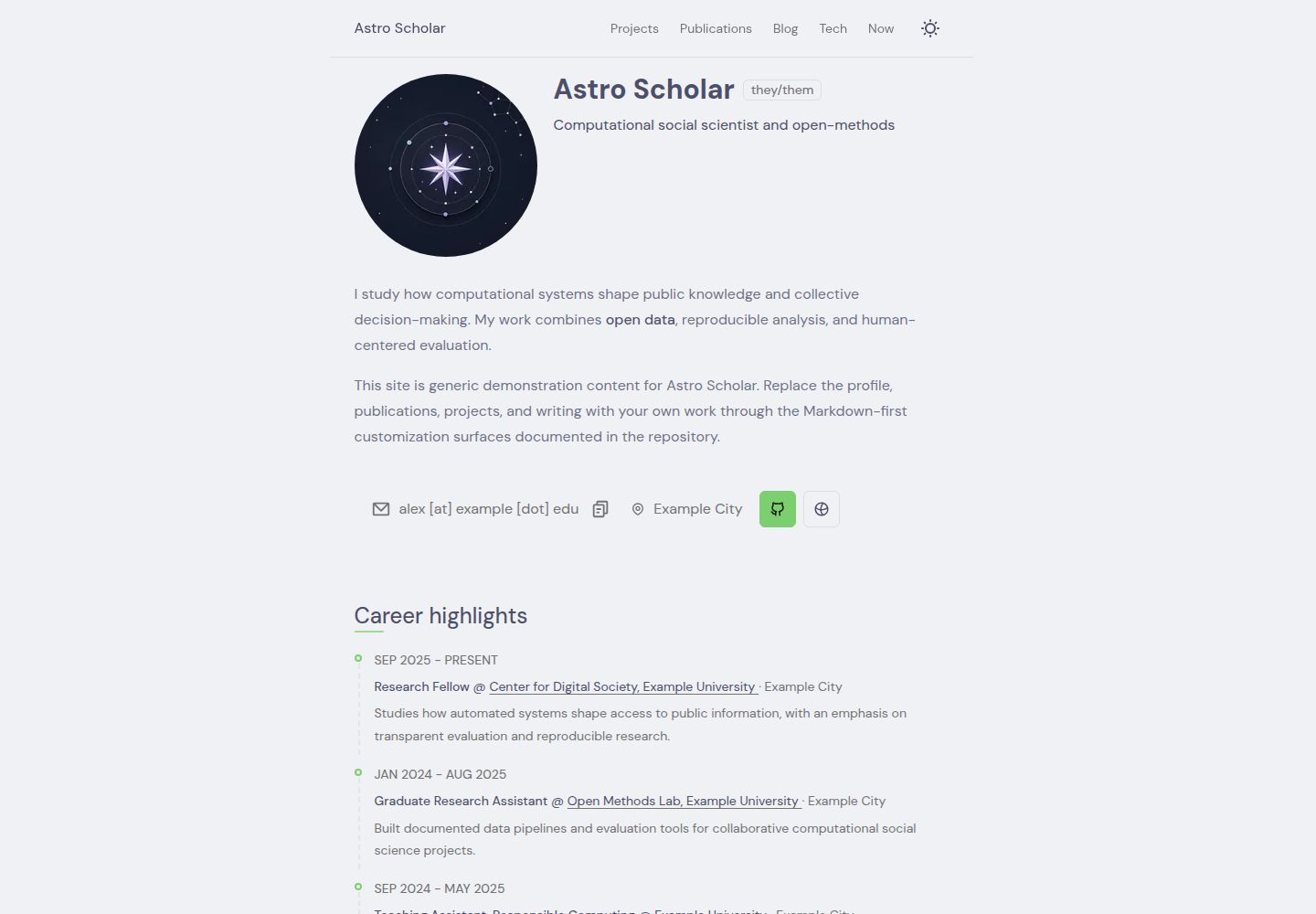
Desktop homepage1 / 3
Desktop captureTop of page
Actual screenshot captured by the server browser.
All pages & views 3
Screenshots show visual appearance; interactive behavior may differ.
Recorded 2026-10-02View source
What stands out
A quick read of the recorded project description.
Built-in content types for academic bios, projects, updates, blogs, authors, and publications
Publications rendered from BibTeX files
Includes sitemap, robots.txt, Open Graph metadata, and social image generation
Blog supports subposts, tags, stages, table of contents, sharing, and multiple authors
Configuration and content schemas are type-validated with Zod
Template Details
My Scholar is an Astro theme for academic personal homepages, research blogs, project showcases, and publication lists, and can also be used for lab sites. It follows a static-first, Markdown-first build approach, with generic demo content included in the repository that researchers can replace with their own materials. Content types cover academic bios, projects, updates, blog posts, authors, and publications; publications are rendered from BibTeX files. On the writing side, it supports Sätteri, callouts, math formulas, code highlighting, heading anchors, and sidenotes, and the blog includes subposts, tags, stages, table of contents, share actions, and multiple authors. The site includes built-in sitemap, robots.txt, Open Graph metadata, and social image generation. Styling uses native CSS with minimal interactive scripts; the icon system supports both local and Iconify sources; configuration and content schemas are type-validated with Zod. The theme is built on astro-erudite v2.0.1 and references Maggie Appleton's digital garden and al-folio. The default static build does not require a UI framework or server adapter; integrations can be added via Astro's add command.
AstroPortfolioBlog
Is it right for your project?
Use Cases
- Build a researcher's academic homepage to showcase bios, projects, and papers in one place
- Run a research blog and publish articles with tags, table of contents, and multiple authors
- Create a lab site with members, projects, and publications
- Maintain a publication list with BibTeX and render it automatically to web pages
- Academic content sites that need static output and minimal client-side interaction
Suitable For
- Researchers who prefer writing in Markdown and managing content as files
- Academic individuals or labs that need to display BibTeX publication lists
- Users who want static builds without relying on a UI framework or server adapter
- Research teams that need multi-author blogs and project showcases
Getting started & customization
Use these recorded setup notes alongside the repository instructions for your chosen version.
- 1
Requires Node.js >=22.12.0 and pnpm
- 2
Create a site from the GitHub template with pnpm create astro@latest --template mychiffonn/astro-scholar
- 3
After installation, run pnpm dev and access http://localhost:4321 by default
- 4
Configure starter content according to docs/INSTALL.md, and personalize content and design according to docs/CUSTOMIZATION.md
- 5
For integrations, use pnpm astro add <integration>, and read the corresponding integration documentation first
License & source material
Usage conditions & limitations
Free to use · keep license noticeThis listing covers the free version in the public repository under the Apache-2.0 license; the free scope is the code of that version and does not mean external services or third-party assets are free.
Must comply with when using
- Free use, modification, commercial use, and distribution are permitted; the Apache-2.0 license must be included when distributing.
- Modified files must be prominently marked as changed, and relevant copyright, patent, trademark, and attribution notices must be retained.
- If the original project includes a NOTICE file, applicable attribution notices in it must be retained when distributing derivative works.
- The license includes an applicable contributor patent grant; initiating patent litigation as described in the license terminates that patent grant, and no trademark use rights are granted.
- The code is provided as-is; warranties and limitations of liability are governed by the original license and applicable law.
Additional costs & items to verify
- Demo images, fonts, icons, and other third-party assets must be checked against their respective licenses and cannot be judged solely by the code's Apache-2.0 license.
- External services such as domains, hosting, databases, payments, or AI may incur additional fees.
View Original Text Basis
https://github.com/mychiffonn/myscholar/blob/main/LICENSEhttps://github.com/mychiffonn/myscholar/blob/main/README.mdno-charge, royalty-free, irrevocable copyright license
Original License Text
Compiled by DeepSeek based on repository license and README ·2026-10-02. Results only cover the materials read; dependencies, images, fonts, and subsequent term changes are subject to their respective original texts.
Project checks & description sources
Template Information
- Source platforms
- GitHub
- Documentation and maintenance reference score
- More documented · 92 / 100
- Technologies
- Astro
- Website type
- Portfolio · Blog
How this score is calculated
Our heuristic uses license records (up to 30), a demo link (12), a preview (10), stars (15), recorded maintenance (15), description completeness (8), feature records (5) and classification data (5). It is not a code, security or performance test, or a Google score. A link does not establish tested functionality.
What to verify for this project
- Repository update recorded
- 2026-09-10
- Screenshot last checked
- 2026-10-02
A demo link is listed. Check it with your own content and viewport sizes; its presence does not confirm that forms, authentication or payments work.
The catalog identifies Astro as the primary stack. Check the actual dependency manifest and lockfile for versions and hosting requirements. These notes use recorded metadata, not a code audit or a deployment test.
Use a selection guide →How this description was prepared
AI-assisted description based on catalog records and repository material. Repository authors are not automatically the reviewers of this description.
Automatically checked against source and license rules; no manual editorial review.
Inspect the recorded source material
SHA-256: 2d36d8b9e8bc5f72caa08a093ac9a16a4f100654aac37e0dae945504c4648a72
2026-10-02T09:49:56.009Z
Source file / repository# My Scholar [](https://github.com/mychiffonn/astro-scholar/releases) [](https://astro.build) [](https://www.typescriptlang.org/)  My Scholar is an [Astro](https://docs.astro.build/en/concepts/why-astro/) theme for academic personal sites, research blogs, projects, publications, and now pages. It is a static-first, Markdown-first starter with generic demonstration content that researchers can replace with their own work. ## Previews | Home | Projects | | --------------------------------------------------- | ----------------------------------------------------------- | |  |  | | Publications | Uses | | ------------------------------------------------------------------- | --------------------------------------------------- | |  |  | | Blog index (light) | Blog post (light) | | ---------------------------------------------------------------- | -------------------------------------------------------------------- | |  |  | | Blog index (dark) | Blog post (dark) | | -------------------------------------------------------------- | ------------------------------------------------------------------ | |  |  | ## Features - Astro 7 with a static-first, content-focused build and support for Astro's integration ecosystem. - Academic profile, projects, updates, blog posts, authors, and publications. - SEO-included: sitemap, robots.txt, Open Graph metadata, and generated social images. - Publications rendered from a BibTeX file. - Markdown-first writing with Sätteri, callouts, math, code highlighting, heading anchors, and sidenotes. - Blog post/subpost system with tags, stages, table of contents, share actions, and multiple authors. - Native CSS with little interaction scripts shipped. - Local and Iconify-backed SVG icon system. - Type-safe config and content schemas with Zod. ## Getting Started Have Node.js `>=22.12.0` and pnpm installed. Create a site directly from the GitHub starter: ```bash pnpm create astro@latest --template mychiffonn/astro-scholar ``` Astro's wizard asks for the destination, installs dependencies, and can initialize Git. See Astro's official [install and starter-template guide](https://docs.astro.build/en/install-and-setup/#use-a-theme-or-starter-template) for branch and repository URL options. Then: 1. Start the development server with `pnpm dev`. 2. Visit <http://localhost:4321>. 3. Follow [docs/INSTALL.md](docs/INSTALL.md) to configure the starter. 4. Personalize content and design with [docs/CUSTOMIZATION.md](docs/CUSTOMIZATION.md). To contribute to the theme itself, clone this repository and run `corepack enable && pnpm install`. ## Astro and AI-assisted development Astro's [Build with AI guide](https://docs.astro.build/en/guides/build-with-ai/) explains how to give coding agents current Astro documentation instead of relying on potentially stale framework knowledge. This repository also includes [AGENTS.md](AGENTS.md) with the theme's installation, customization, development, validation, and publishing conventions. For supported adapters and integrations, use Astro's setup command: ```bash pnpm astro add <integration> ``` The command installs the package and updates `astro.config.ts`. Read the [Astro integrations guide](https://docs.astro.build/en/guides/integrations/) and the selected integration's documentation first; the theme does not require a UI framework or server adapter for its default static build. ## Built With This theme is built on enscribe's [astro-erudite](https://github.com/jktrn/astro-erudite) v2.0.1, and references from [Maggie Appleton](https://github.com/MaggieAppleton/maggieappleton.com-V3)'s digital garden and al-folio. ## Development - [DEVELOPMENT.md](DEVELOPMENT.md): architecture, commands, Erudite v2 principles, and theme publishing checklist. - [CONTRIBUTING.md](CONTRIBUTING.md): contribution workflow and pull request expectations. Common checks: ```bash pnpm format:check pnpm lint pnpm lint:styles pnpm test:markdown pnpm astro check pnpm build ```
Explore similar templates
Compare previews and descriptions within the same stack and category.

astrowind
AstroWind is a free, open-source Astro starter theme using Astro and Tailwind CSS, released under the MIT license.
Astro · Blog

astro-paper
AstroPaper is a minimal, responsive, accessible, and SEO-friendly Astro blog theme. Articles are stored as Markdown/MDX in src/content/posts/, with subdirectories affecting URLs.
Astro · Blog

fuwari
Fuwari is a static blog template built with Astro and Tailwind CSS for personal blogs. It manages posts as Markdown files in src/content/posts/, with frontmatter for title, date, description, cover, tags, categories, draft status, and language.
Astro · Blog

Firefly
Firefly is a clean personal blog theme forked from Astro and Fuwari, offering four background modes, single/double sidebar and list/grid layouts, Pagefind client-side full-text search, and a six-language UI.
Astro · Blog

astro-theme-cactus
Astro Cactus is an Astro-based blog and portfolio theme that uses Markdown/MDX content collections to manage posts, notes, and tags, with frontmatter type-checked by a schema.
Astro · Portfolio

astrofy
Astrofy is a free and open-source personal portfolio website template built with Astro and TailwindCSS, with built-in blog, CV timeline, project showcase, store, and RSS feed modules.
Astro · Portfolio