静态优先、Markdown 优先,内容以文件形式维护
Astro作品集博客
myscholar — Astro 作品集模板
作者 mychiffonn
My Scholar 是一个基于 Astro 的学术个人站点与实验室主题,用 Markdown 组织个人简介、项目、博客和 BibTeX 论文列表,适合研究者搭建静态作品集与科研博客。
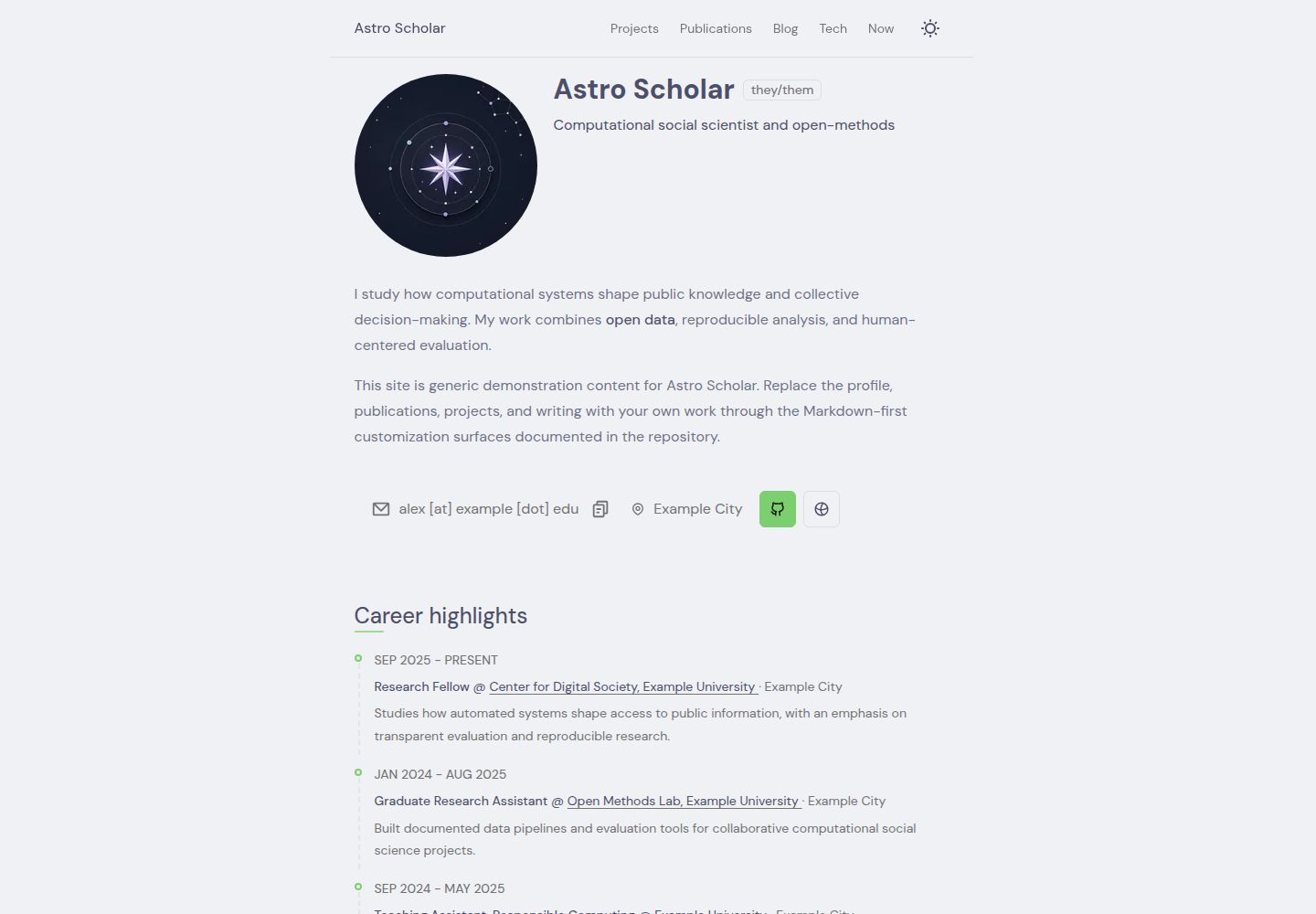
看看你的网站会是什么样
浏览真实页面截图,比较内容排版与手机效果。点击下方缩略图切换,放大查看整页细节。
全部页面与视图 3
截图用于了解视觉与布局,交互效果请以实际项目为准。
采集于 2026-10-02查看来源
值得关注的模板亮点
从已有项目资料中,快速了解它的特点。
内置学术简介、项目、动态、博客、作者与出版物等内容类型
出版物由 BibTeX 文件渲染
包含 sitemap、robots.txt、Open Graph 元数据与社交图片生成
博客支持子文章、标签、阶段、目录、分享与多作者
配置与内容 schema 使用 Zod 做类型校验
模板详细介绍
My Scholar 是面向学术个人主页、研究博客、项目展示与论文列表的 Astro 主题,也可用于实验室站点。它采用静态优先、Markdown 优先的构建方式,仓库内附带通用演示内容,研究者可替换为自己的资料。内容类型覆盖学术简介、项目、动态更新、博客文章、作者与出版物;出版物由 BibTeX 文件渲染。写作侧支持 Sätteri、提示块、数学公式、代码高亮、标题锚点与边注,博客具备子文章、标签、阶段、目录、分享操作与多作者。站点内置 sitemap、robots.txt、Open Graph 元数据与社交图片生成。样式使用原生 CSS,交互脚本较少;图标系统支持本地与 Iconify 两种来源;配置与内容 schema 通过 Zod 做类型校验。主题基于 astro-erudite v2.0.1 构建,并参考了 Maggie Appleton 的数字花园与 al-folio。默认静态构建不要求 UI 框架或服务端适配器,如需集成可通过 Astro 的 add 命令添加。
Astro作品集博客
适合你的项目吗?
适用场景
- 搭建研究者个人学术主页,集中展示简介、项目与论文
- 运营研究博客,发布带标签、目录和多作者的文章
- 为实验室建立包含成员、项目与出版物的站点
- 用 BibTeX 维护论文列表并自动渲染到网页
- 需要静态输出、较少客户端交互的学术内容站点
适合人群
- 习惯用 Markdown 写作、以文件管理内容的研究者
- 需要展示 BibTeX 论文列表的学术个人或实验室
- 希望静态构建、不依赖 UI 框架或服务端适配器的用户
- 需要多作者博客与项目展示的科研团队
上手与定制指南
结合仓库当前版本的说明,按下面的资料检查内容、配置与运行要求。
- 1
需要 Node.js >=22.12.0 与 pnpm
- 2
可通过 pnpm create astro@latest --template mychiffonn/astro-scholar 从 GitHub 模板创建站点
- 3
安装后运行 pnpm dev,默认访问 http://localhost:4321
- 4
按 docs/INSTALL.md 配置起始内容,按 docs/CUSTOMIZATION.md 个性化内容与设计
- 5
如需集成,使用 pnpm astro add <integration>,并先阅读对应集成文档
授权与来源资料
使用条件与限制
免费使用 · 保留许可声明本次收录的是公开仓库中采用 Apache-2.0 许可的免费版本;免费范围为该版本代码,不代表外部服务或第三方素材免费。
使用时需要遵守
- 允许免费使用、修改、商用和分发;分发时需随附 Apache-2.0 许可证。
- 修改过的文件需显著标明改动,并保留相关版权、专利、商标及归属声明。
- 若原项目附有 NOTICE 文件,分发衍生作品时需保留其中适用的归属声明。
- 许可包含适用的贡献者专利授权;发起许可所述专利诉讼会终止该专利授权,且不授予商标使用权。
- 代码按现状提供;担保与责任限制以原许可证及适用法律为准。
额外费用与待核对事项
- 演示图片、字体、图标及其他第三方素材需按各自许可核对,不能仅凭代码的 Apache-2.0 许可判断。
- 域名、托管、数据库、支付或 AI 等外部服务可能另外收费。
查看原文依据
https://github.com/mychiffonn/myscholar/blob/main/LICENSEhttps://github.com/mychiffonn/myscholar/blob/main/README.mdno-charge, royalty-free, irrevocable copyright license
许可证原文
DeepSeek 根据仓库许可证和 README 整理 ·2026-10-02。结果仅覆盖已读取资料,依赖、图片、字体及后续条款变更以各自原文为准。
项目核对记录与介绍依据
模板资料
- 来源平台
- GitHub
- 资料与维护参考分
- 资料较完整 · 92 / 100
- 技术栈
- Astro
- 网站类型
- 作品集 · 博客
这个分数如何计算
本站按许可资料(最高30分)、演示链接(12分)、预览图(10分)、Star数(15分)、记录的维护时间(15分)、描述完整度(8分)、功能记录(5分)和分类资料(5分)计算。它不是代码、安全或性能测试,也不是 Google 评分;有链接不代表已实测可用。
这个项目需要核对什么
- 记录的仓库更新时间
- 2026-09-10
- 截图检查日期
- 2026-10-02
已收录演示链接。请用你的内容与屏幕尺寸检查;有演示不代表表单、认证或支付已经可用。
目录记录的主要技术栈是 Astro。请通过依赖清单和锁文件核对实际版本与托管要求。这些说明基于收录资料,不代表代码审计或部署实测。
查看具体选型方法 →介绍的制作与核对状态
介绍由 AI 辅助整理目录与仓库资料。仓库作者不等于这篇介绍的审核者。
已完成服务器许可规则与 AI 来源核对;未经过人工编辑审核。
查看当时使用的来源资料
SHA-256: 2d36d8b9e8bc5f72caa08a093ac9a16a4f100654aac37e0dae945504c4648a72
2026-10-02T09:49:56.009Z
来源文件 / 仓库# My Scholar [](https://github.com/mychiffonn/astro-scholar/releases) [](https://astro.build) [](https://www.typescriptlang.org/)  My Scholar is an [Astro](https://docs.astro.build/en/concepts/why-astro/) theme for academic personal sites, research blogs, projects, publications, and now pages. It is a static-first, Markdown-first starter with generic demonstration content that researchers can replace with their own work. ## Previews | Home | Projects | | --------------------------------------------------- | ----------------------------------------------------------- | |  |  | | Publications | Uses | | ------------------------------------------------------------------- | --------------------------------------------------- | |  |  | | Blog index (light) | Blog post (light) | | ---------------------------------------------------------------- | -------------------------------------------------------------------- | |  |  | | Blog index (dark) | Blog post (dark) | | -------------------------------------------------------------- | ------------------------------------------------------------------ | |  |  | ## Features - Astro 7 with a static-first, content-focused build and support for Astro's integration ecosystem. - Academic profile, projects, updates, blog posts, authors, and publications. - SEO-included: sitemap, robots.txt, Open Graph metadata, and generated social images. - Publications rendered from a BibTeX file. - Markdown-first writing with Sätteri, callouts, math, code highlighting, heading anchors, and sidenotes. - Blog post/subpost system with tags, stages, table of contents, share actions, and multiple authors. - Native CSS with little interaction scripts shipped. - Local and Iconify-backed SVG icon system. - Type-safe config and content schemas with Zod. ## Getting Started Have Node.js `>=22.12.0` and pnpm installed. Create a site directly from the GitHub starter: ```bash pnpm create astro@latest --template mychiffonn/astro-scholar ``` Astro's wizard asks for the destination, installs dependencies, and can initialize Git. See Astro's official [install and starter-template guide](https://docs.astro.build/en/install-and-setup/#use-a-theme-or-starter-template) for branch and repository URL options. Then: 1. Start the development server with `pnpm dev`. 2. Visit <http://localhost:4321>. 3. Follow [docs/INSTALL.md](docs/INSTALL.md) to configure the starter. 4. Personalize content and design with [docs/CUSTOMIZATION.md](docs/CUSTOMIZATION.md). To contribute to the theme itself, clone this repository and run `corepack enable && pnpm install`. ## Astro and AI-assisted development Astro's [Build with AI guide](https://docs.astro.build/en/guides/build-with-ai/) explains how to give coding agents current Astro documentation instead of relying on potentially stale framework knowledge. This repository also includes [AGENTS.md](AGENTS.md) with the theme's installation, customization, development, validation, and publishing conventions. For supported adapters and integrations, use Astro's setup command: ```bash pnpm astro add <integration> ``` The command installs the package and updates `astro.config.ts`. Read the [Astro integrations guide](https://docs.astro.build/en/guides/integrations/) and the selected integration's documentation first; the theme does not require a UI framework or server adapter for its default static build. ## Built With This theme is built on enscribe's [astro-erudite](https://github.com/jktrn/astro-erudite) v2.0.1, and references from [Maggie Appleton](https://github.com/MaggieAppleton/maggieappleton.com-V3)'s digital garden and al-folio. ## Development - [DEVELOPMENT.md](DEVELOPMENT.md): architecture, commands, Erudite v2 principles, and theme publishing checklist. - [CONTRIBUTING.md](CONTRIBUTING.md): contribution workflow and pull request expectations. Common checks: ```bash pnpm format:check pnpm lint pnpm lint:styles pnpm test:markdown pnpm astro check pnpm build ```
看看同类模板
对比同技术栈与用途的模板,找到更适合的视觉与内容结构。

astrowind
⭕️ AstroWind: A free template using Astro v7 and Tailwind CSS v4. Astro starter theme.
Astro · 博客

astro-paper
A minimal, accessible and SEO-friendly Astro blog theme.
Astro · 博客

fuwari
✨A static blog template built with Astro.
Astro · 博客

Firefly
Firefly 是一款基于 Astro 的静态博客主题,由 CuteLeaf 在 saicaca 的 Fuwari 模板基础上二次开发,主打清新美观的视觉风格。
Astro · 博客

astro-theme-cactus
A simple Astro theme. Use it to create your blog or website.
Astro · 作品集

astrofy
Astrofy is a free and open-source template for your Personal Portfolio Website built with Astro and TailwindCS…
Astro · 作品集