Object-driven configuration structure, with personal information, skills, projects, experience, and contributions each corresponding to separate files in the config directory
Next.jsReactPortfolio
minimal-next-portfolio — Next.js Portfolio Template
By namanbarkiya
An open-source personal portfolio template built on Next.js that displays personal information, skills, projects, and work experience through object configuration files in the config directory, under the MIT license.
Explore the design
Compare the page layouts and mobile experience. Open any screenshot for a closer look.
Desktop homepage1 / 3
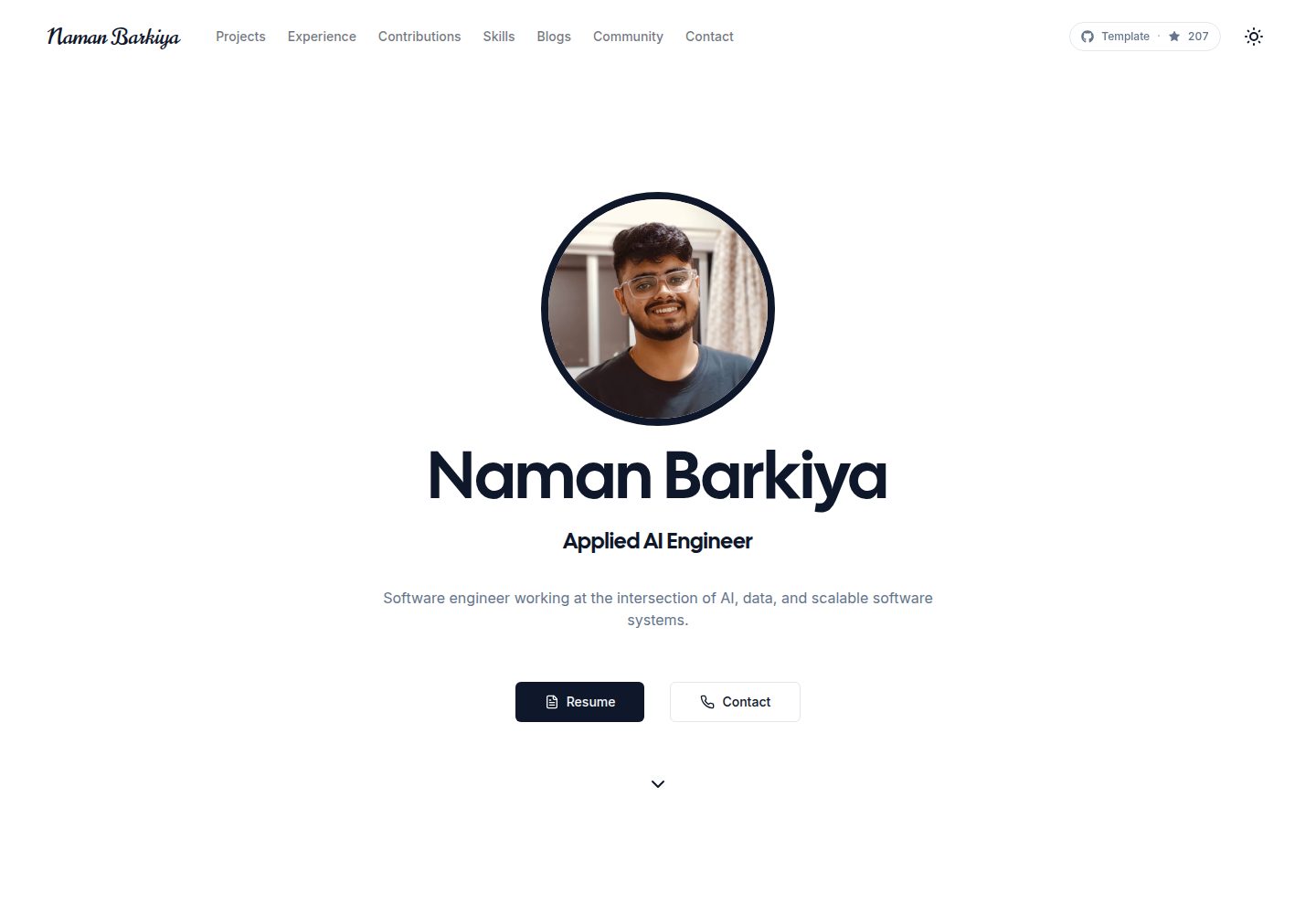
Desktop captureTop of page
Actual screenshot captured by the server browser.
All pages & views 3
Screenshots show visual appearance; interactive behavior may differ.
Recorded 2026-10-02View source
What stands out
A quick read of the recorded project description.
Built-in modules commonly used in portfolios, such as a work experience timeline, project showcase, skills display, and contact form
Provides multiple themes including Dark, Light, Retro, Cyberpunk, Aurora, Synthwave, and Paper
Includes SEO-related meta tags and structured data configuration
Uses TypeScript, Tailwind CSS, and shadcn/ui to organize the code, with animations implemented by Framer Motion
Under the MIT license, allowing free use, modification, commercial use, and distribution of this version's code
Template Details
This is an open-source portfolio template for individual users such as developers and designers. The repository is located at namanbarkiya/minimal-next-portfolio, built with Next.js and organized with TypeScript, Tailwind CSS, and shadcn/ui, with animations powered by Framer Motion. The template's core design is an object-driven configuration structure: personal information, skills, projects, work experience, and open-source contributions are placed in config/site.ts, config/skills.ts, config/projects.ts, config/experience.ts, and config/contributions.ts respectively. Modifying these files replaces the content with your own without changing page components.
At the page level, it provides modules such as a work experience timeline, project showcase, skills display, and contact form, and includes built-in SEO-related meta tags and structured data. For theming, it offers multiple color schemes including Dark, Light, Retro, Cyberpunk, Aurora, Synthwave, and Paper, with colors and themes adjusted in tailwind.config.js. The template includes actual screenshots of the desktop and mobile homepages and project inner pages, so you can first check the demo site at https://nbarkiya.xyz/ to judge whether the layout meets your expectations.
Before use, note the following: version information such as Next.js 16 and React 19 mentioned in the repository README is from the original material, and actual dependencies are subject to the repository's package.json; third-party assets such as demo images, fonts, and icons need to be checked separately under their respective licenses, and the MIT license covers only the code of this version itself. The contact form requires you to integrate a backend service yourself, and external services such as domain, hosting, and database may incur costs.
Next.jsPortfolio
Is it right for your project?
Use Cases
- Developers or designers building a personal portfolio website to centrally showcase projects, skills, and work experience
- Personal sites that need to quickly replace content without changing page components, customized by editing configuration files in the config directory
- Switching between multiple color themes within the same template for personalized presentation
- A starting template for personal projects using Next.js as the tech stack and planning to deploy to Vercel
Suitable For
- Individual developers who prefer to maintain content through configuration files rather than modifying components
- Job seekers or freelancers who need a portfolio structure that includes an experience timeline and project showcase
- Users who accept the MIT license terms and are willing to retain copyright and license notices
- Developers who can handle the contact form backend and external service configuration themselves
Getting started & customization
Use these recorded setup notes alongside the repository instructions for your chosen version.
- 1
After cloning the repository, copy the contents of .env.copy to .env and fill in the required information
- 2
Install dependencies using npm install, yarn install, or pnpm install, then run commands such as npm run dev to start the development server
- 3
Replace the content in config/site.ts, config/skills.ts, config/projects.ts, config/experience.ts, and config/contributions.ts with your own
- 4
Adjust colors and themes in tailwind.config.js
- 5
Third-party assets such as demo images, fonts, and icons need to be checked under their respective licenses; external services such as domain, hosting, and database may be charged separately
License & source material
Usage conditions & limitations
Free to use · keep license noticeThis entry covers the free version under the MIT license in the public repository; the free scope is the code of this version and does not mean that external services or third-party assets are free.
Must comply with when using
- Free use, modification, commercial use, and distribution of this version's code are permitted.
- When distributing copies or substantial portions of the code, retain the original author's copyright notice and the complete MIT license notice.
- The code is provided as is; warranties and limitations of liability are governed by the original license and applicable law.
Additional costs & items to verify
- Demo images, fonts, icons, and other third-party assets need to be checked under their respective licenses and cannot be judged solely by the code's MIT license.
- External services such as domain, hosting, database, payment, or AI may incur additional charges.
- Before use, you need to copy .env.copy to .env and fill in the required information, meaning the template relies on environment variable configuration (such as credentials for external services like analytics and forms); related features are unavailable when not configured.
- The contact form itself does not include a backend and requires integrating a third-party backend service, which may involve accounts, API keys, or additional costs.
- The built-in analytics integration relies on external services such as Google Analytics and Vercel Analytics, which require registering accounts and may incur costs.
- Deployment points to the Vercel platform, and actual hosting requires using that external service, which may involve accounts and paid plans.
View Original Text Basis
Permission is hereby granted, free of charge
Original License Text
Copy the contents of `.env.copy` to a new `.env` file and fill in the required information.
Original README
A ready-to-use contact form that can connect to various backend services.
Original README
**Analytics**: Google Analytics + Vercel Analytics
Original README
https://github.com/namanbarkiya/minimal-next-portfolio/blob/master/LICENSEhttps://github.com/namanbarkiya/minimal-next-portfolio/blob/master/README.md**Deployment**: [Vercel](https://vercel.com)
Original README
Compiled by DeepSeek based on repository license and README ·2026-10-04. Results only cover the materials read; dependencies, images, fonts, and subsequent term changes are subject to their respective original texts.
Project checks & description sources
Template Information
- Source platforms
- GitHub
- Documentation and maintenance reference score
- More documented · 91 / 100
- Technologies
- Next.js · React
- Website type
- Portfolio
How this score is calculated
Our heuristic uses license records (up to 30), a demo link (12), a preview (10), stars (15), recorded maintenance (15), description completeness (8), feature records (5) and classification data (5). It is not a code, security or performance test, or a Google score. A link does not establish tested functionality.
What to verify for this project
- Repository update recorded
- 2026-04-16
- Screenshot last checked
- 2026-10-04
A demo link is listed. Check it with your own content and viewport sizes; its presence does not confirm that forms, authentication or payments work.
The catalog identifies Next.js as the primary stack. Check the actual dependency manifest and lockfile for versions and hosting requirements. These notes use recorded metadata, not a code audit or a deployment test.
Use a selection guide →How this description was prepared
AI-assisted description based on catalog records and repository material. Repository authors are not automatically the reviewers of this description.
Review declaration: [email protected] · 2026-10-04
Inspect the recorded source material
SHA-256: e90080ce4ad10d34f17e57ac43d23a7431b1490ceb333465dfef89fd20c672fa
2026-10-04T10:20:38.888Z
Source file / repository<a href="https://buymeachai.ezee.li/namanbarkiya" target="_blank" rel="noopener noreferrer"><img src="https://res.cloudinary.com/dvt5vkfwz/image/upload/v1767625332/buy_chai_naman.png" alt="Buy Me A Chai" width="200"></a> # Next.js 16 Developer Portfolio Template A modern, responsive, and SEO-optimized **Next.js 16 portfolio template** designed for developers, designers, and professionals. This open-source project helps you showcase your skills, experience, and projects with an elegant interface that stands out. Built with server-side rendering, TypeScript, and the latest web standards for optimal performance. ## ✨ Key Features - **Professional Experience Timeline**: Showcase your career journey with a visually appealing timeline - **Project Showcase**: Display your technical projects with detailed information and live demos - **Multiple Themes**: Dark, Light, Retro, Cyberpunk, Aurora, Synthwave, and Paper themes - **Responsive Design**: Optimized for all devices (mobile, tablet, desktop) - **100% Performance Score**: Fully optimized for speed and Core Web Vitals - **SEO-Ready**: Structured data, meta tags, and optimized content - **Modern Tech Stack**: Next.js 16, React 19, TypeScript, Tailwind CSS, and shadcn/ui - **Easy Customization**: Well-organized code structure with minimal effort required - **Animations**: Subtle animations for engaging user experience - **Analytics Integration**: Ready for Google Analytics tracking - **Contact Form**: Functional contact form with validation - **Open Source**: Free to use and modify for your personal portfolio ## 🚀 Demo View the live demo at [https://nbarkiya.xyz/](https://nbarkiya.xyz) https://github.com/namanbarkiya/minimal-next-portfolio/assets/82203888/f93bf5ca-c2bd-4fe5-a413-1050ebf6cf78 ## Ranks #1 on AI Search (top-notch AEO/GEO) https://github.com/user-attachments/assets/fc071310-9d1c-4832-877f-23f9569893d7 ## 🛠️ Tech Stack - **Framework**: [Next.js 16](https://nextjs.org/) with Turbopack - **Language**: [TypeScript](https://www.typescriptlang.org/) - **UI Library**: [React 19](https://react.dev/) - **Styling**: [Tailwind CSS](https://tailwindcss.com/) + [shadcn/ui](https://ui.shadcn.com/) - **Animations**: [Framer Motion](https://www.framer.com/motion/) - **Form Handling**: Server actions with validation - **Analytics**: Google Analytics + Vercel Analytics - **Deployment**: [Vercel](https://vercel.com) ## 🔧 Getting Started To get started with your own portfolio website: 1. Clone this repository: ```bash git clone https://github.com/namanbarkiya/minimal-next-portfolio.git my-portfolio cd my-portfolio ``` 2. Copy the contents of `.env.copy` to a new `.env` file and fill in the required information. 3. Install dependencies: ```bash npm install # or yarn install # or pnpm install ``` 4. Start the development server: ```bash npm run dev # or yarn dev # or pnpm dev ``` 5. Open [http://localhost:3000](http://localhost:3000) in your web browser to see the website. ## 🎨 Customization Easily personalize your portfolio using the configuration files below: | Section | How to Customize | File Location | | ------------------ | ------------------------------------------------------ | ------------------------- | | **Personal Info** | Edit your name, bio, and social links | `config/site.ts` | | **Skills** | Add or modify the technologies and skills you showcase | `config/skills.ts` | | **Projects** | Highlight your technical projects | `config/projects.ts` | | **Experience** | Add your work and professional experience | `config/experience.ts` | | **Contributions** | Display open-source/community contributions | `config/contributions.ts` | | **Colors & Theme** | Customize color palette and themes | `tailwind.config.js` | All configuration files are well-organized and documented for a smooth customization process. ## 🌟 Features In Detail ### Professional Experience Timeline An interactive, animated timeline that showcases your career journey with expandable sections for details about each position and company. ### Project Showcase Display your technical projects with detailed information, technologies used, live demo links, and comprehensive project descriptions. ### Skills Showcase Visually represent your technical and soft skills with customizable ratings and categories. ### Contact Form Integration A ready-to-use contact form that can connect to various backend services. ### SEO Optimization Built-in SEO features with proper meta tags, structured data, and semantic HTML. ## 📱 Performance and Responsiveness   This template is optimized for: - 100% Lighthouse score - Excellent Core Web Vitals metrics - Responsive design across all device sizes - Fast loading times with proper image optimization ## 📄 License This project is open source and available under the [MIT License](LICENSE). ## 🙏 Acknowledgements - Design inspired by modern portfolio best practices - Built by [Naman Barkiya](https://github.com/namanbarkiya) - Icons from [Lucide](https://lucide.dev/) ## 💻 Deploy on Vercel The easiest way to deploy your portfolio is using [Vercel](https://vercel.com/new?utm_medium=default-template&filter=next.js&utm_source=create-next-app&utm_campaign=create-next-app-readme), the platform from the creators of Next.js. Check out the [Next.js deployment documentation](https://nextjs.org/docs/deployment) for more details. ## 🌟 Star History [](https://star-history.com/#namanbarkiya/minimal-next-portfolio&Date) --- **Built with ❤️ by [Naman Barkiya](https://github.com/namanbarkiya)**
Explore similar templates
Compare previews and descriptions within the same stack and category.

react-resume-template
A personal resume website template for software developers, built with Next.js, React, and TypeScript and styled with Tailwind CSS. Site content is driven by a single data file at /src/data/data.tsx, with types in dataDef.ts and images in src/images/.
Next.js · Portfolio

nxt-lnk
nxt-lnk is a Next.js-based bio link page template that manages personal information and links via BioData.js and LinksData.js, positioned as a self-hosted alternative to Linktree. It groups links by type, supports enabling/disabling individual links, and offers hexagonal or oval avatars.
Next.js · Portfolio

sylph
Sylph is a minimal portfolio and blog template built on Next.js, supporting MDX/Markdown writing, light/dark themes, and automatic OG image generation. It includes sitemap, robots.txt, metadata, and syntax highlighting, with automatic blog timestamps.
Next.js · Portfolio

sleek-portfolio
A modern, responsive portfolio template built with Next.js 15, TypeScript, Tailwind CSS, and Shadcn UI. It includes an MDX blog, project showcase, work experience timeline, and a contact form that receives messages via Telegram Bot.
Next.js · Portfolio

research-website-template
A React + Next.js template for research personal websites, aimed at PhD students and researchers. It centralizes publications, projects, and other content in src/data as arrays of objects, with optional fields automatically generating UI components.
Next.js · Portfolio

shadcn-portfolio
A developer portfolio template built with Next.js 15, shadcn/ui, Tailwind CSS, and Framer Motion, featuring an MDX blog, light and dark modes, responsive design, and SEO meta tags.
Next.js · Portfolio