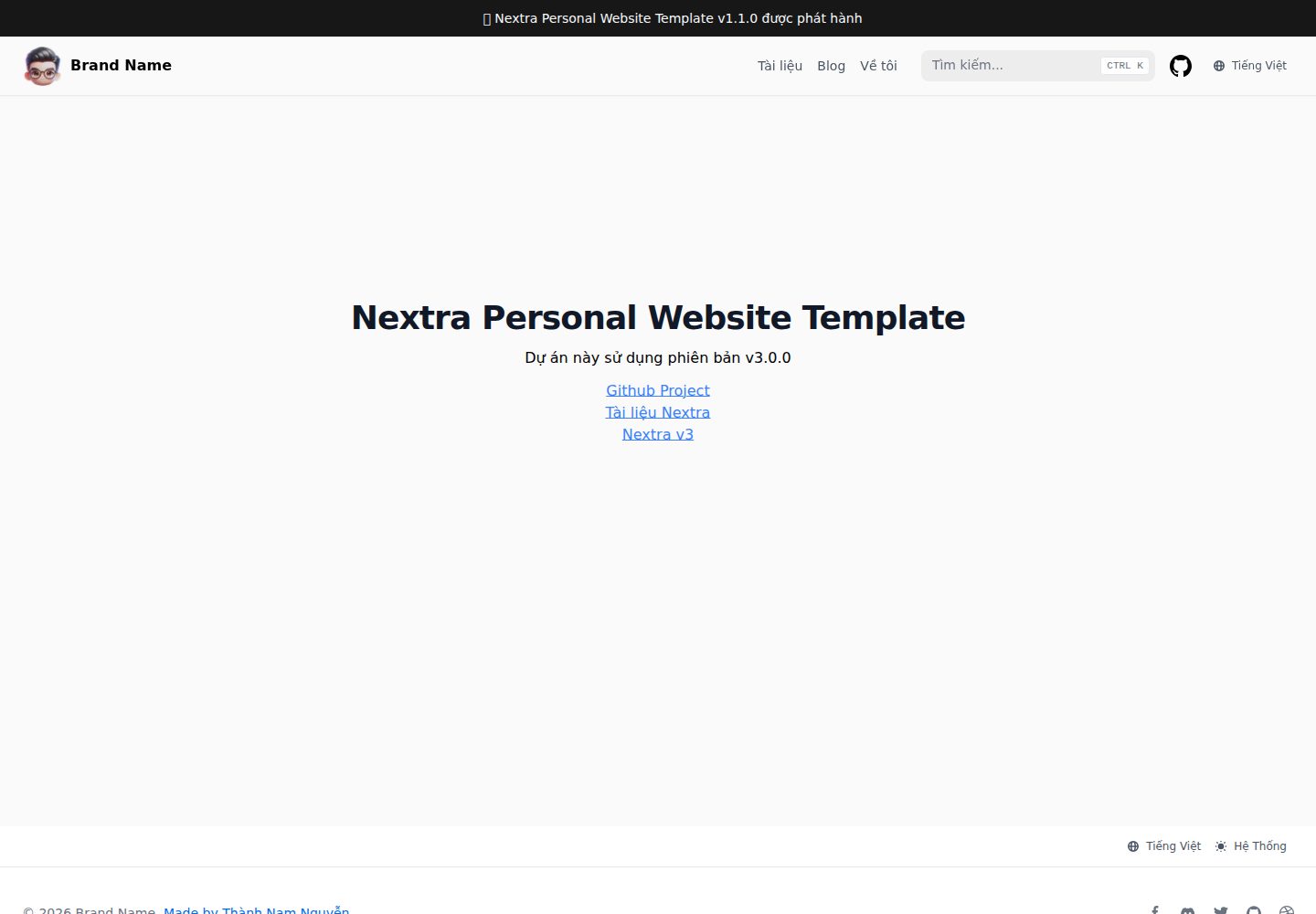
Supports both documentation and blog content types, sharing the same Nextra documentation theme
Next.jsReactPortfolioBlogDocumentation
nextra-personal-website-template — Next.js Portfolio Template
By namnguyenthanhwork
A personal website template based on Next.js and Nextra that provides both blog and documentation content types, with preconfigured Vietnamese and English bilingual support.
Explore the design
Compare the page layouts and mobile experience. Open any screenshot for a closer look.
Desktop homepage1 / 3
Desktop captureTop of page
Actual screenshot captured by the server browser.
All pages & views 3
Screenshots show visual appearance; interactive behavior may differ.
Recorded 2026-10-02View source
What stands out
A quick read of the recorded project description.
Preconfigured Vietnamese and English bilingual i18n
Integrated navigation bar, search bar, page bar, and table of contents (TOC) bar components
Content is written in MDX, and new pages can be added directly under the pages directory
Provides a one-click Vercel clone deployment entry, and repository commits can automatically trigger deployments
Licensed under MIT, allowing free use, modification, commercial use, and distribution
Template Details
This is a Nextra template intended for personal websites, and the repository description explicitly states its purpose is to host both documentation and blog content. The template includes integrated components such as a navigation bar, search bar, page bar, and table of contents (TOC) bar, and comes preconfigured with Vietnamese and English languages (i18n), with the demo site defaulting to the Vietnamese path. On the technical side, the README lists Next.js, Nextra, Tailwind CSS, Shadcn/ui, and MDX; content is written as MDX files, for example by creating pages in pages/index.mdx.
For usage, the template offers two paths: one is to clone the repository and deploy via Vercel with one click, after which every commit to the repository automatically triggers a deployment; the other is to manually clone the repository, install next, react, react-dom, and the Nextra and Nextra Docs theme dependencies, configure dev/build/start scripts in package.json, and create next.config.js and theme.config.jsx in the project root to integrate the theme. The installation commands in the README use the alpha tag, indicating that it relies on pre-release versions.
Limitations and notes: third-party assets such as the template's demo images, fonts, and icons must be checked separately under their respective licenses; the code's MIT license does not cover these assets. External services such as domains and hosting may incur additional costs. The repository does not state performance, accessibility, or production suitability, so these aspects must be evaluated independently.
Next.jsPortfolioBlogDocumentation
Is it right for your project?
Use Cases
- Building a personal site that includes both a personal blog and technical documentation
- Needing an out-of-the-box Vietnamese/English bilingual site skeleton
- Writing in MDX for a documentation-style website where content and components are mixed
- Quickly cloning and deploying a personal website prototype via Vercel
Suitable For
- Front-end developers who want to quickly start a personal website with Next.js and Nextra
- Writers who need blogs and documentation to coexist and care about multilingual support
- Users who accept building with pre-release dependency versions
Getting started & customization
Use these recorded setup notes alongside the repository instructions for your chosen version.
- 1
Can be deployed with one click by cloning the repository via Vercel, after which each commit is automatically deployed
- 2
The manual approach requires installing next, react, react-dom, and the Nextra and Nextra Docs theme dependencies
- 3
Configure dev, build, and start scripts in package.json
- 4
Create next.config.js in the project root and specify the nextra-theme-docs theme and themeConfig path
- 5
Create theme.config.jsx to configure theme options such as the logo and project links, then write content in pages/index.mdx
License & source material
Usage conditions & limitations
Free to use · keep license noticeThis entry covers the free version under the MIT license in a public repository; the free scope is the code of that version and does not mean external services or third-party assets are free.
Must comply with when using
- Allows free use, modification, commercial use, and distribution of that version's code.
- When distributing copies or substantial portions of the code, retain the original author's copyright notice and the full MIT license notice.
- The code is provided as is; warranties and limitations of liability are governed by the original license and applicable law.
Additional costs & items to verify
- Dependencies are installed using the alpha tag, meaning Nextra and the Nextra Docs theme are pre-release versions that may be unstable; evaluate whether to use them in production projects.
- One-click deployment relies on the external Vercel hosting service, which requires an account and may incur additional costs or be subject to its terms.
- The README provides a donation entry, which is voluntary sponsorship and does not affect free use of the code.
- Demo images, fonts, icons, and other third-party assets must be checked under their respective licenses and cannot be judged solely by the code's MIT license.
- External services such as domains, hosting, databases, payments, or AI may incur separate charges.
View Original Text Basis
Permission is hereby granted, free of charge
Original License Text
npm i next react react-dom nextra@alpha nextra-theme-docs@alpha
Original README
You can get started by creating your own Nextra website and deploy to Vercel by clicking the link:
Original README
https://github.com/namnguyenthanhwork/nextra-personal-website-template/blob/master/LICENSEhttps://github.com/namnguyenthanhwork/nextra-personal-website-template/blob/master/README.mdIf you find this project helpful, you can buy me a coffee
Original README
Compiled by DeepSeek based on repository license and README ·2026-10-02. Results only cover the materials read; dependencies, images, fonts, and subsequent term changes are subject to their respective original texts.
Project checks & description sources
Template Information
- Source platforms
- GitHub
- Documentation and maintenance reference score
- More documented · 86 / 100
- Technologies
- Next.js · React
- Website type
- Portfolio · Blog · Documentation
How this score is calculated
Our heuristic uses license records (up to 30), a demo link (12), a preview (10), stars (15), recorded maintenance (15), description completeness (8), feature records (5) and classification data (5). It is not a code, security or performance test, or a Google score. A link does not establish tested functionality.
What to verify for this project
- Repository update recorded
- 2025-03-02
- Screenshot last checked
- 2026-10-02
A demo link is listed. Check it with your own content and viewport sizes; its presence does not confirm that forms, authentication or payments work.
The catalog identifies Next.js as the primary stack. Check the actual dependency manifest and lockfile for versions and hosting requirements. These notes use recorded metadata, not a code audit or a deployment test.
Use a selection guide →How this description was prepared
AI-assisted description based on catalog records and repository material. Repository authors are not automatically the reviewers of this description.
Automatically checked against source and license rules; no manual editorial review.
Inspect the recorded source material
SHA-256: 18018545c8e2d752097ef480032c473540a586262ebca43f2068ec0f5a3b94da
2026-10-02T16:23:56.726Z
Source file / repository# Nextra Personal Website Template
This template includes almost everything you need to build a personal website. You can write **documents** and **blogs**, have navigation bar, search bar, page bar, TOC bar, and other integrated components. And especially with multi-language support (i18n) - pre-configured Vietnamese and English.
[**View Demo →**](https://nextra-personal-website-template.vercel.app)
## Technology used
- NextJS 15
- Nextra v3
- Tailwind CSS, Shadcn/ui
- MDX v3
See more new features of Nextra v3 [here](https://the-guild.dev/blog/nextra-3)
## Start
### Deploy on Vercel
You can get started by creating your own Nextra website and deploy to Vercel by clicking the link:
[](https://vercel.com/new/clone?s=https%3A%2F%2Fgithub.com%2Fnamnguyenthanhwork%2Fnextra-personal-website-template&showOptionalTeamCreation=false)
Vercel will copy the [Nextra Personal Website Template](https://github.com/namnguyenthanhwork/nextra-personal-website-template) and deploy the website for you. Once completed, every commit in the repo will be deployed automatically.
### Copy Repository
You can also clone [this repository](https://github.com/namnguyenthanhwork/nextra-personal-website-template) manually.
### Installation
To manually create a Nextra Docs site, you must install **NextJS, React, Nextra V3 alpha and Nextra Docs Theme V3 alpha**. In your project directory, run the following command to install the dependencies:
```bash
npm i next react react-dom nextra@alpha nextra-theme-docs@alpha
```
If you have NextJS installed in your project, you just need to install `nextra` `nextra-theme-docs`.
Add the following scripts `package.json`:
```json filename="package.json"
"scripts": {
"dev": "next",
"build": "next build",
"start": "next start"
},
```
You can run the project using npm `npm run dev`, running in development mode or `npm run build && npm run start` production mode.
### Add NextJS configuration
Create the `next.config.js` following file in the project root directory:
```js
const withNextra = require('nextra')({
theme: 'nextra-theme-docs',
themeConfig: './theme.config.jsx',
});
module.exports = withNextra();
// If you have other Next.js configurations, you can pass them as parameters:
// module.exports = withNextra({ /* another next.js configuration */ })
```
With the above configuration, Nextra can process Markdown files in your NextJS project, with the theme specified. Other Nextra configurations can be found in the [Guide](https://nextra.site/docs/guide).
### Create Docs Theme configuration
Finally, create the `theme.config.jsx` corresponding file in the project root directory. This will be used to configure the Nextra Docs theme:
```bash
export default {
logo: <span>Nextra Template</span>,
project: {
link: 'https://github.com/namnguyenthanhwork/nextra-personal-website-template',
},
};
```
Full theme configuration can be found [here](https://nextra.site/docs/docs-theme/theme-configuration).
### Ready to use
You can now create your first MDX page at `pages/index.mdx`:
```mdx filename="pages/index.mdx"
# Welcome to Nextra
Hello world!
```
And run the command `next` or `next dev` specified in `package.json` to start project development! 🎉
## Buy me a coffee
If you find this project helpful, you can buy me a coffee 🙏
[](https://buymeacoffee.com/thanhnamnguyen)
## Sponsors
Support this project by becoming a sponsor. Your logo will show up here. [🙏 Become a sponsor via Buy me a coffee](https://buymeacoffee.com/thanhnamnguyen)
Explore similar templates
Compare previews and descriptions within the same stack and category.

tailwind-nextjs-starter-blog
A Next.js and Tailwind CSS blog starter template using Contentlayer for Markdown/MDX, with built-in SEO, code highlighting, and tags. It targets personal technical blogs and migration from Jekyll/Hugo to React, and supports one-click Vercel deployment.
Next.js · Blog

react-resume-template
A personal resume website template for software developers, built with Next.js, React, and TypeScript and styled with Tailwind CSS. Site content is driven by a single data file at /src/data/data.tsx, with types in dataDef.ts and images in src/images/.
Next.js · Portfolio

Nextjs-tailwindcss-blog-template
A personal blog template built with Next.js and Tailwind CSS, using Velite to process Markdown content. It includes home, about, contact and article pages, with a demo site and a companion YouTube tutorial.
Next.js · Blog

nextjs-prisma-boilerplate
A production-grade full stack starter built on Next.js 12, React 18, Prisma 4, and Postgres, with layered frontend and backend architecture, Jest and Cypress testing, next-auth authentication, Docker and Gitpod development environments, GitHub Actions CI/CD, and Traefik-based production deployment.
Next.js · Documentation

Next-js-Blog-Boilerplate
A blog starter built on Next.js 12 and Tailwind CSS 3, integrating TypeScript, ESLint, Prettier, and PostCSS.
Next.js · Blog

nextjs-blog-theme
A Next.js 15 and Tailwind CSS 4.x blog starter by Netlify, designed by Bejamas, with MDX support, dark/light theme switching, and environment-variable configuration. It includes a visual setup wizard for deploying to Netlify and manages content via local .mdx files.
Next.js · Blog