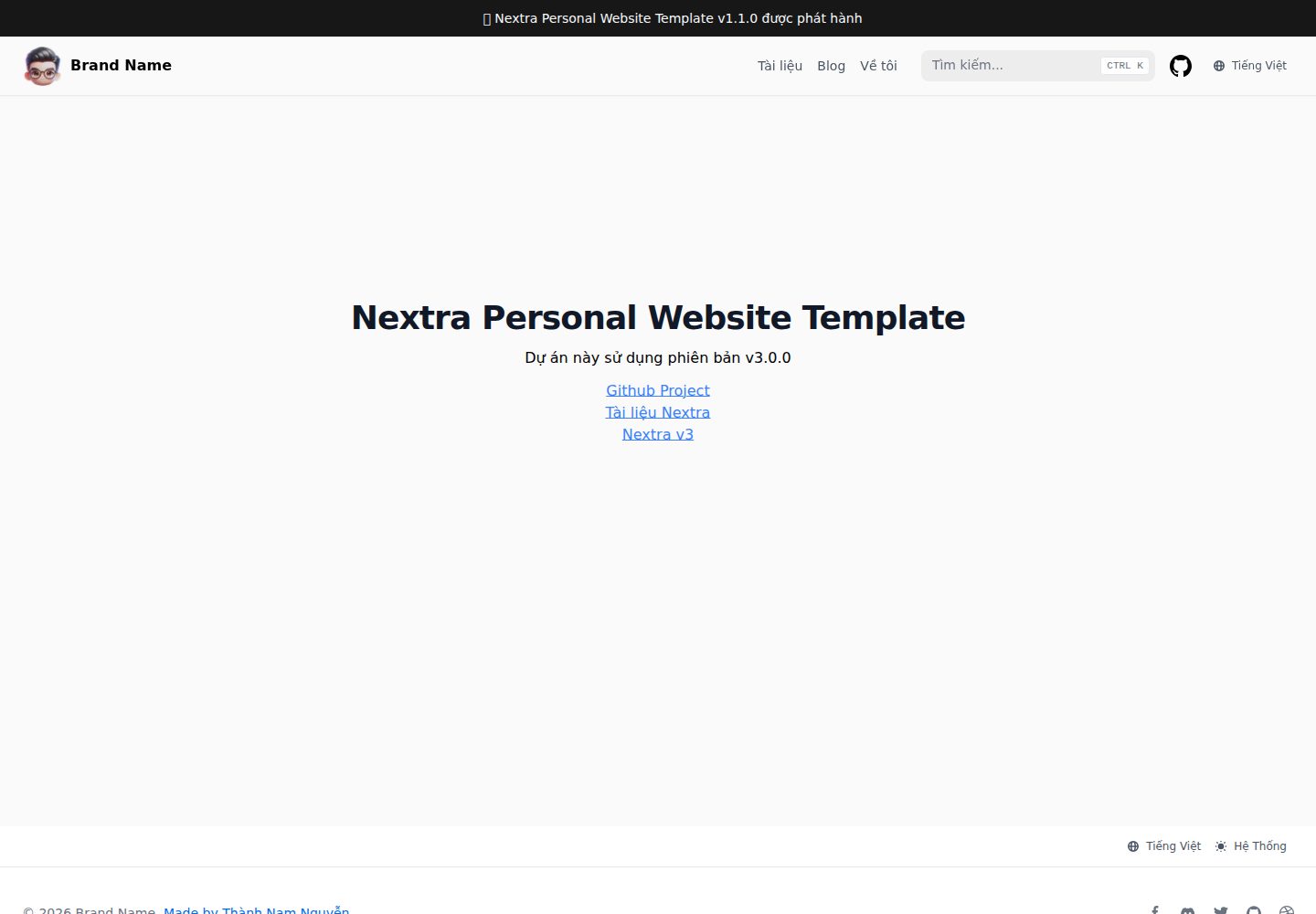
同时支持文档与博客两类内容,共用同一套 Nextra 文档主题
Next.jsReact作品集博客文档
nextra-personal-website-template — Next.js 作品集模板
作者 namnguyenthanhwork
基于 Next.js 与 Nextra 的个人网站模板,同时提供博客与文档两种内容形式,并预置越南语、英语双语支持。
看看你的网站会是什么样
浏览真实页面截图,比较内容排版与手机效果。点击下方缩略图切换,放大查看整页细节。
全部页面与视图 3
截图用于了解视觉与布局,交互效果请以实际项目为准。
采集于 2026-10-02查看来源
值得关注的模板亮点
从已有项目资料中,快速了解它的特点。
预置越南语与英语双语 i18n 配置
集成导航栏、搜索栏、页面栏与目录(TOC)栏组件
内容以 MDX 编写,可在 pages 目录下直接新增页面
提供 Vercel 一键克隆部署入口,仓库提交可自动触发部署
采用 MIT 许可,允许免费使用、修改、商用与分发
模板详细介绍
这是一个面向个人网站场景的 Nextra 模板,仓库说明中明确其用途是同时承载「文档」与「博客」两类内容。模板自带导航栏、搜索栏、页面栏与目录(TOC)栏等集成组件,并预先配置了越南语与英语两种语言(i18n),演示站点默认进入越南语路径。技术栈方面,README 列出 Next.js、Nextra、Tailwind CSS、Shadcn/ui 与 MDX,内容以 MDX 文件形式编写,例如在 pages/index.mdx 中创建页面。
使用方式上,模板提供两条路径:一是通过 Vercel 一键克隆仓库并部署,之后仓库的每次提交会自动触发部署;二是手动克隆仓库,安装 next、react、react-dom 以及 Nextra 与 Nextra Docs 主题依赖,在 package.json 中配置 dev/build/start 脚本,并在项目根目录创建 next.config.js 与 theme.config.jsx 完成主题接入。README 中的安装命令使用了 alpha 标签,说明其依赖的是预发布版本。
限制与注意事项:模板的演示图片、字体、图标等第三方素材需按各自许可单独核对,代码的 MIT 许可不覆盖这些素材;域名、托管等外部服务可能产生额外费用。仓库未说明性能、可访问性或生产环境适用性,这些方面需自行评估。
Next.js作品集博客文档
适合你的项目吗?
适用场景
- 搭建同时包含个人博客与技术文档的个人站点
- 需要一个开箱即用的越南语/英语双语站点骨架
- 以 MDX 写作、希望内容与组件混排的文档型网站
- 通过 Vercel 快速克隆并部署个人网站原型
适合人群
- 希望用 Next.js 与 Nextra 快速起步个人网站的前端开发者
- 需要博客与文档共存、且关注多语言支持的写作者
- 接受使用预发布依赖版本进行搭建的用户
上手与定制指南
结合仓库当前版本的说明,按下面的资料检查内容、配置与运行要求。
- 1
可通过 Vercel 克隆仓库一键部署,之后每次提交自动部署
- 2
手动方式需安装 next、react、react-dom 及 Nextra 与 Nextra Docs 主题依赖
- 3
在 package.json 中配置 dev、build、start 脚本
- 4
在项目根目录创建 next.config.js 并指定 nextra-theme-docs 主题与 themeConfig 路径
- 5
创建 theme.config.jsx 配置 logo、项目链接等主题选项,随后即可在 pages/index.mdx 编写内容
授权与来源资料
使用条件与限制
免费使用 · 保留许可声明本次收录的是公开仓库中采用 MIT 许可的免费版本;免费范围为该版本代码,不代表外部服务或第三方素材免费。
使用时需要遵守
- 允许免费使用、修改、商用和分发该版本代码。
- 分发代码副本或实质性部分时,保留原作者版权声明和完整 MIT 许可声明。
- 代码按现状提供;担保与责任限制以原许可证及适用法律为准。
额外费用与待核对事项
- 安装依赖时使用 alpha 标签,即 Nextra 与 Nextra Docs 主题为预发布版本,可能存在不稳定性,需自行评估是否用于正式项目。
- 一键部署依赖 Vercel 外部托管服务,使用该服务需注册账号并可能产生额外费用或受其条款约束。
- README 提供捐赠入口,属自愿赞助,不影响代码的免费使用。
- 演示图片、字体、图标及其他第三方素材需按各自许可核对,不能仅凭代码的 MIT 许可判断。
- 域名、托管、数据库、支付或 AI 等外部服务可能另外收费。
查看原文依据
Permission is hereby granted, free of charge
许可证原文
npm i next react react-dom nextra@alpha nextra-theme-docs@alpha
README 原文
You can get started by creating your own Nextra website and deploy to Vercel by clicking the link:
README 原文
https://github.com/namnguyenthanhwork/nextra-personal-website-template/blob/master/LICENSEhttps://github.com/namnguyenthanhwork/nextra-personal-website-template/blob/master/README.mdIf you find this project helpful, you can buy me a coffee
README 原文
DeepSeek 根据仓库许可证和 README 整理 ·2026-10-02。结果仅覆盖已读取资料,依赖、图片、字体及后续条款变更以各自原文为准。
项目核对记录与介绍依据
模板资料
- 来源平台
- GitHub
- 资料与维护参考分
- 资料较完整 · 86 / 100
- 技术栈
- Next.js · React
- 网站类型
- 作品集 · 博客 · 文档
这个分数如何计算
本站按许可资料(最高30分)、演示链接(12分)、预览图(10分)、Star数(15分)、记录的维护时间(15分)、描述完整度(8分)、功能记录(5分)和分类资料(5分)计算。它不是代码、安全或性能测试,也不是 Google 评分;有链接不代表已实测可用。
这个项目需要核对什么
- 记录的仓库更新时间
- 2025-03-02
- 截图检查日期
- 2026-10-02
已收录演示链接。请用你的内容与屏幕尺寸检查;有演示不代表表单、认证或支付已经可用。
目录记录的主要技术栈是 Next.js。请通过依赖清单和锁文件核对实际版本与托管要求。这些说明基于收录资料,不代表代码审计或部署实测。
查看具体选型方法 →介绍的制作与核对状态
介绍由 AI 辅助整理目录与仓库资料。仓库作者不等于这篇介绍的审核者。
已完成服务器许可规则与 AI 来源核对;未经过人工编辑审核。
查看当时使用的来源资料
SHA-256: 18018545c8e2d752097ef480032c473540a586262ebca43f2068ec0f5a3b94da
2026-10-02T16:23:56.726Z
来源文件 / 仓库# Nextra Personal Website Template
This template includes almost everything you need to build a personal website. You can write **documents** and **blogs**, have navigation bar, search bar, page bar, TOC bar, and other integrated components. And especially with multi-language support (i18n) - pre-configured Vietnamese and English.
[**View Demo →**](https://nextra-personal-website-template.vercel.app)
## Technology used
- NextJS 15
- Nextra v3
- Tailwind CSS, Shadcn/ui
- MDX v3
See more new features of Nextra v3 [here](https://the-guild.dev/blog/nextra-3)
## Start
### Deploy on Vercel
You can get started by creating your own Nextra website and deploy to Vercel by clicking the link:
[](https://vercel.com/new/clone?s=https%3A%2F%2Fgithub.com%2Fnamnguyenthanhwork%2Fnextra-personal-website-template&showOptionalTeamCreation=false)
Vercel will copy the [Nextra Personal Website Template](https://github.com/namnguyenthanhwork/nextra-personal-website-template) and deploy the website for you. Once completed, every commit in the repo will be deployed automatically.
### Copy Repository
You can also clone [this repository](https://github.com/namnguyenthanhwork/nextra-personal-website-template) manually.
### Installation
To manually create a Nextra Docs site, you must install **NextJS, React, Nextra V3 alpha and Nextra Docs Theme V3 alpha**. In your project directory, run the following command to install the dependencies:
```bash
npm i next react react-dom nextra@alpha nextra-theme-docs@alpha
```
If you have NextJS installed in your project, you just need to install `nextra` `nextra-theme-docs`.
Add the following scripts `package.json`:
```json filename="package.json"
"scripts": {
"dev": "next",
"build": "next build",
"start": "next start"
},
```
You can run the project using npm `npm run dev`, running in development mode or `npm run build && npm run start` production mode.
### Add NextJS configuration
Create the `next.config.js` following file in the project root directory:
```js
const withNextra = require('nextra')({
theme: 'nextra-theme-docs',
themeConfig: './theme.config.jsx',
});
module.exports = withNextra();
// If you have other Next.js configurations, you can pass them as parameters:
// module.exports = withNextra({ /* another next.js configuration */ })
```
With the above configuration, Nextra can process Markdown files in your NextJS project, with the theme specified. Other Nextra configurations can be found in the [Guide](https://nextra.site/docs/guide).
### Create Docs Theme configuration
Finally, create the `theme.config.jsx` corresponding file in the project root directory. This will be used to configure the Nextra Docs theme:
```bash
export default {
logo: <span>Nextra Template</span>,
project: {
link: 'https://github.com/namnguyenthanhwork/nextra-personal-website-template',
},
};
```
Full theme configuration can be found [here](https://nextra.site/docs/docs-theme/theme-configuration).
### Ready to use
You can now create your first MDX page at `pages/index.mdx`:
```mdx filename="pages/index.mdx"
# Welcome to Nextra
Hello world!
```
And run the command `next` or `next dev` specified in `package.json` to start project development! 🎉
## Buy me a coffee
If you find this project helpful, you can buy me a coffee 🙏
[](https://buymeacoffee.com/thanhnamnguyen)
## Sponsors
Support this project by becoming a sponsor. Your logo will show up here. [🙏 Become a sponsor via Buy me a coffee](https://buymeacoffee.com/thanhnamnguyen)
看看同类模板
对比同技术栈与用途的模板,找到更适合的视觉与内容结构。

tailwind-nextjs-starter-blog
tailwind-nextjs-starter-blog 是一个面向个人技术博客的 Next.js 与 Tailwind CSS 启动模板,其 v2 版本基于 App Router 与 React Server Comp…
Next.js · 博客

react-resume-template
A personal resume website template built with React.js, Typescript, Next.js, and styled with Tailwind css
Next.js · 作品集

Nextjs-tailwindcss-blog-template
⭐Build SEO optimized personal blog website with Next.js, Tailwind CSS and Contentlayer. If you want to learn t…
Next.js · 博客

nextjs-prisma-boilerplate
nemanjam/nextjs-prisma-boilerplate 是一个面向中小型全栈应用的生产级启动器,围绕 Next.js 12、React 18、Prisma 4 和 Postgres 构建。
Next.js · 文档

Next-js-Blog-Boilerplate
Next-js-Blog-Boilerplate 是一套面向个人与技术博客的启动代码,基于 Next.js 12 与 Tailwind CSS 3 构建,同时集成了 TypeScript、ESLint、Prettier …
Next.js · 博客

nextjs-blog-theme
nextjs-blog-theme 是 Netlify 团队维护的一个博客启动模板,基于 Next.js 15(Pages Router)和 Tailwind CSS 4.x 构建,设计由 Bejamas 机构完成。
Next.js · 博客