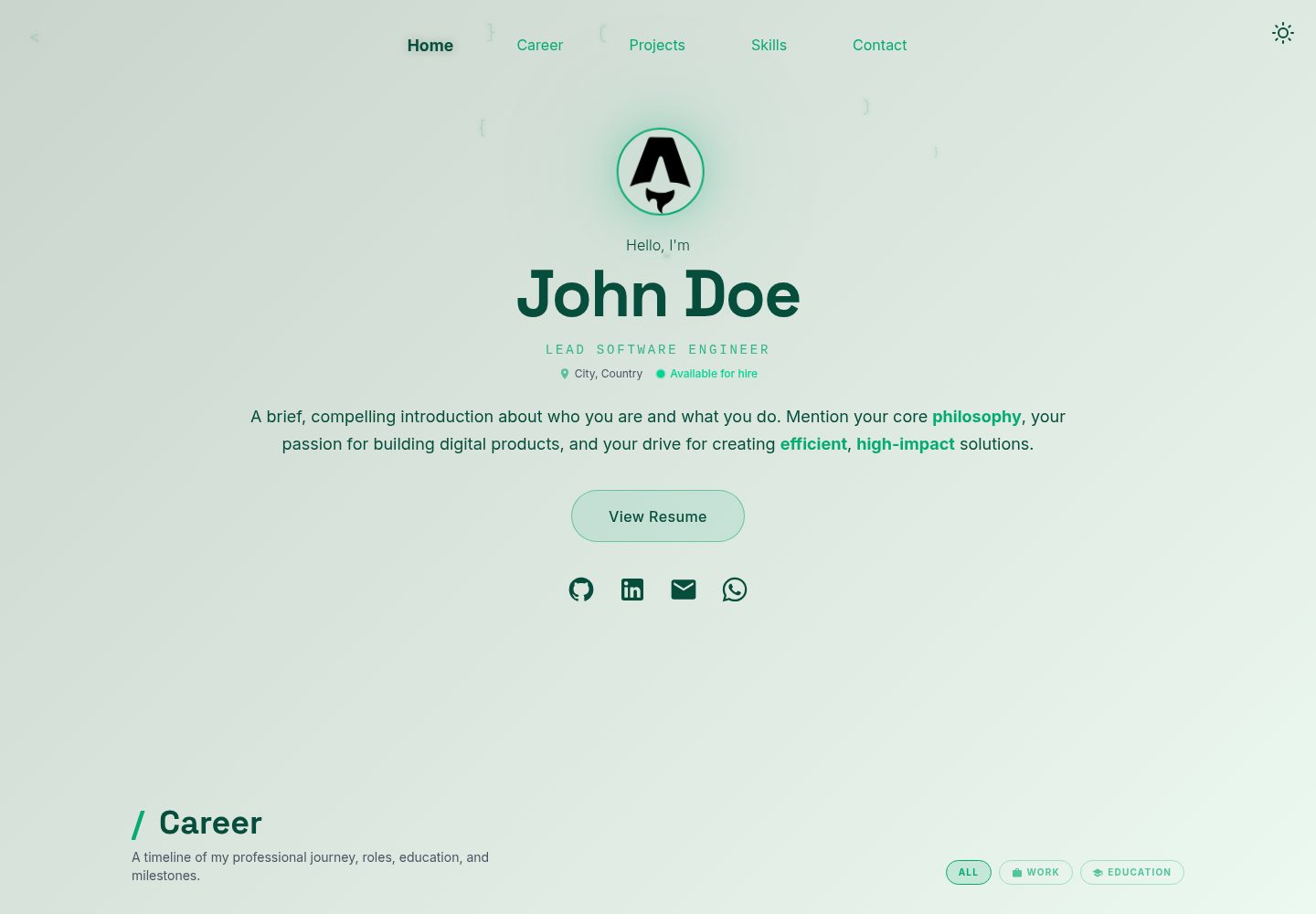
Content is centralized in JSON files under src/data/, so updating personal profile and project data does not require modifying component code
AstroPortfolio
career-portfolio-template — Astro Portfolio Template
By nbakh16
A data-driven personal career portfolio template built on Astro, with content centralized in JSON files under src/data/, multiple built-in color themes and light/dark mode, and automatic generation of sitemap, robots.txt and llms.txt.
Explore the design
Compare the page layouts and mobile experience. Open any screenshot for a closer look.
Desktop homepage1 / 2
Desktop captureTop of page
Actual screenshot captured by the server browser.
All pages & views 2
Screenshots show visual appearance; interactive behavior may differ.
Recorded 2026-10-03View source
What stands out
A quick read of the recorded project description.
src/config.ts provides built-in color schemes such as default, strategic, innovator and executive, and automatically handles light/dark mode switching
At build time, sitemap-index.xml and robots.txt are generated automatically, and a /llms.txt route outputs Markdown content for AI crawlers
SEO fields (title, description, language, job title, keywords, Twitter card, OG image) are configured uniformly in src/data/home.json
Uses Tailwind CSS and astro-icon (Iconify's Material Design Icons set); images placed under src/assets/ are automatically optimized by Astro
Template Details
This is a static portfolio template built with Astro for showcasing personal career history, skills and project highlights. The template emphasizes data-driven design: site information, project data and more are centralized in JSON files under src/data/, so content changes do not require modifying component code. Styling uses Tailwind CSS, icons are imported via astro-icon with the Iconify Material Design Icons set, and images placed under src/assets/ can be automatically optimized by Astro.
For configuration, src/config.ts provides a baseTheme option that can switch between built-in color schemes such as default, strategic, innovator and executive, and automatically handles the corresponding light/dark mode switching. SEO and AI readability fields (siteUrl, webpageTitle, description, lang, jobTitle, keywords, twitterHandle, ogImageUrl) are maintained in src/data/home.json; at build time, sitemap-index.xml and robots.txt are generated automatically, and a Markdown route for LLM crawlers is dynamically output via src/pages/llms.txt.ts.
Usage limitations: the README mentions a FastAPI backend but explicitly states that it can run without a backend, and that the open-source version is coming soon, so the current template does not include backend functionality. The repository uses the MIT license, and the free scope is limited to this version of the code; third-party assets such as demo images, fonts and icons must be checked separately under their respective licenses, and external services such as domains and hosting may incur additional costs.
AstroPortfolio
Is it right for your project?
Use Cases
- Individual developers or job seekers building a static portfolio site to showcase career history, skills and project highlights
- Portfolio projects that need to separate site copy and project data from code and maintain content through JSON files
- Scenarios where the site should include SEO and AI readability configurations such as sitemap, robots.txt, Open Graph/Twitter cards and llms.txt
- Personal sites that need to switch between multiple built-in color schemes and light/dark mode to quickly adjust the visual style
Suitable For
- Front-end developers familiar with or willing to use the Astro and Node.js toolchain
- Users who want to maintain portfolio content through JSON data files rather than page code
- Authors of portfolio sites that need static generation and can be deployed to platforms such as Netlify
- Developers who accept the MIT license terms and can independently verify third-party asset licenses
Getting started & customization
Use these recorded setup notes alongside the repository instructions for your chosen version.
- 1
The README requires Node.js v22.12.0 or higher and mentions Astro v6; refer to the repository dependency list for specific versions
- 2
Click Use this template on GitHub to create a new repository, then clone it, run npm install to install dependencies, and npm run dev to start the local development server (default localhost:4321)
- 3
Edit the JSON files under src/data/ to update content, and modify baseTheme in src/config.ts to switch color schemes
- 4
Before deployment, fill in fields such as siteUrl in src/data/home.json to ensure canonical, sitemap and OG image absolute links are correct
- 5
The FastAPI backend mentioned in the README is not included in the current open-source version; it can run without a backend. Third-party assets such as demo images, fonts and icons must be checked under their respective licenses
License & source material
Usage conditions & limitations
Free to use · keep license noticeThis entry covers the free version under the MIT license in the public repository; the free scope is limited to this version of the code and does not imply that external services or third-party assets are free.
Must comply with when using
- Free use, modification, commercial use and distribution of this version of the code are permitted.
- When distributing copies or substantial portions of the code, retain the original author's copyright notice and the complete MIT license notice.
- The code is provided as is; warranties and limitations of liability are governed by the original license and applicable law.
Additional costs & items to verify
- The README mentions a FastAPI backend but explicitly states that it can run without a backend, and that the open-source version is coming soon, so the current open-source version does not include backend functionality and only provides a front-end static template.
- Using this template requires Astro v6 and Node.js v22.12.0 or higher installed locally, which is a toolchain environment requirement.
- The README recommends installing the Inter font package via npm; third-party assets such as fonts must be checked separately under their respective licenses.
- The README recommends installing the Space Grotesk font package via npm; third-party assets such as fonts must be checked separately under their respective licenses.
- Icons are imported via Iconify's Material Design Icons set; icon assets must be checked separately under their respective licenses.
- The README uses Netlify as a deployment example; external services such as domains and hosting may incur additional costs.
- Demo images, fonts, icons and other third-party assets must be checked under their respective licenses and cannot be judged solely by the code's MIT license.
- External services such as domains, hosting, databases, payments or AI may incur additional costs.
View Original Text Basis
Permission is hereby granted, free of charge
Original License Text
**Backend:** [FastAPI](https://fastapi.tiangolo.com/) *(Works without backend — open source release coming soon)*
Original README
Make sure you have **Astro v6** and **Node.js** (v22.12.0 or higher) installed on your machine.
Original README
Inter font: `npm install @fontsource-variable/inter`
Original README
Space Grotesk font: `npm install @fontsource-variable/space-grotesk`
Original README
Material Desing Icons: `npm install @iconify-json/mdi`
Original README
https://github.com/nbakh16/career-portfolio-template/blob/master/LICENSEhttps://github.com/nbakh16/career-portfolio-template/blob/master/README.md**Deployment:** [Netlify](https://www.netlify.com)
Original README
Compiled by DeepSeek based on repository license and README ·2026-10-03. Results only cover the materials read; dependencies, images, fonts, and subsequent term changes are subject to their respective original texts.
Project checks & description sources
Template Information
- Source platforms
- Astro Themes
- Documentation and maintenance reference score
- More documented · 87 / 100
- Technologies
- Astro
- Website type
- Portfolio
How this score is calculated
Our heuristic uses license records (up to 30), a demo link (12), a preview (10), stars (15), recorded maintenance (15), description completeness (8), feature records (5) and classification data (5). It is not a code, security or performance test, or a Google score. A link does not establish tested functionality.
What to verify for this project
- Repository update recorded
- 2026-09-05
- Screenshot last checked
- 2026-10-03
A demo link is listed. Check it with your own content and viewport sizes; its presence does not confirm that forms, authentication or payments work.
The catalog identifies Astro as the primary stack. Check the actual dependency manifest and lockfile for versions and hosting requirements. These notes use recorded metadata, not a code audit or a deployment test.
Use a selection guide →How this description was prepared
AI-assisted description based on catalog records and repository material. Repository authors are not automatically the reviewers of this description.
Review declaration: [email protected] · 2026-10-04
Inspect the recorded source material
SHA-256: 4463b8c59d8c55a8735e8f5c14809e9235499e96006937497f90c4fda6a637eb
2026-10-03T15:39:29.138Z
Source file / repository# CareerPortfolio: Data-Driven Astro SSG
Live Demo: [careerportofio.netlify.app](https://careerportofio.netlify.app)
[](https://astro.build/)
[](LICENSE)
[](CONTRIBUTING.md)
A high-performance, responsive portfolio built with **Astro**, **Tailwind CSS**, and **Native Browser Animations**. Designed to be 100% data-driven and easy to customize as a reusable template.
## 🌟 Highlights
- **Zero-JS by Default:** Leveraging Astro's islands architecture.
- **JSON-First:** Update your information in `src/data/` without touching any code.
- **SEO & AI Ready:** Auto-generated `sitemap.xml`, `robots.txt`, and `/llms.txt` endpoint for AI/LLM crawlers, full Open Graph/Twitter Card support and JSON-LD structured data.
- **Built-in Themes**: Switch between multiple professional color palettes and light/dark modes from a single config file.
- **Fully Responsive:** Optimized for mobile, tablet, and desktop.
- **Performance:** Optimized for perfect Lighthouse scores.
## 🛠️ Tech Stack
- **Frontend:** [Astro](https://astro.build/) (Static Site Generation)
- **Styling:** [Tailwind CSS](https://tailwindcss.com/)
- **Icons:** [Iconify](https://iconify.design/) via `astro-icon`
- **Deployment:** [Netlify](https://www.netlify.com)
- **Backend:** [FastAPI](https://fastapi.tiangolo.com/) *(Works without backend — open source release coming soon)*
## 🚀 Getting Started
Follow these instructions to get a local copy up and running.
### Prerequisites
Make sure you have **Astro v6** and **Node.js** (v22.12.0 or higher) installed on your machine.
### Installation
1. Click **Use this template** on this repository.
2. Choose **Create a new repository**.
3. Clone your new repository: `git clone <your-repo-url>`
4. Navigate to your repo: `cd <your-repo-name>`
5. Install dependencies: `npm install`
6. Start development server: `npm run dev`
7. Update your content in `/src/data/`
8. Build and deploy on your preferred platform
## 🛠️ How to Customize
To make this portfolio yours, simply edit the JSON files in `src/data/`.
### 🎨 Switching Themes
This template comes with multiple built-in color palettes. To change the theme of your portfolio, open `src/config.ts` and update the `baseTheme` variable to one of the available options:
```typescript
export const SITE_CONFIG = {
// Options: 'default', 'strategic', 'innovator', 'executive'
baseTheme: 'default',
};
```
*(The template will automatically handle the dark/light mode toggles for whichever base theme you choose!)*
### 📁 Directory Structure
```
├── public/ # Global static assets (placeholder.jpg, favicon)
├── src/
│ ├── assets/ # Project & Profile images (Supports automatic Astro optimization)
│ ├── components/ # Reusable Astro components
│ ├── data/ # JSON files for project data
│ ├── layouts/ # Layout templates with Meta tags
│ ├── pages/ # Site routes (index.astro)
│ └── styles/ # Global CSS styles
│ └── config.ts # Global site configuration
├── astro.config.mjs # Astro configuration
└── tsconfig.json # TypeScript configuration
```
### 🔍 SEO & AI Optimization
All SEO and AI metadata is driven from `src/data/home.json`. Update the fields below to improve search engine, social media and AI crawler visibility:
| Field | Description |
| :------------ | :----------------------------------------------------------- |
| `siteUrl` | Your deployed domain (e.g. `https://yourname.dev`). Required for canonical URLs, sitemap and absolute OG image links. |
| `webpageTitle` | Page tab title and Open Graph title tag. |
| `description` | Primary intro summary used for meta description, Open Graph, Twitter preview cards and `/llms.txt`. |
| `lang` | Page language code (e.g. `en`, `fr`, `de`). Sets the `<html lang>` attribute. |
| `jobTitle` | Your role — included in JSON-LD structured data shown to search engines and `/llms.txt`. |
| `keywords` | Comma-separated keywords for the `<meta name="keywords">` tag. |
| `twitterHandle` | Your Twitter/X username (with or without `@`). Enables Twitter Card attribution. |
| `ogImageUrl` | Path to your Open Graph preview image. Use a **1200×630 px** image for best results across all platforms. |
> **Automatic Features:**
> - `sitemap-index.xml` & `robots.txt`: Auto-generated at build time.
> - `/llms.txt`: Dynamically generated Markdown portfolio route for AI agents and LLM web crawlers (powered by [`src/pages/llms.txt.ts`](file:///Users/nabil/_projects/astro-trial/career-portfolio-template/src/pages/llms.txt.ts)).
### 📚 Useful commands and links for reference:
| Command | Action |
| :------------------------ | :----------------------------------------------- |
| `npm install` | Installs dependencies |
| `npm run dev` | Starts local dev server at `localhost:4321` |
| `npm run build` | Build your production site to `./dist/` |
| `npm run preview` | Preview your build locally, before deploying |
| `npm run astro ...` | Run CLI commands like `astro add`, `astro check` |
| `npm run astro -- --help` | Get help using the Astro CLI |
Tailwind CSS: `npx astro add tailwind`
Inter font: `npm install @fontsource-variable/inter`
Space Grotesk font: `npm install @fontsource-variable/space-grotesk`
Astro-icon: `npx astro add astro-icon`
Material Desing Icons: `npm install @iconify-json/mdi`
https://docs.astro.build/en/guides/styling/#add-tailwind-4
https://www.astroicon.dev
https://icon-sets.iconify.design/mdi/?category=Material
## 🤝 Contributing
Contributions are welcome!
Please read the [Contributing Guide](CONTRIBUTING.md) before opening a PR.
## 📝 License
This project is licensed under the [MIT License](LICENSE)
Explore similar templates
Compare previews and descriptions within the same stack and category.

astro-theme-cactus
Astro Cactus is an Astro-based blog and portfolio theme that uses Markdown/MDX content collections to manage posts, notes, and tags, with frontmatter type-checked by a schema.
Astro · Portfolio

astrofy
Astrofy is a free and open-source personal portfolio website template built with Astro and TailwindCSS, with built-in blog, CV timeline, project showcase, store, and RSS feed modules.
Astro · Portfolio

astro-nano
Astro Nano is a static, minimalist portfolio and blog template built with Astro, Tailwind, and TypeScript without frontend frameworks. It includes light/dark themes, animated UI, automatic sitemap and RSS feed generation, and Markdown/MDX support with component imports.
Astro · Portfolio

astro-erudite
astro-erudite is an opinionated, unstyled static blog template built with Astro and native CSS, with no UI or CSS framework and minimal dependencies.
Astro · Portfolio

astro-sphere
Astro Sphere is a static, minimalist portfolio and blog theme maintained by markhorn-dev, built mainly with Astro, Tailwind, and TypeScript, with a small amount of SolidJS for stateful components.
Astro · Portfolio

astro-micro
Astro Micro is a framework-free blog and portfolio theme for Astro, forked from Astro Nano. It adds Pagefind search and Giscus comments while retaining type safety, sitemap, RSS, Markdown and MDX support, and TailwindCSS with system, light, and dark themes.
Astro · Portfolio