Notes support four maturity stages: captured, seedling, budding, and evergreen
AstroBlog
breath — Astro Blog Template
By netologist
Breath is a minimalist digital garden and engineering blog theme built on Astro, natively integrating an Obsidian Vault, with note maturity stages, bidirectional wiki links, an engineering portfolio, and a talks collection.
Explore the design
Compare the page layouts and mobile experience. Open any screenshot for a closer look.
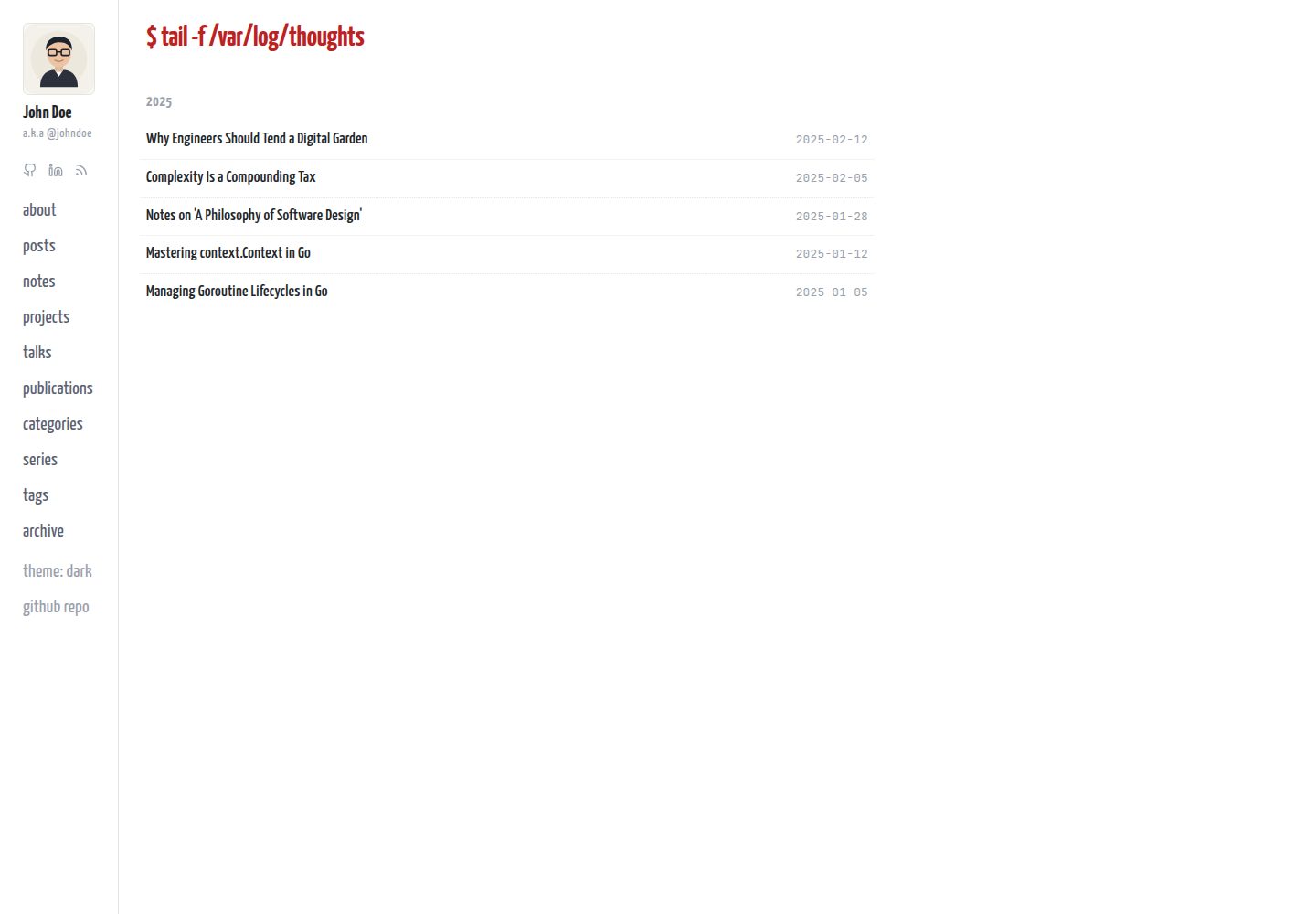
Desktop homepage1 / 3
Desktop captureTop of page
Actual screenshot captured by the server browser.
All pages & views 3
Screenshots show visual appearance; interactive behavior may differ.
Recorded 2026-10-13View source
What stands out
A quick read of the recorded project description.
Can be opened directly as an Obsidian Vault, with preconfigured wikilink completion, attachment routing, and multiple content templates
Supports recursive [[wikilink]] resolution and backlinks, and warns at build time when public posts leak private links
Built-in projects, talks, and publications content collections with automatic embedding of video and presentation links
Provides a Nordic-style dark theme, zero-dependency instant search, Mermaid lightbox, and responsive mobile layout
Personal content is separated from theme code; content/ is gitignored by default, making it easy to update the theme via upstream
Template Details
Breath is an Astro blog and digital garden template for software engineers, systems thinkers, and technical writers. It places structured long-form blog posts and continuously growing linked notes within a single content system: blog posts live in content/blog, garden notes live in content/notes, and they can link to each other via [[wikilink]] syntax with automatically generated backlinks. Notes carry four maturity stages—captured, seedling, budding, and evergreen—to mark the growth state of an idea.
The template natively supports opening the project directory as an Obsidian Vault, with preconfigured wikilink autocompletion, attachment routing, stage badges, and multiple note/blog/project/talk/paper templates. Content is separated from theme code: personal content lives in the root content/ directory (gitignored by default), while the theme ships with example-content for automatic seeding on first run, making it easy to update the theme via upstream without overwriting personal notes.
Beyond blogs and notes, the template provides three additional content collections—projects, talks, and publications—for engineering portfolios, conference talks, and academic papers, and automatically recognizes links from YouTube, Vimeo, SpeakerDeck, SlideShare, Google Slides, and others to generate responsive embeds. Site configuration is centralized in src/site.config.ts, where you can set author information, social links, and sidebar navigation; when the projects, talks, and publications directories are empty, the corresponding navigation items are automatically hidden at build time.
The template includes a Nordic-style dark theme with light/dark toggle, self-hosted fonts, zero-dependency instant search, a Mermaid diagram lightbox, responsive mobile navigation, and private note protection via Cloudflare Pages middleware for /notes/private/* using basic authentication. Before use, note that private note authentication relies on Cloudflare Pages Functions and may not apply to other hosting environments; demo images, fonts, and other third-party assets require separate license verification.
AstroBlog
Is it right for your project?
Use Cases
- Building a personal technical site with Astro that combines long-form blog posts and linked notes
- Writing in Obsidian and automatically syncing to a publishable digital garden
- Organizing engineering portfolios, conference talks, and academic papers and generating embedded display pages
- Protecting private research notes with Cloudflare Pages basic authentication alongside public notes
Suitable For
- Technical writers who are used to writing in Obsidian and want to publish as a website
- Software engineers and systems thinkers who need both a blog and a digital garden
- Developers who want to centrally manage project, talk, and paper display pages
- Users who use Astro and prefer separating content from theme code to follow upstream updates easily
Getting started & customization
Use these recorded setup notes alongside the repository instructions for your chosen version.
- 1
Create a repository via the GitHub template or git clone, rename origin to upstream, and add your own remote repository to facilitate pulling theme updates later
- 2
Run npm install and npm run dev; on first startup, scripts/seed-content.mjs automatically populates the root content/ directory from example-content
- 3
Configure author name, nickname, avatar, bio, social links, and sidebar navigation in src/site.config.ts
- 4
Private note authentication relies on Cloudflare Pages Functions middleware; when deploying to other platforms, you need to implement equivalent protection yourself
- 5
Demo images, fonts, icons, and other third-party assets require separate license verification under their respective licenses; do not judge solely based on the code's MIT license
License & source material
Usage conditions & limitations
Free to use · keep license noticeThis entry covers the free version under the MIT license in the public repository; the free scope is the code of that version and does not mean external services or third-party assets are free.
Must comply with when using
- You are allowed to use, modify, commercialize, and distribute the code of this version for free.
- When distributing copies or substantial portions of the code, retain the original author's copyright notice and the complete MIT license notice.
- The code is provided as is; warranties and limitations of liability are governed by the original license and applicable law.
Additional costs & items to verify
- Demo images, fonts, icons, and other third-party assets require license verification under their respective licenses; do not judge solely based on the code's MIT license.
- External services such as domains, hosting, databases, payments, or AI may incur additional charges.
- Private note protection relies on Cloudflare Pages HTTP Basic Auth middleware; when deployed to other hosting platforms, this protection is unavailable and you need to implement an equivalent solution yourself.
- Access control for private notes is implemented by Cloudflare Pages Function middleware, which is a platform-specific feature and cannot take effect directly outside a Cloudflare Pages environment.
- Enabling private note authentication requires configuring environment variables (AUTH_USER, AUTH_PASSWORD, etc.) in the Cloudflare console, which means a Cloudflare account and corresponding configuration are required.
- Deploying with Cloudflare Pages and private note authentication requires configuring GitHub Secrets (CLOUDFLARE_API_TOKEN, CLOUDFLARE_ACCOUNT_ID, etc.), involving external service accounts and keys.
- The Cloudflare Pages deployment method requires connecting the repository to the Cloudflare Pages service, which is an external hosting platform dependency.
- The default password for private note authentication is changeme; it must be changed before going live, otherwise there is a security risk.
View Original Text Basis
Permission is hereby granted, free of charge
Original License Text
**🔒 Auth-Gated Private Notes:** Protect raw research and personal notes behind Cloudflare Pages HTTP Basic Auth (`/notes/private/*`), while keeping the rest of your garden public.
Original README
1. **Pages Function:** `functions/private/_middleware.js` intercepts requests to `/notes/private/*`.
Original README
2. **Environment Variables:** Set credentials in Cloudflare dashboard (**Settings → Variables and Secrets**):
Original README
3. **Pipeline:** Enable `.github/workflows/cloudflare.yml.disabled` by renaming it to `cloudflare.yml` and configuring GitHub secrets (`CLOUDFLARE_API_TOKEN`, `CLOUDFLARE_ACCOUNT_ID`, `CLOUDFLARE_PROJECT_NAME`, `AUTH_USER`, `AUTH_PASSWORD`).
Original README
1. Connect your repository to Cloudflare Pages (Preset: **Astro**, Build: `npm run build`, Output: `dist`).
Original README
https://github.com/netologist/breath/blob/main/LICENSEhttps://github.com/netologist/breath/blob/main/README.md- `AUTH_PASSWORD` (default: `changeme` — **rotate before going live!**)
Original README
Compiled by DeepSeek based on repository license and README ·2026-10-13. Results only cover the materials read; dependencies, images, fonts, and subsequent term changes are subject to their respective original texts.
Project checks & description sources
Template Information
- Source platforms
- GitHub
- Documentation and maintenance reference score
- More documented · 80 / 100
- Technologies
- Astro
- Website type
- Blog
How this score is calculated
Our heuristic uses license records (up to 30), a demo link (12), a preview (10), stars (15), recorded maintenance (15), description completeness (8), feature records (5) and classification data (5). It is not a code, security or performance test, or a Google score. A link does not establish tested functionality.
What to verify for this project
- Repository update recorded
- 2026-09-13
- Screenshot last checked
- 2026-10-13
A demo link is listed. Check it with your own content and viewport sizes; its presence does not confirm that forms, authentication or payments work.
The catalog identifies Astro as the primary stack. Check the actual dependency manifest and lockfile for versions and hosting requirements. These notes use recorded metadata, not a code audit or a deployment test.
Use a selection guide →How this description was prepared
AI-assisted description based on catalog records and repository material. Repository authors are not automatically the reviewers of this description.
Review declaration: [email protected] · 2026-10-13
Inspect the recorded source material
SHA-256: e5379acf264eecb02473a18d591c8e0d39c9ed9e632a7330345609b19f231ea0
2026-10-13T00:31:51.877Z
Source file / repository# 🌿 Breath — Minimalist Digital Garden & Engineering Blog
[](https://astro.build)
[](https://obsidian.md)
[](https://opensource.org/licenses/MIT)
[](https://github.com/netologist/breath/actions/workflows/github-pages.yml)
**Breath** is a minimalist, hyper-fast **Digital Garden & Engineering Blog** template for [Astro 5+](https://astro.build) with native, zero-setup **Obsidian Vault** integration.
Designed for software engineers, systems thinkers, and technical writers who want to seamlessly combine structured long-form essays with an evolving associative knowledge garden.
---
## ✨ Highlights
- **🌱 4-Stage Note Maturity Ladder:** Evolve ideas across a structured growth cycle (`📥 Captured` → `🌱 Seedling` → `🌿 Budding` → `🌲 Evergreen`).
- **🔮 Native Obsidian Vault:** Open this repository directly in [Obsidian](https://obsidian.md) as a fully configured vault with pre-configured `[[wikilinks]]`, templates, and digital garden property badges.
- **🎨 Nordic Dark Theme & Real-time Toggle:** Sleek dark mode inspired by the Nordic Neovim palette (`#222630` background, `#ECEFF4` text, `#EBCB8B` accents), zero-flicker SSR-safe cookie & `localStorage` persistence, OS auto-detection, and live Mermaid diagram theme re-rendering.
- **💼 Engineering Portfolio & Talks Collections:** First-class collections for `projects`, `talks`, and `publications` with automatic video/slide embeds (YouTube, Vimeo, SlideShare, SpeakerDeck, Google Slides, DOI/PDF links) and smart conditional sidebar navigation.
- **🔍 Interactive Media Lightbox:** Click-to-zoom modal lightbox for architecture diagrams (Mermaid) and inline images with responsive zoom and pan controls.
- **⚙️ Centralized Configuration (`src/site.config.ts`):** Single typed configuration file for your full name, nickname (`a.k.a @...`), avatar, bio, dynamic social links, and sidebar navigation.
- **📚 Andy Matuschak Stacked Notes (Desktop):** Click note links to slide new notes in horizontally as smooth accordion columns (`‹`), collapse side-strips, and sync state in URL query parameters.
- **📱 100% Mobile Responsive:** Clean direct page navigation on mobile, full-screen slide-out TOC and navigation drawers, and touch-optimized list items.
- **⚡ Zero-FOUT Self-Hosted Typography:** Bundled `Yanone Kaffeesatz` & `JetBrains Mono` with `<head>` preloading and `font-display: block` for instant, shift-free first-frame rendering.
- **🔒 Auth-Gated Private Notes:** Protect raw research and personal notes behind Cloudflare Pages HTTP Basic Auth (`/notes/private/*`), while keeping the rest of your garden public.
- **📂 Clean Content Separation:** Your personal content lives in root `content/` outside `src/` (gitignored), while the theme ships with self-seeding `example-content/` for effortless upstream template updates.
- **🔗 Recursive Bi-directional Wikilinks & Backlinks:** Write `[[note-id]]` or `[[note-id|Custom Label]]` with automatic recursive resolution across subdirectories and build-time safety warnings against leaking private links in public posts.
- **🔍 Instant Zero-Dependency Search & Sort:** Real-time search across titles, descriptions, and tags with top-corner `Updated` / `Created` timeline sorting.
- **🖼️ Rich Embeds & Link Previews:** Automatic responsive 16:9 YouTube embeds, native X/Twitter embed widgets, and floating OpenGraph hover cards for external URLs.
---
## 🚀 Quick Start
Breath is distributed as a **GitHub Template Repository**.
### 1. Create your repository
Click **"Use this template"** on GitHub or clone the repository:
```bash
git clone https://github.com/netologist/breath.git my-garden
cd my-garden
```
### 2. Set up Upstream Remote (for seamless theme updates)
```bash
git remote rename origin upstream
git remote add origin https://github.com/your-username/my-garden.git
git push -u origin main
```
### 3. Install & Start
```bash
npm install
npm run dev
```
> **Automatic Content Seeding:** On first run, `scripts/seed-content.mjs` automatically populates root `content/` from `example-content/`. Your local `content/` directory is gitignored so upstream theme updates (`git pull upstream main`) will never overwrite your personal notes!
Visit `http://localhost:4321` in your browser.
---
## 🔮 Native Obsidian Integration
You can open this project directory directly in **Obsidian** as an out-of-the-box digital garden vault:
1. Open **Obsidian** → Click **"Open folder as vault"**.
2. Select your `breath` project folder.
3. Everything is pre-configured and ready:
- **`[[Wikilinks]]` Auto-Completion:** Typing `[[` auto-suggests notes and links them cleanly.
- **Visual Growth Badges:** Frontmatter properties render colored badges for `stage` (`🌱 seedling`, `🌿 budding`, `🌲 evergreen`, `📥 captured`).
- **Attachment Routing:** Drag-and-dropped images automatically save to `public/images/`.
- **Pre-configured Templates (`Ctrl/Cmd + T`):**
- `new-note.md` — Standard seedling note
- `new-evergreen.md` — Deep reference note
- `new-blog-post.md` — Blog article
- `new-capture.md` — Private research capture
- `new-project.md` — Engineering portfolio project showcase
- `new-talk.md` — Conference presentation & slides
- `new-publication.md` — Academic paper / research publication
---
## ⚙️ Configuration (`src/site.config.ts`)
Customize author identity, navigation links, social icons, and site metadata in `src/site.config.ts`:
```typescript
export const siteConfig = {
// Author & Identity
author: {
name: 'John Doe',
nickname: 'johndoe', // Rendered as "a.k.a @johndoe"
avatar: '/avatar.svg',
bio: 'Engineer, tinkerer, and systems thinker.',
},
// Social Links in Sidebar (SVG icons rendered automatically)
social: [
{ platform: 'github', href: 'https://github.com/your-name', label: 'GitHub' },
{ platform: 'linkedin', href: 'https://linkedin.com/in/your-name', label: 'LinkedIn' },
{ platform: 'x', href: 'https://x.com/your-handle', label: 'X / Twitter' },
{ platform: 'rss', href: '/rss.xml', label: 'RSS Feed' },
],
// Sidebar Navigation Items
nav: [
{ href: '/about', label: 'about' },
{ href: '/blog', label: 'posts' },
{ href: '/notes', label: 'notes' },
{ href: '/projects', label: 'projects' }, // Conditionally visible (hidden if folder is empty)
{ href: '/talks', label: 'talks' }, // Conditionally visible (hidden if folder is empty)
{ href: '/publications', label: 'publications' }, // Conditionally visible (hidden if folder is empty)
{ href: '/categories', label: 'categories' },
{ href: '/series', label: 'series' },
{ href: '/tags', label: 'tags' },
{ href: '/archive', label: 'archive' },
],
// Source Repository Link
sourceLink: {
href: 'https://github.com/your-username/my-garden',
label: 'github repo',
},
// Site Metadata
site: {
title: 'Breath',
description: 'A minimalist digital garden and engineering blog.',
url: 'https://your-domain.com',
},
};
```
> **💡 Smart Conditional Navigation:** The sidebar routes for `/projects`, `/talks`, and `/publications` are evaluated at build time. If their corresponding content directories contain no `.md`/`.mdx` files, the navigation items are cleanly omitted from the sidebar to avoid broken links or empty pages.
---
## 📂 Project Structure
```text
├── .obsidian/ # Obsidian vault configuration, templates & CSS snippets
├── content/ # Your site content (gitignored by default)
│ ├── blog/ # Public blog articles (.md / .mdx)
│ ├── notes/ # Public garden notes (.md / .mdx)
│ │ └── private/ # Private / captured notes (auth-gated)
│ ├── projects/ # Engineering portfolio projects (.md / .mdx)
│ ├── talks/ # Conference talks & presentations (.md / .mdx)
│ └── publications/ # Research papers & academic articles (.md / .mdx)
├── example-content/ # Tracked demo content for fresh clones
├── docs/
│ ├── decisions/ # Architecture Decision Records (ADR-001 to ADR-008)
│ └── tech-debt.md # Technical debt & open decision registry
├── functions/
│ └── private/
│ └── _middleware.js # Cloudflare Pages Basic Auth middleware
├── public/
│ ├── fonts/ # Self-hosted woff2 font files
│ ├── images/ # Image attachments (used by Obsidian & Astro)
│ ├── avatar.svg # Profile avatar
│ └── favicon.svg # Site favicon
├── src/
│ ├── site.config.ts # Centralized site & author configuration
│ ├── content.config.ts # Content collections schema (Astro Content Layer)
│ ├── components/ # UI components (Sidebar, Popovers, etc.)
│ ├── layouts/ # BaseLayout, BlogLayout, NoteLayout
│ ├── pages/ # File-based routes (blog, notes, tags, categories)
│ ├── plugins/ # remark-wikilinks, rehype-embeds
│ └── styles/ # CSS variables, typography, and global layout
└── astro.config.mjs
```
---
## ✍️ Content Authoring
### Writing Blog Posts (`content/blog/my-post.md`)
```markdown
---
title: "Building Resilient Distributed Systems"
description: "Patterns for high-availability Raft state machines and consensus."
date: 2026-08-27
updated: 2026-08-28
tags: ["distributed-systems", "raft", "go"]
category: "engineering"
series: "Distributed Systems"
seriesOrder: 1
draft: false
---
Blog posts support full Markdown, code formatting, responsive embeds, and [[wikilinks]].
```
### Writing Garden Notes (`content/notes/my-note.md`)
```markdown
---
title: "Abstractions Should Hide Complexity"
description: "Deep modules provide powerful functionality through narrow interfaces."
stage: evergreen # captured | seedling | budding | evergreen
tags: ["architecture", "design-patterns"]
category: "architecture"
para: resources # projects | areas | resources | archives (optional)
created: 2026-08-27
updated: 2026-08-28
---
Notes can link to other notes seamlessly with `[[note-slug]]` or `[[note-slug|Custom Label]]`.
```
### Showcasing Projects (`content/projects/my-project.md`)
```markdown
---
title: "Breath Digital Garden"
description: "A minimalist digital garden and blog theme engineered for Astro."
date: 2026-08-20
tags: ["astro", "typescript", "design-systems"]
url: "https://netologist.github.io/breath"
repo: "https://github.com/netologist/breath"
status: active # active | completed | wip | archived
role: "Creator"
featured: true
---
Project overview, architecture diagrams, tech stack breakdown, and roadmap.
```
### Documenting Talks & Slides (`content/talks/my-talk.md`)
```markdown
---
title: "Scaling Goroutines & Concurrency Patterns in Production"
description: "Deep dive into goroutine lifecycles, channel patterns, and memory leaks."
date: 2026-05-20
event: "GopherCon Europe 2026"
location: "Berlin, Germany"
url: "https://www.youtube.com/watch?v=dsTXcSeAZq8"
slidesUrl: "https://speakerdeck.com/player/a3674bbec0c44fb7b4df4c356e9c4038"
tags: ["go", "concurrency", "performance"]
language: "en"
featured: true
---
Talk summary and key takeaways.
Breath automatically detects video URLs (YouTube, Vimeo) and presentation URLs (SpeakerDeck, SlideShare, Google Slides) to render responsive embeds right at the top of your talk page!
```
### Listing Publications & Research (`content/publications/my-paper.md`)
```markdown
---
title: "Evaluating Latency and Partition Tolerance in Multi-Raft Clusters"
description: "An empirical study analyzing quorum consensus behaviors during cross-datacenter partitions."
date: 2025-06-18
venue: "ACM SIGOPS Operating Systems Review"
authors:
- "Hüseyin Özgan"
- "Jane Smith"
url: "https://doi.org/10.1145/example-paper"
pdfUrl: "https://arxiv.org/pdf/2301.00001.pdf"
doi: "10.1145/3456789.012345"
tags: ["distributed-systems", "raft", "research"]
featured: true
---
Abstract and key research findings. Breath displays quick-access badges for direct PDF reading and DOI citations.
```
---
## 🎨 Theme & Appearance
Breath features a clean Light theme and a high-contrast **Nordic Dark Theme** inspired by the Nordic Neovim palette.
### Nordic Color Palette Tokens
| Token | Light Theme | Dark Theme (Nordic) | Role |
| :--- | :--- | :--- | :--- |
| `--bg` | `#ffffff` | `#222630` (Nordic black2) | Base page background |
| `--bg-surface` | `#f8f8f6` | `#1E222A` (Nordic black1) | Card surfaces & sidebar drawer |
| `--border` | `#e4e4e0` | `#3B4252` (Nordic gray2) | Dividers & note borders |
| `--text-primary` | `#212529` | `#ECEFF4` (Nordic white3) | High-contrast body & heading text |
| `--text-secondary` | `#5a6070` | `#D8DEE9` (Nordic white1) | Secondary descriptions |
| `--text-muted` | `#9aa0ab` | `#8FBCBB` (Nordic cyan) | Metadata, dates & tags |
| `--text-link` | `#227ce8` | `#EBCB8B` (Nordic yellow) | Hyperlinks & active states |
| `--title-accent` | `#b22` | `#D08770` (Nordic orange) | Section titles & decorative accents |
### Zero-Flicker Theme Engine
1. **Seamless Toggle:** Integrated right into the sidebar navigation list (`theme: dark / light`) on desktop and as an icon button in the mobile sticky header.
2. **SSR-Safe & Zero-FOUT:** Themes are persisted to both `localStorage` and `cookie` (`theme=dark|light`). An inline `<head>` script reads the state and applies `html.dark` before the first paint, eliminating any white flash during page transitions.
3. **OS Auto-Detection:** Automatically matches `prefers-color-scheme: dark` when no explicit user preference is stored.
4. **Live Mermaid Re-theming:** Whenever the theme toggles, a custom `theme-changed` DOM event is dispatched so interactive Mermaid diagrams re-render instantly with matching light or dark styling.
---
## 🔒 Private Notes Setup (Cloudflare Pages)
Breath includes zero-config HTTP Basic Auth for Cloudflare Pages:
1. **Pages Function:** `functions/private/_middleware.js` intercepts requests to `/notes/private/*`.
2. **Environment Variables:** Set credentials in Cloudflare dashboard (**Settings → Variables and Secrets**):
- `AUTH_USER` (default: `admin`)
- `AUTH_PASSWORD` (default: `changeme` — **rotate before going live!**)
- `AUTH_REALM` (default: `Private Notes`)
3. **Pipeline:** Enable `.github/workflows/cloudflare.yml.disabled` by renaming it to `cloudflare.yml` and configuring GitHub secrets (`CLOUDFLARE_API_TOKEN`, `CLOUDFLARE_ACCOUNT_ID`, `CLOUDFLARE_PROJECT_NAME`, `AUTH_USER`, `AUTH_PASSWORD`).
For full details, read [`content/notes/cloudflare-private-notes.md`](content/notes/cloudflare-private-notes.md).
---
## 🚢 Deployment
### GitHub Pages (Default)
The repository ships with `.github/workflows/github-pages.yml` active:
1. In your GitHub repo: **Settings → Pages → Source: GitHub Actions**.
2. Push to `main` — your site builds and deploys automatically.
### Cloudflare Pages (with Private Notes Auth)
1. Connect your repository to Cloudflare Pages (Preset: **Astro**, Build: `npm run build`, Output: `dist`).
2. Add secrets `AUTH_USER` and `AUTH_PASSWORD`.
3. Enable `.github/workflows/cloudflare.yml.disabled` (rename to `.yml`).
---
## 📄 License
MIT © [Breath Contributors](LICENSE)
Explore similar templates
Compare previews and descriptions within the same stack and category.

astrowind
AstroWind is a free, open-source Astro starter theme using Astro and Tailwind CSS, released under the MIT license.
Astro · Blog

astro-paper
An Astro blog theme with Markdown/MDX content, Tailwind styling and Pagefind search. Search is a feature of the blog, rather than a separate tool-site product.
Astro · Blog

fuwari
Fuwari is a static blog template built with Astro and Tailwind CSS for personal blogs. It manages posts as Markdown files in src/content/posts/, with frontmatter for title, date, description, cover, tags, categories, draft status, and language.
Astro · Blog

Firefly
Firefly is a clean personal blog theme forked from Astro and Fuwari, offering four background modes, single/double sidebar and list/grid layouts, Pagefind client-side full-text search, and a six-language UI.
Astro · Blog

astro-theme-cactus
An Astro blog and notes starter with Markdown/MDX content, Tailwind styling and Pagefind search. Its main purpose is publishing posts and notes.
Astro · Blog

astrofy
Astrofy is a free and open-source personal portfolio website template built with Astro and TailwindCSS, with built-in blog, CV timeline, project showcase, store, and RSS feed modules.
Astro · Portfolio