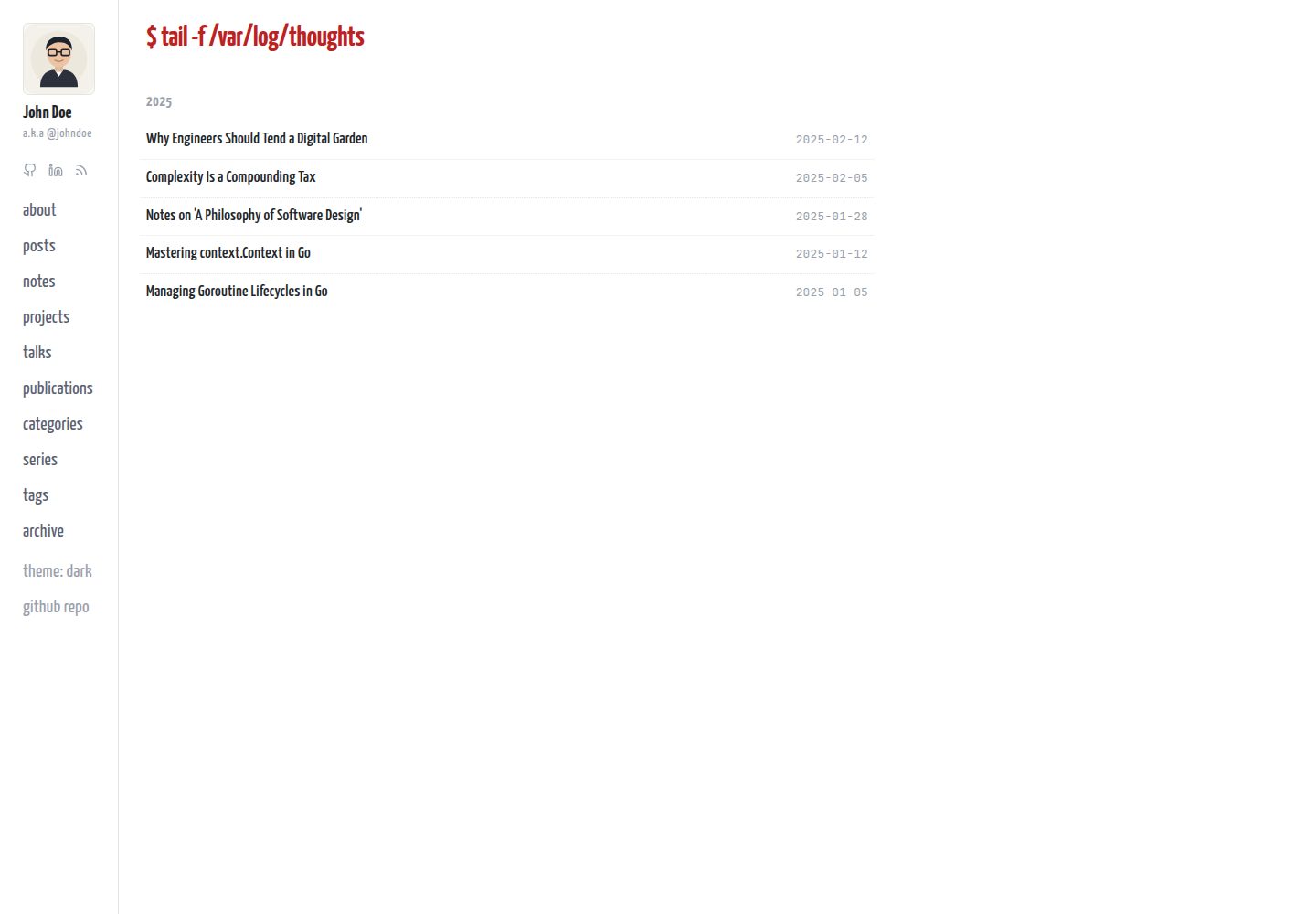
笔记支持 captured、seedling、budding、evergreen 四阶段成熟度标记
Astro博客
breath — Astro 博客模板
作者 netologist
Breath 是一个基于 Astro 的极简数字花园与工程博客主题,原生集成 Obsidian Vault,支持笔记成熟度分级、双向维基链接、工程作品集与演讲合集。
看看你的网站会是什么样
浏览真实页面截图,比较内容排版与手机效果。点击下方缩略图切换,放大查看整页细节。
全部页面与视图 3
截图用于了解视觉与布局,交互效果请以实际项目为准。
采集于 2026-10-13查看来源
值得关注的模板亮点
从已有项目资料中,快速了解它的特点。
可直接作为 Obsidian Vault 打开,预置 wikilink 补全、附件路由与多套内容模板
支持 [[wikilink]] 递归解析与反向链接,并在构建时警告公开文章泄露私有链接
内置 projects、talks、publications 内容集合,自动嵌入视频与演示文稿链接
提供北欧风格深色主题、零依赖即时搜索、Mermaid 灯箱与移动端响应式布局
个人内容与主题代码分离,content/ 默认 gitignore,便于通过 upstream 更新主题
模板详细介绍
Breath 是面向软件工程师、系统思考者和技术写作者的 Astro 博客与数字花园模板。它将结构化的长文博客与不断生长的关联笔记放在同一套内容体系中:博客文章位于 content/blog,花园笔记位于 content/notes,并可通过 [[wikilink]] 语法互相链接、自动生成反向链接。笔记带有 captured、seedling、budding、evergreen 四个成熟度阶段,用于标记想法的生长状态。
模板原生支持将项目目录作为 Obsidian Vault 打开,预置了 wikilink 自动补全、附件路由、阶段徽章以及多套笔记/博客/项目/演讲/论文模板。内容与主题代码分离:个人内容放在根目录 content/(默认被 gitignore),主题自带 example-content 用于首次运行时自动播种,便于通过 upstream 更新主题而不覆盖个人笔记。
除博客和笔记外,模板还提供 projects、talks、publications 三类内容集合,用于工程作品集、会议演讲和学术论文,并会自动识别 YouTube、Vimeo、SpeakerDeck、SlideShare、Google Slides 等链接生成响应式嵌入。站点配置集中在 src/site.config.ts,可设置作者信息、社交链接和侧边栏导航;当 projects、talks、publications 目录为空时,对应导航项会在构建时自动隐藏。
模板包含北欧风格深色主题与明暗切换、自托管字体、零依赖即时搜索、Mermaid 图表灯箱、移动端响应式导航,以及通过 Cloudflare Pages 中间件对 /notes/private/* 做基本认证的私有笔记保护。使用前需注意:私有笔记认证依赖 Cloudflare Pages Functions,其他托管环境不一定适用;演示图片、字体等第三方素材需单独核对许可。
Astro博客
适合你的项目吗?
适用场景
- 用 Astro 搭建同时包含长文博客与关联笔记的个人技术站点
- 在 Obsidian 中写作,并自动同步为可发布的数字花园
- 整理工程作品集、会议演讲和学术论文并生成嵌入展示页
- 在公开笔记之外,用 Cloudflare Pages 基本认证保护私有研究笔记
适合人群
- 习惯使用 Obsidian 写作并希望发布为网站的技术写作者
- 需要博客与数字花园并存的软件工程师和系统思考者
- 希望集中管理项目、演讲和论文展示页的开发者
- 使用 Astro 并偏好内容与主题代码分离、便于跟进上游更新的用户
上手与定制指南
结合仓库当前版本的说明,按下面的资料检查内容、配置与运行要求。
- 1
通过 GitHub 模板或 git clone 创建仓库,将 origin 重命名为 upstream 并添加自己的远程仓库,便于后续拉取主题更新
- 2
运行 npm install 与 npm run dev,首次启动时 scripts/seed-content.mjs 会从 example-content 自动填充根目录 content/
- 3
在 src/site.config.ts 中配置作者姓名、昵称、头像、简介、社交链接和侧边栏导航
- 4
私有笔记认证依赖 Cloudflare Pages Functions 中间件,部署到其他平台时需自行实现等效保护
- 5
演示图片、字体、图标等第三方素材需按各自许可单独核对,不能仅依据代码的 MIT 许可判断
授权与来源资料
使用条件与限制
免费使用 · 保留许可声明本次收录的是公开仓库中采用 MIT 许可的免费版本;免费范围为该版本代码,不代表外部服务或第三方素材免费。
使用时需要遵守
- 允许免费使用、修改、商用和分发该版本代码。
- 分发代码副本或实质性部分时,保留原作者版权声明和完整 MIT 许可声明。
- 代码按现状提供;担保与责任限制以原许可证及适用法律为准。
额外费用与待核对事项
- 演示图片、字体、图标及其他第三方素材需按各自许可核对,不能仅凭代码的 MIT 许可判断。
- 域名、托管、数据库、支付或 AI 等外部服务可能另外收费。
- 私有笔记保护功能依赖 Cloudflare Pages 的 HTTP Basic Auth 中间件,部署到其他托管平台时该保护不可用,需自行实现等效方案。
- 私有笔记的访问控制由 Cloudflare Pages Function 中间件实现,属于平台特定功能,非 Cloudflare Pages 环境无法直接生效。
- 启用私有笔记认证需在 Cloudflare 控制台配置环境变量(AUTH_USER、AUTH_PASSWORD 等),即需要 Cloudflare 账户与相应配置。
- 使用 Cloudflare Pages 部署与私有笔记认证需配置 GitHub Secrets(CLOUDFLARE_API_TOKEN、CLOUDFLARE_ACCOUNT_ID 等),涉及外部服务账户与密钥。
- Cloudflare Pages 部署方式要求将仓库连接到 Cloudflare Pages 服务,属于外部托管平台依赖。
- 私有笔记认证的默认密码为 changeme,上线前必须更换,否则存在安全风险。
查看原文依据
Permission is hereby granted, free of charge
许可证原文
**🔒 Auth-Gated Private Notes:** Protect raw research and personal notes behind Cloudflare Pages HTTP Basic Auth (`/notes/private/*`), while keeping the rest of your garden public.
README 原文
1. **Pages Function:** `functions/private/_middleware.js` intercepts requests to `/notes/private/*`.
README 原文
2. **Environment Variables:** Set credentials in Cloudflare dashboard (**Settings → Variables and Secrets**):
README 原文
3. **Pipeline:** Enable `.github/workflows/cloudflare.yml.disabled` by renaming it to `cloudflare.yml` and configuring GitHub secrets (`CLOUDFLARE_API_TOKEN`, `CLOUDFLARE_ACCOUNT_ID`, `CLOUDFLARE_PROJECT_NAME`, `AUTH_USER`, `AUTH_PASSWORD`).
README 原文
1. Connect your repository to Cloudflare Pages (Preset: **Astro**, Build: `npm run build`, Output: `dist`).
README 原文
https://github.com/netologist/breath/blob/main/LICENSEhttps://github.com/netologist/breath/blob/main/README.md- `AUTH_PASSWORD` (default: `changeme` — **rotate before going live!**)
README 原文
DeepSeek 根据仓库许可证和 README 整理 ·2026-10-13。结果仅覆盖已读取资料,依赖、图片、字体及后续条款变更以各自原文为准。
项目核对记录与介绍依据
模板资料
- 来源平台
- GitHub
- 资料与维护参考分
- 资料较完整 · 80 / 100
- 技术栈
- Astro
- 网站类型
- 博客
这个分数如何计算
本站按许可资料(最高30分)、演示链接(12分)、预览图(10分)、Star数(15分)、记录的维护时间(15分)、描述完整度(8分)、功能记录(5分)和分类资料(5分)计算。它不是代码、安全或性能测试,也不是 Google 评分;有链接不代表已实测可用。
这个项目需要核对什么
- 记录的仓库更新时间
- 2026-09-13
- 截图检查日期
- 2026-10-13
已收录演示链接。请用你的内容与屏幕尺寸检查;有演示不代表表单、认证或支付已经可用。
目录记录的主要技术栈是 Astro。请通过依赖清单和锁文件核对实际版本与托管要求。这些说明基于收录资料,不代表代码审计或部署实测。
查看具体选型方法 →介绍的制作与核对状态
介绍由 AI 辅助整理目录与仓库资料。仓库作者不等于这篇介绍的审核者。
审核声明: [email protected] · 2026-10-13
查看当时使用的来源资料
SHA-256: e5379acf264eecb02473a18d591c8e0d39c9ed9e632a7330345609b19f231ea0
2026-10-13T00:31:51.877Z
来源文件 / 仓库# 🌿 Breath — Minimalist Digital Garden & Engineering Blog
[](https://astro.build)
[](https://obsidian.md)
[](https://opensource.org/licenses/MIT)
[](https://github.com/netologist/breath/actions/workflows/github-pages.yml)
**Breath** is a minimalist, hyper-fast **Digital Garden & Engineering Blog** template for [Astro 5+](https://astro.build) with native, zero-setup **Obsidian Vault** integration.
Designed for software engineers, systems thinkers, and technical writers who want to seamlessly combine structured long-form essays with an evolving associative knowledge garden.
---
## ✨ Highlights
- **🌱 4-Stage Note Maturity Ladder:** Evolve ideas across a structured growth cycle (`📥 Captured` → `🌱 Seedling` → `🌿 Budding` → `🌲 Evergreen`).
- **🔮 Native Obsidian Vault:** Open this repository directly in [Obsidian](https://obsidian.md) as a fully configured vault with pre-configured `[[wikilinks]]`, templates, and digital garden property badges.
- **🎨 Nordic Dark Theme & Real-time Toggle:** Sleek dark mode inspired by the Nordic Neovim palette (`#222630` background, `#ECEFF4` text, `#EBCB8B` accents), zero-flicker SSR-safe cookie & `localStorage` persistence, OS auto-detection, and live Mermaid diagram theme re-rendering.
- **💼 Engineering Portfolio & Talks Collections:** First-class collections for `projects`, `talks`, and `publications` with automatic video/slide embeds (YouTube, Vimeo, SlideShare, SpeakerDeck, Google Slides, DOI/PDF links) and smart conditional sidebar navigation.
- **🔍 Interactive Media Lightbox:** Click-to-zoom modal lightbox for architecture diagrams (Mermaid) and inline images with responsive zoom and pan controls.
- **⚙️ Centralized Configuration (`src/site.config.ts`):** Single typed configuration file for your full name, nickname (`a.k.a @...`), avatar, bio, dynamic social links, and sidebar navigation.
- **📚 Andy Matuschak Stacked Notes (Desktop):** Click note links to slide new notes in horizontally as smooth accordion columns (`‹`), collapse side-strips, and sync state in URL query parameters.
- **📱 100% Mobile Responsive:** Clean direct page navigation on mobile, full-screen slide-out TOC and navigation drawers, and touch-optimized list items.
- **⚡ Zero-FOUT Self-Hosted Typography:** Bundled `Yanone Kaffeesatz` & `JetBrains Mono` with `<head>` preloading and `font-display: block` for instant, shift-free first-frame rendering.
- **🔒 Auth-Gated Private Notes:** Protect raw research and personal notes behind Cloudflare Pages HTTP Basic Auth (`/notes/private/*`), while keeping the rest of your garden public.
- **📂 Clean Content Separation:** Your personal content lives in root `content/` outside `src/` (gitignored), while the theme ships with self-seeding `example-content/` for effortless upstream template updates.
- **🔗 Recursive Bi-directional Wikilinks & Backlinks:** Write `[[note-id]]` or `[[note-id|Custom Label]]` with automatic recursive resolution across subdirectories and build-time safety warnings against leaking private links in public posts.
- **🔍 Instant Zero-Dependency Search & Sort:** Real-time search across titles, descriptions, and tags with top-corner `Updated` / `Created` timeline sorting.
- **🖼️ Rich Embeds & Link Previews:** Automatic responsive 16:9 YouTube embeds, native X/Twitter embed widgets, and floating OpenGraph hover cards for external URLs.
---
## 🚀 Quick Start
Breath is distributed as a **GitHub Template Repository**.
### 1. Create your repository
Click **"Use this template"** on GitHub or clone the repository:
```bash
git clone https://github.com/netologist/breath.git my-garden
cd my-garden
```
### 2. Set up Upstream Remote (for seamless theme updates)
```bash
git remote rename origin upstream
git remote add origin https://github.com/your-username/my-garden.git
git push -u origin main
```
### 3. Install & Start
```bash
npm install
npm run dev
```
> **Automatic Content Seeding:** On first run, `scripts/seed-content.mjs` automatically populates root `content/` from `example-content/`. Your local `content/` directory is gitignored so upstream theme updates (`git pull upstream main`) will never overwrite your personal notes!
Visit `http://localhost:4321` in your browser.
---
## 🔮 Native Obsidian Integration
You can open this project directory directly in **Obsidian** as an out-of-the-box digital garden vault:
1. Open **Obsidian** → Click **"Open folder as vault"**.
2. Select your `breath` project folder.
3. Everything is pre-configured and ready:
- **`[[Wikilinks]]` Auto-Completion:** Typing `[[` auto-suggests notes and links them cleanly.
- **Visual Growth Badges:** Frontmatter properties render colored badges for `stage` (`🌱 seedling`, `🌿 budding`, `🌲 evergreen`, `📥 captured`).
- **Attachment Routing:** Drag-and-dropped images automatically save to `public/images/`.
- **Pre-configured Templates (`Ctrl/Cmd + T`):**
- `new-note.md` — Standard seedling note
- `new-evergreen.md` — Deep reference note
- `new-blog-post.md` — Blog article
- `new-capture.md` — Private research capture
- `new-project.md` — Engineering portfolio project showcase
- `new-talk.md` — Conference presentation & slides
- `new-publication.md` — Academic paper / research publication
---
## ⚙️ Configuration (`src/site.config.ts`)
Customize author identity, navigation links, social icons, and site metadata in `src/site.config.ts`:
```typescript
export const siteConfig = {
// Author & Identity
author: {
name: 'John Doe',
nickname: 'johndoe', // Rendered as "a.k.a @johndoe"
avatar: '/avatar.svg',
bio: 'Engineer, tinkerer, and systems thinker.',
},
// Social Links in Sidebar (SVG icons rendered automatically)
social: [
{ platform: 'github', href: 'https://github.com/your-name', label: 'GitHub' },
{ platform: 'linkedin', href: 'https://linkedin.com/in/your-name', label: 'LinkedIn' },
{ platform: 'x', href: 'https://x.com/your-handle', label: 'X / Twitter' },
{ platform: 'rss', href: '/rss.xml', label: 'RSS Feed' },
],
// Sidebar Navigation Items
nav: [
{ href: '/about', label: 'about' },
{ href: '/blog', label: 'posts' },
{ href: '/notes', label: 'notes' },
{ href: '/projects', label: 'projects' }, // Conditionally visible (hidden if folder is empty)
{ href: '/talks', label: 'talks' }, // Conditionally visible (hidden if folder is empty)
{ href: '/publications', label: 'publications' }, // Conditionally visible (hidden if folder is empty)
{ href: '/categories', label: 'categories' },
{ href: '/series', label: 'series' },
{ href: '/tags', label: 'tags' },
{ href: '/archive', label: 'archive' },
],
// Source Repository Link
sourceLink: {
href: 'https://github.com/your-username/my-garden',
label: 'github repo',
},
// Site Metadata
site: {
title: 'Breath',
description: 'A minimalist digital garden and engineering blog.',
url: 'https://your-domain.com',
},
};
```
> **💡 Smart Conditional Navigation:** The sidebar routes for `/projects`, `/talks`, and `/publications` are evaluated at build time. If their corresponding content directories contain no `.md`/`.mdx` files, the navigation items are cleanly omitted from the sidebar to avoid broken links or empty pages.
---
## 📂 Project Structure
```text
├── .obsidian/ # Obsidian vault configuration, templates & CSS snippets
├── content/ # Your site content (gitignored by default)
│ ├── blog/ # Public blog articles (.md / .mdx)
│ ├── notes/ # Public garden notes (.md / .mdx)
│ │ └── private/ # Private / captured notes (auth-gated)
│ ├── projects/ # Engineering portfolio projects (.md / .mdx)
│ ├── talks/ # Conference talks & presentations (.md / .mdx)
│ └── publications/ # Research papers & academic articles (.md / .mdx)
├── example-content/ # Tracked demo content for fresh clones
├── docs/
│ ├── decisions/ # Architecture Decision Records (ADR-001 to ADR-008)
│ └── tech-debt.md # Technical debt & open decision registry
├── functions/
│ └── private/
│ └── _middleware.js # Cloudflare Pages Basic Auth middleware
├── public/
│ ├── fonts/ # Self-hosted woff2 font files
│ ├── images/ # Image attachments (used by Obsidian & Astro)
│ ├── avatar.svg # Profile avatar
│ └── favicon.svg # Site favicon
├── src/
│ ├── site.config.ts # Centralized site & author configuration
│ ├── content.config.ts # Content collections schema (Astro Content Layer)
│ ├── components/ # UI components (Sidebar, Popovers, etc.)
│ ├── layouts/ # BaseLayout, BlogLayout, NoteLayout
│ ├── pages/ # File-based routes (blog, notes, tags, categories)
│ ├── plugins/ # remark-wikilinks, rehype-embeds
│ └── styles/ # CSS variables, typography, and global layout
└── astro.config.mjs
```
---
## ✍️ Content Authoring
### Writing Blog Posts (`content/blog/my-post.md`)
```markdown
---
title: "Building Resilient Distributed Systems"
description: "Patterns for high-availability Raft state machines and consensus."
date: 2026-08-27
updated: 2026-08-28
tags: ["distributed-systems", "raft", "go"]
category: "engineering"
series: "Distributed Systems"
seriesOrder: 1
draft: false
---
Blog posts support full Markdown, code formatting, responsive embeds, and [[wikilinks]].
```
### Writing Garden Notes (`content/notes/my-note.md`)
```markdown
---
title: "Abstractions Should Hide Complexity"
description: "Deep modules provide powerful functionality through narrow interfaces."
stage: evergreen # captured | seedling | budding | evergreen
tags: ["architecture", "design-patterns"]
category: "architecture"
para: resources # projects | areas | resources | archives (optional)
created: 2026-08-27
updated: 2026-08-28
---
Notes can link to other notes seamlessly with `[[note-slug]]` or `[[note-slug|Custom Label]]`.
```
### Showcasing Projects (`content/projects/my-project.md`)
```markdown
---
title: "Breath Digital Garden"
description: "A minimalist digital garden and blog theme engineered for Astro."
date: 2026-08-20
tags: ["astro", "typescript", "design-systems"]
url: "https://netologist.github.io/breath"
repo: "https://github.com/netologist/breath"
status: active # active | completed | wip | archived
role: "Creator"
featured: true
---
Project overview, architecture diagrams, tech stack breakdown, and roadmap.
```
### Documenting Talks & Slides (`content/talks/my-talk.md`)
```markdown
---
title: "Scaling Goroutines & Concurrency Patterns in Production"
description: "Deep dive into goroutine lifecycles, channel patterns, and memory leaks."
date: 2026-05-20
event: "GopherCon Europe 2026"
location: "Berlin, Germany"
url: "https://www.youtube.com/watch?v=dsTXcSeAZq8"
slidesUrl: "https://speakerdeck.com/player/a3674bbec0c44fb7b4df4c356e9c4038"
tags: ["go", "concurrency", "performance"]
language: "en"
featured: true
---
Talk summary and key takeaways.
Breath automatically detects video URLs (YouTube, Vimeo) and presentation URLs (SpeakerDeck, SlideShare, Google Slides) to render responsive embeds right at the top of your talk page!
```
### Listing Publications & Research (`content/publications/my-paper.md`)
```markdown
---
title: "Evaluating Latency and Partition Tolerance in Multi-Raft Clusters"
description: "An empirical study analyzing quorum consensus behaviors during cross-datacenter partitions."
date: 2025-06-18
venue: "ACM SIGOPS Operating Systems Review"
authors:
- "Hüseyin Özgan"
- "Jane Smith"
url: "https://doi.org/10.1145/example-paper"
pdfUrl: "https://arxiv.org/pdf/2301.00001.pdf"
doi: "10.1145/3456789.012345"
tags: ["distributed-systems", "raft", "research"]
featured: true
---
Abstract and key research findings. Breath displays quick-access badges for direct PDF reading and DOI citations.
```
---
## 🎨 Theme & Appearance
Breath features a clean Light theme and a high-contrast **Nordic Dark Theme** inspired by the Nordic Neovim palette.
### Nordic Color Palette Tokens
| Token | Light Theme | Dark Theme (Nordic) | Role |
| :--- | :--- | :--- | :--- |
| `--bg` | `#ffffff` | `#222630` (Nordic black2) | Base page background |
| `--bg-surface` | `#f8f8f6` | `#1E222A` (Nordic black1) | Card surfaces & sidebar drawer |
| `--border` | `#e4e4e0` | `#3B4252` (Nordic gray2) | Dividers & note borders |
| `--text-primary` | `#212529` | `#ECEFF4` (Nordic white3) | High-contrast body & heading text |
| `--text-secondary` | `#5a6070` | `#D8DEE9` (Nordic white1) | Secondary descriptions |
| `--text-muted` | `#9aa0ab` | `#8FBCBB` (Nordic cyan) | Metadata, dates & tags |
| `--text-link` | `#227ce8` | `#EBCB8B` (Nordic yellow) | Hyperlinks & active states |
| `--title-accent` | `#b22` | `#D08770` (Nordic orange) | Section titles & decorative accents |
### Zero-Flicker Theme Engine
1. **Seamless Toggle:** Integrated right into the sidebar navigation list (`theme: dark / light`) on desktop and as an icon button in the mobile sticky header.
2. **SSR-Safe & Zero-FOUT:** Themes are persisted to both `localStorage` and `cookie` (`theme=dark|light`). An inline `<head>` script reads the state and applies `html.dark` before the first paint, eliminating any white flash during page transitions.
3. **OS Auto-Detection:** Automatically matches `prefers-color-scheme: dark` when no explicit user preference is stored.
4. **Live Mermaid Re-theming:** Whenever the theme toggles, a custom `theme-changed` DOM event is dispatched so interactive Mermaid diagrams re-render instantly with matching light or dark styling.
---
## 🔒 Private Notes Setup (Cloudflare Pages)
Breath includes zero-config HTTP Basic Auth for Cloudflare Pages:
1. **Pages Function:** `functions/private/_middleware.js` intercepts requests to `/notes/private/*`.
2. **Environment Variables:** Set credentials in Cloudflare dashboard (**Settings → Variables and Secrets**):
- `AUTH_USER` (default: `admin`)
- `AUTH_PASSWORD` (default: `changeme` — **rotate before going live!**)
- `AUTH_REALM` (default: `Private Notes`)
3. **Pipeline:** Enable `.github/workflows/cloudflare.yml.disabled` by renaming it to `cloudflare.yml` and configuring GitHub secrets (`CLOUDFLARE_API_TOKEN`, `CLOUDFLARE_ACCOUNT_ID`, `CLOUDFLARE_PROJECT_NAME`, `AUTH_USER`, `AUTH_PASSWORD`).
For full details, read [`content/notes/cloudflare-private-notes.md`](content/notes/cloudflare-private-notes.md).
---
## 🚢 Deployment
### GitHub Pages (Default)
The repository ships with `.github/workflows/github-pages.yml` active:
1. In your GitHub repo: **Settings → Pages → Source: GitHub Actions**.
2. Push to `main` — your site builds and deploys automatically.
### Cloudflare Pages (with Private Notes Auth)
1. Connect your repository to Cloudflare Pages (Preset: **Astro**, Build: `npm run build`, Output: `dist`).
2. Add secrets `AUTH_USER` and `AUTH_PASSWORD`.
3. Enable `.github/workflows/cloudflare.yml.disabled` (rename to `.yml`).
---
## 📄 License
MIT © [Breath Contributors](LICENSE)
看看同类模板
对比同技术栈与用途的模板,找到更适合的视觉与内容结构。

astrowind
⭕️ AstroWind: A free template using Astro v7 and Tailwind CSS v4. Astro starter theme.
Astro · 博客

astro-paper
基于 Astro 的博客主题,使用 Markdown/MDX 内容、Tailwind 样式和 Pagefind 搜索。搜索属于博客功能,不代表独立工具站产品。
Astro · 博客

fuwari
✨A static blog template built with Astro.
Astro · 博客

Firefly
Firefly 是一款基于 Astro 的静态博客主题,由 CuteLeaf 在 saicaca 的 Fuwari 模板基础上二次开发,主打清新美观的视觉风格。
Astro · 博客

astro-theme-cactus
面向博客与笔记发布的 Astro 启动模板,支持 Markdown/MDX 内容、Tailwind 样式与 Pagefind 搜索,主要用途是发布文章和笔记。
Astro · 博客

astrofy
Astrofy is a free and open-source template for your Personal Portfolio Website built with Astro and TailwindCS…
Astro · 作品集