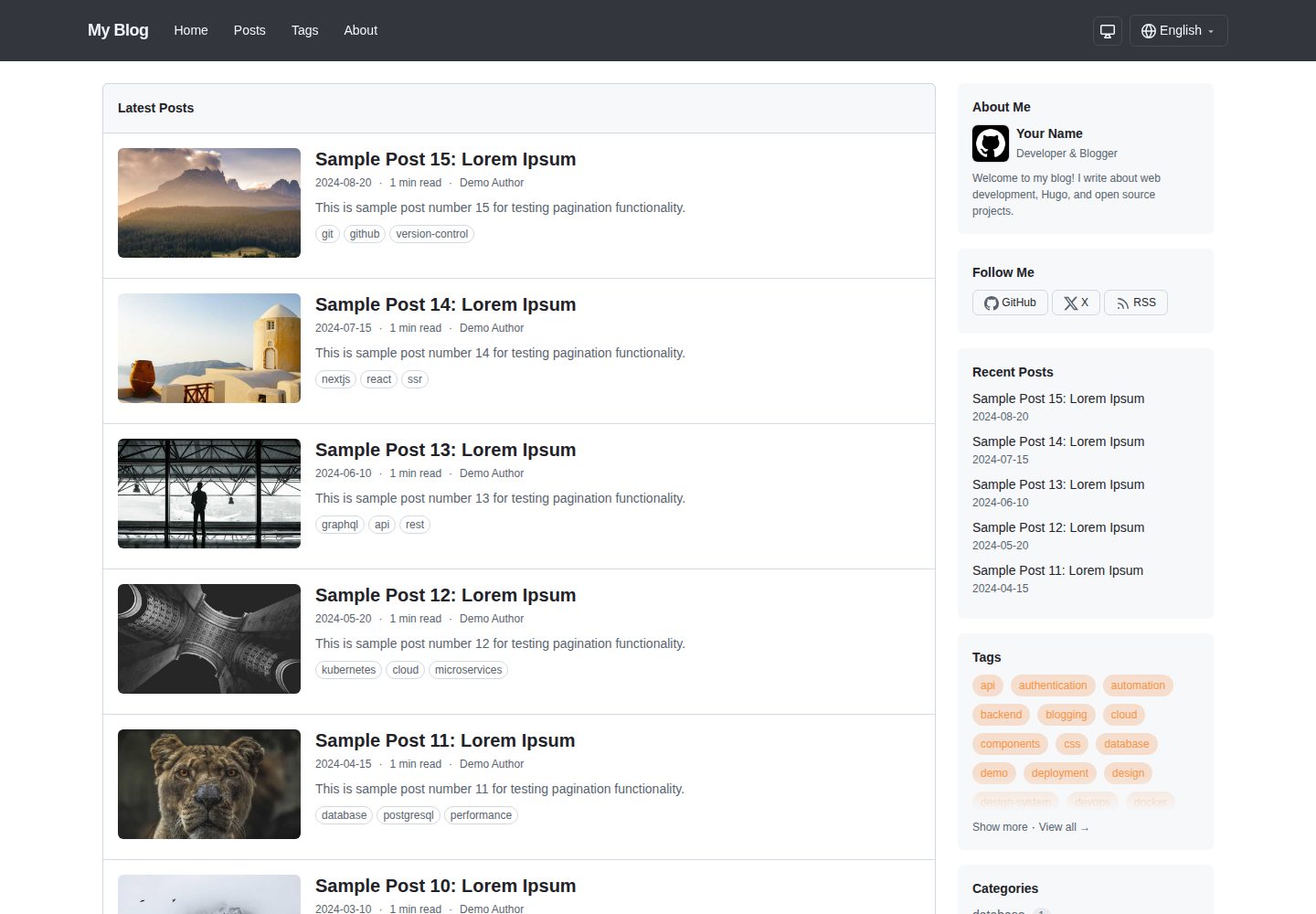
Uses GitHub's Primer CSS design system for clean blog typography and responsive layout
HugoBlog
hugo-primer-blog — Hugo Blog Template
By ngs
A Hugo blog theme based on GitHub's Primer CSS design system, with dark mode, multilingual support, and optional llms.txt / Markdown output.
Explore the design
Compare the page layouts and mobile experience. Open any screenshot for a closer look.
Desktop homepage1 / 3
Desktop captureTop of page
Actual screenshot captured by the server browser.
All pages & views 3
Screenshots show visual appearance; interactive behavior may differ.
Recorded 2026-10-02View source
What stands out
A quick read of the recorded project description.
Dark mode supports automatic system preference following and manual toggle, with the choice saved in localStorage
Built-in English and Japanese translations, supporting multilingual sites with per-language directories
Primary color can be overridden via primaryColor to replace the default GitHub blue, automatically generating light and dark color scales
Optional LLMS and Markdown output formats generate a /llms.txt site index and per-page raw Markdown
Configurable sidebar modules support recent posts, tags, categories, archives, links, and custom partials
Template Details
This is a blog theme for Hugo static sites. The visual layer uses GitHub's Primer CSS design system, giving it a clean, responsive look with an optional sidebar layout. The README states that the theme includes dark mode (automatically following system preference, with manual toggle saved to localStorage), multilingual i18n (with built-in English and Japanese translations), a configurable primary color, complete Markdown typography styles, and asset processing via Hugo Pipes.
For content organization, the theme supports per-language directories (such as content/en, content/ja), provides pages for home, posts, and about, and allows sidebar modules to be combined via params.sidebarModules, including recent posts, tags, categories, archives, and links. Post front matter supports tags, categories, authors, descriptions, featured images (recommended 992×525), hiding reading time, and recursively generating custom Open Graph meta tags via the ogp field.
The theme also includes two optional output formats: LLMS generates a /llms.txt site index on the home page, and Markdown generates a raw Markdown copy for each page, making content easier for AI and LLMs to consume. These two formats are disabled by default and must be explicitly enabled in the site configuration's [outputs] section (Hugo's outputs key does not inherit theme configuration).
Regarding usage constraints, the README requires Hugo v0.146.0 or later, and does not require the Extended version. When installing via Git Submodule, npm install must be run in the theme directory to fetch Primer CSS dependencies. The theme is released under the MIT license, but third-party assets such as demo images, fonts, and icons require separate license verification.
HugoBlog
Is it right for your project?
Use Cases
- Building a personal technical blog with Hugo and wanting a visual style close to GitHub
- Needing multilingual content such as Chinese, English, and Japanese with built-in i18n support from the theme
- Wanting to provide an llms.txt index and raw Markdown copies of pages for AI or LLMs
- Needing a lightweight blog site with dark mode and a customizable primary color
Suitable For
- Sites using Hugo version v0.146.0 or later
- Developers who accept adding the theme via Hugo Module or Git Submodule
- Individuals or teams needing a multilingual blog with modular sidebar layout
- Projects that want content published in both HTML and raw Markdown forms
Getting started & customization
Use these recorded setup notes alongside the repository instructions for your chosen version.
- 1
Hugo version must be v0.146.0 or later; the Extended version is not required
- 2
Recommended to import go.ngs.io/hugo-primer-blog as a Hugo Module, or use Git Submodule and run npm install in the theme directory
- 3
LLMS and Markdown output formats are disabled by default and must be explicitly enabled in the site configuration's [outputs] section
- 4
Custom styles go in assets/css/custom.css and are loaded after the theme styles
- 5
To override templates, copy files from the theme's layouts/ directory into the site's layouts/ directory
License & source material
Usage conditions & limitations
Free to use · keep license noticeThis listing covers the free version under the MIT license in the public repository; the free scope is the code of this version and does not imply that external services or third-party assets are free.
Must comply with when using
- Free use, modification, commercial use, and distribution of this version's code are permitted.
- When distributing copies or substantial portions of the code, retain the original author's copyright notice and the full MIT license notice.
- The code is provided as is; warranties and limitations of liability are governed by the original license and applicable law.
Additional costs & items to verify
- Using this theme requires Hugo version v0.146.0 or later; the Extended version is not required.
- When installing via Git Submodule, npm install must be run in the theme directory to fetch Primer CSS dependencies, so a Node.js and npm environment is required.
- LLMS and Markdown output formats are disabled by default and must be explicitly enabled in the site configuration's [outputs] section to generate llms.txt and per-page Markdown.
- When installing as a Hugo Module, the vanity import path go.ngs.io/hugo-primer-blog is used, which resolves to the GitHub repository.
- If site analytics are enabled, you must provide your own Google Analytics 4 measurement ID, which is an external service configuration.
- Demo images, fonts, icons, and other third-party assets require separate license verification and cannot be judged solely by the code's MIT license.
- External services such as domains, hosting, databases, payments, or AI may incur additional charges.
View Original Text Basis
Permission is hereby granted, free of charge
Original License Text
Hugo v0.146.0 or later (Extended version not required)
Original README
Node.js and npm (for Primer CSS dependencies during theme development)
Original README
The theme **defines** these output formats (and their media types) and provides the templates, but does not enable them by default. You opt in per site via `[outputs]`
Original README
This theme uses a vanity import path. The module is hosted at [go.ngs.io/hugo-primer-blog](https://go.ngs.io/hugo-primer-blog/) and resolves to the GitHub repository.
Original README
https://github.com/ngs/hugo-primer-blog/blob/main/LICENSEhttps://github.com/ngs/hugo-primer-blog/blob/main/README.mdgoogleAnalyticsID = "G-XXXXXXXXXX" # Google Analytics 4 ID
Original README
Compiled by DeepSeek based on repository license and README ·2026-10-02. Results only cover the materials read; dependencies, images, fonts, and subsequent term changes are subject to their respective original texts.
Project checks & description sources
Template Information
- Source platforms
- GitHub
- Documentation and maintenance reference score
- More documented · 87 / 100
- Technologies
- Hugo
- Website type
- Blog
How this score is calculated
Our heuristic uses license records (up to 30), a demo link (12), a preview (10), stars (15), recorded maintenance (15), description completeness (8), feature records (5) and classification data (5). It is not a code, security or performance test, or a Google score. A link does not establish tested functionality.
What to verify for this project
- Repository update recorded
- 2026-08-23
- Screenshot last checked
- 2026-10-02
A demo link is listed. Check it with your own content and viewport sizes; its presence does not confirm that forms, authentication or payments work.
The catalog identifies Hugo as the primary stack. Check the actual dependency manifest and lockfile for versions and hosting requirements. These notes use recorded metadata, not a code audit or a deployment test.
Use a selection guide →How this description was prepared
AI-assisted description based on catalog records and repository material. Repository authors are not automatically the reviewers of this description.
Automatically checked against source and license rules; no manual editorial review.
Inspect the recorded source material
SHA-256: 8965a6c383e2e7dc60f5c69ef3b7d2995d4469929502682cb5d338bbf43f0ccd
2026-10-02T10:23:31.144Z
Source file / repository# Primer Blog
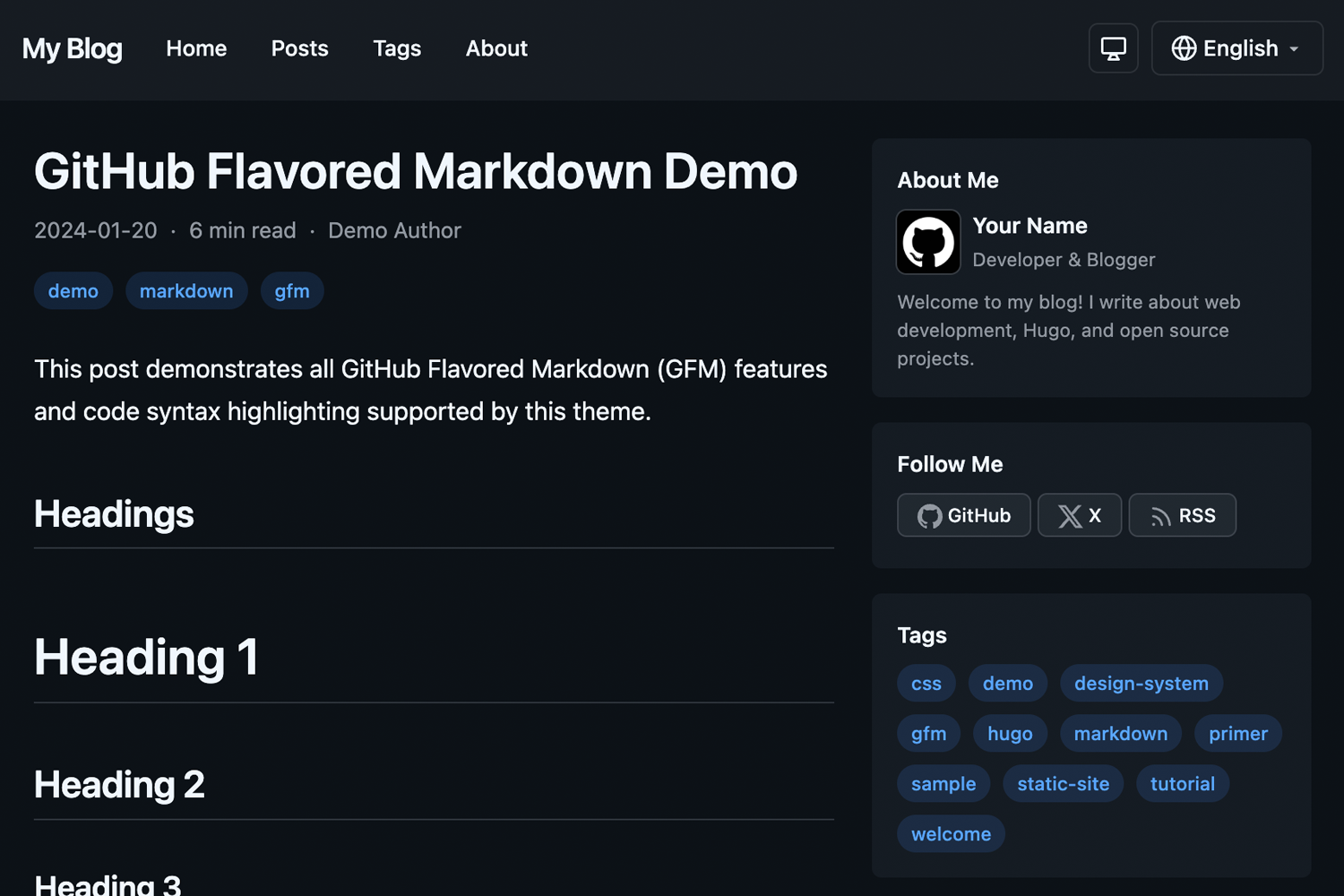
A clean, responsive Hugo blog theme using GitHub's [Primer CSS](https://primer.style/) design system.
**[Live Demo](https://hugo-primer-blog-demo.ngs.io)**
## Features
- **Dark Mode** - Automatic system preference detection with manual override, saved to localStorage
- **Multilingual** - Full i18n support with included English and Japanese translations
- **Responsive Design** - Looks great on all devices with optional sidebar layout
- **Primer CSS** - Built on GitHub's design system for a clean, modern look
- **Customizable Primary Color** - Easy accent color customization via config
- **Markdown Styling** - Full Primer markdown styling for rich content
- **LLM-friendly Output** - Optional `llms.txt` site index and per-page raw Markdown for AI consumption
- **Hugo Pipes** - Built with Hugo Pipes for optimized asset handling
## Requirements
- Hugo v0.146.0 or later (Extended version not required)
- Node.js and npm (for Primer CSS dependencies during theme development)
## Installation
### As a Hugo Module (Recommended)
1. Initialize your Hugo site as a module:
```bash
hugo mod init github.com/your-username/your-site
```
2. Add the theme to your `hugo.toml`:
```toml
[module]
[[module.imports]]
path = "go.ngs.io/hugo-primer-blog"
```
> **Note:** This theme uses a vanity import path. The module is hosted at [go.ngs.io/hugo-primer-blog](https://go.ngs.io/hugo-primer-blog/) and resolves to the GitHub repository.
### As a Git Submodule
1. Add the theme as a submodule:
```bash
git submodule add https://github.com/ngs/hugo-primer-blog.git themes/hugo-primer-blog
```
2. Install npm dependencies:
```bash
cd themes/hugo-primer-blog
npm install
```
3. Set the theme in your `hugo.toml`:
```toml
theme = "hugo-primer-blog"
```
## Configuration
### Basic Configuration
```toml
baseURL = "https://example.com/"
title = "My Blog"
theme = "hugo-primer-blog"
defaultContentLanguage = "en"
defaultContentLanguageInSubdir = true
[params]
sidebar = true # Enable/disable sidebar
recentPostsCount = 5 # Number of recent posts in sidebar module
defaultTheme = "auto" # auto, light, or dark
dateFormat = "2006-01-02"
showReadingTime = true
showAuthor = true
showShareButtons = true
googleAnalyticsID = "G-XXXXXXXXXX" # Google Analytics 4 ID
# Sidebar modules - order determines display order
# Available: recentPosts, tags, categories, archive, links (+ custom partials)
[[params.sidebarModules]]
partial = "recentPosts"
[[params.sidebarModules]]
partial = "tags"
[[params.sidebarModules]]
partial = "archive"
[params.social]
github = "your-username"
x = "your-username"
# Custom favicon (optional)
faviconIco = "favicon.ico"
faviconPng = "favicon.png"
# Apple Touch Icons (optional)
[[params.appleTouchIcons]]
sizes = "180x180"
href = "apple-touch-icon-180x180.png"
[[params.appleTouchIcons]]
sizes = "152x152"
href = "apple-touch-icon-152x152.png"
```
### Multilingual Configuration
```toml
[languages]
[languages.en]
languageName = "English"
weight = 1
contentDir = "content/en"
[languages.ja]
languageName = "日本語"
weight = 2
contentDir = "content/ja"
```
### Menus
```toml
[menus]
[[menus.main]]
name = "Home"
url = "/"
weight = 1
[[menus.main]]
name = "Posts"
url = "/posts/"
weight = 2
[[menus.footer]]
name = "Privacy"
url = "/privacy/"
weight = 1
```
## Content Structure
```
content/
├── en/
│ ├── posts/
│ │ └── my-post.md
│ └── about.md
└── ja/
├── posts/
│ └── my-post.md
└── about.md
```
### Front Matter
```yaml
---
title: "My Post Title"
date: 2024-01-15
draft: false
tags: ["hugo", "primer"]
categories: ["tutorial"]
author: "Your Name"
description: "A brief description of the post"
image: "/images/featured.jpg" # Optional featured image (992×525 recommended; rendered at that aspect ratio)
hideReadingTime: true # Optional: hide reading time for this page
---
```
### Custom Open Graph (OGP) Meta Tags
You can customize Open Graph meta tags per page using the `ogp` frontmatter. The structure is recursively converted to meta tags:
```yaml
---
title: "About Me"
ogp:
og:
type: profile
profile:
first_name: Atsushi
last_name: Nagase
username: ngs
gender: male
---
```
This generates:
```html
<meta property="og:type" content="profile">
<meta property="profile:first_name" content="Atsushi">
<meta property="profile:last_name" content="Nagase">
<meta property="profile:username" content="ngs">
<meta property="profile:gender" content="male">
```
Nested structures are supported with colon-separated property names:
```yaml
ogp:
foo:
bar:
baz: "value"
```
Outputs: `<meta property="foo:bar:baz" content="value">`
Arrays generate multiple meta tags with the same property:
```yaml
ogp:
article:
tag:
- Hugo
- Blog
- Tech
```
Outputs:
```html
<meta property="article:tag" content="Hugo">
<meta property="article:tag" content="Blog">
<meta property="article:tag" content="Tech">
```
Default `og:*` tags (title, description, type, url, image, site_name, locale) are automatically generated unless overridden in the `ogp.og` section.
## LLM-friendly Output (llms.txt & Markdown)
The theme ships two optional [output formats](https://gohugo.io/configuration/output-formats/) that make your content easy for LLMs and AI agents to consume:
- **`LLMS`** - renders a single `/llms.txt` on the home page: an index of your posts (title, link, and description) following the [llms.txt](https://llmstxt.org/) convention.
- **`Markdown`** - renders a raw Markdown `index.md` next to each page's `index.html`, containing the page's original Markdown content without HTML rendering.
### Enabling
The theme **defines** these output formats (and their media types) and provides the templates, but does not enable them by default. You opt in per site via `[outputs]`:
```toml
[outputs]
home = ["HTML", "RSS", "LLMS"]
page = ["HTML", "Markdown"]
```
> **Why opt in here, and not in the theme?** Hugo merges most config keys from themes, but the `outputs` key uses the `none` merge strategy, so it is **not** inherited from a theme. The format *definitions* (`outputFormats` / `mediaTypes`) use the `shallow` strategy and *are* inherited, so all you need in your own config is the `[outputs]` block above. See [Merge configuration from themes](https://gohugo.io/configuration/introduction/#merge-configuration-from-themes).
Once enabled, `hugo` generates:
```
public/
├── llms.txt # site index (home page)
├── about/
│ └── index.md # raw Markdown for the About page
└── posts/
└── my-post/
├── index.html
└── index.md # raw Markdown for the post
```
For multilingual sites, one `llms.txt` is generated per language (e.g. `/llms.txt` and `/ja/llms.txt`), automatically using each language's title, description, and posts.
### Customizing
The output is rendered by two templates you can override like any other:
- `layouts/home.llms.txt` - the `llms.txt` index. By default it lists pages in the `posts` section.
- `layouts/page.md` - the per-page Markdown rendering.
Copy either file into your site's `layouts/` directory to customize it.
## Customization
### Primary Color
You can customize the accent color used for links, tags, pagination, and other interactive elements:
```toml
[params]
primaryColor = "#8250df" # Purple
```
This overrides the default GitHub blue (`#0969da`) with your chosen color. The theme automatically generates appropriate shades for light and dark modes.
### Custom CSS
Create `assets/css/custom.css` in your site root to add custom styles:
```css
/* Your custom styles here */
```
The theme's own styles live in `assets/css/primer-blog.css`. Your `custom.css` is loaded *after* it, so your rules override the theme without shadowing it. (See `exampleSite/assets/css/custom.css` for a working example.)
### Overriding Templates
Copy any template from the theme's `layouts/` directory to your site's `layouts/` directory to override it.
## Development
To run the example site:
```bash
git clone https://github.com/ngs/hugo-primer-blog.git
cd hugo-primer-blog
npm install
hugo server --source exampleSite
```
Then open http://localhost:1313 in your browser.
## Contributing
Contributions are welcome! Please feel free to submit a Pull Request.
## License
This theme is released under the [MIT License](LICENSE).
## Credits
- [Hugo](https://gohugo.io/) - The world's fastest static site generator
- [Primer CSS](https://primer.style/) - GitHub's design system
Explore similar templates
Compare previews and descriptions within the same stack and category.

hugo-PaperMod
A fast, clean, responsive Hugo theme for blogs and lightweight portfolios, with three layout modes (Regular, Home-Info, Profile), automatic and manual light/dark themes, Fuse.js client-side search, multilingual support, and built-in Open Graph, Twitter Cards, and Schema.org data.
Hugo · Portfolio

LoveIt
LoveIt is a clean, elegant, and feature-rich Hugo blog theme derived from LeaveIt and KeepIt, MIT-licensed. It offers light/dark modes, responsive layout, multilingual support, and search via Lunr.js or Algolia.
Hugo · Blog

hugo-coder
hugo-coder is a minimalist Hugo blog theme maintained by luizdepra under the MIT license. It provides a clean, text-focused blog appearance, configuration documentation in the docs directory, and a complete exampleSite with hugo.toml.
Hugo · Blog

blowfish
Blowfish is a Hugo personal website and blog theme built with Tailwind CSS 4, focused on lightness, simplicity, and content-first presentation.
Hugo · Blog

hugo-paper
hugo-paper is a simple, clean, and customizable Hugo blog theme configured through config.toml or hugo.toml.
Hugo · Blog

hextra
Hextra is a Hugo theme for documentation and blog sites, built on Hugo and Tailwind CSS with design referencing Nextra.
Hugo · Documentation