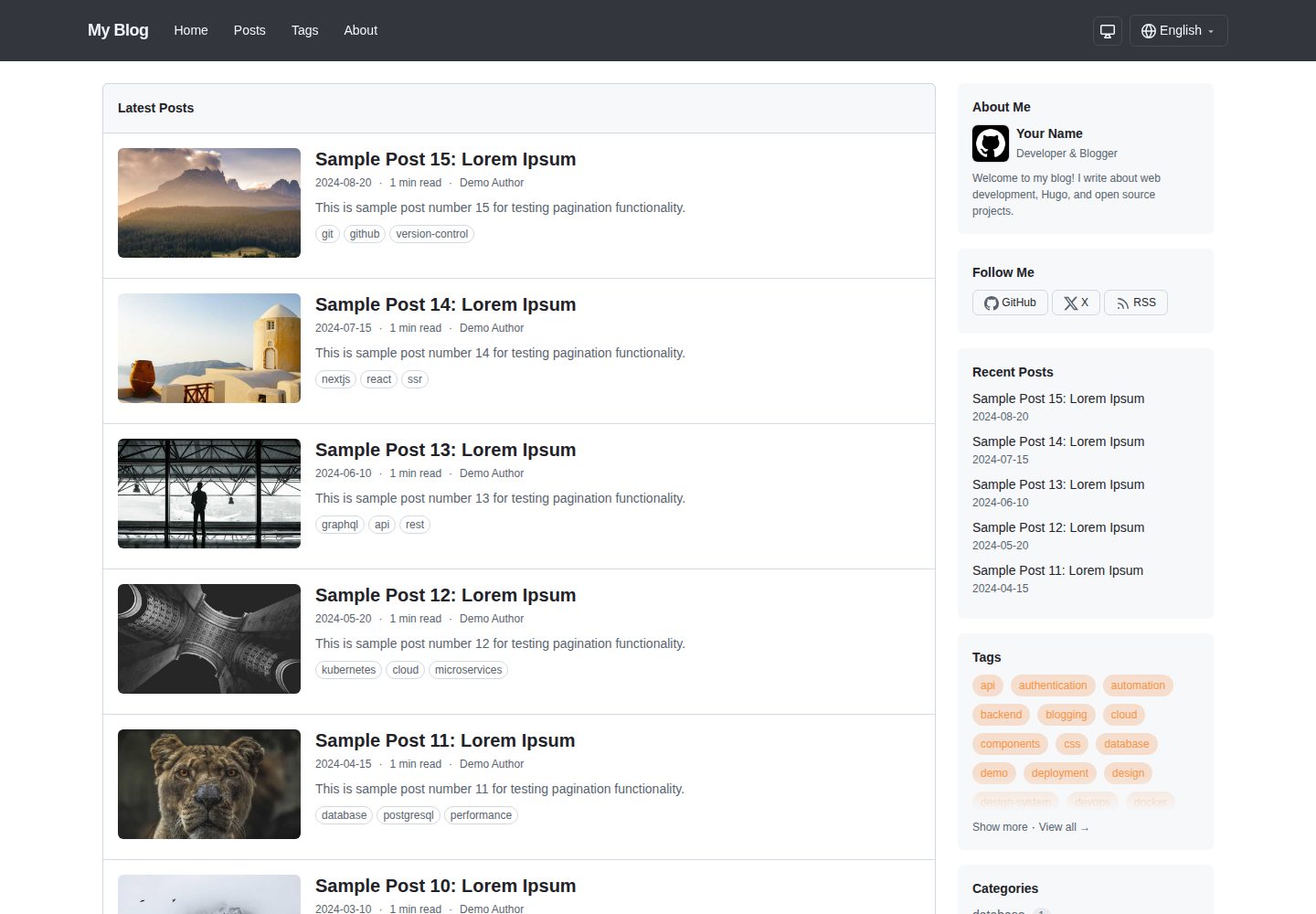
使用 GitHub Primer CSS 设计系统,提供干净的博客排版与响应式布局
Hugo博客
hugo-primer-blog — Hugo 博客模板
作者 ngs
基于 GitHub Primer CSS 设计系统的 Hugo 博客主题,支持深色模式、多语言与可选的 llms.txt / Markdown 输出。
看看你的网站会是什么样
浏览真实页面截图,比较内容排版与手机效果。点击下方缩略图切换,放大查看整页细节。
全部页面与视图 3
截图用于了解视觉与布局,交互效果请以实际项目为准。
采集于 2026-10-02查看来源
值得关注的模板亮点
从已有项目资料中,快速了解它的特点。
深色模式支持自动跟随系统偏好与手动切换,选择保存在 localStorage
内置英文与日文翻译,支持按语言分目录的多语言站点
主色可通过 primaryColor 配置覆盖默认 GitHub 蓝,并自动生成明暗两套色阶
可选 LLMS 与 Markdown 输出格式,生成 /llms.txt 站点索引与逐页原始 Markdown
侧边栏模块可配置,支持最近文章、标签、分类、归档、链接及自定义 partial
模板详细介绍
这是一个面向 Hugo 静态站点的博客主题,视觉层使用 GitHub 的 Primer CSS 设计系统,整体风格干净、响应式,并提供可选的侧边栏布局。README 显示主题内置深色模式(自动跟随系统偏好,也可手动切换并写入 localStorage)、多语言 i18n(自带英文与日文翻译)、可配置的主色、完整的 Markdown 排版样式,以及通过 Hugo Pipes 处理资源。
内容组织上,主题支持按语言分目录(如 content/en、content/ja),提供首页、文章、关于等页面,并可通过 params.sidebarModules 组合最近文章、标签、分类、归档、链接等侧边栏模块。文章 front matter 支持标签、分类、作者、描述、特色图(建议 992×525)、隐藏阅读时间,以及通过 ogp 字段递归生成自定义 Open Graph 元标签。
主题还附带两个可选输出格式:LLMS 在首页生成 /llms.txt 站点索引,Markdown 为每个页面生成原始 Markdown 副本,便于 AI 与 LLM 消费。这两个格式默认不启用,需要在站点配置的 [outputs] 中显式开启(Hugo 的 outputs 键不继承主题配置)。
使用限制方面,README 要求 Hugo v0.146.0 或更高版本,不要求 Extended 版本;以 Git Submodule 方式安装时需要在主题目录执行 npm install 以获取 Primer CSS 依赖。主题以 MIT 许可发布,但演示图片、字体、图标等第三方素材需单独核对许可。
Hugo博客
适合你的项目吗?
适用场景
- 用 Hugo 搭建个人技术博客并希望获得接近 GitHub 的视觉风格
- 需要中英日等多语言内容并希望主题自带 i18n 支持
- 希望为 AI 或 LLM 提供 llms.txt 索引和页面原始 Markdown 副本
- 需要深色模式与可自定义主色的轻量博客站点
适合人群
- 使用 Hugo 且版本不低于 v0.146.0 的站点
- 接受以 Hugo Module 或 Git Submodule 方式引入主题的开发者
- 需要多语言博客与侧边栏模块化布局的个人或团队
- 希望内容同时以 HTML 与原始 Markdown 形式发布的项目
上手与定制指南
结合仓库当前版本的说明,按下面的资料检查内容、配置与运行要求。
- 1
Hugo 版本需为 v0.146.0 或更高,不要求 Extended 版本
- 2
推荐以 Hugo Module 方式导入 go.ngs.io/hugo-primer-blog,或使用 Git Submodule 并在主题目录执行 npm install
- 3
LLMS 与 Markdown 输出格式默认关闭,需在站点配置的 [outputs] 中显式启用
- 4
自定义样式写入 assets/css/custom.css,会在主题样式之后加载
- 5
覆盖模板时把主题 layouts/ 中的文件复制到站点 layouts/ 目录
授权与来源资料
使用条件与限制
免费使用 · 保留许可声明本次收录的是公开仓库中采用 MIT 许可的免费版本;免费范围为该版本代码,不代表外部服务或第三方素材免费。
使用时需要遵守
- 允许免费使用、修改、商用和分发该版本代码。
- 分发代码副本或实质性部分时,保留原作者版权声明和完整 MIT 许可声明。
- 代码按现状提供;担保与责任限制以原许可证及适用法律为准。
额外费用与待核对事项
- 使用该主题要求 Hugo 版本不低于 v0.146.0;不要求 Extended 版本。
- 以 Git Submodule 方式安装时,需在主题目录执行 npm install 以获取 Primer CSS 依赖,因此需要 Node.js 与 npm 环境。
- LLMS 与 Markdown 输出格式默认不启用,必须在站点配置的 [outputs] 中显式开启才会生成 llms.txt 与逐页 Markdown。
- 以 Hugo Module 方式安装时使用 go.ngs.io/hugo-primer-blog 这一 vanity 导入路径,该路径解析到 GitHub 仓库。
- 若启用站点统计,需自行提供 Google Analytics 4 的衡量 ID,属于外部服务配置。
- 演示图片、字体、图标及其他第三方素材需按各自许可核对,不能仅凭代码的 MIT 许可判断。
- 域名、托管、数据库、支付或 AI 等外部服务可能另外收费。
查看原文依据
Permission is hereby granted, free of charge
许可证原文
Hugo v0.146.0 or later (Extended version not required)
README 原文
Node.js and npm (for Primer CSS dependencies during theme development)
README 原文
The theme **defines** these output formats (and their media types) and provides the templates, but does not enable them by default. You opt in per site via `[outputs]`
README 原文
This theme uses a vanity import path. The module is hosted at [go.ngs.io/hugo-primer-blog](https://go.ngs.io/hugo-primer-blog/) and resolves to the GitHub repository.
README 原文
https://github.com/ngs/hugo-primer-blog/blob/main/LICENSEhttps://github.com/ngs/hugo-primer-blog/blob/main/README.mdgoogleAnalyticsID = "G-XXXXXXXXXX" # Google Analytics 4 ID
README 原文
DeepSeek 根据仓库许可证和 README 整理 ·2026-10-02。结果仅覆盖已读取资料,依赖、图片、字体及后续条款变更以各自原文为准。
项目核对记录与介绍依据
模板资料
- 来源平台
- GitHub
- 资料与维护参考分
- 资料较完整 · 87 / 100
- 技术栈
- Hugo
- 网站类型
- 博客
这个分数如何计算
本站按许可资料(最高30分)、演示链接(12分)、预览图(10分)、Star数(15分)、记录的维护时间(15分)、描述完整度(8分)、功能记录(5分)和分类资料(5分)计算。它不是代码、安全或性能测试,也不是 Google 评分;有链接不代表已实测可用。
这个项目需要核对什么
- 记录的仓库更新时间
- 2026-08-23
- 截图检查日期
- 2026-10-02
已收录演示链接。请用你的内容与屏幕尺寸检查;有演示不代表表单、认证或支付已经可用。
目录记录的主要技术栈是 Hugo。请通过依赖清单和锁文件核对实际版本与托管要求。这些说明基于收录资料,不代表代码审计或部署实测。
查看具体选型方法 →介绍的制作与核对状态
介绍由 AI 辅助整理目录与仓库资料。仓库作者不等于这篇介绍的审核者。
已完成服务器许可规则与 AI 来源核对;未经过人工编辑审核。
查看当时使用的来源资料
SHA-256: 8965a6c383e2e7dc60f5c69ef3b7d2995d4469929502682cb5d338bbf43f0ccd
2026-10-02T10:23:31.144Z
来源文件 / 仓库# Primer Blog
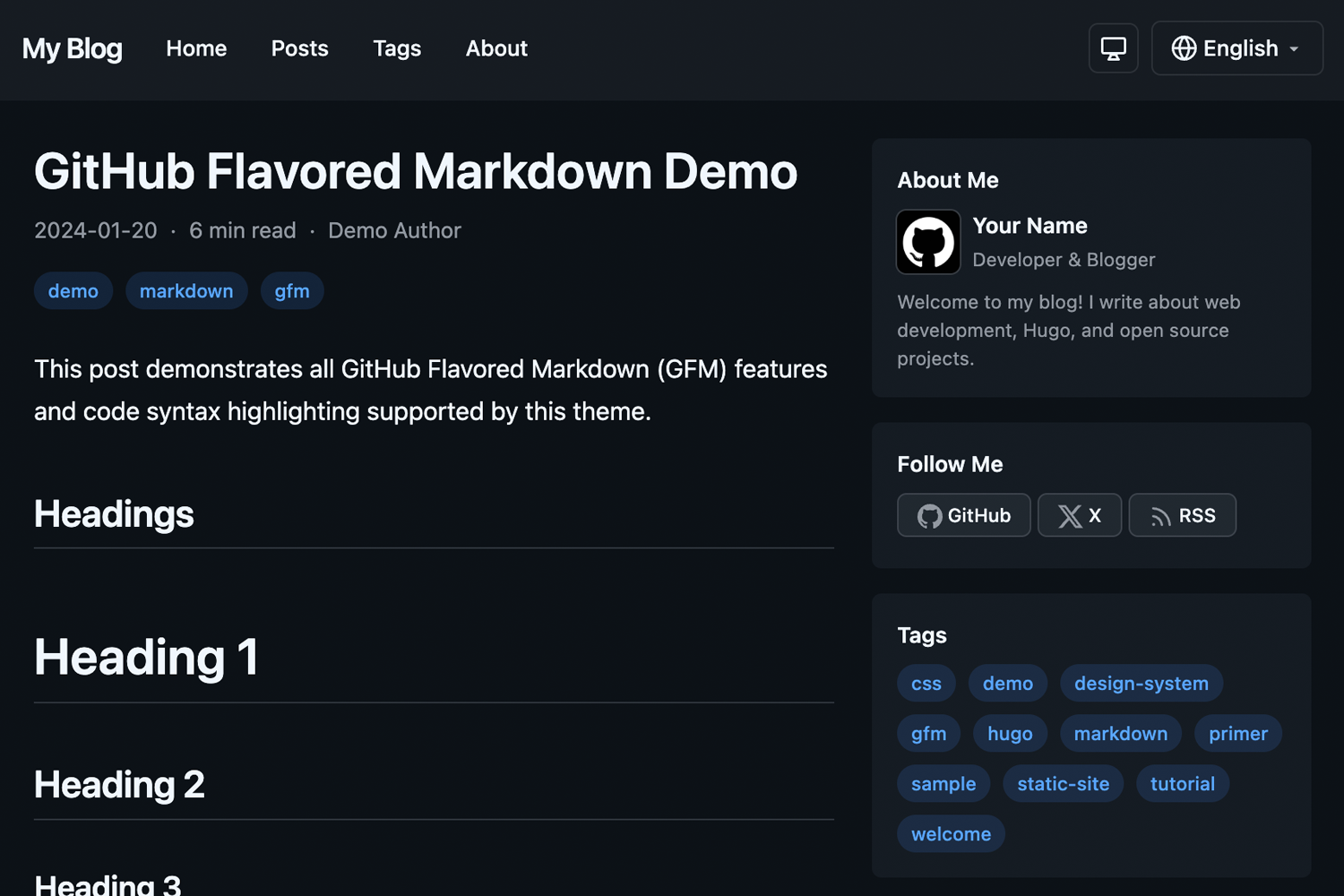
A clean, responsive Hugo blog theme using GitHub's [Primer CSS](https://primer.style/) design system.
**[Live Demo](https://hugo-primer-blog-demo.ngs.io)**
## Features
- **Dark Mode** - Automatic system preference detection with manual override, saved to localStorage
- **Multilingual** - Full i18n support with included English and Japanese translations
- **Responsive Design** - Looks great on all devices with optional sidebar layout
- **Primer CSS** - Built on GitHub's design system for a clean, modern look
- **Customizable Primary Color** - Easy accent color customization via config
- **Markdown Styling** - Full Primer markdown styling for rich content
- **LLM-friendly Output** - Optional `llms.txt` site index and per-page raw Markdown for AI consumption
- **Hugo Pipes** - Built with Hugo Pipes for optimized asset handling
## Requirements
- Hugo v0.146.0 or later (Extended version not required)
- Node.js and npm (for Primer CSS dependencies during theme development)
## Installation
### As a Hugo Module (Recommended)
1. Initialize your Hugo site as a module:
```bash
hugo mod init github.com/your-username/your-site
```
2. Add the theme to your `hugo.toml`:
```toml
[module]
[[module.imports]]
path = "go.ngs.io/hugo-primer-blog"
```
> **Note:** This theme uses a vanity import path. The module is hosted at [go.ngs.io/hugo-primer-blog](https://go.ngs.io/hugo-primer-blog/) and resolves to the GitHub repository.
### As a Git Submodule
1. Add the theme as a submodule:
```bash
git submodule add https://github.com/ngs/hugo-primer-blog.git themes/hugo-primer-blog
```
2. Install npm dependencies:
```bash
cd themes/hugo-primer-blog
npm install
```
3. Set the theme in your `hugo.toml`:
```toml
theme = "hugo-primer-blog"
```
## Configuration
### Basic Configuration
```toml
baseURL = "https://example.com/"
title = "My Blog"
theme = "hugo-primer-blog"
defaultContentLanguage = "en"
defaultContentLanguageInSubdir = true
[params]
sidebar = true # Enable/disable sidebar
recentPostsCount = 5 # Number of recent posts in sidebar module
defaultTheme = "auto" # auto, light, or dark
dateFormat = "2006-01-02"
showReadingTime = true
showAuthor = true
showShareButtons = true
googleAnalyticsID = "G-XXXXXXXXXX" # Google Analytics 4 ID
# Sidebar modules - order determines display order
# Available: recentPosts, tags, categories, archive, links (+ custom partials)
[[params.sidebarModules]]
partial = "recentPosts"
[[params.sidebarModules]]
partial = "tags"
[[params.sidebarModules]]
partial = "archive"
[params.social]
github = "your-username"
x = "your-username"
# Custom favicon (optional)
faviconIco = "favicon.ico"
faviconPng = "favicon.png"
# Apple Touch Icons (optional)
[[params.appleTouchIcons]]
sizes = "180x180"
href = "apple-touch-icon-180x180.png"
[[params.appleTouchIcons]]
sizes = "152x152"
href = "apple-touch-icon-152x152.png"
```
### Multilingual Configuration
```toml
[languages]
[languages.en]
languageName = "English"
weight = 1
contentDir = "content/en"
[languages.ja]
languageName = "日本語"
weight = 2
contentDir = "content/ja"
```
### Menus
```toml
[menus]
[[menus.main]]
name = "Home"
url = "/"
weight = 1
[[menus.main]]
name = "Posts"
url = "/posts/"
weight = 2
[[menus.footer]]
name = "Privacy"
url = "/privacy/"
weight = 1
```
## Content Structure
```
content/
├── en/
│ ├── posts/
│ │ └── my-post.md
│ └── about.md
└── ja/
├── posts/
│ └── my-post.md
└── about.md
```
### Front Matter
```yaml
---
title: "My Post Title"
date: 2024-01-15
draft: false
tags: ["hugo", "primer"]
categories: ["tutorial"]
author: "Your Name"
description: "A brief description of the post"
image: "/images/featured.jpg" # Optional featured image (992×525 recommended; rendered at that aspect ratio)
hideReadingTime: true # Optional: hide reading time for this page
---
```
### Custom Open Graph (OGP) Meta Tags
You can customize Open Graph meta tags per page using the `ogp` frontmatter. The structure is recursively converted to meta tags:
```yaml
---
title: "About Me"
ogp:
og:
type: profile
profile:
first_name: Atsushi
last_name: Nagase
username: ngs
gender: male
---
```
This generates:
```html
<meta property="og:type" content="profile">
<meta property="profile:first_name" content="Atsushi">
<meta property="profile:last_name" content="Nagase">
<meta property="profile:username" content="ngs">
<meta property="profile:gender" content="male">
```
Nested structures are supported with colon-separated property names:
```yaml
ogp:
foo:
bar:
baz: "value"
```
Outputs: `<meta property="foo:bar:baz" content="value">`
Arrays generate multiple meta tags with the same property:
```yaml
ogp:
article:
tag:
- Hugo
- Blog
- Tech
```
Outputs:
```html
<meta property="article:tag" content="Hugo">
<meta property="article:tag" content="Blog">
<meta property="article:tag" content="Tech">
```
Default `og:*` tags (title, description, type, url, image, site_name, locale) are automatically generated unless overridden in the `ogp.og` section.
## LLM-friendly Output (llms.txt & Markdown)
The theme ships two optional [output formats](https://gohugo.io/configuration/output-formats/) that make your content easy for LLMs and AI agents to consume:
- **`LLMS`** - renders a single `/llms.txt` on the home page: an index of your posts (title, link, and description) following the [llms.txt](https://llmstxt.org/) convention.
- **`Markdown`** - renders a raw Markdown `index.md` next to each page's `index.html`, containing the page's original Markdown content without HTML rendering.
### Enabling
The theme **defines** these output formats (and their media types) and provides the templates, but does not enable them by default. You opt in per site via `[outputs]`:
```toml
[outputs]
home = ["HTML", "RSS", "LLMS"]
page = ["HTML", "Markdown"]
```
> **Why opt in here, and not in the theme?** Hugo merges most config keys from themes, but the `outputs` key uses the `none` merge strategy, so it is **not** inherited from a theme. The format *definitions* (`outputFormats` / `mediaTypes`) use the `shallow` strategy and *are* inherited, so all you need in your own config is the `[outputs]` block above. See [Merge configuration from themes](https://gohugo.io/configuration/introduction/#merge-configuration-from-themes).
Once enabled, `hugo` generates:
```
public/
├── llms.txt # site index (home page)
├── about/
│ └── index.md # raw Markdown for the About page
└── posts/
└── my-post/
├── index.html
└── index.md # raw Markdown for the post
```
For multilingual sites, one `llms.txt` is generated per language (e.g. `/llms.txt` and `/ja/llms.txt`), automatically using each language's title, description, and posts.
### Customizing
The output is rendered by two templates you can override like any other:
- `layouts/home.llms.txt` - the `llms.txt` index. By default it lists pages in the `posts` section.
- `layouts/page.md` - the per-page Markdown rendering.
Copy either file into your site's `layouts/` directory to customize it.
## Customization
### Primary Color
You can customize the accent color used for links, tags, pagination, and other interactive elements:
```toml
[params]
primaryColor = "#8250df" # Purple
```
This overrides the default GitHub blue (`#0969da`) with your chosen color. The theme automatically generates appropriate shades for light and dark modes.
### Custom CSS
Create `assets/css/custom.css` in your site root to add custom styles:
```css
/* Your custom styles here */
```
The theme's own styles live in `assets/css/primer-blog.css`. Your `custom.css` is loaded *after* it, so your rules override the theme without shadowing it. (See `exampleSite/assets/css/custom.css` for a working example.)
### Overriding Templates
Copy any template from the theme's `layouts/` directory to your site's `layouts/` directory to override it.
## Development
To run the example site:
```bash
git clone https://github.com/ngs/hugo-primer-blog.git
cd hugo-primer-blog
npm install
hugo server --source exampleSite
```
Then open http://localhost:1313 in your browser.
## Contributing
Contributions are welcome! Please feel free to submit a Pull Request.
## License
This theme is released under the [MIT License](LICENSE).
## Credits
- [Hugo](https://gohugo.io/) - The world's fastest static site generator
- [Primer CSS](https://primer.style/) - GitHub's design system
看看同类模板
对比同技术栈与用途的模板,找到更适合的视觉与内容结构。

hugo-PaperMod
PaperMod 是 Hugo 生态里知名度较高的主题之一,定位很明确:给博客和轻量作品集站点提供一套干净、响应式的阅读界面。
Hugo · 作品集

LoveIt
❤️A clean, elegant but advanced blog theme for Hugo 一个简洁、优雅且高效的 Hugo 主题
Hugo · 博客

hugo-coder
A minimalist blog theme for hugo.
Hugo · 博客

blowfish
Personal Website & Blog Theme for Hugo
Hugo · 博客

hugo-paper
🪺 A simple, clean, customizable Hugo theme
Hugo · 博客

hextra
Hextra 是一个 Hugo 主题,定位在文档站与博客之间:既提供侧边栏导航、目录、面包屑、分页这类文档站结构,也能承载博客内容。
Hugo · 文档