Built with Astro; pages are generated at build time and no client-side JavaScript is shipped by default
AstroBlog
mare-blog — Astro Blog Template
By Niceeepoiu
mare-blog is a minimal personal blog template built with Astro. It supports three content types—posts, logs, and standalone pages—and includes Pagefind full-text search, Tailwind light and dark themes, and optional Giscus comments.
Explore the design
Compare the page layouts and mobile experience. Open any screenshot for a closer look.
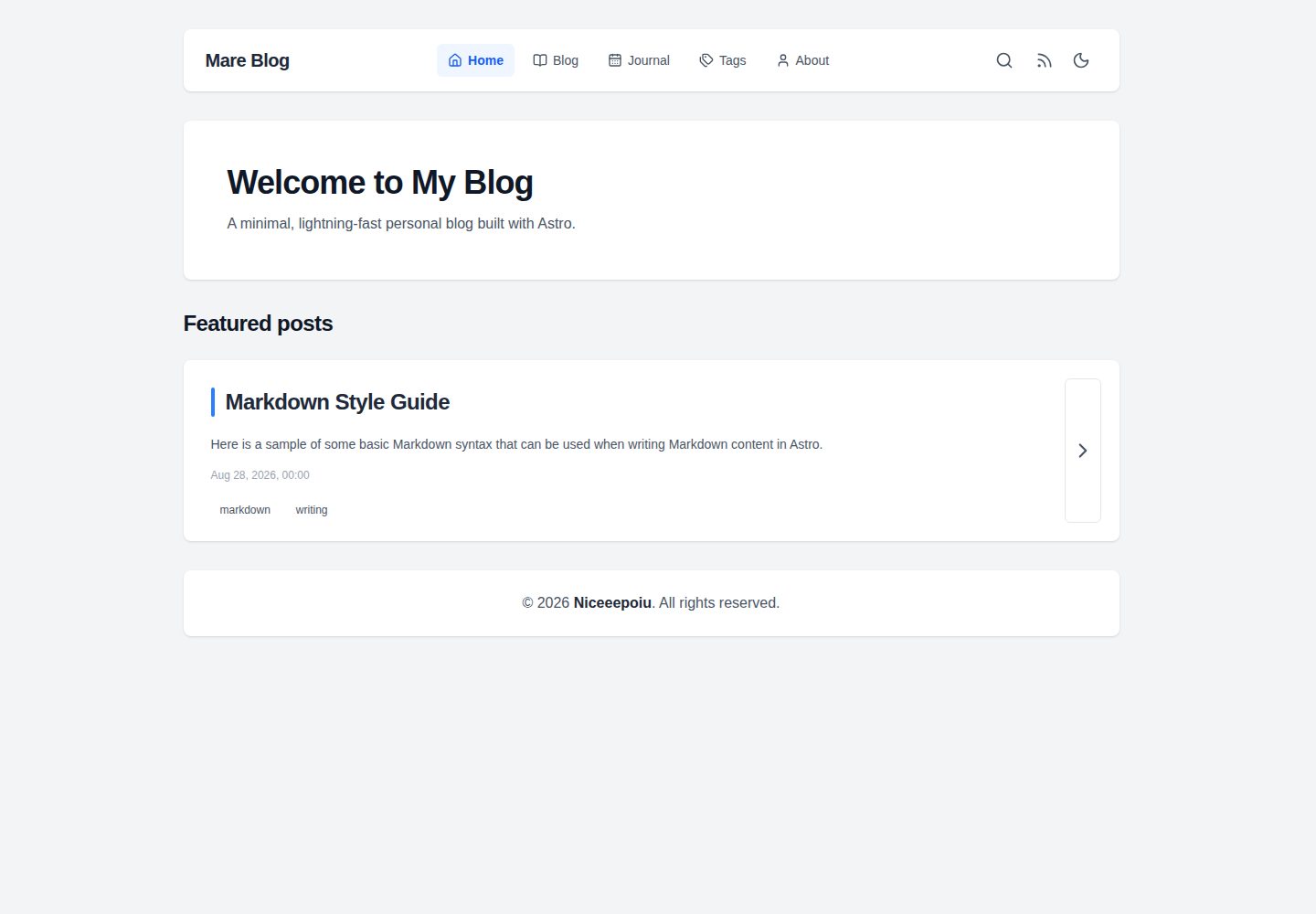
Desktop homepage1 / 3
Desktop captureTop of page
Actual screenshot captured by the server browser.
All pages & views 3
Screenshots show visual appearance; interactive behavior may differ.
Recorded 2026-10-05View source
What stands out
A quick read of the recorded project description.
Supports three content types: blog posts, timeline-style log entries, and standalone pages
Pagefind generates the full-text search index during production builds
Uses Tailwind CSS with light and dark modes and a responsive reading experience
Comments are optional and integrated through Giscus with GitHub Discussions
Includes a configuration and usage guide covering site settings, Giscus configuration, and content publishing
Template Details
Published on GitHub by Niceeepoiu under the MIT license, mare-blog is a personal blog template built with Astro. It divides content into three categories: regular blog posts, timeline-style log entries, and standalone pages, making it suitable for hosting both long-form articles and short records. The site generates static pages at build time and by default ships no client-side JavaScript; during production builds, Pagefind generates the full-text search index. Styling uses Tailwind CSS, with light and dark modes and responsive adaptation. Comments are optional and integrated through Giscus with GitHub Discussions. The template includes a configuration and usage guide covering site settings, Giscus configuration, and content publishing. Local development requires Node.js 22.12.0 or later and pnpm; the development server runs on port 4321 by default. Before publishing, site information and integration settings must be filled in site.config.ts. The README's deployment path is Cloudflare Pages, with the build command pnpm build and the output directory dist.
AstroBlog
Is it right for your project?
Use Cases
- Building a personal blog centered on long-form articles while also recording shorter log entries
- Needing a static site that does not depend on a server runtime, making it easy to host on static platforms
- Wanting the site to include full-text search without adding a third-party search service
- Wanting to host article comments on GitHub Discussions, with the ability to disable them as needed
Suitable For
- Individual developers comfortable with Astro and pnpm
- Writers who need to publish both articles and short logs
- Users planning to deploy the blog to static hosting platforms such as Cloudflare Pages
- Users who want to control site configuration and content structure themselves
Getting started & customization
Use these recorded setup notes alongside the repository instructions for your chosen version.
- 1
The local environment requires Node.js 22.12.0 or later, and dependencies are installed with pnpm
- 2
After cloning the repository, run pnpm install, then start the local development server with pnpm dev (default port 4321)
- 3
Before publishing, fill in site information and integration settings in site.config.ts
- 4
When deploying to Cloudflare Pages, the build command is pnpm build, the output directory is dist, and NODE_VERSION should be set to 22.12.0 or later
- 5
Third-party assets such as demo images, fonts, and icons must be checked separately under their respective licenses
License & source material
Usage conditions & limitations
Free to use · keep license noticeThis entry covers the free version in the public repository under the MIT license; the free scope applies to that version's code and does not mean that external services or third-party assets are free.
Must comply with when using
- The code of this version may be used, modified, used commercially, and distributed free of charge.
- When distributing copies or substantial portions of the code, retain the original author's copyright notice and the complete MIT license notice.
- The code is provided as is; warranties and limitations of liability are governed by the original license and applicable law.
Additional costs & items to verify
- Demo images, fonts, icons, and other third-party assets must be checked under their respective licenses and cannot be judged solely by the code's MIT license.
- External services such as domains, hosting, databases, payments, or AI may incur separate charges.
- The comment feature is optional and requires integration with GitHub Discussions through Giscus; it is an external service dependency that must be configured separately and may be subject to GitHub's terms.
- The deployment path given in the README requires authorizing GitHub and connecting a Cloudflare Pages account, which involves external services and account requirements.
- Local development and builds require Node.js 22.12.0 or later and the pnpm package manager.
View Original Text Basis
Permission is hereby granted, free of charge
Original License Text
**Comments**: Optional Giscus comments backed by GitHub Discussions.
Original README
Open the Cloudflare Pages setup, authorize GitHub, and select your copy of this repository.
Original README
https://github.com/Niceeepoiu/mare-blog/blob/main/LICENSEhttps://github.com/Niceeepoiu/mare-blog/blob/main/README.mdRequires Node.js `22.12.0` or later and [pnpm](https://pnpm.io/).
Original README
Compiled by DeepSeek based on repository license and README ·2026-10-05. Results only cover the materials read; dependencies, images, fonts, and subsequent term changes are subject to their respective original texts.
Project checks & description sources
Template Information
- Source platforms
- Astro Themes
- Documentation and maintenance reference score
- More documented · 83 / 100
- Technologies
- Astro
- Website type
- Blog
How this score is calculated
Our heuristic uses license records (up to 30), a demo link (12), a preview (10), stars (15), recorded maintenance (15), description completeness (8), feature records (5) and classification data (5). It is not a code, security or performance test, or a Google score. A link does not establish tested functionality.
What to verify for this project
- Repository update recorded
- 2026-10-05
- Screenshot last checked
- 2026-10-05
A demo link is listed. Check it with your own content and viewport sizes; its presence does not confirm that forms, authentication or payments work.
The catalog identifies Astro as the primary stack. Check the actual dependency manifest and lockfile for versions and hosting requirements. These notes use recorded metadata, not a code audit or a deployment test.
Use a selection guide →How this description was prepared
AI-assisted description based on catalog records and repository material. Repository authors are not automatically the reviewers of this description.
Review declaration: [email protected] · 2026-10-06
Inspect the recorded source material
SHA-256: b27ce673c3c124a24f88677663bef58ff99c040b20496ba3275737b7bca56524
2026-10-05T20:50:00.927Z
Source file / repository# Mare Blog A fast, minimal personal blog built with **Astro**. Publish articles, short journal entries, and standalone pages with a responsive reading experience, instant search, and no server-side runtime. ## 🖼️ Preview  👉 [View Live Demo →](https://mare-blog.pages.dev) ## ✨ Key Features - **Static and fast**: Astro generates pages at build time, with no client-side JavaScript by default. - **Full-text search**: Pagefind indexes the site during the production build. - **Responsive themes**: Tailwind CSS styling with light and dark modes. - **Comments**: Optional Giscus comments backed by GitHub Discussions. - **Three content types**: Publish blog posts, timeline-style journal entries, and standalone pages. ## 🧰 Tech Stack - [Astro](https://astro.build) · [Tailwind CSS](https://tailwindcss.com) · [Pagefind](https://pagefind.app) · [Giscus](https://giscus.app) ## 🚀 Deploy to Cloudflare Pages [](https://dash.cloudflare.com/?to=/:account/pages/new/provider/github) Open the Cloudflare Pages setup, authorize GitHub, and select your copy of this repository. Use these build settings: | Setting | Value | | :--------------------- | :---------------------------------- | | Framework preset | Astro | | Build command | `pnpm build` | | Build output directory | `dist` | | Environment variable | `NODE_VERSION` = `22.12.0` or later | The `pnpm build` command also generates the Pagefind search index. Cloudflare Pages will build and deploy the site whenever you push changes to the connected Git branch. ## 💻 Run Locally Requires Node.js `22.12.0` or later and [pnpm](https://pnpm.io/). ```bash git clone https://github.com/Niceeepoiu/mare-blog.git cd mare-blog pnpm install pnpm dev ``` The development server runs at `http://localhost:4321`. Before publishing, update [`site.config.ts`](./site.config.ts) with your site details and integrations. ## 📖 Documentation See the [configuration and usage guide](https://mare-blog.pages.dev/blog/guide/) for site settings, Giscus setup, and instructions for publishing content. ## 🧞 Commands | Command | Action | | :--------------------- | :--------------------------------------------- | | `pnpm install` | Installs dependencies | | `pnpm dev` | Starts local dev server at `localhost:4321` | | `pnpm build` | Builds your production site to `./dist/` | | `pnpm preview` | Previews your production build locally | | `pnpm format` | Formats code across the project using Prettier | | `pnpm astro ...` | Runs Astro CLI commands | | `pnpm astro -- --help` | Gets help using the Astro CLI |
Explore similar templates
Compare previews and descriptions within the same stack and category.

astrowind
AstroWind is a free, open-source Astro starter theme using Astro and Tailwind CSS, released under the MIT license.
Astro · Blog

astro-paper
AstroPaper is a minimal, responsive, accessible, and SEO-friendly Astro blog theme. Articles are stored as Markdown/MDX in src/content/posts/, with subdirectories affecting URLs.
Astro · Blog

fuwari
Fuwari is a static blog template built with Astro and Tailwind CSS for personal blogs. It manages posts as Markdown files in src/content/posts/, with frontmatter for title, date, description, cover, tags, categories, draft status, and language.
Astro · Blog

Firefly
Firefly is a clean personal blog theme forked from Astro and Fuwari, offering four background modes, single/double sidebar and list/grid layouts, Pagefind client-side full-text search, and a six-language UI.
Astro · Blog

astro-theme-cactus
Astro Cactus is an Astro-based blog and portfolio theme that uses Markdown/MDX content collections to manage posts, notes, and tags, with frontmatter type-checked by a schema.
Astro · Portfolio

astrofy
Astrofy is a free and open-source personal portfolio website template built with Astro and TailwindCSS, with built-in blog, CV timeline, project showcase, store, and RSS feed modules.
Astro · Portfolio