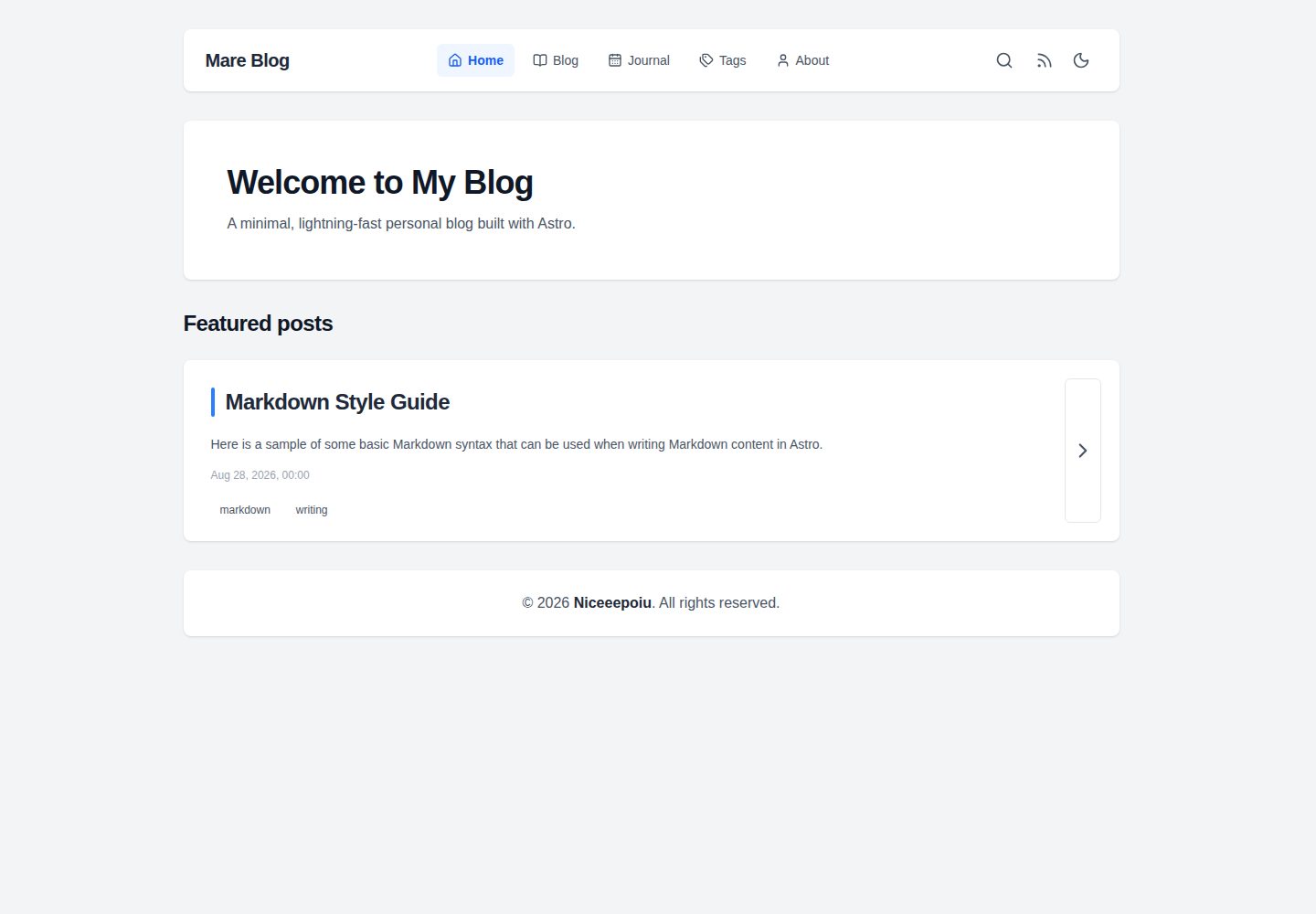
基于 Astro 构建,页面在构建期生成,默认不向客户端输出 JavaScript
Astro博客
mare-blog — Astro 博客模板
作者 Niceeepoiu
mare-blog 是一个基于 Astro 的极简个人博客模板,支持文章、日志与独立页面三种内容类型,内置 Pagefind 全文搜索、Tailwind 明暗主题和可选的 Giscus 评论。
看看你的网站会是什么样
浏览真实页面截图,比较内容排版与手机效果。点击下方缩略图切换,放大查看整页细节。
全部页面与视图 3
截图用于了解视觉与布局,交互效果请以实际项目为准。
采集于 2026-10-05查看来源
值得关注的模板亮点
从已有项目资料中,快速了解它的特点。
支持博客文章、时间线式日志条目和独立页面三种内容类型
生产构建时由 Pagefind 生成全文搜索索引
使用 Tailwind CSS,提供浅色与深色模式及响应式阅读体验
评论为可选项,通过 Giscus 接入 GitHub Discussions
附带配置与使用指南,覆盖站点设置、Giscus 配置和内容发布
模板详细介绍
mare-blog 由 Niceeepoiu 发布在 GitHub,采用 MIT 许可,是一个用 Astro 构建的个人博客模板。它把内容分为三类:常规博客文章、时间线式日志条目以及独立页面,适合同时承载长文和短记录。站点在构建期生成静态页面,默认不向客户端输出 JavaScript;生产构建时由 Pagefind 生成全文搜索索引。样式使用 Tailwind CSS,提供浅色与深色模式,并做响应式适配。评论为可选项,通过 Giscus 接入 GitHub Discussions。模板附带一份配置与使用指南,说明站点设置、Giscus 配置和内容发布方式。本地开发需要 Node.js 22.12.0 或更高版本以及 pnpm,开发服务器默认运行在 4321 端口;发布前需要在 site.config.ts 中填写站点信息与集成配置。README 给出的部署路径是 Cloudflare Pages,构建命令为 pnpm build,输出目录为 dist。
Astro博客
适合你的项目吗?
适用场景
- 搭建以长文为主的个人博客,同时记录较短的日志条目
- 需要一个不依赖服务端运行时的静态站点,便于托管在静态平台
- 希望站点自带全文搜索,而不额外接入第三方搜索服务
- 想用 GitHub Discussions 承载文章评论,并可按需关闭
适合人群
- 习惯使用 Astro 与 pnpm 的个人开发者
- 需要文章与短日志混合发布的写作者
- 计划把博客部署到 Cloudflare Pages 等静态托管平台的用户
- 希望自行掌控站点配置与内容结构的用户
上手与定制指南
结合仓库当前版本的说明,按下面的资料检查内容、配置与运行要求。
- 1
本地环境需要 Node.js 22.12.0 或更高版本,并使用 pnpm 安装依赖
- 2
克隆仓库后执行 pnpm install,再用 pnpm dev 启动本地开发服务器(默认 4321 端口)
- 3
发布前在 site.config.ts 中填写站点信息与集成配置
- 4
部署到 Cloudflare Pages 时,构建命令为 pnpm build,输出目录为 dist,并设置 NODE_VERSION 为 22.12.0 或更高
- 5
演示图片、字体、图标等第三方素材需按各自许可单独核对
授权与来源资料
使用条件与限制
免费使用 · 保留许可声明本次收录的是公开仓库中采用 MIT 许可的免费版本;免费范围为该版本代码,不代表外部服务或第三方素材免费。
使用时需要遵守
- 允许免费使用、修改、商用和分发该版本代码。
- 分发代码副本或实质性部分时,保留原作者版权声明和完整 MIT 许可声明。
- 代码按现状提供;担保与责任限制以原许可证及适用法律为准。
额外费用与待核对事项
- 演示图片、字体、图标及其他第三方素材需按各自许可核对,不能仅凭代码的 MIT 许可判断。
- 域名、托管、数据库、支付或 AI 等外部服务可能另外收费。
- 评论功能为可选项,需通过 Giscus 接入 GitHub Discussions,属于外部服务依赖,需自行配置并可能受 GitHub 相关条款约束。
- README 给出的部署路径需要授权 GitHub 并连接 Cloudflare Pages 账户,属于外部服务与账号要求。
- 本地开发与构建要求 Node.js 22.12.0 或更高版本,并使用 pnpm 包管理器。
查看原文依据
Permission is hereby granted, free of charge
许可证原文
**Comments**: Optional Giscus comments backed by GitHub Discussions.
README 原文
Open the Cloudflare Pages setup, authorize GitHub, and select your copy of this repository.
README 原文
https://github.com/Niceeepoiu/mare-blog/blob/main/LICENSEhttps://github.com/Niceeepoiu/mare-blog/blob/main/README.mdRequires Node.js `22.12.0` or later and [pnpm](https://pnpm.io/).
README 原文
DeepSeek 根据仓库许可证和 README 整理 ·2026-10-05。结果仅覆盖已读取资料,依赖、图片、字体及后续条款变更以各自原文为准。
项目核对记录与介绍依据
模板资料
- 来源平台
- Astro Themes
- 资料与维护参考分
- 资料较完整 · 83 / 100
- 技术栈
- Astro
- 网站类型
- 博客
这个分数如何计算
本站按许可资料(最高30分)、演示链接(12分)、预览图(10分)、Star数(15分)、记录的维护时间(15分)、描述完整度(8分)、功能记录(5分)和分类资料(5分)计算。它不是代码、安全或性能测试,也不是 Google 评分;有链接不代表已实测可用。
这个项目需要核对什么
- 记录的仓库更新时间
- 2026-10-05
- 截图检查日期
- 2026-10-05
已收录演示链接。请用你的内容与屏幕尺寸检查;有演示不代表表单、认证或支付已经可用。
目录记录的主要技术栈是 Astro。请通过依赖清单和锁文件核对实际版本与托管要求。这些说明基于收录资料,不代表代码审计或部署实测。
查看具体选型方法 →介绍的制作与核对状态
介绍由 AI 辅助整理目录与仓库资料。仓库作者不等于这篇介绍的审核者。
审核声明: [email protected] · 2026-10-06
查看当时使用的来源资料
SHA-256: b27ce673c3c124a24f88677663bef58ff99c040b20496ba3275737b7bca56524
2026-10-05T20:50:00.927Z
来源文件 / 仓库# Mare Blog A fast, minimal personal blog built with **Astro**. Publish articles, short journal entries, and standalone pages with a responsive reading experience, instant search, and no server-side runtime. ## 🖼️ Preview  👉 [View Live Demo →](https://mare-blog.pages.dev) ## ✨ Key Features - **Static and fast**: Astro generates pages at build time, with no client-side JavaScript by default. - **Full-text search**: Pagefind indexes the site during the production build. - **Responsive themes**: Tailwind CSS styling with light and dark modes. - **Comments**: Optional Giscus comments backed by GitHub Discussions. - **Three content types**: Publish blog posts, timeline-style journal entries, and standalone pages. ## 🧰 Tech Stack - [Astro](https://astro.build) · [Tailwind CSS](https://tailwindcss.com) · [Pagefind](https://pagefind.app) · [Giscus](https://giscus.app) ## 🚀 Deploy to Cloudflare Pages [](https://dash.cloudflare.com/?to=/:account/pages/new/provider/github) Open the Cloudflare Pages setup, authorize GitHub, and select your copy of this repository. Use these build settings: | Setting | Value | | :--------------------- | :---------------------------------- | | Framework preset | Astro | | Build command | `pnpm build` | | Build output directory | `dist` | | Environment variable | `NODE_VERSION` = `22.12.0` or later | The `pnpm build` command also generates the Pagefind search index. Cloudflare Pages will build and deploy the site whenever you push changes to the connected Git branch. ## 💻 Run Locally Requires Node.js `22.12.0` or later and [pnpm](https://pnpm.io/). ```bash git clone https://github.com/Niceeepoiu/mare-blog.git cd mare-blog pnpm install pnpm dev ``` The development server runs at `http://localhost:4321`. Before publishing, update [`site.config.ts`](./site.config.ts) with your site details and integrations. ## 📖 Documentation See the [configuration and usage guide](https://mare-blog.pages.dev/blog/guide/) for site settings, Giscus setup, and instructions for publishing content. ## 🧞 Commands | Command | Action | | :--------------------- | :--------------------------------------------- | | `pnpm install` | Installs dependencies | | `pnpm dev` | Starts local dev server at `localhost:4321` | | `pnpm build` | Builds your production site to `./dist/` | | `pnpm preview` | Previews your production build locally | | `pnpm format` | Formats code across the project using Prettier | | `pnpm astro ...` | Runs Astro CLI commands | | `pnpm astro -- --help` | Gets help using the Astro CLI |
看看同类模板
对比同技术栈与用途的模板,找到更适合的视觉与内容结构。

astrowind
⭕️ AstroWind: A free template using Astro v7 and Tailwind CSS v4. Astro starter theme.
Astro · 博客

astro-paper
A minimal, accessible and SEO-friendly Astro blog theme.
Astro · 博客

fuwari
✨A static blog template built with Astro.
Astro · 博客

Firefly
Firefly 是一款基于 Astro 的静态博客主题,由 CuteLeaf 在 saicaca 的 Fuwari 模板基础上二次开发,主打清新美观的视觉风格。
Astro · 博客

astro-theme-cactus
A simple Astro theme. Use it to create your blog or website.
Astro · 作品集

astrofy
Astrofy is a free and open-source template for your Personal Portfolio Website built with Astro and TailwindCS…
Astro · 作品集